
Description
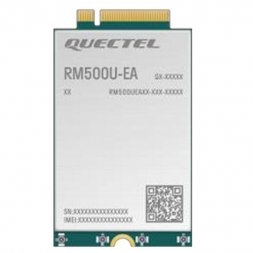
Quectel RM500U-EA · M.2 cellular integration
Bring 5G to the gateway you build.
Compact cellular hardware with broad European band coverage, flexible 5G SA/NSA operation and the diagnostics you need to engineer a dependable connection.
5G SA + NSAChoose the network architecture supported by your operator.
M.2 integrationA compact modem platform for compatible gateways.
LTE Cat 12A useful 4G fallback alongside 5G connectivity.
4 RF connectionsBuild a correctly matched cellular antenna system.
A small module. A versatile cellular platform.
Embedded gatewaysAdd an operator-connected WAN to a compatible router, industrial computer or custom communications appliance.
Industrial IoTConnect remote monitoring, machine telemetry and field systems through a suitably engineered host.
Video & digital signageProvide a cellular link where fixed-line installation is impractical or deployment moves between sites.
Development & diagnosticsWork with modem information, registration and signal measurements through the supported AT interface.
SIM & mobile networkOperator plan, APN and supported bands
RM500U-EA moduleCellular radio and modem control
Your compatible hostRouting, applications and Ethernet/Wi-Fi
Know the hardware before you integrate.
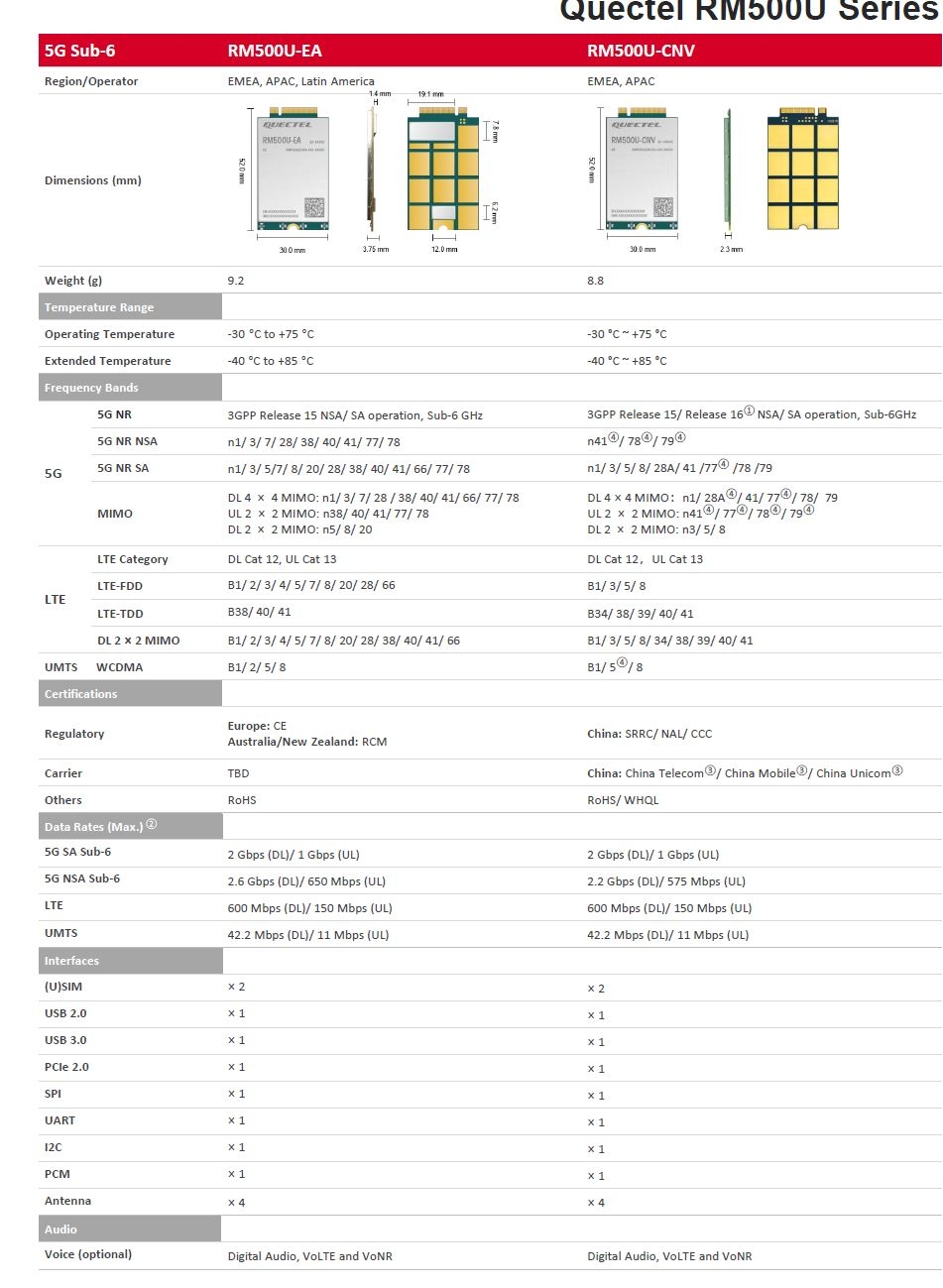
| Manufacturer / model | Quectel RM500U-EA; supplied ordering reference RM500UEAAA |
|---|---|
| Mobile standards | 3GPP Release 15; 5G NR Sub-6 GHz SA and NSA, LTE and WCDMA |
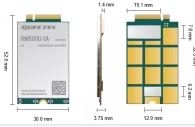
| Form factor | M.2; RM500U-EA dimensions 52 × 30 × 3.75 mm |
| 5G theoretical maximum | NSA: 2.6 Gbit/s download / 650 Mbit/s upload; SA: 2 Gbit/s download / 1 Gbit/s upload |
| LTE theoretical maximum | Cat 12 download / Cat 13 upload: 600 / 150 Mbit/s |
| Antenna interfaces | Four RF antenna connections; use model-matched cellular antennas and micro-coax connectors |
| Host interfaces | USB 2.0 / USB 3.0 and PCIe 2.0 platform interfaces; select the host driver and operating mode for the delivered firmware |
| Control / maintenance | Quectel enhanced AT commands; DFOTA firmware-update capability |
| Power at module | 3.3–4.4 V; typical 3.7 V. Use a compatible modem carrier with appropriate transient-current capability. |
| Temperature | Operating: −30 to +75 °C; extended range: −40 to +85 °C, subject to the manufacturer’s extended-range conditions |
| Module mass | Approximately 9.2 g; catalogue shipping weight is a separate logistics value |
Radio data rates are manufacturer theoretical maxima. End-to-end throughput depends on the operator, spectrum, signal, host interface, driver, traffic load and installation.
Choose the regional variant with confidence.
This offer is the RM500U-EA variant, identified by the RM500UEAAA ordering reference. Match its bands to the operator and location you plan to use. European 5G deployments commonly make n78 relevant, while LTE B20 and B28 are useful considerations for regional coverage planning.| 5G NR SA | n1 / n3 / n5 / n7 / n8 / n20 / n28 / n38 / n40 / n41 / n66 / n77 / n78 |
|---|---|
| 5G NR NSA | n1 / n3 / n7 / n28 / n38 / n40 / n41 / n77 / n78 |
| LTE FDD | B1 / B2 / B3 / B4 / B5 / B7 / B8 / B20 / B28 / B66 |
| LTE TDD | B38 / B40 / B41 |
| WCDMA | B1 / B2 / B5 / B8 |
Plan MIMO by band and by installation.The manufacturer specifies four downlink spatial paths on selected 5G bands and two on n5/n8/n20. Use the modem’s four labelled RF ports and the correct antenna mapping; network-side MIMO availability and antenna separation determine how the radio capability is used.
Engineer the power, host and antenna path together.
- Match the carrier board. Confirm M.2 mechanical fit, the modem pinout, USB routing, SIM connections and a driver supported by the target operating system. Treat an M.2 cellular carrier as a modem-specific design.
- Provide the specified module supply. Use a carrier that regulates the input to the required 3.3–4.4 V module range and handles current peaks during network registration and upload. Keep the supply path short and well decoupled.
- Connect all required RF paths. Choose antennas covering the intended NR/LTE bands and pigtails with the exact module-side connector. Route coax without strain, sharp bends or pinched insulation.
- Prepare the SIM and APN. Use an active data plan suitable for a router or IoT gateway. Record the APN, authentication requirements and SIM PIN before starting the host.
- Bring up the modem. Confirm USB enumeration and driver binding, then verify modem identity, SIM readiness and network registration before starting the data interface.
- Validate at the deployment site. Check signal quality, packet loss, download and upload over a wired path. Compare antenna positions and verify stable power during sustained traffic.
Antennas and pigtails are part of the design.
Choose the RF connector from the actual module and carrier documentation. The small connectors used on M.2 cellular modules need the matching plug and careful vertical mating. Keep feeder loss low, provide physical separation for the antenna paths and use cables rated for the highest band you will deploy. Explore cellular antennas · Explore RF cables and pigtails · Discuss a host and antenna configurationA clear route from hardware to working connectivity.
USB integration and operating-system support
Quectel documents USB serial and network-driver support for Linux, Windows and Android, with the exact package and mode selected for the modem firmware. For a Linux gateway, verify the enumerated USB interfaces and kernel bindings, then use the corresponding connection manager and APN settings. Keep the modem identity and firmware version in your deployment record.AT commands and firmware maintenance
Start with read-only identification and registration checks. Useful standard commands includeATI, AT+CPIN?, AT+CEREG? and AT+CSQ; the exact supported responses depend on the firmware. Use the manufacturer’s command documentation for extended diagnostics and update procedures. Save the existing configuration before changing low-level USB or modem settings.
OpenWrt host integration
On an OpenWrt-based gateway, the host’s installed modem packages must match the interface exposed by this module. Select and test the USB/network mode, connection manager and driver combination as one configuration. The modem firmware and the router operating system have separate update paths. Ask about driver and integration requirements for your host.Find the cause before changing the configuration.
| Host detects no modem | Check carrier power, M.2 seating, USB data routing and kernel enumeration. Inspect the hardware identity before adjusting APN settings. |
|---|---|
| SIM ready, registration incomplete | Confirm the SIM plan and PIN, supported operator bands, roaming policy and antenna connections. |
| Registered, data session incomplete | Check APN, authentication and the network-interface mode expected by the host driver. |
| Speed varies with position | Compare RSRP, RSRQ and SINR together with wired throughput; record the band, time and antenna placement. |
| Connection resets under load | Check supply stability, connector contact, thermal conditions and host logs during upload and registration. |
Reviews
There are no reviews yet.