
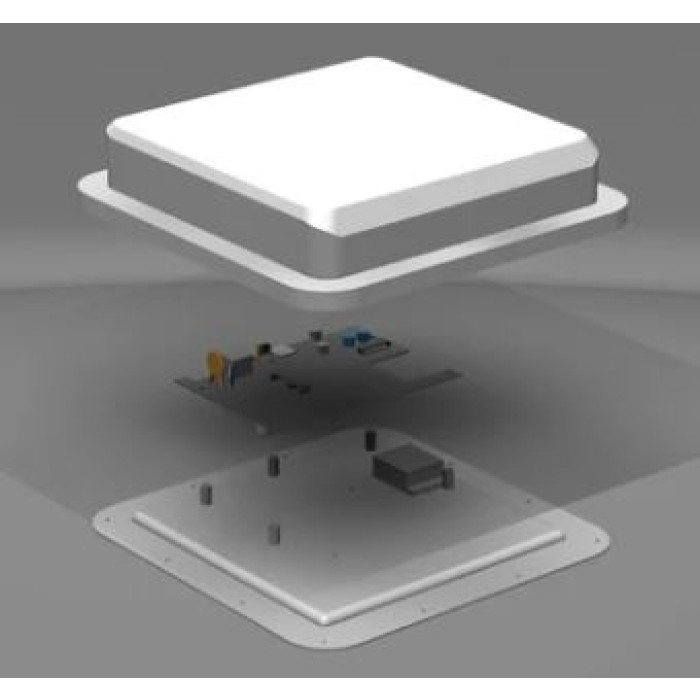
Description
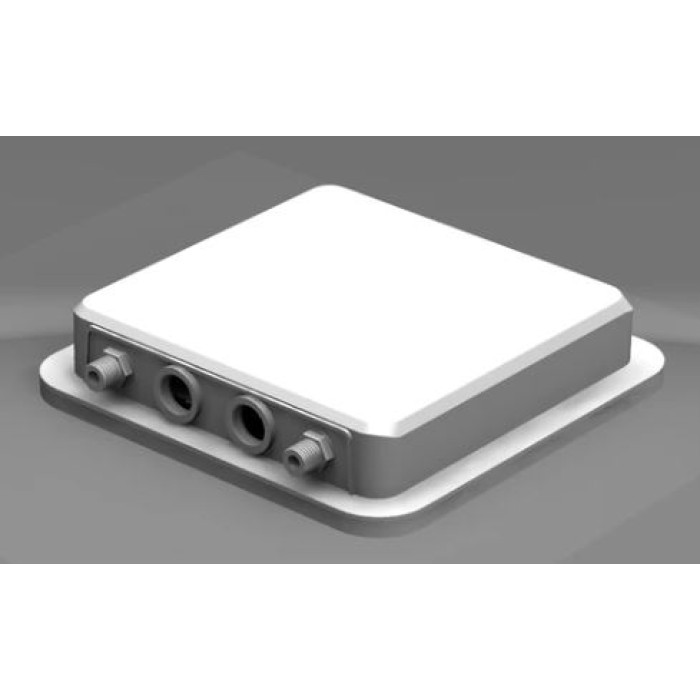
Outdoor 5G CPE, open modem platform and directional 4×4 MIMO system in one unit
The WodaPlug™ Outdoor 5G CPE is built for users who want more than a sealed consumer router. A Quectel RM520N-GL AP module is installed inside the outdoor Dual-Q 5G2PHY platform, connected through PCIe to a Realtek RTL8125 2.5GbE controller and combined with a directional four-port cellular antenna. It can serve as a straightforward 5G-to-Ethernet hand-off, yet it also leaves room for professional APN, band, MBN-profile and AT-command work.
2.5GbE RJ45 hand-off
Directional 4×4 MIMO
RM520N-GL AP installed
Outdoor PoE installation
Professional outdoor 5G CPE with an open architecture
This is a professional outdoor cellular CPE and modem-development bundle. It receives 4G LTE / 5G NR through its integrated directional antenna and presents the modem connection on a 2.5GbE RJ45 port.
- Use it with a compatible SIM as a cellular WAN source for your own router, firewall or computer.
- Keep the modem close to the antenna instead of losing RF power in a long outdoor-to-indoor coaxial run.
- Read signal data, confirm the serving cell, set an APN and perform firmware-dependent Quectel configuration.
- Build laboratory, field-test, failover or specialist networking installations around a replaceable M.2 modem.
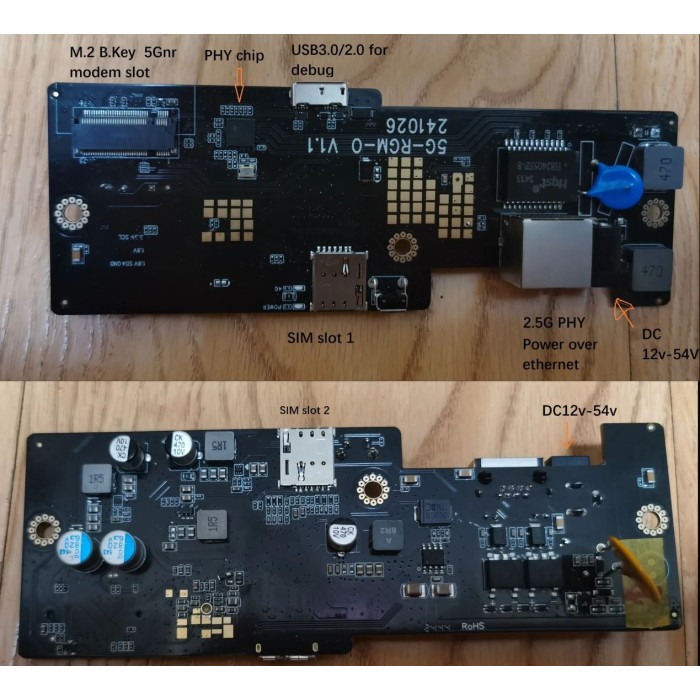
How the cellular-to-Ethernet architecture works
The 5G2PHY board does not need a separate router CPU to create its physical Ethernet hand-off. The RM520N-GL AP operates in PCIe Root Complex mode and communicates with the onboard Realtek RTL8125 Ethernet controller. The result is a direct 2.5GbE port that a downstream router can treat as its WAN interface.
From the test bench to US 5G networks: the complete Dual-Q 5G2PHY field story
This section preserves the complete technical experience recorded by the engineer who configured and tested the platform. Spelling and operator names have been normalized for readability, but none of the original technical information has been removed: the modem list, architecture, cooling result, US speeds, operators, bands, enclosure, antenna ranges, configuration resources and packing list are all retained.
Why we worked with this platform
We worked with the Dual-Q 5G-RGMII-O / 5G2PHY platform as a practical Qualcomm-modem-to-Ethernet solution for users who want direct access to modem configuration rather than a closed consumer interface. During development and integration work, the board family was tested with Quectel RM500Q, RM502Q, RM510Q, RM520N, RM551E and RM521F modems. The names “5G-RGMII-O” and “5G2PHY” identify the platform family; in this assembled version, the installed M.2 modem communicates through PCIe to the Realtek RTL8125 2.5GbE Ethernet controller.
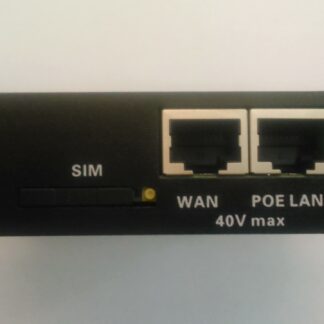
This bundle is supplied with a customized Quectel RM520N-GL AP 5G modem already installed. The installed modem was selected as fully compatible with the Dual-Q 5G-RGMII-O 2.5GbE / 5G2PHY configuration, so the customer receives the complete modem-to-RJ45 outdoor assembly rather than only an empty enclosure or adapter board.
Cooling and an earlier high-throughput modem test
The enclosure and board arrangement were designed with a strong thermal path for the 5G modem, including heat dissipation toward the bottom of the assembly. In the original test record, a customer using an RM551E reported a speed test above 1.6 Gbit/s while the reported modem temperature remained below 40 °C. That RM551E result documents the thermal and Ethernet-platform experience; the modem supplied in the product offered here is the RM520N-GL AP.
What customers saw on live US networks
524WiFi™ has supplied this platform to customers in the United States over time, and it has been deployed, configured and tested repeatedly on live US mobile networks. The practical work covers different modem configurations and real installations rather than a small trial sample. In the surviving United States field report, a customer speed test reached up to 1.6 Gbit/s on a real US mobile network. Further customers reported approximately 700–1200 Mbit/s download. Where signal conditions were worse, the recorded practical expectation was approximately 300–500 Mbit/s download.
The units were tested across T-Mobile, AT&T and Verizon 5G networks. The original test notes list LTE B71 together with 5G NR n71, n25, n41 and n77. These are the actual operator and band references retained from the field record, not a generic copy of the modem datasheet.
| Preserved field-test item | Original technical information | How to interpret it |
|---|---|---|
| Live-network peak | Up to 1.6 Gbit/s | A real customer report from a US mobile network, not a guaranteed minimum or laboratory rating. |
| Further customer reports | 700–1200 Mbit/s download | Reported across additional real-network use with different site and network conditions. |
| Worse-signal result | Approximately 300–500 Mbit/s download | The practical range written in the original field notes for poorer signal conditions. |
| US operators tested | T-Mobile, AT&T and Verizon | The record does not assign every individual speed test to one specific operator. |
| Tested bands recorded | LTE B71; 5G NR n71, n25, n41 and n77 | The surviving notes do not preserve the exact carrier-aggregation combination used for every run. |
| RM551E thermal/platform test | More than 1.6 Gbit/s; reported modem temperature below 40 °C | This earlier result relates to an RM551E on the platform. The retail bundle on this page includes RM520N-GL AP. |
How the outdoor antenna assembly was created
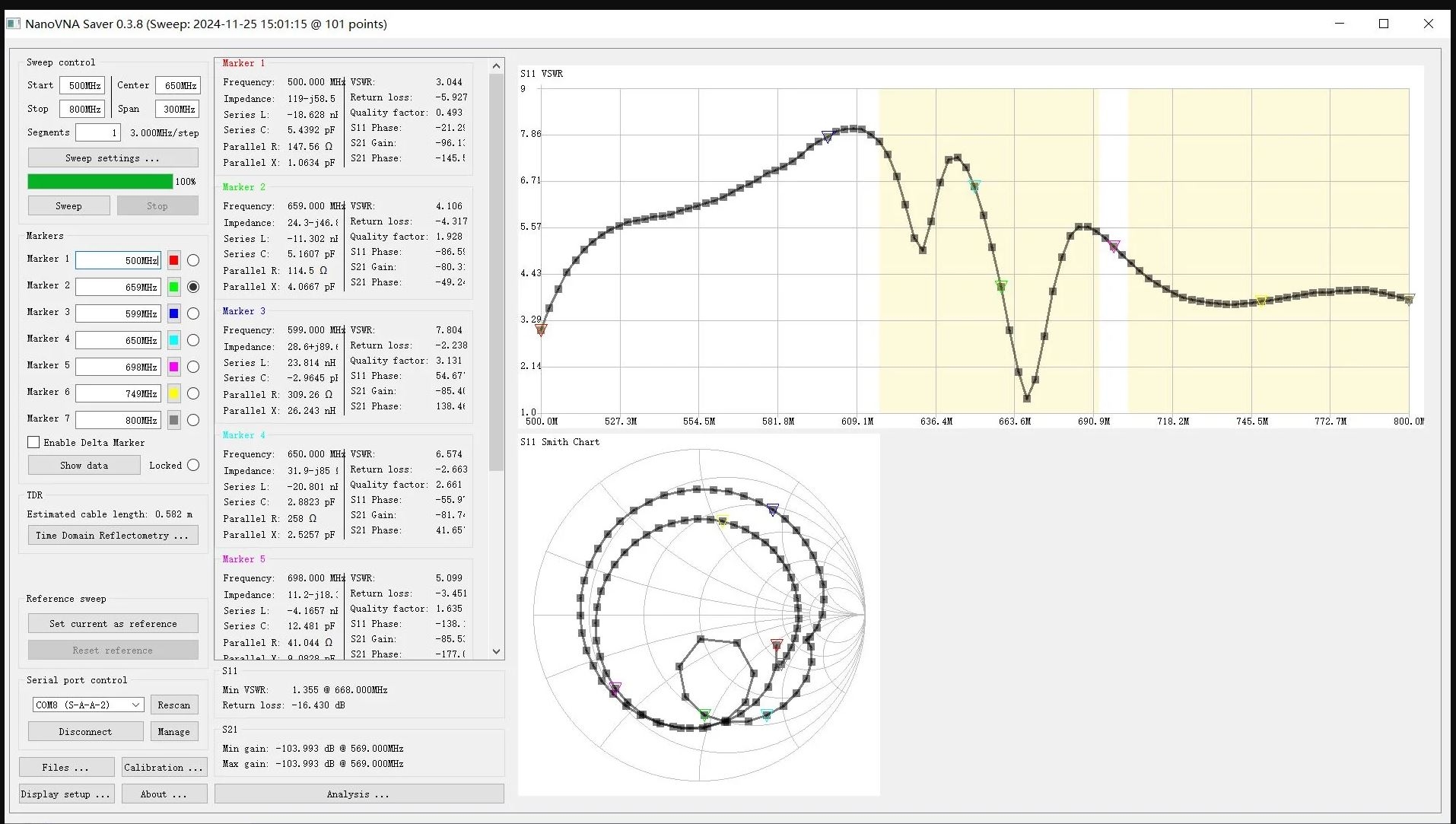
For the outdoor build, we selected the HW B222s-42a enclosure and developed a new internal directional 4×4 MIMO antenna arrangement. The documented antenna range is approximately 600–960 MHz and 1710–3800 MHz. The original platform notes list 5G NR examples n71, n1, n25, n41 and n78, plus LTE bands B1, B2, B3, B4, B5, B8, B25, B26, B38, B40, B41, B66 and B71. The antenna VSWR measurements are retained in the two clickable signal figures in the picture section below.
Keeping the modem inside the outdoor antenna enclosure shortens the four RF paths and avoids the long coaxial feeder loss that would occur if the modem were mounted indoors. Correct outdoor placement, polarization and aiming toward the serving cell remain important for real results.
Configuration and mechanical resources used by the engineer
For WebUI work, AT commands and the RGMII-to-PHY / Ethernet configuration, the original notes recommend the independent developer resource Quectel RGMII configuration notes on GitHub. The original mechanical notes also point to this short L-bracket and bracket-installation video. These are community technical resources, not competing product shops.
Complete packing list from the original build record
- Dual-Q 5G2PHY / 5G-RGMII-O router board × 1
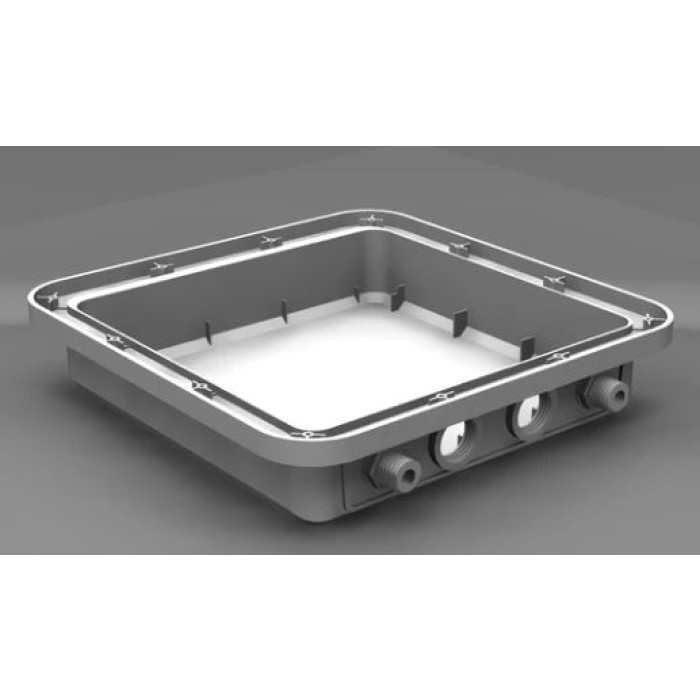
- Waterproof outdoor body enclosure × 1 — the reused professional enclosure may have minor surface scratches that do not affect operation
- Internal directional 4×4 MIMO antenna assembly
- L-bracket and mounting accessories
- Quectel RM520N-GL AP M.2 modem module, pre-installed
- 2.5GbE 54 V Power over Ethernet adapter
Cellular Signal Plus™
524WiFi™ Cellular Signal Plus™ — engineered for the 4G/5G RF path
Cellular Signal Plus™ is the RF-focused configuration of this bundle. It places the modem directly behind the antenna and combines several passive construction improvements intended to preserve signal quality and MIMO separation.
Short internal RF path
The outdoor layout avoids the attenuation of a long coaxial feeder between an indoor modem and a roof- or pole-mounted antenna.
Four cellular paths
ANT0–ANT3 are used for the module’s cellular antenna system so the supported network and modem modes can benefit from multi-antenna operation.
Improved isolation
An internal separation plate, revised antenna elements and an enlarged reflector are used to improve the physical RF arrangement and 4×4 MIMO isolation.
Lower-loss internal coax
The platform revision uses thicker 1.31-class internal coax in place of thinner 1.13-class cable, reducing loss inside the enclosure.
It is a passive optimization, not an active amplifier. It cannot manufacture signal that is not present. Correct band compatibility, outdoor placement, careful azimuth and tilt, a clear path toward the serving site and good network capacity remain essential.
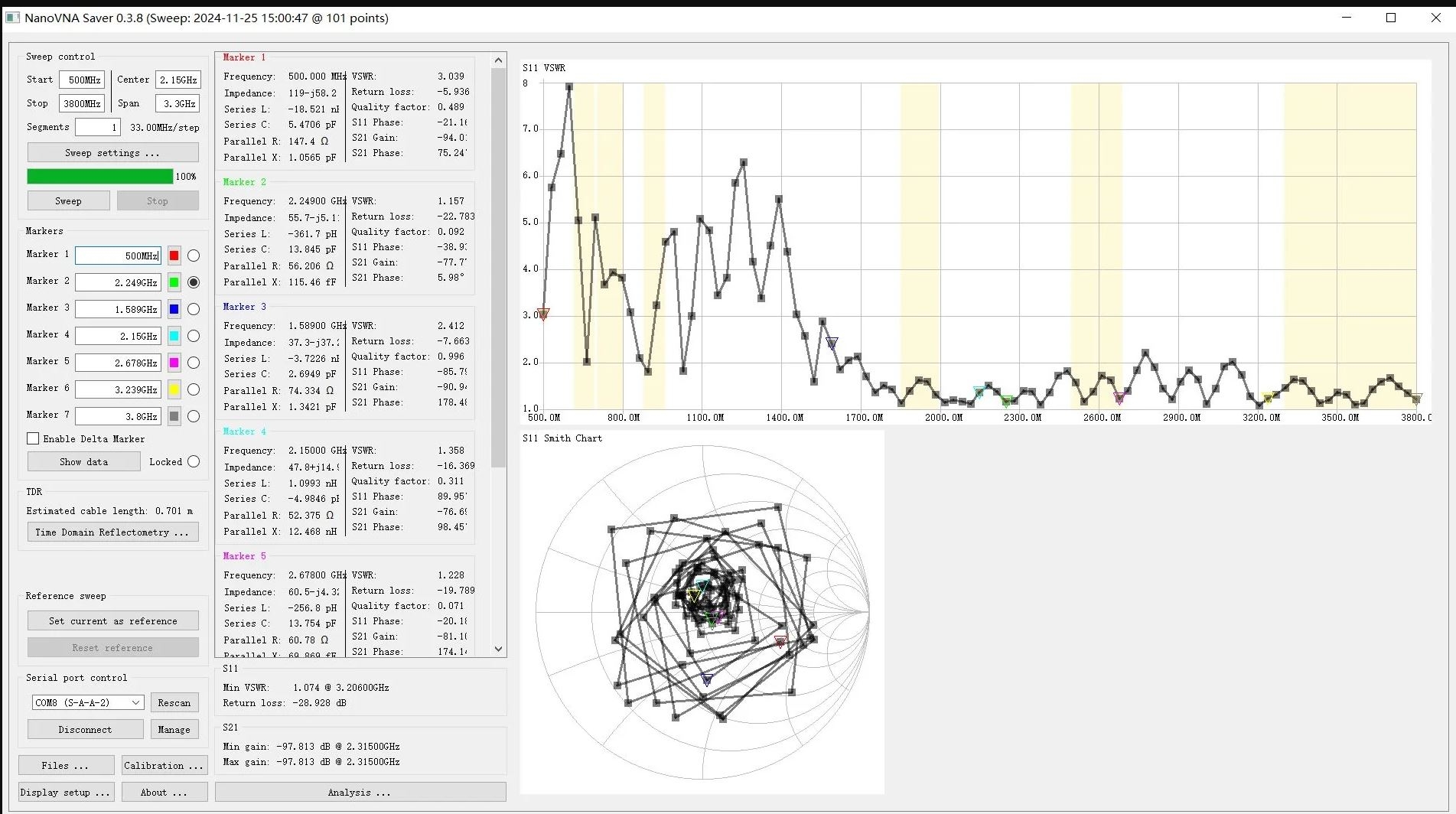
524WiFi™ Pro Plus™ — accessible configuration for specialists
Pro Plus™ describes the integration of the AP-edition Quectel modem with the open 5G2PHY Ethernet platform and the practical access needed for diagnostics and advanced configuration. It is useful to an experienced end user, network engineer, radio enthusiast, integrator or developer who wants to understand and control the modem instead of treating it as a black box.
AT-command access
Read identity and network state, inspect the serving cell, verify SIM status and investigate APN or carrier-profile behaviour.
APN and MBN work
Confirm PDP contexts and installed MBN profiles when a carrier profile overrides or changes expected APN behaviour.
Band and cell analysis
Use firmware-supported commands to inspect registration and radio measurements before changing any band policy.
Community tooling
Public projects document Quectel Ethernet modes, Windows/Linux workflows and optional interfaces. These tools are resources, not guaranteed pre-installed software.
Professional does not mean “business customers only”. Anyone may buy and use the unit, but low-level modem, PCIe, USB and firmware changes require care. Available commands and interfaces vary with the installed firmware. Back up known-good settings before experiments and never paste commands whose effect you do not understand.
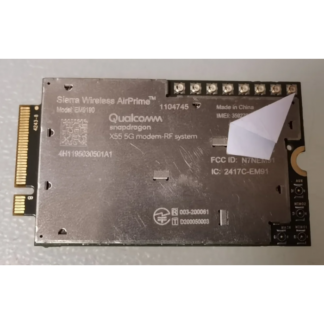
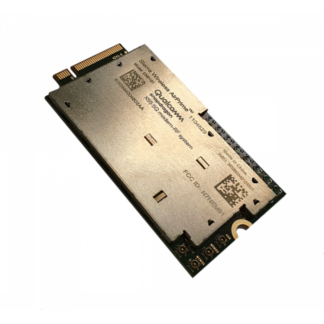
Quectel RM520N-GL AP module
The RM520N-GL is a global Sub-6 GHz M.2 modem based on 3GPP Release 16. It supports 5G standalone and non-standalone operation, LTE fallback, USB and PCIe interfaces, four cellular antenna ports and multi-constellation GNSS capability. The AP edition is selected here for the direct PCIe-to-Ethernet architecture.
| Module characteristic | RM520N-GL capability |
|---|---|
| Radio generations | 5G NR SA / NSA, LTE and WCDMA fallback where supported by network and firmware |
| Standard | 3GPP Release 16 Sub-6 GHz |
| Host interfaces | PCIe x1 and USB 3.1 Gen 2 at module level; this bundle uses the PCIe/Ethernet architecture |
| Cellular antenna ports | Four: ANT0, ANT1, ANT2 and ANT3 |
| Module dimensions | Approximately 30 × 52 × 2.3 mm, M.2 Key-B form factor |
| Module temperature rating | Normal operating range −30 to +75 °C; extended range −40 to +85 °C according to module documentation |
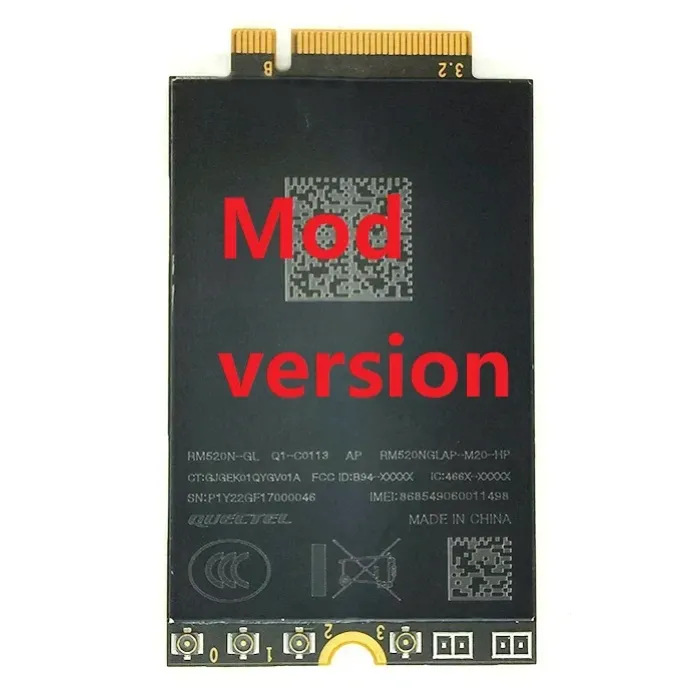
Module bands versus integrated antenna coverage
The modem itself supports a very broad global band set. The integrated directional antenna is specified for approximately 600–960 MHz and 1710–3800 MHz, so the complete assembly’s useful coverage is defined by the intersection of modem capability, antenna range, local operator bands and firmware. Confirm the exact operator bands before purchase, particularly for deployments above 3.8 GHz.
| Layer | Relevant capability | Planning note |
|---|---|---|
| Integrated antenna | Directional 4×4 cellular arrangement, approximately 600–960 and 1710–3800 MHz | Optimized for many common low- and mid-band LTE/5G deployments; not every RM520N band lies inside the stated antenna range. |
| Common 5G examples within the platform listing | n71, n1, n25, n41 and n78 | Availability and aggregation are operator- and region-specific. n78 deployments above the antenna’s stated upper range require particular confirmation. |
| Common LTE examples within the platform listing | B1, B2, B3, B4, B5, B8, B25, B26, B38, B40, B41, B66 and B71 | LTE fallback can be valuable for registration, control-plane operation and locations without usable 5G. |
| SIM hardware in this bundle | One physical SIM slot on the 5G2PHY board | The modem documentation describes two SIM interfaces at module level, but this assembled board exposes one physical slot. |
Theoretical modem maxima stated by Quectel reach up to 3.4 Gbit/s downlink in 5G NSA, 2.4 Gbit/s in 5G SA and 1.6 Gbit/s in LTE under specified laboratory conditions. These are chipset/module capabilities, not promised speeds for this product or your operator. The 2.5GbE hand-off, selected band combination and live radio network impose additional limits.
Installation workflow
- Confirm compatibility before mounting. Check the operator’s LTE/5G bands, SIM plan, APN, deployment country and any carrier device restrictions.
- Insert the SIM with power disconnected. Do not force the SIM or work on RF connectors while the unit is energized.
- Inspect the four internal RF paths. All MHF4 connections are delicate; verify correct seating without twisting or levering the connector.
- Close and mount the enclosure. Use the supplied bracket on a stable pole or wall, initially leaving azimuth and tilt adjustable.
- Use the supplied 54 V PoE hardware. Connect the outdoor Ethernet lead to the correct injector port and the indoor data side to your router, firewall or test computer.
- Set the APN and verify registration. Start with automatic network selection and the minimum changes required by the carrier.
- Aim using radio metrics, not only speed tests. Compare RSRP, RSRQ and SINR, then test stability at different times before tightening the mount.
Useful read-only and setup AT commands
Exact responses depend on firmware and carrier profile. Begin with observation, record the original state and make one deliberate change at a time. The commands below are common diagnostic starting points for this Quectel platform; they are not a substitute for the matching firmware documentation.
| Purpose | Example | What to look for |
|---|---|---|
| Module identity | ATI |
Model and firmware identification; record this before following any community procedure. |
| SIM state | AT+QSIMSTAT? |
Whether the modem detects the physical SIM. |
| Serving cell | AT+QENG="servingcell" |
Registration mode, band, channel, cell identity and radio measurements where firmware reports them. |
| WAN status | AT+QMAP="WWAN" |
Current WAN-side addressing and connection status for supported firmware. |
| PDP contexts / APN | AT+CGDCONT? |
Configured contexts, address family and APN. |
| Carrier profiles | AT+QMBNCFG="list" |
Available and selected MBN profile; a carrier profile can influence APN and radio behaviour. |
| APN example | AT+CGDCONT=1,"IPV4V6","your-apn" |
Replace the placeholder with the operator’s exact APN. Do not assume profile number 1 is correct for every configuration. |
Low-level commands that switch the data interface, PCIe mode, Ethernet driver, USB composition or firmware state can interrupt access to the modem. They are deliberately not presented here as blind copy-and-paste steps. Match any such procedure to the exact RM520N-GL AP firmware and keep a recovery path available.
Signal alignment: measure quality, not just bars
RSRP
Reference-signal received power describes signal strength. Less-negative values are generally stronger, but strength alone does not reveal interference or cell loading.
RSRQ
Reference-signal received quality helps expose a noisy or busy radio environment. A slightly weaker cell can perform better if its quality is cleaner.
SINR
Signal-to-interference-plus-noise ratio is often a useful predictor of modulation efficiency. Higher positive values are generally preferable.
Stability
Observe registration, latency, packet loss and throughput over time. One exceptional speed-test result is not proof of a dependable link.
Rotate the directional unit in small steps, allow the modem to settle and record the serving cell and band after every change. A different direction can attach to a different site or sector. Final alignment should favour repeatable performance and stable radio quality, not merely the highest instantaneous downlink number.
Professional use cases
Outdoor WAN hand-off
Place the cellular radio at the best outdoor position and carry Ethernet indoors to an existing router or firewall.
Backup and failover
Add a cellular WAN path to equipment that already supports multi-WAN policy, health checks and failover logic.
Remote-site networking
Serve workshops, monitoring stations, construction locations or specialist installations where wired service is unavailable.
Modem laboratory
Study Quectel AT behaviour, APNs, MBN profiles, radio status and direct-Ethernet operation on an accessible platform.
Carrier and antenna testing
Compare operators, sites, bands and aiming positions with repeatable measurements and a known physical assembly.
Experienced home user
Build a high-performance rural or suburban cellular link without being locked into the Wi‑Fi and routing features of a consumer CPE.
Technical specification of this bundle
| Item | Specification / supplied configuration |
|---|---|
| Product type | Outdoor 4G LTE / 5G NR CPE and configurable modem-to-Ethernet platform |
| Installed modem | Quectel RM520N-GL AP, M.2 Key-B, 3GPP Release 16 |
| Cellular modes | 5G NR SA / NSA with LTE and WCDMA fallback subject to operator, firmware and regional support |
| Ethernet architecture | Modem PCIe Root Complex to Realtek RTL8125 controller; single 2.5GbE RJ45 hand-off |
| Antenna | Integrated directional 4×4 MIMO cellular assembly, approximately 600–960 MHz and 1710–3800 MHz |
| RF construction | Revised elements and combiner, isolation plate, enlarged reflector and lower-loss internal coax |
| SIM | One physical SIM slot exposed by the assembled platform; SIM and service plan not included |
| Power | Supplied 54 V PoE injector/adapter; use supplied hardware and verified connection order |
| Mounting | Outdoor enclosure with L-bracket and mounting accessories for pole or wall installation |
| Local Wi‑Fi | Not included; connect a separate router or access point if Wi‑Fi is required |
| Configuration | AT commands and firmware-dependent modem interfaces; advanced features require technical knowledge |
| Enclosure note | The body may be a professionally reused enclosure and can have minor cosmetic marks without operational effect |
Free developer and community resources
The following non-commercial community resources help experienced users understand Quectel direct-Ethernet operation and related workflows. They are third-party projects, are not a warranty of compatibility with every firmware and are not a replacement for making a backup before configuration changes.
Cellular Modem Wiki
Quectel M.2 notes, AT-command references and platform guidance.
SDXLEMUR M.2 to Ethernet
Specific community explanation of RM520N-family PCIe Root Complex and Ethernet configuration.
Quectel RGMII Toolkit
Community project for optional administration and networking tools. Nothing from the toolkit is promised as pre-installed.
QuecDeploy
Public Windows-oriented Quectel deployment workflow for advanced users.
Outdoor bracket installation
Short Dual-Q H721O mounting demonstration.
Modem and RF-cable installation
5G-RGM-O installation example showing modem and RF cable handling.
What is included
- Dual-Q 5G2PHY / 5G-RGM-O modem-to-Ethernet board with SIM slot and 2.5GbE RJ45
- Quectel RM520N-GL AP M.2 5G modem, pre-installed
- Integrated directional four-port cellular antenna assembly
- Outdoor enclosure
- L-bracket and mounting accessories
- 2.5GbE-capable 54 V PoE injector/adapter
Not included: SIM card, carrier subscription, guaranteed operator activation, downstream router/firewall, Wi‑Fi access point, Ethernet cabling not shown in the package specification, installation labour and site-specific lightning protection.
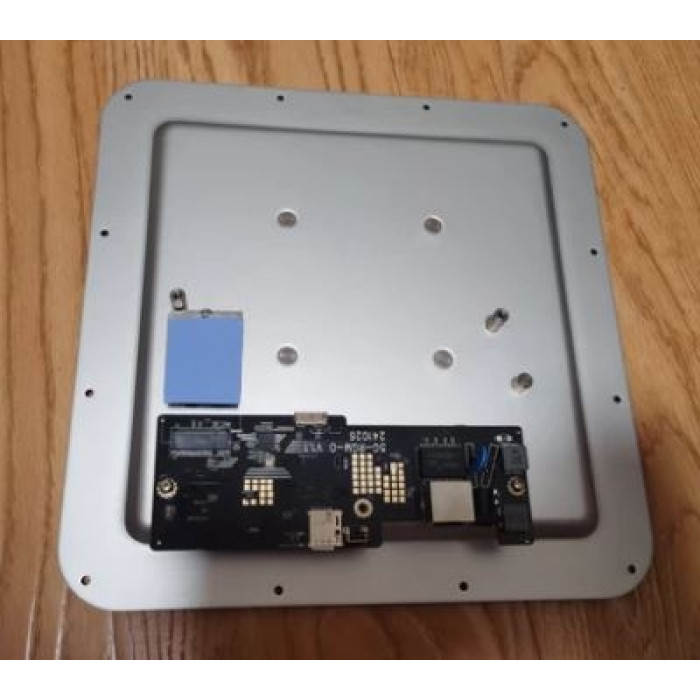
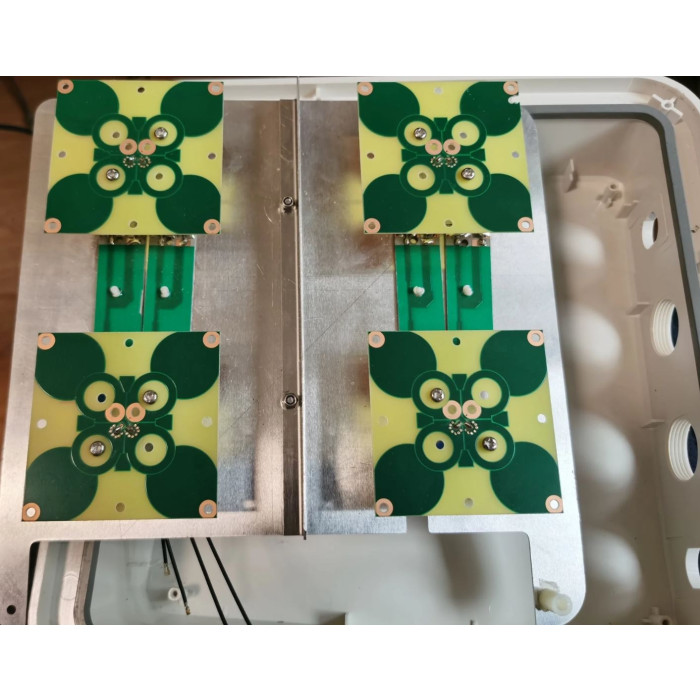
Troubleshooting guide
| Symptom | Check first | Next step |
|---|---|---|
| No Ethernet link | Correct injector ports, supplied power adapter, cable continuity and downstream port speed/negotiation. | Test with a short known-good cable and one computer/router before changing modem settings. |
| SIM not detected | Power off, SIM orientation, contact condition and AT+QSIMSTAT?. |
Try a known-good compatible SIM; never insert or remove it under power. |
| Registered but no Internet | APN, PDP context, address family, carrier MBN profile and WAN address. | Compare AT+CGDCONT?, AT+QMBNCFG="list" and operator requirements. |
| Unexpected LTE instead of 5G | Serving-cell report, local 5G coverage, SIM entitlement, NSA anchor band and selected profile. | Return to automatic band policy before attempting carefully documented band changes. |
| Low or unstable throughput | RSRP, RSRQ, SINR, cell/band changes, antenna direction, cable path and peak-time congestion. | Re-aim in small steps and test over time; do not diagnose from a single speed test. |
| Lost modem access after configuration | Exact last command, selected data/USB/PCIe mode and firmware version. | Use the firmware-specific recovery procedure; avoid stacking further unverified changes. |
Frequently asked questions
Does this product create Wi‑Fi?
No. It is a cellular-to-Ethernet CPE. Connect the 2.5GbE hand-off to your own Wi‑Fi router or access point when local wireless coverage is needed.
What does Cellular Signal Plus™ mean here?
It means the 4G LTE / 5G NR RF path has been arranged around short internal cabling, directional antenna elements, isolation improvements and four cellular paths. It is neither a Wi‑Fi feature nor an active signal amplifier.
Is Pro Plus™ software installed on the modem?
Pro Plus™ is the advanced integrated configuration of this bundle: RM520N-GL AP, 5G2PHY Ethernet platform and access for professional modem work. Public community tools are optional resources unless a particular item is explicitly stated as installed.
Can an ordinary end user buy it?
Yes. It can perform a simple 5G-to-Ethernet role after SIM and APN setup. Its real advantage, however, is the flexibility available to enthusiasts, developers and network specialists.
Is the RJ45 port really 2.5GbE?
The Realtek RTL8125 interface provides a 2.5GbE link. That describes the local Ethernet hand-off, not a guaranteed mobile Internet speed.
Will it work with my operator?
Compatibility depends on operator bands, SIM plan, APN, allowed devices, local coverage, network mode, firmware and the integrated antenna’s frequency range. Ask 524WiFi.net™ to check a specific deployment before ordering when uncertain.
Can I lock bands or adjust modem parameters?
The modem supports extensive Quectel AT commands, but exact command availability varies by firmware. Begin with read-only diagnostics, record the original values and use only a guide that matches the installed firmware.
Does it support active 802.3af/at PoE switches?
Do not assume active PoE negotiation. Use the supplied 54 V injector/adapter and verified connection scheme. A passive-PoE product can share the same connector without implementing IEEE negotiation.
Is the enclosure new and cosmetically perfect?
The outdoor body may be professionally reused and can show small cosmetic marks. This does not change the tested electrical function, but buyers requiring a pristine cosmetic enclosure should confirm availability before ordering.
Is an IP protection rating guaranteed?
No specific IP rating is claimed on this page. Outdoor reliability still depends on correct closure, cable routing, drip loops, connector protection, mounting and site practice.
Engineering and ordering note
This is a configurable professional platform, not a locked consumer appliance. Before purchase, verify the intended country, carrier, required bands, SIM/APN policy, mounting environment, downstream router and your ability to recover from configuration changes. For a specific operator or installation, send 524WiFi.net™ the country, carrier name, target bands and intended network topology.
Reviews
There are no reviews yet.