Posted on

From NVIDIA Jetson Development Kit to Production: What Robotics Companies Need to Consider Beyond AI Computing

For many robotics companies, the NVIDIA Jetson Development Kit is the first step when building a new product.

It allows engineers to quickly evaluate system concepts, connect peripherals, test software, and verify whether the hardware platform can support their application.

However, after the prototype stage, many teams face a different challenge:

The development kit is not the final product.

A development board is designed for flexibility and evaluation.

A commercial product needs to be designed for:

  • Specific mechanical dimensions
  • Required interfaces
  • Stable power supply
  • Thermal conditions
  • Manufacturing process
  • Long-term availability

This transition from evaluation platform to production hardware is where many engineering teams start facing challenges.

The question changes from:

“Can we make the prototype work?”

to:

“Can we build thousands of units with consistent quality?”


Development Kit Is Only the Beginning

A Jetson Development Kit is an excellent engineering tool.

It helps teams quickly verify:

  • Processor performance
  • Camera connection
  • Sensor integration
  • Software environment
  • Application functionality

During early development, engineers usually focus on functionality.

They may connect:

  • USB cameras
  • External sensors
  • Network devices
  • Additional modules

Everything works on the lab desk.

But when moving into a real product, these temporary solutions often become limitations.

A production device cannot simply place a development kit inside an enclosure.


What Changes When Moving to Production?

1. The hardware needs to fit the product

One of the first challenges is mechanical integration.

A development kit has fixed:

  • Size
  • Connector locations
  • Mounting structure

But the final product may have strict requirements.

For example:

A mobile robot may need all electronics installed inside a compact chassis.

An industrial inspection device may require a specific enclosure.

A customized carrier board allows engineers to redesign the hardware around the actual product.


2. Interfaces need to match the application

Different products require different hardware configurations.

A development kit provides general interfaces.

A production system often needs customized combinations.

Examples:

  • Multiple camera inputs
  • Ethernet ports
  • CAN interface
  • RS232/RS485
  • GPIO control
  • Sensor interfaces
  • Storage expansion

Instead of adding external conversion boards, a custom carrier board can integrate the required functions directly.

This reduces:

  • System complexity
  • Cable connections
  • Assembly difficulty

3. Power design becomes more important

Power is often underestimated during prototype development.

A desktop environment provides stable power.

A production device has different conditions.

Engineers need to consider:

  • Input voltage range
  • Power distribution
  • Protection circuits
  • Power consumption
  • Startup sequence

For industrial products, unstable power design can create reliability problems that are difficult to diagnose.


4. Thermal design cannot be ignored

Higher computing performance also creates thermal challenges.

During prototype testing, engineers may use:

  • Open-air environments
  • Standard heatsinks
  • Development accessories

Production products require:

  • Designed heat dissipation
  • Enclosure consideration
  • Long-term operating stability

Thermal design needs to happen together with mechanical design.


Common Challenges During Custom Board Development

Based on our experience working on embedded hardware projects, several challenges appear frequently.

Challenge 1:

Prototype works, but the design is difficult to manufacture

A prototype may use:

  • Evaluation boards
  • Additional modules
  • Manual wiring

This is acceptable for engineering verification.

However, mass production requires:

  • Optimized PCB design
  • Simplified assembly
  • Stable component sourcing
  • Manufacturing testing

The production design needs to consider the entire lifecycle.


Challenge 2:

Balancing performance and cost

The highest specification is not always the best product design.

Engineers need to balance:

  • Computing requirements
  • Hardware cost
  • Power consumption
  • Manufacturing complexity

The right design depends on the application.


Challenge 3:

From prototype samples to stable production

A few working prototypes do not mean the product is ready.

Before production, companies usually need to complete:

  • Hardware verification
  • Reliability testing
  • Manufacturing validation
  • Quality control process

This stage requires cooperation between engineering and manufacturing teams.


Key Considerations When Designing a Jetson Production Platform

1. Start hardware planning early

Many companies first focus on software development.

However, hardware decisions made later can affect:

  • Product size
  • Cost
  • Schedule
  • Manufacturing

Early hardware planning can reduce redesign cycles.


2. Select the right development partner

A production hardware project involves multiple disciplines:

  • Hardware design
  • PCB layout
  • Embedded software
  • Testing
  • Manufacturing

A partner with both engineering and production experience can help shorten the transition.


3. Think about future product versions

A good hardware platform should consider future needs:

  • Interface expansion
  • Component availability
  • Product upgrades

The first production design often becomes the foundation for future products.


524WiFi Perspective

At 524WiFi and Wallys, we have been involved in embedded communication hardware development since 2005.

Our engineering capabilities include:

  • Hardware design
  • PCB development
  • Embedded system integration
  • Prototype validation
  • Production support
  • OEM/ODM/JDM services

With the increasing adoption of NVIDIA Jetson platforms in industrial applications, we are expanding our hardware development capability to support companies that need customized Jetson-based platforms.

Our focus is not only building a prototype board.

It is helping engineering teams move from:

Concept → Prototype → Production

through practical hardware design and manufacturing experience.


Conclusion

The NVIDIA Jetson Development Kit provides engineers with a fast way to start development.

But successful products require much more than selecting a computing module.

The transition to production requires careful consideration of:

  • Hardware customization
  • Interface design
  • Power management
  • Thermal solution
  • Manufacturing requirements

For robotics and industrial equipment companies, the biggest challenge is often not proving that the technology works.

It is turning a working prototype into a reliable product.

What challenges have you experienced when moving from development boards to production hardware?

Posted on

WIFi 7 drivers finally works aka how we tested QCN9274 hw 2.0. board-2.bin and firmware-2.bin file for Linux development and Ath12k Driver MLO debug 9274

October 2025 update :

🚀 Exciting News from 524WiFi !

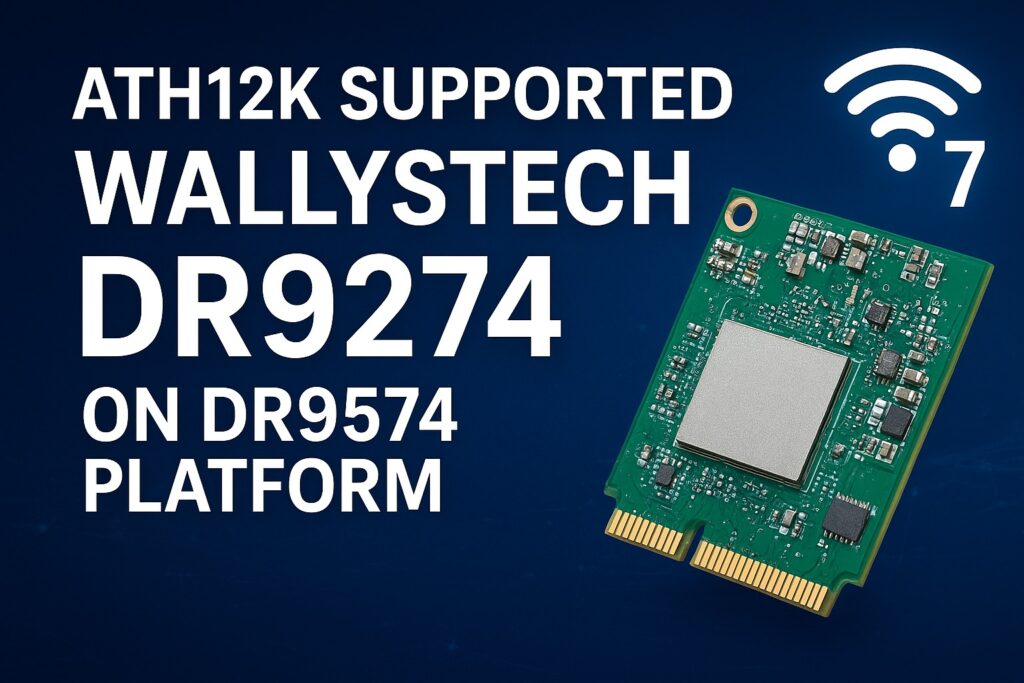
Our 524WiFi DR9274 Series WiFi 7 Network Cards are now fully supported on the DR9574 platform using ath12k driver! And MLO fully working and supported too !

Experience the next generation of wireless performance — faster, smarter, and more reliable.

Sample units and demo tests are now available.

Actually. The Customer can use our board-2.bin from our ftp or from Compex on our DR9274 Cards. Because these Cards are standard Card of Qualcomm. There is no reason for any differences. You can download board-2.bin for all our 524WiFi DR9274 modules from our link : https://wifi5.eu/dls/Wallys/DR9274/

Additionally. If a Customer needs ath12k support, then we can do demo ath12k on our DR9574 boards to support DR9274 cards. Customer can take it as reference. If Customer need support for their own software, it needs check the project scale and then we can offer our support for LINUX / OpenWRT development.

———————————————————————————————-

Dear customers,

You can log in the link and can find latest sources for your development using Ath12k firmware. If there is any mistake, please let us know.

https://git.codelinaro.org/clo/ath-firmware/ath12k-firmware/-/tree/main/QCN9274/hw2.0?ref_type=heads

This is general frimware for QCN 9274 / 6274 based modules. For special function, you need ask the vendor to develop special firmware. They do not provide it for free. For example COMPEX need you to buy it , but the price is about $50000.

For 524wifi DR9274 and also COMPEX modules the bdf is not changed, so you can use the generic board-2, firmware-2  and add your board-id of your module if not included in already. Please read bellow how to use and debug Ath12k driver for our dual band modules.

There are also many known Ath12k bugs and limitations, you can solve known issues using a driver patch – for example :

https://patchwork.kernel.org/project/linux-wireless/list/?series=954967

For examples you can add the 160Mhz Channel Support for 5GHz range.

More general informations :

https://wireless.docs.kernel.org/en/latest/en/users/drivers/ath12k.html

EXAMPLE  1 : 

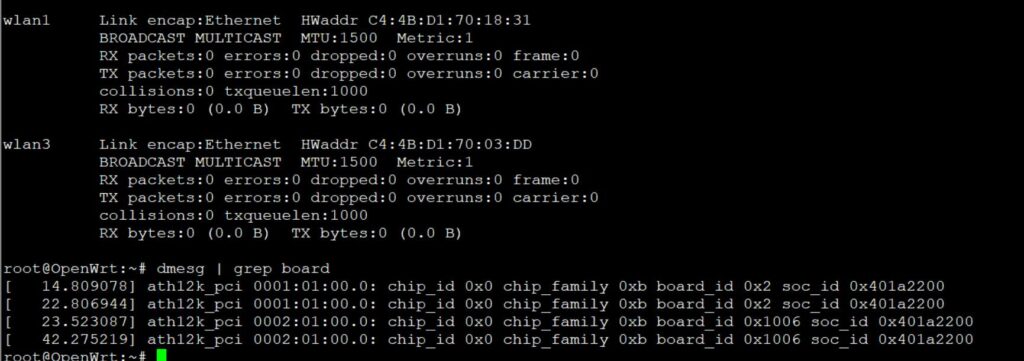
A modified general board-2.bin file for all QCN6274 modules (including dual band 5G6G) is available here. The public file doesn’t support board-id 0x1006 (dual band 5G+6G) , our engineer added support for 0x1006 in to the file : 

 https://wifi5.eu/dls/Wallys/DR9274/

For example WLE7002-E56 or DR9274-5G6G by 524WiFi modules require this modified board-2.bin file, then 6GHz issue is solved via regulatory db. signing the file. And you will also need to apply an existing driver patch from Patchwork.kernel.org

https://patchwork.kernel.org/project/linux-wireless/list/?series=&submitter=&state=&q=ath12k&archive=&delegate=

After this setup tuning and modifications you can achieve working WiFi 7 Dual band card under Linux or OpenWRT. For example openwrt latest trunk is working excellent, + adding right board-2.bin file as mentioned higher. After appling the 160MHZ channel patch we are testing DR9274-5G6G and WLE7002-E56 with MLO support:

current transfer is about 1400MBps for 6GHz/320Mhz with iphone 15 pro max 

and  1500MBps for 5GHz/160Mhz with iphone 15 pro max. Distance is half a meter for this testing.

For big customers , there is a good solution – like this : the customer can evaluate the wifi card on a QCA based router board, like for example DR9574 , and if performance and features are good then they will have confidence to put project to 524WiFi and Wallys to develop software for ath12k. We can allocate a engineer to fix these Customers requirements and if the Customer has a good project with us. MOQ and SW development contract is required.

Are you interested in in testing and development on dr9574 board using DR9274-5G6G module ? You will see how it works with original QCA driver. Please contact us !

Unfortunaly, it seems only single band modules can work with current ath12k without extra development, unfortunately dual band support requires additional development as we show you for wle7002-e25 card bellow:

————————————————————————————————————————————————

COMPEX WLE7002E25 dual band needs to separate phy firmware. 

https://github.com/quic/upstream-wifi-fw/tree/main/ath12k-firmware/QCN9274/hw2.0/1.3.1/WLAN.WBE.1.3.1-00130-QCAHKSWPL_SILICONZ-1

The official firmware It can be downloaded from the following link https://git.codelinaro.org/clo/ath-firmware/ath12k-firmware/-/blob/main/QCN9274/hw2.0/testing/1.1.1/WLAN.WBE.1.1.1-00210-QCAHKSWPL_SILICONZ-1/firmware-2.bin?ref_type=heads
Put the firmware into /lib/firmware/ath12k/QCN9274/hw2.0/

But split phy and firmware-2.bin does not support linux kernel 6.8. You need to download backportfrom https://mirror2.openwrt.org/sources/backports-6.9.1.tar.xz.
Install software to build backports with “sudo apt install build-essential flex bison ncurses-dev”.
The command need to prepare the backport
tar -xf backports-6.9.1.tar.xz
Patch the attached patch files. This will enable support linux kernel 6.xx and add defconfig-ath12k
cd backports-6.9.1/
patch -p1 < [patch file location]
The command need to compile and install backport
make defconfig-ath12k
make
sudo make INSTALL_MOD_STRIP=1 install

—————————-

We have tested this and it works. you can use the link provided directly.

See if it works on your end.

split phy and firmware-2.bin does not support linux kernel 6.8. Need to download backport from https://mirror2.openwrt.org/sources/backports-6.9.1.tar.xz.
Install software to build backports with “sudo apt install build-essential flex bison ncurses-dev”.
The command need to prepare the backport
tar -xf backports-6.9.1.tar.xz
Patch the attached patch files. This will enable support linux kernel 6.xx and add defconfig-ath12k
cd backports-6.9.1/
patch -p1 < [patch file location]
The command need to compile and install backport
make defconfig-ath12k
make
sudo make INSTALL_MOD_STRIP=1 install 

Please check our customer modified working board-2.bin file as an example and guide for your development – https://wifi5.eu/dls/compex/WLE7000

And dont forget as always , comment react or add some info – you will be automaticly added to possibly win set of our designed special 5G or WIFI anntennas

———————————————

Best Regards

524wifi team


Posted on

524WiFi is driving the future of high-power 6GHz Wi-Fi 7 solutions—with full support for OpenWRT and OpenWiFi collaborative development!

As a global leader in wireless innovation, 524WiFi and WallysTech are advancing the next generation of connectivity with a tri-band platform built on the Qualcomm IPQ9574 + QCN9274/QCN6274 architecture—engineered for ultra-reliable, high-power 6GHz transmission.

🧠 We’re not just innovating in hardware—we’re also deeply engaged in the OpenWRT and OpenWiFi communities, empowering rapid development and seamless integration for our global partners.

🔧 Key Product Highlights:
✅ Tri-band concurrent operation (2.4GHz / 5GHz / 6GHz)
✅ High-power 6GHz RF design for long-range outdoor performance
✅ Fully compatible with OpenWRT and OpenWiFi software stacks
✅ Ideal for mesh backhaul, smart campuses, and industrial IoT deployments

🤝 We invite global partners—developers, system integrators, OEM/ODM teams—to collaborate with us in building the future of Wi-Fi 7.

📩 For product briefs, test boards, or partnership opportunities, reach out to us!

Posted on

Mediatek Unveils the New Wi-Fi 7 Platform AP7988-002, Delivering High-Performance Wireless Solutions for the AI Era

As AI development and the IoT market continue to mature, Wi-Fi has become one of the most universal and indispensable transmission methods in everyday life. However, with the growing demand for data traffic, existing networking technologies are facing challenges. To address these needs, 524WiFi proudly introduces its latest generation Wi-Fi 7 router development board, the AP7988-002. Designed to provide exceptional performance and seamless connectivity in the wireless communications field, the AP7988-002 is powered by the four-core ARM Cortex-A73 MediaTek MT7988A processor, making it the ideal choice for AI-driven communication and high-bandwidth applications.

In terms of wireless performance, the AP7988-002 is equipped with the MediaTek MT7996 Wi-Fi chipset, supporting Wi-Fi 7 technology and offering ultra-high-speed connectivity of up to 19,000 Mbps. This ensures ultra-low latency and outstanding data transmission capabilities, providing the perfect solution for next-generation network applications. To further enhance wireless signal coverage, the AP7988-002 features a high-power amplifier front-end module, significantly boosting signal strength and transmission range. This makes it especially suitable for large-scale infrastructure and environments requiring stable connections, positioning it as an essential networking device for both enterprise and residential applications.

The AP7988-002 is built around versatility, combining Tri-Band Triple Concurrent (TBTC) technology with 10G PHY high-speed wired connectivity. This allows it to handle substantial data transmissions simultaneously, ensuring optimal performance in multi-device connected environments and providing a stable network foundation for high-bandwidth applications.

Additionally, the product comes with an integrated M.2 B Key slot, supporting 4G/5G WWAN modules to offer flexible mobile network connectivity options. The M.2 M Key slot enables storage expansion, making it especially suitable for data-intensive applications such as large-scale data processing needed by small to medium-sized businesses. An integrated GPS module further enhances the device’s positioning capabilities, broadening its adaptability in modern network environments.

The launch of the AP7988-002 solidifies Mediatek’s leadership in wireless connectivity solutions, demonstrating the company’s commitment to technological innovation and laying a solid foundation for IoT applications. 524WiFi continues to drive advancements in wireless technology, striving to improve the performance and ease of use of IoT technologies, expanding the ways people live and work.

This product’s release marks a new milestone for Mediatek in the wireless technology field. With its exceptional performance and flexible application options, it brings an unprecedented network experience to both industries and individual users. For more information, please visit the 524WiFi official website for the latest updates and technical support.

Posted on

QCN 9074 QCN 9024 Tri-Band Capability Meets Versatile Development: ROCK 5B + 524 WiFi 6 DR9074-Triband !

Harnessing the Power of 524WiFi 6 DR9074-TRIBAND with x86 Platforms: Practical Case Studies

In the fast-evolving world of wireless networking, Wi-Fi 6E is transforming connectivity with its higher speeds, lower latency, and increased device capacity. At 524WiFi and Wallys, we are dedicated to providing high-performance, easily integrable industrial wireless hardware to empower developers, businesses, and innovators. This article explores how the 524WiFi 6 DR9074-TRIBAND Wi-Fi card paired with x86 platforms can deliver exceptional value and elevate your project outcomes.


Why Choose DR9074-TRIBAND with x86 Platforms?

Selecting the right hardware often involves addressing key challenges:

  1. Does it meet current and future performance needs?
  2. Is it compatible with existing systems?
  3. Can it provide long-term reliability?

The 524WiFi 6 DR9074-TRIBAND card, powered by the Qualcomm QCN9074 chipset, supports Wi-Fi 6E across three frequency bands (2.4 GHz, 5 GHz, and 6 GHz). Combined with the computational power of x86 platforms, this pairing offers robust solutions for:

  • High-performance wireless access points (APs)
  • Extensive wireless mesh networks
  • Wireless protocol development and testing platforms
  • IoT gateways and data center connectivity

By integrating DR9074 and x86 platforms, we aim to help you build reliable, flexible, and scalable wireless networks for a wide range of applications.


Case Studies: How We Enable Success

Case 1: Deploying High-Performance Wireless Networks for SMEs

Challenge A small to medium-sized enterprise (SME) sought to enhance its internal network with low latency, high stability, and support for multiple concurrent connections.

524WiFi Solution

  • Provided the DR9074-TRIBAND card, seamlessly integrated with the client’s x86 motherboard via PCIe.
  • Enabled tri-band Wi-Fi using Ubuntu and the Ath11k driver.
  • Configured Hostapd to deploy an efficient wireless access point.

Results

  • Expanded Wi-Fi coverage to 150 meters and improved throughput by over 50%.
  • Maintained stable performance even under high concurrency, ensuring uninterrupted business operations.

“524WiFi hardware’s performance and ease of use allowed us to upgrade our network effortlessly, saving both time and budget.” — Client Feedback


Case 2: Building a Wireless Mesh Network for a Smart Campus

Challenge A smart campus required seamless wireless coverage across multiple buildings and open spaces with excellent roaming performance.

Wallys Solution

  • Configured multiple x86 devices, each equipped with a DR9074-TRIBAND card, to create mesh network nodes.
  • Utilized OpenWrt to establish the 6 GHz band as the backhaul, reducing interference.
  • Leveraged MU-MIMO and OFDMA to enhance connection density.

Results

  • Achieved full campus coverage with reduced latency using 6 GHz backhaul links.
  • Enabled seamless roaming for users, improving the overall smart campus experience.
For support drivers, please contact: 524wifi team

Case 3: Providing a Cost-Effective Wireless Testing Platform

Challenge A wireless technology research company needed a platform to test Wi-Fi 6E performance and optimize its products.

Wallys Solution

  • Paired x86 servers with DR9074-TRIBAND cards for a versatile testing framework.
  • Integrated tools like iperf3 and Wireshark to analyze bandwidth, latency, and protocols.
  • Simulated complex network environments under high load across multiple bands.

Results

  • Improved testing efficiency by 40% and reduced overall costs.
  • Enabled faster product launches with enhanced market readiness.

Our Commitment: Empowering Your Vision

At 524WiFi, we believe that the true value of technology lies in enabling others. Whether you’re an entrepreneur, developer, or researcher, our products and services are designed to help you:

  • Reduce Deployment Costs: Flexible hardware and software integration for faster implementation.
  • Accelerate Project Timelines: Comprehensive technical documentation and support to minimize trial and error.
  • Achieve Long-Term Goals: Hardware solutions that not only meet today’s needs but also prepare you for tomorrow’s challenges.

📩 For inquiries or hardware procurement, please contact us at [email protected] Let’s build the future of wireless networking together!

How to load driver for DR9074-Triband Tutorial: