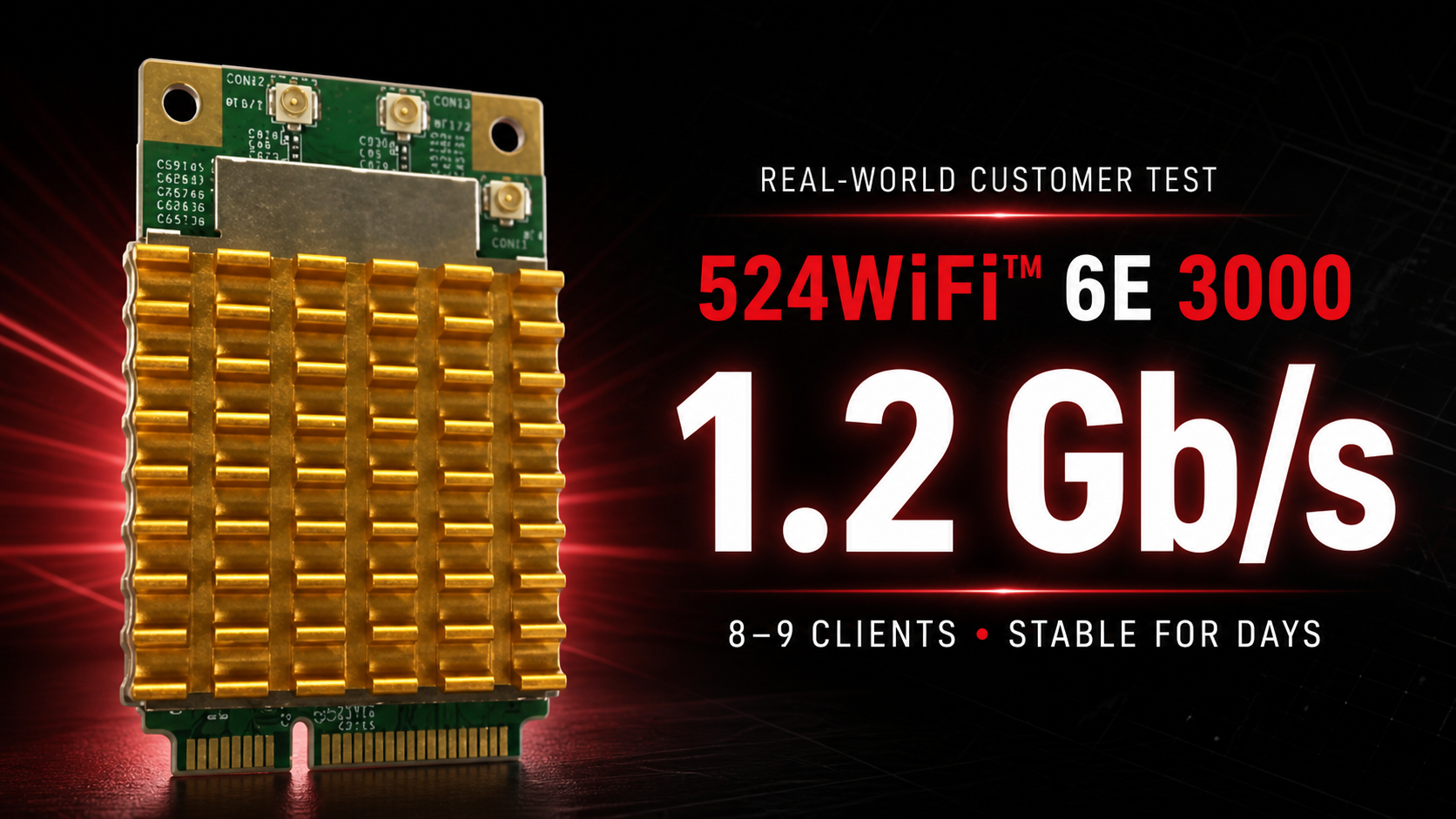
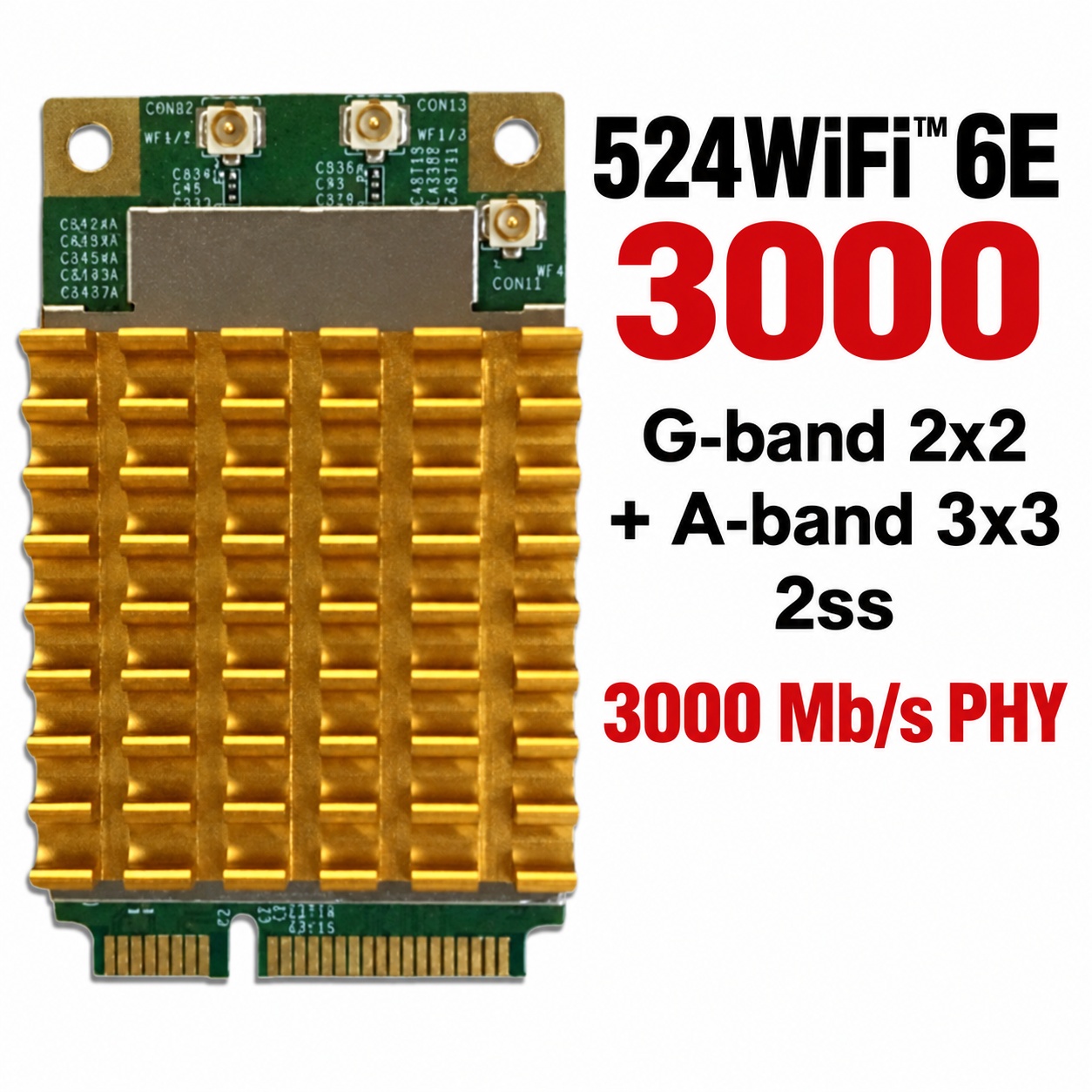
A real customer deployment has put the 524WiFi™ 6E 3000, SKU 524WiFi-7916-NPD through exactly the kind of demanding upgrade this professional module was built for: an older desktop platform, a Linux access point, multiple simultaneous clients and sustained gigabit-class traffic. The verdict was immediate:
“this device is a banger”
This is not a theoretical peak-rate claim. In the customer’s own working access-point setup, the card sustained 1.2 Gb/s to a Wi-Fi 6 client while serving a real network.
The upgrade that finally delivered
The customer installed the 524WiFi-7916-NPD in an older small-form-factor PC through a miniPCIe-to-PCIe adapter. It was configured as a Linux access point using hostapd—the service that lets a compatible Wi-Fi module operate as an access point and manage connected clients.
After years limited to older Wi-Fi technology and several unsuccessful adapter trials, this was the module that finally delivered the upgrade he wanted.
1.2 Gb/s with 8–9 concurrent clients
1.2 Gb/s sustained application throughput
8–9 simultaneous Wi-Fi 6 and Wi-Fi 5 clients
Several days of continuous operation without a crash
Stable Linux access-point operation
A successful upgrade on a legacy desktop platform
The customer described the setup as “very stable.” That combination of real throughput, multi-client operation and stability is why 524WiFi™ focuses on specialist wireless hardware for professional integrations.
A practical note about cooling
The customer also reported that the card runs quite hot despite its fitted heatsink. In this compact installation, the slot direction left the module upside down. It nevertheless remained stable, but builders should provide suitable airflow and verify temperatures in compact or passively ventilated systems.
Why customers choose 524WiFi™
Strong hardware is only part of the purchase. Correct product selection, dependable logistics and specialist experience matter just as much.
“i’d recommend”
“as usual, 524wifi order, logistics, products are top notch quality.”
That feedback captures what 524WiFi™ is built to deliver: carefully selected professional wireless products backed by an experienced supplier selling online since 2003.
Build your own high-performance access point
For a compact mPCIe radio for a Linux router, access point, embedded system or specialist wireless upgrade, choose the 524WiFi-7916-NPD. The customer’s result shows what the right 524WiFi™ module can unlock—even in hardware more than a decade old.
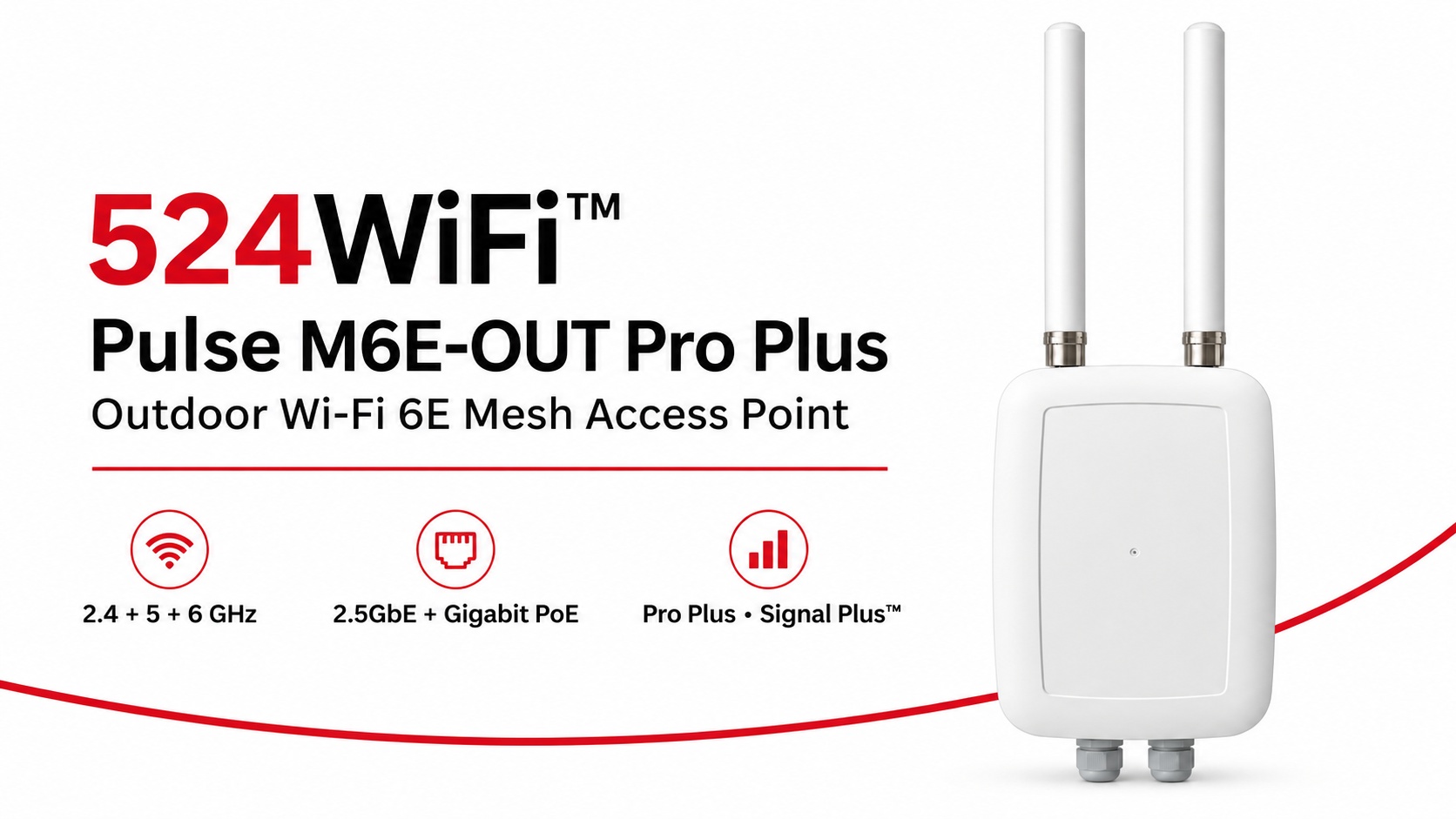
524WiFi™ Pulse M6E-OUT Pro Plus brings the radio platform, outdoor enclosure and model-specific antenna assembly together for a professionally planned Wi-Fi 6E mesh installation. Start with a complete fixed network node and build coverage and inter-node links around the working area.
Three radio bands for the complete site network
Independent 2.4, 5 and 6 GHz radios give the installation three concurrent 2×2 radio paths. The Qualcomm IPQ5018 platform combines a dual-core ARM Cortex-A53 processor at 1.0 GHz with 512 MB DDR3L. A 2.5GbE interface supports the wired uplink, while a Gigabit Ethernet interface with PoE provides practical network and power integration.
The published theoretical PHY rates are up to 573 Mb/s at 2.4 GHz and 2,402 Mb/s each at 5 and 6 GHz. Channel widths reach 40 MHz at 2.4 GHz and 160 MHz on the two higher bands. Choose channels and radio roles around client traffic, the mesh topology and the operating country.
An antenna assembly matched to the outdoor node
The assembly combines two external 5 GHz omnidirectional antennas, two internal 2.4 GHz omnidirectional antennas and an internal directional 6 GHz panel serving the two 6 GHz RF paths. Aim the panel toward the intended link and keep its enclosure face clear of metalwork. This lets the installation use directional interconnection and local coverage deliberately.
Pro Plus and Signal Plus™ for deployment
Pro Plus combines our tuned product configuration, model-specific firmware selection and integration support. Signal Plus™ brings antenna placement, polarization, feed losses, radio roles and channel planning into the same RF system. Commission the complete node under the traffic and RF conditions of the actual site.
Fixed mesh nodes and moving clients
Use the M6E-OUT as a fixed outdoor infrastructure node. Pair it with Pulse M6E-IN for indoor infrastructure and Pulse R6-D2-IN or R6-T3-IN roaming clients on moving Ethernet-equipped machinery. Plan compatible firmware, authentication and RF overlap across the route. Mesh interconnection and moving-client roaming serve complementary roles in the complete network.
Mobile robots used to be limited mainly by batteries and mechanics. Increasingly, the limit is data movement. A modern AMR or UGV carries multiple cameras, LiDAR, and depth sensors. It runs perception models on board, and it has to stay connected while roaming across a warehouse, port, or factory floor. Compute has advanced quickly with NVIDIA Jetson. The wireless link has often stayed one generation behind.
Pairing Jetson-class edge compute with a Wi-Fi 7 network is one practical way to close that gap.
Why Jetson and Wi-Fi 7 belong in the same architecture
Jetson runs perception, localization, and navigation on the robot itself, so the robot does not depend on the network for real-time decisions. But the network still carries the data that matters at fleet level:
Compressed multi-camera streams for remote monitoring and teleoperation
Map and model updates pushed to many robots at once
Fleet telemetry, task dispatch, and OTA firmware
Handover of the robot’s connection between access points while moving
Wi-Fi 7 (IEEE 802.11be) addresses these directly. Channels of up to 320 MHz in the 6 GHz band raise per-link capacity. 4K-QAM raises spectral efficiency. Multi-Link Operation (MLO) lets a client use more than one band to improve reliability and reduce latency variation. Multi-RU scheduling helps when many small clients share a channel, which is the typical multi-robot case.
How the pieces fit together: 524WiFi™ edge platform
At 524WiFi™, we treat the robot’s compute and its radio as one design problem rather than two separate purchases.
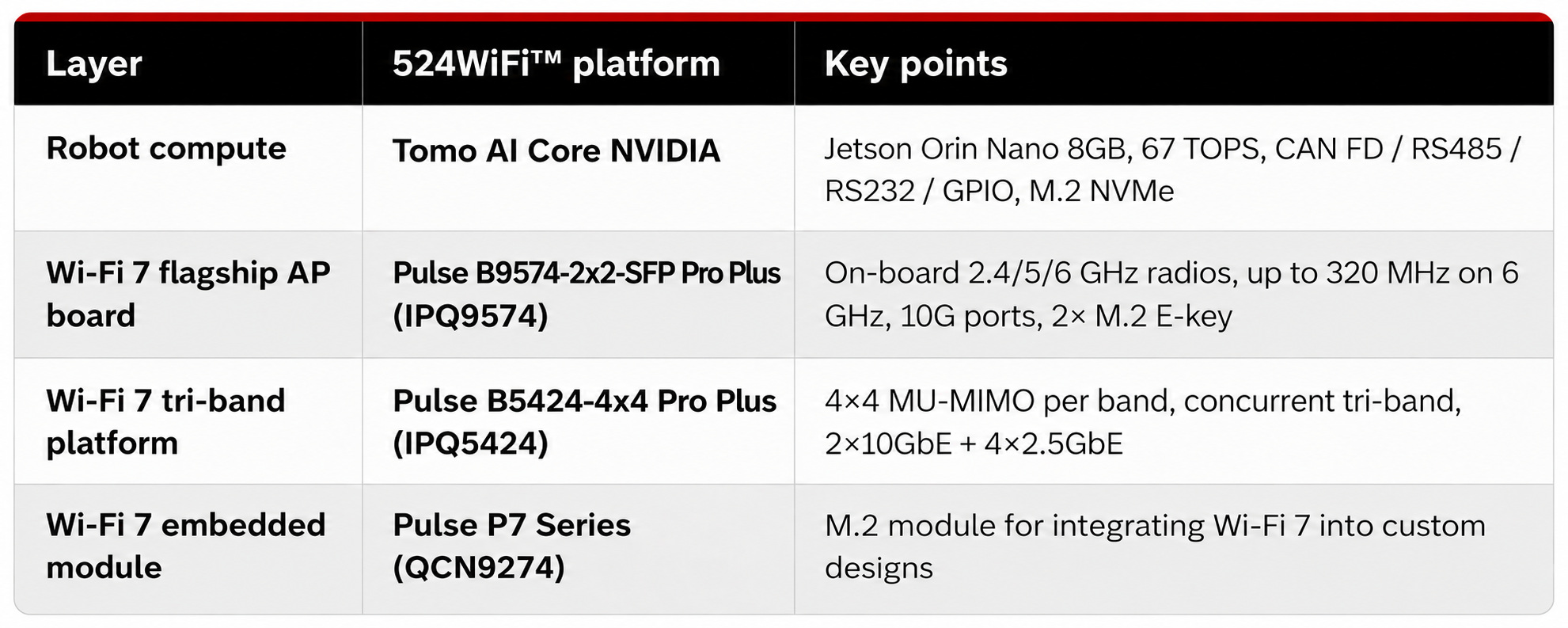
On the robot: the Tomo AI Core NVIDIA is built on the NVIDIA Jetson Orin Nano 8GB module with an industrial carrier board. It offers 67 TOPS of AI performance. Connectivity includes Gigabit Ethernet (one port with 48V PoE), optional Wi-Fi, and optional 4G/5G. Robot-side I/O includes CAN FD, RS485, RS232, GPIO, USB 3.0, and an M.2 NVMe slot. Select the compute, carrier I/O and wireless configuration around the requirements of the robot application.
On the infrastructure side: Wi-Fi 7 platforms based on Qualcomm silicon serve as the access point layer. Examples are the Pulse B9574-2×2-SFP Pro Plus (IPQ9574), the Pulse B5424-4×4 Pro Plus (IPQ5424), and the Pulse P7 Series M.2 modules (QCN9274) for embedding Wi-Fi 7 into your own hardware.
One point worth stating clearly: tri-band does not always mean the same thing. On the Pulse B5424-4×4 Pro Plus and Pulse B9574-2×2-SFP Pro Plus, the 2.4 GHz, 5 GHz, and 6 GHz radios are three independent chains running concurrently. Some tri-band cards are tri-band switchable, meaning one radio moves between bands to avoid interference. Both approaches are useful, but they suit different designs, so check which one a product actually is before planning around it.
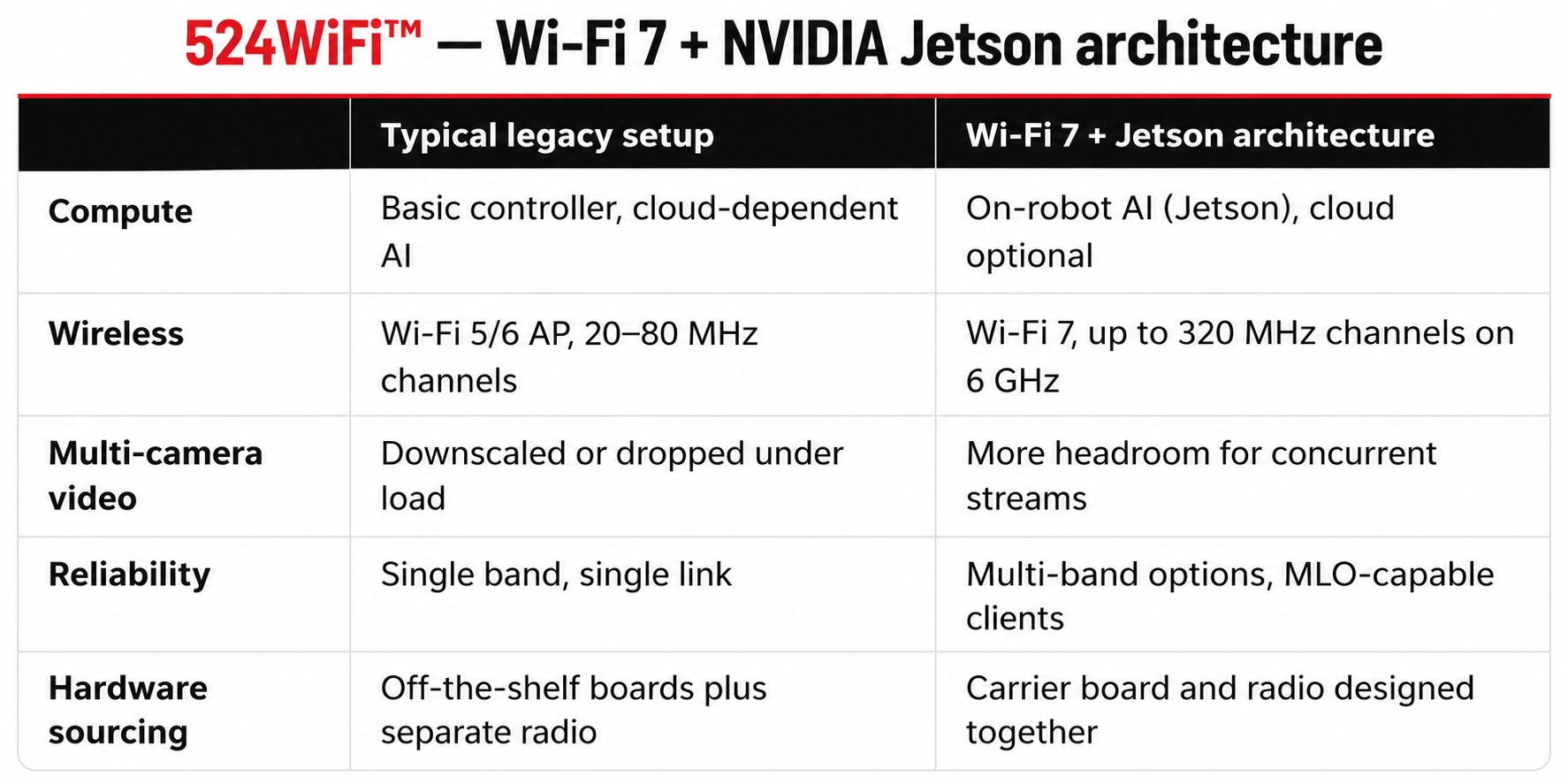
Compared with the usual approach
Wi-Fi 7 is not a magic fix. Real roaming performance still depends on AP placement, channel planning, and client support. But the higher-capacity link and the multi-band tools give the network more room to work with.
Where this architecture applies
Warehouse and logistics AMRs: dense multi-robot fleets with steady roaming and continuous telemetry
Port and yard vehicles: long-range coverage with camera-based monitoring
Machine vision on the move: multi-camera, high-resolution image transfer to inspection systems
Inspection and security robots: live video plus on-board detection
Agricultural and field robotics: long-range control and video links, with custom transmission software where needed
Hardware summary
Talk to us
If you are building mobile robots on Jetson and would rather not develop the wireless hardware yourself, we can supply the modules, routerboards, and custom carrier boards, and discuss the application software and transmission requirements of the complete system.
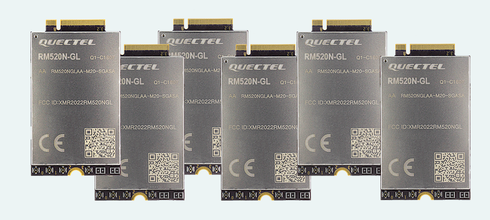
With downlink speeds up to 4.7 Gbps and uplink speeds up to 1.25 Gbps, the RM520N-GL is ideal for applications requiring ultra-low latency and high throughput, such as industrial automation, CPE routers, telematics, video surveillance, and AR/VR platforms.
Among the most sold 5G NR modules out there, the Quectel RM520N-GL is engineered to deliver blazing-fast connectivity for next-generation broadband applications. Supporting both 5G NR (SA/NSA) and fallback to high-speed LTE and 3G, this module ensures reliable coverage and seamless global deployment.
Your device will connect to 5G. But will it be Standalone or Non-Standalone? The answer depends on the network, and the Quectel RM520N-GL handles both. With fallback to LTE and 3G, it keeps devices connected wherever they are deployed.
That flexibility is one reason it’s among the best-selling 5G NR modules available. Add up to 4.7 Gbps downlink and 1.25 Gbps uplink, and it’s a proven choice for CPE routers, industrial automation, telematics and video surveillance.
The upcoming family targets single-band 2.4, 5 and 6 GHz configurations for focused RF design.
A 5×5 radio architecture is aimed at high-density industrial and edge AI connectivity requirements.
The 802.11bn standard remains in development, so availability and final feature support must follow the production release.
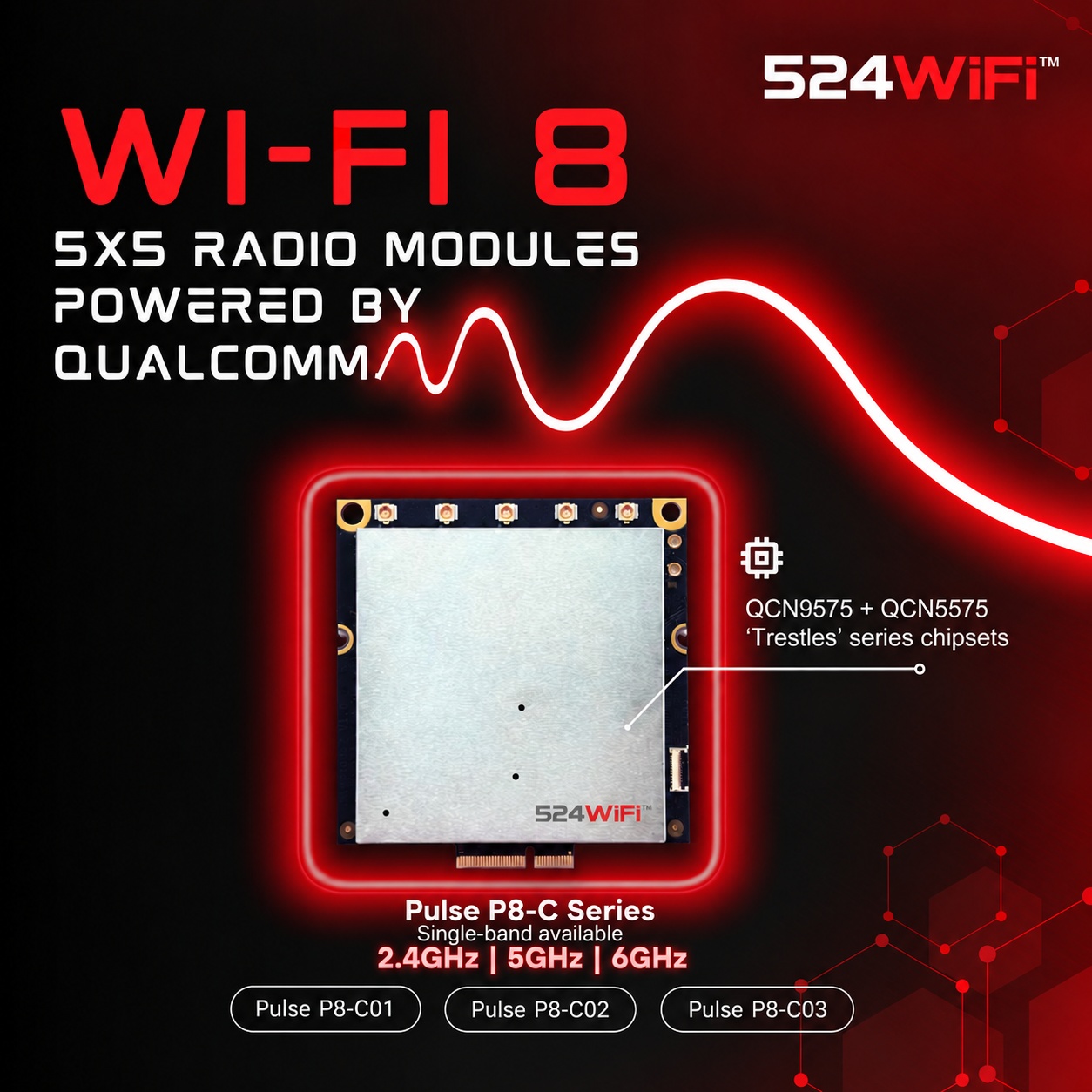
524WiFi™ is preparing a new family of Wi-Fi 8 radio modules based on Qualcomm QCN9575 and QCN5575 “Trestles” series chipsets. The planned modules bring a 5×5 radio architecture to product teams developing high-density industrial access points, edge AI systems and next-generation wireless platforms.
Planned single-band Wi-Fi 8 configurations
The initial family is planned around dedicated single-band modules:
Pulse P8-C01: 2.4 GHz configuration
Pulse P8-C02: 5 GHz configuration
Pulse P8-C03: 6 GHz configuration
Separating the bands into focused module options gives system designers a clearer path for antenna selection, RF filtering, enclosure design and regulatory planning. It also lets a platform use the band configuration that matches its actual deployment instead of carrying unnecessary radio complexity.
Why 5×5 radio architecture matters
Industrial wireless design is increasingly shaped by client density, interference and mobility rather than peak throughput alone. A 5×5 radio architecture provides an additional spatial dimension for platform designers evaluating capacity, diversity and coordinated operation in demanding RF environments. The final performance will still depend on the complete system: chipset firmware, antenna layout, thermal design, host interface and network configuration.
Designed for industrial and edge AI platforms
The new module family is intended for applications such as industrial access points, robotics networks, machine-vision systems, edge AI gateways and other products that need reliable high-density wireless connectivity. These environments benefit from the reliability-first direction of IEEE 802.11bn, including coordinated network operation and more efficient use of available spectrum.
Development status
Wi-Fi 8 and IEEE 802.11bn remain under development. The QCN9575/QCN5575 module family is coming soon, and final specifications, supported features and availability will be confirmed with the production release. Engineering teams can use the current announcement to begin architecture, RF and integration planning without treating draft-stage capabilities as final certification.
For module planning and early project discussions, contact [email protected].
IEEE 802.11bn targets tail latency, packet loss and reliability under difficult real-world conditions.
Multi-AP coordination and dynamic channel use reshape network architecture beyond single-link performance.
Modular mainboards and radios provide flexibility while Wi-Fi 8 silicon and the draft continue to mature.
What Is Wi-Fi 8, and Why Does It Matter for Engineers?
Wi-Fi 8 is the market name for IEEE 802.11bn, the standard succeeding Wi-Fi 7 (802.11be). Unlike previous generations, which were sold primarily on peak throughput, 802.11bn’s official designation is Ultra High Reliability (UHR) — the standard is built to make wireless connections more consistent and predictable in difficult real-world RF conditions rather than simply chasing higher headline speeds.
For engineers, this reframing is the story. Industry research on 802.11bn targets at least 25% better throughput, 25% lower 95th-percentile latency, and 25% lower packet loss compared to Wi-Fi 7 under real conditions — the kind of tail-latency and drop-rate improvement that matters far more than peak Mbps when you’re running AMR fleets, machine vision links, or multi-robot warehouse networks.
As of mid-2026, the 802.11bn task group has draft work underway covering spectrum from 1 GHz to 7.25 GHz, with final IEEE ratification projected for 2028, though chipset vendors are moving early — Broadcom has announced Wi-Fi 8 silicon (BCM4918 APU, BCM6714/6719 radios) and MediaTek has previewed its Filogic 8000 chip series, with early hardware expected to run on draft specifications ahead of full ratification.
Key Technical Features Engineers Should Track
802.11bn introduces several mechanisms that directly reshape multi-AP network design:
Multi-AP Coordination (MAPC): access points coordinate airtime, spatial reuse, and transmissions instead of behaving as independent, competing radios — a shift from Wi-Fi 7’s Multi-Link Operation, which optimizes a single AP-client link rather than the whole deployment.
Coordinated Spatial Reuse and Coordinated Beamforming: neighboring APs share scheduling information to transmit on the same channel without stepping on each other, and align antenna patterns to cut interference.
Dynamic Subchannel Operation and Non-Primary Channel Access: wide channels are used more flexibly, so a busy primary channel no longer blocks all traffic on that link.
Single Mobility Domain behavior: 802.11bn is expected to allow a client to associate with multiple access points simultaneously (and vice versa), fundamentally changing roaming and airtime management compared to 802.11be.
Together these features are what actually deliver the reliability gains — not a new modulation scheme, but coordination logic across the AP layer.
How This Integrates With 524WiFi™’ Wi-Fi 8 Platform
524WiFi™ Wi-Fi 8 lineup is already moving from prototype to production, built around Qualcomm’s next-generation platforms:
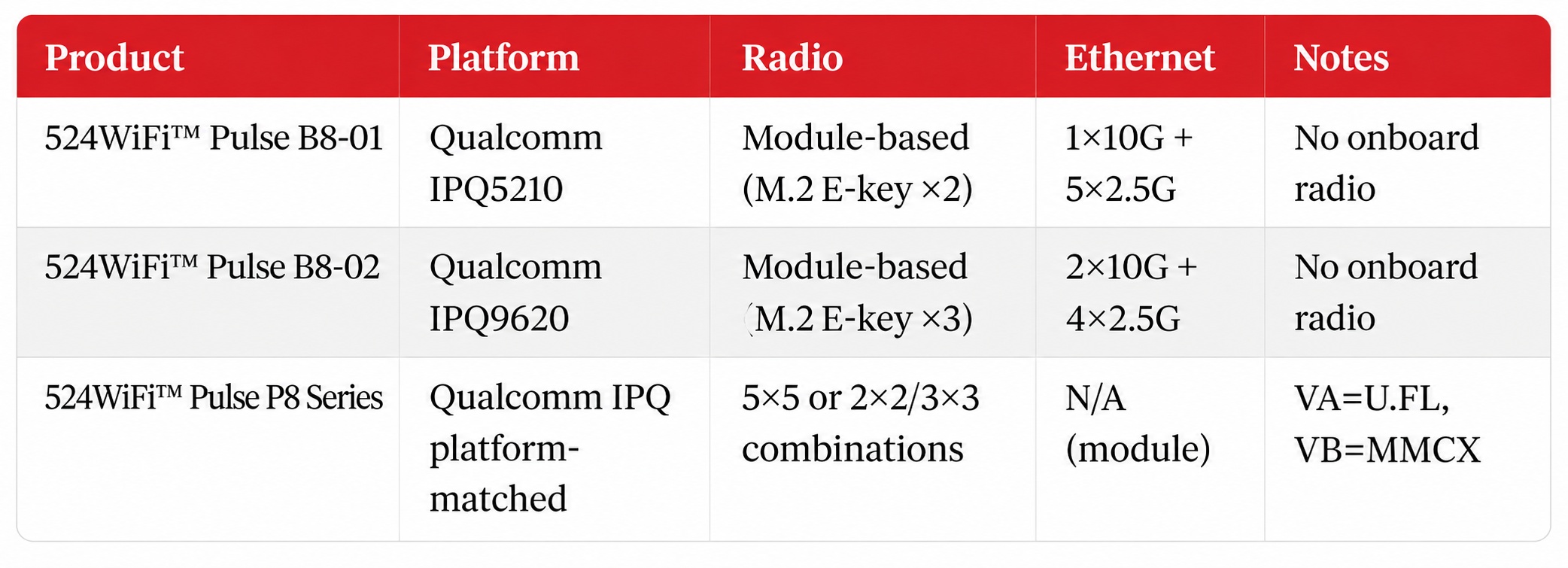
524WiFi™ Pulse P8 Series module family — 5×5 5GHz, 5×5 6GHz, dual-band (2×2 2.4GHz + 3×3 5GHz), and a 5G/6G combo variant (3×3 5GHz + 2×2 6GHz, VB connector only). VA boards use U.FL connectors; VB variants use MMCX.
The modular mainboard-plus-radio-module architecture matters here specifically because of MAPC and coordinated spatial reuse: a fixed single-radio AP can’t easily be re-tuned as the 802.11bn draft evolves, but a mainboard that accepts interchangeable M.2 radio modules can be re-radioed as Wi-Fi 8 chipsets mature — relevant given the standard won’t be fully ratified until 2028.
Wi-Fi 8 vs. Wi-Fi 7: What Actually Changes
This is a distinct axis from the tri-band switchable vs. concurrent distinction that matters for current Wi-Fi 7 hardware selection — Wi-Fi 8’s coordination features operate at the network-topology level, above the radio-chain level.
Applications Enabled: Where UHR Actually Pays Off
Multi-robot warehouse fleets: coordinated multi-AP scheduling and reduced tail latency directly address the roaming-drop and airtime-contention problems that show up once you have more than a handful of AMRs sharing a floor.
Industrial vision networks: camera links tolerate throughput variance poorly; UHR’s packet-loss reduction target is more relevant here than raw peak bandwidth.
Port, mining, and campus deployments: environments already using seamless-roaming Wi-Fi 6 APs (like our 524WiFi™ Pulse R6 roaming series series) are the natural upgrade path once Wi-Fi 8 silicon matures, since the underlying pain point — clean handoff between APs — is exactly what MAPC targets.
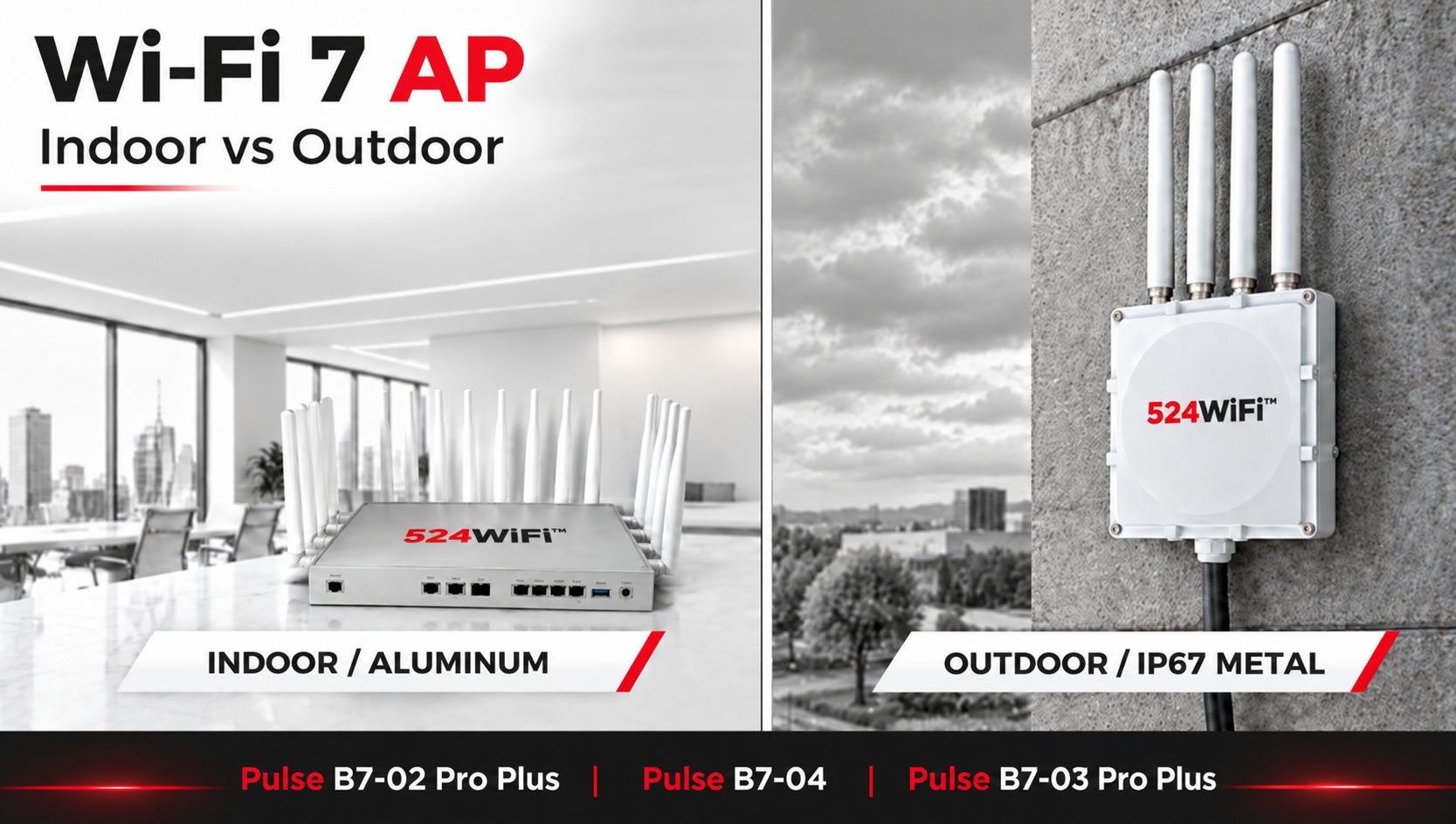
Indoor and outdoor access points need different enclosure, thermal, antenna and environmental designs.
524WiFi™ Pulse B9574-2×2-SFP Pro Plus, 524WiFi™ Pulse B5424-4×4 Pro Plus and 524WiFi™ Pulse B7-04 provide distinct CPU, radio, Ethernet and expansion starting points.
A production AP combines the platform with power, antennas, firmware, mechanics and validation.
A Wi-Fi 7 AP is more than a Wi-Fi 7 chipset.
For a finished access point, the hardware platform, wireless configuration, Ethernet interfaces, enclosure, power design, and deployment environment all affect the final product.
524WiFi™ provides several Wi-Fi 7 AP platforms that can be combined with indoor aluminum enclosures or outdoor IP67-rated metal enclosures.
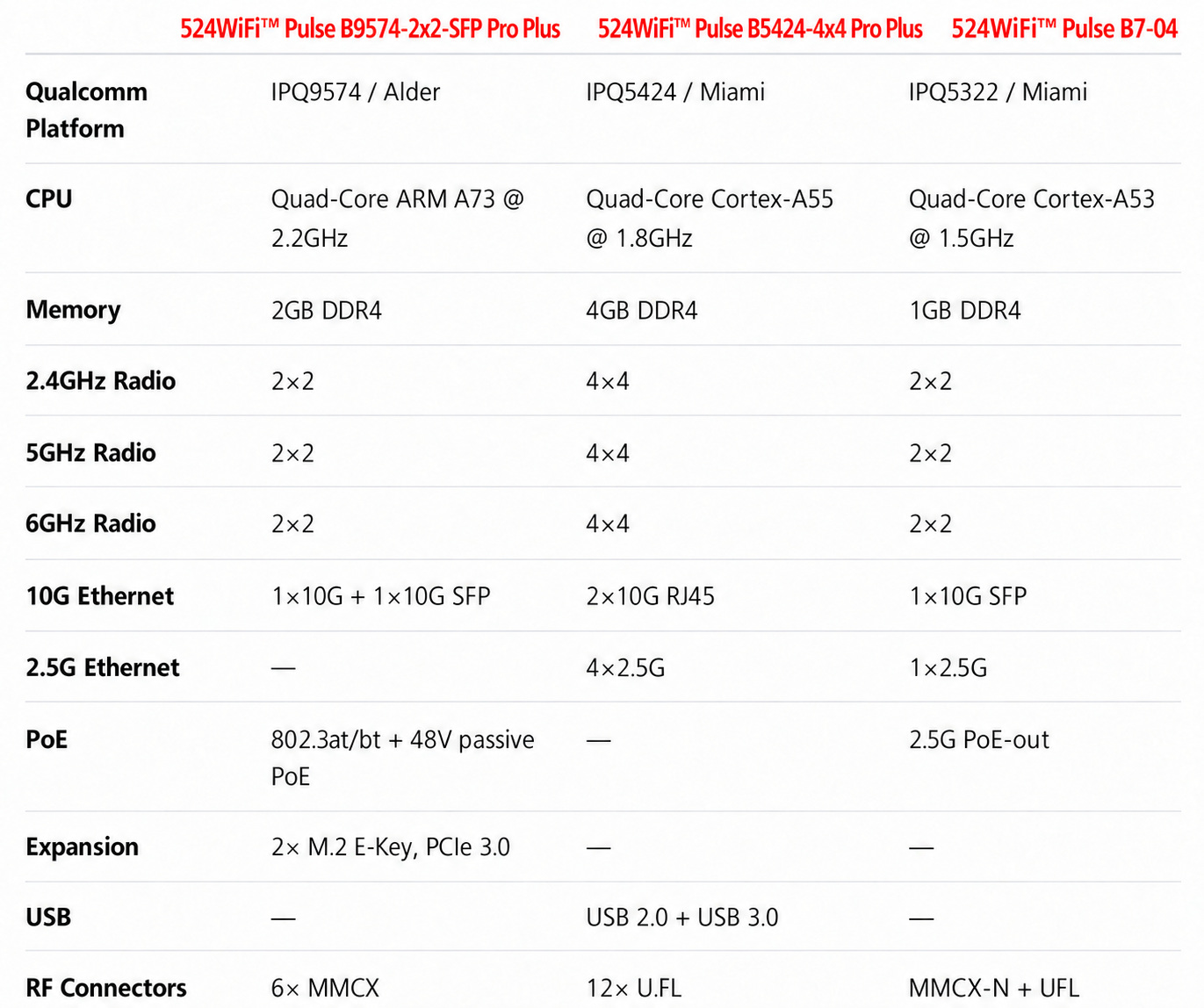
Under the enclosure, customers can choose from three hardware platforms: 524WiFi™ Pulse B9574-2×2-SFP Pro Plus, 524WiFi™ Pulse B5424-4×4 Pro Plus, and 524WiFi™ Pulse B7-04.
The three platforms are designed for different system requirements rather than being simple variations of the same AP.
What Do You Need to Consider When Building a Wi-Fi 7 AP?
There are three basic questions:
1. Where will the AP be deployed?
Indoor or outdoor?
2. What wireless and processing capacity does the application require?
2×2 or 4×4 radios? More CPU resources? More memory?
3. What wired interfaces does the product need?
2.5G, 10G, SFP, PoE, USB, or customized interfaces?
The answer to these questions determines which Wi-Fi 7 platform and enclosure combination makes sense.
Indoor or Outdoor Wi-Fi 7 AP?
The first decision is the enclosure.
Indoor Wi-Fi 7 AP
For indoor applications, 524WiFi™ offers an aluminum enclosure.
It is suitable for deployments such as:
Enterprise networks
Offices and commercial buildings
High-density indoor wireless
Industrial facilities
Warehouses
Smart buildings
The enclosure provides a practical platform for thermal management while keeping the AP suitable for indoor installation.
Outdoor Wi-Fi 7 AP
Outdoor deployments require a different mechanical design.
524WiFi™ offers an IP67-rated metal enclosure for outdoor Wi-Fi 7 AP applications.
It is designed for environments where the equipment needs protection against dust and water, including:
Outdoor wireless networks
Industrial connectivity
Warehouses and logistics yards
Outdoor surveillance
Campus and infrastructure networks
Outdoor wireless backhaul
The enclosure is therefore not simply an external housing choice. It is part of the AP’s deployment architecture.
Which Wi-Fi 7 Platform Should You Choose?
The Pulse family provides two catalogue platforms and a compact IPQ5322 platform for project planning:
524WiFi™ Pulse B9574-2×2-SFP Pro Plus, 524WiFi™ Pulse B5424-4×4 Pro Plus, and 524WiFi™ Pulse B7-04.
They use different Qualcomm platforms and provide different combinations of CPU resources, wireless configuration, Ethernet connectivity, memory, and expansion interfaces.
The important difference is not simply CPU speed.
Each platform gives you a different starting point for the final AP architecture.
524WiFi™ Pulse B9574-2×2-SFP Pro Plus: When CPU and Expansion Matter
The 524WiFi™ Pulse B9574-2×2-SFP Pro Plus is based on the Qualcomm IPQ9574 platform, with a quad-core ARM A73 processor running at 2.2GHz.
It combines:
2GB DDR4
1× 10Gbps Ethernet
1× 10Gbps SFP
2× 1Gbps Ethernet
Active PoE 802.3at/bt
48V passive PoE
2× M.2 E-Key interfaces with PCIe 3.0
2×2 radios on 2.4GHz, 5GHz, and 6GHz
6× MMCX connectors
The two M.2 E-Key interfaces provide additional expansion possibilities for projects that need more than the standard wireless configuration.
This makes 524WiFi™ Pulse B9574-2×2-SFP Pro Plus a suitable starting point for Wi-Fi 7 APs and gateways where CPU resources, 10G connectivity, PoE, or hardware expansion are important.
524WiFi™ Pulse B5424-4×4 Pro Plus: When Wireless Capacity and Ethernet Density Matter
The 524WiFi™ Pulse B5424-4×4 Pro Plus takes a different approach.
It combines 4×4 radios on 2.4GHz, 5GHz, and 6GHz with multiple multi-Gigabit Ethernet interfaces.
The platform provides:
4GB DDR4 in the current Pulse B5424-4×4 configuration
4×4 2.4GHz radio
4×4 5GHz radio
4×4 6GHz radio
2× 10Gbps RJ45
4× 2.5Gbps RJ45
USB 2.0
USB 3.0
12× U.FL connectors
It supports up to 320MHz channel width on 6GHz and up to 240MHz on 5GHz according to the platform specification.
This makes 524WiFi™ Pulse B5424-4×4 Pro Plus a platform for applications where wireless capacity and wired network density are both important.
For example, a high-density AP or gateway may need multiple 2.5G connections for local devices while using 10G Ethernet for aggregation or backhaul.
524WiFi™ Pulse B7-04: When the Design Needs to Stay Compact
The 524WiFi™ Pulse B7-04 uses the Qualcomm IPQ5322 platform with a quad-core Cortex-A53 processor at 1.5GHz and 1GB DDR4.
Its wireless configuration includes:
2×2 2.4GHz
2×2 5GHz
2×2 6GHz
2× MMCX-N connectors for 5GHz
2× MMCX-N connectors for 6GHz
2×2 2.4GHz antenna interfaces
For wired connectivity, it provides:
1× 2.5Gbps Ethernet
1× 2.5G PoE-out Ethernet
1× 10G SFP
JTAG
GPIO interfaces
Reset button
The platform is therefore different from 524WiFi™ Pulse B5424-4×4 Pro Plus.
Instead of maximizing the number of Ethernet ports and using 4×4 radios, 524WiFi™ Pulse B7-04 provides a more compact 2×2 tri-band Wi-Fi 7 architecture with 2.5G, 10G SFP, and PoE-out connectivity.
This can be useful when the project does not require multiple 2.5G LAN ports but still needs multi-Gigabit connectivity.
How Do You Choose Between the Three Platforms?
A simple way to start is with the system requirement.
Need more CPU resources and expansion options?
→ 524WiFi™ Pulse B9574-2×2-SFP Pro Plus
Need 4×4 tri-band Wi-Fi 7 with multiple 10G and 2.5G Ethernet ports?
→ 524WiFi™ Pulse B5424-4×4 Pro Plus
Need a more compact 2×2 tri-band platform with 2.5G, 10G SFP, and PoE-out?
→ 524WiFi™ Pulse B7-04
The platform can then be combined with the appropriate enclosure and interface configuration.
The platform stays relatively consistent, while the final product can be adapted to the application.
Wi-Fi 7 APs for OEM/ODM Projects
524WiFi™ provides Wi-Fi 7 hardware platforms for customers developing their own AP, gateway, or wireless networking products.
The available approach includes:
524WiFi™ Pulse B9574-2×2-SFP Pro Plus / IPQ9574
524WiFi™ Pulse B5424-4×4 Pro Plus / IPQ5424
524WiFi™ Pulse B7-04 / IPQ5322
Indoor aluminum enclosure
Outdoor IP67 metal enclosure
Different wireless configurations
Multi-Gigabit Ethernet options
PoE options
Interface customization
OEM/ODM hardware customization
The goal is to shorten the path from a Wi-Fi 7 platform to a finished, application-specific wireless product.
Summary
Choosing a Wi-Fi 7 AP is not only about choosing a Wi-Fi 7 chipset.
The right configuration depends on where the AP will be deployed, how much wireless and CPU performance is required, what Ethernet interfaces are needed, and how much customization the project requires.
524WiFi™ provide multiple Wi-Fi 7 platforms, enclosure options, and hardware customization possibilities so that customers can build a Wi-Fi 7 AP around their application instead of adapting their application to a fixed product.
Interested in Wi-Fi 7 samples or a customized AP configuration?
Multi-AP Coordination changes access points from independent competitors into coordinated network participants.
Coordinated airtime and spatial reuse can improve consistency in dense, interference-heavy deployments.
Implementation quality will determine how effectively products translate the standard into real performance.
Among the technologies defining Wi-Fi 8 (IEEE 802.11bn), Multi-AP Coordination stands out as the one that changes network architecture, not just radio performance.
The Mechanism Traditionally, each access point schedules its own transmissions independently — even when it’s sitting a few meters from another AP on an overlapping channel. Multi-AP Coordination replaces this with a shared, real-time scheduling layer: participating APs exchange timing and channel-state information, then jointly decide transmission order, channel assignment, and power levels. The two core techniques are coordinated beamforming (nulling interference toward neighboring cells) and coordinated spatial reuse (letting multiple APs transmit simultaneously without stepping on each other).
How This Differs From Wi-Fi 6/7 Wi-Fi 6E and 7 pushed hard on per-AP spectral efficiency and standardized faster handoff mechanisms (802.11k/v/r), but interference management between APs remained largely reactive — each radio senses and avoids, rather than actively coordinating. Multi-AP Coordination is proactive and network-initiated: the system prevents interference by design instead of working around it after the fact.
Applications Enabled
Seamless, network-managed roaming for AMR/AGV fleets moving continuously across many AP cells
Stable control-link performance in multi-robot cells with tight overlap tolerances
Higher effective throughput in high-density outdoor deployments (ports, yards, campuses) where channel reuse was previously constrained by self-interference
Simplified RF planning in environments where AP density was previously capped by interference budgets, not coverage needs
Bottom Line Multi-AP Coordination turns a group of APs from independent competitors into a coordinated system — which is exactly the shift dense industrial and robotics deployments have been waiting for.
—
For projects evaluating Wi-Fi 8, our Pulse B8 routerboard and Pulse P8 radio platform planning focuses on complete host, firmware and RF integration. Contact [email protected] to discuss the platform configuration and engineering requirements for your application.
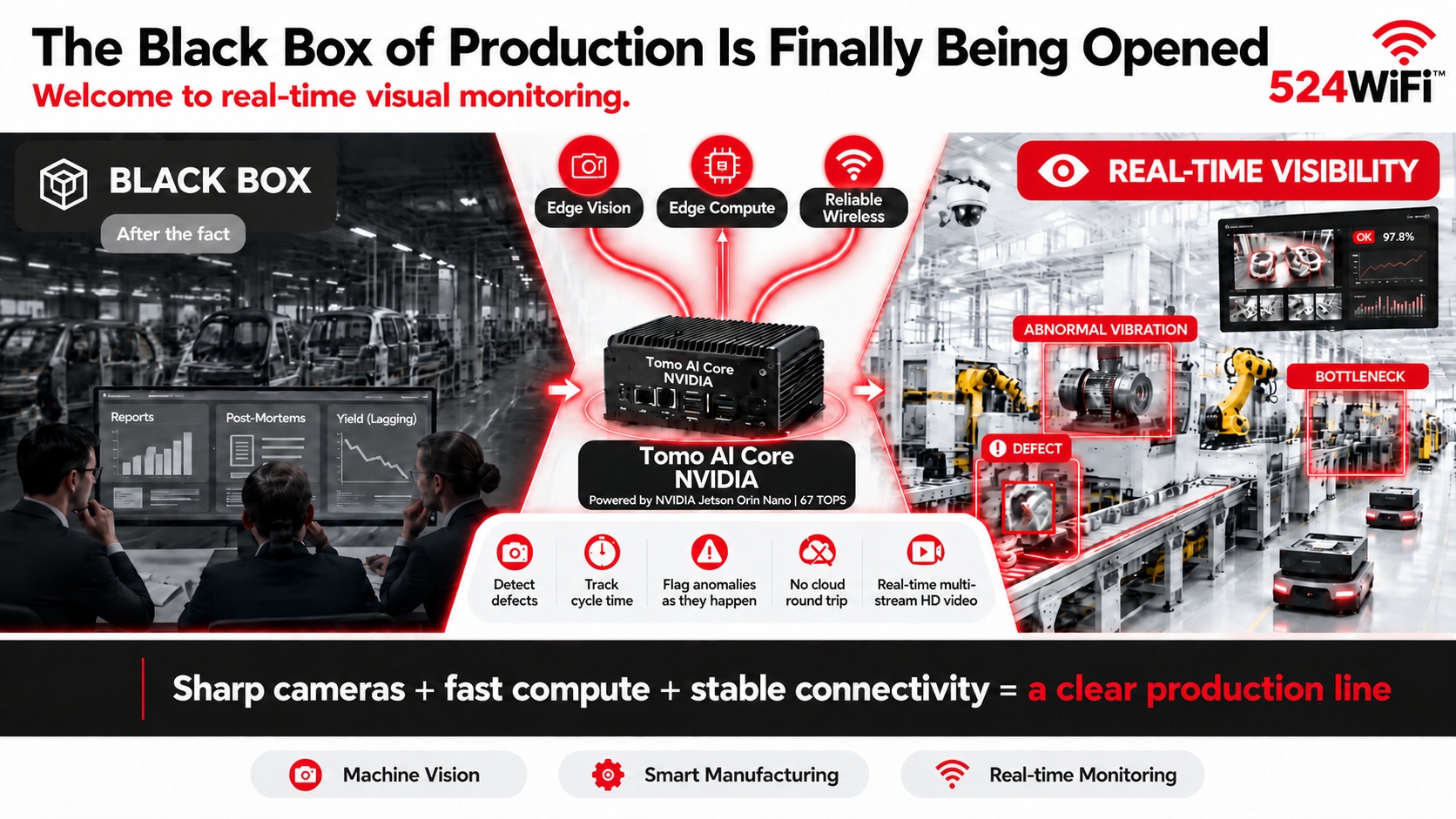
Real-time visual monitoring turns production data into immediate operational context instead of after-the-fact reports.
Edge processing keeps inference close to cameras and production equipment for faster response.
An integrated compute and wireless platform simplifies deployment of industrial vision applications.
For decades, the factory floor has been a black box. Managers could only reconstruct what went wrong after the fact — from yield reports, from post-mortems, from a supervisor’s memory of “something felt off.” When did that motor start vibrating abnormally? Which station is quietly becoming the bottleneck? At what exact second did that defective part slip through inspection? Manual checks and lagging data simply can’t answer these questions in time.
That black box is finally being opened.
Three technologies maturing together are making it possible:
📷 Edge vision — high-resolution industrial cameras + edge AI let equipment actually “see” the line: detecting defects, tracking cycle time, flagging anomalies as they happen ⚡ Edge compute — platforms like NVIDIA Jetson Orin Nano (e.g. our Tomo AI Core NVIDIA, 67 TOPS) run inference locally on the line, no round trip to the cloud, no waiting 📡 Reliable wireless — multi-stream HD video demands far more than standard WiFi can deliver; only WiFi 7’s high throughput, low latency, and multi-stream concurrency turn “real-time” into something real, instead of a buffering spinner
None of the three works alone. Sharp cameras, fast compute, and stable connectivity together are what turn a production line into a pane of clear glass — instead of a black box you can only guess at.
524WiFi™ supplies industrial-grade WiFi 6/7 modules and routerboards + custom Jetson carrier board solutions, purpose-built for multi-camera setups, high-density robot/AGV fleets, and machine vision inspection environments.
If you’re building a production visualization or monitoring project and need a wireless + edge-compute hardware partner, let’s talk: [email protected]
DSO addresses capability mismatches between wide-channel access points and narrower-channel clients.
More flexible sub-band allocation can preserve capacity instead of forcing the network to the lowest common denominator.
The feature matters most in mixed fleets and dense industrial networks with varied client radios.
What is DSO, and why does it exist?
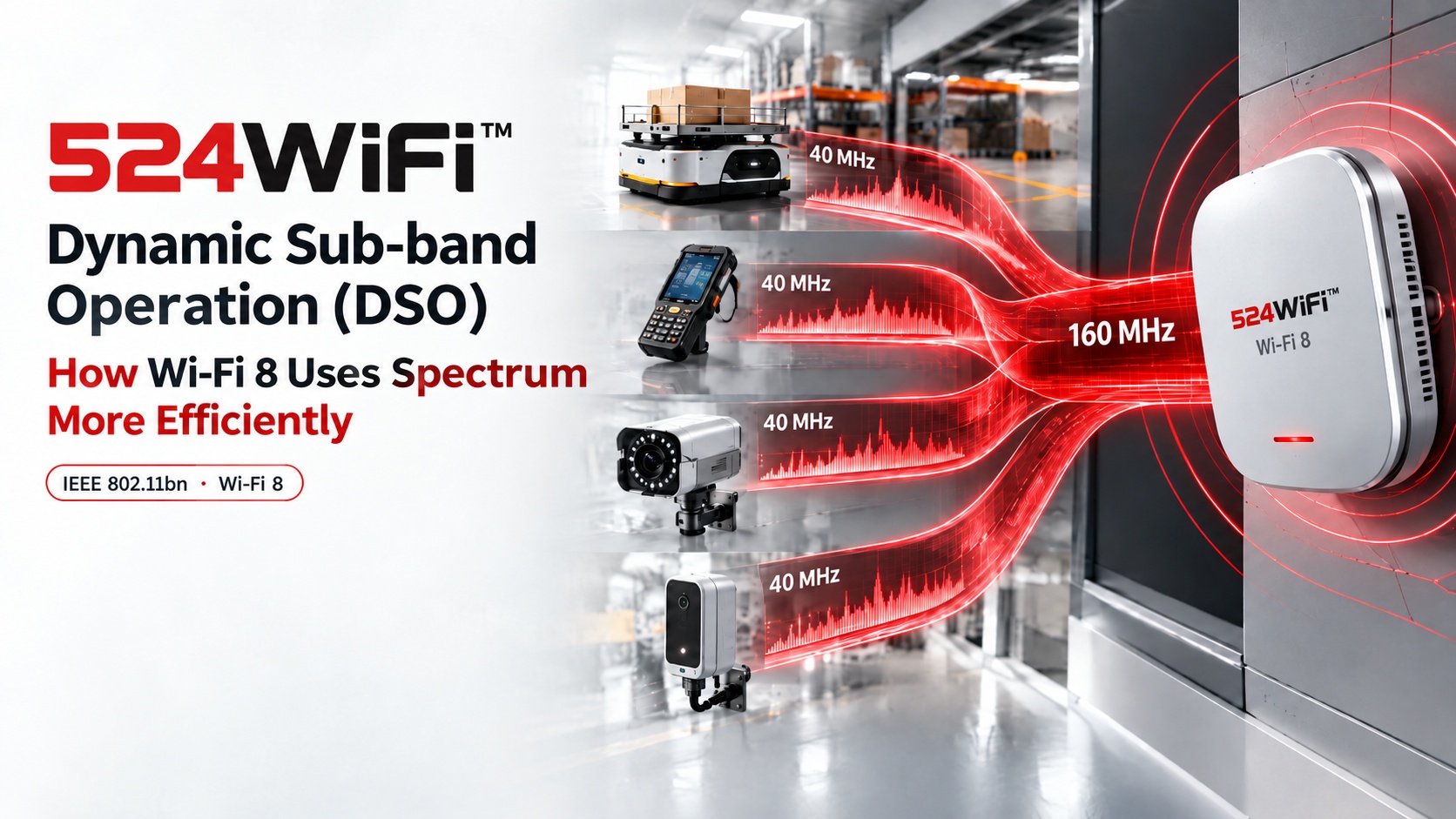
IEEE 802.11bn (Wi-Fi 8) introduces Dynamic Sub-band Operation (DSO) — sometimes called Dynamic Sub-Channel Operation — to solve a very concrete problem: the capability gap between access points and client devices. A modern AP chipset can run 160 MHz or even 320 MHz channels. Most connected stations — sensors, cameras, handheld scanners, mobile robots — only support 20 MHz or 40 MHz. Under Wi-Fi 6/7 rules, once an AP grants a TXOP (transmit opportunity) to a narrow-band station, the rest of that wide channel sits idle for the whole transmission window. A 160 MHz AP serving a 40 MHz station wastes 120 MHz on every single TXOP.
DSO fixes this at the MAC layer. Instead of allocating the full wide channel to one narrow-band station, the AP schedules multiple stations onto different sub-channels within the same TXOP, using an ICF/ICR (Intra-TXOP Control Frame / Response) exchange to coordinate who transmits where before data starts flowing. Four 40 MHz stations can now share a single 160 MHz TXOP concurrently instead of taking four separate turns.
How this changes AP/module design
For hardware teams building on Qualcomm Wi-Fi 7/8 platforms (IPQ9574, IPQ5424, QCN9274-class silicon), DSO isn’t just a MAC firmware feature — it changes how you think about channel width provisioning. Wide-channel APs stop being “wasted” on mixed-capability deployments; the same 320 MHz radio design that used to only pay off with all-320 MHz clients now scales efficiency gracefully down to 20 MHz legacy devices in the same BSS.
DSO vs. the Wi-Fi 7 alternative (static OFDMA/channel bonding only)
Wi-Fi 7 already gave us Multi-Link Operation and preamble puncturing, but scheduling flexibility within one TXOP for mixed-bandwidth clients wasn’t part of the toolkit. DSO is a Wi-Fi 8-specific MAC mechanism that works alongside Non-Primary Channel Access (NPCA) — where a station can move off a busy primary channel — to squeeze real throughput out of dense, mixed-device networks rather than relying purely on wider channels or more spectrum.
Applications this enables
Dense AMR/AGV warehouse fleets where robots, handheld scanners, and fixed cameras all share one AP with very different bandwidth capabilities
Any industrial site consolidating mixed-generation devices onto one Wi-Fi 8 AP instead of running parallel 6/7/8 networks
Where we’re headed
We’re preparing our Wi-Fi 8 routerboard platform now, building on the same IPQ9574/IPQ5424-class hardware lineage we already ship in 524WiFi™ Pulse B9574-4M2 Pro Plus and 524WiFi™ Pulse B5424-4×4 Pro Plus. If DSO-level MAC efficiency matters for your next-gen industrial AP or robot connectivity design, happy to compare notes.