When it comes to building high-performance wireless infrastructure for industrial or outdoor use, stability and scalability matter just as much as speed.
At 524WiFi and Wallys, we continue to support our customers with proven, cost-effective WiFi 6 solutions — like the DR6018 router board paired with the QCN9024 module — designed for real-world performance in smart cities, surveillance networks, and rugged environments.
🔧 DR6018: Built to Perform
Powered by the Qualcomm IPQ6010/IPQ6018 platform, the DR6018 is one of our most popular and versatile router boards. It features:
✅ Dual-band concurrent 2.4GHz + 5GHz support
✅ Mini PCIe and M.2 slots for modular expansion
✅ 5x Gigabit Ethernet ports
✅ USB 3.0, SD card, SIM support
✅ PoE optional
✅ OpenWrt and QSDK compatibility
Its modularity and robustness make it a go-to choice for OEM/ODM clients who need a balance of performance, flexibility, and cost.
📶 Why QCN9024?
QCN9024 is Qualcomm’s high-throughput WiFi 6 radio chip:
🔁 Supports 4×4 MU-MIMO
📡 Optimized for DFS, long-range & outdoor stability
⚙️ Excellent Linux/OpenWrt driver support
🔩 Easily integrated into DR6018 or DR5018S for consistent results
Whether you’re setting up outdoor CPEs, APs for city-wide WiFi, or reliable backhaul links for security systems, QCN9024 delivers where it counts.
Your project is unique — and our team is here to help you tailor the right solution.
📢 Coming Soon: IPQ5424 Support
Looking ahead? Our R&D team is preparing a new line based on Qualcomm IPQ5424 (Marina Series), featuring Quad-Core ARM-A55 @1.8GHz. Ideal for next-gen industrial APs and higher-end deployments. Stay tuned!
If you’re looking for a powerful and flexible wireless communication solution, the QCA based DR6018 Router Board, powered by the Qualcomm IPQ6018 CPU, and paired with the DR9074 network card (featuring the QCN9074 chip), offers exceptional performance for industrial applications. Whether you’re setting up a wireless network for IoT devices, smart factories, or remote monitoring systems, this combination provides the speed, reliability, and scalability you need.
Key Features of the DR6018 Router Board with IPQ6018 and DR9074 Network Card
Powerful Qualcomm IPQ6018 CPU
The Qualcomm IPQ6018 is a high-performance quad-core processor designed for Wi-Fi 6 (802.11ax) solutions. This powerful CPU ensures that your router board can handle high traffic and multiple simultaneous connections without compromising performance, making it perfect for demanding industrial and enterprise networks.
Flexible Wireless Connectivity with DR9074 Network Card
The DR9074 network card features the QCN9074 chip, which supports Wi-Fi 6 and offers high-speed wireless performance. Wallys’ DR9074 card comes with multiple radio options—2.4GHz, 5GHz, and even 6GHz—allowing you to choose the most suitable band for your specific application.
Wi-Fi 6 for Faster, More Efficient Networks
Wi-Fi 6 brings a host of advantages, including faster speeds, better range, and improved efficiency, especially in crowded networks. The DR6018 Router Board combined with the DR9074 network card ensures that your system can handle multiple devices, with the ability to prioritize traffic and reduce latency, making it ideal for high-demand environments like smart manufacturing, IoT systems, and enterprise networking.
Scalability with Multiple Radio Options
With the DR9074 network card, you can select between 2.4GHz, 5GHz, and 6GHz radios depending on your needs:2.4GHz: Great for long-range communication, even through obstacles, with decent speeds.5GHz: Ideal for fast, high-throughput applications like video streaming, data-intensive tasks, and real-time monitoring.6GHz: The latest in Wi-Fi technology, offering the fastest speeds, least congestion, and low latency for high-density environments.
Enhanced Network Security
With the latest WPA3 encryption standard, your DR6018 Router Board and DR9074 network card ensure that your data remains secure, protecting sensitive information and ensuring safe communication across your network.
Applications for the DR6018 Router Board with DR9074 Network Card
Industrial IoT (IIoT)
The DR6018 Router Board with the DR9074 card is ideal for IIoT applications where reliability and real-time data transmission are crucial. Whether you’re managing smart sensors, automated machinery, or monitoring systems, this combination ensures your devices stay connected with minimal downtime.
Smart Factories
In smart manufacturing environments, the DR6018 Router Board delivers fast and reliable wireless communication, supporting machine-to-machine (M2M) communication, predictive maintenance, and data analysis. The Wi-Fi 6 capabilities and flexible radio options ensure smooth operation in a fast-paced industrial setting.
Enterprise Networking
For enterprise applications requiring high-speed and high-capacity networks, the DR6018 Router Board provides the performance needed to handle large amounts of data, multi-user connectivity, and high-density environments, ensuring your business operations run smoothly.
Smart Cities
The DR6018 Router Board and DR9074 network card are perfect for smart city applications like traffic management systems, public safety monitoring, and environmental monitoring networks. The flexibility of the Wi-Fi 6 technology and different radio options makes it easy to deploy high-performance networks across urban environments.
Wireless Access Points
Whether you’re upgrading existing infrastructure or setting up new wireless access points in an industrial setting, the DR6018 Router Board with the DR9074 network card offers reliable, high-speed connectivity. The multiple radio options make it adaptable to different use cases, from wide-area coverage to high-speed, low-latency communication.
Why Choose the DR6018 Router Board with DR9074 Network Card?
High Performance: Powered by the Qualcomm IPQ6018 CPU and Wi-Fi 6 technology, this solution offers exceptional speed and capacity for high-demand industrial networks.
Flexible Wireless Options: With the DR9074 network card, you can select the best radio for your environment—2.4GHz, 5GHz, or 6GHz—for optimal performance.
Scalable: Easily scale your network as your needs grow, with multiple wireless channels and a modular design.
Reliability: Designed for industrial environments, this solution ensures continuous, stable communication even in challenging conditions.
Security: Built-in WPA3 encryption ensures that your network is secure and your data is protected from unauthorized access.
Conclusion
The DR6018 Router Board, powered by the Qualcomm IPQ6018 CPU and paired with the DR9074 network card, offers a comprehensive and flexible solution for industrial wireless communication. With support for Wi-Fi 6 and multiple radio options, this platform ensures your systems remain fast, reliable, and secure, no matter how demanding the environment.
If you’re looking to enhance your industrial network with high-speed wireless communication, contact 524WiFi team to learn more about our products and how we can tailor a solution for your needs.
In point-to-point WiFi long-distance transmission, selecting the right hardware platform is crucial. To achieve stable signal transmission, it’s important to focus on key factors such as processor performance, transmission standards, RF (radio frequency) performance, and heat dissipation design. Wallys offers a range of industrial wireless routers that meet these needs, particularly excelling in scenarios requiring stable transmission over distances of up to 23 kilometers.
1. Processor Performance
Choosing routers with high-performance CPUs is essential. 524WiFi’ industrial routers are equipped with powerful multi-core processors capable of handling high data traffic, ensuring a smooth network experience even with multiple device connections. This level of performance guarantees reliability in data-intensive applications, such as video monitoring and real-time data transmission.
WIFI6 VS WIFI7
2. Transmission Standards
To achieve higher efficiency and lower latency, it’s vital to select devices that support the latest WiFi standards. Wallys 524WiFi routers support WiFi 6 and WiFi 6E, with preparations for WiFi 7. This means users can enjoy faster connection speeds and greater network capacity, making them suitable for high-density user environments.
3. RF (Radio Frequency) Performance
Good RF performance is another key factor for stable transmission. 524WiFi’ industrial wireless routers employ advanced RF designs that optimize signal transmission and reception, significantly enhancing signal stability and interference resistance. This is especially important in complex environments such as factories or warehouses, ensuring stable signal transmission even over distances of up to 23 kilometers.
4. Heat Dissipation Design
Overheating can severely impact device performance, so a good heat dissipation design is crucial. Wallys 524WiFi routers utilize efficient heat management solutions to maintain stable performance during long-term operation. This design allows devices to operate efficiently under high load conditions, ensuring continuous network connectivity.
524WIFI 7 Heat Dissipation Design
5. Quality Control
524WiFi’ commitment to quality is reflected in its manufacturing process. All devices undergo 100% calibration before shipment, ensuring that signal quality and performance meet high standards. This rigorous quality control measure gives users peace of mind, ensuring that devices can operate reliably in various environments.
Recommended Models
DR5018S: Based on the Qualcomm IPQ5018 CPU, supports WiFi 6, suitable for high-density connection environments, offering robust data processing capabilities.
DR5018S router board
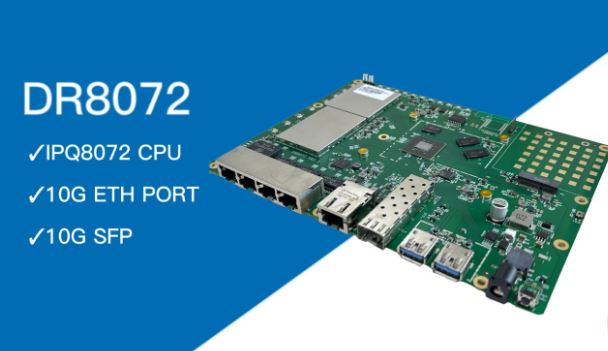
DR8072: Features the Qualcomm IPQ8072 CPU, supports WiFi 6E, with excellent RF performance and heat dissipation design, ideal for industrial applications.
DR8072
Wallys DR6018: Based on the Qualcomm IPQ6010 CPU, suitable for environments that require stable transmission and efficient processing.
Wallys DR6018
DR5332: A forward-looking design supporting WiFi 7, based on the Qualcomm IPQ5332 CPU, offering multiple connectivity options to meet future needs.
IPQ6010 VS IPQ5332
DR9574: Equipped with the Qualcomm IPQ9574 CPU, providing exceptional performance and efficient signal transmission, suitable for large-scale applications.
Wallys DR9574
Conclusion
Choosing the right industrial wireless router is essential for ensuring stable wireless transmission. 524WiFi’ products excel in processor performance, transmission standards, RF performance, and heat dissipation design, making them ideal for achieving efficient point-to-point WiFi connections while maintaining stability over distances of up to 23 kilometers. By selecting the appropriate model based on specific application scenarios and requirements, you can maximize network stability and efficiency, ensuring reliable wireless communication.
Complete Guide to Captive Portal Configuration on 524WiFi DR6018 Wallys Router
In this article, we’ll walk you through everything you need to know about setting up a captive portal on the DR6018 router, from understanding what a captive portal is to configuring it step by step.
1. What is Captive Portal?
Captive portal is a web page that users are automatically directed to when they connect to a public Wi-Fi network. This page typically requires the user to authenticate, agree to terms of service, or log in before gaining access to the internet.
Captive portals are commonly used in places such as cafes, airports, hotels, and corporate environments. When a user connects to the network, their browser is redirected to this login page, allowing the network owner to control access or display messages.
2. Why Is a Captive Portal Beneficial?
Captive portals provide several advantages for both network administrators and users:
Improved Security: Captive portals allow network administrators to control access to the network, ensuring that only authorized users can connect. This helps to prevent unauthorized access and enhances overall network security.
User Authentication: By requiring users to log in or agree to terms of service, you can track who is accessing your network. This is particularly important for public Wi-Fi networks where many users may connect.
Marketing Opportunities: Captive portals provide an excellent platform for displaying advertisements, promotions, or important messages to users before they access the internet. This is a great way for businesses to increase engagement with their customers.
Regulatory Compliance: In some industries or regions, regulations require businesses to monitor and track internet usage. A captive portal helps ensure that the network is used in compliance with legal guidelines.
3. Step-by-Step Guide: Configuring Captive Portal on DR6018 Router
Now that we’ve covered the basics, let’s move on to the detailed steps for setting up a captive portal on the DR6018 router.
Step 1: Upgrade the DR6018 Router with CoovaChilli Firmware
The first step is to ensure your Wallys DR6018 router is running the CoovaChilli firmware. This firmware is essential for setting up a captive portal. Follow the firmware upgrade process in the router’s interface to ensure you have the latest version.
Step 2: Configure eth0 as the WAN Port
Once the firmware is installed, log into the router’s interface and configure the eth0 interface as the WAN port. Remove eth0 from the LAN bridge and disable the DHCP server for this interface. This ensures the router properly routes internet traffic through the WAN port.
Step 3: Connect the Internet Cable and Verify IP Address
Next, plug in your internet cable to the eth0 port. The router should now obtain an IP address within the 192.168.7.xx range. Verify that the WAN port has successfully connected to the internet and is assigned the correct IP address.
Step 4: Configure the Landing Page in CoovaChilli
Now, it’s time to configure the landing page. This is the page users will see when they first connect to your Wi-Fi network. In the CoovaChilli panel, set up the URL for your landing page. For example, you can configure the landing page to redirect users to Baidu’s website or any custom page you want to use.
Step 5: Connect a Device and Test the Captive Portal
With the landing page configured, you can now test the setup. Connect a device, such as a laptop, to the Wi-Fi network provided by the Wallys DR6018 router. Once connected, open a web browser, and you should be automatically redirected to the landing page you configured.
Step 6: Authorize Internet Access with chilli_query authorize ip
Finally, once the user has interacted with the landing page, you can authorize internet access using the CoovaChilli chilli_query authorize ip command. This grants the user permission to browse the internet.
4. Procurement and Project Consultation
If you’re interested in purchasing the Wallys DR6018 router or need further consultation for your networking projects, feel free to reach out to us. Our team is here to assist with any technical or project-related inquiries.
IPQ6010 IPQ6018 Routerboard DR6018
By following this guide, you should now have a fully functioning captive portal on your 524WiFi DR6018 router, offering enhanced security, user management, and marketing opportunities. Stay tuned for more networking tips and tutorials!