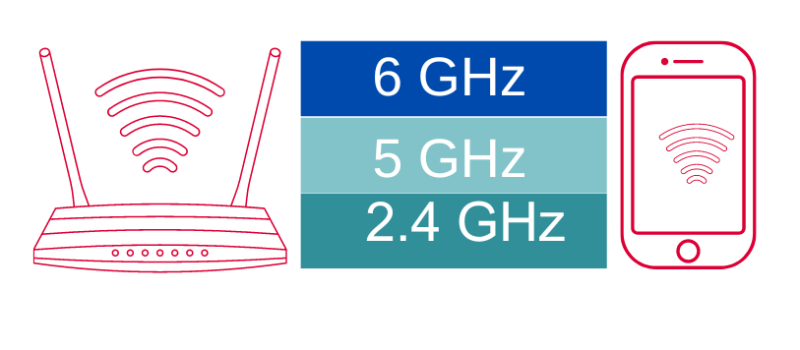
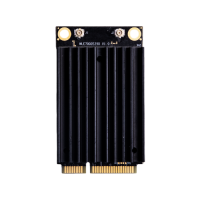
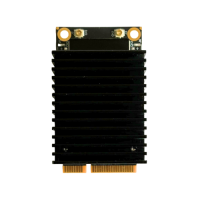
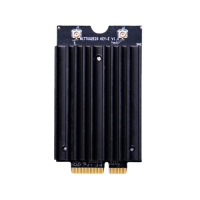
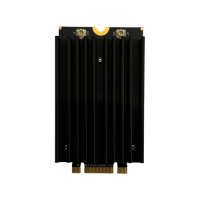
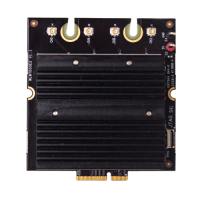
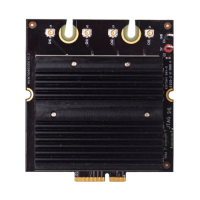
Unlock the future. By combining DR9274-2G5G and DR9274-5G6G, 524WiFi delivers a true tri-band Wi-Fi 7 platform ready for tomorrow’s wireless demands. X86 Linux supported!
Powered by Multi-Link Operation (MLO), our solution enables:
✅ Simultaneous dual 5GHz operation ✅ Aggregated bandwidth for higher throughput ✅ More resilient and flexible wireless networks
In the world of embedded networking, visibility is everything. Whether you’re an engineer troubleshooting a client deployment or a developer fine-tuning a custom OpenWrt-based application, packet-level insights can save hours — if not days — of guesswork.
We’re excited to announce that tcpdump is now fully supported on our DR5018S router board, bringing enterprise-grade packet analysis directly to your industrial WiFi 6 hardware.
🧰 Why Tcpdump Matters
Tcpdump is a powerful, command-line packet analyzer tool that allows users to:
Monitor live traffic on specific interfaces
Capture and filter packets based on IP, port, protocol, and more
Export logs for deeper analysis or compliance purposes
Debug intermittent network issues with precision
Now with tcpdump on DR5018S, you don’t need a separate laptop or tap device — your router board becomes the diagnostic tool.
📡 About DR5018S
The DR5018S is based on the Qualcomm IPQ5018 SoC, designed for advanced industrial WiFi 6 applications. It supports:
2.4G/5G concurrent dual-band
M.2 slot for LTE/5G modem expansion
Optional PoE support
Flexible OpenWrt/QSDK firmware environment
By adding tcpdump support, we’re giving system integrators, OEMs, and network developers more control and clarity at the edge.
📝 Documentation & Access
An updated user manual with tcpdump usage examples, interface configurations, and filtering tips will be released shortly. In the meantime, you can check out the DR5018S hardware details here:
Today we share a guide how to make COMPEX WLE3002HX module work well under Linux 6.1.99 and OpenWRT
LINUX:
1 – Use Linux 6.1.99 kernel version and add ath11k related drivers
2 – UseQCN9074/hw1.0/2.7.0.1/WLAN.HK.2.7.0.1-01744-QCAHKSWPL_SILICONZ-1 firmware version
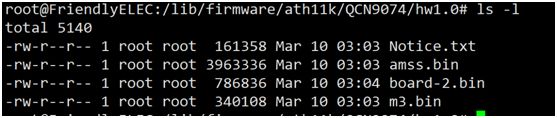
3 – Copy the firmware to the directory/lib/firmware/ath11k/QCN9074/hw1.0/directory, as shown in the following figure
4. Load the ath11k driver successfully, and the kernel prints as follows.
5. Use ifconfig to check that wlan0 has been recognized.
6.Scan external WiFi using the WPA_CLI scan and WPA_CLI scan_desult commands, only 5G band WiFi can be scanned
7.Connect to the scanned 5G frequency band WIFI for normal communication.
8. According to the previously provided document, replace the relevant firmware. The document content is as follows, please use serial console:
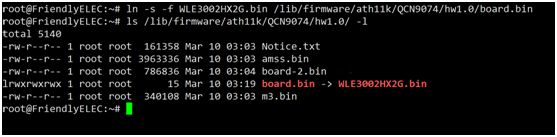
1.cd /lib/firmware 2.mkdir ath11k && cd ath11k 3.mkdir QCN9074 && cd QCN9074 4.mkdir hw1.0 && cd hw1.0 5.cp /directory/of/bdf.bin ./ (repeat this step for all above files) 6.ln -s WLE3002HX_SPF11_4_2G.bin board.bin (for first attempt on symbolic link)
To change board data files after first attempt: Change to 2G: ln -s -f WLE3002HX_SPF11_4_2G.bin board.bin Change to 5G: ln -s -f WLE3002HX_SPF11_4_5G.bin board.bin
Please replace DBF completely, the file name needs to be changed to the name in your system as described in this file.
Please contact us and we will sned these files to our customers by email.
9. According to the understanding, WLE3002HX_SFP11_4_2G.bin needs to be soft connected to
/lib/firmware/ath11k/QCN9074/hw1.0/board.bin
OpenWRT:
Ultimately what we did was:
1. Deactivate ath11k-firmware from my openwrt custom builds
2. Get the verified firmware version from git – WLAN.HK.2.7.0.1-01744-QCAHKSWPL_SILICONZ-1 e.g. 2 files amss.bin and m3.bin
3. Never download/use board-2.bin from qualcomm firmware
4. cp WLE3002HX5G.bin /lib/firmware/ath11k/QCN9074/hw1.0/board.bin (instead of symlinking)
bonus – cron to recreate the fw folder with files from backup location if missin
so the /lib/firmware/ath11k/QCN9074/hw1.0 folder contains only 3 files: amss.bin board.bin m3.bin
bonus – startup cron to recreate the fw folder with files from backup location if missing
This way the adapter works fine.
Thank you for reading. Hope that this can help you too.
Please see our reference guide how to run QCN 9024 / 9074 DR9074-Triband module with our ath11k driver on Rockship board .
The driver is sensitive to the hardware, so we refer you to use the Rockchip board to try these driver. If you have a bigger project, then lets discuss on the driver issues or send us the hardware description and we would help you to develope the ath11k driver for your application.
in the compiled environment. This directory may not be available in the newly downloaded environment. You can compile the kernel to obtain this directory.
Compile the kernel so you can get a new kernel deb with ath11k_pci.
Secondly, the correct firmware of the WiFi card is also required to activate it, you can move our firmware (amss.bin, board-2.bin) to:
/lib/firmware/ath11k/QCN9074/hw1.0
and delete the amss.bin.zst and board-2.bin.zst from the directory.
Setup wireless on ubuntu
Download hostapd
you can download hostapd by use command:
sudo apt-get install hostapd
Use hostapd to create a wireless access point
First, you should turn off ubuntu’s wifi tool by this command:
sudo nmcli radio wifi off
it will block you wifi function unblock wifi by use this command:
sudo rfkill unblock wifi
You can setup an access point by using command:
sudo hostapd hostapd.conf
hostapd.config is a configuration which has set the type of wi-fi you want to enable and the following figure shows its typical structure:
I have marked the most important part with a red box, where ssid represents the name of the wifi and interface represents the device selected to enable wifi. By the way if you don’t know your interface name, you can use command: ip addr which can show you the information about the interface, the wireless interface always seem like wlan* or wlp*.
If you see following output after you use hostapd command:
this means you have successfully started the AP.
And when you see this:
it means a device connected to you access point.
This also means connect if you not set password:
Use wpa_supplicant to connect a access point
First, you should turn off ubuntu’s wifi tool by this command:
sudo nmcli radio wifi off
it will block you wifi function unblock wifi by use this command:
-i can set the interface you want to use to connect. wpa.config is a configuration which has set the type of wi-fi you want to connect and the following figure shows its typical structure:
you can change the ssid to which access point you want.
If you see following output after you use hostapd command:
this means connect successful.
If you want to connect a access point which has a password you should change the wpa_supplicant configuration like this:
the psk is the password proto and key_mgmt is the encryption options.
FAQ
when you see this output you can use: sudo rfkill unblock wifi
when you see this output that means you may run another wpa_supplicant, you should close it then you can run another wpa_supplicant if you don’t know where is it, you can use command: sudo killall wpa_supplicant to kill all wpa_supplicant.
Introduction: The Next Era of Enterprise Wireless Connectivity
The rapid evolution of Wi-Fi 7 (IEEE 802.11be) is revolutionizing enterprise networks, demanding hardware that combines cutting-edge performance with seamless integration. The 524WiFi DR9274 PCIe Wireless Card, powered by Qualcomm QCN9274/QCN6274 chips, emerges as a game-changer. Designed for x86 architecture and fully compatible with Ubuntu systems, this module delivers multi-gigabit speeds, industrial-grade reliability, and future-proof scalability — ideal for high-stakes environments like smart factories, dense office networks, and mission-critical IoT deployments.
5 Key Advantages of 524WiFi DR9274 Wi-Fi 7 Modules
1. x86 & Ubuntu Compatibility: Unleash Developer Flexibility
Native x86 Support: Seamlessly integrates with Intel/AMD-based servers, industrial PCs, and edge gateways, eliminating driver conflicts.
Ubuntu 22.04 LTS Optimization: Pre-certified drivers and SDKs enable rapid deployment on Linux environments, with full access to OpenWRT/OpenWiFi for custom network policies.
Use Case: Deploy as a software-defined access point (SDAP) or cloud-managed wireless controller on existing x86 infrastructure.
Wireless Backhaul: Replace fiber with 6GHz point-to-point links for 5G small cell aggregation.
Public Wi-Fi 7 Hotspots: Deploy in airports or malls with captive portals and AI-driven traffic shaping.
4. Defense & Mission-Critical Systems
Tactical Mesh Networks: Build self-healing wireless grids using MLO and 4K QAM.
Drone Command Centers: Stream 360° LiDAR data via 320MHz channels.
Conclusion: Future-Proof Your Wireless Infrastructure Today
The DR9274 Wi-Fi 7 PCIe Card transcends traditional wireless limitations by merging Qualcomm’s silicon excellence, x86/Ubuntu adaptability, and industrial resilience. Whether upgrading enterprise networks, automating factories, or building smart city backbones, this module delivers unparalleled speed, reliability, and control.
In the rapidly evolving world of wireless networking, the MT7915 stands out as a powerful and versatile solution for modern connectivity needs. Designed to deliver high performance, reliability, and flexibility, this WiFi 6 chip is ideal for a wide range of applications, from industrial IoT to enterprise networking. In this article, we’ll take a deep dive into the features and benefits of the MT7915, and explore why it’s a top choice for next-gen wireless solutions.
Key Features of the MT7915
1. WiFi 6 Technology
The MT7915 supports 802.11ax (WiFi 6), the latest wireless standard that offers significant improvements over previous generations. With features like OFDMA (Orthogonal Frequency Division Multiple Access) and MU-MIMO (Multi-User Multiple Input Multiple Output), it enables faster speeds, lower latency, and better performance in high-density environments.
2. Dual-Band Support
The MT7915 operates on both 2.4GHz and 5GHz bands, providing flexibility for various networking scenarios. Whether you need broader coverage or higher throughput, this chip delivers optimal performance.
3. High Throughput
With support for 2T2R (2 Transmit, 2 Receive) streams, the MT7915 offers impressive data rates, making it suitable for bandwidth-intensive applications like video streaming, online gaming, and industrial automation.
4. OpenWRT Compatibility
The MT7915 is compatible with OpenWRT, a popular open-source operating system for routers and networking devices. This allows for greater customization and flexibility, enabling developers to tailor the solution to their specific needs.
5. Mini PCIe and M.2 keay A+E or B+M Form Factor
The MT7915 comes in a Mini PCIe or m.2 module, making it easy to integrate into a wide range of devices, from routers and access points to industrial equipment and IoT devices.
6. Industrial-Grade Reliability
Designed for harsh environments, the MT7915 operates reliably in extreme temperatures and conditions, making it ideal for industrial applications.
Benefits of the MT7915
1. Enhanced Performance
The MT7915 delivers faster speeds and lower latency compared to previous-generation WiFi chips, ensuring a seamless user experience even in high-density environments.
2. Cost-Effective Solution
With its high performance and flexibility, the MT7915 offers excellent value for money, making it a cost-effective choice for businesses and developers.
3. Future-Proof Technology
By supporting WiFi 6, the MT7915 ensures that your network is ready for the future, with the ability to handle increasing data demands and new applications.
4. Easy Integration
The Mini PCIe form factor and OpenWRT compatibility make the MT7915 easy to integrate into existing systems, reducing development time and costs.
5. Versatility
From smart homes and offices to industrial IoT and smart cities, the MT7915 is suitable for a wide range of applications, providing reliable connectivity wherever it’s needed.
Applications of the MT7915
1. Industrial IoT
The MT7915’s industrial-grade reliability and high throughput make it ideal for industrial IoT applications, such as factory automation, remote monitoring, and smart logistics.
2. Enterprise Networking
With its support for WiFi 6 and high-density environments, the MT7915 is perfect for enterprise networks, providing fast and reliable connectivity for offices, campuses, and data centers.
3. Smart Homes
The MT7915’s dual-band support and high performance make it a great choice for smart home devices, ensuring seamless connectivity for streaming, gaming, and smart appliances.
4. Public WiFi
The MT7915’s ability to handle high-density environments makes it suitable for public WiFi hotspots, such as airports, malls, and stadiums.
Why Choose Mediatek MT7915 Solution?
At 524WiFi, we offer various MT7915 and MT7916 WiFi 6 / 6E module based on the Mediatek chip, designed to meet the needs of modern wireless networks. Our solution includes:
High-quality hardware: Built for durability and performance.
OpenWRT support: Enabling customization and flexibility.
Expert support: Our team is available to assist with integration and optimization.
The MT7915 is a powerful and versatile WiFi 6 chip that offers high performance, reliability, and flexibility for a wide range of applications. Whether you’re building an industrial IoT system, an enterprise network, or a smart home solution, the MT7915 is a future-proof choice that delivers exceptional value.
Wi-Fi 7 with Multi-Link Operation (MLO) on X86 Devices: A New Era of Connectivity
As the world of wireless technology continues to evolve, the introduction of Wi-Fi 7 is nothing short of a game-changer. With its potential for significantly higher speeds, lower latency, and enhanced reliability, Wi-Fi 7 is set to revolutionize industries and applications ranging from industrial IoT to high-performance consumer devices. At Wallys, we’re always driven by customer needs, and as part of our commitment to offering cutting-edge solutions, we’re focused on expanding the possibilities for Wi-Fi 7 technology—specifically by enabling Multi-Link Operation (MLO) support on X86 platforms.
Expanding the Reach of Wi-Fi 7: A New Level of Compatibility
Last year, we introduced X86 driver support for our Wi-Fi 6 module, DR9074, which enabled seamless integration across a broader range of motherboard platforms, not just Qualcomm devices. This support empowered our customers to experience high-quality, stable Wi-Fi data transmission and opened the door for new applications that demand reliable and high-throughput wireless connections.
With the introduction of Wi-Fi 7, cross-platform compatibility becomes even more critical. Wi-Fi 7 brings with it a new set of features designed to push the boundaries of wireless connectivity, and one of the most significant is Multi-Link Operation (MLO). But to harness the full potential of MLO, we need to ensure that our solutions can operate on multiple platforms—something we’re excited to announce we’re working on with our DR9274 (QCN9274) and QCN6274 Wi-Fi 7 modules.
wifi6 vs wifi7
What is MLO? And Why Does It Matter?
Multi-Link Operation (MLO) is one of the standout features of Wi-Fi 7. MLO allows devices to transmit data across multiple frequency bands (like 2.4 GHz, 5 GHz, and 6 GHz) simultaneously. This multi-band transmission significantly improves throughput and reliability, while reducing latency and congestion, making it an ideal solution for environments that require high-speed and low-latency communication.
In simple terms, MLO will enable your devices to leverage the full bandwidth potential of Wi-Fi 7, resulting in faster speeds, more stable connections, and more efficient use of available spectrum.
Introducing the QCN9274 & QCN6274 Wi-Fi 7 Modules
To enable the full potential of MLO, we’re leveraging the power of QCN9274 and QCN6274—two of Qualcomm’s latest Wi-Fi 7 chipsets, both designed for high-performance applications.
QCN9274 (Waikiki)
QCN6274 (Waikiki)
MLO
These two powerful chipsets represent the future of Wi-Fi 7 and provide the foundation for expanding compatibility across a variety of platforms. With MLO support, both the QCN9274 and QCN6274 enable better utilization of the 2.4, 5, and 6 GHz bands, delivering faster speeds and more reliable connections.
wifi7 new features
What Will MLO Bring to Your X86 Devices?
By introducing MLO support for X86 devices, we’re pushing the envelope on what’s possible in wireless networking. Users of X86 platforms will now be able to tap into the full power of Wi-Fi 7, unlocking:
Higher Throughput: With MLO, data is split across multiple channels, leading to faster speeds and higher data rates, ideal for bandwidth-hungry applications like streaming, gaming, and industrial IoT.
Enhanced Reliability: MLO ensures that devices can maintain stable connections, even in environments with interference or congestion, by balancing traffic across different frequency bands.
Reduced Latency: Faster communication between devices can significantly reduce lag and improve the responsiveness of real-time applications, from virtual reality to autonomous systems.
The implications are significant. Wi-Fi 7, combined with MLO, could transform industries that rely on seamless, high-performance wireless connectivity—think smart cities, industrial automation, healthcare, and beyond.
At 524WiFi, we’re committed to ensuring that our solutions are as versatile and adaptable as possible. With the upcoming X86 driver support for DR9274 and MLO functionality, you’ll be able to take full advantage of Wi-Fi 7 speeds and unlock new potential for your devices.
Thoughtput testing:achieve 8Gbps+ speed
This new capability will open up new opportunities for a variety of applications, and we’re eager to see how our customers will integrate this powerful technology into their own use cases.
DR9274 wifi7 M.2 card
Are You Ready for the Future of Wireless Connectivity?
With Wi-Fi 7’s blazing-fast speeds and MLO’s game-changing capabilities, the possibilities are endless. How do you envision using Wi-Fi 7 with MLO on your X86 platforms? Whether it’s enhancing your industrial IoT devices, supporting next-gen gaming applications, or powering high-bandwidth communications, the potential is vast.
At 524WiFi, we’re excited to continue innovating and providing the tools you need to stay ahead in the rapidly evolving wireless landscape. If you’re interested in learning more about our Wi-Fi 7 solutions or how we can help with your next project, feel free to reach out to us.
X86 Industrial Computer + QCN9024 DR9024 MINI PCIE Interface 1v1 and 1v100 Performance Test Report:
Test purpose: Test the performance of QCN9024 network card with industrial computer 1v1 and 1v10 Test tool: Ixchariot 6.7 Test equipment: X86 industrial computer + MINI PCIE QCN9024 DR9024 module
X86 as STA test environment:
Self-developed equipment as AP, X86 industrial computer as STA
Chariot traffic test Test 1: STA to AP traffic, throughput 2145Mbps
Test 2: AP sends traffic to STA, throughput 2318Mbps
Test 3: AP and STA bidirectional traffic, throughput 2660Mbps
X86 as AP test environment:
Self-developed equipment as STA, X86 industrial computer as AP
Chariot traffic test Test 1: AP to STA traffic, throughput 2215Mbps
Test 2: STA sends data to AP, throughput 2271Mbps
Test 3: AP and STA bidirectional traffic, throughput 2603Mbps
X86 Industrial Computer + QCN9024 DR9024 MINI PCIE Interface 1v1 and 1v100 Performance Test Report:
Test purpose: Test the performance of QCN9024 network card with industrial computer 1v1 and 1v10 Test tool: Ixchariot 6.7 Test equipment: X86 industrial computer + MINI PCIE QCN9024 DR9024 module
In today’s fast-paced digital landscape, the demand for robust and efficient wireless connectivity has never been greater. Mediatek’s cutting-edge Wi-Fi 6, Wi-Fi 6E, and Wi-Fi 7 modules are designed to meet these demands, providing seamless integration with various AI Linux PCs, including popular distributions like Debian, Ubuntu, Fedora, and more. These modules are set to revolutionize how users experience connectivity across multiple platforms.
Key Features of 524WiFi MIDIATEK’s Wi-Fi Modules
Wi-Fi 6 (802.11ax): This standard introduces significant improvements in speed, capacity, and efficiency. With features like Orthogonal Frequency Division Multiple Access (OFDMA) and Multi-User Multiple Input Multiple Output (MU-MIMO), Wi-Fi 6 can handle multiple devices simultaneously without compromising performance. This is particularly beneficial in environments with high device density, such as offices or public spaces.
Wi-Fi 6E: Expanding on the capabilities of Wi-Fi 6, Wi-Fi 6E operates in the newly available 6 GHz band. This additional spectrum allows for more channels, reducing congestion and enabling higher data rates for bandwidth-intensive applications like streaming and gaming. The increased capacity ensures that users can enjoy uninterrupted connectivity even in crowded environments.
Wi-Fi 7 (802.11be): As the latest advancement in wireless technology, Wi-Fi 7 promises even faster speeds and lower latency through features like 320 MHz channels and enhanced MU-MIMO capabilities. This will be a game-changer for applications requiring real-time data transmission, such as augmented reality (AR) and virtual reality (VR).
Compliance and Certifications
524WiFi’s commitment to quality and safety is underscored by its extensive certifications. Most of their modules have passed rigorous testing and obtained certifications from recognized international bodies, including:
FCC (Federal Communications Commission): Ensuring compliance with U.S. regulations for electronic devices.
CE (Conformité Européenne): Certifying that products meet European health, safety, and environmental protection standards.
IC (Industry Canada): Meeting Canadian regulatory requirements for communication devices.
RCM (Regulatory Compliance Mark): Compliance with Australian electrical safety standards.
NCC (National Communications Commission): Adhering to Taiwanese communication regulations.
These certifications emphasize the performance and reliability of 524WiFi’s products while demonstrating their dedication to creating a seamlessly connected IoT landscape.
Compatibility with Linux Distributions
Mediatek’s Wi-Fi modules are designed with compatibility in mind, ensuring that they work seamlessly across various Linux distributions:
Debian/Ubuntu: Users can easily install drivers through package managers or compile from source if necessary.
Fedora/CentOS: The modules support the latest kernels available in these distributions, providing out-of-the-box functionality for most users.
Arch Linux/OpenSUSE/Manjaro: These distributions often have up-to-date kernel support, allowing users to take advantage of the latest features offered by Mediatek’s modules.
Red Hat Enterprise Linux/Oracle/Linux Mint/Gentoo/Slackware: These distributions may require additional configuration but are fully capable of supporting Mediatek’s Wi-Fi technology with the right drivers.
Enhanced Performance for AI Applications
The integration of Mediatek’s Wi-Fi modules into AI-driven Linux PCs enhances performance significantly. The high throughput and low latency provided by these technologies enable faster data processing and improved communication between devices. This is crucial for applications such as machine learning models that require large datasets to be transmitted quickly and efficiently.Moreover, the power efficiency of Wi-Fi 6 and beyond means that devices can maintain longer operational times without frequent recharging or energy consumption concerns. This is particularly important for IoT devices that rely on continuous connectivity.
Conclusion
Mediatek’s Wi-Fi 6, 6E, and 7 modules represent a significant leap forward in wireless technology. Their compatibility with a wide range of Linux distributions makes them an ideal choice for users looking to enhance their AI Linux PC experience. With faster speeds, increased capacity, improved efficiency, and compliance with international standards, these modules are poised to transform how we connect in an increasingly digital world. Embrace the future of connectivity with 524WiFi’s innovative solutions today!
Wi-Fi 7, also known as IEEE 802.11be, is the next-generation Wi-Fi standard that supports 2.4GHz, 5GHz, and 6GHz all three frequency bands. This advanced technology introduces innovative features that provide wider signal coverage, reduced latency and seamless connectivity. Wi-Fi 7 is set to revolutionize the way we connect, redefining the standards of wireless communication and rewriting your connectivity experiences. For Linux users, recommended is Linux krenel 6.5 and in kernel ath12k driver.
Unlock the Full Possibilities of Wi-Fi 7
320MHz Bandwidths
Wi-Fi 7 introduces 320MHz channel bandwidths, significantly expanding data transmission capacity. This allows for higher data rates and improved performance, ideal for bandwidth-intensive applications like streaming, gaming, and large file transfers.
4096 QAM
WiFi 7 uses 4K QAM to enhance data capacity, enabling higher speeds and efficiency. This improves performance for 4K streaming, online gaming, and large file downloads, delivering superior connectivity for modern applications.
Multi-Link Operation
Wi-Fi 7 debuts Multi-Link Operation (MLO), enabling devices to connect to the same access point across multiple channels and frequency bands simultaneously. MLO increases throughput, reduces latency, and enhances reliability.
Compex Wi-Fi 7 Solutions
The new Compex’s Wi-Fi 7 Dual-Band Dual-Concurrent Modules are designed to take your connectivity to the next level with seamless adoption, power efficiency and enhanced wireless performance. Ideal for enterprise, industrial, cybersecurity, transportation, and SMB applications or appliances, our Wi-Fi 7 Dual-Band Dual-Concurrent Modules set a new standard in performance and reliability.
Compex Wi-Fi 7 Solutions Product Matrix
WLE7000 Standard MiniPCIe Series
WLE7002E25
2×2 2.4+5GHz DBDC WiFi 7 with 2.4/5GHz Diplexer MiniPCIe Interface with PCIe 3.0
WLE7002E56
2×2 5+6GHz DBDC WiFi 7 with 5/6GHz Diplexer MiniPCIe Interface with PCIe 3.0
WLT7000 M.2 Series
WLTE7002E25
2×2 2.4+5GHz DBDC WiFi 7 with 2.4/5GHz Diplexer M.2 E Key Interface with PCIe 3.0
WLTB7002E25
2×2 2.4+5GHz DBDC WiFi 7 with 2.4/5GHz Diplexer M.2 B+M Key Interface with PCIe 3.0
WLW7000 High-Power M.2 Series
WLW7002E25
2×2 2.4+5GHz DBDC WiFi 7 M.2 E Key Interface with PCIe 3.0
WLW7002E56
2×2 5+6GHz DBDC WiFi 7 M.2 E Key Interface with PCIe 3.0
WLW7000E2
4×4 2.4GHz WiFi 7 M.2 E Key Interface with PCIe 3.0