Posted on

Mediatek MT7915 : A Comprehensive Review of Its Features and Benefits

In the rapidly evolving world of wireless networking, the MT7915 stands out as a powerful and versatile solution for modern connectivity needs. Designed to deliver high performance, reliability, and flexibility, this WiFi 6 chip is ideal for a wide range of applications, from industrial IoT to enterprise networking. In this article, we’ll take a deep dive into the features and benefits of the MT7915, and explore why it’s a top choice for next-gen wireless solutions.

Key Features of the MT7915

1. WiFi 6 Technology

The MT7915 supports 802.11ax (WiFi 6), the latest wireless standard that offers significant improvements over previous generations. With features like OFDMA (Orthogonal Frequency Division Multiple Access) and MU-MIMO (Multi-User Multiple Input Multiple Output), it enables faster speeds, lower latency, and better performance in high-density environments.

2. Dual-Band Support

The MT7915 operates on both 2.4GHz and 5GHz bands, providing flexibility for various networking scenarios. Whether you need broader coverage or higher throughput, this chip delivers optimal performance.

3. High Throughput

With support for 2T2R (2 Transmit, 2 Receive) streams, the MT7915 offers impressive data rates, making it suitable for bandwidth-intensive applications like video streaming, online gaming, and industrial automation.

4. OpenWRT Compatibility

The MT7915 is compatible with OpenWRT, a popular open-source operating system for routers and networking devices. This allows for greater customization and flexibility, enabling developers to tailor the solution to their specific needs.

5. Mini PCIe and M.2 keay A+E or B+M Form Factor

The MT7915 comes in a Mini PCIe or m.2 module, making it easy to integrate into a wide range of devices, from routers and access points to industrial equipment and IoT devices.

6. Industrial-Grade Reliability

Designed for harsh environments, the MT7915 operates reliably in extreme temperatures and conditions, making it ideal for industrial applications.

Benefits of the MT7915

1. Enhanced Performance

The MT7915 delivers faster speeds and lower latency compared to previous-generation WiFi chips, ensuring a seamless user experience even in high-density environments.

2. Cost-Effective Solution

With its high performance and flexibility, the MT7915 offers excellent value for money, making it a cost-effective choice for businesses and developers.

3. Future-Proof Technology

By supporting WiFi 6, the MT7915 ensures that your network is ready for the future, with the ability to handle increasing data demands and new applications.

4. Easy Integration

The Mini PCIe form factor and OpenWRT compatibility make the MT7915 easy to integrate into existing systems, reducing development time and costs.

5. Versatility

From smart homes and offices to industrial IoT and smart cities, the MT7915 is suitable for a wide range of applications, providing reliable connectivity wherever it’s needed.

Applications of the MT7915

1. Industrial IoT

The MT7915’s industrial-grade reliability and high throughput make it ideal for industrial IoT applications, such as factory automation, remote monitoring, and smart logistics.

2. Enterprise Networking

With its support for WiFi 6 and high-density environments, the MT7915 is perfect for enterprise networks, providing fast and reliable connectivity for offices, campuses, and data centers.

3. Smart Homes

The MT7915’s dual-band support and high performance make it a great choice for smart home devices, ensuring seamless connectivity for streaming, gaming, and smart appliances.

4. Public WiFi

The MT7915’s ability to handle high-density environments makes it suitable for public WiFi hotspots, such as airports, malls, and stadiums.

Why Choose Mediatek MT7915 Solution?

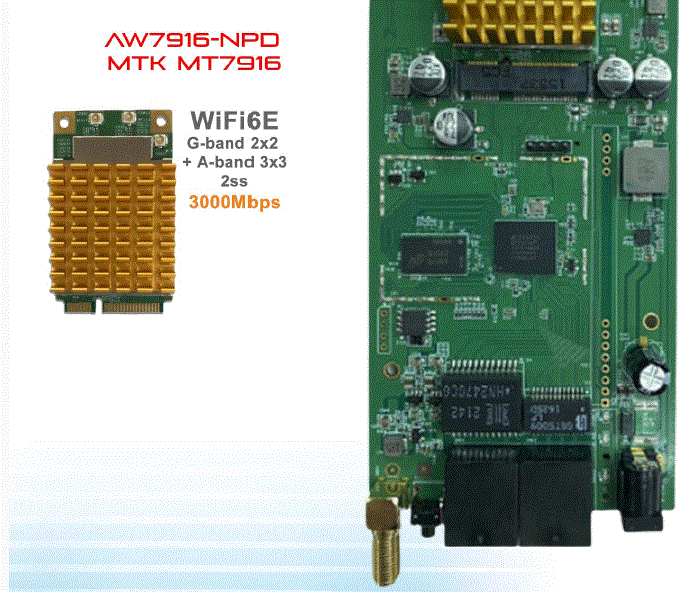
At 524WiFi, we offer various MT7915 and MT7916 WiFi 6 / 6E module based on the Mediatek chip, designed to meet the needs of modern wireless networks. Our solution includes:

  • High-quality hardware: Built for durability and performance.
  • OpenWRT support: Enabling customization and flexibility.
  • Expert support: Our team is available to assist with integration and optimization.

To learn more about our MT7915-based solution, please read more : https://524wifi.net/?s=7915

Conclusion

The MT7915 is a powerful and versatile WiFi 6 chip that offers high performance, reliability, and flexibility for a wide range of applications. Whether you’re building an industrial IoT system, an enterprise network, or a smart home solution, the MT7915 is a future-proof choice that delivers exceptional value.

Posted on

Unlocking the Future of Connectivity with Mediatek Wi-Fi 6, 6E, and 7 Modules

In today’s fast-paced digital landscape, the demand for robust and efficient wireless connectivity has never been greater. Mediatek’s cutting-edge Wi-Fi 6, Wi-Fi 6E, and Wi-Fi 7 modules are designed to meet these demands, providing seamless integration with various AI Linux PCs, including popular distributions like Debian, Ubuntu, Fedora, and more. These modules are set to revolutionize how users experience connectivity across multiple platforms.

Key Features of 524WiFi MIDIATEK’s Wi-Fi Modules

Wi-Fi 6 (802.11ax): This standard introduces significant improvements in speed, capacity, and efficiency. With features like Orthogonal Frequency Division Multiple Access (OFDMA) and Multi-User Multiple Input Multiple Output (MU-MIMO), Wi-Fi 6 can handle multiple devices simultaneously without compromising performance. This is particularly beneficial in environments with high device density, such as offices or public spaces.

Wi-Fi 6E: Expanding on the capabilities of Wi-Fi 6, Wi-Fi 6E operates in the newly available 6 GHz band. This additional spectrum allows for more channels, reducing congestion and enabling higher data rates for bandwidth-intensive applications like streaming and gaming. The increased capacity ensures that users can enjoy uninterrupted connectivity even in crowded environments.

Wi-Fi 7 (802.11be): As the latest advancement in wireless technology, Wi-Fi 7 promises even faster speeds and lower latency through features like 320 MHz channels and enhanced MU-MIMO capabilities. This will be a game-changer for applications requiring real-time data transmission, such as augmented reality (AR) and virtual reality (VR).

Compliance and Certifications

524WiFi’s commitment to quality and safety is underscored by its extensive certifications. Most of their modules have passed rigorous testing and obtained certifications from recognized international bodies, including:

  • FCC (Federal Communications Commission): Ensuring compliance with U.S. regulations for electronic devices.
  • CE (Conformité Européenne): Certifying that products meet European health, safety, and environmental protection standards.
  • IC (Industry Canada): Meeting Canadian regulatory requirements for communication devices.
  • RCM (Regulatory Compliance Mark): Compliance with Australian electrical safety standards.
  • NCC (National Communications Commission): Adhering to Taiwanese communication regulations.

These certifications emphasize the performance and reliability of 524WiFi’s products while demonstrating their dedication to creating a seamlessly connected IoT landscape.

Compatibility with Linux Distributions

Mediatek’s Wi-Fi modules are designed with compatibility in mind, ensuring that they work seamlessly across various Linux distributions:

  • Debian/Ubuntu: Users can easily install drivers through package managers or compile from source if necessary.
  • Fedora/CentOS: The modules support the latest kernels available in these distributions, providing out-of-the-box functionality for most users.
  • Arch Linux/OpenSUSE/Manjaro: These distributions often have up-to-date kernel support, allowing users to take advantage of the latest features offered by Mediatek’s modules.
  • Red Hat Enterprise Linux/Oracle/Linux Mint/Gentoo/Slackware: These distributions may require additional configuration but are fully capable of supporting Mediatek’s Wi-Fi technology with the right drivers.

Enhanced Performance for AI Applications

The integration of Mediatek’s Wi-Fi modules into AI-driven Linux PCs enhances performance significantly. The high throughput and low latency provided by these technologies enable faster data processing and improved communication between devices. This is crucial for applications such as machine learning models that require large datasets to be transmitted quickly and efficiently.Moreover, the power efficiency of Wi-Fi 6 and beyond means that devices can maintain longer operational times without frequent recharging or energy consumption concerns. This is particularly important for IoT devices that rely on continuous connectivity.

Conclusion

Mediatek’s Wi-Fi 6, 6E, and 7 modules represent a significant leap forward in wireless technology. Their compatibility with a wide range of Linux distributions makes them an ideal choice for users looking to enhance their AI Linux PC experience. With faster speeds, increased capacity, improved efficiency, and compliance with international standards, these modules are poised to transform how we connect in an increasingly digital world. Embrace the future of connectivity with 524WiFi’s innovative solutions today!

Posted on

Unlock the Future of Connectivity: Explore Dual-Band Dual-Concurrent DBDC Cards for Industrial Applications

DBDC Cards: A Solution for High-Density, High-Interference, and High-Bandwidth Network Environments

In today’s network landscape, the rapid increase in connected devices has introduced unprecedented challenges for stable and high-speed connectivity. In environments with high device density, strong signal interference, and high bandwidth requirements, traditional single-band networks often fall short of meeting users’ demands. Enter the Dual-Band Dual-Concurrent (DBDC) card, a breakthrough solution that redefines network performance. This article delves into the advantages of DBDC cards in tackling these network challenges, along with some recommended DBDC products from 524WiFi.

Key Advantages of DBDC Cards

1. Dual-Band Concurrency to Distribute Network Load

DBDC cards’ primary feature is their ability to operate simultaneously on both 2.4GHz and 5GHz bands. This dual-band functionality effectively expands total bandwidth, allowing devices to spread across two frequency bands, reducing congestion on a single channel. In high-density environments, DBDC cards enable devices to efficiently locate open channels, significantly decreasing signal interference and delays.

2. Interference Reduction for Stable Connections

In interference-heavy environments, such as public venues or industrial zones, DBDC cards’ dual-band capability is essential. The 5GHz band, which is typically less congested, is allocated for high-bandwidth, high-stability tasks, while the 2.4GHz band is reserved for low-bandwidth, non-time-sensitive tasks. This smart frequency allocation minimizes interference, ensuring stable connections for critical devices.

3. High Throughput for Future Bandwidth Needs

With increased demands for bandwidth due to high-resolution video, VR/AR applications, and cloud computing, DBDC cards provide substantial throughput improvements. Dual-band usage enables faster data transfers, reducing latency and supporting high-bandwidth applications, making DBDC cards ideal for bandwidth-heavy environments.

4. Enhanced Network Reliability

DBDC cards offer a dual-frequency safety net for devices, maintaining connection stability even if one band experiences interference or connection issues. This built-in redundancy is crucial for industries that rely on uninterrupted data transmission, providing higher levels of reliability across connected devices.

DBDC Card Applications Across Industries

1. Enterprise Environments

In office settings, DBDC cards improve network efficiency by managing multiple users and devices on separate bands. Enterprises that depend on video conferencing, data sharing, and collaborative work benefit from DBDC cards’ stability, optimizing productivity through smoother network performance.

2. Industrial IoT (IIoT)

DBDC cards are ideal for Industrial IoT applications, where a network of sensors, monitoring systems, and data collectors are continuously connected. Their high stability and resistance to interference enable DBDC cards to support IIoT environments with real-time data transmission, enhancing industrial device performance.

3. Public Venues and Smart Cities

In high-density public areas like airports and sports arenas or within smart city networks, countless IoT devices are connected simultaneously. DBDC cards’ dual-band functionality effectively reduces channel congestion and enhances connectivity between devices. In addition, DBDC-enabled devices in public networks can substantially improve user experience with smoother connections.

Recommended DBDC Products from 524WiFi

524WiFi offers a range of high-performance DBDC modules. Here are a few standout DBDC card options:

MediaTek MT 7915 / 7916

  • Overview: Powered by MediaTek’s MT7915 or 7916 chip, this WiFi 6 / 6E DBDC card supports 2T2R and is compatible with OpenWRT.
  • Highlights: Supports 802.11AX standard and features a MiniPCIe interface, making it suitable for enterprise and industrial IoT applications.
  • Product link : https://524wifi.net/?s=mediatek

DR 9274

  • Overview: The latest WiFi 7 dual-band module powered by Qualcomm’s QCN9274 and QCN6274 chips, designed for future high-bandwidth demands.
  • Highlights: Features an M.2 interface and supports 2×2 dual-band concurrent operation, perfect for high-bandwidth, high-resilience applications.
  • Product Link

Conclusion

DBDC cards offer an innovative approach to networking in high-density, high-interference, and high-bandwidth environments. By leveraging dual-band concurrent operation, DBDC cards effectively address pain points like channel congestion, signal interference, and bandwidth bottlenecks, improving network reliability and stability. 524WiFi’ DBDC products, with their robust performance and reliable design, are paving the way for enterprises and industrial users to meet the future of networking with confidence.

Posted on

MT 7916 porting guide for OpenWRT


MT 7916 porting guide for OpenWRT on AP7621 platform

1. Compile OpenWRT


1-1. Host Enviromnemt

OS: Ubuntu 22.4.1 LTS


1-2. Install utilities for compiling


Execute following command in terminal:


sudo apt update

sudo apt upgrade

sudo apt install build-essential clang flex g++ gawk gcc-multilib gettext git

libncurses5-dev libssl-dev python3-distutils rsync unzip zlib1g-dev pkg-config

1-3. Clone Source Code and Update


Clone the main branch and update it
git clone https://git.openwrt.org/openwrt/openwrt.git
cd openwrt
./scripts/feeds update -a
./scripts/feeds install -a


1-4. Menuconfig Setting


make menuconfig


Select the following setting:


Target System: MediaTek Ralink MIPS
Subtarget: MT7621 based boards
Target Profile: AP7621-001

Include the following features:


Kernel modules/Wireless drivers/kmod-mt7916-firmware
Kernel modules/Wireless drivers/kmod-mt76x2
Kernel modules/Wireless drivers/kmod-mt7915e
Kernel modules/Wireless Drivers/kmod-cfg80211
Kernel modules/Wireless Drivers/kmod-mac80211
(*optional for ap)Network/WirelessAPD/wpad
(*optional for ap)Network/WirelessAPD/hostapd-common
(*optional for iw tools)Base system/wireless-tools
(*optional for web server)LuCI/Collections/luci
(*optional for web server)LuCI/Collections/luci-ssl

1-5. (*optional) Turn on wireless ap in default


Revise the file /openwrt/package/kernel/mac80211/files/lib/wifi/mac80211.sh


set wireless.${name}.disabled=0

Save and compile.

1-6. Compile


make -j $(nproc) kernel_menuconfig

make -j $(nproc) defconfig download clean world V=s

2. Starting AP7621 platform for verify


After burning and booting your AP7621, you can check the interface on OpenWRT by the command:

ifconfig -a

and test the connection by ping.

View All Tags