Posted on

DR9074 Triband : QCN9074 WiFi 6E Network Card – 23dBm, 4949 Mbps, Industrial-Grade

As wireless technology continues to evolve, the demand for high-performance solutions that can keep pace with increasing connectivity needs has never been greater. At the forefront of this revolution is the Qualcomm QCN9074 chipset, a powerful and versatile component designed to meet the rigorous demands of modern wireless networks. Here’s why the QCN9074 is considered the future of high-performance wireless solutions.

1. Cutting-Edge Wi-Fi 6 Technology

The QCN9074 chipset is built to fully harness the capabilities of Wi-Fi 6 (802.11ax), the latest and most advanced Wi-Fi standard. Wi-Fi 6 brings a host of improvements over previous generations, including faster speeds, greater capacity, and enhanced efficiency. With the QCN9074, you can achieve data rates that are up to four times faster than Wi-Fi 5, making it ideal for bandwidth-intensive applications such as video streaming, online gaming, and virtual reality.

2. Superior Multi-User Performance

One of the standout features of the QCN9074 is its support for OFDMA (Orthogonal Frequency Division Multiple Access) and MU-MIMO (Multi-User, Multiple Input, Multiple Output). These technologies allow the QCN9074 to handle multiple devices simultaneously without a drop in performance. This is particularly beneficial in environments with high device density, such as smart homes, offices, and public spaces, where multiple users need to access the network at the same time.

3. Exceptional Signal Quality and Coverage

The QCN9074 chipset is engineered to deliver superior signal quality and coverage. It supports 4×4 MIMO, which enhances the signal strength and extends the coverage area. Whether you’re deploying a network in a large office, a multi-story building, or an outdoor environment, the QCN9074 ensures that every corner is covered, providing a reliable connection even in challenging conditions.

4. Energy Efficiency

In today’s world, energy efficiency is a critical consideration for any wireless solution. The QCN9074 is designed with power-saving features that reduce energy consumption without compromising performance. This makes it an excellent choice for IoT devices, smart home applications, and other scenarios where power efficiency is crucial.

5. Versatile Frequency Support

The QCN9074 supports a wide range of frequency bands, including 2.4 GHz, 5 GHz, and 6 GHz. This versatility allows it to operate in various environments, from congested urban areas to remote industrial sites. The ability to switch between different frequency bands also ensures that your network can adapt to changing conditions and maintain optimal performance at all times.

6. Robust Security Features

With increasing concerns about cybersecurity, the QCN9074 offers advanced security features to protect your wireless network. It supports the latest WPA3 security protocol, providing enhanced protection against unauthorized access and ensuring that your data remains secure. This is particularly important in enterprise and industrial environments where sensitive information is transmitted over the network.

QCN9074 6E CARD

DR9074-Triband Spes

Symbol: Parameter

Chipset: Qualcomm Atheros QCN9024

WLAN Host Interface: PCI Express 3.0 Interface

System Memory: 2Mbit serial I²C bus EEPROM

Standard Operating Voltage: 3.3V

Operating Systems: QSDK

Host Interface: M.2 E Key

Antenna Cable / Port: 4 x ufl Connectors, 4T4R

Frequency Range: 2.412GHz-2.472GHz & 5.18GHz-5.825GHz & 5.925GHz-7.125GHz

Data Rates: Maximum 23dBm per chain, up to 4804Mbps

Channel Spectrum Widths: Supports 20/40/80/160MHz

Modulation Techniques: OFDMA: BPSK, QPSK, DBPSK, DQPSK, 16-QAM, 64-QAM, 256-QAM, 1024-QAM

Temperature Range: Operating: -20°C to 70°C, Storage: -40°C to 90°C

Humidity: Operating: 5% to 95% (non-condensing), Storage: Max. 90% (non-condensing)

Certification: TBD

Reference Design: PN02

Power Consumption: TBD

Dimensions (WxHxD): 57mm x 63mm x 6mm

Conclusion

The Qualcomm QCN9074 chipset is more than just a component; it’s a gateway to the future of wireless technology. With its advanced features, superior performance, and versatility, the QCN9074 is poised to lead the next generation of high-performance wireless solutions. Whether you’re building a smart home, deploying an enterprise network, or designing an industrial application, the QCN9074 offers the reliability and performance you need to stay ahead in a rapidly evolving digital world.

As the demand for faster, more reliable, and more secure wireless networks continues to grow, the QCN9074 stands out as a future-proof solution that can meet the challenges of tomorrow’s connectivity needs today.

If you’re looking for a QCN9074-based module, consider the 524WiFi DR9074 network card. The DR9074 is a high-performance network card designed by 524WiFi and Wallys, offering multiple configurations to meet the diverse needs of industrial projects.
Posted on

MEDIATEK 7915 WIFI 6 DBDC MINIPCIE WI-FI MODULES in a Coach or Bus

524WIFI 6 MT7915 WITH IPQ4019/IPQ4029 5G RADIO ACHIEVE 843 MBPS THROUGHPUT | DBDC NETWORK CARD

The throughput of a network card refers to the data transfer rate or the amount of data that the network card can handle in a specific period. It is usually measured in bits per second (bps) or its multiples like kilobits per second (Kbps), megabits per second (Mbps), or gigabits per second (Gbps).

 The throughput of a network card is influenced by various factors, including the hardware capabilities of the card, the quality of the network cables, the network environment, and the protocols being used. Different network card models may have varying throughputs based on their design and capabilities.

 Modern network cards, especially those designed for high-speed networks like Gigabit Ethernet (1000 Mbps) or even faster, can handle data transfers at very high rates. The throughput of a network card is an important consideration in network performance, as it directly impacts the data transmission speed and overall efficiency of the network.

 It’s worth noting that the actual throughput experienced in a network may be lower than the maximum throughput of the network card due to factors like network congestion, latency, and other network bottlenecks. Network administrators often perform tests and optimizations to achieve the best possible throughput in their specific network setups.

Please read the full test report for MT7915 in IPQ 4029 router board here: https://www.524wifi.com/index.php/dr4029board/

TEST REPORT ON THE OPERATION OF MEDIATEK WIFI 6 DBDC MINIPCIE WI-FI MODULES AW7915-NPD BY 524WIFI.COM

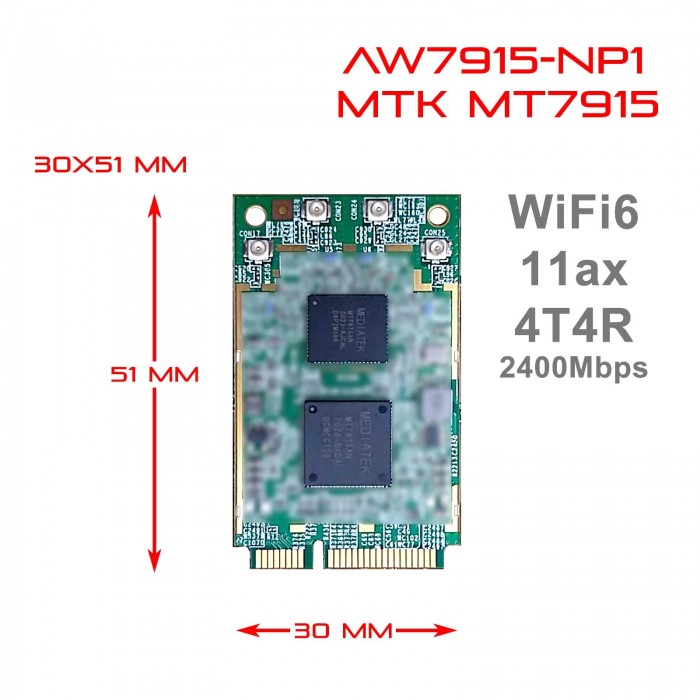
For our report we have used Wi-Fi 6 DBDC (Dual Band Dual Concurrent) miniPCIe module: 524wifi.com-AW7915-NPD ( Mediatek MT7915DAN chipset )

Installed into 7 buses, Setra 516 and MAN Lion Coach types, operation length 3 months. Application  – dual band wifi for passengers.


Setra 516: Length 13.1 m, width, seat amount 55                                                                              MAN Lion Coach: Length 12.1m, width, seat amount 53

Used antennas:

SENCITY® Omni-SR (1399.35.0002)

Huber & Suhner OmPlecs®-TOP 90 RAIL WiFi 2.4-5.8 (100-57-61-02.4) Antonics

Installation method:

Dual band antenna SENCITY® Omni-SR is installed in the front of the bus and above rear door

Used HW platform

Intel i5-6442EQ, 1.9/2.7GHz, 8GB or 16 GB RAM

Intel i7-6822EQ, 2.0/2.8 GHz, 8GB or 16 GB RAM

Intel I5-4300U, Dual core 1.9Ghz, 8GB RAM

Intel Celeron J1900 Quad-Core 2 Ghz, 8GB RAM


Used Linux distribution:

Debian (bullseye-backports) linux-image-amd64, verze 5.15.0-0.bpo.2-amd64, that corresponds to vanilla kernel 5.15.5.

Latest Kernel version also work well – tested for new installation
Please take note – there is no module firmware inside of the module.  You need to compile the driver again after your Linux kernel update!

We have also concluded the tests using the ARM based board and were able to get around 800 Mbit/s with an MCS between 10 and 11 (1020.8 to 1134.3 Mbit/s). This board runs Ubuntu 20.04.4 LTS with a compiled kernel.

You can also use OpenWRT, these modules are supported in OpenWRT version 21 and newer – In OPENWRT you need to set up read RF parameters from eFuse. Kindly be noted.

OpenWRT drivers – GITHUB – https://github.com/openwrt/mt76/tree/master/mt7915   (for MT7916 modules you can use same driver)

OpenWRT system tested on Wallys DR4029 board with QCA IPQ4019 processor  

OpenWRT porting guide example – read here


Firmware:

mt7915_rom_patch.bin

HW/SW Version: 0x8a108a10, Build Time: 20201105222230a

mt7915_wm.bin

WM Firmware Version: ____000000, Build Time: 20201105222304

mt7915_wa.bin

WA Firmware Version: DEV_000000, Build Time: 20201105222323

(Posted on 1/20/2022  –  Latest Kernel version also work well – tested for new installation)

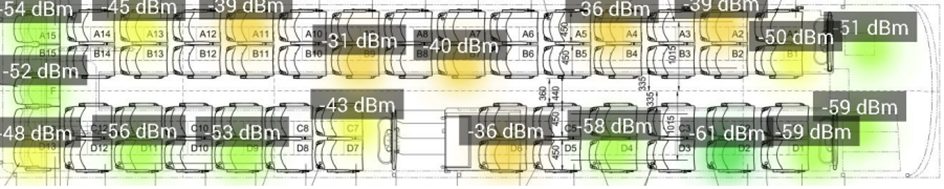
MEASURING THE SIGNAL STRENGTH IN THE BUS

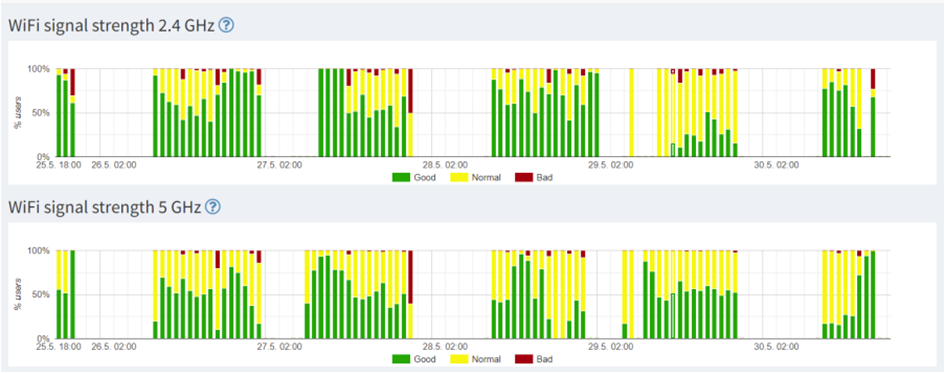
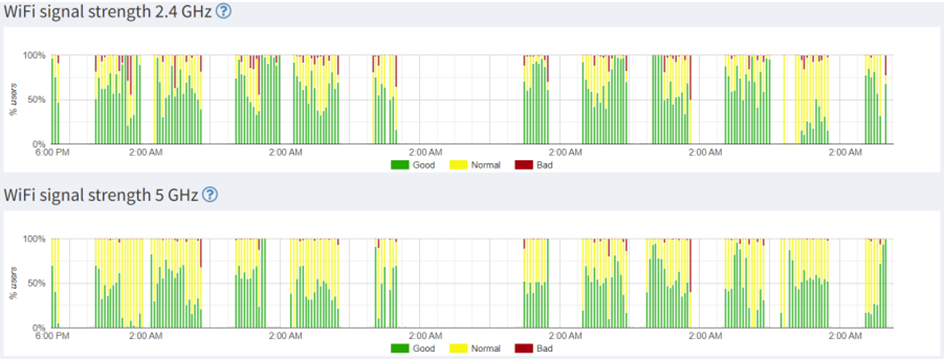
2.4 GHz antenna Huber & Suhner in the middle of the bus + 524wifi.com-AW7915-NPD

5 GHz antenna Huber & Suhner in the middle of the bus + 524wifi.com-AW7915-NPD

2.4 GHz antenna Antonics in the front of the bus + 524wifi.com-AW7915-NPD

5 GHz antenna Antonics in the front of the bus + 524wifi.com-AW7915-NPD

CONCLUSIONS FROM THE TESTING:


The test operations verified that the 524wifi.com-AW7915-NPD DBDC modules are usable in real situations and they are a full-fledged replacement for 2 Compex WLE900VX modules. The module was normally connected to 20-30 mobile devices. The signal strength on the device was in most cases up to 70 dBm.

Good>50 dBm
Normal50-70 dBm
Weak<70 dBm

For DBDC wifi operation, it is important to use an antenna for both 2.4 and 5 GHz frequency zones located in the bus area so that the signal covers all seats. When the bus is heavily occupied, two phenomena are happening at the same time:
1) Multiple devices are connected to the module
2) There is a deterioration of the spread of the RF signal (the human body acts as a signal shield)
The main advantage of using DBDC modules is the reduction of the number of antennas and cables by half. Which brings significant savings and simplifies installation. The disadvantage, on the other hand, can be a bit less coverage of the bus space because of smaller antenna amount.

In OPENWRT you need to set up read RF parameters from eFuse. Kindly be noted.

Tomorrow systems s.r.o. 2022