Posted on

IPQ4019 IPQ4029 Phase Out Alert: Secure Your Upgrade Path with IPQ5018 IPQ5010

Introduction

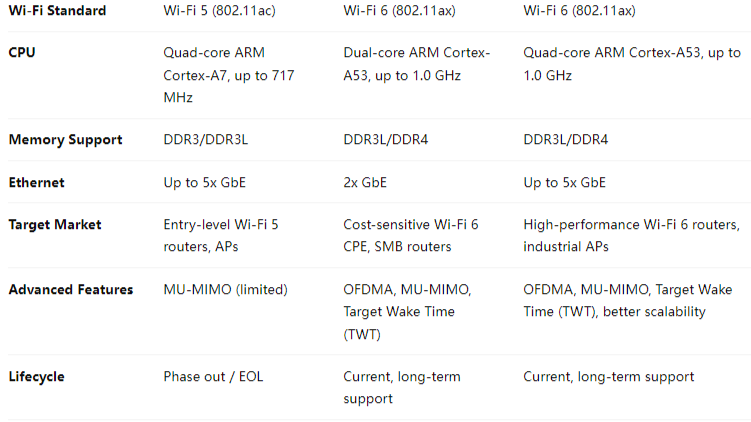
The Qualcomm IPQ4019 and IPQ4029 chipsets have long been popular choices for cost-effective Wi-Fi 5 router boards and networking solutions. However, as Wi-Fi technology advances and demand for higher throughput, better efficiency, and longer product lifecycles grows, these chipsets are now entering the phase out stage.

For product developers and OEMs/ODMs who have built solutions around IPQ4019/IPQ4029, this shift raises a key question: What’s next?

The answer lies in Qualcomm’s next-generation IPQ5018 and IPQ5010 chipsets — designed to deliver superior Wi-Fi 6 performance while offering a cost-effective and future-proof path for industrial and enterprise networking solutions.


Why IPQ4019 / IPQ4029 Are Phasing Out

  • Wi-Fi 5 Limitations: With Wi-Fi 6 becoming the industry standard, Wi-Fi 5 chipsets like IPQ4019/4029 struggle to meet the growing requirements of high-density and high-throughput networks.
  • Lifecycle End
  • Market Demand: Clients now expect advanced features such as OFDMA, MU-MIMO, and improved energy efficiency — capabilities not fully supported by IPQ40xx chipsets.

Why Transition to IPQ5018 / IPQ5010?

1. Wi-Fi 6 Performance

  • Support for OFDMA and MU-MIMO, ensuring stable performance in dense environments.
  • Higher throughput and lower latency compared to IPQ4019/IPQ4029.

2. Cost-Effective Upgrade Path

  • IPQ5010 is ideal for entry-level Wi-Fi 6 solutions, providing a balance of performance and affordability.
  • IPQ5018 offers more robust capabilities for industrial and enterprise-grade products.

3. Extended Lifecycle

  • Qualcomm’s roadmap ensures that IPQ50xx series chipsets will receive long-term support, securing your product investments.

4. Industrial-Grade Applications

  • Rugged and reliable for deployments in smart cities, industrial Wi-Fi, surveillance, and long-distance outdoor networking.
  • Future-ready platform to support customized software development including OpenWrt and QSDK.

Our Solutions Based on IPQ5018/IPQ5010

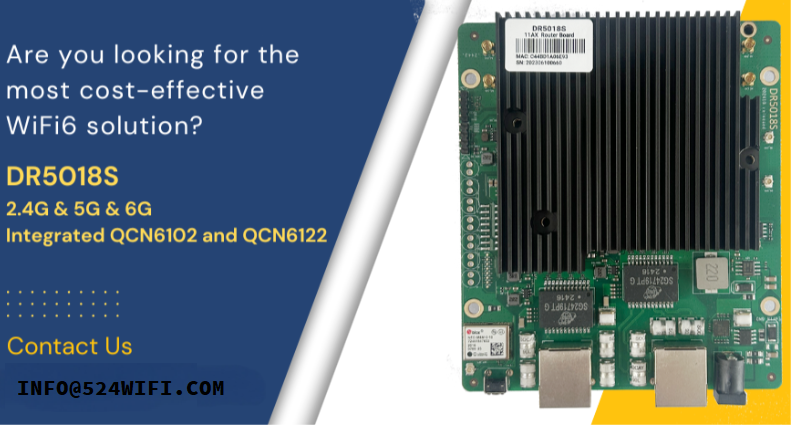
At 524WIFI and Wallys Communications (Suzhou) Co., Ltd., we have developed a range of router boards and wireless solutions built on the IPQ50xx series. Our latest product, the DR5018S, leverages the IPQ5018 chipset to deliver:

  • High-performance Wi-Fi 6 connectivity
  • Multiple Gigabit Ethernet ports
  • Support for industrial applications
  • Flexible OEM/ODM/JDM customization options

With strong hardware and software expertise, we ensures a smooth migration from IPQ40xx-based platforms to IPQ50xx solutions.


Conclusion

The phase-out of Qualcomm’s IPQ4019/IPQ4029 chipsets signals the end of an era — but also the beginning of a new one. By adopting the IPQ5018 and IPQ5010, businesses can secure a future-proof, cost-effective, and high-performance upgrade path that aligns with the growing demand for Wi-Fi 6 technology.

For more details on our IPQ5018/IPQ5010 solutions, or to discuss OEM/ODM opportunities, please visit www.524wifi.com / .net or contact us at info@524wifi dot com or net

Quick Review / More Info:

Both DR4019 and DR5018S support:

  • Wallys AP Controller
  • Hardware SOM version
  • VLAN functionality

The latest DR5018S VLAN configuration guide is first published here: Blog Article
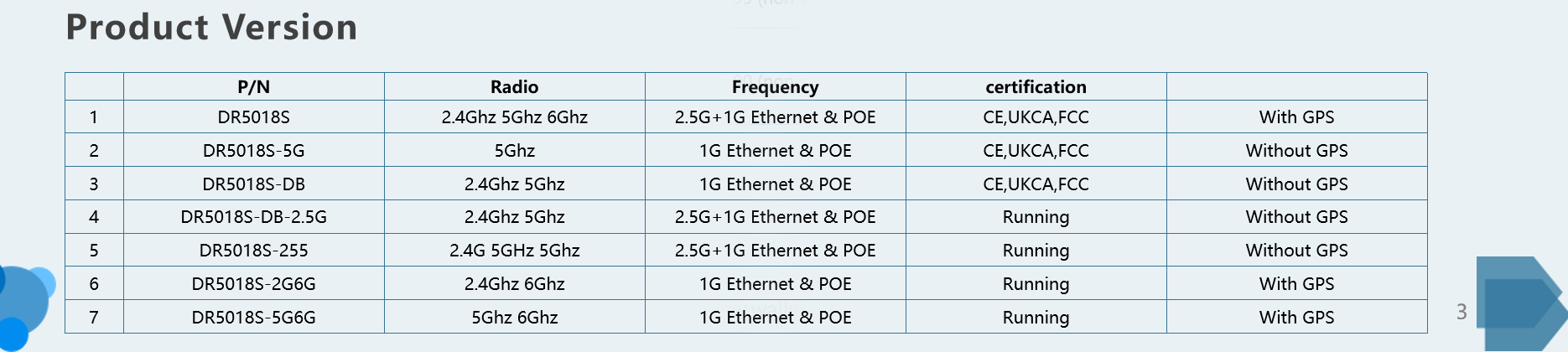
All available DR5018S Versions

Additional DR5018S features:

  • Mesh networking & seamless roaming
  • Long-range PTP over 30 km
  • GPS support
  • Tri-band option
  • FCC, CE, and UKCA certified
  • Proven performance: DR5018S-AP achieved a 14 km 5 GHz link test in Dongbei at 50 m height, with one-way throughput reaching 475 Mbps!
Posted on

IPQ8072 vs IPQ9574: Why Upgrade to Wi-Fi 7 for Your Next Wireless Project

The Qualcomm IPQ8072 has long been a reliable choice for Wi-Fi 6 networking hardware. Many enterprise routers, carrier CPEs, and industrial access points are still powered by IPQ8072 due to its strong balance of cost and performance. However, with the rapid evolution of Wi-Fi 7 (802.11be), the Qualcomm IPQ9574 offers significant technical advantages that make it the logical upgrade path for next-generation solutions.

In this article, we compare IPQ8072 vs IPQ9574, highlighting the major differences and why developers should consider migrating to Wi-Fi 7 hardware.


Overview of IPQ8072 (Wi-Fi 6 SoC)

The Qualcomm IPQ8072 is part of the IPQ807x family, designed for Wi-Fi 6. It features:

  • Quad-core ARM Cortex-A53 processor
  • 8×8 MU-MIMO capability
  • Up to 160 MHz channel bandwidth
  • 1024-QAM modulation
  • Robust support for enterprise and carrier-grade networking

While still capable, the IPQ8072 has reached maturity, and limitations in throughput and latency become noticeable in demanding applications.


Overview of IPQ9574 (Wi-Fi 7 SoC)

The Qualcomm IPQ9574 represents the new generation of Wi-Fi 7 platforms, optimized for ultra-high throughput and low latency. Key features include:

  • Enhanced multi-core CPU architecture for higher processing power
  • 320 MHz channel bandwidth (double that of IPQ8072)
  • 4096-QAM modulation for higher spectral efficiency
  • Support for Multi-Link Operation (MLO)
  • Designed for advanced enterprise, industrial, and carrier networks

This makes IPQ9574 ideal for data-heavy applications such as 8K video streaming, AR/VR, industrial IoT, and low-latency control systems.


IPQ8072 vs IPQ9574 Technical Comparison

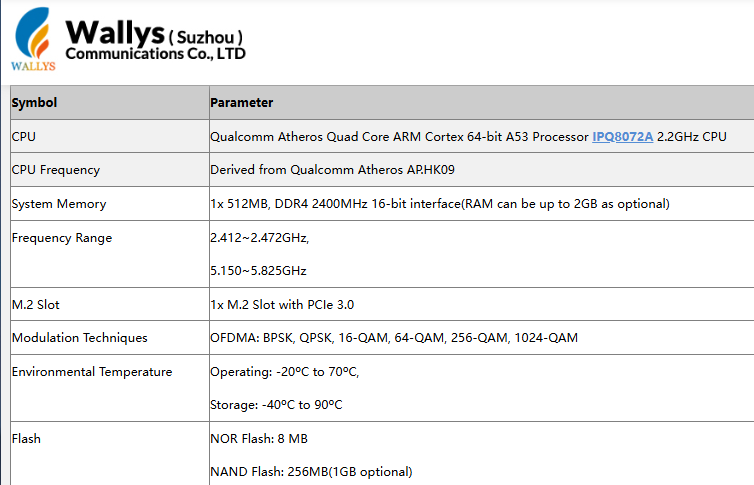
The Qualcomm IPQ8072 is a Wi-Fi 6 (802.11ax) SoC built with a quad-core Cortex-A53 processor. It supports channel bandwidths of up to 160 MHz and uses 1024-QAM modulation, making it a strong choice for enterprise routers, carrier CPE, and industrial APs.

Article content
Data from Wallys DR8072 Webpage

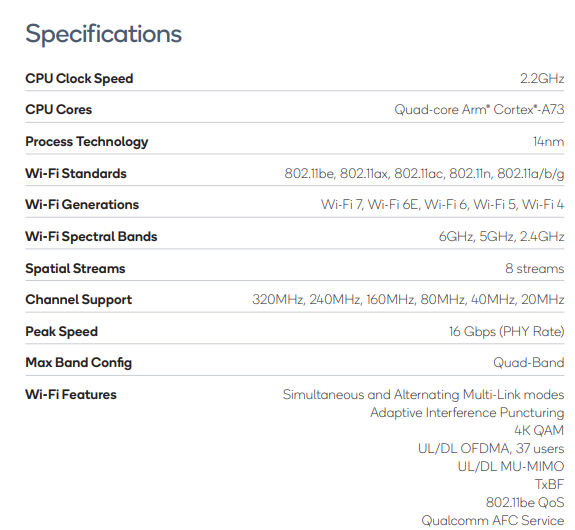
By contrast, the Qualcomm IPQ9574 belongs to the Wi-Fi 7 (802.11be) generation. It features a more advanced multi-core CPU architecture, supports 320 MHz channel bandwidth (double that of IPQ8072), and enables 4096-QAM modulation for higher spectral efficiency. Unlike IPQ8072, it also supports Multi-Link Operation (MLO), a Wi-Fi 7 feature that allows simultaneous use of multiple frequency bands to reduce latency and improve stability. These enhancements make IPQ9574 ideal for next-generation enterprise networks, industrial IoT deployments, low-latency applications, and high-density environments.

Article content
Data from Qualcomm IPQ9574 Datasheet

Why Upgrade from IPQ8072 to IPQ9574?

  1. Performance Leap – Wi-Fi 7 doubles available channel bandwidth and introduces 4096-QAM for significantly higher throughput.
  2. Ultra-Low Latency – MLO ensures faster and more reliable connectivity, critical for real-time applications.
  3. Future-Proofing – As Wi-Fi 6 hardware reaches end of lifecycle, Wi-Fi 7 ensures long-term product competitiveness.
  4. Scalability – IPQ9574’s stronger CPU supports more devices, traffic, and complex networking tasks.

524WiFi and Wallys’ IPQ9574 Router Board Solution

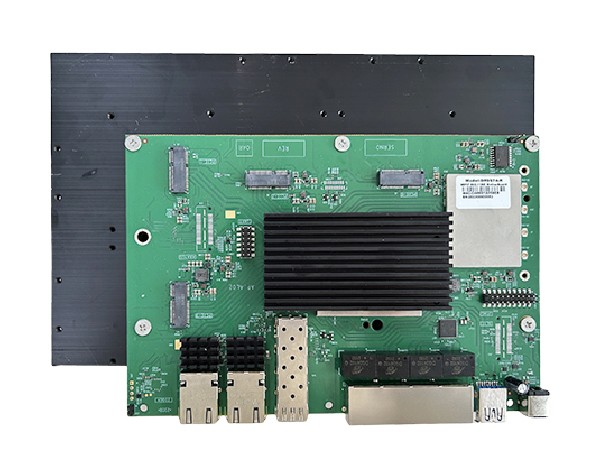
At 524WiFi, we provide hardware solutions based on Qualcomm IPQ9574, including the DR9574 Router Board, designed for Wi-Fi 7 networks. With strong processing power, advanced wireless features, and industrial-grade reliability, it is the perfect upgrade path for developers currently using IPQ8072-based designs.

Frequently Asked Questions (FAQ)

1. Is IPQ8072 still good in 2025?

Yes. The Qualcomm IPQ8072 is still a stable and cost-effective Wi-Fi 6 chipset, suitable for enterprise routers and industrial APs. However, for new projects that require higher throughput, lower latency, and longer product lifecycle, Wi-Fi 7 chipsets such as IPQ9574 are strongly recommended.

Article content
DR9574 board

2. What is the difference between IPQ8072 and IPQ9574?

The IPQ8072 is a Wi-Fi 6 (802.11ax) SoC, supporting up to 160 MHz bandwidth and 1024-QAM. The IPQ9574 is a Wi-Fi 7 (802.11be) SoC with 320 MHz bandwidth, 4096-QAM, and Multi-Link Operation (MLO), enabling much higher throughput and lower latency.

3. Why upgrade from Wi-Fi 6 to Wi-Fi 7?

Upgrading to Wi-Fi 7 provides faster data rates, reduced latency, and better efficiency in high-density environments. For applications such as AR/VR, 8K streaming, and industrial automation, Wi-Fi 7 ensures future-proof performance and competitiveness.

4. Does 524WiFi provide IPQ9574-based solutions?

Yes. 524WiFi and Wallys Communications offer router boards and network modules based on Qualcomm IPQ9574, including the DR9574 Router Board. These solutions are designed for enterprise, carrier, and industrial use cases that demand next-generation Wi-Fi 7 performance.

Posted on

How to Upgrade the Wallys DR4019 Router Board to OpenWrt 23.05 – A Step-by-Step Guide

How to Upgrade the Wallys DR4019 Router Board to OpenWrt 23.05 – A Step-by-Step Guide for Industrial Networks

In the world of industrial WiFi, staying ahead of the curve is key to ensuring your network operates at peak efficiency. That’s why we’re excited to share a new tutorial on upgrading the Wallys DR4019 router board to the latest OpenWrt 23.05 firmware.

Here’s what you’ll learn in the video:

  1. Hardware Setup: The first step is ensuring you have all the required components for the upgrade, including your Wallys DR4019 router board, Ethernet cable, and UART cable. We’ll walk you through the setup to get everything ready for the firmware flash.
  2. Loading the Firmware: Once you’re set up, we guide you through the process of loading the latest OpenWrt 23.05 firmware via TFTP. This simple process ensures your router is ready to take advantage of the latest features.
  3. Verifying the Upgrade: After rebooting, we show you how to check that the firmware has been successfully installed. You’ll learn how to access the updated OpenWrt interface and ensure everything is running smoothly.

Stay Ahead of the Game

This tutorial simplifies the upgrade process for you, helping you stay ahead with the latest technology. If you’re looking for customized industrial WiFi solutions or have any hardware inquiries, feel free to reach out to us at [email protected].

Don’t Miss Out on Our Next Tutorial!

In our upcoming video, we’ll dive deeper into the DR4019’s Mesh capabilities and test its performance across multiple devices. Be sure to follow us for more insights and updates!

Watch the video now to upgrade your DR4019 router board and unlock the full potential of your industrial wireless network!