Most industrial mesh networks start choking after 3-4 hops — latency spikes, throughput collapses, and your robots lose their control link exactly when you need it most.
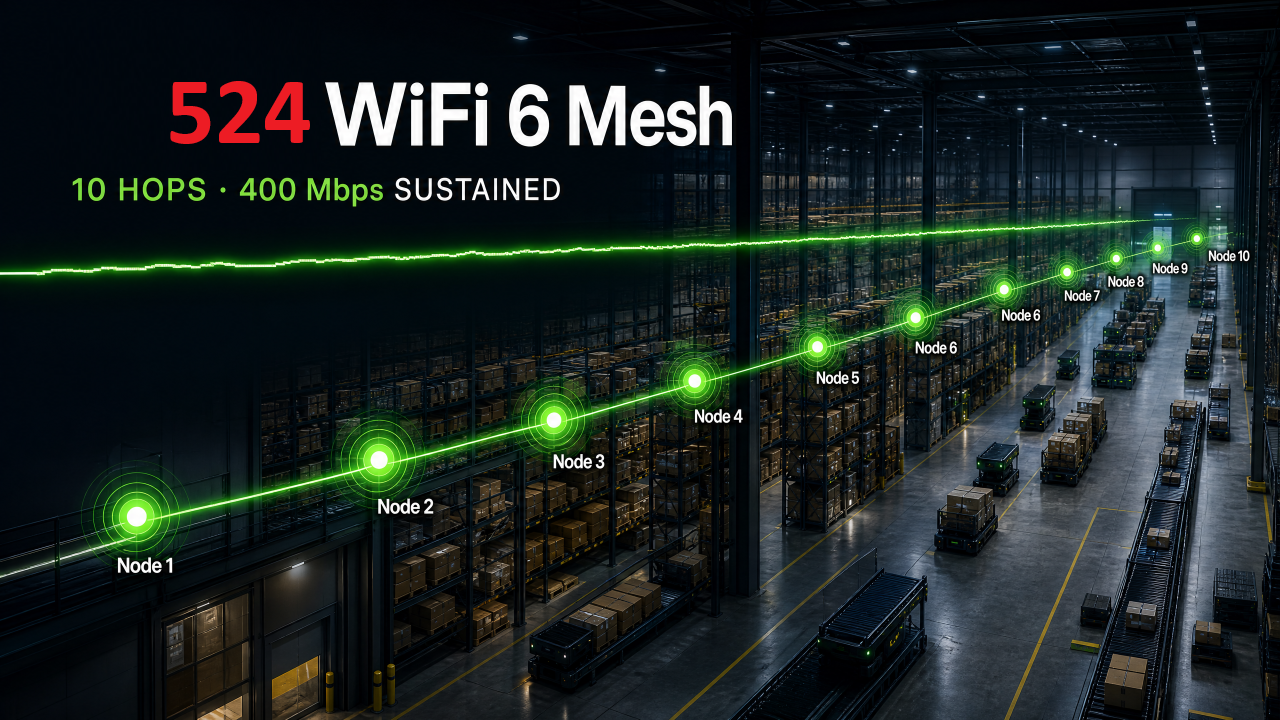
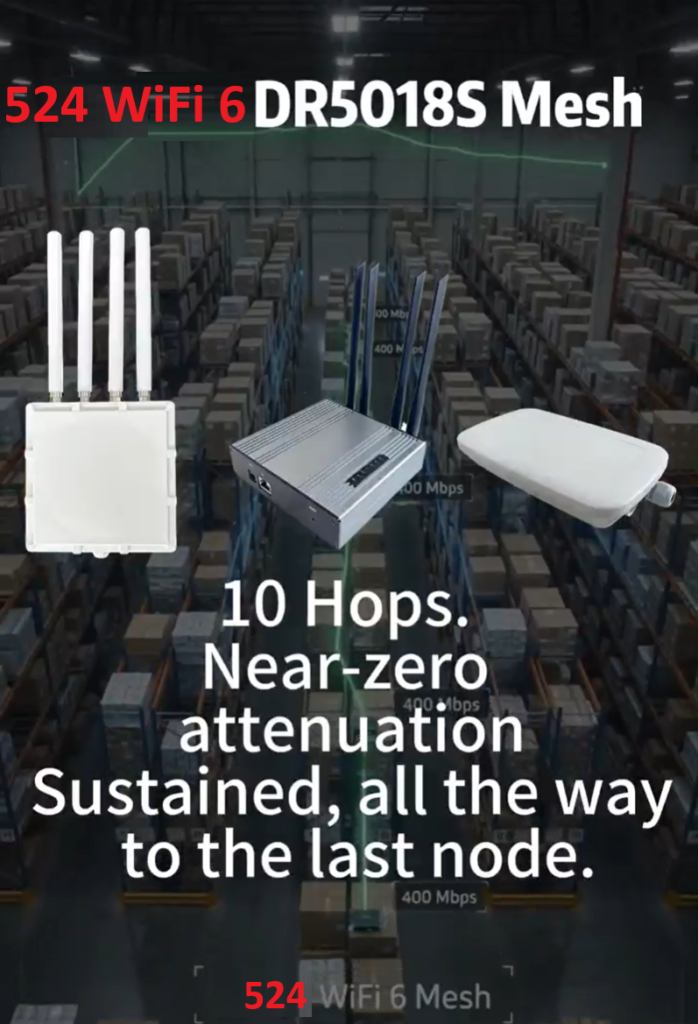
We just wrapped a 10-hop mesh stress test on our WiFi 6 platform, and the results speak for themselves: near-zero attenuation across all 10 hops, with sustained throughput of 400Mbps at the final node.
524WiFI mesh 10 hops testing environment
For AMR fleets, warehouse automation, and multi-robot deployments, this isn’t a lab number — it’s the difference between a robot that stays connected across a 50,000 sq ft facility and one that drops out the moment it turns a corner.
From PC1 to PC2 10 HOPS THROUGHPUT TEST RESULTS
No more compromising on coverage. No more babysitting mesh hops. Just reliable, high-throughput connectivity that scales with your facility, not against it — no need for WiFi 7 to get there.
Reliable Connectivity Is Just as Important as Flight Performance
Modern drones are becoming far more than flying cameras.
Today, drones are used for:
Infrastructure inspection
Precision agriculture
Public safety
Mapping and surveying
Warehouse inventory
Mining operations
Industrial monitoring
At the same time, onboard computing is evolving rapidly. AI processors, multiple cameras, LiDAR, thermal imaging, and edge computing are becoming standard components of professional UAV platforms.
While engineers often spend months selecting flight controllers, sensors, and AI hardware, one component is frequently underestimated:
The wireless communication module.
A poorly chosen Wi-Fi module can become the bottleneck of an otherwise excellent drone design.
Here are five key factors every drone engineer should evaluate before selecting a wireless communication solution.
1. Does the Module Provide Enough Bandwidth for Your Payload?
Not every drone transmits the same type of data.
A basic inspection drone may only send telemetry and compressed video.
An AI-powered drone may simultaneously transmit:
Multiple HD video streams
AI inference results
Telemetry data
Sensor information
Remote control commands
As payloads become more sophisticated, wireless bandwidth quickly becomes a limiting factor.
When evaluating a Wi-Fi module, consider:
Maximum throughput
Number of spatial streams
Channel bandwidth
Support for Wi-Fi 6 or Wi-Fi 7
Higher bandwidth doesn’t simply improve video quality—it also creates more capacity for future upgrades.
2. Is Low Latency More Important Than Maximum Speed?
Many engineers focus on peak data rates.
However, drones often benefit more from consistent low latency than from maximum theoretical throughput.
For applications such as:
Remote piloting
Autonomous navigation
AI-assisted obstacle avoidance
Real-time monitoring
Stable communication is far more valuable than occasional bursts of high speed.
Look beyond the headline specifications and evaluate how the wireless solution performs under continuous, real-world workloads.
3. How Reliable Is the Connection in Complex Environments?
Drones rarely operate in ideal radio environments.
They may fly near:
Buildings
Metal structures
Industrial equipment
Trees
Utility infrastructure
These environments introduce interference, signal reflections, and changing link conditions.
A reliable Wi-Fi module should support features that help maintain stable communication under challenging conditions.
Modern technologies such as Wi-Fi 6 and Wi-Fi 7 introduce significant improvements in efficiency, interference management, and overall reliability compared with earlier generations.
For industrial UAVs, connection stability is often more important than achieving the highest benchmark speeds.
4. Can the Module Integrate Easily with Your Embedded Platform?
Selecting a Wi-Fi module is not only about radio performance.
Engineers should also consider integration.
Questions worth asking include:
Does it support Linux or OpenWrt?
Are software drivers actively maintained?
Is the hardware interface compatible with your design?
Is documentation readily available?
Can the module integrate with NVIDIA Jetson or other edge AI platforms?
Reducing development complexity can significantly shorten time-to-market.
Choosing a well-supported platform often saves more engineering time than selecting a module based solely on specifications.
5. Will the Solution Scale from Prototype to Production?
Many wireless solutions perform well during prototyping.
Production introduces different challenges:
Long-term availability
Industrial reliability
Certification requirements
Thermal performance
Supply chain stability
Choosing a communication platform with a clear product roadmap helps avoid redesigns later in the project lifecycle.
Engineers should think beyond the first prototype and evaluate whether the wireless solution can support future production volumes and product evolution.
Connectivity Is Becoming Part of the Drone Architecture
Modern drones are evolving into flying edge computing platforms.
A typical professional UAV now combines:
Flight control systems
AI processors
Vision sensors
Navigation systems
High-speed wireless communication
Each subsystem depends on the others.
Even the most advanced AI algorithms become less effective if communication is unstable.
Reliable wireless connectivity is no longer just another hardware component.
It has become part of the overall system architecture.
Looking Ahead
The next generation of drones will continue to demand:
Higher bandwidth
Lower latency
More reliable wireless links
Better support for AI workloads
Faster integration with embedded computing platforms
Selecting the right Wi-Fi module today is not simply about improving communication performance.
It is about building a platform that can support the future of autonomous aerial systems.
As drones become smarter, wireless connectivity will play an increasingly important role in enabling safe, efficient, and scalable operations.
Because in autonomous systems, intelligence may guide the mission—but connectivity keeps it flying.
What factors matter most when your team selects a wireless communication solution for UAV projects?
I’d be interested to hear how other drone engineers approach this decision.
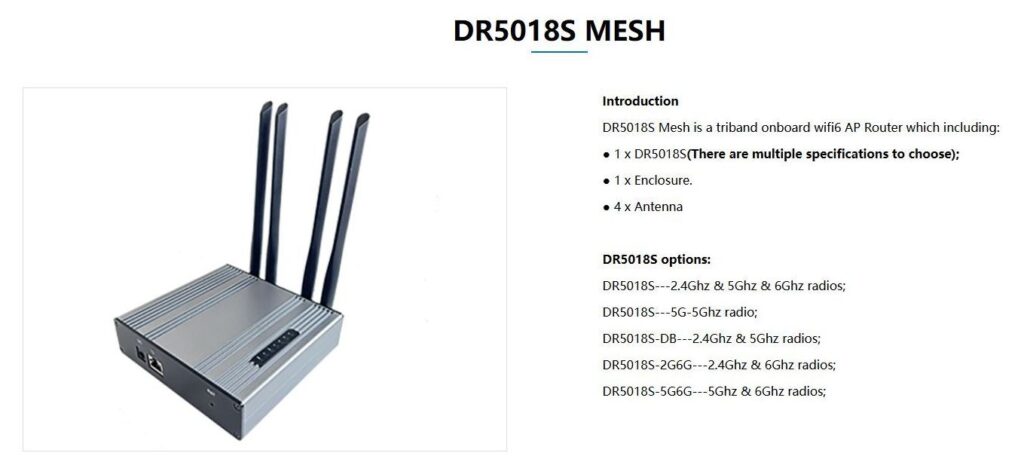
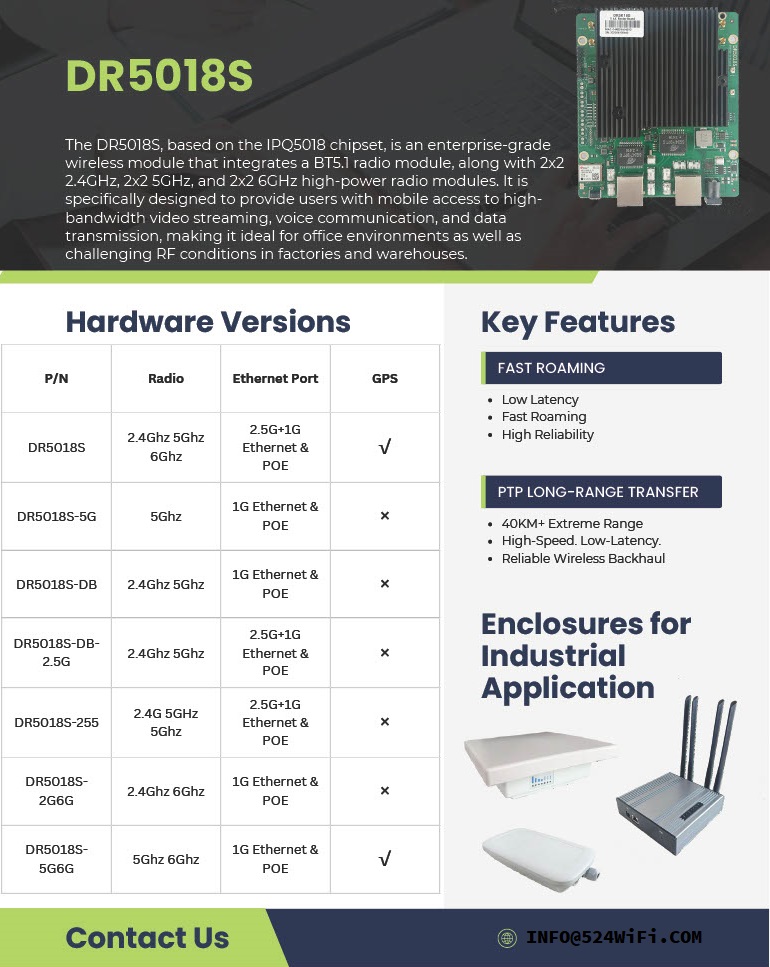
🚀 Introducing the DR5018S – Built for Industrial-Grade Wireless
From smart ports to logistics hubs to long-range PTP connections, the DR5018S is engineered to deliver: ✅ Fast Roaming ✅ 40km+ PTP Long-Range Transmission ✅ Flexible Enclosures for Any Industrial Application
Whether it’s powering connectivity in smart cities, transportation, or critical infrastructure, the DR5018S ensures powerful performance with reliability you can trust.
xperience next-level WiFi 6 tri-band performance with the DR5018S Mesh – designed for industrial, enterprise, and large-scale applications. Seamless connectivity, EasyMesh support, and robust hardware all in one compact solution. 💡 Learn more and explore full specifications on our website:
: Introducing the DR5018S – Built for Industrial Grade Wireless – Qualcomm IPQ5018
🚀 When 5G NR Meets Mesh: Filling the Coverage Gaps
5G NR provides standardized, high-performance connectivity — but there are still scenarios where base station deployment is difficult or impractical:
Drone swarms requiring real-time coordination in remote airspace Robots in underground mines where signals can’t penetrate Military field operations demanding resilient, ad-hoc communication In such environments, Mesh networks step in as a complementary layer, ensuring local connectivity even when 5G NR coverage is limited.
👉 Question for the community: Do you see Mesh as a temporary patch until 5G expands everywhere, or as a long-term complement to 3GPP 5G NR in mission-critical deployments?
Please see our reference guide how to run QCN 9024 / 9074 DR9074-Triband module with our ath11k driver on Rockship board .
The driver is sensitive to the hardware, so we refer you to use the Rockchip board to try these driver. If you have a bigger project, then lets discuss on the driver issues or send us the hardware description and we would help you to develope the ath11k driver for your application.
in the compiled environment. This directory may not be available in the newly downloaded environment. You can compile the kernel to obtain this directory.
Compile the kernel so you can get a new kernel deb with ath11k_pci.
Secondly, the correct firmware of the WiFi card is also required to activate it, you can move our firmware (amss.bin, board-2.bin) to:
/lib/firmware/ath11k/QCN9074/hw1.0
and delete the amss.bin.zst and board-2.bin.zst from the directory.
Setup wireless on ubuntu
Download hostapd
you can download hostapd by use command:
sudo apt-get install hostapd
Use hostapd to create a wireless access point
First, you should turn off ubuntu’s wifi tool by this command:
sudo nmcli radio wifi off
it will block you wifi function unblock wifi by use this command:
sudo rfkill unblock wifi
You can setup an access point by using command:
sudo hostapd hostapd.conf
hostapd.config is a configuration which has set the type of wi-fi you want to enable and the following figure shows its typical structure:
I have marked the most important part with a red box, where ssid represents the name of the wifi and interface represents the device selected to enable wifi. By the way if you don’t know your interface name, you can use command: ip addr which can show you the information about the interface, the wireless interface always seem like wlan* or wlp*.
If you see following output after you use hostapd command:
this means you have successfully started the AP.
And when you see this:
it means a device connected to you access point.
This also means connect if you not set password:
Use wpa_supplicant to connect a access point
First, you should turn off ubuntu’s wifi tool by this command:
sudo nmcli radio wifi off
it will block you wifi function unblock wifi by use this command:
-i can set the interface you want to use to connect. wpa.config is a configuration which has set the type of wi-fi you want to connect and the following figure shows its typical structure:
you can change the ssid to which access point you want.
If you see following output after you use hostapd command:
this means connect successful.
If you want to connect a access point which has a password you should change the wpa_supplicant configuration like this:
the psk is the password proto and key_mgmt is the encryption options.
FAQ
when you see this output you can use: sudo rfkill unblock wifi
when you see this output that means you may run another wpa_supplicant, you should close it then you can run another wpa_supplicant if you don’t know where is it, you can use command: sudo killall wpa_supplicant to kill all wpa_supplicant.
In the rapidly evolving world of wireless networking, the MT7915 stands out as a powerful and versatile solution for modern connectivity needs. Designed to deliver high performance, reliability, and flexibility, this WiFi 6 chip is ideal for a wide range of applications, from industrial IoT to enterprise networking. In this article, we’ll take a deep dive into the features and benefits of the MT7915, and explore why it’s a top choice for next-gen wireless solutions.
Key Features of the MT7915
1. WiFi 6 Technology
The MT7915 supports 802.11ax (WiFi 6), the latest wireless standard that offers significant improvements over previous generations. With features like OFDMA (Orthogonal Frequency Division Multiple Access) and MU-MIMO (Multi-User Multiple Input Multiple Output), it enables faster speeds, lower latency, and better performance in high-density environments.
2. Dual-Band Support
The MT7915 operates on both 2.4GHz and 5GHz bands, providing flexibility for various networking scenarios. Whether you need broader coverage or higher throughput, this chip delivers optimal performance.
3. High Throughput
With support for 2T2R (2 Transmit, 2 Receive) streams, the MT7915 offers impressive data rates, making it suitable for bandwidth-intensive applications like video streaming, online gaming, and industrial automation.
4. OpenWRT Compatibility
The MT7915 is compatible with OpenWRT, a popular open-source operating system for routers and networking devices. This allows for greater customization and flexibility, enabling developers to tailor the solution to their specific needs.
5. Mini PCIe and M.2 keay A+E or B+M Form Factor
The MT7915 comes in a Mini PCIe or m.2 module, making it easy to integrate into a wide range of devices, from routers and access points to industrial equipment and IoT devices.
6. Industrial-Grade Reliability
Designed for harsh environments, the MT7915 operates reliably in extreme temperatures and conditions, making it ideal for industrial applications.
Benefits of the MT7915
1. Enhanced Performance
The MT7915 delivers faster speeds and lower latency compared to previous-generation WiFi chips, ensuring a seamless user experience even in high-density environments.
2. Cost-Effective Solution
With its high performance and flexibility, the MT7915 offers excellent value for money, making it a cost-effective choice for businesses and developers.
3. Future-Proof Technology
By supporting WiFi 6, the MT7915 ensures that your network is ready for the future, with the ability to handle increasing data demands and new applications.
4. Easy Integration
The Mini PCIe form factor and OpenWRT compatibility make the MT7915 easy to integrate into existing systems, reducing development time and costs.
5. Versatility
From smart homes and offices to industrial IoT and smart cities, the MT7915 is suitable for a wide range of applications, providing reliable connectivity wherever it’s needed.
Applications of the MT7915
1. Industrial IoT
The MT7915’s industrial-grade reliability and high throughput make it ideal for industrial IoT applications, such as factory automation, remote monitoring, and smart logistics.
2. Enterprise Networking
With its support for WiFi 6 and high-density environments, the MT7915 is perfect for enterprise networks, providing fast and reliable connectivity for offices, campuses, and data centers.
3. Smart Homes
The MT7915’s dual-band support and high performance make it a great choice for smart home devices, ensuring seamless connectivity for streaming, gaming, and smart appliances.
4. Public WiFi
The MT7915’s ability to handle high-density environments makes it suitable for public WiFi hotspots, such as airports, malls, and stadiums.
Why Choose Mediatek MT7915 Solution?
At 524WiFi, we offer various MT7915 and MT7916 WiFi 6 / 6E module based on the Mediatek chip, designed to meet the needs of modern wireless networks. Our solution includes:
High-quality hardware: Built for durability and performance.
OpenWRT support: Enabling customization and flexibility.
Expert support: Our team is available to assist with integration and optimization.
The MT7915 is a powerful and versatile WiFi 6 chip that offers high performance, reliability, and flexibility for a wide range of applications. Whether you’re building an industrial IoT system, an enterprise network, or a smart home solution, the MT7915 is a future-proof choice that delivers exceptional value.
Unlocking High-Performance Wireless Connectivity for Next-Gen Intelligent Systems
Introduction
As AIoT ( Artificial Intelligence of Things ) and autonomous robotics continue to transform industries — from smart factories to unmanned logistics and surveillance systems — high-performance wireless connectivity has become a mission-critical requirement. Advanced machines need real-time data exchange, seamless remote control, and ultra-reliable low-latency communication (URLLC). This is exactly where WiFi 6 and WiFi 7 modules powered by Qualcomm’s IPQ5018 and IPQ9574 shine.
Why Wireless Connectivity Matters for AIoT & Autonomous Robots
1. Real-Time Sensor Fusion
Robots in smart warehouses, delivery drones, and autonomous patrol vehicles rely on multiple sensors, including cameras, LiDAR, and radar. These sensors generate vast amounts of data that need to be transmitted to central controllers or edge processing nodes in real time.
2. Collaborative Operations
Swarm robotics (groups of robots working together) demand synchronized communication to coordinate movements, object handling, and obstacle avoidance — requiring high bandwidth and low latency.
3. Mobile AI Processing
For AIoT devices in industrial and outdoor environments, real-time data streaming between edge AI processors and cloud systems is crucial to optimize performance using advanced analytics and machine learning models.
Meet the Power Duo: IPQ5018 and IPQ9574
📡 IPQ5018 — Optimized WiFi 6 Solution for Cost-Effective Performance
Ideal for Mid-Range AIoT and Autonomous Devices
Feature Specification : Wireless StandardWiFi 6 802.11ax Bands 2.4GHz + 5GHz Dual-band Data Rate Up to 3Gbps CPU Dual-core ARM Cortex A53 Security WPA3, Secure Boot, Trusted Execution Environment (TEE)Target Applications Drones, AGVs, Smart Cameras, Industrial Sensors
🚀 IPQ9574 — High-Performance WiFi 7 Solution for Next-Level Intelligence
Designed for High-End Robotics and AIoT Hubs
Feature Specification: Wireless StandardWiFi 7 802.11be Bands Tri-band (2.4GHz + 5GHz + 6GHz) Data Rate Up to 21Gbps CPU Quad-core ARM Cortex A73 MLO (Multi-Link Operation)✅ Supported Target Applications Autonomous Vehicles, Smart Manufacturing, Large-Scale Sensor Networks
Key Benefits for AIoT and Autonomous Robotics
✅ Ultra-Low Latency Control
With OFDMA and MLO (in WiFi 7), these modules significantly reduce wireless communication delays, which is essential for real-time remote control and mission-critical data feedback.
✅ High Throughput for AI Workloads
AI-driven devices, particularly those with onboard vision processing or collaborative SLAM (Simultaneous Localization and Mapping), generate vast streams of data. WiFi 6/7 ensures uninterrupted, high-bandwidth transmission.
✅ Interference Mitigation in Dense Environments
AIoT ecosystems often operate in challenging RF environments — factories, ports, or urban areas — where multiple devices compete for bandwidth. Features like BSS Coloring and MU-MIMO (in both WiFi 6 & 7) guarantee efficient channel sharing.
✅ Future-Proof Connectivity
With WiFi 7’s 320 MHz channels and 4096-QAM, autonomous robots and AIoT nodes can benefit from unprecedented wireless speeds, supporting emerging workloads like real-time AI inference streaming or collaborative deep learning updates.
Application Scenarios
Use Case WiFi Module Recommendation Autonomous Mobile Robots (AMR) IPQ5018 Smart Drones IPQ5018 High-Speed AGVs in Warehouses IPQ9574 Remote AI Surveillance Towers IPQ9574 AIoT Sensor Networks in Smart Cities IPQ5018 Large-Scale Robotic Fleets IPQ9574
Why Choose DR5018S & DR9574 Modules
At 524WiFi andWallys Communications, we specialize in developing cutting-edge wireless hardware tailored for industrial applications. Our DR5018S (IPQ5018) and DR9574 (IPQ9574) modules offer:
✅ Industrial-grade durability for harsh environments
✅ Full support for OpenWRT and customizable firmware
✅ Compact form factors perfect for integration into AIoT devices
✅ Strong RF performance with advanced antenna design support
✅ Flexible customization — from hardware interfaces to security features
Final Thoughts
As AIoT and autonomous robots become smarter and more connected, choosing the right wireless solution becomes a strategic decision. Whether you’re building the next-gen delivery robot or deploying a real-time AI sensor network in a smart factory, 524WiFi’s IPQ5018 and IPQ9574-based modules ensure your devices communicate reliably and efficiently — today and into the future.
In the rapidly evolving world of wireless technology, selecting the right hardware platform can make or break your project. Today, we’re putting two industry powerhouses head-to-head: IPQ5332 and IPQ8072. Both come from Qualcomm, both deliver impressive performance — but they’re built for slightly different missions. Let’s dive in.
Meet the Contenders
🔹 IPQ5332 — Compact Power Meets WiFi 7
The IPQ5332 is part of Qualcomm’s latest WiFi 7 lineup, designed to deliver multi-gigabit speeds, ultra-low latency, and enhanced spectrum flexibility. It’s a natural fit for next-generation industrial APs, CPEs, and IoT gateways, where size and performance need to go hand-in-hand.
DR5322 (IPQ5332) Key Features:
✅ Quad-Core Cortex-A53 @ 1.5GHz processor
✅ Onboard 2×2 2.4GHz radio, up to 573Mbps physical data rate
✅ Supports 2×2 5GHz & 2×2 6GHz via QCN9274/QCN6274 WiFi 7 modules, delivering up to 5764Mbps
✅ 4 x 2.5GbE ports + 1 x 10Gbps SFP port for versatile high-speed networking
✅ Full MLO (Multi-Link Operation) support for faster, more reliable wireless connections
🔹 IPQ8072 — Battle-Tested WiFi 6 Powerhouse
The IPQ8072 is a proven leader in the WiFi 6 era, with a strong track record in enterprise APs, public hotspots, and carrier-grade wireless equipment. Its powerful RF design and multi-user optimization make it ideal for handling congested environments with high device density.
DR8072 (IPQ8072) Key Features:
✅ Qualcomm Atheros IPQ8072A Quad-Core ARM Cortex-A53 @ 2.2GHz
✅ Onboard 5GHz radio, up to 2475Mbps physical data rate
✅ Onboard 2.4GHz radio, up to 1147Mbps physical data rate
✅ Memory: 8MB NOR Flash + 256MB NAND Flash (expandable to 1GB NAND)
✅ Supports 11ax TX Beamforming, 11ac/ax MU-MIMO DL/UL, and OFDMA DL/UL ✅ Dynamic Frequency Selection (DFS) support for optimal spectrum use
✅ 1GB DDR3L RAM (expandable to 2GB DDR3L)
✅ M.2 connector for external module expansion, including support for QCN9074
Technology Insights
🌐 WiFi 7’s Secret Weapon: MLO
The IPQ5332 (DR5322) fully supports Multi-Link Operation (MLO), allowing devices to aggregate traffic across multiple bands simultaneously (2.4GHz + 5GHz + 6GHz). This translates to:
✅ Faster real-world speeds
✅ Lower latency
✅ Greater reliability in challenging RF conditions
For real-time applications like video surveillance, industrial automation, and low-latency remote control, this is a game changer.
🚀 IPQ8072’s Strength: Multi-User Optimization
The IPQ8072 (DR8072) excels in environments where many devices are connected at once, such as:
✅ Large offices
✅ Shopping malls
✅ Transportation hubs
✅ Smart cities
With its 4×4 MU-MIMO and OFDMA capabilities, it efficiently handles concurrent traffic from dozens of users, delivering consistently reliable performance.
Which One Fits Your Project?
Use Case Recommended Solution
Building for WiFi 7 future?✅ IPQ5332 (DR5322)
Industrial APs or IoT hubs?✅ IPQ5332 (DR5322)
High-density public WiFi?✅ IPQ8072 (DR8072)
Upgrading existing WiFi 6?✅ IPQ8072 (DR8072)
Conclusion
For those planning next-generation deployments, especially in industrial, smart city, or IoT-focused networks, the IPQ5332 (DR5322) is the perfect choice. Its MLO, WiFi 7 support, and 10Gbps SFP uplink make it a future-proof powerhouse.
For large-scale public access and enterprise WiFi 6 deployments, the IPQ8072 (DR8072) remains an outstanding option, with its high-density optimization and reliable performance already proven in the field.
In today’s fast-paced digital landscape, the demand for robust and efficient wireless connectivity has never been greater. Mediatek’s cutting-edge Wi-Fi 6, Wi-Fi 6E, and Wi-Fi 7 modules are designed to meet these demands, providing seamless integration with various AI Linux PCs, including popular distributions like Debian, Ubuntu, Fedora, and more. These modules are set to revolutionize how users experience connectivity across multiple platforms.
Key Features of 524WiFi MIDIATEK’s Wi-Fi Modules
Wi-Fi 6 (802.11ax): This standard introduces significant improvements in speed, capacity, and efficiency. With features like Orthogonal Frequency Division Multiple Access (OFDMA) and Multi-User Multiple Input Multiple Output (MU-MIMO), Wi-Fi 6 can handle multiple devices simultaneously without compromising performance. This is particularly beneficial in environments with high device density, such as offices or public spaces.
Wi-Fi 6E: Expanding on the capabilities of Wi-Fi 6, Wi-Fi 6E operates in the newly available 6 GHz band. This additional spectrum allows for more channels, reducing congestion and enabling higher data rates for bandwidth-intensive applications like streaming and gaming. The increased capacity ensures that users can enjoy uninterrupted connectivity even in crowded environments.
Wi-Fi 7 (802.11be): As the latest advancement in wireless technology, Wi-Fi 7 promises even faster speeds and lower latency through features like 320 MHz channels and enhanced MU-MIMO capabilities. This will be a game-changer for applications requiring real-time data transmission, such as augmented reality (AR) and virtual reality (VR).
Compliance and Certifications
524WiFi’s commitment to quality and safety is underscored by its extensive certifications. Most of their modules have passed rigorous testing and obtained certifications from recognized international bodies, including:
FCC (Federal Communications Commission): Ensuring compliance with U.S. regulations for electronic devices.
CE (Conformité Européenne): Certifying that products meet European health, safety, and environmental protection standards.
IC (Industry Canada): Meeting Canadian regulatory requirements for communication devices.
RCM (Regulatory Compliance Mark): Compliance with Australian electrical safety standards.
NCC (National Communications Commission): Adhering to Taiwanese communication regulations.
These certifications emphasize the performance and reliability of 524WiFi’s products while demonstrating their dedication to creating a seamlessly connected IoT landscape.
Compatibility with Linux Distributions
Mediatek’s Wi-Fi modules are designed with compatibility in mind, ensuring that they work seamlessly across various Linux distributions:
Debian/Ubuntu: Users can easily install drivers through package managers or compile from source if necessary.
Fedora/CentOS: The modules support the latest kernels available in these distributions, providing out-of-the-box functionality for most users.
Arch Linux/OpenSUSE/Manjaro: These distributions often have up-to-date kernel support, allowing users to take advantage of the latest features offered by Mediatek’s modules.
Red Hat Enterprise Linux/Oracle/Linux Mint/Gentoo/Slackware: These distributions may require additional configuration but are fully capable of supporting Mediatek’s Wi-Fi technology with the right drivers.
Enhanced Performance for AI Applications
The integration of Mediatek’s Wi-Fi modules into AI-driven Linux PCs enhances performance significantly. The high throughput and low latency provided by these technologies enable faster data processing and improved communication between devices. This is crucial for applications such as machine learning models that require large datasets to be transmitted quickly and efficiently.Moreover, the power efficiency of Wi-Fi 6 and beyond means that devices can maintain longer operational times without frequent recharging or energy consumption concerns. This is particularly important for IoT devices that rely on continuous connectivity.
Conclusion
Mediatek’s Wi-Fi 6, 6E, and 7 modules represent a significant leap forward in wireless technology. Their compatibility with a wide range of Linux distributions makes them an ideal choice for users looking to enhance their AI Linux PC experience. With faster speeds, increased capacity, improved efficiency, and compliance with international standards, these modules are poised to transform how we connect in an increasingly digital world. Embrace the future of connectivity with 524WiFi’s innovative solutions today!