Posted on

Standard Edge Computing Box vs. Custom Jetson Carrier Board: How Should Robotics and Drone Makers Choose?

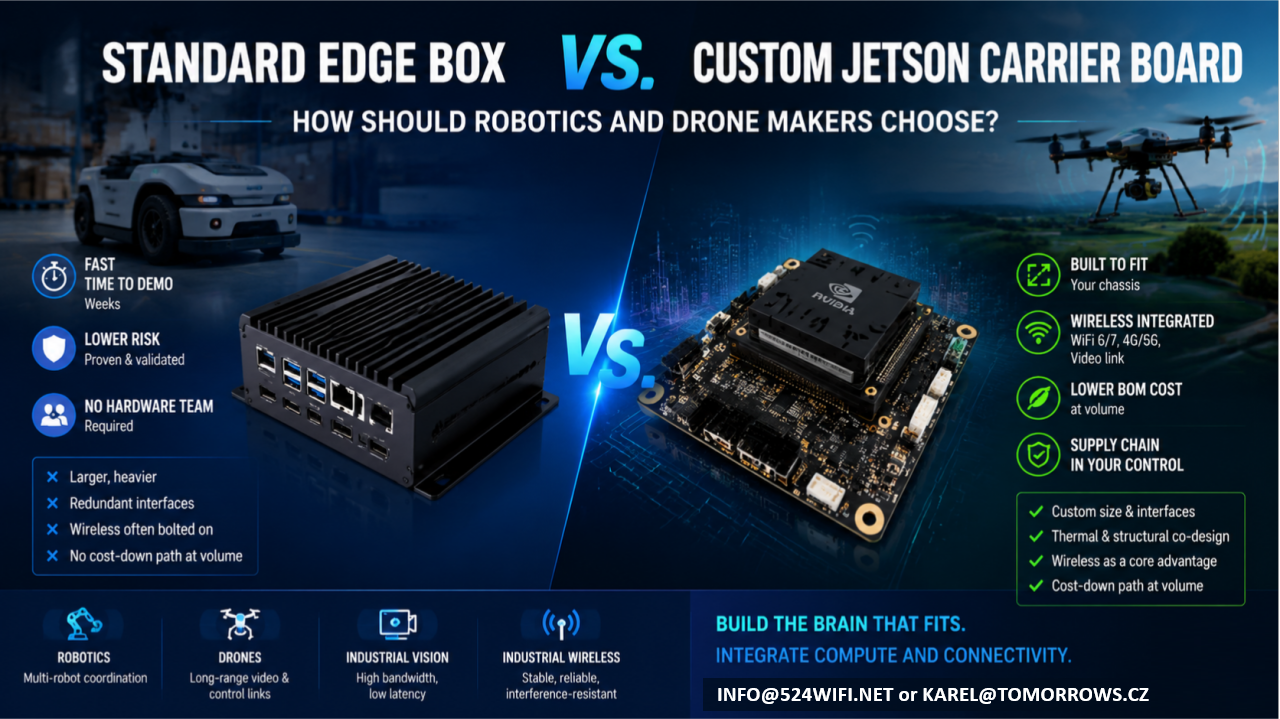
If your team has already built the robot chassis or drone airframe, and what’s missing is the “brain” — an edge compute module that can run vision, navigation, and decision-making — you’re almost certainly weighing two paths:

Option A: Buy a standard edge computing box and bolt it onto your platform Option B: Design a custom carrier board around a Jetson module and integrate it directly into your product

Neither path is universally right. Each fits a different stage, scale, and product positioning. This article lays out the trade-offs so you can make the call with your eyes open.

The short version: it’s a trade between speed and long-term cost

  • A standard box trades a proven industrial design for development speed — at the cost of long-term compromises in cost, size, and reliability.
  • A custom carrier board trades a heavier upfront engineering investment for lasting product competitiveness.

Which one makes sense depends on where you are right now.

Option A: Standard Edge Box — Fast, but with a Low Ceiling

Off-the-shelf Jetson boxes — whether NVIDIA’s own dev-kit enclosures or third-party integrated industrial PCs — have one clear strength: speed.

Advantages

  • Fast time to demo: plug in power and network, and you’re running within weeks
  • Lower risk: standard products are already validated, so you’re not carrying hardware design risk
  • No hardware team required: your software team can get the system running without a dedicated hardware engineer

But the trade-offs are real

  1. Size and weight are the biggest problem. Standard boxes are built for broad compatibility and generic thermal margins, so they’re almost always bigger and heavier than what you actually need. For a drone, where every gram matters, that extra weight eats directly into flight time and payload. For a robot chassis that’s already been finalized, bolting on an external box often means re-tooling the enclosure and adding brackets — which breaks the industrial design you already locked in.
  2. Redundant interfaces you’re paying for. To serve “everyone,” standard boxes ship with a pile of ports you’ll never use — extra USB, HDMI, multiple Ethernet jacks. Each of those is both a cost line and a reliability liability: exposed connectors don’t hold up well against vibration and dust in industrial environments.
  3. Wireless connectivity is the most overlooked weak point of the bolt-on approach. Robots and drones need stable video links, control links, and multi-unit networking. The radios in standard boxes are usually consumer-grade, and they tend to drop connections and show latency jitter under the concurrent-device, high-interference conditions common in warehouses, farms, and industrial sites. That usually forces you to bolt on a second box — an industrial-grade wireless module — on top of the first. Now you’ve got a box on a box, with size, cabling, and power delivery spiraling out of control.
  4. No cost-down path at volume. Standard boxes are purchased per unit at a fixed price; the bigger your production run, the worse the economics get. And your supply chain sits entirely with someone else — you have no leverage if they raise prices or discontinue the part.

Who this fits: teams still in validation, prototypes or small batches (a few dozen units or fewer), teams that haven’t locked their final product form yet, or teams that just want to get the algorithm running before dealing with hardware.

Option B: Custom Jetson Carrier Board — Slower, but Built for Volume

A custom carrier board means keeping only the Jetson module itself and designing a new PCB around your actual product requirements — size, interfaces, power, wireless, thermal — so the compute unit is truly built into your chassis, not bolted on top of it.

Advantages

  1. The footprint follows your chassis, not the other way around. A carrier board can be shaped to fit into an arm, a body cavity, a drone gimbal bay — anywhere a standard box simply can’t go.
  2. Only the interfaces you actually need, with wireless (WiFi 6/7, 4G/5G, video links) integrated directly onto the same board instead of bolted on as a second module. One less board-to-board connection means one less failure point, plus far less cabling and structural volume to manage.
  3. Thermal and structural design can be co-engineered. The board can be designed to work with your chassis’s own thermal paths and metal structure, instead of carrying its own standalone fan or heatsink like a boxed unit does — critical for drones and sealed robot enclosures.
  4. Meaningfully lower BOM cost at volume, and your design assets and supply chain stay in your own hands, rather than being exposed to a single vendor’s pricing or discontinuation decisions.
  5. This is where wireless communication genuinely becomes part of your product’s competitive edge. Most customers who come to us asking for “a Jetson carrier board” eventually realize the real bottleneck is the wireless link — roaming latency during multi-robot coordination, interference resistance for video transmission, stability of long-range control links. Board-level integration lets you co-optimize the WiFi 6/7 RF front end, antenna placement, and EMC design together with the compute board in a single pass — something a box-plus-bolt-on-module combination can never achieve.

Trade-offs

  • Requires a proper design, prototyping, and validation cycle upfront (typically weeks to a few months, depending on complexity)
  • Requires a partner who understands both Jetson hardware design and RF engineering — teams with both skill sets aren’t common
  • At very small batch sizes (single digits to a few dozen units), the amortized development cost may not pencil out

Who this fits: teams whose product form is already locked and heading toward volume production (typically 100+ units), teams with hard requirements on size/weight/battery life, or teams for whom wireless performance — multi-robot coordination, long-range video, industrial-grade networking — is itself a core product differentiator.

Quick Decision Table

Dimension Standard Edge Box Custom Jetson Carrier Board Development timeline Weeks Weeks to months Upfront investment Low Medium-high (one-time) Per-unit cost at volume Fixed, no cost-down path Decreases with volume Size / weight Constrained by standard enclosure Fully customizable Wireless integration Usually bolted on, extra link in the chain Can be co-designed with the compute board Supply chain control Dependent on a single vendor Design assets owned in-house Best fit stage Validation / small batch Volume production / finalized product

What We Can Do for You

This is exactly what we do at 524WiFi and Wallys: custom carrier board design around Jetson modules, combined with our own track record in industrial-grade WiFi 6/7 and long-range wireless transmission — so compute and connectivity end up on a single board, instead of customers having to stitch together a “Jetson box + industrial wireless module” combo themselves.

If your team:

  • Already has a robot or drone product form and is weighing edge-compute options
  • Has validated a demo on a standard box and is now thinking about cost-down and miniaturization for volume production
  • Needs multi-robot coordination, long-range video transmission, or interference-resistant networking — not just raw compute

Reach out and let’s talk through your specific use case: info at 524wifi.net

We’re happy to start with a free assessment of your current setup to help you decide whether it’s time to keep iterating on a bolt-on box, or move straight to a fully integrated custom design.
Posted on

Jetson Off-the-Shelf SOM vs. Custom Carrier Board: When Should You Make the Switch?

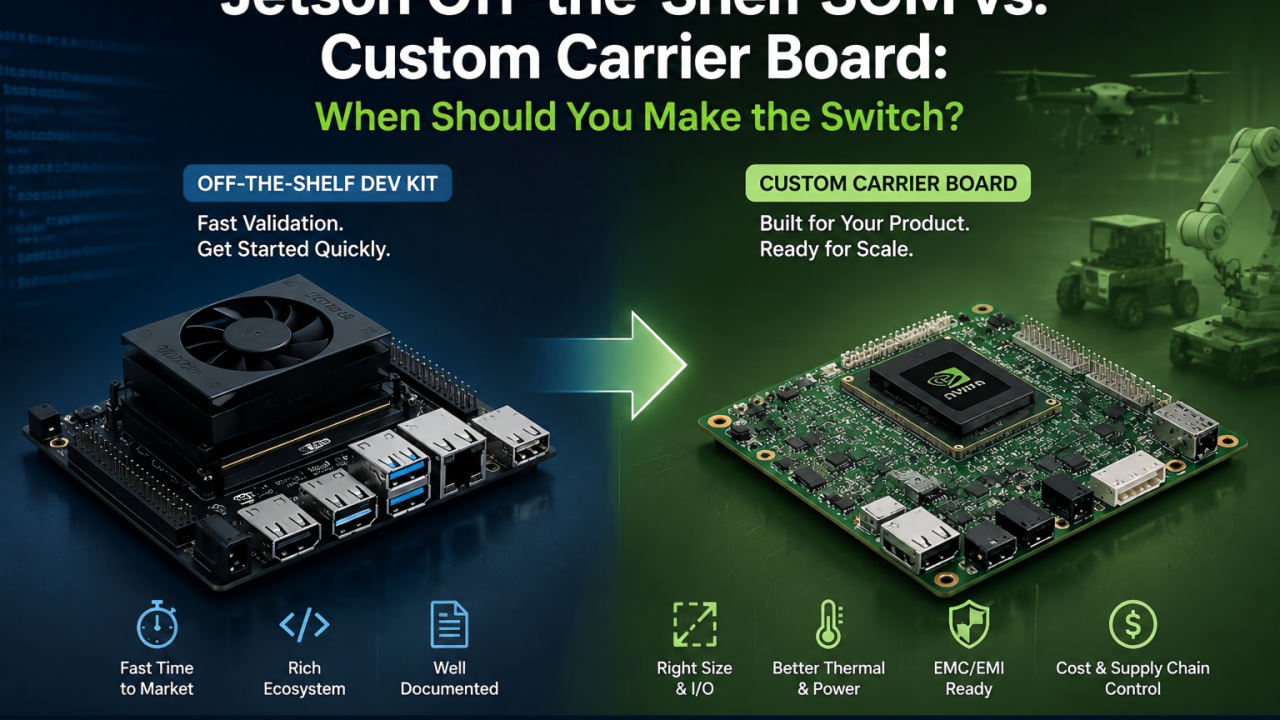
The question I get asked most often in edge AI hardware consulting is: “We’ve already got our demo running on a Jetson off-the-shelf dev kit — is it time to move to a custom carrier board?”

There’s no one-size-fits-all answer, but there are a few clear signals worth sharing.

First, Know What the Stock Dev Kit Is Good For

The Jetson ecosystem’s off-the-shelf dev kits are mature and well-documented, and their real value is fast algorithm validation. If you’re still tuning models and debugging your pipeline, sticking with the stock board is almost always the right call — you don’t want to split your team’s focus between hardware design and algorithm iteration at that stage.

Moving to a custom carrier board too early is a common trap: hardware design can’t keep pace with fast-moving algorithm changes, and every board respin ends up slowing the whole project down.

Signals That It’s Time to Switch to a Custom Carrier Board

Signal 1: Physical space becomes a hard constraint Drones, robotic arm end-effectors, and small inspection robots are all extremely sensitive to size and weight. In these cases, the stock module’s dimensions and connector overhead often can’t meet mechanical requirements. A custom carrier board can be laid out around your actual mechanical envelope, instead of forcing your design to fit the stock form factor.

Signal 2: Your I/O requirements don’t match the stock board Needing a specific number of CSI camera interfaces, industrial buses like CAN or RS485, or wanting to strip out unused interfaces to cut cost and power draw — these customization needs are hard to satisfy with an off-the-shelf board.

Signal 3: Production cost and supply chain control Once off-the-shelf modules go into volume production, unit pricing and lead times aren’t fully in your hands. A custom carrier board has higher upfront design cost, but at mid-to-high volume it typically gives you better control over BOM cost and lead times — especially relevant given ongoing supply chain volatility.

Signal 4: Power and thermal performance are core to your application Drones care deeply about weight and flight time; outdoor equipment needs wide operating temperature ranges and passive cooling. These requirements need to be addressed at the carrier board design stage — a generic thermal solution on a stock board rarely gets you there.

An Often-Overlooked Factor: EMC/EMI Design

For drones and industrial equipment operating in electrically noisy environments especially, if the carrier board layout isn’t designed with EMC in mind from the start, you’re likely to run into certification issues later — and the rework cost at that point far exceeds the extra design time it would have taken upfront.


Bottom line: an off-the-shelf module answers “can it run?” — a custom carrier board answers “can it run reliably, cost-effectively, and at scale?” Deciding when to switch really comes down to identifying the point where your project moves from validation to productization.

If you’re evaluating a custom carrier board for a Jetson-based platform, happy to talk through your specific application and technical requirements.

Posted on

IPQ5018 Inside: DR5018S Board Redefines Industrial WiFi 6 Connectivity

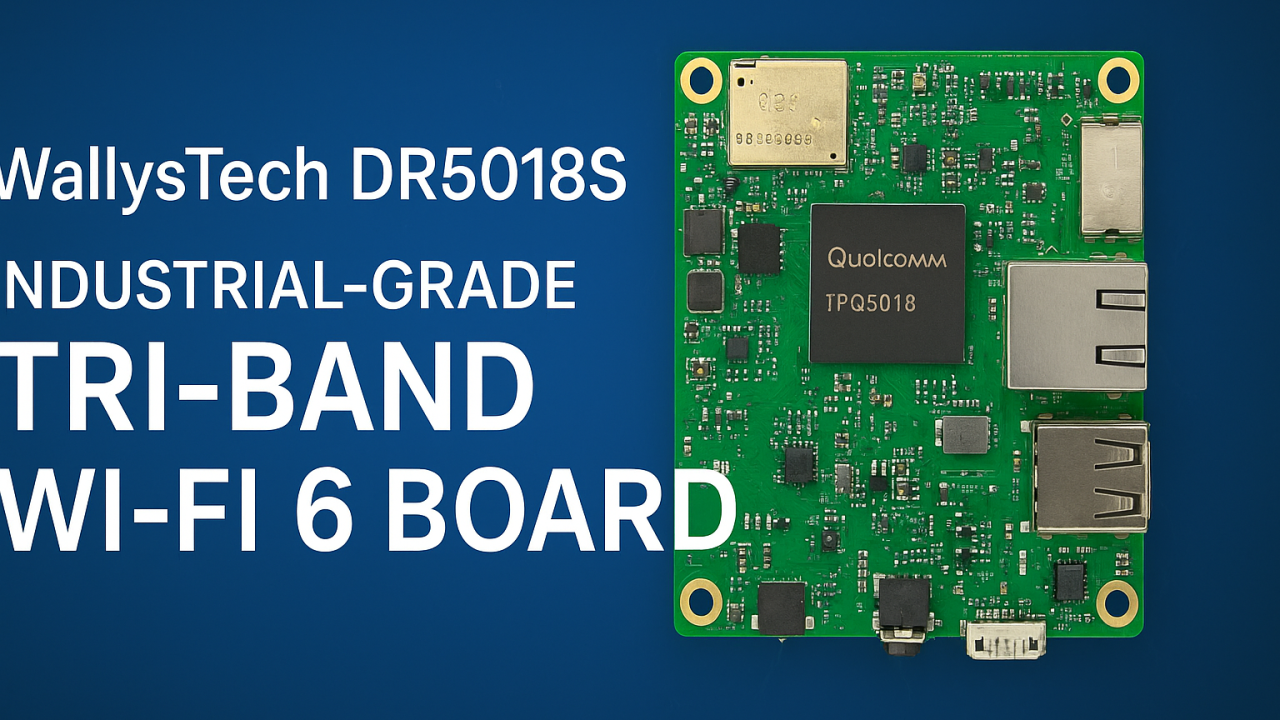
🌐 Introducing DR5018S — Industrial-Grade Tri-Band WiFi 6 Board for OpenWRT and OpenWiFi development

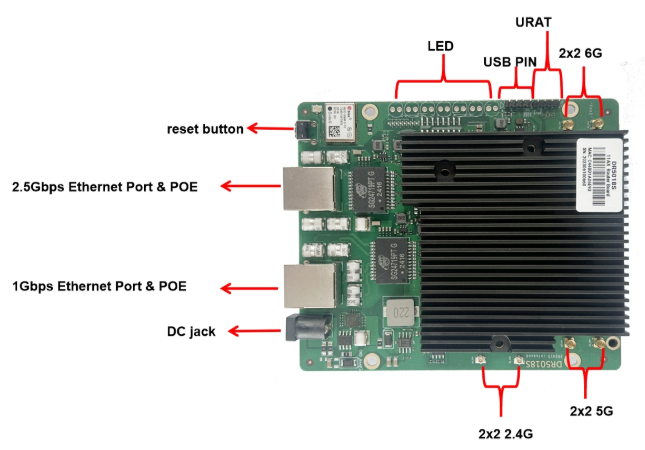
524WiFi introduces the WallysTech DR5018S, a high-performance industrial-grade WiFi 6 platform built for the next generation of wireless networks. Powered by the Qualcomm IPQ5018 SoC, the DR5018S integrates 2.4GHz, 5GHz, and 6GHz bands into one compact board — offering exceptional throughput, low latency, and strong adaptability for modern wireless environments.


⚙️ Key Features

  • Qualcomm IPQ5018 SoC — Dual-core ARM 64-bit A53 @1.0GHz
  • Tri-band support: 2.4GHz (573 Mbps) + 5GHz (2402 Mbps) + 6GHz (2402 Mbps)
  • WiFi 6 (802.11ax) with OFDMA, MU-MIMO, 1024-QAM
  • Memory & Storage: 512 MB DDR3L + 128 MB NAND Flash
  • Networking: 1× 2.5 GbE + 1× 1 GbE + USB 2.0 + SGMII + UART
  • Optional modules: GPS and Bluetooth 5.1
  • Power: 12–52 V DC or 802.3at/bt PoE
  • Operating temperature: –40 °C ~ +70 °C (industrial-grade)
  • Certifications: CE / FCC / UKCA
Article content

💡 Why DR5018S Stands Out

✅ Tri-band flexibility — handle high-density environments and interference-free operations

✅ Future-ready with 6GHz — prepared for WiFi 6E and early WiFi 7 transition

✅ Industrial-grade reliability — wide temperature, PoE, and durable design

✅ Open-source platform — OpenWRT/OpenWiFi for customization and fast development

✅ 2.5GbE interface — for high-throughput backhaul and mesh deployments

Article content

🏭 Real-World Applications

The DR5018S is designed for industrial and enterprise-grade wireless networks, enabling reliable connectivity in demanding conditions:

🔹 Mining & Oilfield Operations — establish long-distance wireless mesh links for remote monitoring, sensors, and field communication networks.

🔹 Smart Cities & Urban Infrastructure — build tri-band APs and gateways for IoT devices, cameras, and autonomous systems.

🔹 Industrial IoT & Automation — integrate into factory APs or gateways with OpenWRT for flexible control and connectivity.

🔹 Edge Computing & AI Gateways — combine compute + tri-band WiFi for edge data collection and analysis.

🔹 Warehouse & Logistics — enable low-latency mesh communication for autonomous AGVs and real-time tracking.

🔹 Outdoor Mesh & Backhaul Nodes — leverage 6GHz as a dedicated backhaul channel for high-speed, interference-free wireless mesh.

Its flexibility also makes DR5018S an excellent foundation for OEM/ODM wireless solutions, custom AP design, and smart industrial routers.


🚀 Empowering Wireless Innovation

At 524WiFi, we help partners accelerate product development and reduce evaluation costs through open, modular, and stable platforms. The DR5018S continues our mission to bridge industrial-grade reliability with open-source innovation — enabling faster time-to-market and future-ready WiFi 6/6E connectivity.

Posted on

Chipset Comparison: IPQ5322 vs IPQ5424-What’s the Difference and Which One Fits Your Project?

DR5332S vs DR5424: What’s the Difference and Which One Fits Your Project?

As Wi-Fi 7 enters the spotlight of next-gen wireless connectivity, developers and OEMs are seeking powerful, cost-effective router boards to power AIoT, edge computing, mesh networking, and enterprise-grade gateways. At Wallys, we provide two flagship tri-band Wi-Fi 7 router boards: the DR5332S and the DR5424. While they share a common mission — delivering ultra-reliable, high-throughput connectivity — they are built on different SoC platforms and tailored for slightly different project needs.

Let’s break down the differences and help you decide which one is the right fit for your application.

1. Chipset Comparison: IPQ5322 vs IPQ5424

CPU Architecture: A53 vs A55

  • The IPQ5424 uses a Cortex-A55 @1.8GHz, which is newer, more efficient, and more powerful than the Cortex-A53 @1.5GHz in IPQ5332.
  • A55 supports out-of-order execution, making it significantly better for multitasking and edge workloads.

IPQ5424 offers superior computing performance, making it ideal for intensive processing and multitasking at the edge.

AI Acceleration

  • IPQ5424 benefits from its more capable CPU architecture and overall system bandwidth for smoother AI task handling.
Article content

If you’re considering router boards such as Wallys DR5332S (IPQ5332) or DR5424 (IPQ5424):

  • 🧩 DR5332S + IPQ5332: Great for budget-sensitive, compact, quick-to-market solutions
  • 🚀 DR5424 + IPQ5424: Built for edge intelligence, multi-client environments, and future-proof mesh deployments

🔍 DR5424 offers higher performance and better power efficiency at the same time the costs will be higher than DR5322S.

Article content

2. Wireless Capabilities (Tri-Band Wi-Fi 7)

Both boards support tri-band (2.4GHz + 5GHz + 6GHz) Wi-Fi 7, including:

  • Multi-Link Operation (MLO) for increased stability
  • 320MHz bandwidth support on 6GHz band
  • 4096-QAM for enhanced throughput
  • Onboard radio modules for space-saving and simplified integration

However, DR5424 has more headroom for advanced use cases involving concurrent client management, AI inference at the edge, or industrial-grade networking.

3. Use Case Suitability

💡 Recommendation:

  • Choose DR5332S if your project prioritizes cost, compactness, and moderate throughput.
  • Choose DR5424 if you need higher computing power, better future-proofing, and support for intensive applications like edge inference, video analytics, or high-density mesh.

4. Hardware Interface & Customization

Both boards offer:

  • 2.5G Ethernet
  • Multiple UART, I2C, SPI
  • M.2 / USB3.0 / GPIO
  • Support for OpenWRT SDK
  • Optional expansion for LTE/5G/Storage modules

Customization and ODM services are available for both platforms.

5. Pricing & Availability

Both models are available for sampling, with volume support for OEM/ODM integration. DR5332S is generally more affordable and available sooner for entry-level or mid-range products, while DR5424 is geared for premium products with long-term lifecycle planning.

📬 For pricing, datasheets, or demo kits, contact us at: 📧 info@524wifi dot net or com

🧠 Final Thoughts

Whether you’re building a smart city gateway, an industrial mesh router, or a next-gen enterprise AP, 524WiFi and Wallys’ Wi-Fi 7 router boards offer flexible, powerful foundations.

  • DR5332S → Cost-effective, compact, fast-to-market
  • DR5424 → High-performance, future-ready, edge-AI capable

Need help choosing or customizing for your unique application? 

Posted on

IPQ5018 IPQ5010 Wallys DR5018S WiFi 6 Router Board Now Supports Tcpdump — Network Diagnostics Just Got Easier

In the world of embedded networking, visibility is everything. Whether you’re an engineer troubleshooting a client deployment or a developer fine-tuning a custom OpenWrt-based application, packet-level insights can save hours — if not days — of guesswork.

We’re excited to announce that tcpdump is now fully supported on our DR5018S router board, bringing enterprise-grade packet analysis directly to your industrial WiFi 6 hardware.

🧰 Why Tcpdump Matters

Tcpdump is a powerful, command-line packet analyzer tool that allows users to:

  • Monitor live traffic on specific interfaces
  • Capture and filter packets based on IP, port, protocol, and more
  • Export logs for deeper analysis or compliance purposes
  • Debug intermittent network issues with precision

Now with tcpdump on DR5018S, you don’t need a separate laptop or tap device — your router board becomes the diagnostic tool.

Article content

📡 About DR5018S

The DR5018S is based on the Qualcomm IPQ5018 SoC, designed for advanced industrial WiFi 6 applications. It supports:

  • 2.4G/5G concurrent dual-band
  • M.2 slot for LTE/5G modem expansion
  • Optional PoE support
  • Flexible OpenWrt/QSDK firmware environment

By adding tcpdump support, we’re giving system integrators, OEMs, and network developers more control and clarity at the edge.

📝 Documentation & Access

An updated user manual with tcpdump usage examples, interface configurations, and filtering tips will be released shortly. In the meantime, you can check out the DR5018S hardware details here:

https://www.524wifi.com/index.php/catalogsearch/result/?q=5018

Posted on

IPQ5018 Chipset-Powered DR5018S: A Tri-Band Network Device with GPS and CE/UKCA/FCC Certifications

IPQ 5018 DR5018S: A Powerful Network Device with 2.4G, 5G, and 6G Support, CE-UKCA-FCC Certifications

The router board DR5018S is an innovative network device based on Qualcomm’s IPQ5018 SOC chipset, designed to meet the high demands of various commercial and industrial applications. With its powerful performance and multifunctional configuration, it stands out as one of the leading Wi-Fi 6 solutions in the industry. Below, we provide a detailed analysis of the DR5018S’s features and advantages, offering a comprehensive understanding of this exceptional device.

Core Hardware: IPQ5018 SOC Chipset

The DR5018S is powered by Qualcomm’s IPQ5018 chipset, a leader in Wi-Fi 6 technology. This chipset delivers higher transmission speeds, lower latency, and more stable connections, excelling at handling multi-device connections and high-bandwidth demands. It is ideal for both commercial and industrial environments, managing a large number of simultaneous device connections while maintaining network stability and performance.

Multi-Band Support: 2.4G, 5G, and 6G

A standout feature of the DR5018S is its support for three frequency bands: 2.4GHz, 5GHz, and 6GHz. This tri-band support provides a flexible network solution for various application scenarios. In crowded Wi-Fi environments, selecting the right frequency band helps avoid interference, ensuring faster speeds and higher stability.

  • 2.4GHz: Ideal for wider coverage, though with lower speeds. Best for devices with low bandwidth needs.
  • 5GHz: Offers higher speeds, making it suitable for modern devices requiring higher bandwidth and low latency.
  • 6GHz: As part of Wi-Fi 6E, 6GHz offers clearer channels with less interference, perfect for high-density environments and bandwidth-intensive applications.

This tri-band support allows the DR5018S to deliver outstanding performance, addressing different connection needs across various environments.

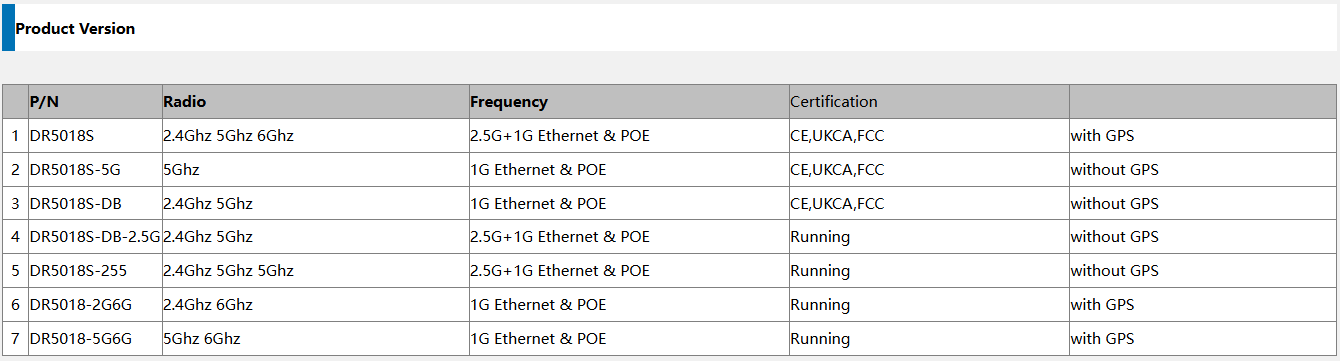
Available Versions for Customization

The DR5018S is available in multiple versions to meet your specific project needs:

  1. DR5018S-5G:Supports 5G;1G Ethernet & POE;No GPS
  2. DR5018S:2.4GHz, 5GHz, 6GHz support;2.5G + 1G Ethernet & POE;Includes GPS
  3. DR5018-DB:2.4GHz, 5GHz support;1G Ethernet & POE;No GPS

GPS Functionality

The DR5018S is equipped with built-in GPS functionality, making it ideal for applications requiring precise location tracking. This feature is especially useful in asset management, fleet tracking, and location-based services. Whether in smart transportation, logistics, or other industries that require accurate positioning, the DR5018S provides robust support.

Global Certifications: CE, UKCA, FCC

The DR5018S holds multiple global certifications, including CE (European Union), UKCA (United Kingdom), and FCC (United States), ensuring compliance with regulatory standards across major international markets. These certifications guarantee that the DR5018S meets high-performance and safety standards, allowing seamless use across regions without legal or regulatory issues.

  • CE Certification: Complies with health, safety, and environmental standards for the European market.
  • UKCA Certification: Meets UK market requirements, ensuring smooth access to the UK market.
  • FCC Certification: Ensures compliance with wireless communication requirements in the U.S., preventing excessive wireless interference.

These certifications are essential for the sale and use of electronic products globally, allowing the DR5018S to be easily promoted and deployed in international markets.

Comprehensive Advantages

  • Powerful Processing Capability: The IPQ5018 chipset offers strong network processing, handling high volumes of device connections with ease.
  • Tri-Band Support: Supports 2.4GHz, 5GHz, and 6GHz frequency bands for flexible and efficient network services.
  • Built-In GPS Functionality: Strong support for location-based applications, expanding use cases.
  • Global Certifications: With CE, UKCA, and FCC certifications, the DR5018S meets regulatory requirements for global markets.
  • Stability and Compatibility: Wi-Fi 6 technology ensures excellent performance in high-density environments, offering greater adaptability.

Conclusion

The DR5018S is a highly integrated, high-performance network device that combines Wi-Fi 6 technology, tri-band support, built-in GPS functionality, and global certifications, making it suitable for a wide range of applications. Whether for commercial offices, industrial networks, or smart device applications requiring precise location tracking, the DR5018S ensures stable, reliable network connections and accurate positioning services. With its global certifications, it can be deployed confidently across international markets, expanding your business reach.

The DR5018S is not just a technologically advanced product; it’s a standout solution in the global network connectivity space.

Posted on

IPQ6010 IPQ6018 Router Board with 1GbE + 2.5GbE Support: A High-Performance WiFi 6 Solution

IPQ6010 IPQ6018 Router Board with 1GbE + 2.5GbE Support: A High-Performance WiFi 6 Solution

With the growing demand for high-speed wireless connectivity in industrial and enterprise applications, the IPQ6010 IPQ6018 Router Board stands out as a powerful WiFi 6 solution. Designed with 1GbE + 2.5GbE ports, this board provides ultra-fast data transfer rates, making it ideal for networking, IoT, and AI applications.

Key Features of IPQ6010 IPQ6018 Router Board

  1. Qualcomm IPQ6010 IPQ6018 SoC – A high-performance WiFi 6 (802.11ax) processor.
  2. Dual Ethernet Ports – Supports 1GbE and 2.5GbE, allowing for high-speed wired connections.
  3. Dual-Band WiFi 6 Support – Operates on 2.4GHz and 5GHz bands, offering improved coverage and speed.
  4. MU-MIMO & OFDMA – Enhances network efficiency in high-density environments.
  5. OpenWRT & SDK Support – Enables developers to customize firmware and optimize performance.

Why 2.5GbE Matters for Modern Networking

Traditional 1GbE Ethernet has been the industry standard for years, but with the increasing demand for higher bandwidth, 2.5GbE is becoming a must-have feature for:

  • High-speed data centers
  • Cloud applications & AI workloads
  • 4K/8K video streaming
  • IoT and smart city networks

By integrating a 2.5GbE port, the IPQ6010 IPQ6018 router board ensures future-proof networking, providing faster wired connectivity without requiring expensive infrastructure upgrades.

Ideal Use Cases for the IPQ6010 IPQ6018 Router Board

  1. Enterprise WiFi 6 Networks – Supports high-speed internet for offices and commercial buildings.
  2. Industrial IoT (IIoT) Applications – Reliable connectivity for manufacturing and automation.
  3. Smart Cities & Surveillance Systems – Handles real-time video streaming and AI-powered analytics.
  4. Mesh Networking & Wireless ISP – Ideal for large-scale deployments.
with SFP version

Conclusion

The IPQ6010 IPQ6018 Router Board with 1GbE + 2.5GbE support is a game-changer in WiFi 6 networking. Whether you are building next-gen enterprise solutions, upgrading industrial networks, or deploying high-performance IoT applications, this router board delivers exceptional speed, reliability, and flexibility.

DR6018
Posted on

Is Your Mining Operation Struggling with Connectivity? Discover the IPQ4019 Solution!

In today’s fast-paced mining industry, reliable connectivity is crucial for operational efficiency, safety, and productivity. However, many mining operations face significant challenges when it comes to maintaining stable and robust wireless communication in remote and rugged environments. If you’re grappling with connectivity issues, it’s time to consider a solution that can meet your unique needs – the DR 4029 / 4019 Wi-Fi 5 Router Board from Wallys Communications, powered by the IPQ4019 chipset.

DR4019SOM(Left),DR4019(Right)

The Challenge of Connectivity in Mining

Mining operations often take place in isolated locations, where traditional wired connections are impractical. The reliance on wireless networks means that any connectivity disruption can lead to delays, safety hazards, and financial losses. Factors such as rugged terrain, mobile equipment, and the need for IoT devices can complicate this further, highlighting the importance of a robust wireless solution.

Introducing the DR4019 Wi-Fi 5 Router Board

Wallys Communications is proud to present the DR4019, a high-performance, cost-effective Wi-Fi 5 router board specifically designed to address the connectivity challenges faced in the mining sector. Here’s why the DR4019, based on the IPQ4019 solution, could be the game-changing answer for your mining operations:

High Performance

The DR4019 is powered by the Qualcomm IPQ4019 chipset, ensuring reliable and robust wireless connectivity even in demanding environments. With high data throughput and low latency, you can trust that your communication systems will remain operational when it matters most.

Cost-Effective Solution

Designed with budget-conscious customers in mind, the DR4019 offers exceptional value without compromising on quality. It provides a reliable connectivity solution that won’t break the bank, making it an ideal choice for mining operations of all sizes.

DR4019,LTE,5G,OPENWRT,AP,IPQ4019

Advanced Features

The DR 4029 / 4019 comes packed with advanced features that set it apart:

  • OpenWrt 23.05 Support: This latest firmware enables unparalleled customization and flexibility, allowing you to tailor the router’s performance to your specific needs.
  • Mesh Networking Capabilities: This feature facilitates extended, seamless coverage across large mining sites, ensuring connectivity even in the most expansive operations.
MESH FUNCTION
  • Seamless Roaming: With the ability to maintain uninterrupted connectivity for mobile devices and equipment, the DR4019 enhances overall operational efficiency.

Perfect for Mining Applications

The DR 4029 / 4019 is built to meet the unique demands of the mining industry. It provides consistent and reliable connectivity for:

  • IoT devices used in monitoring and managing mining operations.
  • Secure communication networks that protect the safety of personnel.
  • Worker safety and monitoring systems that ensure the well-being of your team.

Partnering for Success

At Wallys Communications, we combine cutting-edge technology with industry expertise to deliver solutions that empower our customers. The DR 4029 / 4019 is not just a router; it’s your trusted partner for enhanced connectivity in mining, leveraging the powerful IPQ4019 solution.

Posted on

Mastering MLO on the IPQ 5332 Board with DR 9274 5G6G Card: Step-by-Step Video Guide

Are you working on industrial wireless projects and looking for a reliable guide to set up Multi-Link Operation (MLO)? Look no further! At 524WiFi and WallysTech, we’ve just released a comprehensive tutorial video to help you configure MLO on the IPQ5332 board (DR5332) paired with the DR9274-5G6G card.

This video covers everything you need to know, including:

✅ Hardware connection setup

✅ Firmware loading instructions

✅ Access Point (AP) configuration

✅ Practical tips to optimize your industrial wireless network

Why MLO Matters

MLO is a game-changing feature in WiFi 7 that allows simultaneous use of multiple bands for enhanced throughput and reliability. With industrial applications demanding higher speeds and more stable connections, mastering MLO is key to staying ahead.

Watch the Tutorial Now

Click below to watch the full step-by-step guide: 👉 How to Set Up MLO on the IPQ5332 Board with DR9274-5G6G Card

Need This Hardware? We’ve Got You Covered!

If you’d like to test this setup or integrate it into your project, contact our sales team at [email protected]. We’re here to provide tailored solutions and support your success.


💬 We’d love to hear from you! What other topics would you like us to cover? Comment below with your suggestions, and don’t forget to share this article with your network.

📢 Follow us for more updates, tutorials, and insights into the latest wireless technologies!

Posted on

Stop Using Unencrypted WiFi: Secure Your Network with WPA3

In today’s hyperconnected world, WiFi has become essential for work, entertainment, and daily communication. However, many networks are still operating on outdated or unencrypted protocols, leaving them highly vulnerable to cyber threats. If your network security is not up to date, it’s time to consider upgrading to WPA3, the latest and most secure WiFi encryption standard available.

The Risks of Unencrypted WiFi

Using unencrypted or weakly encrypted WiFi opens your network to a variety of threats, including:

  • Data Interception: Without proper encryption, hackers can easily capture sensitive information such as passwords, bank details, and private messages.
  • Man-in-the-Middle Attacks: In unprotected networks, attackers can insert themselves between your device and the network to spy on your activity or modify the information being exchanged.
  • Unauthorized Network Access: Attackers can infiltrate your network and exploit connected devices, leaving them vulnerable to malware or ransomware attacks.

WPA3 encryption prevents these attacks by securing the data transmitted over your network, ensuring that only authorized users have access.

What Makes WPA3 More Secure?

WPA3 (Wi-Fi Protected Access 3) represents the most advanced WiFi security protocol to date. It is designed to address the weaknesses of earlier standards like WPA2, providing more robust encryption and additional layers of protection.

Here’s why WPA3 is the best choice for securing your WiFi:

  1. Stronger Encryption: WPA3 uses 192-bit encryption for enterprise environments and 128-bit encryption for personal use, making it much harder for attackers to break into your network.
  2. Simultaneous Authentication of Equals (SAE): This replaces the pre-shared key (PSK) system used by WPA2, significantly enhancing protection against brute-force attacks.
  3. Forward Secrecy: Even if a hacker intercepts data in the future, they cannot decrypt previously captured traffic, thanks to forward secrecy.
  4. Improved Protection for IoT Devices: WPA3’s Easy Connect feature simplifies the process of securely adding IoT devices, which are often a weak link in network security.
  5. Enhanced Safeguards for Public Networks: WPA3 improves protection on open networks, such as those in public places, by encrypting individual connections, preventing eavesdropping and data theft.

Benefits of Upgrading to WPA3

Upgrading to WPA3 provides numerous benefits that protect your network and enhance your user experience:

  • Peace of Mind: With WPA3, you know that your network is protected by the latest encryption standards, keeping your data secure from unauthorized access.
  • Future-Proof Security: As cyber threats continue to evolve, WPA3 is designed to provide long-term protection, ensuring that your network stays secure even as new vulnerabilities emerge.
  • Better IoT Security: With the growing number of smart devices in homes and businesses, WPA3’s improved security features for IoT devices reduce the risk of these devices being exploited.
  • Easier Network Management: WPA3 allows for easier management of network devices while maintaining high security standards, making it ideal for both personal and enterprise use.

How to Upgrade to WPA3

To upgrade your network to WPA3, follow these steps:

  1. Check Your Router’s Compatibility: Ensure that your router supports WPA3. Many newer models include WPA3 support, but older routers may need a firmware update or replacement.
  2. Update Router Firmware: If your router supports WPA3, update its firmware to enable the latest security features.
  3. Configure WPA3 Settings: Access your router settings and enable WPA3 encryption. Most routers have this option under the wireless security or network settings tab.
  4. Device Compatibility: Ensure that your devices (laptops, smartphones, tablets) support WPA3. Many devices released after 2019 are WPA3-compatible.
  5. Mixed Mode for Legacy Devices: If you have older devices that don’t support WPA3, you can use WPA2/WPA3 mixed mode, which maintains backward compatibility while improving security for newer devices.

524WiFi WPA3-Enabled Routerboards

524WiFi and WallysTech offer a range of high-performance routerboards that support WPA3, making them ideal for industrial and extreme usage scenarios where network security is critical. 524WiFi specializes in industrial wireless communication products, ensuring that their hardware is optimized for even the most demanding environments. Here are a few of their top routerboards that support WPA3:

  • DR5018S (IPQ5018) This tri-band routerboard supports 2.4GHz, 5GHz, and 6GHz WiFi 6 bands with MU-MIMO and OFDMA, providing exceptional speed and security, including WPA3 encryption. Ideal for high-traffic networks.
  • DR8072 (IPQ8072) Powered by the Qualcomm IPQ8072A chipset, this board supports OpenWRT, WiFi 6, and WPA3 encryption. Its 10GE port and 10G SFP make it a great choice for data-heavy applications.
  • DR9574 (IPQ9574) A WiFi 7-ready routerboard, the DR9574 delivers top-of-the-line performance with WPA3 support and multiple high-speed Ethernet ports, making it a future-proof option for businesses.
  • DR5332 (IPQ5332) Featuring WiFi 7 and the IPQ5332 chipset, this routerboard offers 10G SFP connectivity, WPA3 encryption, and exceptional processing power for demanding industrial applications.