For years, the promise of 5G has been a tale of two extremes. On one end, high-speed smartphones and fixed wireless access demanding gigabit speeds. On the other, massive IoT sensors requiring years of battery life but minimal data. In the vast, fertile middle ground, a crucial category of devices has been left waiting for a cost-effective, power-efficient, yet capable wireless solution.
That wait is over. The arrival of 5G Reduced Capability (RedCap) is not just an incremental update; it’s the key that unlocks the full, diverse potential of the 5G ecosystem.
Bridging the 5G Divide: What is RedCap?
Think of the 5G spectrum as a highway system. You have the Formula 1 lanes for eMBB (enhanced Mobile Broadband) and the specialized, low-power bike paths for mMTC (massive Machine-Type Communications). RedCap effectively creates a new, smart “commuter lane”—perfectly balanced for devices that need more than a trickle of data but don’t require the expense and power drain of a full 5G modem.
Formally defined in the 3GPP Release 17 standard, 5G RedCap (also known as NR-Light) is a optimized version of 5G. It’s designed specifically for devices that fall between the high-performance and low-power extremes. By strategically reducing complexity, antenna count, and supported features, RedCap achieves a critical goal: it brings the inherent benefits of 5G—security, low latency, and mobility—to a much wider array of applications at a fraction of the cost and power consumption.
The Engineering Trade-Off: How RedCap “Slims Down”
RedCap isn’t a watered-down version of 5G; it’s a purpose-built one. It achieves its efficiency through several intelligent design choices:
Reduced Bandwidth: While high-end 5G can use up to 100 MHz in sub-7 GHz spectra, RedCap operates on a leaner 20 MHz. For most industrial sensors, health monitors, and wearables, this is more than sufficient and drastically cuts complexity.
Fewer Antennas: A flagship smartphone might have 4 receive antennas (4Rx). RedCap devices can operate with just 1 or 2 (1Rx or 2Rx). This simplification is a major driver behind reducing device size, cost, and power needs.
Half-Duplex FDD: This allows the device to either transmit or receive at a time, but not both simultaneously. By eliminating the need for a duplexer (a component that prevents interference), RedCap devices become significantly cheaper and more power-efficient. For many applications that send bursts of data, this slight trade-off is unnoticeable.
Lower Order Modulation: RedCap primarily uses 64 QAM instead of the 256 QAM found in high-end 5G. This is a more than capable modulation scheme that reduces power demands on the device’s power amplifier.
The Real-World Impact: RedCap’s Killer Applications
The theoretical benefits are clear, but where will we actually see RedCap make a difference? The answer is in three key verticals that have been hamstrung by the limitations of existing technologies.
Industrial IoT 2.0: The factory floor is a perfect environment for RedCap. Think of wireless video surveillance cameras for safety and quality control, condition monitoring sensors on high-value machinery, and programmable logic controllers (PLCs). These devices need more bandwidth than a simple LPWAN sensor but can’t justify the cost of a full 5G module. RedCap fits perfectly, offering the reliable, low-latency connection needed for modern automation.
The Next Generation of Wearables: While smartwatches today use a mix of 4G and proprietary technologies, RedCap paves the way for a new class of advanced wearables. Imagine high-performance augmented reality (AR) glasses for enterprise or rich video-streaming capabilities in a fitness band. RedCap provides the data throughput for these experiences while ensuring the device doesn’t overheat and has a usable battery life.
A New Era for Video Surveillance: City-wide and industrial security systems require high-quality, real-time video streaming. RedCap modems are powerful enough to handle 1080p or even 4K video, and their native support for network slicing means a city can guarantee a secure, uninterrupted video feed for public safety, separate from consumer traffic on the same network.
The Road Ahead: Integration and Coexistence
The rollout of RedCap is a masterclass in seamless network integration. A key feature is its “fallback” capability. RedCap devices can connect to both modern 5G Standalone (SA) networks and older 4G LTE networks, ensuring broad coverage from day one. For network operators, enabling RedCap is often a simple software upgrade to existing 5G SA cellsites, making deployment swift and cost-effective.
Looking forward, RedCap doesn’t replace existing technologies like LTE-M or NB-IoT; it complements them. It fills a crucial performance and cost gap, creating a more complete and versatile connectivity portfolio. As we move toward 3GPP Releases 18 and beyond, we can expect further enhancements in power saving and integration, solidifying RedCap’s role as the backbone for the mid-tier IoT revolution.
In summary, 5G RedCap is the missing piece in the connectivity puzzle. By making a few smart engineering trade-offs, it brings the robust power of 5G to the devices that will define the next decade of innovation—from smarter factories to advanced wearables. The 5G revolution is no longer just about speed; it’s about intelligent, scalable, and efficient connectivity for everything. And with RedCap, that future is finally within reach.
A recent report by Ookla and Omdia highlights the current state of 5G standalone globally, showing the state, or rather lack thereof of 5G SA in Europe.
A key takeaway cited in the report states that Europe severly lags other regions in 5G SA availability. Within Europe, you also see a great disparity between countries. “Germany, the United Kingdom, and Spain – all four-player markets benefiting from targeted 5G SA specific fiscal stimuli or coverage obligations – lead Europe in terms of 5G SA rollout across multiple operators”.
“However, as the industry moves into the mid-point of the 5G cycle with 5G SA, Southern Europe has taken on a more prominent role, while the Nordics have been less central compared to their leading position in the initial wave of non-standalone commercialization. For instance, large-scale 5G SA deployments have been observed in multiple Southern European countries such as Spain, Portugal and Greece, while Finland remains the only Nordic country to date with a substantial 5G SA footprint.” The full report is available here.
Conclusion:
Europe is at an important crossroads in its 5G journey. Despite setting the most ambitious infrastructure targets among advanced liberal economies, the bloc continues to lag behind its developed peers in key measures of network reach and performance with 5G SA—a technology it has positioned as central to its emerging pro-growth industrial strategy and the broader European competitiveness compass. A confluence of challenges—including a depressed investment environment, reliance on legacy business models, skills shortages, technical barriers, and insufficient targeted government support— continues to impede the wide-scale deployment and monetization of 5G SA networks in Europe. Leading markets such as Germany, Spain, and the United Kingdom have made notable strides through targeted fiscal measures and strategic coverage obligations. However, the isolated nature of these successes highlights the urgent need for a more coordinated, pan-European strategy to accelerate 5G SA deployment and adoption as a distinct objective, separate from the bloc’s broader 5G coverage goals.
The advent of 5G technology marks a significant milestone in the evolution of wireless communication, promising to revolutionize how we connect, communicate, and interact with the world around us. As we delve into the era of 5G, it’s essential to explore its potential impacts, the advancements it brings, and what lies beyond in the realm of wireless communication.
The Promise of 5G Technology
5G, the fifth generation of mobile networks, is designed to deliver unprecedented speeds, ultra-low latency, and massive connectivity. Unlike its predecessors, 5G is not just an incremental upgrade but a transformative leap forward. Key features of 5G include:
Enhanced Mobile Broadband (eMBB): Offering data speeds up to 100 times faster than 4G, 5G enables seamless streaming, rapid downloads, and high-quality video conferencing.
Ultra-Reliable Low Latency Communication (URLLC): With latency as low as 1 millisecond, 5G supports critical applications such as autonomous vehicles, remote surgery, and industrial automation.
Massive Machine-Type Communications (mMTC): Capable of connecting millions of IoT devices per square kilometer, 5G facilitates smart cities, connected homes, and industrial IoT applications.
Impact on Various Industries
The transformative capabilities of 5G extend across multiple industries, driving innovation and efficiency:
Healthcare: 5G enables telemedicine, remote monitoring, and real-time data sharing, improving patient care and access to medical services.
Automotive: Enhanced vehicle-to-everything (V2X) communication supports autonomous driving, traffic management, and vehicle safety systems.
Manufacturing: Smart factories leverage 5G for real-time monitoring, predictive maintenance, and automation, increasing productivity and reducing downtime.
Entertainment: Virtual reality (VR) and augmented reality (AR) experiences become more immersive and interactive with the high bandwidth and low latency of 5G.
Technical Advancements
The success of 5G relies on several key technological advancements:
Millimeter Wave (mmWave) Spectrum: Utilizing higher frequency bands (24-100 GHz) enables faster data transmission and greater capacity, albeit with shorter range and higher susceptibility to obstacles.
Massive MIMO (Multiple Input Multiple Output): Increases network capacity by using multiple antennas to send and receive more data simultaneously.
Network Slicing: Allows the creation of virtual networks tailored to specific applications or services, ensuring optimal performance and resource allocation.
Edge Computing: Reduces latency by processing data closer to the source, critical for applications requiring real-time responsiveness.
Challenges and Considerations
Despite its potential, 5G deployment faces several challenges:
Infrastructure Investment: Building the necessary infrastructure, including small cells and fiber optic networks, requires significant investment.
Spectrum Allocation: Efficiently managing the allocation and use of limited spectrum resources is crucial to avoid interference and maximize performance.
Security Concerns: Enhanced connectivity and increased attack surfaces necessitate robust security measures to protect against cyber threats.
In the rapidly evolving landscape of communication technology, the advent of 5G has emerged as a groundbreaking force, promising to redefine the way we connect and communicate. As the fifth generation of wireless technology, 5G brings unprecedented speed, reliability, and low latency, setting the stage for transformative changes across various industries.
>Lightning-Fast Speeds: Redefining Connectivity
One of the most significant advancements that 5G brings to the table is its remarkable speed. With data transfer rates up to 100 times faster than its predecessor, 4G, 5G opens the door to near-instantaneous downloads, seamless streaming, and real-time communication. This speed revolutionizes the user experience, enabling applications that were once impractical, such as augmented reality (AR) and virtual reality (VR), to flourish.
>Low Latency: Enhancing Real-Time Interactions
Low latency, or the minimal delay in data transmission, is a critical aspect of 5G technology. This reduction in lag is particularly crucial for applications that demand real-time interactions, such as online gaming, video conferencing, and autonomous vehicles. The responsiveness of 5G ensures that actions and communications occur almost instantaneously, creating a more immersive and efficient user experience.
>Internet of Things (IoT): Connecting the Unconnected
5G is a catalyst for the widespread adoption of the Internet of Things (IoT). The enhanced connectivity and capacity of 5G networks can support a massive number of devices simultaneously, paving the way for a seamlessly interconnected world. From smart homes and cities to industrial automation, 5G empowers the growth of IoT applications, fostering greater efficiency and convenience in our daily lives.
>Transforming Industries: From Healthcare to Manufacturing
The impact of 5G extends beyond personal communication to reshape entire industries. In healthcare, for instance, 5G enables remote patient monitoring, telemedicine, and faster transmission of medical data, revolutionizing healthcare delivery. In manufacturing, the low latency of 5G facilitates the implementation of smart factories, where machines can communicate and coordinate in real time, optimizing production processes.
>Challenges and Considerations
While the promise of 5G is immense, it comes with challenges. The deployment of 5G infrastructure requires substantial investment, and concerns about security and potential health effects have sparked debates. Striking a balance between reaping the benefits of 5G and addressing these challenges is crucial for the successful integration of this technology.
>Global Connectivity and Collaboration
5G technology also holds the potential to bridge digital divides globally, providing reliable connectivity in remote areas and fostering collaboration on a global scale. As nations continue to roll out 5G networks, international cooperation becomes essential to create a cohesive and interconnected digital ecosystem.
In conclusion, 5G technology is ushering in a new era of communication, characterized by unparalleled speed, low latency, and transformative possibilities. As the world becomes more interconnected, the societal, economic, and technological impacts of 5G are set to reshape the way we communicate and collaborate, unlocking a future of innovation and connectivity.
An APN (Access Point Name) is the gateway configuration that tells your cellular module which network path to use when connecting to the internet or a private data network. Think of it as the “address” your device hands to the carrier to establish a data session. It determines routing, IP assignment, and in many cases, what security policies apply to your traffic.
APNs exist because carriers need to route data traffic to different destinations: a consumer browsing social media, a fleet vehicle reporting GPS, and a medical device uploading readings all have very different requirements – and the APN is how the network tells them apart.
In IoT deployments, leaving the APN on auto-detect is a common mistake. Manually setting it ensures your device consistently connects to the right context, especially critical when using IoT SIMs, private APNs with fixed IPs, or roaming SIMs where auto-selection can land you on a suboptimal or even incorrect bearer. A wrong or missing APN means no data, silent failures, and hours of debugging that could have been avoided with a single AT command.
How to set “my APN” in a cellular module?
By default, cellular modules come without a pre-defined APN (Access Point Name). It is however best practice to set this to the correct value to tell the module how to get online
AT+CGDCONT=1,"IPV4V6","techship.com" // Set APN
OK
AT+CGDCONT? // Query APN
+CGDCONT: 1,"IPV4V6","techship.com","0.0.0.0.0.0.0.0.0.0.0.0.0.0.0.0",0,0,0,0,,,,,,,,,,"",,,,0
AT+CFUN=1,1 // Restart the module for settings to take effect
Via Windows GUI:
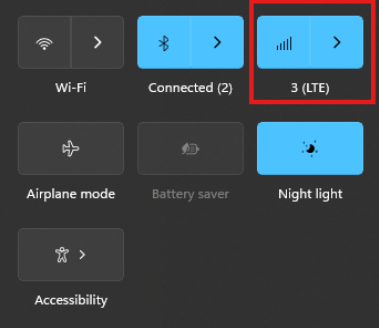
The connection manager settings and controls can be found and accessed on Windows desktop start menu through the network icon (see picture)
The Cellular tab can be found in Windows system settings and the connection APN details can be manually entered through “Advanced options”
Via Linux ModemManager/NetworkManager:
Using NetworkManager and ModemManager in Linux to automatically establish a connection and configure IP details
In this article we will show how to set up NetworkManager to automatically configure, establish the cellular data connection in your system.
NetworkManager and ModemManager are open source tool for Linux to manage several types of networks and interfaces such as ethernet, wifi, etc. It can also manage cellular WWAN interfaces through the ModemManager tool. It is hosted by the Freedesktop.org community and driven by Aleksander Morgado and other contributors. please visit https://wiki.gnome.org/Projects/NetworkManager and https://www.freedesktop.org/wiki/Software/ModemManager/ for latest information, source code, API reference manuals, debugging tips, contribution, mailing list etc.
ModemManager is capable of communicating over several types of device control channels such as QMI/RMNET, MBIM, MODEM / AT command etc. But support for vendor proprietary or out-of-kernel drivers are none or very limited. Such drivers are gobinet, simcom_wwan and other drivers provided by the vendors directly.
Many Linux distributions have NetworkManager and ModemManager pre-installed or they can typically easily be installed through the systems package manager. In Ubuntu for example apt can install it for you by command if not already installed: apt install network-manager
Check with commands below that you have both tools installed in system and their versions. NetworkManager -V ModemManager -V
ModemManager (and NetworkManager) are continuously developed for better compatibility with the cellular devices, therefore it is recommend to use a recent version of the tools and in case of problem situations, evaluate the latest versions from source and check the mailing list archives for possible discussions on the problem experienced.
Keep in mind that NetworkManager and ModemManager projects are not directly developed or driven by the cellular device vendors and the compatibility with the device you aim to use can be limited. Some vendors contribute with code to make their devices fully compatible, while others don’t. Many cellular devices can be set to expose standardized types of USB network interface and control channel such as MBIM interface by USB-IF or the Qualcomm proprietary interface QMI that ModemManager will try to identify, and often manage to work successfully with but there are exceptions also.
Both NetworkManager and ModemManager have command line interfaces (nmcli and mmcli respectively) where you can interact with the management tools.
Have ModemManager list all the cellular device it has detected. Here we use the Alcatel IK41 series with MBIM interface in this example: mmcli –list-modems /org/freedesktop/ModemManager1/Modem/0 [Alcatel] Mobilebroadband
Check that the cellular device is managed by NetworkManager by not having state “unmanaged” listed for it. nmcli device status DEVICE TYPE STATE CONNECTION cdc-wdm0 gsm disconnected — enp3s0 ethernet unmanaged — lo loopback unmanaged —
Now you should create a connection profile in NetworkManager for your specific network carrier and SIM card with the “nmcli connection add” command: For example: nmcli connection add type gsm ifname ‘*’ con-name ‘3-sweden’ apn ‘data.tre.se’ connection.autoconnect yes gsm.pin 0000
– type is gsm for all typical cellular connections unless it is of cdma type. – ifname is the control interface name, in this case cdc-wdm0, wildcard can be used also to have it autoselect. – con-name is the profile name you want to give it. – apn is provided by your network carrier and tells the modem what attach point it should use for the data connection. – connection.autoconnect set to yes will make NetworkManager always try to auto connect and maintain this profile connection. – gsm.pin lets you provide a pin code for the SIM card, that NetworkManager will try to use if PIN check is enabled for SIM card.
There are several additional commands and attributes available such as username and password settings for the APNs etc. Refer to the NetworkManager help and manual pages for full details on the commands.
If successful you should receive a reply similar to this one: Connection ‘3-sweden’ (cad6fcbf-2cb1-4796-b7e6-67b9f9635aef) successfully added.
You can check the status now by command: nmcli device status DEVICE TYPE STATE CONNECTION cdc-wdm0 gsm connected 3-sweden enp3s0 ethernet unmanaged — lo loopback unmanaged —
Where connected should be listed as state if the connection establishment was successful.
If the connection is not successful or you want more details about the device and connection you can check commands:
You can list the current status with command: nmcli radio WIFI-HW WIFI WWAN-HW WWAN enabled enabled enabled enabled
nmcli connection show NAME UUID TYPE DEVICE 3-sweden e946017f-2e9c-477b-89ad-4c31e7331d65 gsm cdc-wdm0
Ifconfig should now show the related IP address details already set to the network interface by NetworkManager: ifconfig wwan0: flags=4291 mtu 1500 inet 2.68.73.130 netmask 255.255.255.252 broadcast 2.68.73.131 inet6 2a02:aa1:1017:6d11:6474:7254:7b72:eb09 prefixlen 64 scopeid 0x0 inet6 2a02:aa1:1017:6d11:1060:3dff:feac:e92f prefixlen 64 scopeid 0x0 ether 12:60:3d:ac:e9:2f txqueuelen 1000 (Ethernet) RX packets 186 bytes 10886 (10.8 KB) RX errors 0 dropped 0 overruns 0 frame 0 TX packets 5 bytes 480 (480.0 B) TX errors 0 dropped 0 overruns 0 carrier 0 collisions 0
You can now for example test the connection over the network interface by sending ping requests. Testing IPV4 connection: ping -4 -I wwan0 8.8.8.8 PING 8.8.8.8 (8.8.8.8) from 2.68.73.130 wwan0: 56(84) bytes of data. 64 bytes from 8.8.8.8: icmp_seq=1 ttl=118 time=55.8 ms 64 bytes from 8.8.8.8: icmp_seq=2 ttl=118 time=45.4 ms 64 bytes from 8.8.8.8: icmp_seq=3 ttl=118 time=42.9 ms — 8.8.8.8 ping statistics — 3 packets transmitted, 3 received, 0% packet loss, time 2003ms rtt min/avg/max/mdev = 42.918/48.053/55.845/5.601 ms
Testing IPV6 connection: (if your cellular device, network subscription and APN supports it) ping -6 -I wwan0 2600:: PING 2600::(2600::) from 2a02:aa1:1017:6d11:1060:3dff:feac:e92f wwan0: 56 data bytes 64 bytes from 2600::: icmp_seq=1 ttl=46 time=172 ms 64 bytes from 2600::: icmp_seq=2 ttl=46 time=171 ms 64 bytes from 2600::: icmp_seq=3 ttl=46 time=169 ms 64 bytes from 2600::: icmp_seq=4 ttl=46 time=168 ms — 2600:: ping statistics — 4 packets transmitted, 4 received, 0% packet loss, time 3004ms rtt min/avg/max/mdev = 167.921/170.037/172.272/1.651 ms
The connection is successful and automatic reconnect is working when testing to unplug and plug in the device again. For additional configurations, commands and available attributes, please relate to the manual pages for NetworkManager and ModemManager.
Troubleshooting logs: NetworkManager and ModemManager write log messages to the Linux syslog file /var/log/syslog. In case of problems with establishing a cellular data connection, please copy the logfile after the problem have appeared and include it in a Techship technical support ticket.
In some situations more detailed debug logs are needed, these can be acquired by changing the log levels for NetworkManager and ModemManager and run them manually.
To capture debug logs, please first disable and stop the normal services: systemctl stop NetworkManager ModemManager systemctl disable NetworkManager ModemManager
Run them manually in background with debug level set: /usr/sbin/ModemManager –log-level=DEBUG &> /dev/null & /usr/sbin/NetworkManager –log-level=DEBUG &
Reproduce the cellular data connection problem. Once completed, kill the processes: killall -TERM NetworkManager ModemManager
Copy the relate messages in syslog to a mm-nm-sys-debug.log logfile: grep -E ‘ModemManager|NetworkManager|systemd|dbus-daemon|dhclient’ /var/log/syslog > mm-nm-sys-debug.log
Activate and start the services again: systemctl enable NetworkManager ModemManager systemctl start NetworkManager ModemManager
Include the mm-nm-sys-debug.log in a technical support ticket at Techship.com where you describe the issue in details and include other relevant information also such as kernel version, ModemManager and NetworkManager versions, dmesg log etc.
You probably know that LTE is divided in categories, shorthand “Cat” which you can see everywhere in Techship’s available documentation and website. But is higher always faster? And is a Cat-4 always a Cat-4?
The answer surprisingly is no. Let’s take an example with LTE Cat-12 which has been around for quite a while, it boasts 600Mbps DL and 150Mbps UL capabilities. So does that mean an LTE Cat-13 module is even faster? No, an LTE Cat-13 provides 400Mbps DL and 150Mbps UL. Meaning that the uplink performance is the same, but the downlink performance is different between these two categories. This generally stems from a separation of DL/UL performance in the 3GPP standards, meaning that modules from 3GPP standard before 12 conforms to a combined UE category system, and after 12 it separates the DL/UL categories. This means that what is typically defined as an LTE Cat-7 device (300Mbps DL/150Mbps UL) is actually LTE Cat-7 UE DL and LTE Cat-13 UE UL.
And our mystical comment about LTE Cat-4? Well not all Cat-4’s are the same either. LTE Cat-4 was introduced in 3GPP Release-8 with 150Mbps DL and 50Mbps UL using 64QAM. In a later release, support for 256QAM DL was introduced, meaning that newer chipsets supporting LTE Cat-4 can utilize this high downlink modulation scheme. An example being a lot of today’s 5G RedCap modules supporting LTE Cat-4 based on 3GPP Release-16.
If you want to know more about 3GPP releases, you can contact our experts, or dig through the archives at 3GPP.