Platform choice depends on radio topology and I/O as much as CPU performance.
DR9574S emphasizes CPU headroom and expansion; DR5424 emphasizes 4×4 tri-band capacity and Ethernet density.
DR5322S uses a different upper-band module architecture that must be included in BOM and RF planning.
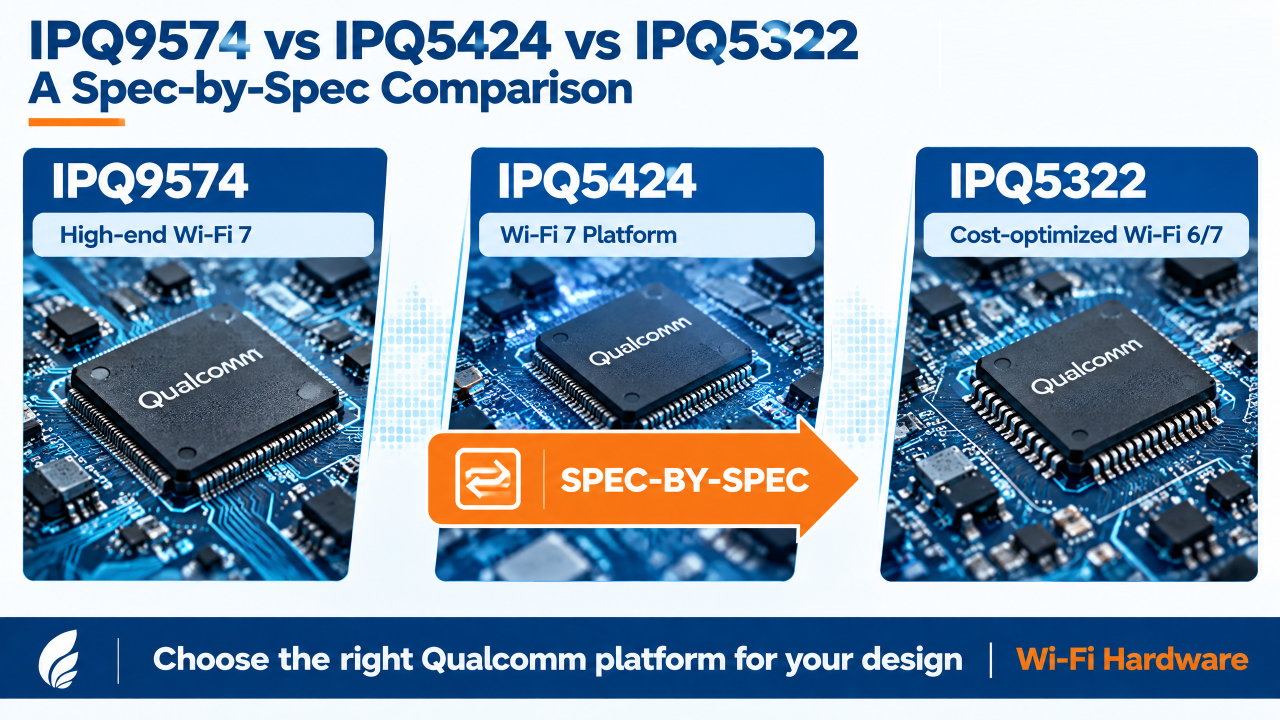
Most comparisons of these three chips treat them as a simple good/better/best tri-band lineup. The datasheets say otherwise. IPQ5424 and IPQ5322 share the same CPU core, clock speed, and reference design — the real split between them is radio topology, not compute. And IPQ5322 isn’t actually a tri-band SoC on its own: 5GHz/6GHz only exist on a DR5322S board because of an added QCN9274/QCN6274 module, not because the chip integrates them. This breakdown goes through the datasheet numbers for DR9574S (IPQ9574), DR5424 (IPQ5424), and DR5322S (IPQ5322) — CPU, radio chains, channel width, and I/O — so the platform choice is based on what’s actually on the silicon.
CPU and Reference Design
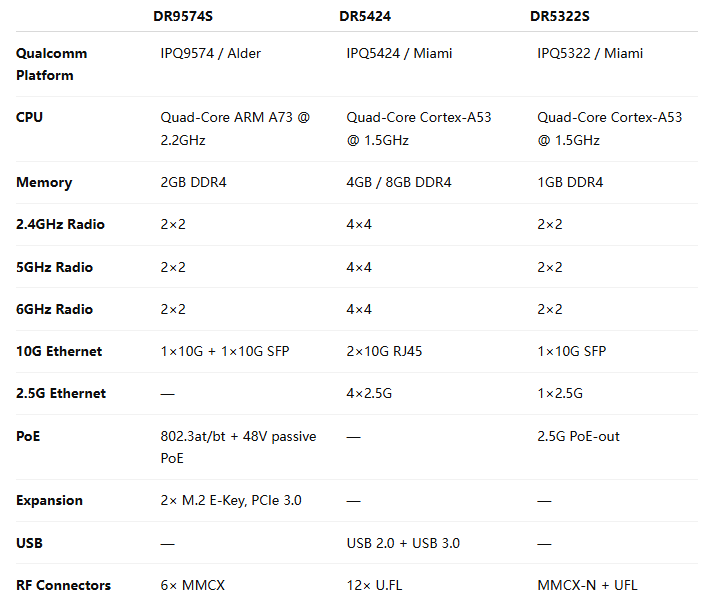
Worth flagging since it’s a common assumption error: IPQ5424 and IPQ5322 share the same CPU class and clock (quad-core A53 @ 1.5GHz) and the same reference design (AP.MI01.2). The performance gap between DR5424 and DR5322S is not a CPU-tier difference — it’s entirely in RAM/flash headroom and, more significantly, radio topology below.
Radio Topology — the Part That Determines System Design
This is where the three platforms actually diverge, and it’s not just “more bands = better”:
DR9574S (IPQ9574): three independent on-board radios, 2×2 each — 2.4GHz (up to 573.6Mbps PHY), 5GHz (up to 2882Mbps PHY), 6GHz (up to 5765Mbps PHY). All three run concurrently.
DR5424 (IPQ5424): three independent on-board radios, but 4×4 MU-MIMO on each band — 2.4GHz (802.11b/g/n/ax/be, 23dBm/chain max), 5GHz (802.11a/n/ac/ax/be, 21dBm/chain max), 6GHz (802.11ax/be, 19dBm/chain max), all concurrent. 12× U.FL antenna connectors reflect the 4×4-per-band chain count.
DR5322S (IPQ5322): only 2×2 2.4GHz is on-board. There is no native 5GHz or 6GHz radio on the IPQ5322 SoC itself — 5/6GHz coverage requires adding a separate QCN9274 or QCN6274 WiFi 7 module. This is a structurally different platform from the other two: DR9574S and DR5424 are integrated tri-band SoCs; DR5322S is a 2.4GHz baseband platform designed to pair with an external WiFi 7 radio module for the upper bands.
If your BOM assumption was “IPQ5322 = cheaper tri-band chip,” that’s incorrect at the silicon level — the tri-band capability on a DR5322S design is a module-add, not an on-die feature. Budget and BOM planning should treat it accordingly.
Channel Width and Modulation
DR5424 supports 240MHz on 5GHz, a step beyond DR9574S’s 160MHz ceiling on that band — relevant if you’re doing 5GHz-heavy backhaul rather than leaning on 6GHz for the wide channels.
I/O and Interfaces
DR9574S is the only one of the three with M.2 E-key PCIe 3.0 expansion slots — relevant if your design needs an add-in card (cellular, additional radio) beyond what’s on-board. DR5424 carries the heaviest native Ethernet backhaul (2×10GbE + 4×2.5GbE), which lines up with its role as a high-density AP/gateway aggregation point rather than an edge client device.
Selection Guidance
Need three genuinely concurrent radios with maximum per-band throughput and PCIe expansion: DR9574S. The 2.2GHz A73 CPU and M.2 slots also make it the better fit if you’re layering additional compute or a cellular module onto the same board.
Need three concurrent radios with more antenna chains (4×4) and heavier Ethernet backhaul, at a lower CPU clock: DR5424. This is the platform for high-density AP deployments where per-band MIMO order matters more than raw CPU headroom.
Building a cost-optimized 2.4GHz-anchor design and adding WiFi 7 upper-band coverage via an external QCN9274/QCN6274 module: DR5322S. Don’t spec this as a drop-in tri-band replacement for DR5424 — the radio architecture is fundamentally different, and your BOM needs to account for the module separately.
Indoor and outdoor access points need different enclosure, thermal, antenna and environmental designs.
DR9574S, DR5424 and DR5322S provide distinct CPU, radio, Ethernet and expansion starting points.
A production AP combines the platform with power, antennas, firmware, mechanics and validation.
A Wi-Fi 7 AP is more than a Wi-Fi 7 chipset.
For a finished access point, the hardware platform, wireless configuration, Ethernet interfaces, enclosure, power design, and deployment environment all affect the final product.
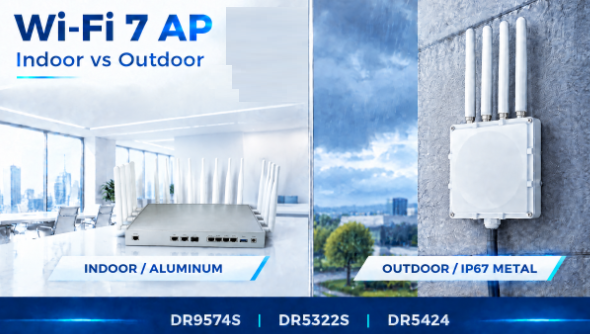
Wallys provides several Wi-Fi 7 AP platforms that can be combined with indoor aluminum enclosures or outdoor IP67-rated metal enclosures.
Under the enclosure, customers can choose from three hardware platforms: DR9574S, DR5424, and DR5322S.
The three platforms are designed for different system requirements rather than being simple variations of the same AP.
What Do You Need to Consider When Building a Wi-Fi 7 AP?
There are three basic questions:
1. Where will the AP be deployed?
Indoor or outdoor?
2. What wireless and processing capacity does the application require?
2×2 or 4×4 radios? More CPU resources? More memory?
3. What wired interfaces does the product need?
2.5G, 10G, SFP, PoE, USB, or customized interfaces?
The answer to these questions determines which Wi-Fi 7 platform and enclosure combination makes sense.
Indoor or Outdoor Wi-Fi 7 AP?
The first decision is the enclosure.
Indoor Wi-Fi 7 AP
For indoor applications, 524WiFi™ offers an aluminum enclosure.
It is suitable for deployments such as:
Enterprise networks
Offices and commercial buildings
High-density indoor wireless
Industrial facilities
Warehouses
Smart buildings
The enclosure provides a practical platform for thermal management while keeping the AP suitable for indoor installation.
Outdoor Wi-Fi 7 AP
Outdoor deployments require a different mechanical design.
Wallys offers an IP67-rated metal enclosure for outdoor Wi-Fi 7 AP applications.
It is designed for environments where the equipment needs protection against dust and water, including:
Outdoor wireless networks
Industrial connectivity
Warehouses and logistics yards
Outdoor surveillance
Campus and infrastructure networks
Outdoor wireless backhaul
The enclosure is therefore not simply an external housing choice. It is part of the AP’s deployment architecture.
Which Wi-Fi 7 Platform Should You Choose?
524WiFi™ currently offers three Wi-Fi 7 hardware platforms for finished AP designs:
DR9574S, DR5424, and DR5322S.
They use different Qualcomm platforms and provide different combinations of CPU resources, wireless configuration, Ethernet connectivity, memory, and expansion interfaces.
The important difference is not simply CPU speed.
Each platform gives you a different starting point for the final AP architecture.
DR9574S: When CPU and Expansion Matter
The DR9574S is based on the Qualcomm IPQ9574 platform, with a quad-core ARM A73 processor running at 2.2GHz.
It combines:
2GB DDR4
1× 10Gbps Ethernet
1× 10Gbps SFP
2× 1Gbps Ethernet
Active PoE 802.3at/bt
48V passive PoE
2× M.2 E-Key interfaces with PCIe 3.0
2×2 radios on 2.4GHz, 5GHz, and 6GHz
6× MMCX connectors
The two M.2 E-Key interfaces provide additional expansion possibilities for projects that need more than the standard wireless configuration.
This makes DR9574S a suitable starting point for Wi-Fi 7 APs and gateways where CPU resources, 10G connectivity, PoE, or hardware expansion are important.
DR5424: When Wireless Capacity and Ethernet Density Matter
The DR5424 takes a different approach.
It combines 4×4 radios on 2.4GHz, 5GHz, and 6GHz with multiple multi-Gigabit Ethernet interfaces.
The platform provides:
4GB DDR4, with 8GB as the maximum option
4×4 2.4GHz radio
4×4 5GHz radio
4×4 6GHz radio
2× 10Gbps RJ45
4× 2.5Gbps RJ45
USB 2.0
USB 3.0
12× U.FL connectors
It supports up to 320MHz channel width on 6GHz and up to 240MHz on 5GHz according to the platform specification.
This makes DR5424 a platform for applications where wireless capacity and wired network density are both important.
For example, a high-density AP or gateway may need multiple 2.5G connections for local devices while using 10G Ethernet for aggregation or backhaul.
DR5322S: When the Design Needs to Stay Compact
The DR5322S uses the Qualcomm IPQ5322 platform with a quad-core Cortex-A53 processor at 1.5GHz and 1GB DDR4.
Its wireless configuration includes:
2×2 2.4GHz
2×2 5GHz
2×2 6GHz
2× MMCX-N connectors for 5GHz
2× MMCX-N connectors for 6GHz
2×2 2.4GHz antenna interfaces
For wired connectivity, it provides:
1× 2.5Gbps Ethernet
1× 2.5G PoE-out Ethernet
1× 10G SFP
JTAG
GPIO interfaces
Reset button
The platform is therefore different from DR5424.
Instead of maximizing the number of Ethernet ports and using 4×4 radios, DR5322S provides a more compact 2×2 tri-band Wi-Fi 7 architecture with 2.5G, 10G SFP, and PoE-out connectivity.
This can be useful when the project does not require multiple 2.5G LAN ports but still needs multi-Gigabit connectivity.
How Do You Choose Between the Three Platforms?
A simple way to start is with the system requirement.
Need more CPU resources and expansion options?
→ DR9574S
Need 4×4 tri-band Wi-Fi 7 with multiple 10G and 2.5G Ethernet ports?
→ DR5424
Need a more compact 2×2 tri-band platform with 2.5G, 10G SFP, and PoE-out?
→ DR5322S
The platform can then be combined with the appropriate enclosure and interface configuration.
The platform stays relatively consistent, while the final product can be adapted to the application.
Wi-Fi 7 APs for OEM/ODM Projects
524WiFi™ provides Wi-Fi 7 hardware platforms for customers developing their own AP, gateway, or wireless networking products.
The available approach includes:
DR9574S / IPQ9574
DR5424 / IPQ5424
DR5322S / IPQ5322
Indoor aluminum enclosure
Outdoor IP67 metal enclosure
Different wireless configurations
Multi-Gigabit Ethernet options
PoE options
Interface customization
OEM/ODM hardware customization
The goal is to shorten the path from a Wi-Fi 7 platform to a finished, application-specific wireless product.
Summary
Choosing a Wi-Fi 7 AP is not only about choosing a Wi-Fi 7 chipset.
The right configuration depends on where the AP will be deployed, how much wireless and CPU performance is required, what Ethernet interfaces are needed, and how much customization the project requires.
524WiFi™ and Wallys provide multiple Wi-Fi 7 platforms, enclosure options, and hardware customization possibilities so that customers can build a Wi-Fi 7 AP around their application instead of adapting their application to a fixed product.
Interested in Wi-Fi 7 samples or a customized AP configuration?