Posted on

Do you need original QCA Linux DBDC driver for Sparklan WNFQ or WPEQ 268AXI WiFi6 module? Or is better to use open source Ath11k driver ?

Let us share our experience with Qualcomm Atheros WCN6856 based Wi-Fi 6 Triband modules from Sparklan. These WiFi6 modules are very popular. Many professional customers are requesting testing samples and want to use them for their projects.

Open Source Linux ath11k driver is available, works but has limitations.

If the customer needs DBS, they will need to apply the ath11k patch. However, after applying the patch, DFS will not be available, and many functions will not work with ath11k. In many cases, we have already suggested using the official QCA driver. Unfortunately original QCA driver is for older Linux kernel only – WNFQ-269AX(BT) Qualcomm official driver supports Linux Kernel version 5.4 & 5.10 & 5.15.

“For DFS and support for more client connections (+60) , they will need to use the official QCA driver.”

Sparklan can provide the original driver but every customer has to sign the NDA . If you are interested in , then please contact us and provide your project description and company details. We will send the NDA for you.

Here is the latest driver for 268AXI module :

Change WPEQ-268AXI.tar.xz Firmware BDF

SOP 

#rm -r /lib/firmware/ath11k/WCN6855

#cp WPEQ-268AXI.tar.xz /lib/firmware/ath11k

#cd /lib/firmware/ath11k

#tar xvf WPEQ-268AXI.tar.xz

Please follow the steps higher to replace the firmware BDF.

Here is an older success story from our customer, maybe thsi can help to many other to develop relaibel working x86 Linux based device with WCN6856 based Wi-Fi 6 Triband modules :

I think we will have to stick with the open source ath11k driver for now since we already are committed to 6.1.x.

I have since migrated this project to Debian 12, also on 6.1.x. I can confirm the exact kernel version. However I was able to install ath11k on Debian 12 core (no X since this will run headless) along with the open source firmware and I do have hostapd working now. I am yet to activate dnsmasq, a bridge that includes the lan interface, etc. So far it seems that what I am stuck on is 2.4GHz + 5GHz DBDC. I’ve experimented with hostapd.conf quite a bit and I cannot seem to figure out how to do this. Typically with DBDC I have seen two wifi interfaces enumerate in linux. I only see one (named wlp1s0) in my case. Performing sudo iw list does show all of the correct frequencies in the supported list (including 6GHz which is not necessary for my application).

Strangely, after a reboot, the only way that I can correctly set the regulatory region (sudo iw reg set US in my case here) is after I perform a manual sudo iwlist scan. This could be an issue because I will want the appliance to reboot with hostapd activated automatically (presumably by systemd?)

I would be happy to share my hostapd.conf and anything else from my configurations to get this working. I feel that I am quite close to success and with just a few more configuration file adjustments plus the correct systemd service definition this project will be complete.

The hostapd.conf and dnsmasq.conf are attached. These are working well except:

No SDBC. I don’t seem to see in a scan anything except the 5GHz radio.

Trying after boot:

armbian@nanopi-r5c:/$ sudo hostapd /etc/hostapd.conf
wlp1s0: interface state UNINITIALIZED->COUNTRY_UPDATE
Frequency 5180 (primary) not allowed for AP mode, flags: 0x100853 NO-IR
Primary frequency not allowed
wlp1s0: IEEE 802.11 Configured channel (36) or frequency (5180) (secondary_channel=1) not found from the channel list of the current mode (2) IEEE 802.11a
wlp1s0: IEEE 802.11 Hardware does not support configured channel
Could not select hw_mode and channel. (-3)
wlp1s0: interface state COUNTRY_UPDATE->DISABLED
wlp1s0: AP-DISABLED 
wlp1s0: interface state DISABLED->DISABLED
wlp1s0: AP-DISABLED 
wlp1s0: CTRL-EVENT-TERMINATING 
hostapd_free_hapd_data: Interface wlp1s0 wasn’t started
nl80211: deinit ifname=wlp1s0 disabled_11b_rates=0

Produces hostapd failure every time. However if I instead first:

armbian@nanopi-r5c:/$ sudo ip link set wlp1s0 up
armbian@nanopi-r5c:/$ sudo iwlist scan
armbian@nanopi-r5c:/$ sudo iw reg set US
armbian@nanopi-r5c:/$ sudo hostapd /etc/hostapd.conf
wlp1s0: interface state UNINITIALIZED->COUNTRY_UPDATE
wlp1s0: interface state COUNTRY_UPDATE->HT_SCAN
wlp1s0: interface state HT_SCAN->ENABLED
wlp1s0: AP-ENABLED


Doing these steps produces a perfectly running ap bridged with one of the two ethernet NICs and with a working DHCP server. It seems stuck in 5GHz and at lower speed classes. But otherwise it’s working. These extra steps are quite tricky to run without a bunch of shell scripts called by systemd which is not as reliable as I would prefer.

sudo iw reg set US

Does nothing unless I first: sudo iwlist scan

NetworkManager (NM) is disabled and I am using systemd-networkd. This is a headless micro-server and NM just got in the way of everything.

I feel like I am very close to having this working perfectly!

More system information follows. Thanks.

armbian@nanopi-r5c:/$ uname -a
Linux nanopi-r5c 6.6.31-current-rockchip64 #1 SMP PREEMPT Fri May 17 10:02:40 UTC 2024 aarch64 GNU/Linux

armbian@nanopi-r5c:/$ inxi -b
System:
  Host: nanopi-r5c Kernel: 6.6.31-current-rockchip64 arch: aarch64 bits: 64 Console: pty pts/0
    Distro: Armbian GNU/Linux 12 (bookworm)
Machine:
  Type: ARM System: FriendlyElec NanoPi R5C details: N/A serial: 43d60e96d20b8351
CPU:
  Info: quad core Model N/A [MCP] speed (MHz): avg: 1800 min/max: 408/1992
Graphics:
  Device-1: display-subsystem driver: rockchip_drm v: N/A
  Device-2: rk3568-mali driver: panfrost v: kernel
  Device-3: rk3568-dw-hdmi driver: dwhdmi_rockchip v: N/A
  Display: server: No display server data found. Headless machine? tty: 167×44
    resolution: 3840×2160
  API: N/A Message: No display API data available in console. Headless machine?
Network:
  Device-1: Qualcomm QCNFA765 Wireless Network Adapter driver: ath11k_pci
  Device-2: Realtek RTL8125 2.5GbE driver: r8169
  Device-3: Realtek RTL8125 2.5GbE driver: r8169
Drives:
  Local Storage: total: 58.63 GiB used: 7.9 GiB (13.5%)
Info:
  Processes: 206 Uptime: 14m Memory: 3.65 GiB used: 416 MiB (11.1%) Init: systemd
  target: graphical (5) Shell: Bash inxi: 3.3.26

Here is the solution for this customer.

1. Kernel config —> enable “CONFIG_ATH_REG_DYNAMIC_USER_REG_HINTS”

2. iw reg get —> phy#0 (self-managed) country ?

3. iw reg set US

4. iw list —> Check 5G Frequencies “NO-IR” disappears

However, I must remind you again that they will need to apply the ath11k patch for DBS.

Result – Super helpful and I can report I have success, I have an AP, I have rather good performance for a software AP, and I’m going to send this to testing.

In case anyone else was wondering: on current Debian the wifi needed a new file /usr/lib/firmware/ath11k/WCN6855/hw2.0/board-2.bin which was extracted from either Debian unstable or https://git.kernel .org/pub/scm/linux/kernel/git/firmware/linux-firmware.git/
Posted on

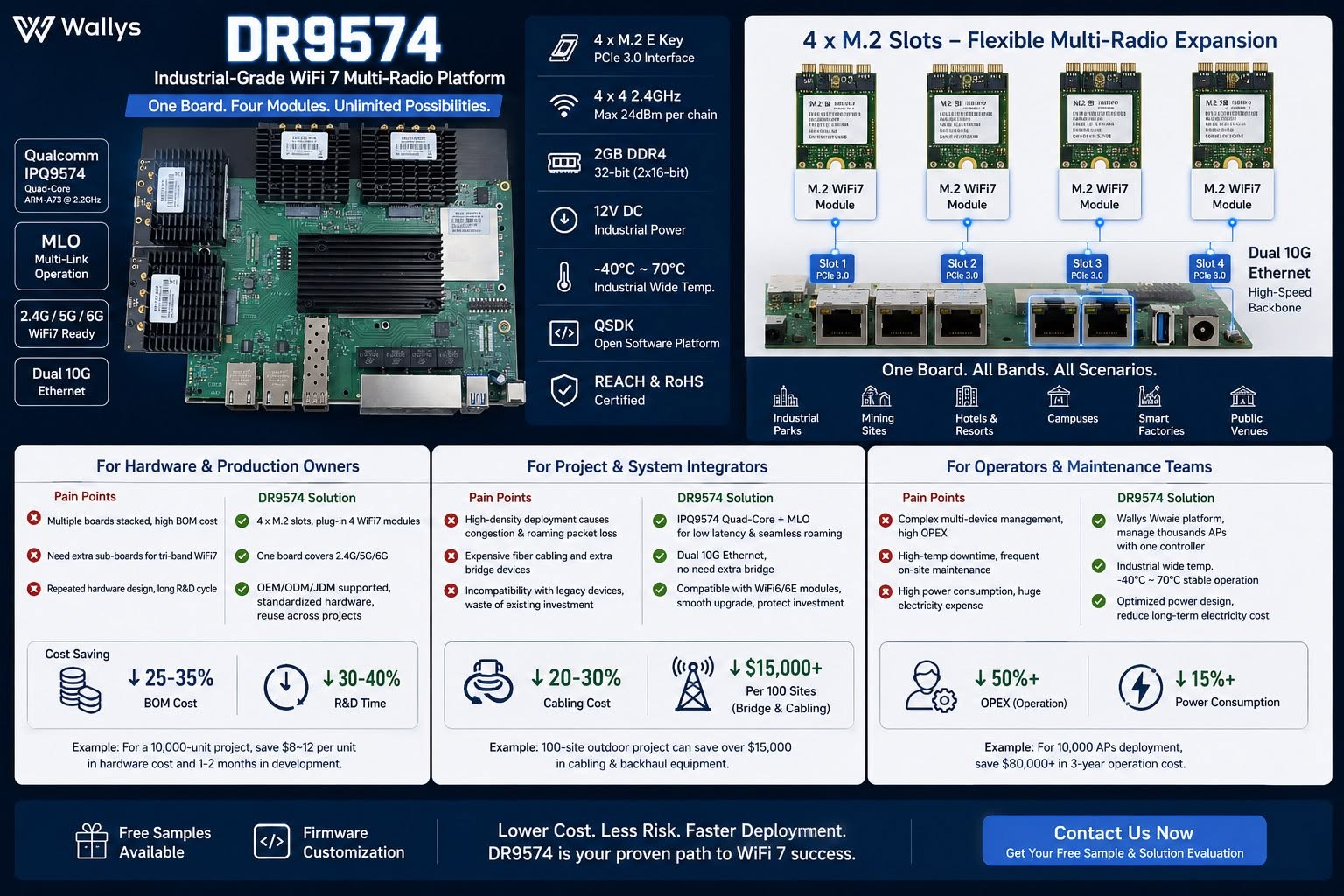
Qualcomm IPQ9574 with MLO support, dual 10G Ethernet, wide temperature industrial design – DR9574 support QSDK and OpenWRT 3 band MLO

DR9574 Industrial WiFi7 Multi-Radio Board – One board, four M.2 radio modules, unlimited wireless deployment possibilities.

Built on Qualcomm IPQ9574 with MLO support, dual 10G Ethernet, wide temperature industrial design.

Lower BOM, less cabling cost, fewer maintenance workloads & power consumption for mass AP projects.

Ideal for system integrators, OEM hardware makers & wireless operators serving campuses, mining, smart factory & hospitality networks.

Testing samples & firmware customization available – DM to get your solution evaluation!

QSDK based firmware with QCA drivers is available , 3 card 3 band MLO support !! 4×4 MU MIMO or 2×2 MU MIMO configuration for 3 band MLO available.

https://wifi5.eu/dls/Wallys/DR9574

OpenWRT support available too !!

— working mainline OpenWrt port (10G + Wi-Fi 7 MLO)

Over the past few weeks we’ve brought the board up on a fully mainline stack — mainline Linux 6.12 + OpenWrt + ath12k, no QSDK and no out-of-tree datapath driver — and it now cold-boots from NAND into a working router/AP with both:

– 10G USXGMII ethernet (the AQR113C ports) bringing up a link and passing traffic with a DHCP lease, and
– a 3-link Wi-Fi 7 AP-MLD (one SSID across 6 / 5 / 2.4 GHz, WPA3-SAE) on mainline ath12k, with a real client associating and passing iperf traffic.

Getting the 10G working on mainline required root-causing and fixing an actual upstream kernel bug — a per-port clock that was left at the 10G rate regardless of the negotiated link speed. It’s a small, clean patch I’m preparing for the netdev mailing list, and it should help any IPQ95xx board with an Aquantia USXGMII PHY, not just this one.

Everything is public and reproducible here:
https://codeberg.org/insalata-fresca/openwrt-dr9574
(device tree, the patch set, and a write-up of the root cause.)

Why we think this could be interesting for you : a mainline-based firmware track means a current kernel with ongoing security fixes, an auditable, blob-minimal stack, and upstreamable patches — a strong story for customers who need long support windows, as a complement to the QSDK option.

W've pushed the mainline port further: the four 2.5G QCA8084 LAN ports are now the focus. The four copper PHYs come up and answer on mainline, and the 10G/USXGMII uplink and the 3-link Wi-Fi 7 MLO already work. But the 2.5G ports don't pass traffic yet,and I've traced it to one specific, well-understood gap.

In short: the QCA8084's internal XPCS never becomes reachable over MDIO. The chip's security-control config space (0xC90F000, which holds WORK_MODE and the SerDes/XPCS MDIO address fix-up) is readable but appears write-locked in our mainline bring-up. The driver writes the correct values (work mode 0x2f, XPCS MDIO address 7), but they don't take - so the XPCS stays at a default address, answers nowhere, and everything downstream (per-channel config, link, traffic) is blocked behind it. We are working on the final solution now.


The full write-up and the exact register evidence are on a public WIP page:

Status and the open question:
https://codeberg.org/insalata-fresca/openwrt-dr9574/src/branch/wip-qca8084-2p5g/docs/qca8084-2p5g-status.md

Register evidence (the actual readouts):
https://codeberg.org/insalata-fresca/openwrt-dr9574/src/branch/wip-qca8084-2p5g/docs/qca8084-2p5g-register-evidence.md

Repo root (device tree, 10G and Wi-Fi 7 patches):
https://codeberg.org/insalata-fresca/openwrt-dr9574

Posted on

The Wi-Fi 7 Revolution: Beyond Speed to Industrial Reliability and MLO

In the world of Industrial IoT, legacy wireless standards are more than just slow—they are bottlenecks. In high-density environments, waiting for a single free channel is a luxury enterprises can no longer afford. This is why Wi-Fi 7 MLO (Multi-Link Operation) is the true game-changer.

At 524WiFi, we view Wi-Fi 7 not just as a speed upgrade, but as an infrastructure overhaul. Imagine a congested highway: MLO doesn’t just increase the speed limit; it adds multiple lanes across 5GHz and 6GHz bands simultaneously, ensuring data flows without interruption.

We recognize that many of our clients are at a crossroads: you need Wi-Fi 7 performance but are locked into existing Mini PCIe architectures.

To bridge this gap, 524WiFi has introduced the AW7990-NPD, the world’s first Wi-Fi 7 BE3600 Mini PCIe module. Powered by the MediaTek MT7990 chipset, this module is specifically engineered to bring enterprise-grade connectivity to industrial robotics, edge computing, and security gateways—without requiring a total system overhaul.

Technical Core & Strategic Advantages :

  • Sub-1GHz Efficiency : Operating in the Sub-1GHz spectrum to ensure superior wall penetration and minimized interference.
  • 1KM+ Transmission : Achieves long-range connectivity exceeding 1 kilometer, ideal for remote sensor monitoring and agricultural IoT.
  • Plug-and-Play Integration : A versatile USB interface that simplifies the addition of Wi-Fi HaLow capabilities to existing gateways, PCs, or embedded controllers.
  • IEEE 802.11ah Standard : Optimized for high-density IoT networks, supporting thousands of nodes with significantly lower power consumption than traditional Wi-Fi.

Why the AW7990-NPD is a Strategic Asset:

  • Extreme Throughput : Leveraging BE3600 dual-band concurrency and 4096-QAM for unprecedented data density.
  • Deterministic Latency : MLO technology ensures a stable, “wire-like” connection even in the most crowded RF environments.
  • Industrial Heritage : A standard Mini PCIe form factor designed for the rigors of high-performance  industrial applications.

We know the industry’s open secret: great hardware is often crippled by poor drivers. At AsiaRF, we don’t just build modules; we build development platforms.

Our MediaTek-powered Wi-Fi 7 solutions are highly optimized for Linux and OpenWrt. We provide the robust software foundation your custom Enterprise APs demand, so your engineering team can stop debugging drivers and start building legendary systems.

Our growth is fueled by a single principle: Stability is everything. We are committed to being the reliable partner you need for the next generation of industrial deployment.

🔗 Explore 𝗼𝘂𝗿 𝗪𝗶-𝗙𝗶 𝟳 𝗰𝗼𝗹𝗹𝗲𝗰𝘁𝗶𝗼𝗻

Posted on

524WiFi 𝑨𝑾7990-𝑵𝑷𝑫: MediTatek Filogic 6 MT7990 𝑾𝒊-𝑭𝒊 7 𝑴𝒊𝒏𝒊 𝑷𝑪𝑰𝒆 𝑴𝒐𝒅𝒖𝒍𝒆


Infrastructure Preservation: Upgrade to 802.11be Without a PCB Redesign

In industrial computing, the lifecycle of your platform is critical. While the industry pivots to Wi-Fi 7, transitioning often necessitates a full-scale hardware overhaul—until the introduction of the 524WiFi AW7990-NPD Mediatek based module.

Technical Core & Strategic Advantages :

  • MediaTek Filogic 600 (MT7990) : Delivers BE3600 dual-band concurrent (DBDC) operation.
  • 4096-QAM Modulation : Achieves a 20% increase in peak data rates compared to Wi-Fi 6.
  • Multi-Link Operation (MLO) : Ensures deterministic latency and link reliability in congested environments.
  • Drop-In Upgrade : Bypasses R&D costs and time-to-market delays by utilizing the standard Mini PCIe form factor.

Optimized for Mission-Critical Verticals :

  • Industrial Robotics : High-bandwidth telemetry for AMRs/AGVs.
  • Edge AI Nodes : Rapid data synchronization for Smart Factory 4.0.
  • Security Gateways : High-throughput processing without thermal throttling.

AW7990-NPD: High-Performance Wi-Fi 7 BE3600 AP Module with MediaTek MT7990AN

AW7990-NPD is an Wi-Fi 7 AP module BE3600 by MediaTek MT7990AN chipset supports Wi-Fi 7 technology and feature IEEE802.11 a/ b/ g/ n/ ac/ ax/ be compliant, 2.4GHz 2×2, 5GHz
3×3 2ss BE3600 Wi-Fi subsystem. The MT7990AN offers feature-rich wireless connectivity at high standards and delivers reliable, cost-effective throughput from an extended distance.

The optimized Wi-Fi baseband algorithms provide superb performance. The intelligent MAC design deploys a highly efficient offload engine and hardware data processing accelerators,
which fully offload Wi-Fi task of the host processor. The MT7976CN is designed to support standard-based features in the areas of security, quality of service, and international regulations, giving end users the greatest performance at any time and in any circumstances.

Pre-certified with CE / FCC / IC, this solution helps accelerate product deployment while lowering certification cost and complexity.

Features

WLAN

  • Wi-Fi compliant
  • IEEE 802.11a, b, g, n, ac, ax, be compliant
  • 2.4GHz 20 and 40 MHz, 2×2
  • 5GHz: 20, 40, 80 and 160 MHz, 3×3 2ss
  • Dual-Band Dual Concurrent (DBDC) iFEM
  • Supports up to 4096-QAM
  • Data rate of up to 688Mbps for 40MHz channel in 2.4Ghz and 2882Mbps for 160MHz in 5GHz mode
  • Integrated power detector to support per packet Tx power control
  • Multi-user multiple input multiple output (MU-MIMO) for Tx and Rx
  • Multi-user Orthogonal Frequency-Division Multiple Access (MU-OFDMA) for Tx and Rx
  • Support STBC, LDPC, Tx beamformer and Rx beamformee
  • Support greenfield mode, mixed mode, and legacy mode

Platform

  • 32bit RISC-V MCU for Wi-Fi protocol and Wi-Fi offload
  • Embedded SRAM and ROM
  • PCIe3.0 interface

Security

  • WFA, WPA, WPA2, WPA3 personal, WPS 2.0

QoS

  • WFA WMM and WMM-PS

Standard

ChipsetMT7990AN with MT7976CN
Memory8M byte
Host InterfaceMini PCIe
Operating VoltageDC 3.3V ± 5%
Power Consumption11.5W
Wireless2.4GHz 2T2R 802.11b/g/n/ac/ax/be5GHz 3T3R 2ss 802.11a/n/ac/ax/be
Frequency Range2.4GHz: 2.412~2.472GHz5GHz: 5.15~5825GHz
Channel Spectrum WidthsSupports 20/40MHz at 2.4GHzSupports 20/40/80/160MHz at 5GHz
AntennaExternal Antenna connector (IPEX) x3
Operating SystemLinux
Environmental TemperatureOperating:-10°C to 70°C, Storage:-20°C to 90°C
Environmental HumidityOperating: 10% to 90%, Storage: Max. 90%
Dimensions (mm)30(W)*51(L)*5.1(H)mm
WeightTBD
CertificationTBD

Package with Heatsink 30x40x25mm Aluminum material

Power consumption maximum is 9W, average is 4 – 8W.
Main board Power Supply design please provide 3.3V 3A, minimum 3.3V 2.5A.

Additional information

Weight0.0255 kg
Dimensions9.5 × 6.5 × 1.5 cm
Posted on

How to Use 524WiFi MEDIATEK Wi-Fi 5, 6, 6E, and Wi-Fi 7 Modules

A practical integration guide with a full 524WiFi MEDIATEK chipset based module overview.

524WiFi provides a complete portfolio of industrial-grade Wi-Fi modules covering Wi-Fi 5 (802.11ac), Wi-Fi 6 (802.11ax), Wi-Fi 6E (ax + 6 GHz), and Wi-Fi 7 (802.11be). These modules are widely used in routers, gateways, industrial IoT, smart cities, robotics, and embedded Linux systems.

This guide explains how to select, install, configure, and deploy AsiaRF Wi-Fi modules, followed by a full comparison table of current Wi-Fi 5/6/6E/7 models.

1. Choosing the Right MEDIATEK Wi-Fi Module

When selecting a module, consider:

  • Wi-Fi generation
    • Wi-Fi 5 → cost-effective, mature ecosystem
    • Wi-Fi 6 → higher efficiency, OFDMA, MU-MIMO
    • Wi-Fi 6E → access to clean 6 GHz spectrum
    • Wi-Fi 7 → ultra-low latency, multi-link operation (MLO)
  • Form factor
    • Mini-PCIe (industrial & networking equipment)
    • M.2 Key-A / Key-E (embedded systems & SBCs)
  • MIMO & throughput
    • 2×2 for compact/low-power designs
    • 4×4 for gateways, APs, and routers
2. Hardware Installation

Physical installation

  1. Insert the module into the Mini-PCIe or M.2 slot
  2. Secure with a screw
  3. Connect antennas using U.FL / MHF4 connectors
  4. Ensure antenna count matches RF chains (2×2 or 4×4)

Power & thermal

  • High-performance Wi-Fi 6/7 modules require:
    • Stable 3.3 V supply
    • Adequate ground plane
    • Optional heatsink or airflow for sustained throughput
3. Driver & OS Support

Linux / OpenWrt

524WiFi MT Mediatek Wi-Fi 6 / 6E / 7 modules are primarily based on MediaTek chipsets and are supported by:

Typical steps:

opkg update

opkg install kmod-mt76 hostapd iw

AP / STA configuration

  • Use hostapd for AP mode
  • Use wpa_supplicant for client mode
  • Configure regulatory domain:

iw reg set US # example

4. Antenna & RF Best Practices
  • Place antennas away from metal enclosures
  • Maintain proper antenna spacing for MIMO
  • Use low-loss coax for external antennas
  • Verify antenna tuning for 2.4 GHz / 5 GHz / 6 GHz
5. Regulatory & 6 GHz Considerations

For Wi-Fi 6E and Wi-Fi 7:

  • 6 GHz availability depends on country regulations
  • Ensure:
    • Correct country code
    • Proper EIRP limits
    • DFS compliance (5 GHz)
6. Validation & Testing

Recommended tests:

  • Throughput: iperf3
  • Stability: 24–72 hr stress test
  • Multi-client load test
  • Thermal monitoring under peak load
7. Full 524WiFI MEDIATEK Wi-Fi Module Table (Wi-Fi 5 → Wi-Fi 7)
ModelWi-Fi StandardBandsForm FactorMIMOChipset FamilyTypical Use Case
AW7615-NP1Wi-Fi 5 (802.11ac)2.4 / 5 GHzMini-PCIe4×4MediaTek MT7615Legacy routers, cost-optimized gateways
AW7915-NP1Wi-Fi 62.4 / 5 GHzMini-PCIe4×4MediaTek MT7915Industrial APs, enterprise gateways
AW7915-NPDWi-Fi 62.4 / 5 GHzMini-PCIe2×2MediaTek MT7915Embedded Linux platforms
AW7915-AE1Wi-Fi 62.4 / 5 GHzM.2 Key-A4×4MediaTek MT7915SBCs, edge computing
AW7915-AEDWi-Fi 62.4 / 5 GHzM.2 Key-E2×2MediaTek MT7915Compact embedded designs
AW7916-NPDWi-Fi 6E2.4 / 5 / 6 GHzMini-PCIe2×3MediaTek MT79166 GHz industrial gateways
✅ AW7916-AEDWi-Fi 6E2.4 / 5 / 6 GHzM.2 Key-E2×3MediaTek MT7916Compact Wi-Fi 6E embedded systems
AW7990-NPDWi-Fi 7 (BE)2.4 / 5 / 6 GHzMini-PCIe3×3MediaTek MT7990Wi-Fi 7 gateways & APs
✅ AW7990-AEDWi-Fi 7 (BE)2.4 / 5 / 6 GHzM.2 Key-E3×3MediaTek MT7990Next-gen embedded Wi-Fi 7 devices
✅ AW7991-AE2Wi-Fi 7 (BE)2.4 / 5 / 6 GHzM.2 Key-A/E3×3MediaTek MT7991High-efficiency Wi-Fi 7 platforms
8. Typical Application Scenarios
  • Industrial IoT gateways
  • Smart city infrastructure
  • AIoT edge devices
  • Enterprise & carrier-grade routers
  • Wi-Fi 7 next-generation APs
  • OpenWrt-based networking products
Conclusion

MEDIATEK Wi-Fi modules provide a clear upgrade path from Wi-Fi 5 to Wi-Fi 7, with consistent Linux/OpenWrt support, industrial-ready form factors, and scalable RF performance. By choosing the right module, following best practices for installation, and leveraging open-source drivers, system integrators can rapidly deploy reliable wireless solutions across diverse markets.

Posted on

SparkLAN Client Wi-Fi Modules

Premium Wi-Fi Modules in various form factors. SparkLAN delivers premium industrial Wi-Fi solutions in connectorized and LGA form factors with a focus on maintaining high quality and functionality. Whether you’re looking for an M.2, mPCIe, or solder down solution, cutting-edge Wi-Fi 7, or a reliable USB dongle, SparkLAN has got you covered. Plese contact us to test samples !

Explore : SPARKLAN PREMIUM WI-FI modules

Posted on

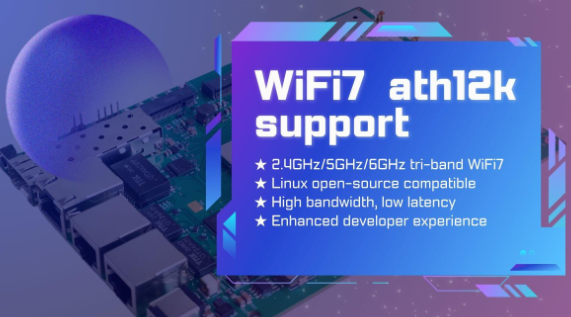
524 WiFi 7 modules from Wallys Now Fully Supports ath12k | Faster Performance & Open-Source Flexibility

524 WiFi 7 cards Now Fully Supports ath12k — Performance Unlocked, Connectivity Redefined

The evolution of WiFi 7 continues to accelerate, and open-source innovation is playing a key role in enabling faster development and deployment. We are excited to announce that our entire WiFi 7 product line now offers full compatibility with the ath12k driver — Qualcomm’s next-generation open-source wireless driver for Linux.

From high-performance router boards to enterprise-grade network cards, Wallys WiFi 7 platforms based on IPQ95xx, QCN92xx, and QCN62xx are now ready to take advantage of the powerful features and enhanced stability provided by ath12k.


Why ath12k Matters for WiFi 7 Development

As the successor to ath11k, the ath12k driver introduces major improvements tailored for WiFi 7’s advanced feature set. Developers, integrators, and enterprises gain stronger kernel support, increased flexibility, and a smoother path to building next-generation wireless systems.

Key Benefits of ath12k

  • Tri-band WiFi 7 support (2.4GHz / 5GHz / 6GHz) Supports core WiFi 7 technologies such as 4K-QAM, MLO, and Multi-Link Aggregation, unlocking higher throughput and reliability.
  • Deep compatibility with the Linux open-source ecosystem Ideal for companies building custom firmware or integrating WiFi 7 into specialized platforms.
  • Significant performance upgrades Improved speed, lower latency, and greater stability — perfect for enterprise networking, industrial IoT, MDUs, and outdoor deployments.
  • Developer-friendly architecture Open, flexible, and optimized for ODM/OEM workflows, reducing development time and increasing customization freedom.

WallysTech Products Now Supporting ath12k

With ath12k integration now complete across our WiFi 7 lineup, developers gain reliable and scalable platforms for their next wireless innovation.

1. DR9574 Series (IPQ9574)

A high-performance tri-band WiFi 7 router/AP mainboard designed for:

  • Enterprise WiFi networks
  • Industrial wireless systems
  • High-density environments
  • Multi-port, high-throughput applications

2. DR9274 & DR6274 WiFi 7 NICs (QCN9274 / QCN6274)

PCIe-based WiFi 7 network cards suitable for:

  • Custom Access Points
  • CPE devices
  • Industrial and outdoor wireless equipment
  • OEM/ODM hardware upgrades

3. Additional WiFi 7 SoC Mainboards

More WiFi 7 models are currently under development and will be added to the ath12k-enabled family soon, expanding options for integrators and solution providers.


Accelerating Real-World WiFi 7 Deployment

At 524WiFi and WallysTech, our mission is to deliver open, flexible, and production-ready wireless platforms to help customers shorten evaluation cycles and bring WiFi 7 products to market faster.

With full ath12k support, our WiFi 7 solutions now provide:

  • Greater openness for developers
  • Better compatibility with custom Linux systems
  • Improved performance for demanding use cases
  • A smoother upgrade path for companies transitioning to WiFi 7

Whether you’re building enterprise APs, industrial routers, outdoor IoT gateways, or custom wireless equipment, ours WiFi 7 platforms offer the performance and openness needed for next-generation deployments.

Article content

The integration of ath12k marks a major milestone for the WiFi 7 ecosystem. 524WiFi is proud to be among the first hardware solution providers to fully adopt the new driver across a broad product portfolio.

As WiFi 7 continues to redefine wireless performance, 524WiFi and WallysTech will keep delivering powerful, customizable, and future-ready solutions to help partners innovate with confidence.

Posted on

How Network Drivers Bridge the Digital World – ECM, NDIS, RNDIS, MBIM, RMNET, QMI…and more

In our hyper-connected world, we think of networks in terms of Wi-Fi signals, ethernet cables, and blazing 5G. But beneath the surface of every email sent, every stream buffered, and every video call connected, lies a critical piece of software that rarely gets the spotlight: the network driver. These digital workhorses are the essential interpreters that allow your computer’s operating system to have a meaningful conversation with the physical hardware that connects you to the world.

Understanding them isn’t just academic; it’s key to troubleshooting a flaky connection, boosting performance, or simply appreciating the hidden complexity of a networked world.

The Universal Translator for Your Hardware

At its core, a network driver is a specialized software module that acts as a universal translator. It sits between a computer’s operating system (like Windows, Linux, or macOS) and its Network Interface Card (NIC)—the physical or virtual hardware that sends and receives data.

The operating system speaks in high-level, standardized commands (“send this packet,” “check the connection”). The NIC, whether it’s a gigabit ethernet port, a Wi-Fi adapter, or a 5G modem, has its own unique, hardware-specific language. The driver’s sole purpose is to translate the OS’s generic commands into the precise instructions the specific NIC model needs to function. Without the correct driver, even the most advanced, expensive network card is a useless piece of silicon.

A Spectrum of Drivers: From Universal to Specialized

Not all drivers are created equal. They exist on a spectrum, designed to meet different needs for compatibility, performance, and cost.

  • In-Box Drivers: These are the generic drivers built directly into an operating system. They provide basic functionality for a wide range of common hardware, allowing you to get online immediately after a fresh OS install. Think of them as a phrasebook—it gets the basic job done but lacks the nuance for high-performance tasks.
  • Vendor-Supplied Drivers: This is where the real magic happens. These are the optimized drivers written and maintained by the hardware manufacturer (like Intel, Broadcom, or Qualcomm). They are finely tuned to unlock the full potential of their specific hardware, offering enhanced features, better power management, superior stability, and lower latency. For any serious application, these are the gold standard.
  • Generic NDIS Drivers: The Network Driver Interface Specification (NDIS) is a standard framework, primarily in Windows, that provides a universal API. This allows hardware vendors to write a single driver that can interface with multiple versions of the Windows OS, simplifying development and ensuring broad compatibility.

Why Drivers Matter: The Practical Impact

You might only think about a driver when something goes wrong, but their quality and configuration have a daily impact on your experience.

  • Performance: A well-tuned driver can maximize throughput (speed) and minimize latency (lag), which is crucial for online gaming, video conferencing, and large data transfers. A poorly optimized driver can create a bottleneck, leaving you with slower-than-expected speeds.
  • Stability & Reliability: The infamous “Blue Screen of Death” or a persistent, dropped connection can often be traced back to a corrupt, outdated, or buggy network driver. A stable driver is the foundation of a reliable network connection.
  • Security: Drivers operate at a privileged level in the system. As such, they can be a target for security vulnerabilities. Manufacturers regularly release driver updates to patch these security holes, making keeping your drivers current a critical cybersecurity practice.
  • Feature Enablement: Advanced hardware features like Wake-on-LAN, traffic prioritization (QoS), or teaming multiple network ports together are almost always dependent on support from the vendor-specific driver.

The Evolution: Virtualization and the Cloud

The role of the driver is evolving beyond physical hardware. In virtualized and cloud environments, the physical NIC is shared among multiple virtual machines (VMs). Here, virtual network drivers become crucial.

Technologies like virtio-net (for Linux/KVM) and VMXNET3 (for VMware) are paravirtualized drivers. They are not tied to any specific physical hardware but are designed for optimal performance within a virtualized ecosystem. They communicate directly with the hypervisor, drastically reducing overhead and providing near-native network performance to VMs, which is the lifeblood of modern cloud infrastructure.

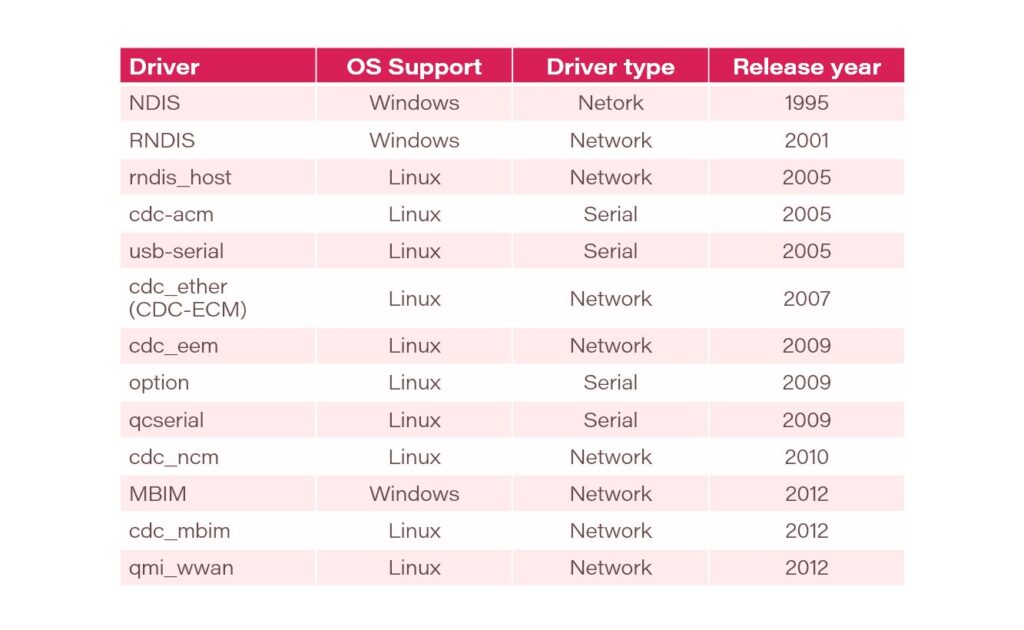
Here is a history of the network drivers:

The Bottom Line

Network drivers are a fundamental, if invisible, component of our digital lives. They are the diligent interpreters that transform abstract data into electrical signals and radio waves, connecting our devices to the global network. By understanding their role—from the basic in-box version to the high-performance vendor driver—we gain a deeper appreciation for the complexity of connectivity and the tools to build faster, more stable, and more secure networked systems. The next time you have a flawless video call, remember to thank the unsung interpreter working behind the scenes.

Posted on

WIFi 7 drivers finally works aka how we tested QCN9274 hw 2.0. board-2.bin and firmware-2.bin file for Linux development and Ath12k Driver MLO debug 9274

October 2025 update :

🚀 Exciting News from 524WiFi !

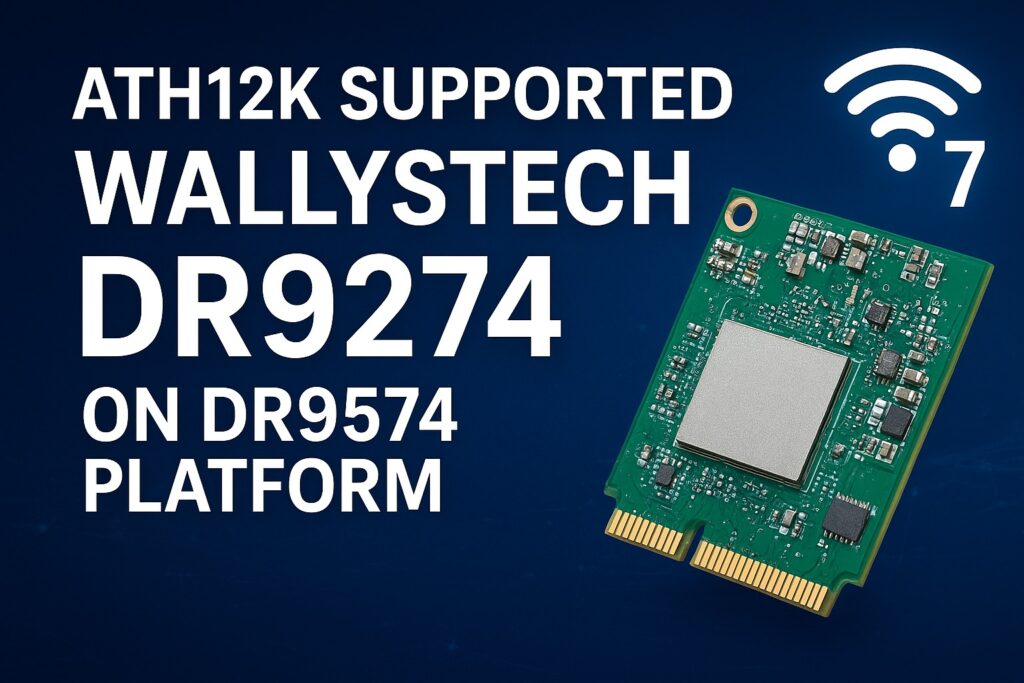
Our 524WiFi DR9274 Series WiFi 7 Network Cards are now fully supported on the DR9574 platform using ath12k driver! And MLO fully working and supported too !

Experience the next generation of wireless performance — faster, smarter, and more reliable.

Sample units and demo tests are now available.

Actually. The Customer can use our board-2.bin from our ftp or from Compex on our DR9274 Cards. Because these Cards are standard Card of Qualcomm. There is no reason for any differences. You can download board-2.bin for all our 524WiFi DR9274 modules from our link : https://wifi5.eu/dls/Wallys/DR9274/

Additionally. If a Customer needs ath12k support, then we can do demo ath12k on our DR9574 boards to support DR9274 cards. Customer can take it as reference. If Customer need support for their own software, it needs check the project scale and then we can offer our support for LINUX / OpenWRT development.

———————————————————————————————-

Dear customers,

You can log in the link and can find latest sources for your development using Ath12k firmware. If there is any mistake, please let us know.

https://git.codelinaro.org/clo/ath-firmware/ath12k-firmware/-/tree/main/QCN9274/hw2.0?ref_type=heads

This is general frimware for QCN 9274 / 6274 based modules. For special function, you need ask the vendor to develop special firmware. They do not provide it for free. For example COMPEX need you to buy it , but the price is about $50000.

For 524wifi DR9274 and also COMPEX modules the bdf is not changed, so you can use the generic board-2, firmware-2  and add your board-id of your module if not included in already. Please read bellow how to use and debug Ath12k driver for our dual band modules.

There are also many known Ath12k bugs and limitations, you can solve known issues using a driver patch – for example :

https://patchwork.kernel.org/project/linux-wireless/list/?series=954967

For examples you can add the 160Mhz Channel Support for 5GHz range.

More general informations :

https://wireless.docs.kernel.org/en/latest/en/users/drivers/ath12k.html

EXAMPLE  1 : 

A modified general board-2.bin file for all QCN6274 modules (including dual band 5G6G) is available here. The public file doesn’t support board-id 0x1006 (dual band 5G+6G) , our engineer added support for 0x1006 in to the file : 

 https://wifi5.eu/dls/Wallys/DR9274/

For example WLE7002-E56 or DR9274-5G6G by 524WiFi modules require this modified board-2.bin file, then 6GHz issue is solved via regulatory db. signing the file. And you will also need to apply an existing driver patch from Patchwork.kernel.org

https://patchwork.kernel.org/project/linux-wireless/list/?series=&submitter=&state=&q=ath12k&archive=&delegate=

After this setup tuning and modifications you can achieve working WiFi 7 Dual band card under Linux or OpenWRT. For example openwrt latest trunk is working excellent, + adding right board-2.bin file as mentioned higher. After appling the 160MHZ channel patch we are testing DR9274-5G6G and WLE7002-E56 with MLO support:

current transfer is about 1400MBps for 6GHz/320Mhz with iphone 15 pro max 

and  1500MBps for 5GHz/160Mhz with iphone 15 pro max. Distance is half a meter for this testing.

For big customers , there is a good solution – like this : the customer can evaluate the wifi card on a QCA based router board, like for example DR9574 , and if performance and features are good then they will have confidence to put project to 524WiFi and Wallys to develop software for ath12k. We can allocate a engineer to fix these Customers requirements and if the Customer has a good project with us. MOQ and SW development contract is required.

Are you interested in in testing and development on dr9574 board using DR9274-5G6G module ? You will see how it works with original QCA driver. Please contact us !

Unfortunaly, it seems only single band modules can work with current ath12k without extra development, unfortunately dual band support requires additional development as we show you for wle7002-e25 card bellow:

————————————————————————————————————————————————

COMPEX WLE7002E25 dual band needs to separate phy firmware. 

https://github.com/quic/upstream-wifi-fw/tree/main/ath12k-firmware/QCN9274/hw2.0/1.3.1/WLAN.WBE.1.3.1-00130-QCAHKSWPL_SILICONZ-1

The official firmware It can be downloaded from the following link https://git.codelinaro.org/clo/ath-firmware/ath12k-firmware/-/blob/main/QCN9274/hw2.0/testing/1.1.1/WLAN.WBE.1.1.1-00210-QCAHKSWPL_SILICONZ-1/firmware-2.bin?ref_type=heads
Put the firmware into /lib/firmware/ath12k/QCN9274/hw2.0/

But split phy and firmware-2.bin does not support linux kernel 6.8. You need to download backportfrom https://mirror2.openwrt.org/sources/backports-6.9.1.tar.xz.
Install software to build backports with “sudo apt install build-essential flex bison ncurses-dev”.
The command need to prepare the backport
tar -xf backports-6.9.1.tar.xz
Patch the attached patch files. This will enable support linux kernel 6.xx and add defconfig-ath12k
cd backports-6.9.1/
patch -p1 < [patch file location]
The command need to compile and install backport
make defconfig-ath12k
make
sudo make INSTALL_MOD_STRIP=1 install

—————————-

We have tested this and it works. you can use the link provided directly.

See if it works on your end.

split phy and firmware-2.bin does not support linux kernel 6.8. Need to download backport from https://mirror2.openwrt.org/sources/backports-6.9.1.tar.xz.
Install software to build backports with “sudo apt install build-essential flex bison ncurses-dev”.
The command need to prepare the backport
tar -xf backports-6.9.1.tar.xz
Patch the attached patch files. This will enable support linux kernel 6.xx and add defconfig-ath12k
cd backports-6.9.1/
patch -p1 < [patch file location]
The command need to compile and install backport
make defconfig-ath12k
make
sudo make INSTALL_MOD_STRIP=1 install 

Please check our customer modified working board-2.bin file as an example and guide for your development – https://wifi5.eu/dls/compex/WLE7000

And dont forget as always , comment react or add some info – you will be automaticly added to possibly win set of our designed special 5G or WIFI anntennas

———————————————

Best Regards

524wifi team


Posted on

Compex Wi-Fi 7 Dual-Band Dual-Concurrent Modules are CE, FCC and IC certified and Ready for the World

𝗖𝗲𝗿𝘁𝗶𝗳𝗶𝗲𝗱 𝗮𝗻𝗱 𝗥𝗲𝗮𝗱𝘆 𝗳𝗼𝗿 𝘁𝗵𝗲 𝗪𝗼𝗿𝗹𝗱.

Compex Wi-Fi 7 Dual-Band Dual-Concurrent Modules are CE, FCC and IC certified, bringing together global compliance and industry-leading performance. Available in Standard MiniPCIe form factor and M.2 variants, our Qualcomm-powered modules deliver reliable and high-performance wireless connectivity for markets worldwide.

✅Powered by Qualcomm’s QCN6224 / QCN6274 / QCN9274 “Waikiki” series chipsets
✅Comes with band options: 2.4+5GHz, 2.4+6GHz, 5+5GHz and 5+6GHz
✅Multi-Link Operation (MLO) for higher throughput, lower latency and improved reliability
✅Diplexer Design to reduce the need for multiple Wi-Fi antennas for transmission
✅Open Source Ath12k Support

📩 Reach out to us at info@524wifi dot net or com to explore how we can power your next project.