Posted on — Leave a comment

Qualcomm Wi-Fi 8 Chipset: What Hardware Developers Should Know

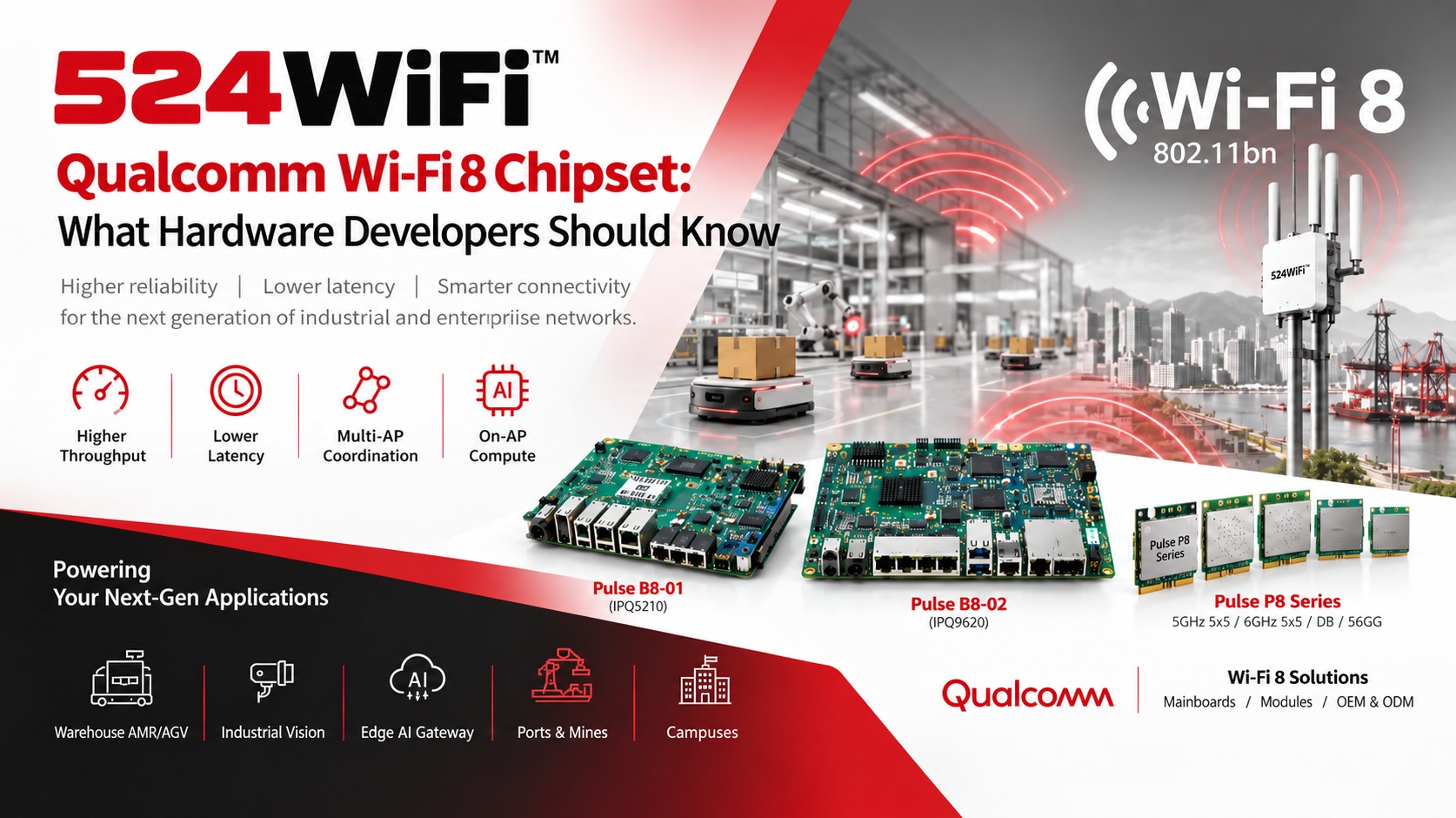
524WiFi™ Pulse B8 mainboards and Pulse P8 radio modules on Qualcomm Wi-Fi 8 technology

Wi-Fi 8 (IEEE 802.11bn) has moved from a standards discussion into silicon you can design around. Qualcomm’s MWC 2026 launch gave hardware teams a concrete platform to plan against. Here is what matters for developers building routers, industrial APs, gateways and robot connectivity.

What Is Qualcomm’s Wi-Fi 8 Platform, and Why Does It Matter?

Qualcomm launched a Wi-Fi 8 portfolio with a mobile chip (FastConnect 8800) and new Dragonwing networking platforms aimed at broadband gateways, enterprise access points and fixed wireless equipment. The infrastructure flagship is the Dragonwing NPro A8 Elite, part of the IPQ96 family. rcrwireless

The headline specs from Qualcomm’s materials:

  • A 5×5 Wi-Fi 8 radio system, with up to 40% more throughput at typical distances, 2.5x lower latency at peak usage, and up to 30% lower daily energy use than the previous generation techpowerup
  • A penta-core CPU up to 2.0 GHz, a Hexagon NPU, and a peak PHY rate of up to 33 Gbps qualcomm
  • Capacity for up to 1,500 clients in infrastructure gear dev

The design goal is reliability, not just peak speed. Wi-Fi 8 is meant to be about reliability rather than raw speed. For hardware developers, latency consistency, roaming behavior and performance under load matter more than the 33 Gbps figure, which is a peak PHY rate, not a throughput you will measure in the field. wifinowglobal

How Does Wi-Fi 8 Change Hardware Design?

1. Compute moves onto the access point. The NPro A8 Elite integrates an NPU and a packet processing engine. Your AP can run containerized services and network-optimization models locally instead of relying on a controller or the cloud.

2. Uplinks become the bottleneck. With PHY rates in the tens of Gbps, a 1G port will not do. Plan for 2.5G and 10G copper or SFP, and check your PoE budget. Qualcomm’s own IPQ96 documentation lists 2.5GbE and 25GbE-class interfaces, so board-level power, thermal and switch design need a fresh look.

3. 6 GHz becomes core, not optional. Wide channels and multi-radio designs put your antenna layout, RF shielding and connector choices (U.FL vs. MMCX) under more pressure than on Wi-Fi 6.

4. Roaming changes. Wi-Fi 8’s multi-AP coordination features, including the Single Mobility Domain (SMD) concept for seamless roaming without repeated re-authentication, target moving clients such as AMRs. Client-side support will be the limiting factor early on, so validate with real client devices.

Wi-Fi 8 vs. Wi-Fi 7: What Is Actually Different?

524WiFi™ Wi-Fi 8 and Wi-Fi 7 architecture comparison

Should you skip Wi-Fi 7? No. Wi-Fi 7 platforms such as IPQ9574 and IPQ5424 are shipping and stable, with mature software. Wi-Fi 8 makes sense when your product roadmap spans 2027 and beyond, or when roaming and latency in dense multi-robot environments are your main pain points.

Which Applications Benefit Most?

  • Warehouse AMR/AGV fleets: consistent latency and better roaming matter more than raw Gbps.
  • Industrial vision: multi-camera streams need stable uplinks and predictable performance under load.
  • Edge AI gateways: on-AP compute can pre-process data before it reaches an edge server.
  • Ports, mines and campuses: dense clients, mobile endpoints and harsh RF environments.

Where 524WiFi™ Fits: Wi-Fi 8 Hardware in Development

We are preparing Wi-Fi 8 routerboards and modules built on Qualcomm silicon. The modular platform roadmap combines dedicated mainboards and radio modules. The planned lineup:

Mainboards (no onboard radio, radios added via M.2 E-key):

  • Pulse B8-01 (IPQ5210): DDR4, NOR + NAND, 2× M.2 E-key, 1× 10G copper, 5× 2.5G, 12V
  • Pulse B8-02 (IPQ9620): DDR4, NOR + NAND, 3× M.2 E-key, 2× 10G copper, 4× 2.5G, 12V

Pulse P8 Series Wi-Fi 8 modules:

  • 5 GHz 5×5
  • 6 GHz 5×5
  • DB: 2×2 2.4 GHz + 3×3 5 GHz
  • 5G6G: 3×3 5 GHz + 2×2 6 GHz (VB only)

Connector options: VA = U.FL, VB = MMCX.

The mainboard-plus-module approach lets OEMs choose their radio configuration and enclosure, indoor or outdoor, without a full board respin. The same system planning can pair Qualcomm-based connectivity with Tomo AI Core NVIDIA for Jetson-based edge compute.

Quick Checklist for Hardware Teams

  1. Define whether you need peak throughput or reliability and roaming. The answer decides Wi-Fi 7 vs. Wi-Fi 8.
  2. Budget for 2.5G/10G uplinks, PoE and thermal headroom.
  3. Confirm client-device support before promising end-to-end Wi-Fi 8 gains.
  4. Get regulatory and certification timelines early, as Wi-Fi 8 products are new to test labs.
  5. Choose a modular architecture so you can upgrade radios without redesigning the mainboard.

Planning a Wi-Fi 8 or Wi-Fi 7 product? Talk to our engineering team about mainboards, modules and custom designs : info at 524wifi.net or .com

Platform references: DR5210_VA, DR9650_VA and DR9575.
Posted on

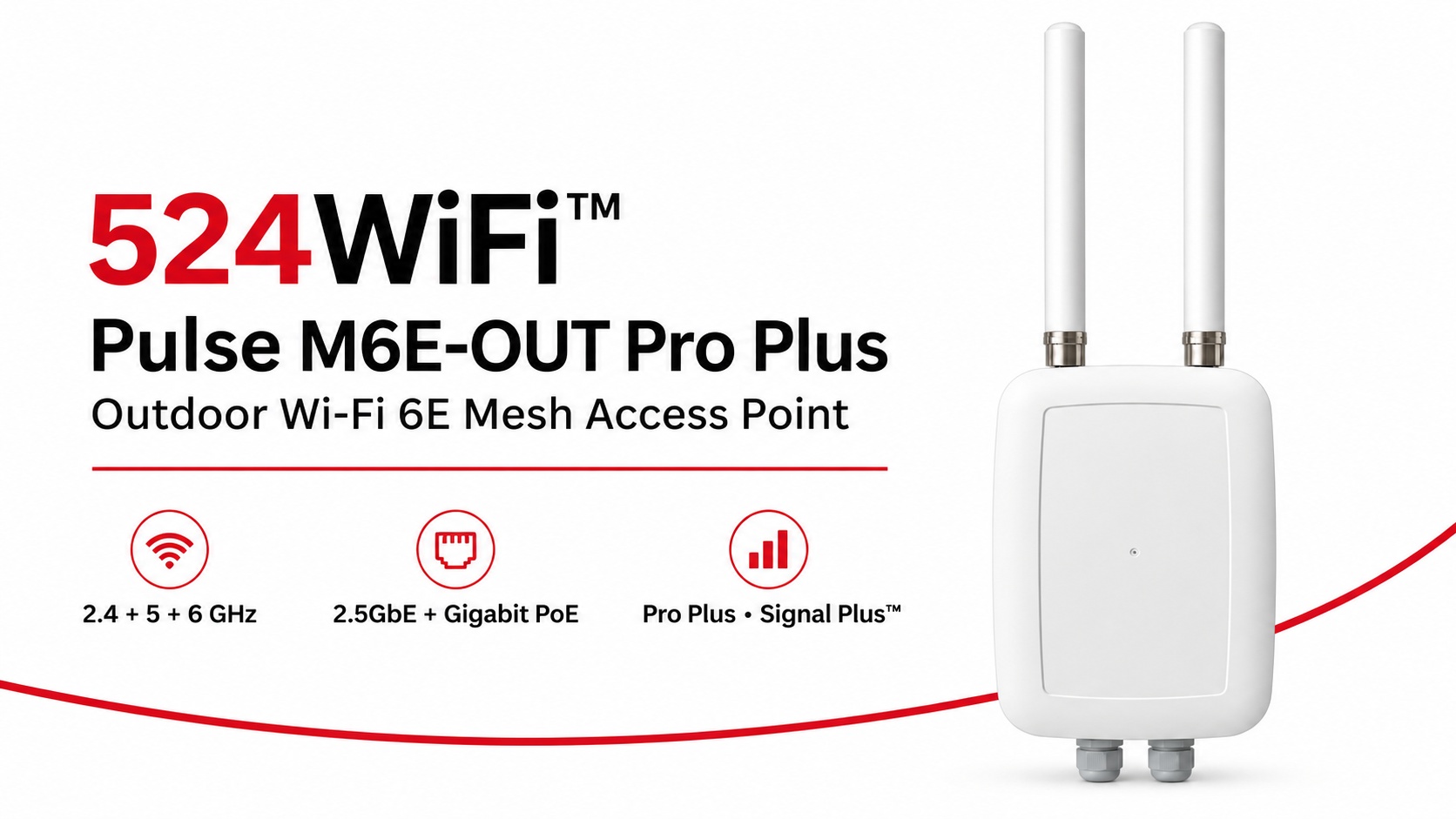
524WiFi™ Pulse M6E-OUT Pro Plus: Outdoor Wi-Fi 6E Mesh

524WiFi™ Pulse M6E-OUT Pro Plus outdoor Wi-Fi 6E mesh access point

524WiFi™ Pulse M6E-OUT Pro Plus brings the radio platform, outdoor enclosure and model-specific antenna assembly together for a professionally planned Wi-Fi 6E mesh installation. Start with a complete fixed network node and build coverage and inter-node links around the working area.

Three radio bands for the complete site network

Independent 2.4, 5 and 6 GHz radios give the installation three concurrent 2×2 radio paths. The Qualcomm IPQ5018 platform combines a dual-core ARM Cortex-A53 processor at 1.0 GHz with 512 MB DDR3L. A 2.5GbE interface supports the wired uplink, while a Gigabit Ethernet interface with PoE provides practical network and power integration.

The published theoretical PHY rates are up to 573 Mb/s at 2.4 GHz and 2,402 Mb/s each at 5 and 6 GHz. Channel widths reach 40 MHz at 2.4 GHz and 160 MHz on the two higher bands. Choose channels and radio roles around client traffic, the mesh topology and the operating country.

An antenna assembly matched to the outdoor node

The assembly combines two external 5 GHz omnidirectional antennas, two internal 2.4 GHz omnidirectional antennas and an internal directional 6 GHz panel serving the two 6 GHz RF paths. Aim the panel toward the intended link and keep its enclosure face clear of metalwork. This lets the installation use directional interconnection and local coverage deliberately.

Pro Plus and Signal Plus™ for deployment

Pro Plus combines our tuned product configuration, model-specific firmware selection and integration support. Signal Plus™ brings antenna placement, polarization, feed losses, radio roles and channel planning into the same RF system. Commission the complete node under the traffic and RF conditions of the actual site.

Fixed mesh nodes and moving clients

Use the M6E-OUT as a fixed outdoor infrastructure node. Pair it with Pulse M6E-IN for indoor infrastructure and Pulse R6-D2-IN or R6-T3-IN roaming clients on moving Ethernet-equipped machinery. Plan compatible firmware, authentication and RF overlap across the route. Mesh interconnection and moving-client roaming serve complementary roles in the complete network.

Explore the 524WiFi™ Pulse M6E-OUT Pro Plus specification and order configuration, or compare the Pulse product family.

Platform reference: DRWave-1000 / DR5018S.

Posted on

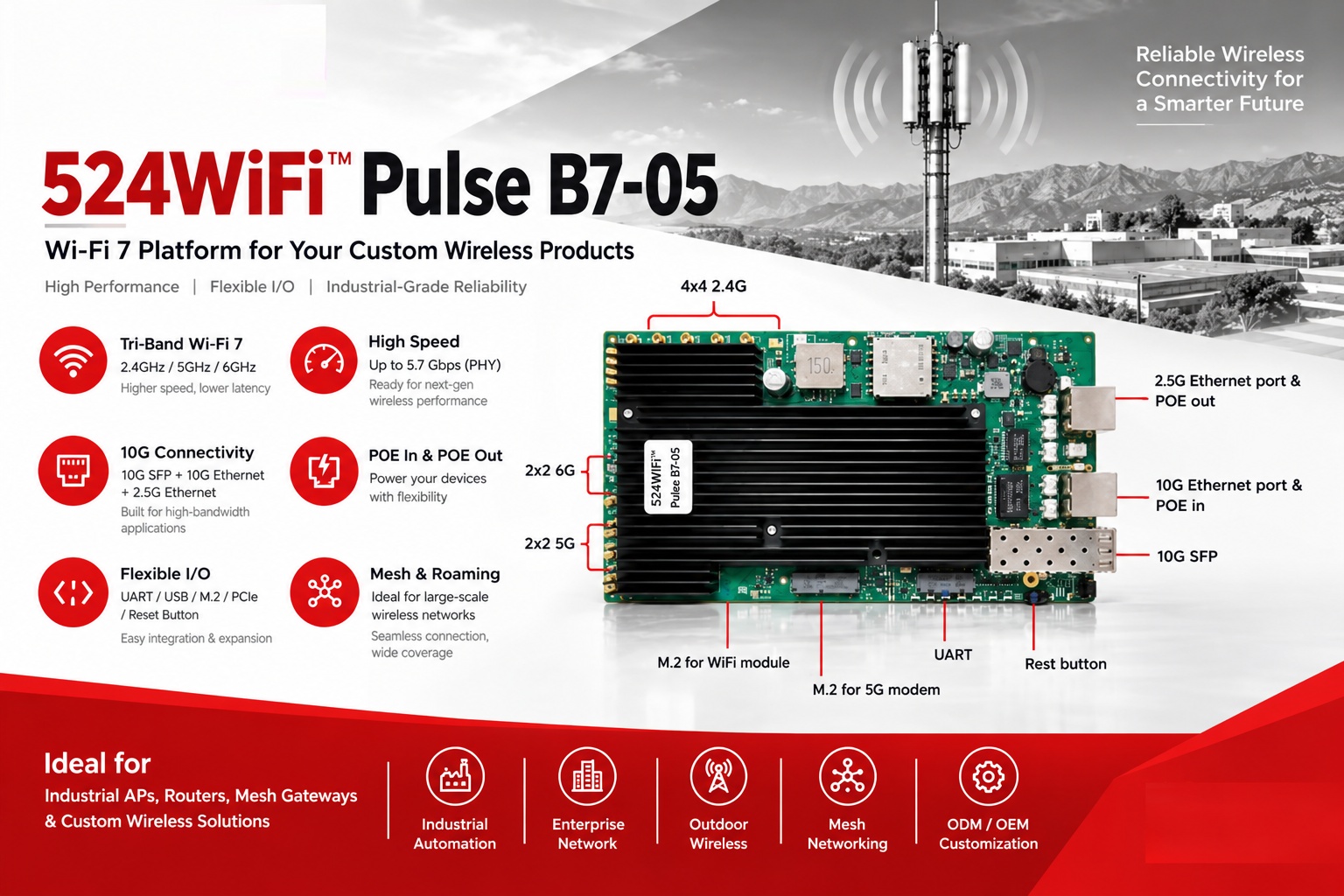
524WiFi™ Pulse B7-05: Wi-Fi 7 Platform for Custom Wireless Products

524WiFi™ Pulse B7-05 Wi-Fi 7 platform and hardware interfaces

524WiFi™ Pulse B7-05 is our tri-band (2.4/5/6GHz) Wi-Fi 7 platform for OEM/ODM projects, with 10G Ethernet, 10G SFP, and PoE in/out options on board.

It’s a good fit for:
→ Industrial APs
→ Enterprise routers
→ Mesh gateways
→ Outdoor wireless devices

We can help with hardware customization and software development, so you don’t have to build everything from scratch.

Have a project in mind? Let’s talk about whether 524WiFi™ Pulse B7-05 is the right fit – info at 524wifi.net or .com

Platform reference: DR5424S.

Posted on

Wi-Fi 6 Mesh Development with IPQ5018 & IPQ5010: WallysTech DR5018S Source Code Now on GitHub

🚀 WallysTech Releases Open-Source DR5018S Mesh Solution on GitHub!

We’re excited to announce that the DR5018S Mesh solution — optimized, tested, and production-ready — has now been fully open-sourced on GitHub.
Built on OpenWrt and enhanced through extensive real-world deployments, this solution is designed for teams working on Wi-Fi 6 / ath11k Mesh networks.

🔍 Why We Open-Sourced It

Mesh networking is essential in industrial IoT, outdoor coverage, enterprise networking, and large-scale distributed systems.
Yet many teams still struggle with:
• Unstable links
• Slow backhaul recovery
• Performance drops in high-density environments
• Limited ath11k Mesh reference designs

After deep testing and tuning in our own projects, we’ve created a stable, engineering-grade Mesh implementation — and we want to share it with the community.

⭐ What’s Inside

✔ Optimized Mesh link logic
✔ Faster reconnection & self-healing
✔ Lower latency during link interruptions
✔ NSS-accelerated forwarding
✔ Mesh configs, tuning parameters, and deployment guides
✔ Driver & firmware-related adjustments for ath11k

💡 About DR5018S

Powered by the Qualcomm IPQ5018 Wi-Fi 6 SoC, DR5018S is proven in harsh environments such as mines, oil fields, campuses, smart cities, and enterprise networks.
It supports flexible roles as both access and backhaul nodes — and is available with an industrial IP68 outdoor enclosure.

📦 GitHub Repository

🔗 [ GitHub link]

We’ve included examples, configs, debugging tips, and FAQs to help teams go from “it works” to “it works reliably.”

🤝 Join the Mesh Open-Source Community

If you’re building on Wi-Fi 6 or ath11k Mesh, we invite you to try the solution, share feedback, open issues, or submit PRs.
For large-scale deployments or custom requirements, our team is happy to support — just reach out.

Let’s build the next generation of Mesh networks together. 💡🌐

🚀 Key Features

1. High-Performance Platform Based on IPQ5018

  • Qualcomm IPQ5018 chip, dual-core ARM Cortex-A53 @ 1.0GHz
  • 512MB DDR3L system memory, 128MB NAND Flash storage
  • Hardware NAT acceleration supporting high-concurrency network connections

2. Complete Mesh Network Support

  • Natively integrated B.A.T.M.A.N. Advanced Mesh protocol
  • Supports multi-hop routing and dynamic topology discovery
  • Automatic link quality assessment and routing optimization

3. Enterprise-Level Functions

  • Supports WPA3 enterprise-grade security encryption
  • VLAN isolation and multi-SSID management
  • Centralized network management and monitoring
  • Supports Captive Portal and billing systems

DR5018S Mesh product family : https://524wifi.net/?s=mesh&post_type=product

Posted on

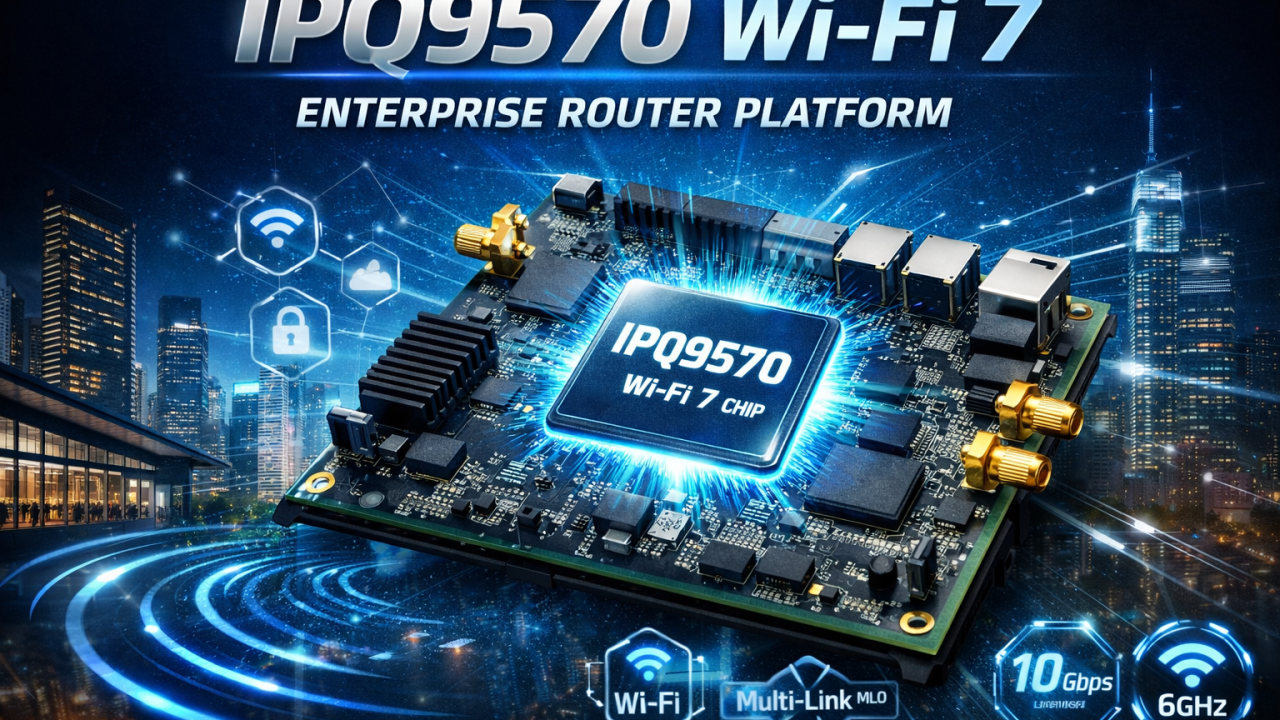
IPQ9570 Wi-Fi 7 Chip Overview: High-End Enterprise Router Platform

As Wi-Fi 7 (IEEE 802.11be) enters commercial deployment, enterprises and industrial users are demanding higher throughput, lower latency, stronger reliability, and scalable networking platforms. The Qualcomm IPQ9570 is designed precisely for these needs, positioning itself as a high-end Wi-Fi 7 router SoC for enterprise, industrial, and mission-critical networking applications.

This article provides a comprehensive overview of the IPQ9570 Wi-Fi 7 chipset, its key features, advantages, and typical application scenarios.

What Is IPQ9570?

The IPQ9570 is a flagship networking processor from Qualcomm’s Wi-Fi 7 router platform lineup. It targets enterprise-grade access points, high-performance gateways, and industrial routers, delivering advanced compute power, next-generation wireless capabilities, and rich wired connectivity.

Built for multi-gigabit networking, IPQ9570 is ideal for deployments where performance, stability, and long-term scalability are critical.

Key Features of IPQ9570 Wi-Fi 7 Platform

1. Wi-Fi 7 (802.11be) Support

IPQ9570 fully supports Wi-Fi 7, bringing major enhancements over Wi-Fi 6/6E:

  • 320 MHz channel bandwidth
  • Multi-Link Operation (MLO)
  • 4096-QAM
  • Significantly improved throughput and spectrum efficiency

These features enable ultra-fast wireless performance while maintaining stable connections in dense environments.

2. Multi-Link Operation (MLO)

One of the most important Wi-Fi 7 innovations, MLO, allows devices to transmit and receive data across multiple bands (2.4 GHz / 5 GHz / 6 GHz) simultaneously.

Benefits include:

  • Lower latency
  • Seamless roaming
  • Higher reliability
  • Reduced packet loss in mission-critical applications

This makes IPQ9570 particularly suitable for enterprise roaming, industrial mobility, and real-time communication systems.

3. High-Performance Quad-Core CPU

IPQ9570 integrates a high-performance quad-core processor, delivering strong computing capability for:

  • Advanced routing
  • Firewall and security services
  • VPN acceleration
  • Edge computing and traffic management

This ensures stable operation even under heavy traffic loads and complex network conditions.

4. Multi-Gigabit Ethernet Connectivity

To eliminate wired bottlenecks, IPQ9570 supports:

  • 2.5G / 5G / 10G Ethernet interfaces
  • High-speed LAN and WAN configurations

This enables full utilization of Wi-Fi 7 wireless speeds and supports modern enterprise network architectures.

5. Enterprise-Grade Security and Reliability

IPQ9570 is designed with enterprise and industrial reliability in mind, offering:

  • Hardware-accelerated security
  • Secure boot and encryption
  • Long-term platform support

It is well suited for 24/7 operation in demanding environments.

Typical Applications of IPQ9570

Thanks to its high-end positioning, IPQ9570 is widely applicable in:

  • Enterprise Wi-Fi 7 Access Points
  • High-performance Wi-Fi 7 Routers & Gateways
  • Industrial Wireless Routers
  • Smart Factories & Industrial Automation
  • Smart Ports, Airports, and Transportation Systems
  • Mesh & Seamless Roaming Networks
  • Edge Computing Gateways

IPQ9570 vs Previous-Generation Platforms

Compared with Wi-Fi 6/6E platforms, IPQ9570 offers:

  • Up to 2×–3× higher wireless throughput
  • Lower latency for real-time applications
  • Better performance in high-density environments
  • Improved future-proofing for next-generation devices

For enterprises planning long-term network upgrades, IPQ9570 provides a solid foundation.

Why Choose IPQ9570 for Wi-Fi 7 Projects?

Choosing IPQ9570 means investing in:

  • Future-ready Wi-Fi 7 performance
  • Enterprise-grade stability
  • Scalable hardware and software architecture
  • Support for advanced features like MLO and multi-gig Ethernet

It is an ideal solution for customers who require high reliability, customization flexibility, and long product lifecycle support.

Conclusion

The Qualcomm IPQ9570 stands out as a high-end Wi-Fi 7 router platform designed for enterprise and industrial applications. With support for Wi-Fi 7, MLO, multi-gigabit Ethernet, and strong processing power, IPQ9570 enables next-generation wireless networks that are faster, more reliable, and ready for the future.

For companies planning to deploy Wi-Fi 7 enterprise routers, industrial APs, or custom wireless solutions, IPQ9570 is a powerful and forward-looking choice.

524WiFi and Wallys IPQ9570 Router Board & ODM Services

We provide IPQ9570-based Wi-Fi 7 router boards and customized ODM solutions for enterprise and industrial applications.

With in-house R&D, manufacturing, and software customization capabilities, Wallys helps customers accelerate Wi-Fi 7 product development, from concept to mass production. Our IPQ9570 router board solutions support:

  • Wi-Fi 7 (802.11be) architecture with MLO support
  • Multi-gigabit Ethernet (2.5G / 5G / 10G) designs
  • Industrial-grade hardware options
  • Customized RF, antenna, and enclosure design
  • OpenWrt / Linux-based firmware customization
  • OEM / ODM / JDM project support

Whether you are building enterprise Wi-Fi 7 routers, industrial gateways, mesh & roaming systems, or customized wireless platforms, 524WiFi delivers flexible, reliable, and scalable solutions tailored to your project requirements.

Posted on

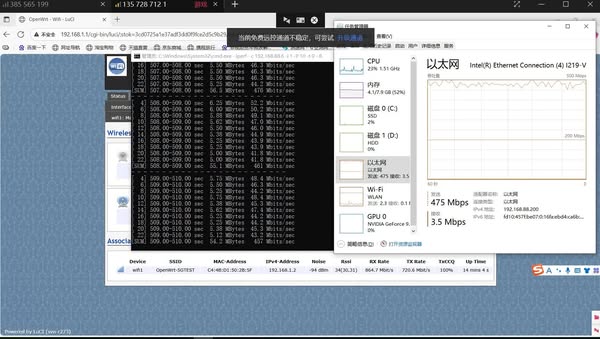
The DR5018S-AP crushed a 14 km 5 GHz link test – hitting 475 Mbps unidirectional throughput!

Wallystech DR5018S-AP crushed a 14 km 5 GHz link test in Dongbei at 50 m high — hitting 475 Mbps unidirectional throughput! We prepare more detailed test report.

Posted on

IPQ8072 vs IPQ9574: Why Upgrade to Wi-Fi 7 for Your Next Wireless Project

The Qualcomm IPQ8072 has long been a reliable choice for Wi-Fi 6 networking hardware. Many enterprise routers, carrier CPEs, and industrial access points are still powered by IPQ8072 due to its strong balance of cost and performance. However, with the rapid evolution of Wi-Fi 7 (802.11be), the Qualcomm IPQ9574 offers significant technical advantages that make it the logical upgrade path for next-generation solutions.

In this article, we compare IPQ8072 vs IPQ9574, highlighting the major differences and why developers should consider migrating to Wi-Fi 7 hardware.


Overview of IPQ8072 (Wi-Fi 6 SoC)

The Qualcomm IPQ8072 is part of the IPQ807x family, designed for Wi-Fi 6. It features:

  • Quad-core ARM Cortex-A53 processor
  • 8×8 MU-MIMO capability
  • Up to 160 MHz channel bandwidth
  • 1024-QAM modulation
  • Robust support for enterprise and carrier-grade networking

While still capable, the IPQ8072 has reached maturity, and limitations in throughput and latency become noticeable in demanding applications.


Overview of IPQ9574 (Wi-Fi 7 SoC)

The Qualcomm IPQ9574 represents the new generation of Wi-Fi 7 platforms, optimized for ultra-high throughput and low latency. Key features include:

  • Enhanced multi-core CPU architecture for higher processing power
  • 320 MHz channel bandwidth (double that of IPQ8072)
  • 4096-QAM modulation for higher spectral efficiency
  • Support for Multi-Link Operation (MLO)
  • Designed for advanced enterprise, industrial, and carrier networks

This makes IPQ9574 ideal for data-heavy applications such as 8K video streaming, AR/VR, industrial IoT, and low-latency control systems.


IPQ8072 vs IPQ9574 Technical Comparison

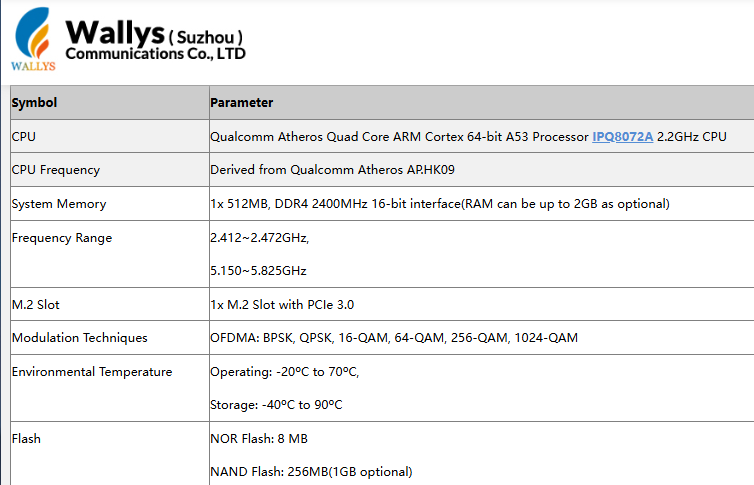
The Qualcomm IPQ8072 is a Wi-Fi 6 (802.11ax) SoC built with a quad-core Cortex-A53 processor. It supports channel bandwidths of up to 160 MHz and uses 1024-QAM modulation, making it a strong choice for enterprise routers, carrier CPE, and industrial APs.

Article content
Data from Wallys DR8072 Webpage

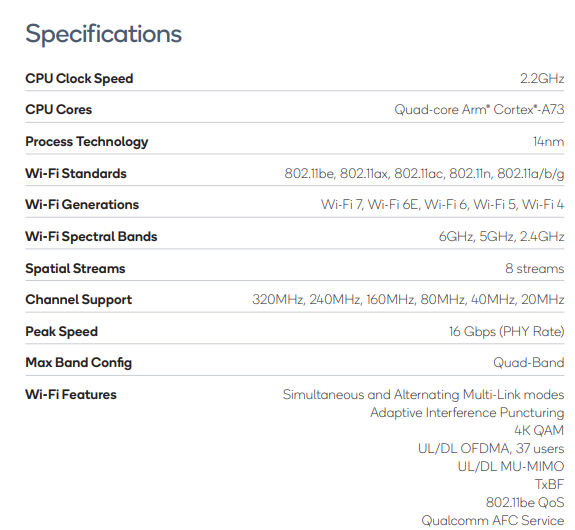
By contrast, the Qualcomm IPQ9574 belongs to the Wi-Fi 7 (802.11be) generation. It features a more advanced multi-core CPU architecture, supports 320 MHz channel bandwidth (double that of IPQ8072), and enables 4096-QAM modulation for higher spectral efficiency. Unlike IPQ8072, it also supports Multi-Link Operation (MLO), a Wi-Fi 7 feature that allows simultaneous use of multiple frequency bands to reduce latency and improve stability. These enhancements make IPQ9574 ideal for next-generation enterprise networks, industrial IoT deployments, low-latency applications, and high-density environments.

Article content
Data from Qualcomm IPQ9574 Datasheet

Why Upgrade from IPQ8072 to IPQ9574?

  1. Performance Leap – Wi-Fi 7 doubles available channel bandwidth and introduces 4096-QAM for significantly higher throughput.
  2. Ultra-Low Latency – MLO ensures faster and more reliable connectivity, critical for real-time applications.
  3. Future-Proofing – As Wi-Fi 6 hardware reaches end of lifecycle, Wi-Fi 7 ensures long-term product competitiveness.
  4. Scalability – IPQ9574’s stronger CPU supports more devices, traffic, and complex networking tasks.

524WiFi and Wallys’ IPQ9574 Router Board Solution

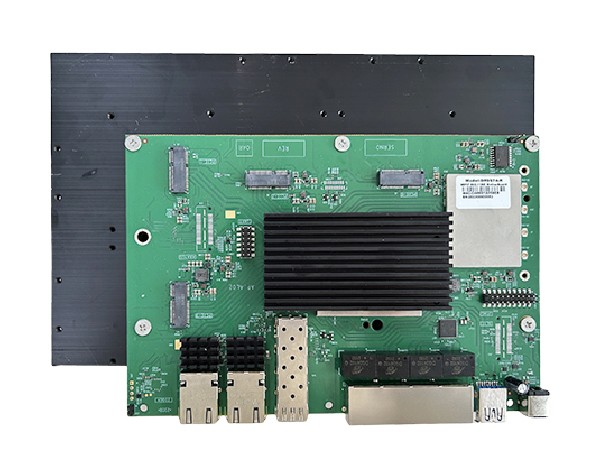
At 524WiFi, we provide hardware solutions based on Qualcomm IPQ9574, including the DR9574 Router Board, designed for Wi-Fi 7 networks. With strong processing power, advanced wireless features, and industrial-grade reliability, it is the perfect upgrade path for developers currently using IPQ8072-based designs.

Frequently Asked Questions (FAQ)

1. Is IPQ8072 still good in 2025?

Yes. The Qualcomm IPQ8072 is still a stable and cost-effective Wi-Fi 6 chipset, suitable for enterprise routers and industrial APs. However, for new projects that require higher throughput, lower latency, and longer product lifecycle, Wi-Fi 7 chipsets such as IPQ9574 are strongly recommended.

Article content
DR9574 board

2. What is the difference between IPQ8072 and IPQ9574?

The IPQ8072 is a Wi-Fi 6 (802.11ax) SoC, supporting up to 160 MHz bandwidth and 1024-QAM. The IPQ9574 is a Wi-Fi 7 (802.11be) SoC with 320 MHz bandwidth, 4096-QAM, and Multi-Link Operation (MLO), enabling much higher throughput and lower latency.

3. Why upgrade from Wi-Fi 6 to Wi-Fi 7?

Upgrading to Wi-Fi 7 provides faster data rates, reduced latency, and better efficiency in high-density environments. For applications such as AR/VR, 8K streaming, and industrial automation, Wi-Fi 7 ensures future-proof performance and competitiveness.

4. Does 524WiFi provide IPQ9574-based solutions?

Yes. 524WiFi and Wallys Communications offer router boards and network modules based on Qualcomm IPQ9574, including the DR9574 Router Board. These solutions are designed for enterprise, carrier, and industrial use cases that demand next-generation Wi-Fi 7 performance.

Posted on

IPQ5018 | 524WiFi and Wallys DR5018S VLAN Configuration Guide

1. Introduction

The 524WiFi and Wallys DR5018S router board, based on the Qualcomm IPQ5018 chipset, is widely used in industrial wireless applications. VLAN functionality allows network segmentation, optimized traffic management, and enhanced security. This guide provides a step-by-step tutorial to configure Access VLAN and Trunk VLAN on the DR5018S.

2. Understanding VLAN, Access, and Trunk

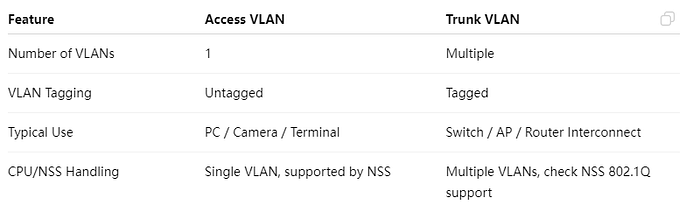
Article content

Access VS Trunk

3. Prerequisites

  • Wallys DR5018S router, firmware: wallys firmware
  • Admin access via Web GUI or SSH
  • VLAN ID plan and IP addressing plan
  • Optional: VLAN-aware NIC or Vlan Switch for testing

4. VLAN Configuration on DR5018S

Steps:

  1. Log in to the Web GUI.
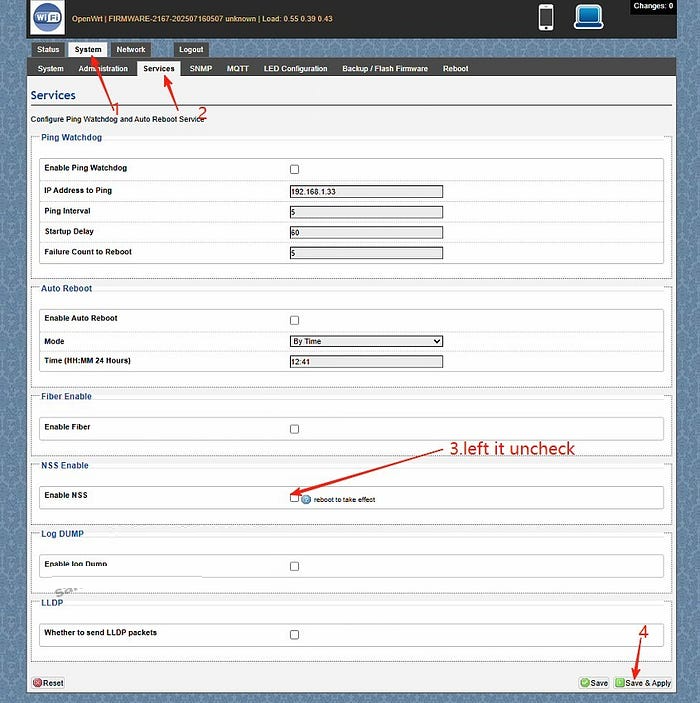
  2. Go to System → Services. Left the Enable NSS uncheck and click “save and apply”
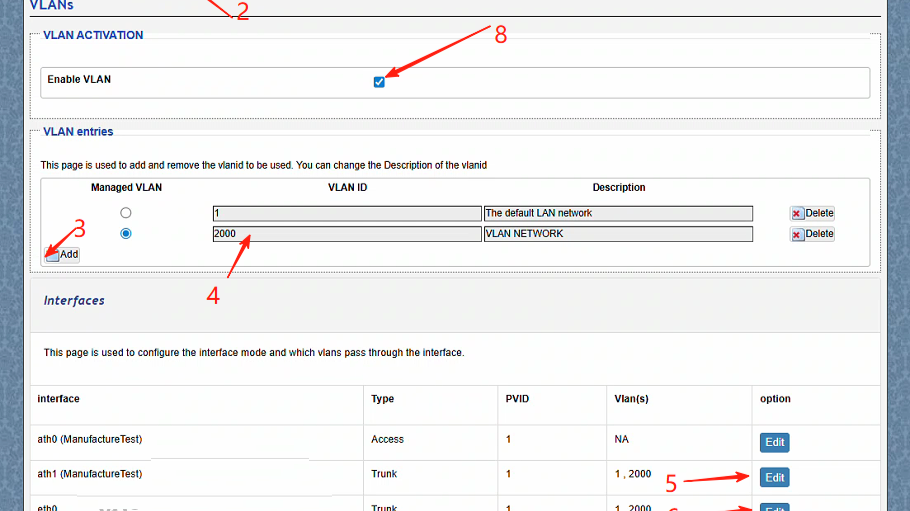
  3. Go to Network → Vlans.Create a VLAN (e.g., VLAN 2000).
  4. Edit the ath1(the working radio) and eth0(the ethernet port connected) port mode to Trunk.
  5. ath1 setting:Select type Trunk,Assign the PVID as 1,select Vlans 2000,save changes
  6. ath1 setting:Select type Trunk,Assign the PVID as 1,select Vlans 2000,save changes.
  7. Assign an IP address to the VLAN interface (static or DHCP).
  8. Save and apply the configuration.
  9. Test connectivity: connect a PC to the port, get an IP, and ping the radio.

5. Troubleshooting

  • Cannot access the device → check VLAN ID, PVID, and tagging.
  • Trunk traffic lost → verify VLAN configuration on the remote end.
  • PC cannot ping → ensure the IP address is in the VLAN subnet.
  • Check NSS hardware acceleration

With this guide, you can easily configure Access VLAN and Trunk VLAN on the DR5018S router board. VLANs help isolate traffic, improve security, and optimize performance in industrial wireless networks.

For more technical support and inquiry for industrial wireless products, contact 524WiFi at info@524wifi dot com or net!

Posted on

IPQ4019 IPQ4029 Mesh Networking Setup: DR4019 Router Boards in Action

Learn how to set up and test a robust mesh network using three Wallystech DR4019 router boards. Watch as we:

Upgrade firmware with Wallys OpenWrt Mesh. Configure unique IPs for seamless communication.

Test network resilience, proving reliable data transmission even during power disruptions.

Perfect for smart cities, IoT, and industrial applications!

You can also read previous article How to Upgrade DR4019 with OpenWrt 23.05 – Simple Steps! Enjoy.

Posted on

IPQ5424 Sneak Peek: The Cost-Effective Path to WiFi 7 Starts Here

As WiFi 7 begins to reshape industrial and commercial networking, not every project requires the horsepower (or cost) of top-tier platforms like IPQ9574. That’s where Qualcomm’s IPQ5424 comes into play — offering a balanced, quad-core solution designed to bring the Marina family of chipsets to the mainstream market.

Wallys is excited to announce that IPQ5424-based router boards are in the pipeline, aiming to help developers and OEMs transition smoothly into WiFi 7 with a cost-effective and scalable solution.

🌟 Key Specs of IPQ5424 (Preview)

  • Processor: Quad-core ARM Cortex-A55 @ 1.8GHz
  • Target Use: SMB routers, industrial APs, mesh nodes
  • WiFi Support: 4×4 2.4GHz / 4×4 5GHz (potential MLO support)
  • Firmware: OpenWrt/QSDK support in progress
  • Memory Support: DDR4 up to 2GB
  • I/O: USB 3.0, PCIe Gen3, SGMII/USXGMII

This makes the IPQ5424 a strategic choice for:

  • Mid-tier WiFi 7 CPE development
  • Smart building and IoT gateway integration
  • Compact enterprise wireless solutions

🔗 Positioned Between Performance and Affordability

If you’re currently using platforms like IPQ5018 or IPQ6018, the IPQ5424 offers a smooth upgrade path — unlocking multi-gig capabilities without the power draw or cost of premium SoCs.

It also complements high-end modules like QCN9074 or QCN9024, allowing system integrators to build hybrid solutions: high-performance uplinks powered by QCN modules, with local routing managed by IPQ5424.

And of course, for users already deploying IPQ9574, the IPQ5424 can serve as a cost-optimized secondary node in distributed mesh or WiFi 7 extender environments.


📦 Stay Tuned: Wallys Upcoming IPQ5424-Based Board

We’re currently developing a new IPQ5424 router board, which will feature:

  • Industrial-grade stability
  • WiFi 7-ready MLO
  • Open SDK support
  • Flexible PCIe for WiFi modules like QCN9274 or QCN6274

👉 Want early access or technical previews? Contact us!


📌 Related 524WiFi and Wallys Products You Can Explore Now:

  • DR5018S – WiFi 6 router board with tcpdump support
  • DR9574 – High-performance WiFi 7 board based on IPQ9574
  • DR9274 – M.2 module based on QCN9274
  • DR8072A – Mature WiFi 6 AP based on IPQ8072
  • DR6018 – Cost-effective solution based on IPQ6018