Posted on

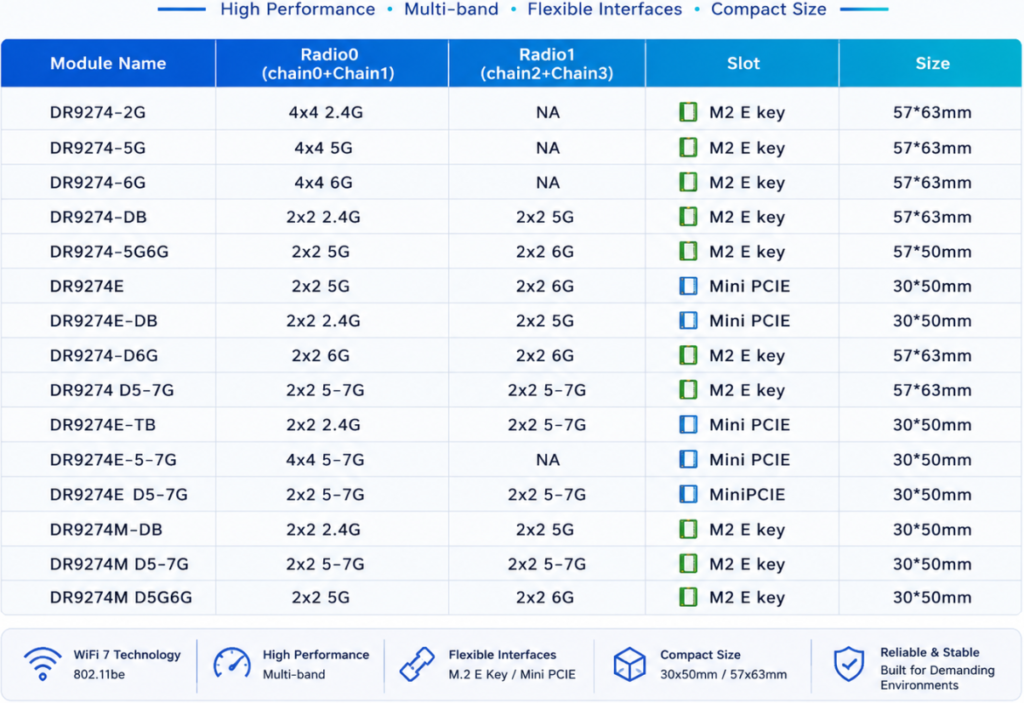
List of our Qualcomm WiFi 7 modules – new populer versions !

Module NameBDwlanRadio0
(chain0+Chain1)
Radio1
(chain2+Chain3)
SlotStatusNote
DR9274-2GB00014×4 2.4GNAM2 E keyavailable 
DR9274-5GB00024×4 5GNAM2 E keyavailableB0015
DR9274-6GB00044×4 6GNAM2 E keyavailableB0016
DR9274-DBB10032×2 2.4G2×2 5GM2 E keyavailable 
DR9274-5G6GB10062×2 5G2×2 6GM2 E keyavailable 
DR9274-5GKB00114×4 5GNAM2 E keyavailablebdwlanKCT.b0002
DR9274-6GKB00134×4 6GNAM2 E keyavailablebdwlanKCT.b0004
DR9274EB10182×2 5G2×2 6GMini PCIEavailableNew bdwlan
DR9274E-DBB10172×2 2.4G2×2 5GMini PCIEavailableNew bdwlan
DR9274-D6GB10192×2 6G2×2 6GM2 E keyavailableNew bdwlan
DR9274 D5-7GB100d2×2 5-7G2×2 5-7GM2 E keyavailableNew bdwlan
DR9274E-TBB100e2×2 2.4G2×2 5-7GMini PCIEComing soonNew bdwlan
DR9274E-5-7G 4×4 5-7GNAMini PCIEComing soon 
DR9274E D5-7G 2×2 5-7G2×2 5-7GMini PCIEComing soon 

Why Wi-Fi 7 Matters for Robotics

Wi-Fi 7 introduces several capabilities that directly address the requirements of next-generation robotics.

1. Higher Throughput for AI Data Streams

With features such as:

  • 320MHz channel bandwidth
  • 4096-QAM modulation
  • Multi-Link Operation (MLO)

Wi-Fi 7 significantly improves wireless capacity.

This enables robots to transmit and receive more data, supporting applications such as:

  • Real-time HD/4K video analysis
  • Multi-camera perception
  • Digital twin visualization
  • Remote robot operation

For industrial environments, higher bandwidth means more robots can operate simultaneously without creating network bottlenecks.


2. Lower Latency for Real-Time Control

Latency is critical for autonomous systems.

A delayed wireless connection can impact:

  • Robot navigation
  • Collision avoidance
  • Remote control
  • Human-machine collaboration

Wi-Fi 7’s Multi-Link Operation allows devices to utilize multiple frequency bands simultaneously, improving connection stability and reducing congestion.

For mobile robots operating in complex environments, maintaining a consistent connection is often more important than achieving maximum peak speed.


3. Better Connectivity in High-Density Environments

Future factories and warehouses may contain:

  • Hundreds of autonomous mobile robots (AMRs)
  • AI cameras
  • Industrial sensors
  • Wireless controllers
  • Edge computing nodes

A wireless infrastructure designed only for consumer environments may not be enough.

Industrial Wi-Fi requires:

  • Stable roaming
  • RF optimization
  • Enterprise-level management
  • Long-term hardware reliability

Wi-Fi 7 provides a stronger foundation for these high-density deployments.


Edge AI + Wi-Fi 7: Bringing Intelligence Closer to Machines

While cloud computing remains important, many robotic applications are moving toward edge AI.

Why?

Because robots need:

  • Faster response times
  • Reduced dependence on cloud connectivity
  • Better privacy protection
  • More reliable operation in industrial environments

Edge AI platforms process data locally, allowing robots to make decisions in real time.

But edge intelligence requires a powerful communication layer.

The relationship is simple:

Edge AI provides the intelligence. Wi-Fi 7 provides the nervous system.

Together, they enable robots to:

  • Understand their environment faster
  • Coordinate with other machines
  • Adapt to changing conditions
  • Operate autonomously at scale

Beyond Speed: Industrial Wireless Requires Reliability

A common misunderstanding is that the future of industrial wireless is simply about faster Wi-Fi.

In reality, industrial applications require much more:

Reliable roaming

Mobile robots need seamless handover between access points while moving across large facilities.

Stable performance under interference

Factories often contain metal structures, machinery, and RF noise.

Long-term platform support

Industrial customers expect hardware platforms that can operate reliably for years.

Flexible deployment options

Different environments require different designs:

  • Indoor industrial APs
  • Outdoor wireless bridges
  • Embedded Wi-Fi modules
  • Custom router platforms

The Future: AI Robots Need AI-Ready Networks

As robotics continues to evolve, wireless connectivity will become a strategic infrastructure layer.

The next generation of robots will not work alone.

They will communicate with:

  • Other robots
  • Edge servers
  • AI vision systems
  • Factory automation platforms
  • Cloud management systems

A powerful AI model without reliable connectivity cannot deliver its full value.

The future belongs to systems where:

AI intelligence + Edge computing + Advanced wireless connectivity work together.

Wi-Fi 7 is not just a faster wireless standard.

It is becoming the communication backbone for intelligent machines.


Building the Industrial Wireless Foundation for Tomorrow

At 524WiFi and Wallys, we are exploring the next generation of industrial wireless platforms by combining:

  • Qualcomm-based Wi-Fi 6 / Wi-Fi 7 solutions
  • Industrial-grade router boards
  • High-performance wireless modules
  • Edge AI application platforms
  • OEM/ODM customization capability

Our goal is to help robotics companies, AI developers, and industrial solution providers build reliable wireless infrastructure for the intelligent world.

Because the future of robotics will not only depend on smarter machines.

It will depend on how well those machines can communicate.
Posted on

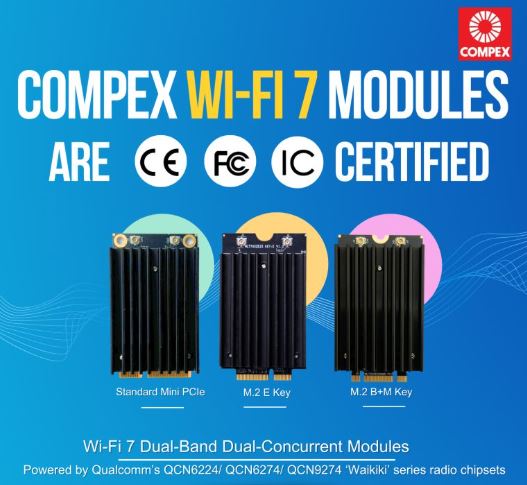
Compex Wi-Fi 7 Dual-Band Dual-Concurrent Modules are CE, FCC and IC certified and Ready for the World

𝗖𝗲𝗿𝘁𝗶𝗳𝗶𝗲𝗱 𝗮𝗻𝗱 𝗥𝗲𝗮𝗱𝘆 𝗳𝗼𝗿 𝘁𝗵𝗲 𝗪𝗼𝗿𝗹𝗱.

Compex Wi-Fi 7 Dual-Band Dual-Concurrent Modules are CE, FCC and IC certified, bringing together global compliance and industry-leading performance. Available in Standard MiniPCIe form factor and M.2 variants, our Qualcomm-powered modules deliver reliable and high-performance wireless connectivity for markets worldwide.

✅Powered by Qualcomm’s QCN6224 / QCN6274 / QCN9274 “Waikiki” series chipsets
✅Comes with band options: 2.4+5GHz, 2.4+6GHz, 5+5GHz and 5+6GHz
✅Multi-Link Operation (MLO) for higher throughput, lower latency and improved reliability
✅Diplexer Design to reduce the need for multiple Wi-Fi antennas for transmission
✅Open Source Ath12k Support

📩 Reach out to us at info@524wifi dot net or com to explore how we can power your next project.

Posted on

HOW-TO SETUP LTE 4G modules On COMPEX Router BOARDs

 Hudratores from 524wifi.com & wifi6.eu  how-to setup LTE 4G / 5G modules on COMPEX router boards 

Hudratores from 524wifi.com & wifi6.eu  how-to setup LTE / 4G / 5G modems on COMPEX router board:

May I have your attention please ………. (dramatic pause)

Today we all gather on this place to learn how to à

Save the world & souls and how to successfully connect a board with LTE support ( for example WPJ419 WPJ428 and WPJ563)
with modems ( I used cat 4 EC25-E, cat 6 EP06-E + Sierra Wireless EM7455 and cat 12 Quectel EM12-G ) and not to become crazy:

First,make it clear > You have found this document, because you probably belong to 98% of society
majority, whom never gets routerboard products work at first shot, well, pls note,
nobody does, because manufacturers usually make great products, but they think that we all follow
they’re logic and we know everything (btw. Its waste of time to try to convince
them other ways, they too good to get on our low miserable level of knowlidge )

LIST OF ALREADY SUPPORT LTE MODULES IN V 6.2.12 FIRMWARE:

MiniPCIe v2.0

Huawei Me909s: WPJ563, WPJ419, WPQ864 and WPQ865, Huawei Me909s

Sierra Wireless MC7455: WPJ563, WPJ419, WPQ864 and WPQ865

Quectel EC25: WPJ563, WPJ419, WPQ865, WPQ864

Quectel EP06-E, A: WPJ563, WPJ419, WPQ864, WPQ864

M.2 B key v3.0

Sierra Wireless EM7455: WPJ428, WPQ865

Huawei ME906s: WPJ428, WPQ865

Quectel EM06, EM12-G: WPJ428, WPJ563A (with adapter to mniPCIe slot)  –   same setup as below, pls scroll down for detailed HowTo sect 3.

M.2 5G PCIE3.0 B key          

Quectel RM500Q-GL: WPQ873 and newer Wi-Fi 6 boards like WPQ618

First of all, you need to know secret access to all “must know” information,
that beside of web interface management on 192.168.1.1 standardly used by
default – you have to know status of your try-outs,
because why would anyone put such not important information as SIM and modem
status for LTE board to main page, am I right  , so use this
link to make it work:

http://192.168.1.1/prod/info.txt

you will see
something like this:

Firmware Version: MimoAP v6.2.12_b190718

Loader Version: U-Boot 2012.07 [Chaos
Calmer 15.05.1,r35193] (Oct 24 2018)

First Radio MAC address: 04:F0:21:5F:97:9A

Second Radio MAC address: 04:F0:21:5F:97:9B

Third Radio MAC address:

Ethernet MAC address: 04:F0:21:5F:97:98

Company Name: Compex

Model Name: WPJ419

Flash Size: 32 MB

NAND Size: 128 MB

RAM Size: 256 MB

PCIe Radio Detected: None

USB STORAGE:

USB LTE: USB2, Android

LTE SIM1:

MICROSD:

ETH PORTS:


LAN0: link: up speed:1000baseT full-duplex


LAN1: link: down

Wow – so I actually can see something important, good, and what’s next?

Don’t push it guys, or I’ll stop… ok ok …. And now the happy
part, how to read secret sneaky file – not to be added to main status page for
god only know why reasons – found on this address:

<1.find where the modem name is shown (you will see PCIe
not detected), but worry not, you look for modem type (EP06, EC25E, EM7455) –
beside of this non important info you will see port used by system (USB2 USB3
etc) and that you will put into WAN part (not work
for EC25E)

<!2.as you can see in our case EC25E cat 4 LTE module is
not even detected, BUT (see, there is always but) at USB LTE: you can read USB2
, and that ladies and
gentleman is our port to be put in WAN interface besides of APN and dial informations, if nessesary

second, Folks please, refer to picture “compexsimotherwaythanallothers.jpg” because they
put sim other way than rest of the world. Don’t we love this I something and
Compex silly moves to be separated from others? 

3. for Quectel EM12G you wont see SIM info in …/info.txt , + needs fw MimoAP v6.4.02_spf61_b200825 or above, simply check wifi6.eu / wifi5.eu, pls note that WPJ428 only works with some SIM cards (in my case its not supporting Vodafone, but works with O2 and T-Mobile SIM), on the other hand WPJ563 works with Vodafone and with O2 (pls dont ask me anything about this – you have to investigate what provider will work for you in your area)  – another point- pls note for wpj428 SIMBAY 0 is marked as sim 4 on board while SIMbay 1 is marked as sim 3 onboard (again dont dare to ask me why)

how to set up LTE module on compex board
how to insert sim in compex board

Third, if you still fail to make it work, you can 1. shoot yourself 2. start crying or 3. refer to this article:

https://compexsystems.freshdesk.com/support/solutions/articles/36000164813

pls if you don’t have access to Compex very sacred web manuals, all pictures are on the end starting by LTE Modules Configuration Steps

BUT, I tried to use some recommended mods to make modem works and I always returned to old good LTE / UMTS / GPRS / EV-DO protocol for simple reason, it works for all tested modems, yes ill show you which one is fastest, I know you want to see it (Quectel EC25E, EP06E ,Sierra EM7455). Oh, back to idea, I used this protocol because…… I need to connect to O2, Vodafone and T-Mobile here using not only APN: internet, but dial *99# as well, and that is impossible with other mods (and now you know another secret might help to make it work)

Readme for COMPEX v6.4.02_spf61_b200825 firmware for WPJ428 and WPJ563 boards :  test firmware to support Quectel EM12 modem

please use mbim protocol and /dev/cdc-wdm0 device for this modem

Use this command to show sim card iccid:
gcom -d /dev/ttyUSB2 -s /etc/gcom/geticcidq.gcom

Now probably your board and module and SIM works smoothly and you are dancing around the table celebrating , that your compex 419 board works and you know, it was worth it, because guys, this tested wpj419 board is smoking gun in compare to speeds , wifi load (who doesnt know compex profi wifi moduls right? ) and stability, and i have tested many LTE boards, believe me – you know what, ill put here simple measuring made at the table with samsung s9+ over wifi 5 ac  160width in my hand, voila:

BTW if you don’t read Czech (believe it or not, there may be still few uneducated readers out there ), note that left number is download, right number upload & …… this Sierra Wireless modem module is little devil isn’t it – Oh and for this modem we used adapter

Now is the time to clap your hands, say Thanks Hud and if necessary, to read boring files below. See ya at testing more expansive boards (when they give them to me)

Always yours (in love with Compex, Quectel, Sierra Wireless)

Hud & Dan from 524wifi.com email Daniel at 524wifi dot com

Compex stolen “how to” file follows, but i suggest you go to this page directly, as its dynamic and still evolving :

https://compexsystems.freshdesk.com/support/solutions/articles/36000164813

 Protocol – LTE mode

  1. Before setup the Cellular Network, you may prompt to yourserverip/prod/info.txtto verify the LTE modules and SIM card was able to detect by Compex Embedded Board. Check on the USB LTE and LTE SIM column, you may able to see the information listed on each column.

* Remarks, serverip is refer to your Luci Interface IP address.

  1. Click Edit on WAN interface.

2. Configure the SIM slot to either 0/1. (Depend on the Cellular SIM card install on which SIM slot).  

3. For Modem device, configure to either ttyUSB0/ttyUSB1/ttyUSB2. 

4.For Service Type, you may configure it based on your requirement, in this example we will configure it to LTE only. 

5. Leave others column blank and click on Save & Apply button. 

6. At Last, the Cellular Network is established, and you may browse Internet by using the Cellular Network. To verify the internet connection, you may notice the Internet Icon on top right side is Light up.  

Protocol – NCM mode Some of the LTE modules able to run in Network Control Mode (NCM mode). NCM protocol is Ethernet over USB protocol used by some fast speed USB modems/dongles, for example: Huawei ME906E, Huawei ME909 model etc. can run in this mode.   To setup the LTE modules run in NCM mode, you may setup as steps below:  

  1. Choose NCM mode under protocol. 
  2. Choose the SIM slot using. Depend on the SIM card is located on which port. If the board only have one SIM slot, it probably located at Slot 0. 
  3. For Modem device, you are required to manually figure out the Modem device located on which interface. In this example
  4. For Service type, you may choose your preferred operating mode such as LTE mode.
  5. For IP protocol, you may choose it to allocate IP based on IPv4 format.    
  6. At last, the cellular network is establish and now you may browse Internet by using Cellular Network, To verify the Internet connectivity, you may either setup AP on your wireless card and connected on the particular AP or you may notice the Internet Icon on top right side Light up.

 Protocol – QMI mode Some of the LTE modules able to run in QMI Cellular mode or may known as MBIM mode. QMI protocol is proprietary by Qualcomm, for example Sierra Wireless EM7455, Quectel EC25 and EP06 LTE Modules etc.   To setup LTE module run in QMI mode, you may setup as steps below:  

  1. Choose QMI Mode under protocol. 
  2. Choose the SIM slot using. Depend on the SIM card located on which SIM slot. 
  3. For Modem Device, you may choose either wdm0 or wdm1.
  4. Ignore others column and proceed to Save & Apply.
  5.  At last, the cellular network is established and now you may browse Internet by using Cellular Network,. To verify the Internet connectivity, you may either setup AP on your wireless card and connected on the particular AP or you may notice the Internet Icon on top right-side Light up.

 Protocol – MBIM mode Regarding to MBIM protocol, the setup is same as QIM mode. You are required to setup the Service Type and IP Protocol compared to QMI mode.  

**Remarks: If after you switch the protocol, you found the WAN interface is Down, without any IP address assigned, you may try to Reboot the board and tried the steps again. 

  Ffs stop reading this and go to do something useful instead

  Hud

Posted on — 1 Comment

Industrial Wi-Fi modules with Qulacomm chipsets

524 WIFI INDUSTRIAL MODULES

Tomorrow systems (524wifi.com) offers a long-proven range of Wi-Fi modules for industrial applications with a large temperature range (-40 ° C to + 85 ° C). One of the largest manufacturers of Wi-Fi modules is significantly expanding its product portfolio in the Wi-Fi 802.11ac broadband standard. Recently, it has been choosing more and more manufacturers of industrial APs, routers and hubs. All new Tomac systems 11ac miniPCIe modules are now available in full-size standard 50.95 × 30 mm, even with a 4 × 4 MU-MIM solution.

RELIES ON QUALITY

524WiFi, founded in 2002, can successfully look back after 14 years of cooperation with Qualcomm. Some previous miniPCI Wi-Fi modules have become true legends. It can now exclusively use the latest Wi-Fi technologies developed by this world leader in wireless communication in all its miniPCIe Wi-Fi modules. In addition, we cooperate with an official ADC partner (Authorized Design Center) of Qualcomm and, in addition to reference designs, offers its customers support in customizing hardware and software designs.

CAN HANDLE HIGHER TEMPERATURES

524wifi has a long-standing good reputation in the field as a specialist in WiFi modules for demanding thermal conditions with an extended (-20 ° C to + 70 ° C) and industrial (-40 ° C to + 80 ° C) temperature range. However, the 524wifi now offers its Wi-Fi modules with an extended industrial temperature range (-40 ° C to + 85 ° C), which is marked with the letter “I” meaning Industrial. Usually, the upper limit of the operating temperature + 70 ° C is determined in relation to the surrounding area, ie outside the shielding of the Wi-Fi module. Since the temperature inside the shield is usually even higher than outside, we recommend using Wi-Fi modules with a sufficient safety margin for operating temperatures for high-speed data transmission. You will achieve long-term reliability in continuous operation.

WIDE OFFER

Most 11ac modules are available in both temperature ranges, ie in versions with and without the “I” marking. The enclosed tables provide a general overview of all available 11ac modules, divided into single and dual band types. Dual-band modules (operating in the 2.4 and 5GHz frequency bands) include 4 proven 2 × 2 and 3 × 3 MIMO modules: WLE600VX-I, WLE 900VX-I, 524WiFi 900VX Pro+ and 600VX Pro+. The first two modules represent industrial versions of the long-selling best-selling module based on the QCA 9890 chipset. Version Pro+  is a standard commercial version now with improved parameters. We also offer single-band Wi-Fi 6 (802.11ax) and MU-MIMO 4 × 4 Wi-Fi 5 modules based on popular Mediatek chipset

HIGH PERFORMANCE

Usually, these single-band modules differ in the antenna configuration used, and thus in the resulting data rate of 867Mbps @ MU MIMO 2 × 2, 1.3Gbps@MU MIMO 3 × 3 and 1.7Gbps@MU MIMO 4 × 4. Another characteristic feature is their output power. The WLE650V5-18A product family supports a maximum output power of 18dBm @ 5Ghz, the WLE650V5-25A range of high-performance modules offers an output power of 25 dBm @ 5 GHz. All 5GHz single-band modules have in common that they support multi-user (MU-MIMO) as well as 80 MHz + 80 MHz channel pooling for 1SS or 2SS (SS = Spatial Stream).

STANDARD WITH HEATSINK

Due to the high throughput and heating, all single-band modules are equipped with a heatsink as standard. However, Tomorrow systems is ready to meet any customer requirements and, according to their wishes, install them with coolers as desired, or deliver them without them due to lack of space for installation.

PREPARATION FOR IOT

While single-band modules specialize in 802.11ac and 802.11an @ 5GHz, dual-band modules also offer 802.11b / g / n @ 2.4 GHz standards. In the future, it will be even more important for the Wi-Fi module to handle a large number of simultaneously connected clients. Just like on a train, up to 50 passengers are connected to one Wi-Fi module, in the future it will not be an exception that 50 household devices will communicate with your Wi-Fi router in your home, so you must pay close attention to choosing a suitable Wi-Fi module! 524wifi modules will be ready.

FAVORITE TRANSPORT CHOICE

This is another area where 524wifi modules are gaining ground. For their reliability, stability, performance and a large number of connectable clients, our popular 524wifi 600vx Pro+ and 900vx Pro+ modules have become widely used in buses, trains, airports and train terminals throughout Europe, not only within the “Wi-Fi for passengers” application. “. They have also become very popular in the Czech Republic, where you can find them on trains on Czech railways and on buses. For example, public transport in Brno and Ostrava have opted for them, and the international carrier FlixBus, for example, also uses them in its buses.

READY FOR LTE 5G

Currently, most of the 524WiFi 600VX Pro+ and 900VX Pro+ modules are used for “Wi-Fi for passengers”, which are installed in special Embedded routers with the Linux system and, thanks to today’s best Wi-Fi chip from Qualcomm – QCA9880 – provide a stable and fast connection for 50 or more passengers in a bus or train (one wagon). The great advantage of this chip is that it is dual-band and can handle a large number of connected users, thus saving the need for additional HW (reduces the number of required routers). They also take care of the communication of the vehicle with the depot and transmit information obtained on the route from the control computer in the car. The internet connection to the car is solved by LTE modules – ie from mobile operators. However, the system is already ready for LTE 5G and carriers have already tested that all passengers on the bus will then be able to stream HD video.

CZECH FOR ALL OF EUROPE

Distribution of 524wifi Wi-Fi modules for Europe is provided by Tomorrow systems s.r.o. with headquarters in Prague. Detailed information about all 524WiFi and COMPEX Wi-Fi products can be found at www.compexshop.cz, or at 524wifi.com Contact for distributors or any questions and requirements please contact Pavel FRICE, pavel (at) 524wifi.com, tel +420 775 262 900.