Posted on

Qualcomm IPQ9574 with MLO support, dual 10G Ethernet, wide temperature industrial design – DR9574 support QSDK and OpenWRT 3 band MLO

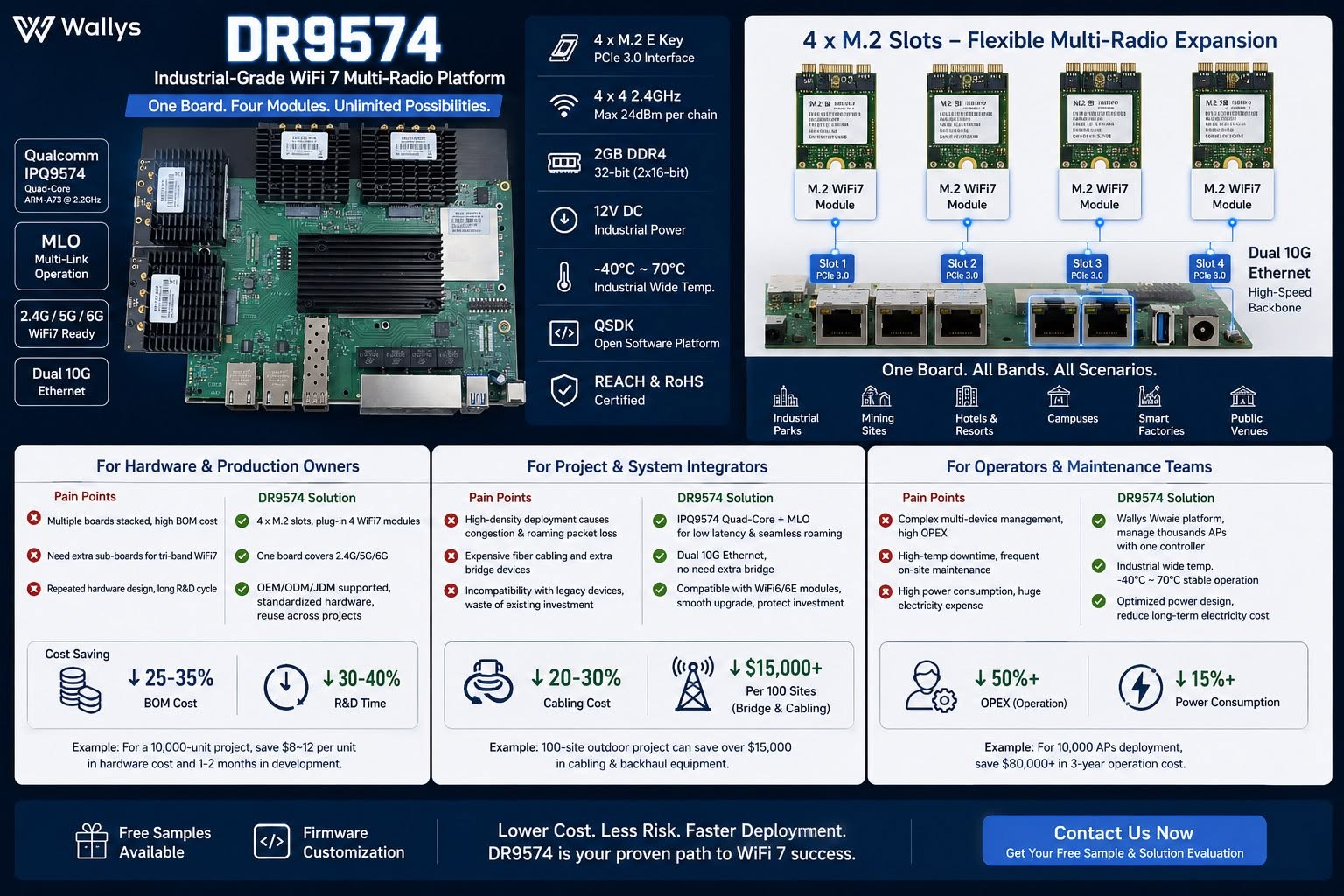
DR9574 Industrial WiFi7 Multi-Radio Board – One board, four M.2 radio modules, unlimited wireless deployment possibilities.

Built on Qualcomm IPQ9574 with MLO support, dual 10G Ethernet, wide temperature industrial design.

Lower BOM, less cabling cost, fewer maintenance workloads & power consumption for mass AP projects.

Ideal for system integrators, OEM hardware makers & wireless operators serving campuses, mining, smart factory & hospitality networks.

Testing samples & firmware customization available – DM to get your solution evaluation!
QSDK based firmware with QCA drivers is available , 3 card 3 band MLO support !! 4×4 MU MIMO or 2×2 MU MIMO configuration for 3 band MLO available.

https://wifi5.eu/dls/Wallys/DR9574

OpenWRT support available too !!

— working mainline OpenWrt port (10G + Wi-Fi 7 MLO)

Over the past few weeks we’ve brought the board up on a fully mainline stack — mainline Linux 6.12 + OpenWrt + ath12k, no QSDK and no out-of-tree datapath driver — and it now cold-boots from NAND into a working router/AP with both:

– 10G USXGMII ethernet (the AQR113C ports) bringing up a link and passing traffic with a DHCP lease, and
– a 3-link Wi-Fi 7 AP-MLD (one SSID across 6 / 5 / 2.4 GHz, WPA3-SAE) on mainline ath12k, with a real client associating and passing iperf traffic.

Getting the 10G working on mainline required root-causing and fixing an actual upstream kernel bug — a per-port clock that was left at the 10G rate regardless of the negotiated link speed. It’s a small, clean patch I’m preparing for the netdev mailing list, and it should help any IPQ95xx board with an Aquantia USXGMII PHY, not just this one.

Everything is public and reproducible here:
https://codeberg.org/insalata-fresca/openwrt-dr9574
(device tree, the patch set, and a write-up of the root cause.)

Why we think this could be interesting for you : a mainline-based firmware track means a current kernel with ongoing security fixes, an auditable, blob-minimal stack, and upstreamable patches — a strong story for customers who need long support windows, as a complement to the QSDK option.

W've pushed the mainline port further: the four 2.5G QCA8084 LAN ports are now the focus. The four copper PHYs come up and answer on mainline, and the 10G/USXGMII uplink and the 3-link Wi-Fi 7 MLO already work. But the 2.5G ports don't pass traffic yet,and I've traced it to one specific, well-understood gap.

In short: the QCA8084's internal XPCS never becomes reachable over MDIO. The chip's security-control config space (0xC90F000, which holds WORK_MODE and the SerDes/XPCS MDIO address fix-up) is readable but appears write-locked in our mainline bring-up. The driver writes the correct values (work mode 0x2f, XPCS MDIO address 7), but they don't take - so the XPCS stays at a default address, answers nowhere, and everything downstream (per-channel config, link, traffic) is blocked behind it. We are working on the final solution now.


The full write-up and the exact register evidence are on a public WIP page:

Status and the open question:
https://codeberg.org/insalata-fresca/openwrt-dr9574/src/branch/wip-qca8084-2p5g/docs/qca8084-2p5g-status.md

Register evidence (the actual readouts):
https://codeberg.org/insalata-fresca/openwrt-dr9574/src/branch/wip-qca8084-2p5g/docs/qca8084-2p5g-register-evidence.md

Repo root (device tree, 10G and Wi-Fi 7 patches):
https://codeberg.org/insalata-fresca/openwrt-dr9574

Posted on

The Wi-Fi 7 Revolution: Beyond Speed to Industrial Reliability and MLO

In the world of Industrial IoT, legacy wireless standards are more than just slow—they are bottlenecks. In high-density environments, waiting for a single free channel is a luxury enterprises can no longer afford. This is why Wi-Fi 7 MLO (Multi-Link Operation) is the true game-changer.

At 524WiFi, we view Wi-Fi 7 not just as a speed upgrade, but as an infrastructure overhaul. Imagine a congested highway: MLO doesn’t just increase the speed limit; it adds multiple lanes across 5GHz and 6GHz bands simultaneously, ensuring data flows without interruption.

We recognize that many of our clients are at a crossroads: you need Wi-Fi 7 performance but are locked into existing Mini PCIe architectures.

To bridge this gap, 524WiFi has introduced the AW7990-NPD, the world’s first Wi-Fi 7 BE3600 Mini PCIe module. Powered by the MediaTek MT7990 chipset, this module is specifically engineered to bring enterprise-grade connectivity to industrial robotics, edge computing, and security gateways—without requiring a total system overhaul.

Technical Core & Strategic Advantages :

  • Sub-1GHz Efficiency : Operating in the Sub-1GHz spectrum to ensure superior wall penetration and minimized interference.
  • 1KM+ Transmission : Achieves long-range connectivity exceeding 1 kilometer, ideal for remote sensor monitoring and agricultural IoT.
  • Plug-and-Play Integration : A versatile USB interface that simplifies the addition of Wi-Fi HaLow capabilities to existing gateways, PCs, or embedded controllers.
  • IEEE 802.11ah Standard : Optimized for high-density IoT networks, supporting thousands of nodes with significantly lower power consumption than traditional Wi-Fi.

Why the AW7990-NPD is a Strategic Asset:

  • Extreme Throughput : Leveraging BE3600 dual-band concurrency and 4096-QAM for unprecedented data density.
  • Deterministic Latency : MLO technology ensures a stable, “wire-like” connection even in the most crowded RF environments.
  • Industrial Heritage : A standard Mini PCIe form factor designed for the rigors of high-performance  industrial applications.

We know the industry’s open secret: great hardware is often crippled by poor drivers. At AsiaRF, we don’t just build modules; we build development platforms.

Our MediaTek-powered Wi-Fi 7 solutions are highly optimized for Linux and OpenWrt. We provide the robust software foundation your custom Enterprise APs demand, so your engineering team can stop debugging drivers and start building legendary systems.

Our growth is fueled by a single principle: Stability is everything. We are committed to being the reliable partner you need for the next generation of industrial deployment.

🔗 Explore 𝗼𝘂𝗿 𝗪𝗶-𝗙𝗶 𝟳 𝗰𝗼𝗹𝗹𝗲𝗰𝘁𝗶𝗼𝗻

Posted on

524WiFi 𝑨𝑾7990-𝑵𝑷𝑫: MediTatek Filogic 6 MT7990 𝑾𝒊-𝑭𝒊 7 𝑴𝒊𝒏𝒊 𝑷𝑪𝑰𝒆 𝑴𝒐𝒅𝒖𝒍𝒆


Infrastructure Preservation: Upgrade to 802.11be Without a PCB Redesign

In industrial computing, the lifecycle of your platform is critical. While the industry pivots to Wi-Fi 7, transitioning often necessitates a full-scale hardware overhaul—until the introduction of the 524WiFi AW7990-NPD Mediatek based module.

Technical Core & Strategic Advantages :

  • MediaTek Filogic 600 (MT7990) : Delivers BE3600 dual-band concurrent (DBDC) operation.
  • 4096-QAM Modulation : Achieves a 20% increase in peak data rates compared to Wi-Fi 6.
  • Multi-Link Operation (MLO) : Ensures deterministic latency and link reliability in congested environments.
  • Drop-In Upgrade : Bypasses R&D costs and time-to-market delays by utilizing the standard Mini PCIe form factor.

Optimized for Mission-Critical Verticals :

  • Industrial Robotics : High-bandwidth telemetry for AMRs/AGVs.
  • Edge AI Nodes : Rapid data synchronization for Smart Factory 4.0.
  • Security Gateways : High-throughput processing without thermal throttling.

AW7990-NPD: High-Performance Wi-Fi 7 BE3600 AP Module with MediaTek MT7990AN

AW7990-NPD is an Wi-Fi 7 AP module BE3600 by MediaTek MT7990AN chipset supports Wi-Fi 7 technology and feature IEEE802.11 a/ b/ g/ n/ ac/ ax/ be compliant, 2.4GHz 2×2, 5GHz
3×3 2ss BE3600 Wi-Fi subsystem. The MT7990AN offers feature-rich wireless connectivity at high standards and delivers reliable, cost-effective throughput from an extended distance.

The optimized Wi-Fi baseband algorithms provide superb performance. The intelligent MAC design deploys a highly efficient offload engine and hardware data processing accelerators,
which fully offload Wi-Fi task of the host processor. The MT7976CN is designed to support standard-based features in the areas of security, quality of service, and international regulations, giving end users the greatest performance at any time and in any circumstances.

Pre-certified with CE / FCC / IC, this solution helps accelerate product deployment while lowering certification cost and complexity.

Features

WLAN

  • Wi-Fi compliant
  • IEEE 802.11a, b, g, n, ac, ax, be compliant
  • 2.4GHz 20 and 40 MHz, 2×2
  • 5GHz: 20, 40, 80 and 160 MHz, 3×3 2ss
  • Dual-Band Dual Concurrent (DBDC) iFEM
  • Supports up to 4096-QAM
  • Data rate of up to 688Mbps for 40MHz channel in 2.4Ghz and 2882Mbps for 160MHz in 5GHz mode
  • Integrated power detector to support per packet Tx power control
  • Multi-user multiple input multiple output (MU-MIMO) for Tx and Rx
  • Multi-user Orthogonal Frequency-Division Multiple Access (MU-OFDMA) for Tx and Rx
  • Support STBC, LDPC, Tx beamformer and Rx beamformee
  • Support greenfield mode, mixed mode, and legacy mode

Platform

  • 32bit RISC-V MCU for Wi-Fi protocol and Wi-Fi offload
  • Embedded SRAM and ROM
  • PCIe3.0 interface

Security

  • WFA, WPA, WPA2, WPA3 personal, WPS 2.0

QoS

  • WFA WMM and WMM-PS

Standard

ChipsetMT7990AN with MT7976CN
Memory8M byte
Host InterfaceMini PCIe
Operating VoltageDC 3.3V ± 5%
Power Consumption11.5W
Wireless2.4GHz 2T2R 802.11b/g/n/ac/ax/be5GHz 3T3R 2ss 802.11a/n/ac/ax/be
Frequency Range2.4GHz: 2.412~2.472GHz5GHz: 5.15~5825GHz
Channel Spectrum WidthsSupports 20/40MHz at 2.4GHzSupports 20/40/80/160MHz at 5GHz
AntennaExternal Antenna connector (IPEX) x3
Operating SystemLinux
Environmental TemperatureOperating:-10°C to 70°C, Storage:-20°C to 90°C
Environmental HumidityOperating: 10% to 90%, Storage: Max. 90%
Dimensions (mm)30(W)*51(L)*5.1(H)mm
WeightTBD
CertificationTBD

Package with Heatsink 30x40x25mm Aluminum material

Power consumption maximum is 9W, average is 4 – 8W.
Main board Power Supply design please provide 3.3V 3A, minimum 3.3V 2.5A.

Additional information

Weight0.0255 kg
Dimensions9.5 × 6.5 × 1.5 cm
Posted on

How to Use 524WiFi MEDIATEK Wi-Fi 5, 6, 6E, and Wi-Fi 7 Modules

A practical integration guide with a full 524WiFi MEDIATEK chipset based module overview.

524WiFi provides a complete portfolio of industrial-grade Wi-Fi modules covering Wi-Fi 5 (802.11ac), Wi-Fi 6 (802.11ax), Wi-Fi 6E (ax + 6 GHz), and Wi-Fi 7 (802.11be). These modules are widely used in routers, gateways, industrial IoT, smart cities, robotics, and embedded Linux systems.

This guide explains how to select, install, configure, and deploy AsiaRF Wi-Fi modules, followed by a full comparison table of current Wi-Fi 5/6/6E/7 models.

1. Choosing the Right MEDIATEK Wi-Fi Module

When selecting a module, consider:

  • Wi-Fi generation
    • Wi-Fi 5 → cost-effective, mature ecosystem
    • Wi-Fi 6 → higher efficiency, OFDMA, MU-MIMO
    • Wi-Fi 6E → access to clean 6 GHz spectrum
    • Wi-Fi 7 → ultra-low latency, multi-link operation (MLO)
  • Form factor
    • Mini-PCIe (industrial & networking equipment)
    • M.2 Key-A / Key-E (embedded systems & SBCs)
  • MIMO & throughput
    • 2×2 for compact/low-power designs
    • 4×4 for gateways, APs, and routers
2. Hardware Installation

Physical installation

  1. Insert the module into the Mini-PCIe or M.2 slot
  2. Secure with a screw
  3. Connect antennas using U.FL / MHF4 connectors
  4. Ensure antenna count matches RF chains (2×2 or 4×4)

Power & thermal

  • High-performance Wi-Fi 6/7 modules require:
    • Stable 3.3 V supply
    • Adequate ground plane
    • Optional heatsink or airflow for sustained throughput
3. Driver & OS Support

Linux / OpenWrt

524WiFi MT Mediatek Wi-Fi 6 / 6E / 7 modules are primarily based on MediaTek chipsets and are supported by:

Typical steps:

opkg update

opkg install kmod-mt76 hostapd iw

AP / STA configuration

  • Use hostapd for AP mode
  • Use wpa_supplicant for client mode
  • Configure regulatory domain:

iw reg set US # example

4. Antenna & RF Best Practices
  • Place antennas away from metal enclosures
  • Maintain proper antenna spacing for MIMO
  • Use low-loss coax for external antennas
  • Verify antenna tuning for 2.4 GHz / 5 GHz / 6 GHz
5. Regulatory & 6 GHz Considerations

For Wi-Fi 6E and Wi-Fi 7:

  • 6 GHz availability depends on country regulations
  • Ensure:
    • Correct country code
    • Proper EIRP limits
    • DFS compliance (5 GHz)
6. Validation & Testing

Recommended tests:

  • Throughput: iperf3
  • Stability: 24–72 hr stress test
  • Multi-client load test
  • Thermal monitoring under peak load
7. Full 524WiFI MEDIATEK Wi-Fi Module Table (Wi-Fi 5 → Wi-Fi 7)
ModelWi-Fi StandardBandsForm FactorMIMOChipset FamilyTypical Use Case
AW7615-NP1Wi-Fi 5 (802.11ac)2.4 / 5 GHzMini-PCIe4×4MediaTek MT7615Legacy routers, cost-optimized gateways
AW7915-NP1Wi-Fi 62.4 / 5 GHzMini-PCIe4×4MediaTek MT7915Industrial APs, enterprise gateways
AW7915-NPDWi-Fi 62.4 / 5 GHzMini-PCIe2×2MediaTek MT7915Embedded Linux platforms
AW7915-AE1Wi-Fi 62.4 / 5 GHzM.2 Key-A4×4MediaTek MT7915SBCs, edge computing
AW7915-AEDWi-Fi 62.4 / 5 GHzM.2 Key-E2×2MediaTek MT7915Compact embedded designs
AW7916-NPDWi-Fi 6E2.4 / 5 / 6 GHzMini-PCIe2×3MediaTek MT79166 GHz industrial gateways
✅ AW7916-AEDWi-Fi 6E2.4 / 5 / 6 GHzM.2 Key-E2×3MediaTek MT7916Compact Wi-Fi 6E embedded systems
AW7990-NPDWi-Fi 7 (BE)2.4 / 5 / 6 GHzMini-PCIe3×3MediaTek MT7990Wi-Fi 7 gateways & APs
✅ AW7990-AEDWi-Fi 7 (BE)2.4 / 5 / 6 GHzM.2 Key-E3×3MediaTek MT7990Next-gen embedded Wi-Fi 7 devices
✅ AW7991-AE2Wi-Fi 7 (BE)2.4 / 5 / 6 GHzM.2 Key-A/E3×3MediaTek MT7991High-efficiency Wi-Fi 7 platforms
8. Typical Application Scenarios
  • Industrial IoT gateways
  • Smart city infrastructure
  • AIoT edge devices
  • Enterprise & carrier-grade routers
  • Wi-Fi 7 next-generation APs
  • OpenWrt-based networking products
Conclusion

MEDIATEK Wi-Fi modules provide a clear upgrade path from Wi-Fi 5 to Wi-Fi 7, with consistent Linux/OpenWrt support, industrial-ready form factors, and scalable RF performance. By choosing the right module, following best practices for installation, and leveraging open-source drivers, system integrators can rapidly deploy reliable wireless solutions across diverse markets.

Posted on

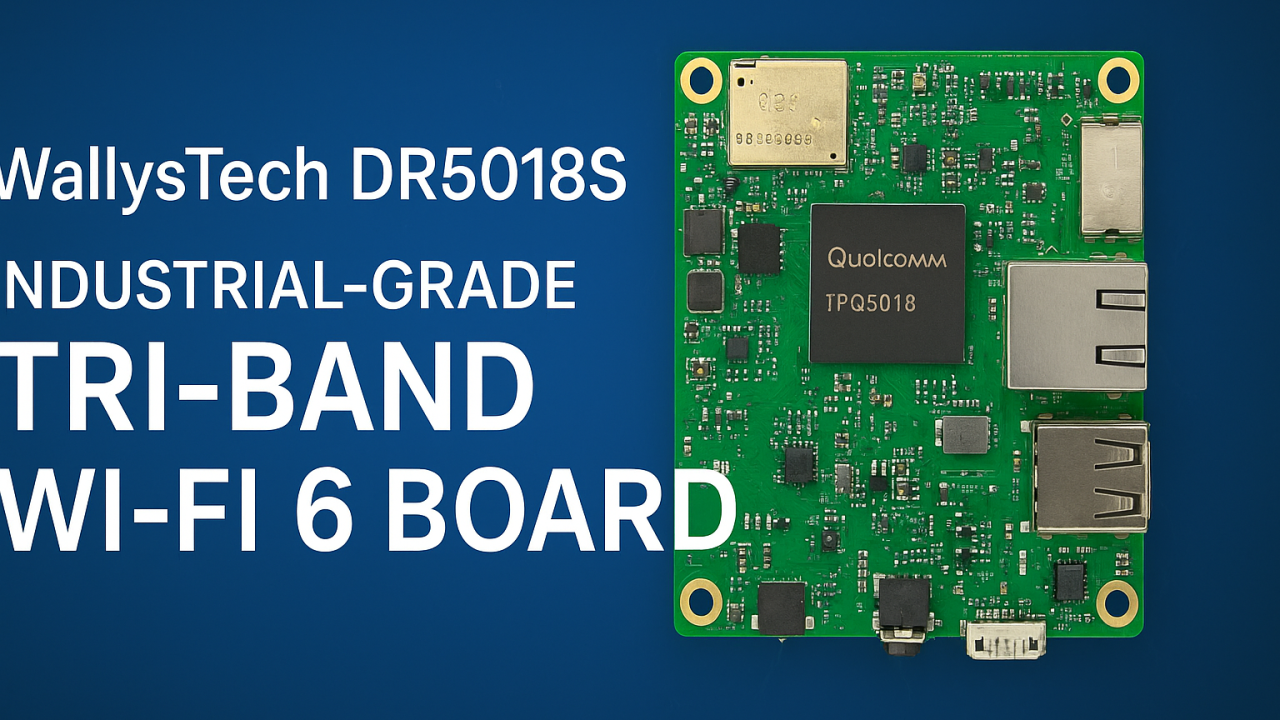
IPQ5018 Inside: DR5018S Board Redefines Industrial WiFi 6 Connectivity

🌐 Introducing DR5018S — Industrial-Grade Tri-Band WiFi 6 Board for OpenWRT and OpenWiFi development

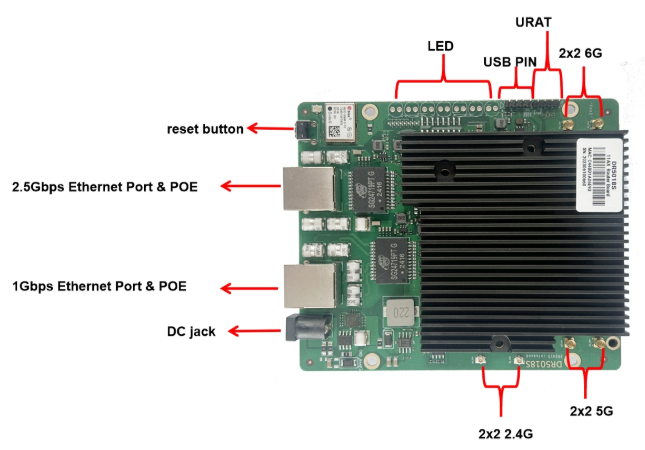
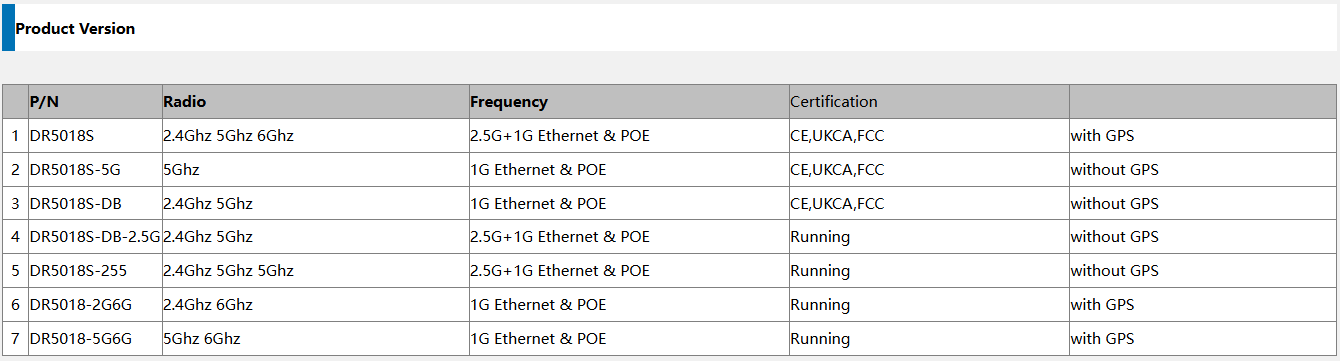
524WiFi introduces the WallysTech DR5018S, a high-performance industrial-grade WiFi 6 platform built for the next generation of wireless networks. Powered by the Qualcomm IPQ5018 SoC, the DR5018S integrates 2.4GHz, 5GHz, and 6GHz bands into one compact board — offering exceptional throughput, low latency, and strong adaptability for modern wireless environments.


⚙️ Key Features

  • Qualcomm IPQ5018 SoC — Dual-core ARM 64-bit A53 @1.0GHz
  • Tri-band support: 2.4GHz (573 Mbps) + 5GHz (2402 Mbps) + 6GHz (2402 Mbps)
  • WiFi 6 (802.11ax) with OFDMA, MU-MIMO, 1024-QAM
  • Memory & Storage: 512 MB DDR3L + 128 MB NAND Flash
  • Networking: 1× 2.5 GbE + 1× 1 GbE + USB 2.0 + SGMII + UART
  • Optional modules: GPS and Bluetooth 5.1
  • Power: 12–52 V DC or 802.3at/bt PoE
  • Operating temperature: –40 °C ~ +70 °C (industrial-grade)
  • Certifications: CE / FCC / UKCA
Article content

💡 Why DR5018S Stands Out

✅ Tri-band flexibility — handle high-density environments and interference-free operations

✅ Future-ready with 6GHz — prepared for WiFi 6E and early WiFi 7 transition

✅ Industrial-grade reliability — wide temperature, PoE, and durable design

✅ Open-source platform — OpenWRT/OpenWiFi for customization and fast development

✅ 2.5GbE interface — for high-throughput backhaul and mesh deployments

Article content

🏭 Real-World Applications

The DR5018S is designed for industrial and enterprise-grade wireless networks, enabling reliable connectivity in demanding conditions:

🔹 Mining & Oilfield Operations — establish long-distance wireless mesh links for remote monitoring, sensors, and field communication networks.

🔹 Smart Cities & Urban Infrastructure — build tri-band APs and gateways for IoT devices, cameras, and autonomous systems.

🔹 Industrial IoT & Automation — integrate into factory APs or gateways with OpenWRT for flexible control and connectivity.

🔹 Edge Computing & AI Gateways — combine compute + tri-band WiFi for edge data collection and analysis.

🔹 Warehouse & Logistics — enable low-latency mesh communication for autonomous AGVs and real-time tracking.

🔹 Outdoor Mesh & Backhaul Nodes — leverage 6GHz as a dedicated backhaul channel for high-speed, interference-free wireless mesh.

Its flexibility also makes DR5018S an excellent foundation for OEM/ODM wireless solutions, custom AP design, and smart industrial routers.


🚀 Empowering Wireless Innovation

At 524WiFi, we help partners accelerate product development and reduce evaluation costs through open, modular, and stable platforms. The DR5018S continues our mission to bridge industrial-grade reliability with open-source innovation — enabling faster time-to-market and future-ready WiFi 6/6E connectivity.

Posted on

IPQ5018 | 524WiFi and Wallys DR5018S VLAN Configuration Guide

1. Introduction

The 524WiFi and Wallys DR5018S router board, based on the Qualcomm IPQ5018 chipset, is widely used in industrial wireless applications. VLAN functionality allows network segmentation, optimized traffic management, and enhanced security. This guide provides a step-by-step tutorial to configure Access VLAN and Trunk VLAN on the DR5018S.

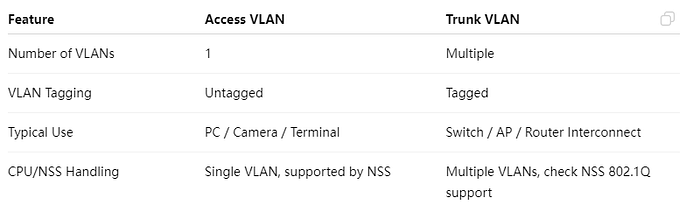
2. Understanding VLAN, Access, and Trunk

Article content

Access VS Trunk

3. Prerequisites

  • Wallys DR5018S router, firmware: wallys firmware
  • Admin access via Web GUI or SSH
  • VLAN ID plan and IP addressing plan
  • Optional: VLAN-aware NIC or Vlan Switch for testing

4. VLAN Configuration on DR5018S

Steps:

  1. Log in to the Web GUI.
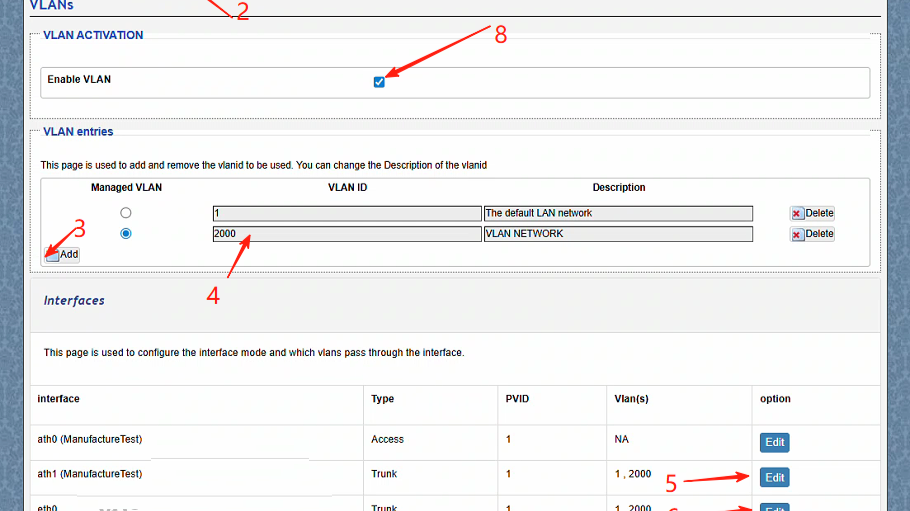
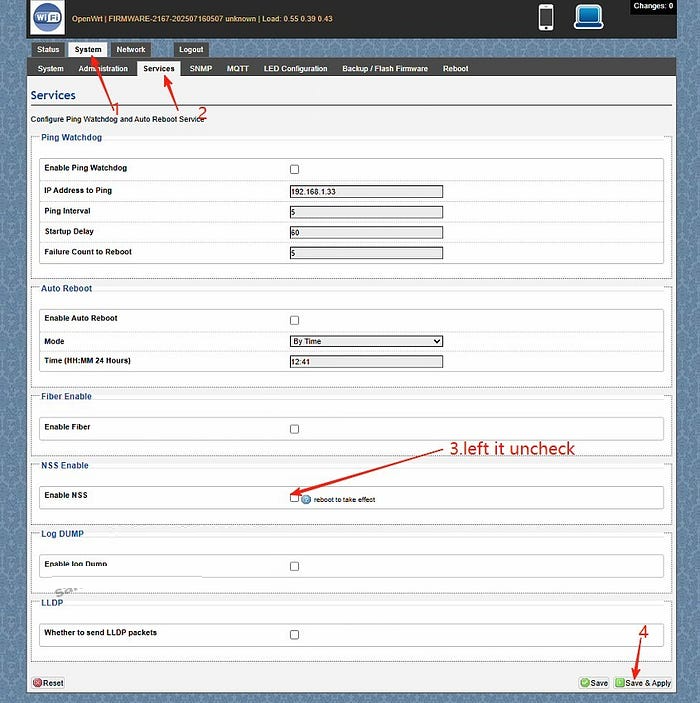
  2. Go to System → Services. Left the Enable NSS uncheck and click “save and apply”
  3. Go to Network → Vlans.Create a VLAN (e.g., VLAN 2000).
  4. Edit the ath1(the working radio) and eth0(the ethernet port connected) port mode to Trunk.
  5. ath1 setting:Select type Trunk,Assign the PVID as 1,select Vlans 2000,save changes
  6. ath1 setting:Select type Trunk,Assign the PVID as 1,select Vlans 2000,save changes.
  7. Assign an IP address to the VLAN interface (static or DHCP).
  8. Save and apply the configuration.
  9. Test connectivity: connect a PC to the port, get an IP, and ping the radio.

5. Troubleshooting

  • Cannot access the device → check VLAN ID, PVID, and tagging.
  • Trunk traffic lost → verify VLAN configuration on the remote end.
  • PC cannot ping → ensure the IP address is in the VLAN subnet.
  • Check NSS hardware acceleration

With this guide, you can easily configure Access VLAN and Trunk VLAN on the DR5018S router board. VLANs help isolate traffic, improve security, and optimize performance in industrial wireless networks.

For more technical support and inquiry for industrial wireless products, contact 524WiFi at info@524wifi dot com or net!

Posted on

524 WiFi 7 DR9274E – QCN 9274 / 6274 Dual band concurrent miniPCIE Network Cards

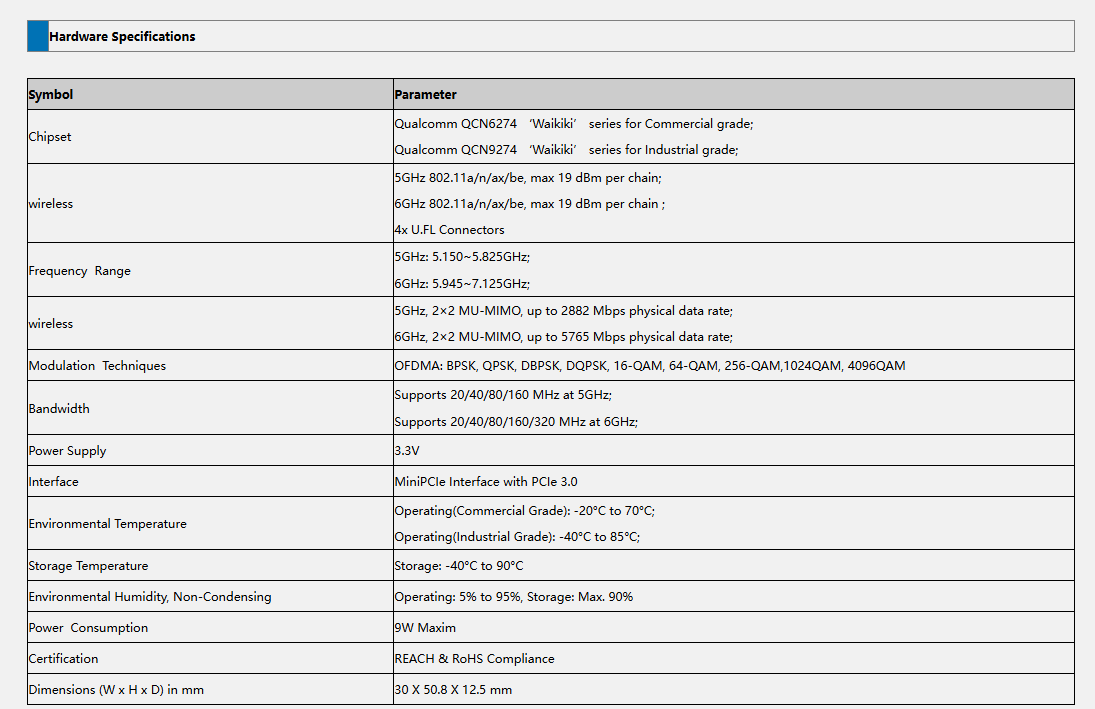
The DR9274E is a family of high-performance WiFi 7 radio modules built on Qualcomm’s QCN9274 or QCN6274 ‘Waikiki’ series chipsets.

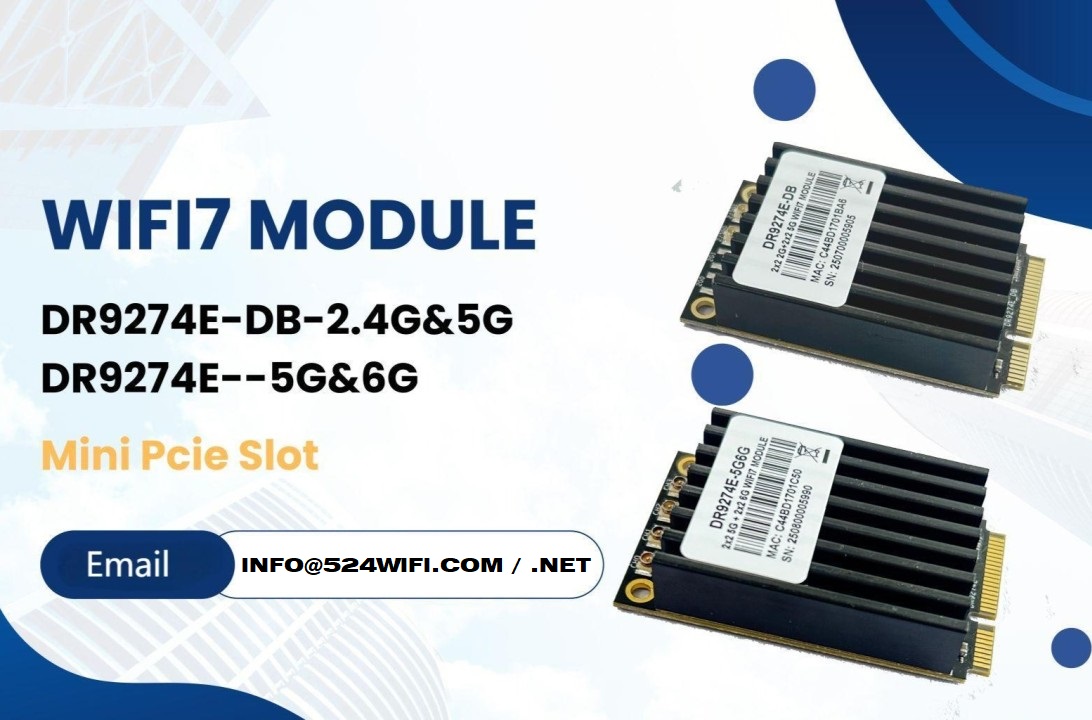
524WiFi is proud to announce the launch of two brand-new WiFi 7 MiniPCIe modules — the DR9274E-DB and DR9274E-5G6G, engineered to meet the demands of today’s most advanced industrial and commercial wireless applications.

These modules are part of the DR9274E family, built on Qualcomm’s QCN9274 / QCN6274 ‘Waikiki’ series chipsets, and designed to unlock the full potential of WiFi 7 in a compact MiniPCIe form factor. Samples available with QCN9274 chipset now !


🔧 Product Variants


⚙️ Key Features at a Glance

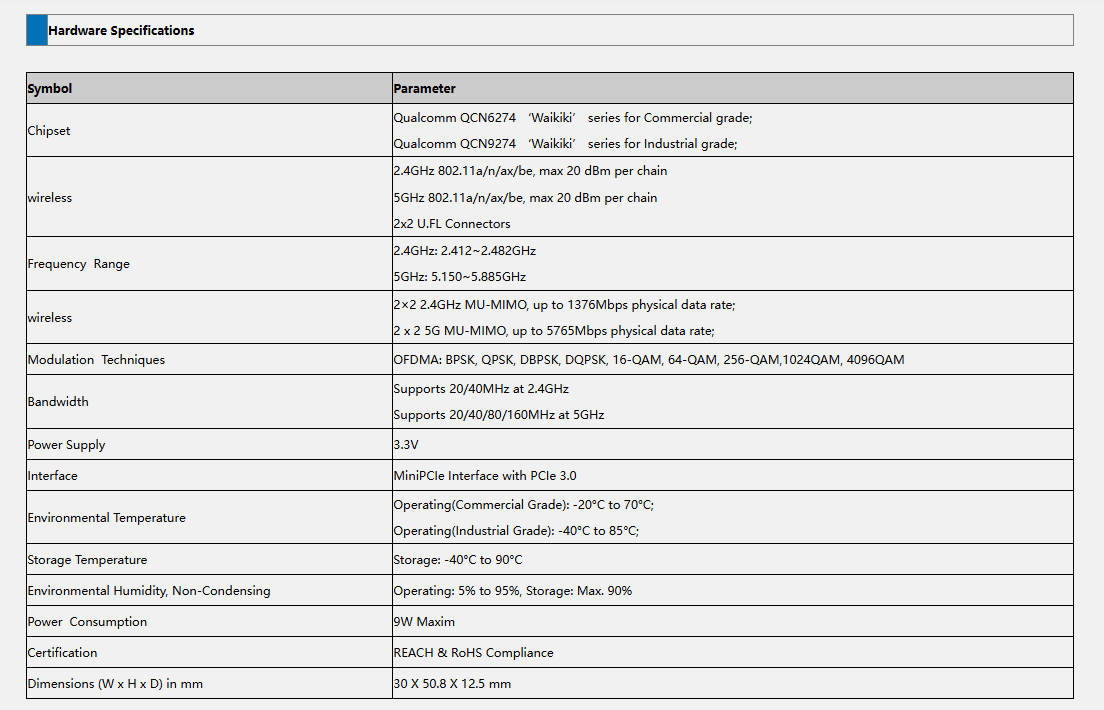
✅ Based on Qualcomm QCN6274 (Commercial Grade) or QCN9274 (Industrial Grade)

✅ Supports WiFi 7 (802.11be) for next-generation speed and efficiency

✅ 2×2 MU-MIMO at 5GHz and 6GHz

✅ Max throughput: 2882 Mbps (5GHz) and 5765 Mbps (6GHz)

✅ 320 MHz ultra-wide bandwidth support in 6GHz

✅ MiniPCIe interface with PCIe 3.0

✅ Ultra-rugged: Operating Temp up to -40°C to 85°C (Industrial)

✅ REACH & RoHS Compliant


🌐 Perfect for Demanding Applications

Whether you’re building the next smart city or designing rugged outdoor systems, the DR9274E modules are built for:

  • Industrial & Commercial WiFi Infrastructure
  • Security Surveillance Systems
  • Hotel and Campus Wireless Coverage
  • Forest Fire Monitoring Projects
  • Remote Area Connectivity
  • Custom Applications in Challenging Environments

📏 Tech Specs Snapshot

Article content
DR9274E-DB
Article content
DR9274E-5G6G

💼 Looking to Integrate WiFi 7 Into Your Product?

524WiFi and Wallys specialize in custom industrial wireless solutions, and we’re ready to support your projects with:

  • Hardware customization
  • Software/driver support
  • Long-term supply guarantee
  • Technical documentation and enclosure design references

📩 Contact our sales team today at [email protected] to request datasheets, samples, or technical consultation.

Posted on

IPQ4019 IPQ4029 Mesh Networking Setup: DR4019 Router Boards in Action

Learn how to set up and test a robust mesh network using three Wallystech DR4019 router boards. Watch as we:

Upgrade firmware with Wallys OpenWrt Mesh. Configure unique IPs for seamless communication.

Test network resilience, proving reliable data transmission even during power disruptions.

Perfect for smart cities, IoT, and industrial applications!

You can also read previous article How to Upgrade DR4019 with OpenWrt 23.05 – Simple Steps! Enjoy.

Posted on

524WiFi is driving the future of high-power 6GHz Wi-Fi 7 solutions—with full support for OpenWRT and OpenWiFi collaborative development!

As a global leader in wireless innovation, 524WiFi and WallysTech are advancing the next generation of connectivity with a tri-band platform built on the Qualcomm IPQ9574 + QCN9274/QCN6274 architecture—engineered for ultra-reliable, high-power 6GHz transmission.

🧠 We’re not just innovating in hardware—we’re also deeply engaged in the OpenWRT and OpenWiFi communities, empowering rapid development and seamless integration for our global partners.

🔧 Key Product Highlights:
✅ Tri-band concurrent operation (2.4GHz / 5GHz / 6GHz)
✅ High-power 6GHz RF design for long-range outdoor performance
✅ Fully compatible with OpenWRT and OpenWiFi software stacks
✅ Ideal for mesh backhaul, smart campuses, and industrial IoT deployments

🤝 We invite global partners—developers, system integrators, OEM/ODM teams—to collaborate with us in building the future of Wi-Fi 7.

📩 For product briefs, test boards, or partnership opportunities, reach out to us!

Posted on

IPQ5018 IPQ5010 Wallys DR5018S WiFi 6 Router Board Now Supports Tcpdump — Network Diagnostics Just Got Easier

In the world of embedded networking, visibility is everything. Whether you’re an engineer troubleshooting a client deployment or a developer fine-tuning a custom OpenWrt-based application, packet-level insights can save hours — if not days — of guesswork.

We’re excited to announce that tcpdump is now fully supported on our DR5018S router board, bringing enterprise-grade packet analysis directly to your industrial WiFi 6 hardware.

🧰 Why Tcpdump Matters

Tcpdump is a powerful, command-line packet analyzer tool that allows users to:

  • Monitor live traffic on specific interfaces
  • Capture and filter packets based on IP, port, protocol, and more
  • Export logs for deeper analysis or compliance purposes
  • Debug intermittent network issues with precision

Now with tcpdump on DR5018S, you don’t need a separate laptop or tap device — your router board becomes the diagnostic tool.

Article content

📡 About DR5018S

The DR5018S is based on the Qualcomm IPQ5018 SoC, designed for advanced industrial WiFi 6 applications. It supports:

  • 2.4G/5G concurrent dual-band
  • M.2 slot for LTE/5G modem expansion
  • Optional PoE support
  • Flexible OpenWrt/QSDK firmware environment

By adding tcpdump support, we’re giving system integrators, OEMs, and network developers more control and clarity at the edge.

📝 Documentation & Access

An updated user manual with tcpdump usage examples, interface configurations, and filtering tips will be released shortly. In the meantime, you can check out the DR5018S hardware details here:

https://www.524wifi.com/index.php/catalogsearch/result/?q=5018