
Posted on

IPQ5018 | 524WiFi and Wallys DR5018S VLAN Configuration Guide

1. Introduction

The 524WiFi and Wallys DR5018S router board, based on the Qualcomm IPQ5018 chipset, is widely used in industrial wireless applications. VLAN functionality allows network segmentation, optimized traffic management, and enhanced security. This guide provides a step-by-step tutorial to configure Access VLAN and Trunk VLAN on the DR5018S.

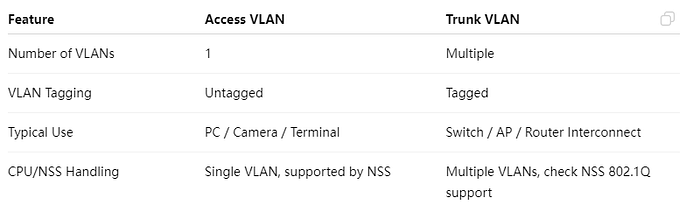
2. Understanding VLAN, Access, and Trunk
Article content

Access VS Trunk

3. Prerequisites

  • Wallys DR5018S router, firmware: wallys firmware
  • Admin access via Web GUI or SSH
  • VLAN ID plan and IP addressing plan
  • Optional: VLAN-aware NIC or Vlan Switch for testing

4. VLAN Configuration on DR5018S

Steps:

  1. Log in to the Web GUI.
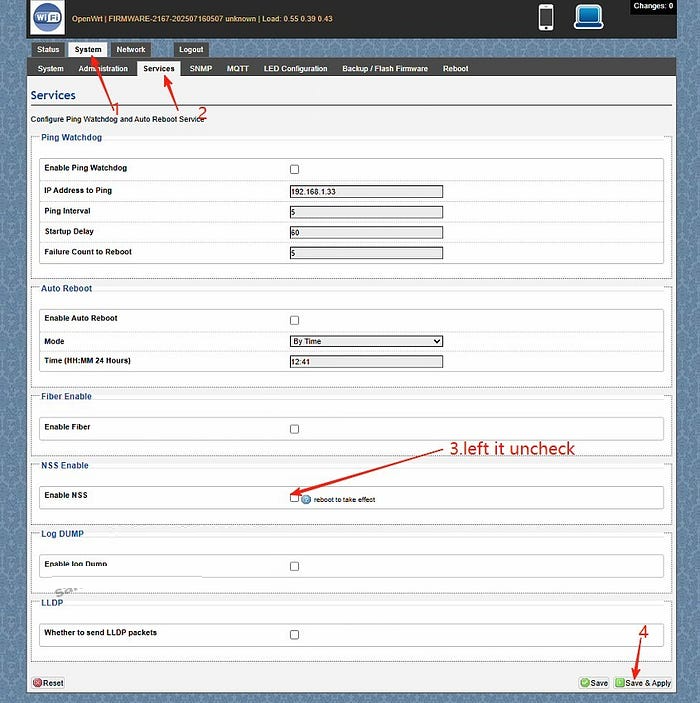
  2. Go to System → Services. Left the Enable NSS uncheck and click “save and apply”
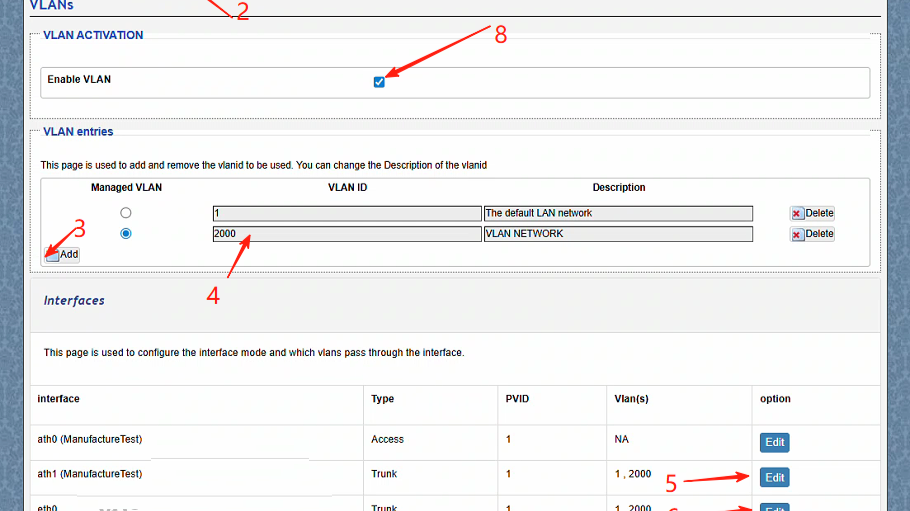
  3. Go to Network → Vlans.Create a VLAN (e.g., VLAN 2000).
  4. Edit the ath1(the working radio) and eth0(the ethernet port connected) port mode to Trunk.
  5. ath1 setting:Select type Trunk,Assign the PVID as 1,select Vlans 2000,save changes
  6. ath1 setting:Select type Trunk,Assign the PVID as 1,select Vlans 2000,save changes.
  7. Assign an IP address to the VLAN interface (static or DHCP).
  8. Save and apply the configuration.
  9. Test connectivity: connect a PC to the port, get an IP, and ping the radio.
5. Troubleshooting

  • Cannot access the device → check VLAN ID, PVID, and tagging.
  • Trunk traffic lost → verify VLAN configuration on the remote end.
  • PC cannot ping → ensure the IP address is in the VLAN subnet.
  • Check NSS hardware acceleration

With this guide, you can easily configure Access VLAN and Trunk VLAN on the DR5018S router board. VLANs help isolate traffic, improve security, and optimize performance in industrial wireless networks.

For more technical support and inquiry for industrial wireless products, contact 524WiFi at info@524wifi dot com or net!
Posted on

IPQ4019 IPQ4029 Mesh Networking Setup: DR4019 Router Boards in Action

Learn how to set up and test a robust mesh network using three Wallystech DR4019 router boards. Watch as we:

Upgrade firmware with Wallys OpenWrt Mesh. Configure unique IPs for seamless communication.

Test network resilience, proving reliable data transmission even during power disruptions.

Perfect for smart cities, IoT, and industrial applications!

You can also read previous article How to Upgrade DR4019 with OpenWrt 23.05 – Simple Steps! Enjoy.

Posted on

Wallystech DR9574 with DR9274-2G DR9274-5G DR9274-6G Card 4×4 Triband MLO Configuration Tutorial

Welcome back to 524WiFi! In today’s video, we’ll walk you through the process of loading firmware and configuring MLO for the IPQ9574 board.

If you’re setting up advanced hardware, this guide will help you get everything up and running smoothly. Let’s dive in! First, we’ll connect the hardware.

You’ll need a UART cable, and here’s how to connect the pins:

GND connects to the black cable, TX to the white cable, RX to the green cable. Remember, VCC is not needed.

Once that’s connected, we can move on to the software configuration.

Next, we’ll load the firmware. Make sure the firmware file is in the same folder as tftpd32. Follow these steps:

Open the terminal and enter U-Boot mode. Modify the machid and configure the card slots.

If you’re using the DR9274-2G, DR9274-5G, and DR9274-6G modules, input the following commands: Open the tftpd32 tool and input the following command to re-flash the firmware:

Finally, input reset to reboot the system and proceed with AP configuration.

Now, we’ll configure the Access Points (AP). After the reboot, log in as root with the password asdf1234. Then, input the following command to edit the wireless configuration file: Modify the AP settings as needed.

Here’s an example configuration: Once done, press ESC, then shift+zz to save and exit.

To finalize the setup, enable the configuration by typing:wifi

Then, check if the radios are up by entering:iwconfig

And that’s it! Your APs are configured, and the new firmware has been successfully loaded! Next, we’ll be testing the DR9574kit’s MLO throughput performance. Stay tuned to our channel for the latest updates and test results. Don’t forget to hit the notification bell, so you don’t miss out! Thank you for watching this firmware loading and MLO configuration tutorial! If you found this video helpful, make sure to give us a thumbs up and subscribe to Wallystech for more technical guides and hardware tutorials. See you in the next video!

You can download related files here : https://wifi5.eu/dls/Wallys/DR9574/

Posted on

Entering the Multi-Link Era of Wi-Fi 7 with 524WiFi. Maximize coverage. Boost performance.

Unlock the future.
By combining DR9274-2G5G and DR9274-5G6G, 524WiFi delivers a true tri-band Wi-Fi 7 platform ready for tomorrow’s wireless demands. X86 Linux supported!


Powered by Multi-Link Operation (MLO), our solution enables:


✅ Simultaneous dual 5GHz operation
✅ Aggregated bandwidth for higher throughput
✅ More resilient and flexible wireless networks


Ready to go Multi-Link? Contact us !

Posted on

DR6018 + QCN9024: Reliable WiFi 6 for Real-World Industrial Deployments

When it comes to building high-performance wireless infrastructure for industrial or outdoor use, stability and scalability matter just as much as speed.

At 524WiFi and Wallys, we continue to support our customers with proven, cost-effective WiFi 6 solutions — like the DR6018 router board paired with the QCN9024 module — designed for real-world performance in smart cities, surveillance networks, and rugged environments.

🔧 DR6018: Built to Perform

Powered by the Qualcomm IPQ6010/IPQ6018 platform, the DR6018 is one of our most popular and versatile router boards. It features:

  • ✅ Dual-band concurrent 2.4GHz + 5GHz support
  • ✅ Mini PCIe and M.2 slots for modular expansion
  • ✅ 5x Gigabit Ethernet ports
  • ✅ USB 3.0, SD card, SIM support
  • ✅ PoE optional
  • ✅ OpenWrt and QSDK compatibility

Its modularity and robustness make it a go-to choice for OEM/ODM clients who need a balance of performance, flexibility, and cost.

📶 Why QCN9024?

QCN9024 is Qualcomm’s high-throughput WiFi 6 radio chip:

  • 🔁 Supports 4×4 MU-MIMO
  • 📡 Optimized for DFS, long-range & outdoor stability
  • ⚙️ Excellent Linux/OpenWrt driver support
  • 🔩 Easily integrated into DR6018 or DR5018S for consistent results

Whether you’re setting up outdoor CPEs, APs for city-wide WiFi, or reliable backhaul links for security systems, QCN9024 delivers where it counts.

🧠 For Developers & System Integrators

Wallys offers:

  • 🔧 Fully assembled kits or PCBA-only versions
  • ✏️ Custom software/firmware tuning (MIMO, TX power, DFS channels)
  • 📞 Pre-sales and post-sales engineering support

Your project is unique — and our team is here to help you tailor the right solution.

📢 Coming Soon: IPQ5424 Support

Looking ahead? Our R&D team is preparing a new line based on Qualcomm IPQ5424 (Marina Series), featuring Quad-Core ARM-A55 @1.8GHz. Ideal for next-gen industrial APs and higher-end deployments. Stay tuned!

Posted on

DR5322S + QCN9274: Next-Gen WiFi 7 for Industrial Networks

WiFi 7 is here — and 524WiFi is ready.

Our latest solution, the DR5332 and DR5322s router boards, combine the power of Qualcomm IPQ 5332 / IPQ5322 and the high-speed QCN9274 wireless module to deliver multi-gigabit connectivity, ultra-low latency, and industrial-grade reliability.

🧠 Key Platform Specs — DR5322

  • ✅ Based on Qualcomm IPQ5322 SoC
  • ✅ Dual 2.5G Ethernet ports + 10G SFP
  • ✅ Supports Tri-band: 2.4G / 5G / 6G (via QCN9274/QCN6274)
  • ✅ PCIe 3.0 slot for flexible radio support
  • ✅ DDR4 1GB, eMMC 8GB onboard
  • ✅ Fully OpenWrt/QSDK customizable

📶 Why QCN9274?

  • ✅ 4×4 MIMO
  • ✅ 320 MHz channel width
  • ✅ Multi-Link Operation (MLO) ready
  • ✅ Supports WiFi 7 (802.11be) features

Paired with DR5322s, this combo brings elite wireless performance to OEM/ODM platforms in:

  • Industrial APs
  • Outdoor wireless CPEs
  • Edge mesh gateways

🔧 Future-Proof Your Wireless Projects

This isn’t just a board. It’s a WiFi 7 infrastructure base built for the next 5–10 years. And yes — QCN6274, QCN9024, and even QCN9074 (WiFi 6) are all supported too, for backward compatibility.

📩 Want to test a DR5322s sample or request a spec sheet? Contact us!

Posted on

524WiFi is driving the future of high-power 6GHz Wi-Fi 7 solutions—with full support for OpenWRT and OpenWiFi collaborative development!

As a global leader in wireless innovation, 524WiFi and WallysTech are advancing the next generation of connectivity with a tri-band platform built on the Qualcomm IPQ9574 + QCN9274/QCN6274 architecture—engineered for ultra-reliable, high-power 6GHz transmission.

🧠 We’re not just innovating in hardware—we’re also deeply engaged in the OpenWRT and OpenWiFi communities, empowering rapid development and seamless integration for our global partners.

🔧 Key Product Highlights:
✅ Tri-band concurrent operation (2.4GHz / 5GHz / 6GHz)
✅ High-power 6GHz RF design for long-range outdoor performance
✅ Fully compatible with OpenWRT and OpenWiFi software stacks
✅ Ideal for mesh backhaul, smart campuses, and industrial IoT deployments

🤝 We invite global partners—developers, system integrators, OEM/ODM teams—to collaborate with us in building the future of Wi-Fi 7.

📩 For product briefs, test boards, or partnership opportunities, reach out to us!

Posted on

IPQ5424 Sneak Peek: The Cost-Effective Path to WiFi 7 Starts Here

As WiFi 7 begins to reshape industrial and commercial networking, not every project requires the horsepower (or cost) of top-tier platforms like IPQ9574. That’s where Qualcomm’s IPQ5424 comes into play — offering a balanced, quad-core solution designed to bring the Marina family of chipsets to the mainstream market.

Wallys is excited to announce that IPQ5424-based router boards are in the pipeline, aiming to help developers and OEMs transition smoothly into WiFi 7 with a cost-effective and scalable solution.

🌟 Key Specs of IPQ5424 (Preview)

  • Processor: Quad-core ARM Cortex-A55 @ 1.8GHz
  • Target Use: SMB routers, industrial APs, mesh nodes
  • WiFi Support: 4×4 2.4GHz / 4×4 5GHz (potential MLO support)
  • Firmware: OpenWrt/QSDK support in progress
  • Memory Support: DDR4 up to 2GB
  • I/O: USB 3.0, PCIe Gen3, SGMII/USXGMII

This makes the IPQ5424 a strategic choice for:

  • Mid-tier WiFi 7 CPE development
  • Smart building and IoT gateway integration
  • Compact enterprise wireless solutions

🔗 Positioned Between Performance and Affordability

If you’re currently using platforms like IPQ5018 or IPQ6018, the IPQ5424 offers a smooth upgrade path — unlocking multi-gig capabilities without the power draw or cost of premium SoCs.

It also complements high-end modules like QCN9074 or QCN9024, allowing system integrators to build hybrid solutions: high-performance uplinks powered by QCN modules, with local routing managed by IPQ5424.

And of course, for users already deploying IPQ9574, the IPQ5424 can serve as a cost-optimized secondary node in distributed mesh or WiFi 7 extender environments.


📦 Stay Tuned: Wallys Upcoming IPQ5424-Based Board

We’re currently developing a new IPQ5424 router board, which will feature:

  • Industrial-grade stability
  • WiFi 7-ready MLO
  • Open SDK support
  • Flexible PCIe for WiFi modules like QCN9274 or QCN6274

👉 Want early access or technical previews? Contact us!


📌 Related 524WiFi and Wallys Products You Can Explore Now:

  • DR5018S – WiFi 6 router board with tcpdump support
  • DR9574 – High-performance WiFi 7 board based on IPQ9574
  • DR9274 – M.2 module based on QCN9274
  • DR8072A – Mature WiFi 6 AP based on IPQ8072
  • DR6018 – Cost-effective solution based on IPQ6018

Posted on

Powering the WiFi 7 Era: QCN9274 & QCN6274 Modules in Action

Powering the WiFi 7 Era: QCN9274 & QCN6274 Modules in Action

WiFi 7 isn’t just faster — it’s smarter, more efficient, and built for the future of connectivity. At the heart of this transformation are Qualcomm’s QCN9274 and QCN6274 WiFi 7 modules, engineered for high-throughput, low-latency wireless environments.

These modules are perfect for: ???? Industrial APs and high-density public deployments ???? Mesh systems requiring seamless roaming ???? Ultra-responsive applications like AR/VR, video streaming, and edge AI

???? Pair It with Wallys DR5322 (IPQ5322)

To bring these modules to life, 524WiFi offers the DR5322 router board, a powerhouse based on the IPQ5322 SoC, featuring:

  • ✅ 10G SFP port for fiber uplink
  • ✅ 1GB DDR4 (16-bit) RAM
  • ✅ Mini PCIe & M.2 slots for flexible wireless expansion
  • ✅ Perfectly compatible with QCN9274 / QCN6274 modules
  • ✅ Full support for OpenWrt/QSDK

???? Product details:  https://www.524wifi.com/index.php/catalogsearch/result/?q=5332


???? Coming Soon: IPQ5424 “Marina” Series

Wallys is preparing to release a new generation of boards based on Qualcomm’s IPQ5424 (Quad-core ARM A55 @1.8GHz) — codename Marina — offering enhanced processing power, optimized wireless efficiency, and designed with enterprise-level networking in mind.

Stay tuned for updates on our IPQ5424 platform launch!

Posted on

QCN9274 + IPQ9574: Leading WiFi 7, Watching IPQ5424

As industrial and enterprise wireless demand skyrockets, the need for extreme throughput, multi-link flexibility, and custom firmware capabilities has never been more critical. At the heart of this new era? Qualcomm’s flagship WiFi 7 combo: QCN9274 + IPQ9574.

But what if you could get WiFi 7 performance in a more compact, power-efficient design?

Introducing a sneak peek at the upcoming IPQ5424 — Qualcomm’s Quad-Core ARM Cortex-A55 SoC, clocked at 1.8GHz, and part of the Marina series. Wallys is actively prototyping boards based on this chip.


⚡ QCN9274 (DR9274): The WiFi 7 Gold Standard

  • Qualcomm WiFi 7 radio (successor to QCN9074)
  • 4096-QAM, 320 MHz channels
  • 4×4 MU-MIMO support
  • Ultra-fast 5/6GHz performance
  • Multi-Link Operation (MLO) ready
  • WPA3, DFS, and industrial-grade reliability

Paired with boards like the Wallys DR9574, it’s ideal for future-proof enterprise APs, smart logistics, and ultra-reliable long-range bridges.


🧠 IPQ9574: The Brains Behind Next-Gen Routing

  • High-performance quad-core ARM architecture
  • Native support for QCN9274 in tri-band setups
  • Integrated WiFi 6 radio for unified design
  • Designed for OpenWrt/QSDK 12+
  • Suitable for high-end router boards like DR9574

Perfect for OEMs building advanced gateways, CPEs, or edge routers — capable of handling gigabit WiFi + backhaul + edge computing in one.


👀 On the Radar: IPQ5424

Wallys is currently prototyping new boards based on the IPQ5424 “Marina” Series — a mid-tier SoC with:

  • Quad-core ARM Cortex-A55 @1.8GHz
  • Optimized for compact, efficient WiFi 7 deployments
  • Ideal for SMB routers, mesh APs, edge nodes

While IPQ9574 leads the pack, IPQ5424 fills the cost-performance gap — making WiFi 7 more accessible for scaled applications.


🔧 Compatible SoCs & Modules for QCN9274/QCN9024:

  • IPQ9574 — WiFi 7 flagship
  • IPQ8072/IPQ8074 — WiFi 6 platform
  • IPQ6010 — Mid-range WiFi 6
  • IPQ4019/IPQ4029 — Entry-level WiFi 5/6 bridges
  • Coming soon: DR5424 (IPQ5424-based board)

Wallys modules supporting these platforms include: DR9274–6E, DR9574, DR6018, and DR8074