Posted on

A Smarter Drone Still Needs a Stronger Wireless Link

The future of drones is no longer only about flying.

Modern drones are becoming intelligent platforms equipped with:

  • AI vision systems
  • Autonomous navigation
  • Real-time data processing
  • Advanced sensors
  • Edge AI computing capabilities

But behind every smart drone, there is one critical infrastructure that is often overlooked:

Reliable wireless connectivity.

Because even the most advanced AI system becomes limited when the connection is unstable.


AI Makes Drones Smarter. Connectivity Makes Them Useful.

A drone performing industrial inspection, mapping, agriculture monitoring, or security missions needs to continuously exchange large amounts of data.

It needs to:

  • Stream high-resolution video in real time
  • Transfer sensor and vision data
  • Maintain low-latency control communication
  • Stay connected during high-speed movement

The wireless link is no longer just a communication channel.

It becomes the nervous system of an autonomous flying machine.


Why Drone Applications Need More Than Traditional Wireless Connectivity

Many UAV applications operate in challenging environments:

  • Long-range communication
  • High-speed mobility
  • Complex RF environments
  • Multiple drones working simultaneously
  • High-bandwidth AI data transmission

For these scenarios, peak speed alone is not enough.

A professional drone platform requires:

  • Stable connectivity
  • Low-latency response
  • Strong interference resistance
  • Reliable performance during long operation cycles

WiFi 6 and WiFi 7: Building the Wireless Foundation for Next-Generation UAVs

As drones become more intelligent, wireless technology must evolve to support higher demands.

Advanced WiFi platforms enable:

High-bandwidth AI applications

Real-time video streaming, multi-camera systems, and edge AI processing require fast and reliable data transmission.

Low-latency autonomous control

Faster response helps support autonomous navigation and mission-critical operations.

Multi-device communication

Future drone fleets and collaborative robotic systems will require efficient wireless networking.


524WiFi Industrial WiFi Modules for Intelligent Drone Platforms

For drone developers, selecting a wireless module is not only about maximum throughput.

Important considerations include:

  • Industrial-grade chipset platform
  • Driver and software support
  • Thermal stability
  • Flexible integration options
  • Long-term supply availability

Based on Qualcomm wireless platforms, Wallys provides WiFi solutions designed for industrial and AI-driven applications.


DR9274E WiFi 7 Module: Enabling Next-Generation Autonomous Drones

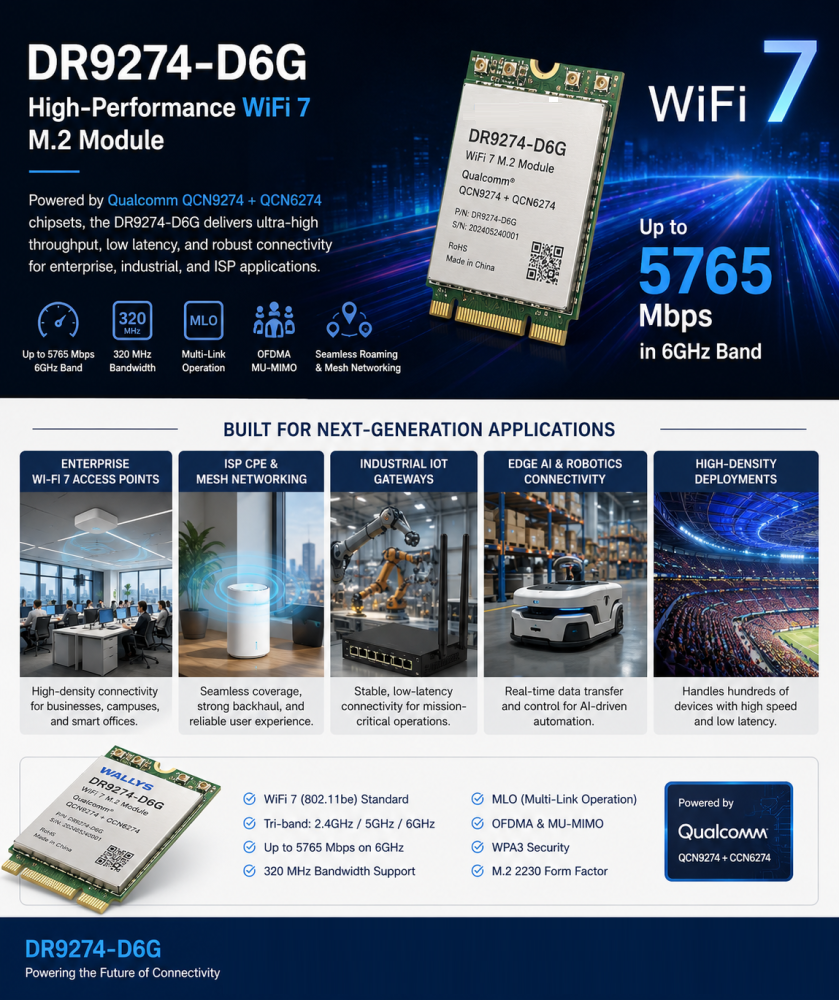
Powered by Qualcomm QCN9274 and QCN6274 platforms, the DR9274E WiFi 7 module is designed for applications requiring higher bandwidth, advanced connectivity, and future-ready wireless performance.

Potential applications include:

  • AI vision drones
  • Autonomous aerial robots
  • Industrial inspection UAVs
  • High-resolution video transmission systems

With WiFi 7 capabilities, it provides a powerful wireless foundation for intelligent devices requiring faster data exchange and more reliable connections.

DR9074 WiFi 6E Module: Reliable Connectivity for Industrial UAV Applications

Based on Qualcomm QCN9024, the DR9074 supports Tri-Band WiFi 6E operation across 2.4GHz, 5GHz, and 6GHz.

It is designed for applications requiring:

  • Stable wireless links
  • High-performance data transmission
  • Flexible frequency selection
  • Industrial deployment reliability

Suitable for:

  • Inspection drones
  • Mapping systems
  • Smart agriculture UAVs
  • Edge AI devices
Article content

Connecting the Future of Autonomous Flight

The future of drones will not only depend on better AI algorithms.

It will depend on the complete technology ecosystem:

AI provides intelligence. Sensors provide perception. Wireless connectivity enables action.

A smarter drone still needs a stronger wireless link.

At 524WiFi and Wallys, we are committed to providing Qualcomm-based WiFi 6 and WiFi 7 platforms for the next generation of drones, robotics, and edge AI applications.

The future of autonomous flight will not only be smarter.

It will be better connected.
Posted on

QCN6224 Wi-Fi 7 2×2 Module Overview for Cost-Optimized APs

Introduction

As Wi-Fi 7 (IEEE 802.11be) transitions from cutting-edge innovation to mainstream deployment, device manufacturers increasingly look for wireless solutions that balance performance, cost, and energy efficiency. The QCN6224 Wi-Fi 7 2×2 module delivers exactly that balance. It brings next-generation connectivity into cost-optimized access points (APs), routers, CPEs, and industrial gateways, without significantly increasing system complexity or bill-of-materials (BOM) costs.


What Is the QCN6224 Wi-Fi 7 Module?

The QCN6224 is a 2×2 MU-MIMO Wi-Fi 7 module designed for embedded networking equipment. Supporting dual-band or tri-band operation depending on design, the module introduces major Wi-Fi 7 enhancements such as higher throughput, improved spectral efficiency, and greater link reliability — all within a compact and power-efficient form factor. Compared with many high-end Wi-Fi 7 chipsets, the QCN6224 focuses on value-driven performance, making it ideal for mainstream devices rather than premium flagship systems.


Key Wi-Fi 7 Features of QCN6224

✔ 320 MHz Channel Support

The QCN6224 supports ultra-wide 320 MHz channels, enabling dramatically higher peak data rates. This capability reduces latency and improves user experience in applications such as HD and 4K video streaming, VR/AR, cloud gaming, and high-density enterprise networks.

✔ Multi-Link Operation (MLO)

MLO allows Wi-Fi devices to transmit data across multiple frequency bands at the same time. This improves reliability by minimizing interruption risks and delivers smoother, faster data transfers — especially valuable in congested wireless environments.

✔ 4K-QAM Modulation

With 4K-QAM support, the QCN6224 significantly increases spectral efficiency, packing more data into every transmission. This is ideal for environments with many users, such as offices, campuses, hotels, and public Wi-Fi deployments.

✔ 2×2 MU-MIMO Architecture

The 2×2 design provides the optimal balance between speed, power consumption, and hardware cost. It enables fast performance without requiring the more complex RF layouts or higher component costs seen in larger 4×4 or 8×8 systems.


Why the QCN6224 Is Ideal for Cost-Optimized APs

Manufacturers of cost-optimized access points face several key design requirements. They need low BOM cost, compact hardware, and efficient power consumption — without sacrificing network performance. The QCN6224 meets all these criteria.

Because it uses a 2×2 architecture, the module footprint is smaller and integration is simpler. At the same time, Wi-Fi 7-level features such as MLO and 4K-QAM ensure clear performance gains over Wi-Fi 6. Its low-power operation makes it especially suitable for PoE-powered APs and always-on devices. In addition, the QCN6224 is compatible with popular networking software ecosystems such as OpenWrt and QSDK (depending on vendor implementation), helping device makers bring products to market more quickly.


Typical Application Scenarios

The QCN6224 Wi-Fi 7 2×2 module is well-suited for:

  • Enterprise and SMB access points
  • Mid-range Wi-Fi 7 routers
  • ONT / FTTH gateway devices
  • Industrial networking equipment
  • Smart building and IoT controllers
  • Wireless video transmission systems

Its compact size and stable performance make it highly attractive for embedded and industrial environments where reliability and cost efficiency are critical.


QCN6224 vs. Higher-End Wi-Fi 7 Solutions

Compared with 4×4 and 8×8 Wi-Fi 7 chipsets, the QCN6224 focuses on value rather than maximum throughput. High-end chipsets deliver higher data rates but also require more complex RF layouts, significantly higher power consumption, and greater BOM costs — making them ideal for premium enterprise or carrier-class APs.

By contrast, the QCN6224 is optimized for mainstream Wi-Fi 7 devices. It delivers strong performance upgrades over Wi-Fi 6 while keeping both power and hardware costs at practical levels. This makes it an excellent choice for large-scale deployments, SMB networking, consumer broadband devices, and mid-range enterprise APs where cost-performance balance is essential.

In short, if your design goal is reliability, efficiency, and affordability, rather than extreme bandwidth, the QCN6224 stands out as a perfect match.


Benefits for OEMs and Device Manufacturers

Selecting QCN6224 brings multiple advantages:

  • Reduced BOM cost compared with larger Wi-Fi 7 solutions
  • Faster product development cycles
  • Lower thermal and power-supply requirements
  • Compatibility with established software stacks
  • Strong Wi-Fi 7 marketing value for product positioning

Manufacturers can upgrade Wi-Fi 6 designs to Wi-Fi 7 with minimal redesign effort — accelerating time-to-market.


Conclusion

The QCN6224 Wi-Fi 7 2×2 module is a powerful, efficient, and cost-optimized solution for next-generation wireless devices. Featuring MLO, 320 MHz channel support, 4K-QAM, and 2×2 MU-MIMO, it enables manufacturers to deliver Wi-Fi 7-class performance at highly competitive price points.

If your goal is to build compact, power-efficient, and scalable access points or gateways, the QCN6224 offers the ideal balance between technology advancement and commercial practicality.

Posted on

The Quiet Revolution: How 5G RedCap is Unlocking a New Wave of Connected Devices

For years, the promise of 5G has been a tale of two extremes. On one end, high-speed smartphones and fixed wireless access demanding gigabit speeds. On the other, massive IoT sensors requiring years of battery life but minimal data. In the vast, fertile middle ground, a crucial category of devices has been left waiting for a cost-effective, power-efficient, yet capable wireless solution.

That wait is over. The arrival of 5G Reduced Capability (RedCap) is not just an incremental update; it’s the key that unlocks the full, diverse potential of the 5G ecosystem.

Bridging the 5G Divide: What is RedCap?

Think of the 5G spectrum as a highway system. You have the Formula 1 lanes for eMBB (enhanced Mobile Broadband) and the specialized, low-power bike paths for mMTC (massive Machine-Type Communications). RedCap effectively creates a new, smart “commuter lane”—perfectly balanced for devices that need more than a trickle of data but don’t require the expense and power drain of a full 5G modem.

Formally defined in the 3GPP Release 17 standard, 5G RedCap (also known as NR-Light) is a optimized version of 5G. It’s designed specifically for devices that fall between the high-performance and low-power extremes. By strategically reducing complexity, antenna count, and supported features, RedCap achieves a critical goal: it brings the inherent benefits of 5G—security, low latency, and mobility—to a much wider array of applications at a fraction of the cost and power consumption.

Source: https://www.ericsson.com/en/blog/2021/2/reduced-cap-nr

The Engineering Trade-Off: How RedCap “Slims Down”

RedCap isn’t a watered-down version of 5G; it’s a purpose-built one. It achieves its efficiency through several intelligent design choices:

  • Reduced Bandwidth: While high-end 5G can use up to 100 MHz in sub-7 GHz spectra, RedCap operates on a leaner 20 MHz. For most industrial sensors, health monitors, and wearables, this is more than sufficient and drastically cuts complexity.
  • Fewer Antennas: A flagship smartphone might have 4 receive antennas (4Rx). RedCap devices can operate with just 1 or 2 (1Rx or 2Rx). This simplification is a major driver behind reducing device size, cost, and power needs.
  • Half-Duplex FDD: This allows the device to either transmit or receive at a time, but not both simultaneously. By eliminating the need for a duplexer (a component that prevents interference), RedCap devices become significantly cheaper and more power-efficient. For many applications that send bursts of data, this slight trade-off is unnoticeable.
  • Lower Order Modulation: RedCap primarily uses 64 QAM instead of the 256 QAM found in high-end 5G. This is a more than capable modulation scheme that reduces power demands on the device’s power amplifier.

The Real-World Impact: RedCap’s Killer Applications

The theoretical benefits are clear, but where will we actually see RedCap make a difference? The answer is in three key verticals that have been hamstrung by the limitations of existing technologies.

  1. Industrial IoT 2.0: The factory floor is a perfect environment for RedCap. Think of wireless video surveillance cameras for safety and quality control, condition monitoring sensors on high-value machinery, and programmable logic controllers (PLCs). These devices need more bandwidth than a simple LPWAN sensor but can’t justify the cost of a full 5G module. RedCap fits perfectly, offering the reliable, low-latency connection needed for modern automation.
  2. The Next Generation of Wearables: While smartwatches today use a mix of 4G and proprietary technologies, RedCap paves the way for a new class of advanced wearables. Imagine high-performance augmented reality (AR) glasses for enterprise or rich video-streaming capabilities in a fitness band. RedCap provides the data throughput for these experiences while ensuring the device doesn’t overheat and has a usable battery life.
  3. A New Era for Video Surveillance: City-wide and industrial security systems require high-quality, real-time video streaming. RedCap modems are powerful enough to handle 1080p or even 4K video, and their native support for network slicing means a city can guarantee a secure, uninterrupted video feed for public safety, separate from consumer traffic on the same network.

The Road Ahead: Integration and Coexistence

The rollout of RedCap is a masterclass in seamless network integration. A key feature is its “fallback” capability. RedCap devices can connect to both modern 5G Standalone (SA) networks and older 4G LTE networks, ensuring broad coverage from day one. For network operators, enabling RedCap is often a simple software upgrade to existing 5G SA cellsites, making deployment swift and cost-effective.

Looking forward, RedCap doesn’t replace existing technologies like LTE-M or NB-IoT; it complements them. It fills a crucial performance and cost gap, creating a more complete and versatile connectivity portfolio. As we move toward 3GPP Releases 18 and beyond, we can expect further enhancements in power saving and integration, solidifying RedCap’s role as the backbone for the mid-tier IoT revolution.

In summary, 5G RedCap is the missing piece in the connectivity puzzle. By making a few smart engineering trade-offs, it brings the robust power of 5G to the devices that will define the next decade of innovation—from smarter factories to advanced wearables. The 5G revolution is no longer just about speed; it’s about intelligent, scalable, and efficient connectivity for everything. And with RedCap, that future is finally within reach.

Posted on

WIFi 7 drivers finally works aka how we tested QCN9274 hw 2.0. board-2.bin and firmware-2.bin file for Linux development and Ath12k Driver MLO debug 9274

October 2025 update :

🚀 Exciting News from 524WiFi !
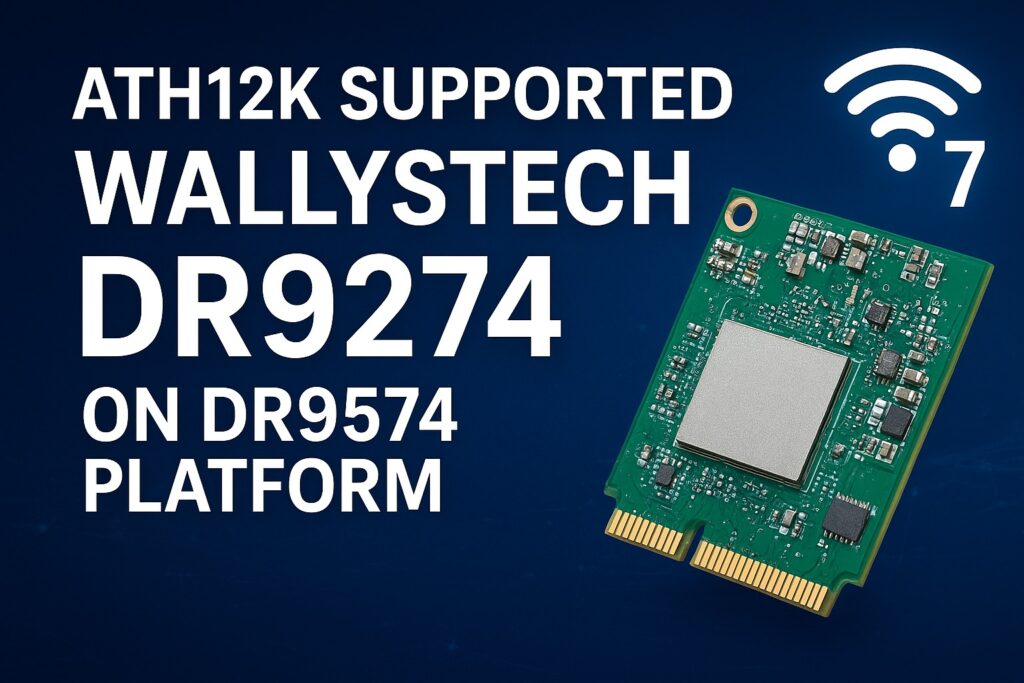
Our 524WiFi DR9274 Series WiFi 7 Network Cards are now fully supported on the DR9574 platform using ath12k driver! And MLO fully working and supported too !

Experience the next generation of wireless performance — faster, smarter, and more reliable.

Sample units and demo tests are now available.

Actually. The Customer can use our board-2.bin from our ftp or from Compex on our DR9274 Cards. Because these Cards are standard Card of Qualcomm. There is no reason for any differences. You can download board-2.bin for all our 524WiFi DR9274 modules from our link : https://wifi5.eu/dls/Wallys/DR9274/

Additionally. If a Customer needs ath12k support, then we can do demo ath12k on our DR9574 boards to support DR9274 cards. Customer can take it as reference. If Customer need support for their own software, it needs check the project scale and then we can offer our support for LINUX / OpenWRT development.

———————————————————————————————-

Dear customers,

You can log in the link and can find latest sources for your development using Ath12k firmware. If there is any mistake, please let us know.

https://git.codelinaro.org/clo/ath-firmware/ath12k-firmware/-/tree/main/QCN9274/hw2.0?ref_type=heads

This is general frimware for QCN 9274 / 6274 based modules. For special function, you need ask the vendor to develop special firmware. They do not provide it for free. For example COMPEX need you to buy it , but the price is about $50000.

For 524wifi DR9274 and also COMPEX modules the bdf is not changed, so you can use the generic board-2, firmware-2  and add your board-id of your module if not included in already. Please read bellow how to use and debug Ath12k driver for our dual band modules.

There are also many known Ath12k bugs and limitations, you can solve known issues using a driver patch – for example :

https://patchwork.kernel.org/project/linux-wireless/list/?series=954967

For examples you can add the 160Mhz Channel Support for 5GHz range.

More general informations :

https://wireless.docs.kernel.org/en/latest/en/users/drivers/ath12k.html

EXAMPLE  1 : 

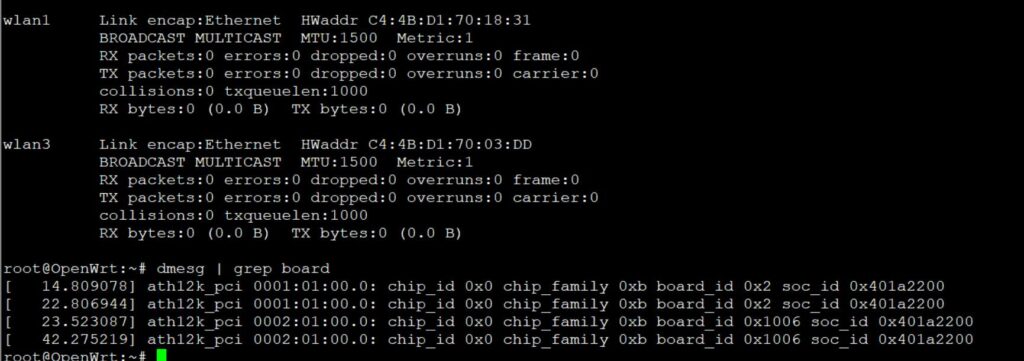
A modified general board-2.bin file for all QCN6274 modules (including dual band 5G6G) is available here. The public file doesn’t support board-id 0x1006 (dual band 5G+6G) , our engineer added support for 0x1006 in to the file : 

 https://wifi5.eu/dls/Wallys/DR9274/

For example WLE7002-E56 or DR9274-5G6G by 524WiFi modules require this modified board-2.bin file, then 6GHz issue is solved via regulatory db. signing the file. And you will also need to apply an existing driver patch from Patchwork.kernel.org

https://patchwork.kernel.org/project/linux-wireless/list/?series=&submitter=&state=&q=ath12k&archive=&delegate=

After this setup tuning and modifications you can achieve working WiFi 7 Dual band card under Linux or OpenWRT. For example openwrt latest trunk is working excellent, + adding right board-2.bin file as mentioned higher. After appling the 160MHZ channel patch we are testing DR9274-5G6G and WLE7002-E56 with MLO support:

current transfer is about 1400MBps for 6GHz/320Mhz with iphone 15 pro max 

and  1500MBps for 5GHz/160Mhz with iphone 15 pro max. Distance is half a meter for this testing.

For big customers , there is a good solution – like this : the customer can evaluate the wifi card on a QCA based router board, like for example DR9574 , and if performance and features are good then they will have confidence to put project to 524WiFi and Wallys to develop software for ath12k. We can allocate a engineer to fix these Customers requirements and if the Customer has a good project with us. MOQ and SW development contract is required.

Are you interested in in testing and development on dr9574 board using DR9274-5G6G module ? You will see how it works with original QCA driver. Please contact us !

Unfortunaly, it seems only single band modules can work with current ath12k without extra development, unfortunately dual band support requires additional development as we show you for wle7002-e25 card bellow:

————————————————————————————————————————————————

COMPEX WLE7002E25 dual band needs to separate phy firmware. 

https://github.com/quic/upstream-wifi-fw/tree/main/ath12k-firmware/QCN9274/hw2.0/1.3.1/WLAN.WBE.1.3.1-00130-QCAHKSWPL_SILICONZ-1

The official firmware It can be downloaded from the following link https://git.codelinaro.org/clo/ath-firmware/ath12k-firmware/-/blob/main/QCN9274/hw2.0/testing/1.1.1/WLAN.WBE.1.1.1-00210-QCAHKSWPL_SILICONZ-1/firmware-2.bin?ref_type=heads
Put the firmware into /lib/firmware/ath12k/QCN9274/hw2.0/

But split phy and firmware-2.bin does not support linux kernel 6.8. You need to download backportfrom https://mirror2.openwrt.org/sources/backports-6.9.1.tar.xz.
Install software to build backports with “sudo apt install build-essential flex bison ncurses-dev”.
The command need to prepare the backport
tar -xf backports-6.9.1.tar.xz
Patch the attached patch files. This will enable support linux kernel 6.xx and add defconfig-ath12k
cd backports-6.9.1/
patch -p1 < [patch file location]
The command need to compile and install backport
make defconfig-ath12k
make
sudo make INSTALL_MOD_STRIP=1 install

—————————-

We have tested this and it works. you can use the link provided directly.

See if it works on your end.

split phy and firmware-2.bin does not support linux kernel 6.8. Need to download backport from https://mirror2.openwrt.org/sources/backports-6.9.1.tar.xz.
Install software to build backports with “sudo apt install build-essential flex bison ncurses-dev”.
The command need to prepare the backport
tar -xf backports-6.9.1.tar.xz
Patch the attached patch files. This will enable support linux kernel 6.xx and add defconfig-ath12k
cd backports-6.9.1/
patch -p1 < [patch file location]
The command need to compile and install backport
make defconfig-ath12k
make
sudo make INSTALL_MOD_STRIP=1 install 

Please check our customer modified working board-2.bin file as an example and guide for your development – https://wifi5.eu/dls/compex/WLE7000

And dont forget as always , comment react or add some info – you will be automaticly added to possibly win set of our designed special 5G or WIFI anntennas

———————————————

Best Regards

524wifi team


Posted on

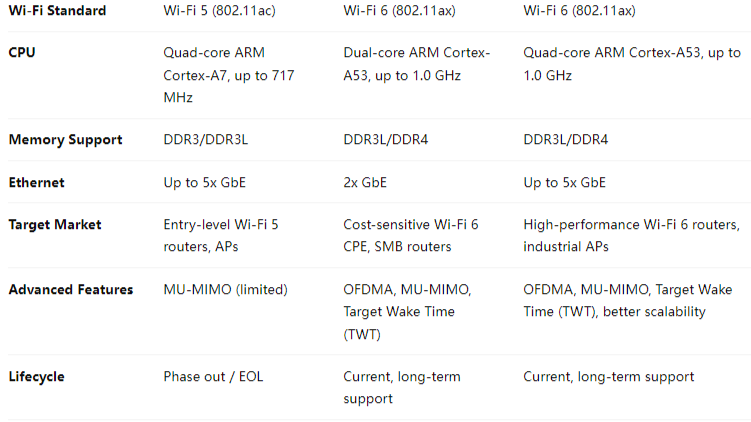
IPQ4019 IPQ4029 Phase Out Alert: Secure Your Upgrade Path with IPQ5018 IPQ5010

Introduction

The Qualcomm IPQ4019 and IPQ4029 chipsets have long been popular choices for cost-effective Wi-Fi 5 router boards and networking solutions. However, as Wi-Fi technology advances and demand for higher throughput, better efficiency, and longer product lifecycles grows, these chipsets are now entering the phase out stage.

For product developers and OEMs/ODMs who have built solutions around IPQ4019/IPQ4029, this shift raises a key question: What’s next?

The answer lies in Qualcomm’s next-generation IPQ5018 and IPQ5010 chipsets — designed to deliver superior Wi-Fi 6 performance while offering a cost-effective and future-proof path for industrial and enterprise networking solutions.


Why IPQ4019 / IPQ4029 Are Phasing Out

  • Wi-Fi 5 Limitations: With Wi-Fi 6 becoming the industry standard, Wi-Fi 5 chipsets like IPQ4019/4029 struggle to meet the growing requirements of high-density and high-throughput networks.
  • Lifecycle End
  • Market Demand: Clients now expect advanced features such as OFDMA, MU-MIMO, and improved energy efficiency — capabilities not fully supported by IPQ40xx chipsets.

Why Transition to IPQ5018 / IPQ5010?

1. Wi-Fi 6 Performance

  • Support for OFDMA and MU-MIMO, ensuring stable performance in dense environments.
  • Higher throughput and lower latency compared to IPQ4019/IPQ4029.

2. Cost-Effective Upgrade Path

  • IPQ5010 is ideal for entry-level Wi-Fi 6 solutions, providing a balance of performance and affordability.
  • IPQ5018 offers more robust capabilities for industrial and enterprise-grade products.

3. Extended Lifecycle

  • Qualcomm’s roadmap ensures that IPQ50xx series chipsets will receive long-term support, securing your product investments.

4. Industrial-Grade Applications

  • Rugged and reliable for deployments in smart cities, industrial Wi-Fi, surveillance, and long-distance outdoor networking.
  • Future-ready platform to support customized software development including OpenWrt and QSDK.

Our Solutions Based on IPQ5018/IPQ5010

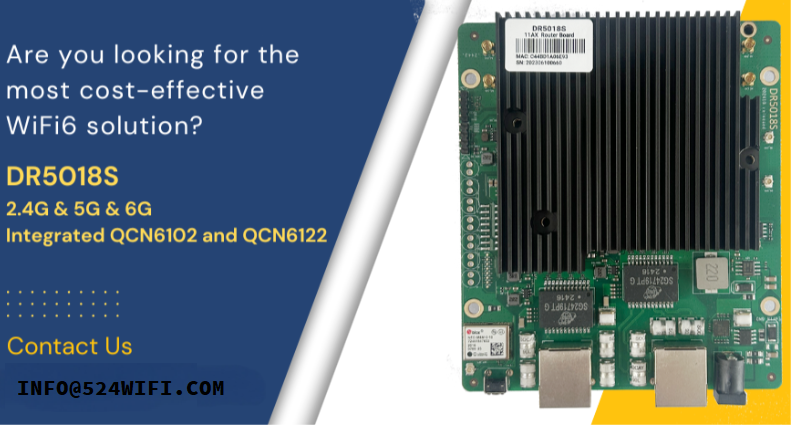
At 524WIFI and Wallys Communications (Suzhou) Co., Ltd., we have developed a range of router boards and wireless solutions built on the IPQ50xx series. Our latest product, the DR5018S, leverages the IPQ5018 chipset to deliver:

  • High-performance Wi-Fi 6 connectivity
  • Multiple Gigabit Ethernet ports
  • Support for industrial applications
  • Flexible OEM/ODM/JDM customization options

With strong hardware and software expertise, we ensures a smooth migration from IPQ40xx-based platforms to IPQ50xx solutions.


Conclusion

The phase-out of Qualcomm’s IPQ4019/IPQ4029 chipsets signals the end of an era — but also the beginning of a new one. By adopting the IPQ5018 and IPQ5010, businesses can secure a future-proof, cost-effective, and high-performance upgrade path that aligns with the growing demand for Wi-Fi 6 technology.

For more details on our IPQ5018/IPQ5010 solutions, or to discuss OEM/ODM opportunities, please visit www.524wifi.com / .net or contact us at info@524wifi dot com or net

Quick Review / More Info:

Both DR4019 and DR5018S support:

  • Wallys AP Controller
  • Hardware SOM version
  • VLAN functionality

The latest DR5018S VLAN configuration guide is first published here: Blog Article

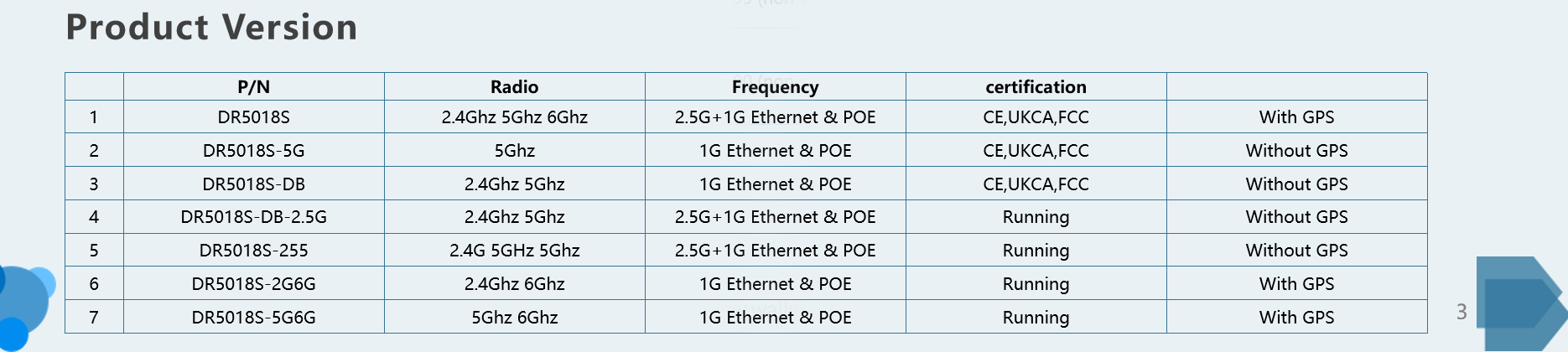
All available DR5018S Versions

Additional DR5018S features:

  • Mesh networking & seamless roaming
  • Long-range PTP over 30 km
  • GPS support
  • Tri-band option
  • FCC, CE, and UKCA certified
  • Proven performance: DR5018S-AP achieved a 14 km 5 GHz link test in Dongbei at 50 m height, with one-way throughput reaching 475 Mbps!
Posted on

IPQ8072 vs IPQ9574: Why Upgrade to Wi-Fi 7 for Your Next Wireless Project

The Qualcomm IPQ8072 has long been a reliable choice for Wi-Fi 6 networking hardware. Many enterprise routers, carrier CPEs, and industrial access points are still powered by IPQ8072 due to its strong balance of cost and performance. However, with the rapid evolution of Wi-Fi 7 (802.11be), the Qualcomm IPQ9574 offers significant technical advantages that make it the logical upgrade path for next-generation solutions.

In this article, we compare IPQ8072 vs IPQ9574, highlighting the major differences and why developers should consider migrating to Wi-Fi 7 hardware.


Overview of IPQ8072 (Wi-Fi 6 SoC)

The Qualcomm IPQ8072 is part of the IPQ807x family, designed for Wi-Fi 6. It features:

  • Quad-core ARM Cortex-A53 processor
  • 8×8 MU-MIMO capability
  • Up to 160 MHz channel bandwidth
  • 1024-QAM modulation
  • Robust support for enterprise and carrier-grade networking

While still capable, the IPQ8072 has reached maturity, and limitations in throughput and latency become noticeable in demanding applications.


Overview of IPQ9574 (Wi-Fi 7 SoC)

The Qualcomm IPQ9574 represents the new generation of Wi-Fi 7 platforms, optimized for ultra-high throughput and low latency. Key features include:

  • Enhanced multi-core CPU architecture for higher processing power
  • 320 MHz channel bandwidth (double that of IPQ8072)
  • 4096-QAM modulation for higher spectral efficiency
  • Support for Multi-Link Operation (MLO)
  • Designed for advanced enterprise, industrial, and carrier networks

This makes IPQ9574 ideal for data-heavy applications such as 8K video streaming, AR/VR, industrial IoT, and low-latency control systems.


IPQ8072 vs IPQ9574 Technical Comparison

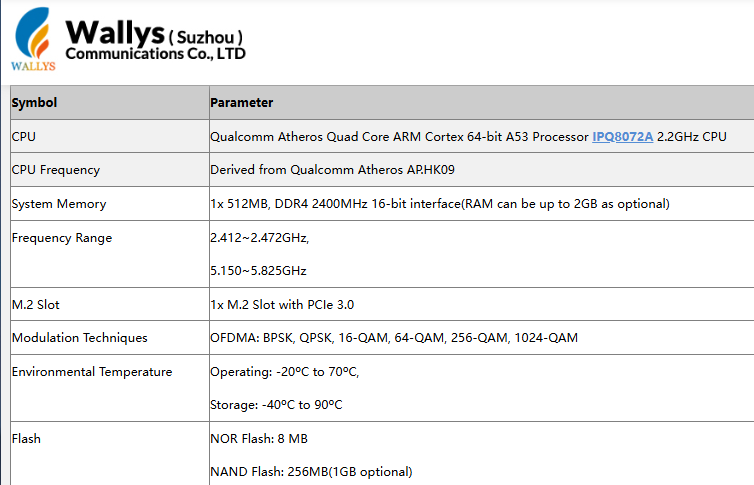
The Qualcomm IPQ8072 is a Wi-Fi 6 (802.11ax) SoC built with a quad-core Cortex-A53 processor. It supports channel bandwidths of up to 160 MHz and uses 1024-QAM modulation, making it a strong choice for enterprise routers, carrier CPE, and industrial APs.

Article content
Data from Wallys DR8072 Webpage

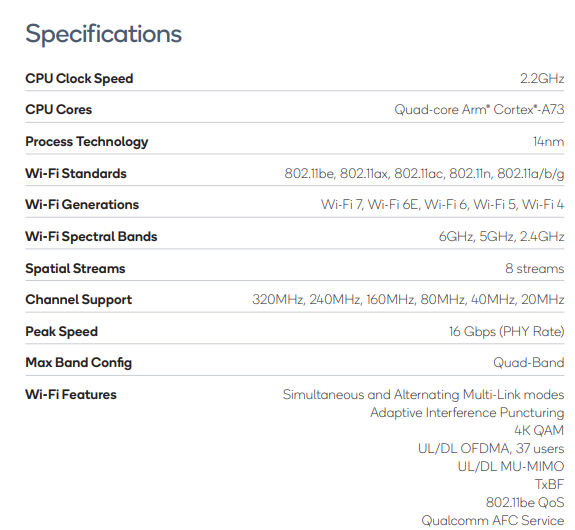
By contrast, the Qualcomm IPQ9574 belongs to the Wi-Fi 7 (802.11be) generation. It features a more advanced multi-core CPU architecture, supports 320 MHz channel bandwidth (double that of IPQ8072), and enables 4096-QAM modulation for higher spectral efficiency. Unlike IPQ8072, it also supports Multi-Link Operation (MLO), a Wi-Fi 7 feature that allows simultaneous use of multiple frequency bands to reduce latency and improve stability. These enhancements make IPQ9574 ideal for next-generation enterprise networks, industrial IoT deployments, low-latency applications, and high-density environments.

Article content
Data from Qualcomm IPQ9574 Datasheet

Why Upgrade from IPQ8072 to IPQ9574?

  1. Performance Leap – Wi-Fi 7 doubles available channel bandwidth and introduces 4096-QAM for significantly higher throughput.
  2. Ultra-Low Latency – MLO ensures faster and more reliable connectivity, critical for real-time applications.
  3. Future-Proofing – As Wi-Fi 6 hardware reaches end of lifecycle, Wi-Fi 7 ensures long-term product competitiveness.
  4. Scalability – IPQ9574’s stronger CPU supports more devices, traffic, and complex networking tasks.

524WiFi and Wallys’ IPQ9574 Router Board Solution

At 524WiFi, we provide hardware solutions based on Qualcomm IPQ9574, including the DR9574 Router Board, designed for Wi-Fi 7 networks. With strong processing power, advanced wireless features, and industrial-grade reliability, it is the perfect upgrade path for developers currently using IPQ8072-based designs.

Frequently Asked Questions (FAQ)

1. Is IPQ8072 still good in 2025?

Yes. The Qualcomm IPQ8072 is still a stable and cost-effective Wi-Fi 6 chipset, suitable for enterprise routers and industrial APs. However, for new projects that require higher throughput, lower latency, and longer product lifecycle, Wi-Fi 7 chipsets such as IPQ9574 are strongly recommended.

Article content
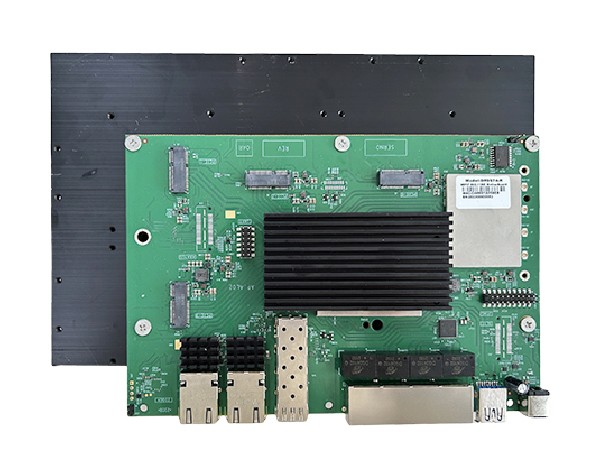
DR9574 board

2. What is the difference between IPQ8072 and IPQ9574?

The IPQ8072 is a Wi-Fi 6 (802.11ax) SoC, supporting up to 160 MHz bandwidth and 1024-QAM. The IPQ9574 is a Wi-Fi 7 (802.11be) SoC with 320 MHz bandwidth, 4096-QAM, and Multi-Link Operation (MLO), enabling much higher throughput and lower latency.

3. Why upgrade from Wi-Fi 6 to Wi-Fi 7?

Upgrading to Wi-Fi 7 provides faster data rates, reduced latency, and better efficiency in high-density environments. For applications such as AR/VR, 8K streaming, and industrial automation, Wi-Fi 7 ensures future-proof performance and competitiveness.

4. Does 524WiFi provide IPQ9574-based solutions?

Yes. 524WiFi and Wallys Communications offer router boards and network modules based on Qualcomm IPQ9574, including the DR9574 Router Board. These solutions are designed for enterprise, carrier, and industrial use cases that demand next-generation Wi-Fi 7 performance.

Posted on

524 WiFi 7 DR9274E – QCN 9274 / 6274 Dual band concurrent miniPCIE Network Cards

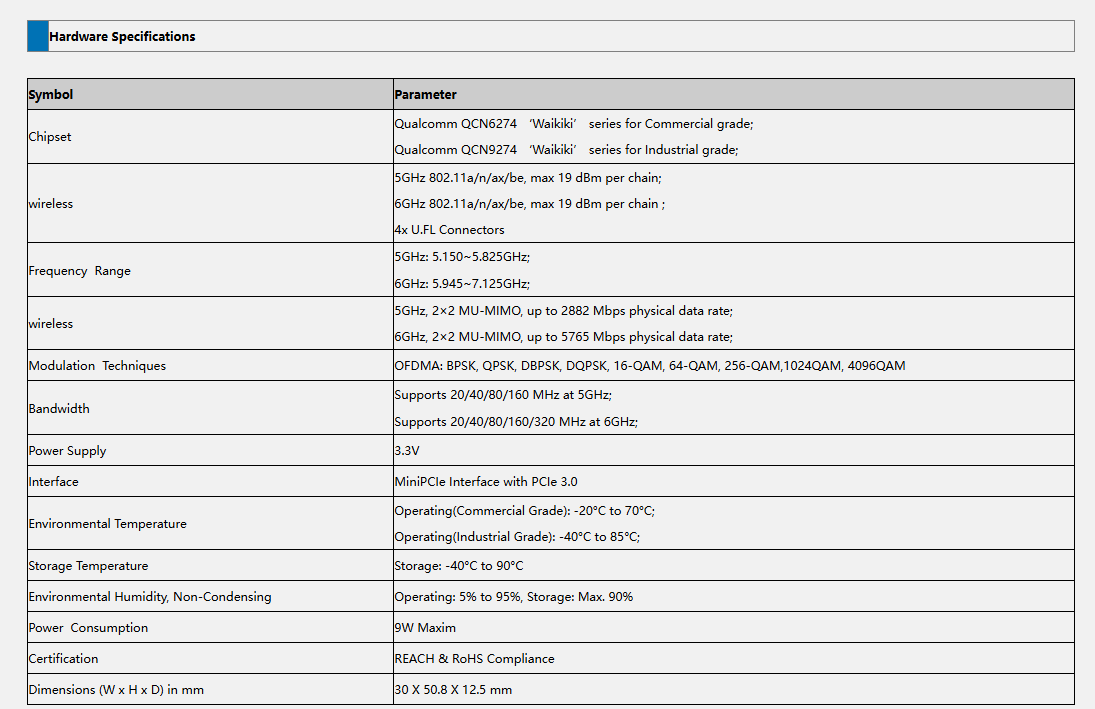
The DR9274E is a family of high-performance WiFi 7 radio modules built on Qualcomm’s QCN9274 or QCN6274 ‘Waikiki’ series chipsets.

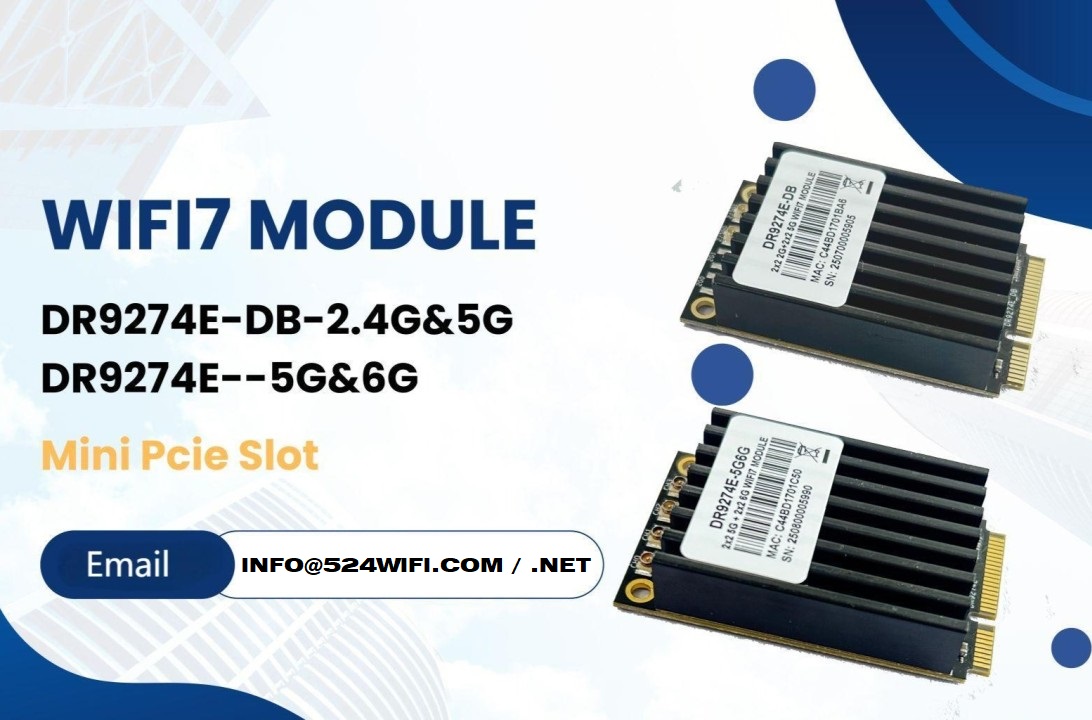
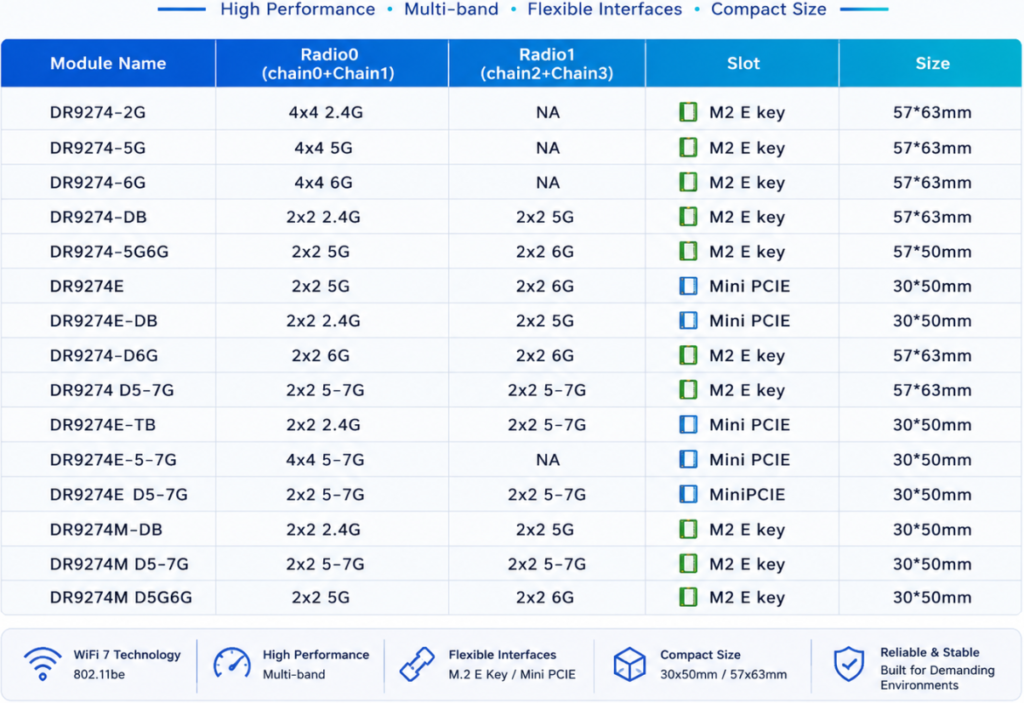
524WiFi is proud to announce the launch of two brand-new WiFi 7 MiniPCIe modules — the DR9274E-DB and DR9274E-5G6G, engineered to meet the demands of today’s most advanced industrial and commercial wireless applications.

These modules are part of the DR9274E family, built on Qualcomm’s QCN9274 / QCN6274 ‘Waikiki’ series chipsets, and designed to unlock the full potential of WiFi 7 in a compact MiniPCIe form factor. Samples available with QCN9274 chipset now !


🔧 Product Variants


⚙️ Key Features at a Glance

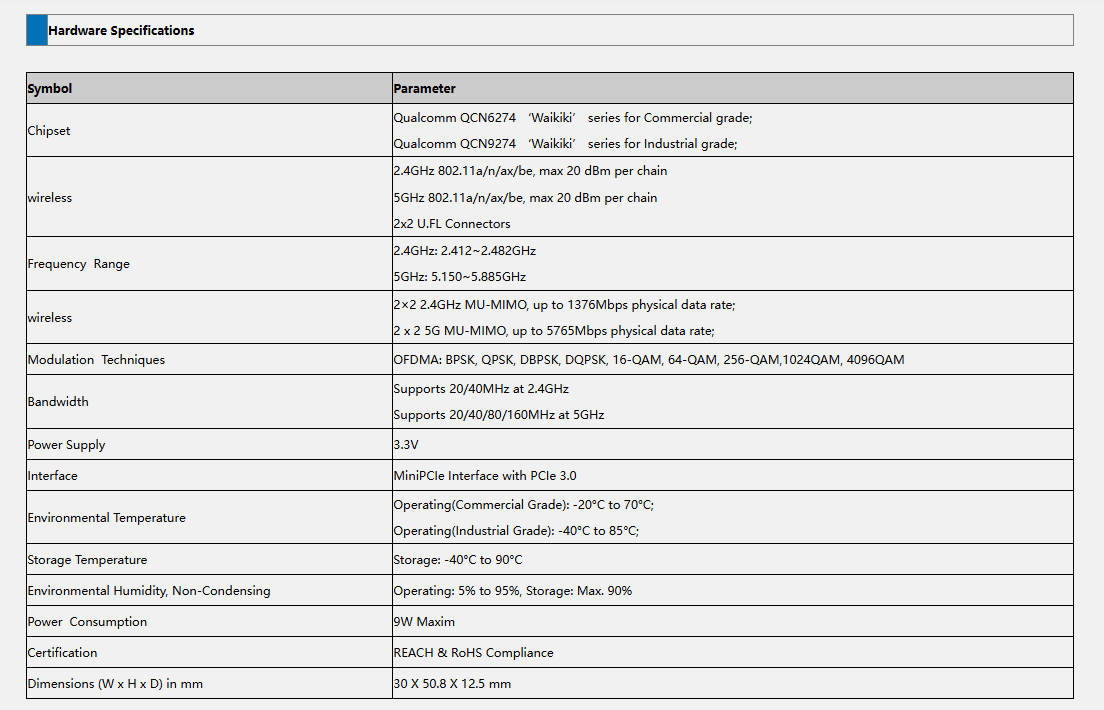
✅ Based on Qualcomm QCN6274 (Commercial Grade) or QCN9274 (Industrial Grade)

✅ Supports WiFi 7 (802.11be) for next-generation speed and efficiency

✅ 2×2 MU-MIMO at 5GHz and 6GHz

✅ Max throughput: 2882 Mbps (5GHz) and 5765 Mbps (6GHz)

✅ 320 MHz ultra-wide bandwidth support in 6GHz

✅ MiniPCIe interface with PCIe 3.0

✅ Ultra-rugged: Operating Temp up to -40°C to 85°C (Industrial)

✅ REACH & RoHS Compliant


🌐 Perfect for Demanding Applications

Whether you’re building the next smart city or designing rugged outdoor systems, the DR9274E modules are built for:

  • Industrial & Commercial WiFi Infrastructure
  • Security Surveillance Systems
  • Hotel and Campus Wireless Coverage
  • Forest Fire Monitoring Projects
  • Remote Area Connectivity
  • Custom Applications in Challenging Environments

📏 Tech Specs Snapshot

Article content
DR9274E-DB
Article content
DR9274E-5G6G

💼 Looking to Integrate WiFi 7 Into Your Product?

524WiFi and Wallys specialize in custom industrial wireless solutions, and we’re ready to support your projects with:

  • Hardware customization
  • Software/driver support
  • Long-term supply guarantee
  • Technical documentation and enclosure design references

📩 Contact our sales team today at [email protected] to request datasheets, samples, or technical consultation.

Posted on

Wallystech DR9574 with DR9274-2G DR9274-5G DR9274-6G Card 4×4 Triband MLO Configuration Tutorial

Welcome back to 524WiFi! In today’s video, we’ll walk you through the process of loading firmware and configuring MLO for the IPQ9574 board.

If you’re setting up advanced hardware, this guide will help you get everything up and running smoothly. Let’s dive in! First, we’ll connect the hardware.

You’ll need a UART cable, and here’s how to connect the pins:

GND connects to the black cable, TX to the white cable, RX to the green cable. Remember, VCC is not needed.

Once that’s connected, we can move on to the software configuration.

Next, we’ll load the firmware. Make sure the firmware file is in the same folder as tftpd32. Follow these steps:

Open the terminal and enter U-Boot mode. Modify the machid and configure the card slots.

If you’re using the DR9274-2G, DR9274-5G, and DR9274-6G modules, input the following commands: Open the tftpd32 tool and input the following command to re-flash the firmware:

Finally, input reset to reboot the system and proceed with AP configuration.

Now, we’ll configure the Access Points (AP). After the reboot, log in as root with the password asdf1234. Then, input the following command to edit the wireless configuration file: Modify the AP settings as needed.

Here’s an example configuration: Once done, press ESC, then shift+zz to save and exit.

To finalize the setup, enable the configuration by typing:wifi

Then, check if the radios are up by entering:iwconfig

And that’s it! Your APs are configured, and the new firmware has been successfully loaded! Next, we’ll be testing the DR9574kit’s MLO throughput performance. Stay tuned to our channel for the latest updates and test results. Don’t forget to hit the notification bell, so you don’t miss out! Thank you for watching this firmware loading and MLO configuration tutorial! If you found this video helpful, make sure to give us a thumbs up and subscribe to Wallystech for more technical guides and hardware tutorials. See you in the next video!

You can download related files here : https://wifi5.eu/dls/Wallys/DR9574/

Posted on

Entering the Multi-Link Era of Wi-Fi 7 with 524WiFi. Maximize coverage. Boost performance.

Unlock the future.
By combining DR9274-2G5G and DR9274-5G6G, 524WiFi delivers a true tri-band Wi-Fi 7 platform ready for tomorrow’s wireless demands. X86 Linux supported!


Powered by Multi-Link Operation (MLO), our solution enables:


✅ Simultaneous dual 5GHz operation
✅ Aggregated bandwidth for higher throughput
✅ More resilient and flexible wireless networks


Ready to go Multi-Link? Contact us !

Posted on

Powering the WiFi 7 Era: QCN9274 & QCN6274 Modules in Action

Powering the WiFi 7 Era: QCN9274 & QCN6274 Modules in Action

WiFi 7 isn’t just faster — it’s smarter, more efficient, and built for the future of connectivity. At the heart of this transformation are Qualcomm’s QCN9274 and QCN6274 WiFi 7 modules, engineered for high-throughput, low-latency wireless environments.

These modules are perfect for: ???? Industrial APs and high-density public deployments ???? Mesh systems requiring seamless roaming ???? Ultra-responsive applications like AR/VR, video streaming, and edge AI

???? Pair It with Wallys DR5322 (IPQ5322)

To bring these modules to life, 524WiFi offers the DR5322 router board, a powerhouse based on the IPQ5322 SoC, featuring:

  • ✅ 10G SFP port for fiber uplink
  • ✅ 1GB DDR4 (16-bit) RAM
  • ✅ Mini PCIe & M.2 slots for flexible wireless expansion
  • ✅ Perfectly compatible with QCN9274 / QCN6274 modules
  • ✅ Full support for OpenWrt/QSDK

???? Product details:  https://www.524wifi.com/index.php/catalogsearch/result/?q=5332


???? Coming Soon: IPQ5424 “Marina” Series

Wallys is preparing to release a new generation of boards based on Qualcomm’s IPQ5424 (Quad-core ARM A55 @1.8GHz) — codename Marina — offering enhanced processing power, optimized wireless efficiency, and designed with enterprise-level networking in mind.

Stay tuned for updates on our IPQ5424 platform launch!