Posted on

Wi-Fi 8 vs Wi-Fi 7: Reliability, Roaming and Speed

524WiFi™ Wi-Fi 8 and Wi-Fi 7 comparison: roaming, reliability and continuity

Key takeaways

  • Wi-Fi 7 emphasizes link capacity through wide channels, 4K-QAM and Multi-Link Operation.
  • Wi-Fi 8 targets continuity across access points through SMD and coordinated network operation.
  • The right generation depends on whether the application prioritizes fixed high throughput or mobile reliability.

Wi-Fi 8 vs Wi-Fi 7: What Really Changes?

Every generation of Wi-Fi promises “faster, more reliable, more efficient.” Most of the time, that just means bigger numbers on a spec sheet. Wi-Fi 8 (IEEE 802.11bn) is different — it’s the first generation explicitly designed around reliability and continuity, not just peak throughput. For anyone building multi-AP environments — warehouses full of AMRs, ports, factory floors — that shift matters more than another jump in Mbps.

What Is Wi-Fi 8, and Why Does It Exist?

Wi-Fi 7 (802.11be) was a throughput and latency story: Multi-Link Operation (MLO), 320MHz channels, 4K-QAM. Wi-Fi 8 keeps that PHY-layer foundation but adds something industrial users have been asking for since the first multi-AP AMR deployment: continuity across the coordinated network as a device moves across access points.

The headline feature is Single Mobility Domain (SMD) — a framework where multiple APs behave as one logical network from the client’s point of view. Instead of a robot or handheld scanner disassociating from AP-A and re-authenticating with AP-B, SMD is designed to make that transition invisible: no re-auth handshake, no dropped session, no packet-loss spike at the handoff point.

Wi-Fi 8 also formalizes Multi-AP Coordination (MAC) for interference management and pushes further on deterministic latency for time-sensitive traffic — both aimed less at “how fast” and more at “how consistent.”

How This Changes the Multi-Robot Network Problem

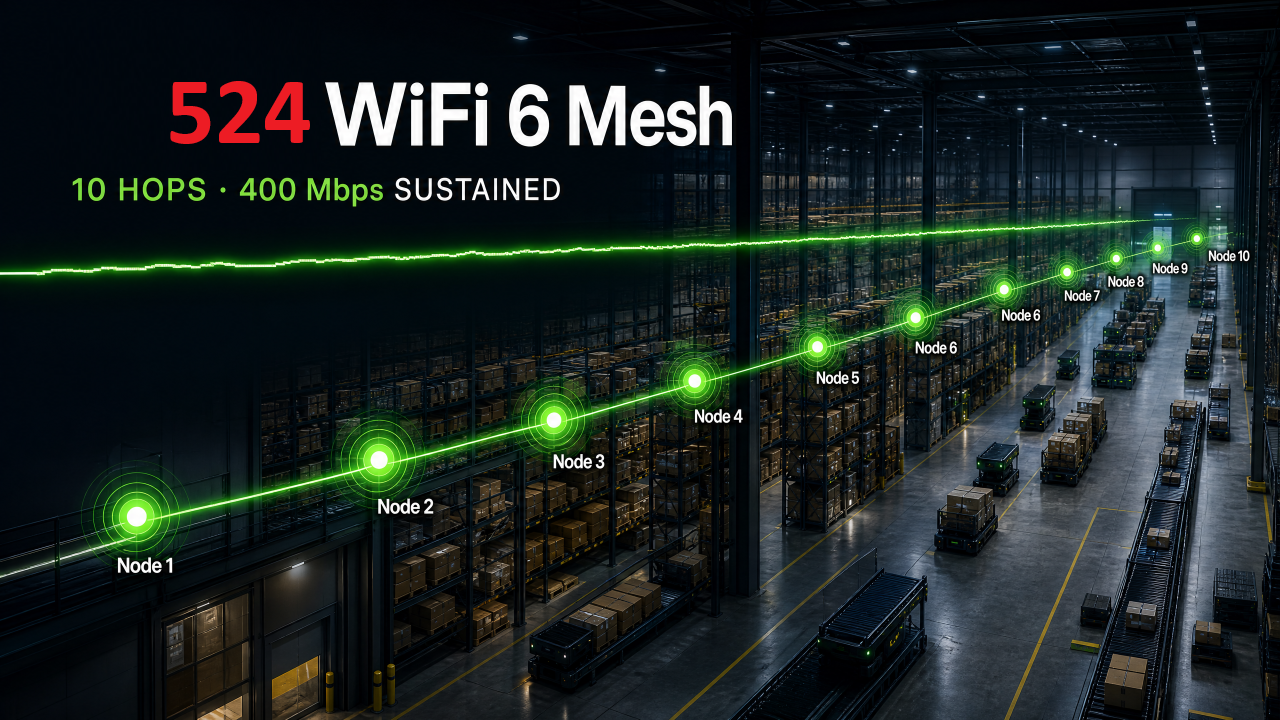
A manufacturer-reported 10-hop Wi-Fi 6 mesh test showed near-zero attenuation and a sustained 400Mbps — solid mesh performance. But mesh and multi-AP roaming are two different problems. Throughput across hops doesn’t tell you what happens in the 50–150ms window when a device actually switches APs — and in a warehouse with dozens of AMRs on the same floor, that handoff window is where control-link glitches and localization errors happen.

Wi-Fi 7’s MLO already reduces link disruption by keeping multiple radio links active in parallel. Wi-Fi 8’s SMD goes a layer further: it targets the roaming event itself, not just the link redundancy around it. For fleets doing continuous SLAM and real-time motion control, that’s the difference between “fast Wi-Fi” and “Wi-Fi designed for continuous mobility.”

Wi-Fi 8 vs Wi-Fi 7: The Practical Contrast

  • Wi-Fi 7 = maximize throughput and reduce latency on a single link (320MHz channels, 4K-QAM, MLO across bands)
  • Wi-Fi 8 = maximize continuity across a network of APs (SMD, multi-AP coordination, deterministic handoff)

They’re not competing generations so much as sequential layers: Wi-Fi 7 solved “how much data, how fast,” Wi-Fi 8 is solving “what happens when the client keeps moving.” For fixed-location industrial gear, Wi-Fi 7 already covers most needs. For anything mobile — AMRs, AGVs, tracked assets, handheld scanners — Wi-Fi 8’s roaming model is the more relevant upgrade.

Where This Applies

  • Warehouse AMR/AGV fleets: multi-AP floors where dozens of robots roam continuously between zones
  • Port and yard operations: long, multi-AP corridors where vehicles and cranes move across cell boundaries constantly
  • Mining and tunnel environments: point-to-point roaming where any re-auth gap means a control-link blackout, not just a slow download
  • Mobile industrial vision: multi-camera inspection carts that can’t tolerate a frame drop mid-handoff

Where We’re Positioned

524WiFi™ are preparing our Wi-Fi 8 routerboard line now, building on the same IPQ/QCN industrial platform architecture behind our current Wi-Fi 7 boards (524WiFi™ Pulse B9574-4M2 Pro Plus, 524WiFi™ Pulse B5424-4×4 Pro Plus) and Wi-Fi 6 roaming series (524WiFi™ Pulse R6 roaming series). If you’re evaluating multi-AP roaming for a robotics, port, or industrial mobility deployment — or want to talk through where Wi-Fi 7 is still the right call versus waiting on Wi-Fi 8 — reach out [email protected].
Posted on — 2 Comments

Wi-Fi 8 Explained: Features, Benefits and Use Cases

524WiFi™ Wi-Fi 8 features, benefits and applications

Key takeaways

  • Wi-Fi 8 shifts the design target from peak speed toward reliable performance in dense and mobile networks.
  • Single Mobility Domain and Multi-AP Coordination directly address industrial roaming and interference.
  • Robotics, machine vision and edge AI are natural use cases for a reliability-first wireless architecture.

Wi-Fi 8 Explained: Features, Benefits and Applications

Wi-Fi 7 (IEEE 802.11be) is still rolling out across industrial and enterprise deployments, but the next standard is already taking shape: Wi-Fi 8 (IEEE 802.11bn). Unlike previous generations, which chased bigger peak throughput numbers, Wi-Fi 8’s headline goal is different — guaranteed reliability and consistent latency, even in dense, interference-heavy, or mobile environments. For anyone building AMR fleets, industrial vision networks, or edge AI devices that depend on a wireless link, that shift matters more than another “Gbps” milestone.

What Is Wi-Fi 8, and Why Does It Matter?

Wi-Fi 8 is being developed under the banner of Ultra High Reliability (UHR). Instead of optimizing purely for maximum data rate, the standard targets:

  • Deterministic, low-latency performance under real-world conditions (congestion, interference, mobility)
  • Seamless multi-AP roaming without re-authentication delays
  • Coordinated multi-AP operation, where multiple access points share scheduling and spectrum decisions instead of acting independently
  • Backward compatibility with Wi-Fi 6/6E/7 devices, easing migration

For industrial and robotics use cases, this reliability-first design directly addresses the pain points that throughput-focused standards never fully solved: a robot moving between access points, a camera feed that can’t tolerate a stall, or a control link that needs bounded worst-case latency rather than a high average speed.

The Feature Engineers Should Actually Care About: Single Mobility Domain (SMD)

One of the most relevant Wi-Fi 8 capabilities for multi-robot environments is Single Mobility Domain (SMD) — a mechanism that lets a client roam across multiple APs within the same logical domain without dropping the session or re-authenticating. In a warehouse with dozens of AMRs crossing AP coverage cells continuously, every re-authentication handshake is a moment of packet loss and control-link jitter. SMD is designed to remove that gap almost entirely, which is exactly the kind of improvement that turns “mostly reliable” wireless into “control-loop reliable” wireless.

This is where Wi-Fi 8 stops being a marketing number and starts being a systems-engineering decision.

How Wi-Fi 8 Fits Into an Industrial Wireless + Edge AI Stack

At 524WiFi™, our current Wi-Fi 7 platforms — including the 524WiFi™ Pulse B9574-4M2 Pro Plus (IPQ9574-based flagship routerboard) and the 524WiFi™ Pulse B5424-4×4 Pro Plus (IPQ5424-based tri-band platform) — already push toward the low-latency, high-density direction Wi-Fi 8 formalizes. We’re actively preparing our next-generation Wi-Fi 8 routerboards, built to carry forward:

  • Multi-radio concurrent operation (as validated on 524WiFi™ Pulse B5424-4×4 Pro Plus / 524WiFi™ Pulse B9574-2×2-SFP Pro Plus)
  • High-density AP deployment for warehouses, ports, and factory floors
  • Compatibility with edge AI hardware like our Jetson Orin Nano–based AI Box (Tomo AI Core NVIDIA), where the wireless module and the compute module are designed together rather than bolted on afterward

Pairing UHR-class wireless with an edge AI compute platform means the camera, the inference engine, and the network no longer have to be sourced, qualified, and integrated separately — a meaningful advantage for teams that don’t want to build an in-house hardware team just to get a robot or vision system talking reliably.

Wi-Fi 8 vs. Wi-Fi 7: What Actually Changes

Wi-Fi 7 (802.11be):

  • Primary goal: higher peak throughput, wider channels
  • Roaming: standard re-association per AP
  • AP coordination: largely independent APs
  • Best fit: bandwidth-hungry applications (multi-camera video)

Wi-Fi 8 (802.11bn, in development):

  • Primary goal: guaranteed reliability, low latency
  • Roaming: Single Mobility Domain — seamless handoff
  • AP coordination: coordinated multi-AP scheduling
  • Best fit: latency-sensitive, mobile, high-density deployments

Wi-Fi 7 isn’t going away — for multi-camera, high-resolution vision transmission, its wide channels and multi-link operation still matter. Wi-Fi 8 is best understood as the layer that makes mobility and density reliable on top of that bandwidth.

Applications This Unlocks

  • Warehouse and port AMR/AGV fleets — continuous roaming across dozens of APs without control-link interruption
  • Industrial vision inspection networks — stable multi-camera feeds even as APs handle many simultaneous high-bandwidth clients
  • Mining, tunnel, and campus environments — point-to-point and point-to-multipoint links where mobile assets cross multiple coverage cells
  • Edge AI robotics platforms — pairing UHR wireless with Jetson-class compute for a single integrated hardware layer, instead of separately sourced radio and compute modules

Where We Are Today

Wi-Fi 8 standardization is still in progress, with ratification expected later in the decade — but the direction is clear enough that hardware teams should be planning for it now, the same way early Wi-Fi 6E adopters got ahead of the 6GHz transition. We – 524WiFi™ – are already engineering toward this: our Wi-Fi 7 platforms are the foundation for our upcoming Wi-Fi 8 routerboards, and our Jetson-based edge AI hardware is being designed to pair with them from day one.

If you’re evaluating wireless infrastructure for a robotics, vision, or edge AI product roadmap and want to talk through where Wi-Fi 8 fits, reach out [email protected].

Posted on

Welcome to 524wifi – cruising online for more than 24 years and having 40+ certificates – home of the best WiFi & LTE 5G NR & Internet over Coax & GEPON Passive Optical networks!

Welcome to 524wifi – home of the best WiFi & LTE 5G NR & Internet over Coax & GEPON Passive Optical networks! Certified by UK Joscar Hellios, from automotive for sample by VW group , telecomunications Nokia, for onlne Google certified … and tons of others big companies we have over 40 security clearances and certificates for to sale and for implement into USA and EU and globally.

There is no continent, where we would not have a satisfied customer! Yes, our modules works and we have already delivered our Wi-Fi modules even to Antarctica ! You can find our modules, for example, in wind turbines, drones, ships, trains (Norway, Czech SK and many more),public transportation comm systems, aircrafts, both civil, acrobatic and military… on land, on water and in the air. NASA has also ordered samples, so the next goal is to get them into the outer Space! 524WiFi Pro+ modules! Well if you do someting well for almost 25 years, you have lot of customers…..

With more than 24 years of experience in the Networking Industry, our partners as Wodaplug Quectel & SIMcom, Compex & Wallys communications and lot more. Wodaplug offers reliable solution for Ethernet Data over Coax (EOC), G EPON and 4G 5G LTE routers & backup units.  Quectel leads market in LTE 5G 4G modules & IoT technologies. 524wifi is part of Google Customers Reviews program to assure customers satisfaction – Google Approved. Eshop owner is located in EU – CZ.

If that huge time period we developed ourselves as connecting bridge between modules and chips designers, drivers designers and practical users , industrial aplications

Please, if you are a distributor / dealer or ISP, first create an account and mail us for business login with discount. For support write email to sup..

For News questions and Promo – pleasae visit and follow as on our 524WiFi Facebook!

Qualcomm Atheros & MEDIATEK reference design miniPCIe Wi-Fi modules with best parameters,

We do HELP customers DEVELOP ath11k for DR9074 WIFI 6 and WIFI 7 ath12k driver cards

Quectel LTE 4G / 5G Sub 6G cellular modules – EC25, EG25-G, EP06, EM060K, EM12-G, EM160R, RM502Q, RM510Q, RM520N …

We can deliver all Quectel, SIMCOM, TELIT, SIERRA WIRELES, SPARKLAN and other wireless modules and antennas for your business projects, please ask us!

New Wodaplug Dual Mode XPON ONU for GPON and GEPON in one device !

Internet over coax cables for long range and with more than 300Mbps – Wodaplug EOC series

Check Wodaplug dual SIM 4G / 5G LTE routers with ROOTer and X WRT firmware!
Posted on

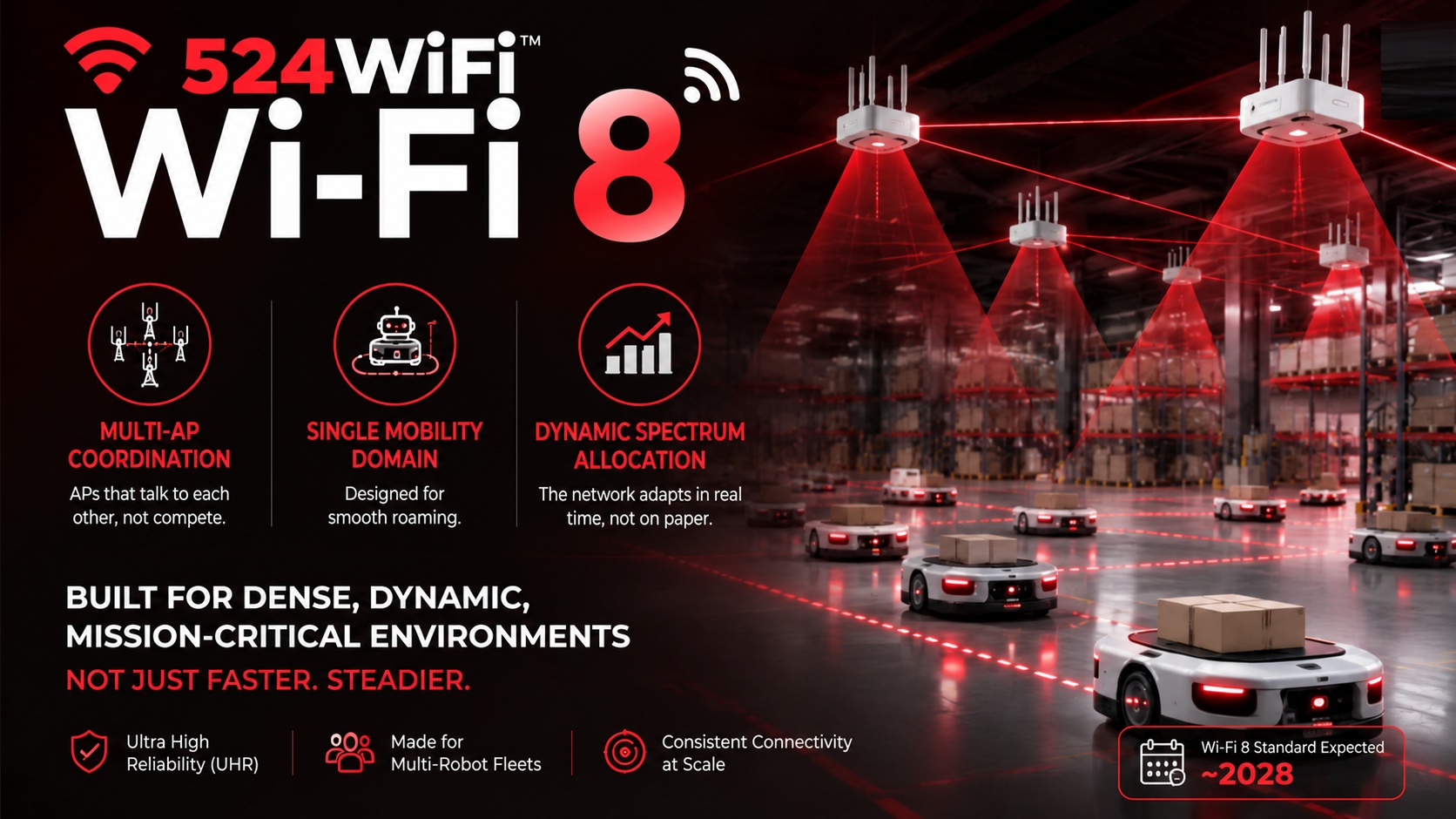
Wi-Fi 8 Multi-AP, SMD and DSO Explained

524WiFi™ Wi-Fi 8 Multi-AP Coordination, Single Mobility Domain and spectrum allocation

Key takeaways

  • Multi-AP Coordination lets neighboring access points manage airtime and interference as a system.
  • Single Mobility Domain targets cleaner handoffs for robots, scanners and other moving clients.
  • Dynamic spectrum operation helps mixed devices use available channel capacity more efficiently.

Every new Wi-Fi generation arrives with a fresh batch of jargon. Wi-Fi 6 gave us OFDMA and TWT. Wi-Fi 7 brought MLO and 320MHz ultra-wide channels. Now Wi-Fi 8 is rolling out its own set: Multi-AP Coordination, Single Mobility Domain, dynamic spectrum allocation.

If you’re building networking equipment for dense, high-device-count environments — industrial IoT, enterprise campuses, hospitality, warehousing, robotics, transit, or any deployment where dozens of devices share the same airspace — your first reaction is probably: this sounds like marketing noise that’s still years away from mattering to me.

We’d argue the opposite. These three terms were essentially written with exactly this kind of deployment in mind — Wi-Fi 8 isn’t chasing consumer peak-speed bragging rights this time. It’s chasing dense, multi-device, can’t-afford-to-drop scenarios, which is precisely what a crowded venue, a large facility, or a fleet of moving devices looks like from the network’s perspective.

The headline first: Wi-Fi 8 isn’t faster. It’s steadier.

The theoretical peak throughput of Wi-Fi 8 is roughly on par with Wi-Fi 7. The standard’s official designation even says it outright: Ultra High Reliability (UHR). The name tells you where the priorities are — not benchmark numbers, but consistency under real-world conditions.

For the consumer market, that pivot might feel underwhelming — most households were never saturating Wi-Fi 7’s peak bandwidth anyway. But for high-density deployments, this is exactly the right direction. The real pain points in these environments were never “is there enough bandwidth.” They were: does a device drop connection at the edge of AP coverage, do dozens of devices fighting for the same channel start colliding, does a few-hundred-millisecond handoff between APs interrupt a time-sensitive session. These are precisely the problems the next three features are aimed at.

Multi-AP Coordination: from “every AP for itself” to “APs that actually talk to each other”

Traditionally, each access point in a deployment operates independently — it decides on its own who gets to transmit and when, with zero coordination with neighboring APs. In a dense environment (say, ten-plus APs across a warehouse, office campus, or venue), this leads to constant interference: adjacent APs competing for the same spectrum, unaware of what their neighbor is doing.

Multi-AP Coordination (MAPC) is designed to fix exactly this. Neighboring APs negotiate in advance — dividing up time slots, spatial resources, or transmit power — instead of colliding blindly. There are several coordination schemes under this umbrella: splitting a transmission window into slices and rotating through APs (Co-TDMA), transmitting simultaneously with carefully managed power to avoid interference (Co-SR), and combinations of both, applied dynamically depending on traffic conditions.

Why this matters: if a deployment involves dense AP coverage — a large warehouse, a multi-floor facility, a hotel, a stadium, a factory floor — Multi-AP Coordination directly determines whether the network can hold up under load. The packet loss and jitter that dense deployments have historically suffered from is largely a symptom of APs not talking to each other. This is the first generation of the standard to tackle that at the protocol level.

Single Mobility Domain: no more “hiccup” when a device crosses AP boundaries

This term sounds abstract, but the problem it solves is very concrete: how does a moving device hand off cleanly between access points as it moves through a space, instead of dropping the connection, re-authenticating, and reconnecting.

Traditional roaming works like this: the device itself decides “signal’s getting weak, time to find the next AP,” then kicks off a full re-authentication and reconnection process. That process might only take tens to a few hundred milliseconds — imperceptible for casual browsing, but more than enough to interrupt a real-time control loop, a live video stream, a VoIP call, or a tracking session, depending on what the device is doing.

Single Mobility Domain aims to logically merge multiple APs into what behaves like one continuous network, so a device moving through the space experiences something closer to a smooth signal-strength transition rather than a disconnect-and-reconnect event. A manufacturer-reported 8-node Co-TDMA reference test reached an aggregate throughput of 1797 Mbit/s — but what actually determines the real-world experience in any dense, mobile-device deployment was never just peak throughput. It’s whether roaming stays stable. Single Mobility Domain is the standard finally addressing that pain point head-on.

Why this matters: anywhere devices move across AP coverage areas — mobile robots on a warehouse floor, handheld scanners in a retail store, tablets and carts moving through a hospital, passengers moving through a transit hub — this is the single Wi-Fi 8 feature most directly relevant to the deployment, and worth scrutinizing closely in any vendor’s actual implementation.

Dynamic spectrum allocation: letting the network improvise

Wi-Fi 7 already supports 320MHz ultra-wide channels, but how channels get allocated and when the network shifts bands has largely followed fairly fixed rules. Wi-Fi 8 pushes this further: spectrum allocation becomes dynamic, adjusting in real time based on current traffic and interference conditions instead of following a static, pre-set policy.

On its own, this feature might sound unremarkable, but it’s actually the foundation that lets Multi-AP Coordination and Single Mobility Domain deliver on their promise. Without flexible spectrum allocation, there’s limited room for APs to coordinate with each other or for devices to hand off smoothly.

Why this matters: in environments with multiple device types and mixed traffic priorities — control commands, video feeds, voice, general data — dynamic spectrum allocation determines whether the network can automatically make room for the most critical traffic, rather than requiring rigid, manually pre-planned channel assignments.

The bottom line: these aren’t marketing terms. They were built for scenarios like these.

Put these three features side by side and a pattern emerges: nearly every core improvement in Wi-Fi 8 is described in terms of dense deployments, multiple devices, zero tolerance for drops. That profile fits an enormous range of real deployments — AMR warehouses, multi-robot production lines, hospitality and retail environments, transit and campus networks, industrial IoT sites — not the living-room, one-or-two-device scenario Wi-Fi standards were traditionally optimized for.

But there’s a question the industry itself is already debating: the standard only defines the “grammar” of coordination — how APs negotiate, how resources get sliced up. What actually determines real-world performance is a layer the standard doesn’t dictate: when to coordinate, with whom, and using which strategy. That decision-making intelligence is left entirely to chipset vendors and solution providers to implement. Two products can both claim Wi-Fi 8 compliance and still perform wildly differently in a dense deployment — the gap lives in that unwritten layer of coordination intelligence.

That’s also why we didn’t wait for the standard to be finalized (expected around 2028) before starting work. Our Pulse B8 and P8 platform planning follows Qualcomm’s Wi-Fi 8 reference architecture. If you’re planning to get ahead on Wi-Fi 8, feel free to reach out to [email protected]

Posted on — 4 Comments

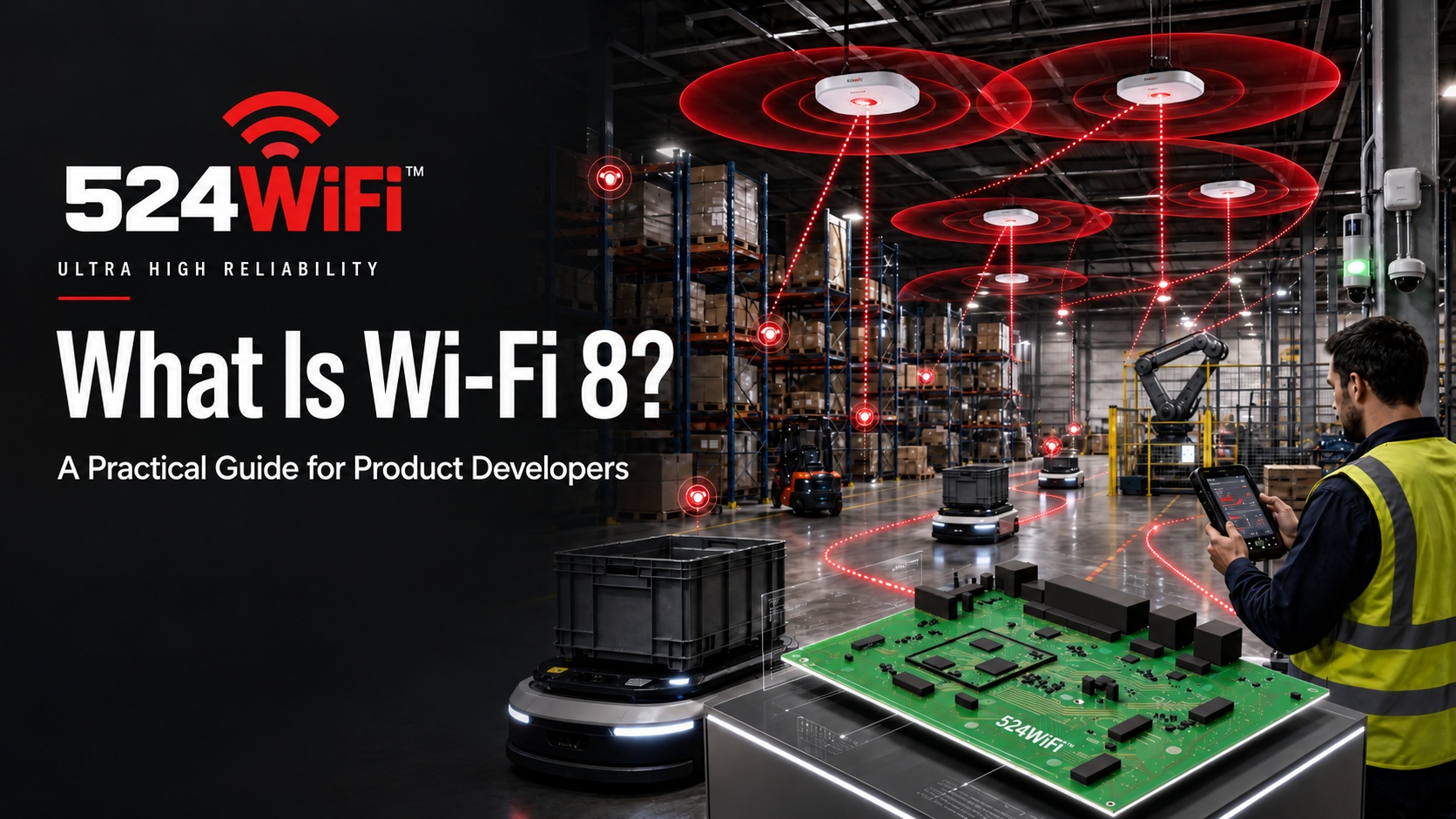
What Is Wi-Fi 8? Practical 802.11bn Guide for Developers

524WiFi™ practical Wi-Fi 8 guide for product developers, industrial networks and modular platforms

Key takeaways

  • Wi-Fi 8 focuses on reliability, mobility and predictable performance rather than a new peak-speed headline.
  • SMD, Multi-AP Coordination, DSO and ELR address distinct roaming, density, spectrum and range problems.
  • Product teams can prototype early while tracking the draft revision and interoperability path.

What Is Wi-Fi 8? A Practical Guide for Product Developers

If you’re speccing a router, gateway, or edge device roadmap for 2027-2028, “Wi-Fi 8” has probably already landed in a requirements doc somewhere — usually with no more detail than the name itself. Here’s what the standard actually is, what’s still moving, and what it means if you’re the one who has to put it on a board.

It’s not “faster Wi-Fi 7”

Every previous Wi-Fi generation sold itself on peak throughput. Wi-Fi 8 doesn’t. It’s built on the IEEE 802.11bn amendment, officially named Ultra High Reliability (UHR) — and the name is the point. The target isn’t a bigger link-rate number; it’s making real-world connections behave more predictably when a network is dense, noisy, or full of moving clients. Peak throughput stays roughly in Wi-Fi 7 territory; what improves is the worst case.

That distinction matters for how you plan a product. If your customer’s pain point is “our AP throughput number looks great in a spec sheet but connections still drop when we’ve got 40 clients in one warehouse bay,” Wi-Fi 8 is aimed squarely at you. If the pitch you need is a bigger peak-speed number, it isn’t.

The four features actually worth designing around

Strip away the marketing layer and 802.11bn comes down to four mechanisms:

  • Single Mobility Domain (SMD) — lets a station stay associated while moving between APs inside the same domain, instead of doing a full re-association each time. This is the direct answer to multi-AP roaming latency and packet loss — the exact failure mode that shows up as “the robot’s connection blips every time it crosses a cell boundary.”
  • Multi-AP Coordination (MAPC) — APs coordinate channel access and spectrum use with each other rather than competing independently. In a facility with high AP density, this is what actually improves reliability, not adding more radios.
  • Dynamic Subband Operation (DSO) — lets an AP hand a client a slice of bandwidth outside that client’s normal operating range when there’s a capability mismatch, instead of falling back to the lowest common denominator.
  • Enhanced Long Range (ELR) — addresses the link-budget imbalance between AP and station, with defined support for uplink transmission on 2.4/5/6 GHz and downlink on 2.4 GHz. Relevant to anything using a low-power, small-antenna client at range — a drone, a sensor node, a handheld.

None of these are throughput features. All four are reliability-under-real-conditions features, which is a different design conversation than the one Wi-Fi 6→7 required.

Where the standard actually stands (be honest about this)

This is the part vendors tend to blur, and it’s worth stating plainly: 802.11bn is a draft, not a shipped standard. The IEEE task group released its first draft (D1.0) in mid-2025, sponsor ballot is expected around 2027, and final ratification isn’t expected before 2028. Pre-standard silicon is expected to start appearing in 2026, with early devices based on draft specifications rather than a locked amendment.

What that means practically: anything shipping under a “Wi-Fi 8” label before ~2027-2028 is a pre-standard implementation. Features can still shift before ratification, and interoperability between different vendors’ pre-standard silicon isn’t guaranteed. If a supplier tells you otherwise, that’s the question to push on.

Planning a 524WiFi™ Wi-Fi 8 platform

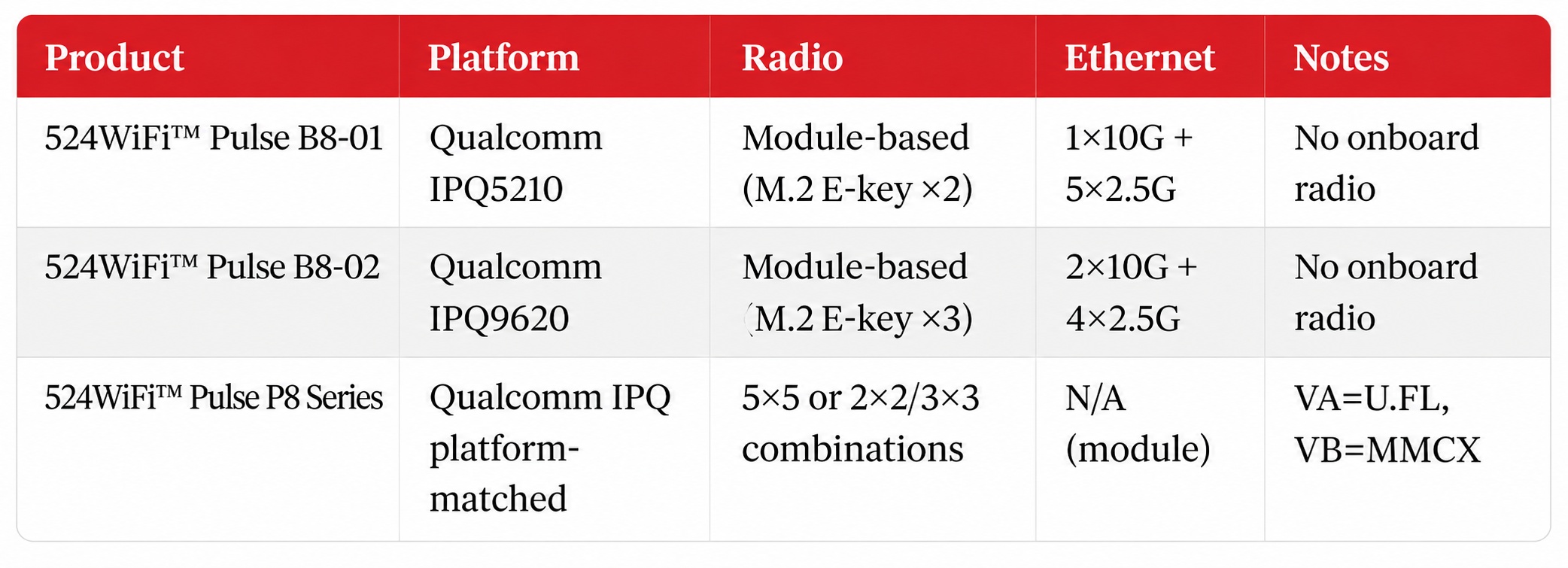
524WiFi™ platform planning combines Qualcomm-based mainboards with dedicated radio modules. The Pulse B8-01 and Pulse B8-02 mainboard architectures use M.2 E-key radio expansion, while the Pulse P8 module family provides band-specific and combined-radio configurations. This modular approach gives product teams a practical framework for host interfaces, Ethernet backhaul, RF connectors and integration requirements.

524WiFi™ Wi-Fi 8 modular mainboard and radio platform overview
524WiFi™ Wi-Fi 8 platform architectures for integration planning.

For an early design, confirm the production specification, supported draft revision, firmware interfaces and regulatory path for the selected mainboard and radio configuration. RF trace layout, radio timing, power sequencing and thermal design remain part of the complete system integration.

What this means if you’re planning a 2027 product

  • Don’t wait for ratification to start prototyping. By the time the standard is final, you want your firmware and RF integration lessons already learned on pre-standard silicon.
  • Match the feature to the actual problem. SMD solves roaming, MAPC solves density, ELR solves range, DSO solves capability mismatches. Pick the one that maps to your customer’s actual failure mode rather than treating “Wi-Fi 8” as one undifferentiated upgrade.
  • Ask suppliers exactly which draft revision their silicon targets. “Wi-Fi 8 ready” is not yet a standardized claim — it’s a pre-standard implementation claim, and the details differ by vendor and by draft version.

If you’re evaluating a Qualcomm-based Wi-Fi 8 platform for your own product — whether that’s a carrier board, an ODM hardware partnership, or just a technical sounding board while the standard finishes settling — we’re happy to compare

Posted on

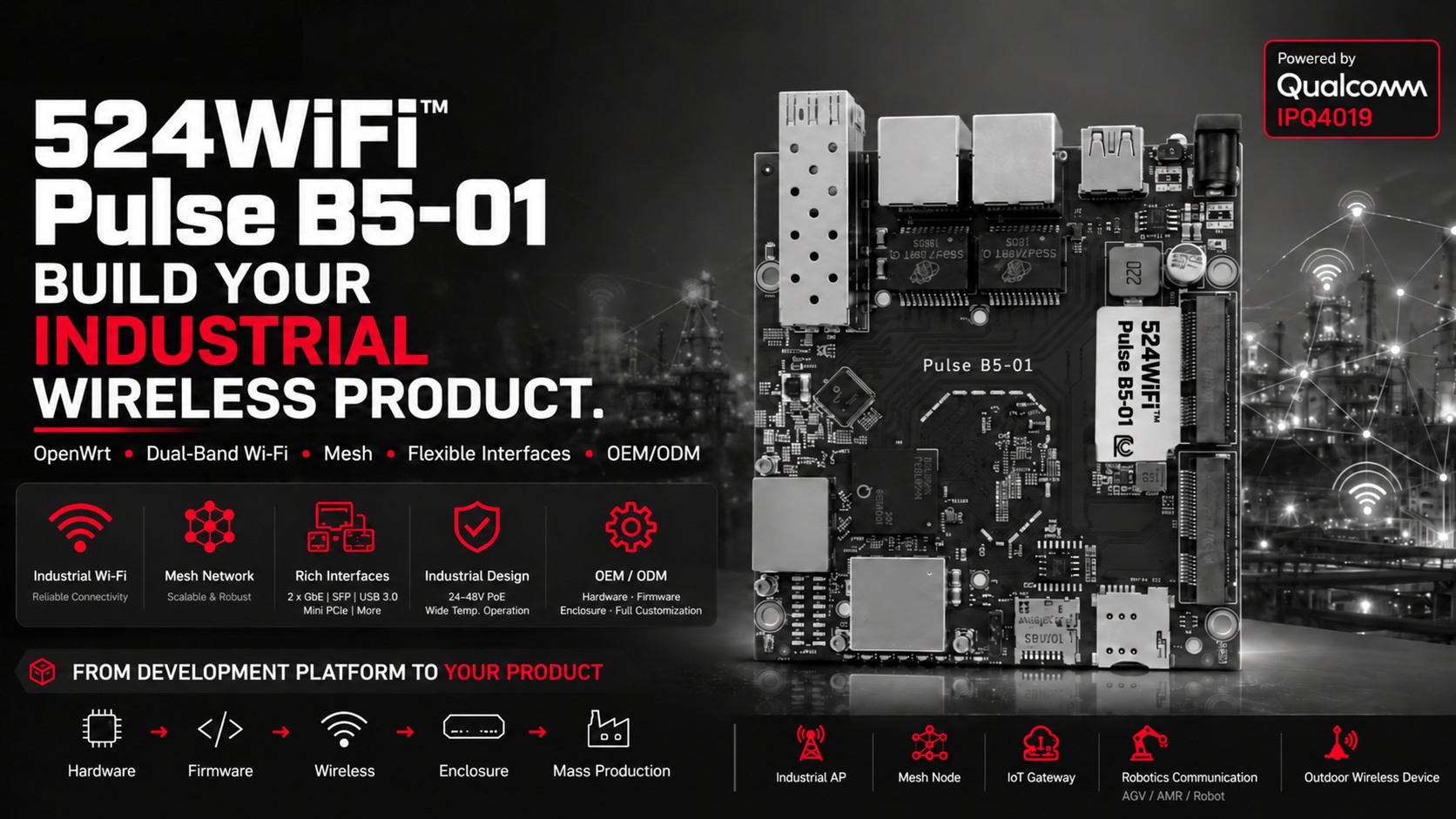
524WiFi™ Pulse B5-01: Industrial Wi-Fi Platform with OpenWrt

524WiFi™ Pulse B5-01 industrial OpenWrt platform

Key takeaways

  • A mature Qualcomm IPQ4019 platform shortens the path from wireless concept to deployable product.
  • OpenWrt, dual-band Wi-Fi, SFP, Mini PCIe and USB provide a flexible integration base.
  • Industrial power and customization options support access points, mesh nodes, gateways and robotics links.

If you’ve ever tried to take a wireless idea from concept to product, you already know the real challenge isn’t “making Wi-Fi work.” It’s finding a platform that’s actually ready to become a product.

Most consumer-grade routers hit their limits fast — no OpenWrt, no mesh, no industrial power input, no room to customize. And building everything from scratch? That means a longer timeline, higher cost, and a lot more risk than most teams want to take on.

This is exactly the gap the 524WiFi™ Pulse B5-01 is built to close.

Start from a mature platform — not from zero

The 524WiFi™ Pulse B5-01 runs on the proven Qualcomm IPQ4019, with dual-band Wi-Fi and full OpenWrt support out of the box. That gives you a solid wireless foundation plus an open platform to build on — custom firmware, mesh networking, third-party integrations, your own branded software. Instead of fighting a closed consumer router, you get a base that’s actually meant to be shaped into your product.

More ways to connect, out of the box

The IPQ4019 SoC isn’t just Wi-Fi — it comes with 2x Gigabit Ethernet, SFP, Mini PCIe, and USB 3.0, so you can add cellular, fiber, or other peripherals depending on what your application needs. With 24–48V passive PoE support and a wide operating temperature range, it’s built to handle industrial and outdoor deployments, not just a lab bench.

Where it fits

We’re seeing the 524WiFi™ Pulse B5-01 used as the wireless core for:

  • Industrial access points
  • Mesh nodes and wireless repeaters
  • IoT gateways
  • Robot, AGV, and AMR communication links
  • Outdoor wireless equipment

And here’s the part that matters most: it can become your product

The 524WiFi™ Pulse B5-01 doesn’t have to stay a development board. Through our OEM/ODM services, we can take it further — different interfaces, custom wireless configs, tailored firmware, hardware changes, your own enclosure, full production. We take the platform from hardware to firmware to wireless to enclosure to mass production, so what starts as a wireless concept ends up as a real, market-ready product.

If you’re working on industrial Wi-Fi, mesh, an IoT gateway, robotics communication, or outdoor wireless — you don’t have to start from zero. The 524WiFi™ Pulse B5-01 gives you a mature, open, and customizable starting point.

Qualcomm IPQ4019 · OpenWrt · Dual-Band Wi-Fi · Mesh · SFP · LTE · OEM/ODM

📩 If you’re evaluating a Wi-Fi platform for your next product, I’d be happy to talk through whether the 524WiFi™ Pulse B5-01 is the right fit — feel free to reach out at [email protected]

Platform reference: DR4019.

Posted on

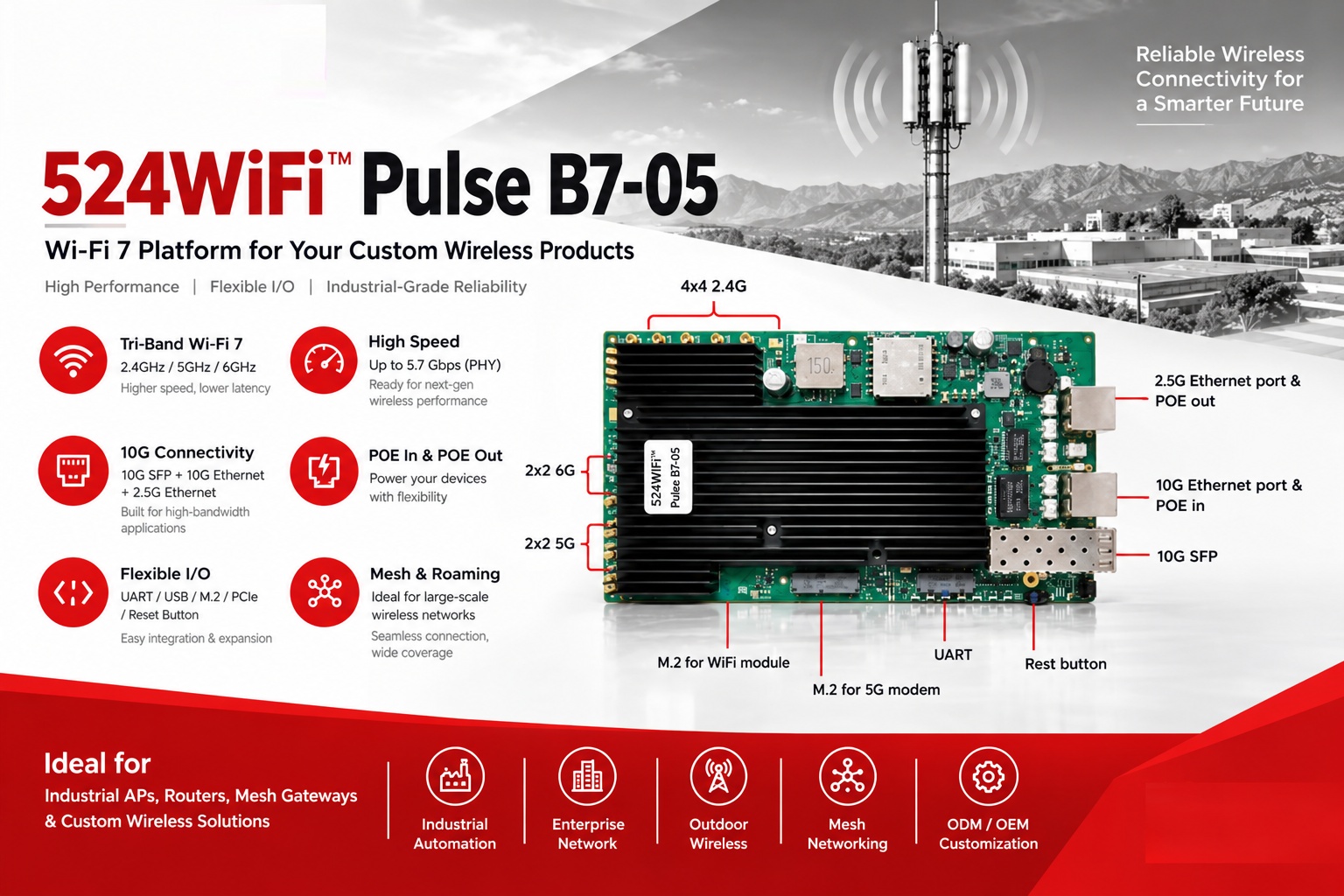
524WiFi™ Pulse B7-05: Wi-Fi 7 Platform for Custom Wireless Products

524WiFi™ Pulse B7-05 Wi-Fi 7 platform and hardware interfaces

524WiFi™ Pulse B7-05 is our tri-band (2.4/5/6GHz) Wi-Fi 7 platform for OEM/ODM projects, with 10G Ethernet, 10G SFP, and PoE in/out options on board.

It’s a good fit for:
→ Industrial APs
→ Enterprise routers
→ Mesh gateways
→ Outdoor wireless devices

We can help with hardware customization and software development, so you don’t have to build everything from scratch.

Have a project in mind? Let’s talk about whether 524WiFi™ Pulse B7-05 is the right fit – info at 524wifi.net or .com

Platform reference: DR5424S.

Posted on — Leave a comment

Qualcomm FastConnect 8800: A Wi‑Fi 8 Hardware Planning Guide for Embedded Module Teams

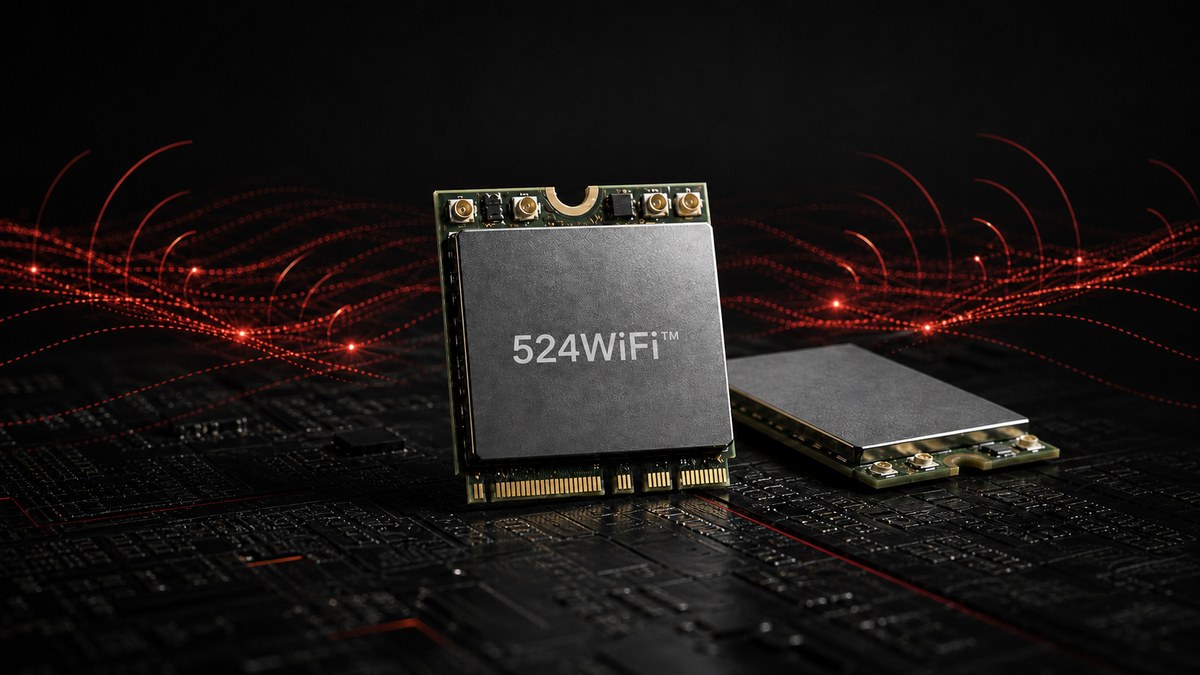
524WiFi™ Wi‑Fi 8 wireless module centered for the FastConnect 8800 engineering guide

Wi‑Fi 8 is now a hardware-planning issue, not just a standards roadmap. On 2 March 2026, Qualcomm Technologies introduced the Qualcomm® FastConnect™ 8800 Mobile Connectivity System alongside its wider Wi‑Fi 8 portfolio. For embedded-device and wireless-module teams, the most important news is not simply the headline PHY rate. It is the move to a 4×4 mobile radio architecture and the resulting impact on antennas, host bandwidth, power, heat and coexistence.

This engineering guide from 524WiFi.net™ translates the announcement into practical design questions for teams planning laptops, tablets, robots, edge-AI systems and other compact connected products.

FastConnect 8800 specifications at a glance

Qualcomm describes FastConnect 8800 as a single-chip, 6 nm connectivity system that combines Wi‑Fi 8, Bluetooth® High Data Throughput, Ultra-Wideband and Thread. The published Wi‑Fi specifications include:

  • a 4×4 radio configuration;
  • a peak PHY rate of up to 11.6 Gbps;
  • 2.4 GHz, 5 GHz and 6 GHz operation;
  • channels up to 320 MHz and 4K QAM;
  • High Band Simultaneous Multi-Link, uplink and downlink MU-MIMO, and OFDMA;
  • Wi‑Fi 8 Extended Long Range (ELR); and
  • support for earlier Wi‑Fi 7, Wi‑Fi 6E and Wi‑Fi 6 generations.

Qualcomm also reports up to three times longer gigabit range than its previous generation under the company’s stated 4×4, 320 MHz, RF front-end and ELR test conditions. Both the speed and range figures are platform claims rather than guaranteed product-level results: enclosure design, antennas, drivers, regional spectrum rules and the peer device will determine real performance.

Why a 4×4 mobile radio changes the integration plan

Four useful RF paths must fit inside the product

A four-stream radio needs more than four connectors on a schematic. Each path must remain useful after the module is installed in the final enclosure. Antenna spacing, polarization, cable loss, ground-plane interaction and isolation all matter across 2.4, 5 and 6 GHz. Metalwork, displays, batteries and edge-compute boards can detune antennas or create asymmetric paths that erase the expected 4×4 benefit.

Teams should reserve antenna volume early and validate the complete mechanical assembly, not only an open-bench reference setup. This is especially important for robots and industrial systems, where orientation and nearby machinery can change rapidly.

The host interface cannot be an afterthought

An 11.6 Gbps PHY rate is not the same as application throughput, but it still raises the ceiling for every subsystem around the radio. PCIe lane configuration, memory bandwidth, interrupt handling, CPU load, DMA behavior and driver architecture must be considered together. A next-generation radio connected through a constrained host path will deliver a constrained result.

Before freezing a carrier board, define realistic simultaneous traffic targets and include protocol overhead, multi-link scheduling and bidirectional workloads. Our Wi‑Fi 5 to Wi‑Fi 7 module selection guide shows why host compatibility and software support already matter as much as radio specifications.

Power delivery and thermal behavior need system-level testing

More RF chains, wider channels and concurrent links can increase peak power demand. The module, voltage regulators, connector and PCB must tolerate short bursts without instability, while the enclosure must prevent sustained workloads from triggering thermal throttling. Average consumption alone is not enough: measure peak current, rail noise and temperature under worst-case traffic, ambient conditions and antenna mismatch.

Coexistence becomes a product feature

FastConnect 8800 integrates Wi‑Fi, Bluetooth, UWB and Thread, and Qualcomm’s Proximity AI concept combines Wi‑Fi Ranging, UWB and Bluetooth Channel Sounding for direction and distance awareness. Integration reduces component count, but it also makes coexistence planning more important. Antenna topology, filtering, clocking and firmware scheduling should be tested with multiple radios active at once.

Wi‑Fi 8 changes the target from peak speed to dependable performance

Wi‑Fi 7 brought 320 MHz channels and multi-link operation into current high-performance designs. Wi‑Fi 8, based on IEEE 802.11bn, is being positioned around more reliable performance, useful range and predictable behavior under load. That shift is relevant to edge AI, autonomous machines and industrial links, where a stable latency envelope may be more valuable than a laboratory maximum.

The design question therefore changes from “Which radio has the highest number?” to “Which complete platform maintains the required throughput and latency in the real enclosure, spectrum environment and thermal budget?” Our article on tri-band Wi‑Fi for edge-AI platforms provides a practical baseline for systems being built today.

A practical Wi‑Fi 8 readiness checklist

  1. Reserve RF and mechanical space. Plan four antenna paths, isolation targets and connector access before the enclosure is fixed.
  2. Budget host throughput. Check the real PCIe configuration, CPU and memory path against bidirectional application traffic.
  3. Design for peak power. Validate transient current, rail stability and worst-case thermal conditions.
  4. Test concurrent radios. Include Wi‑Fi, Bluetooth, UWB and Thread coexistence in the validation matrix.
  5. Confirm the software path. Driver availability, operating-system support, firmware maturity and regulatory features remain deployment gates.
  6. Separate roadmap claims from production requirements. Use measured application performance and certified configurations as release criteria.

What product teams should do in 2026

Qualcomm says FastConnect 8800 is sampling to customers and expects commercial products later in 2026. That makes Wi‑Fi 8 relevant for new platform architecture, but it does not make proven Wi‑Fi 6E and Wi‑Fi 7 modules obsolete. Designs entering production now should still be selected according to available drivers, lifecycle, certification, regional 6 GHz rules and the throughput the application can actually use.

524WiFi™ and Tomorrow Systems® are following Wi‑Fi 8 module development with the same criteria applied to current hardware: stable software, credible RF design and repeatable performance outside the test bench. Browse our current wireless network modules while planning the transition path for your next platform.

Primary sources: Qualcomm Technologies, “Qualcomm Debuts AI-Native Wi‑Fi 8 Portfolio”, and the Qualcomm® FastConnect™ 8800 product page, both published 2 March 2026. Peak-rate and range statements above are Qualcomm claims; peak speed refers to PHY rate and actual results depend on implementation, configuration and network conditions.

Posted on

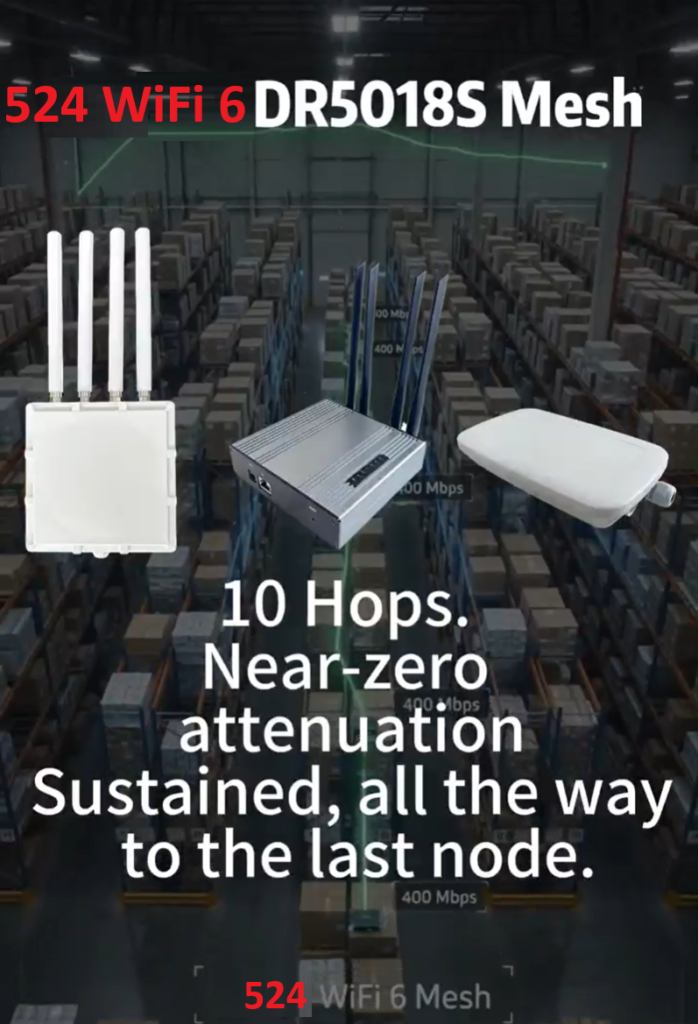
DR5018S 524 WiFi 6 MESH|10 Hops. Zero Compromise. 400Mbps

10 Hops. Near-zero attenuation. 400Mbps.

Most industrial mesh networks start choking after 3-4 hops — latency spikes, throughput collapses, and your robots lose their control link exactly when you need it most.

We just wrapped a 10-hop mesh stress test on our WiFi 6 platform, and the results speak for themselves: near-zero attenuation across all 10 hops, with sustained throughput of 400Mbps at the final node.

Article content
524WiFI mesh 10 hops testing environment

For AMR fleets, warehouse automation, and multi-robot deployments, this isn’t a lab number — it’s the difference between a robot that stays connected across a 50,000 sq ft facility and one that drops out the moment it turns a corner.

Article content
From PC1 to PC2 10 HOPS THROUGHPUT TEST RESULTS

No more compromising on coverage. No more babysitting mesh hops. Just reliable, high-throughput connectivity that scales with your facility, not against it — no need for WiFi 7 to get there.

Complete DR5018S MESh product family : https://524wifi.net/?s=mesh&post_type=product

Want the full test report or a demo on your floor plan? Please feel fre to contact us !

Posted on

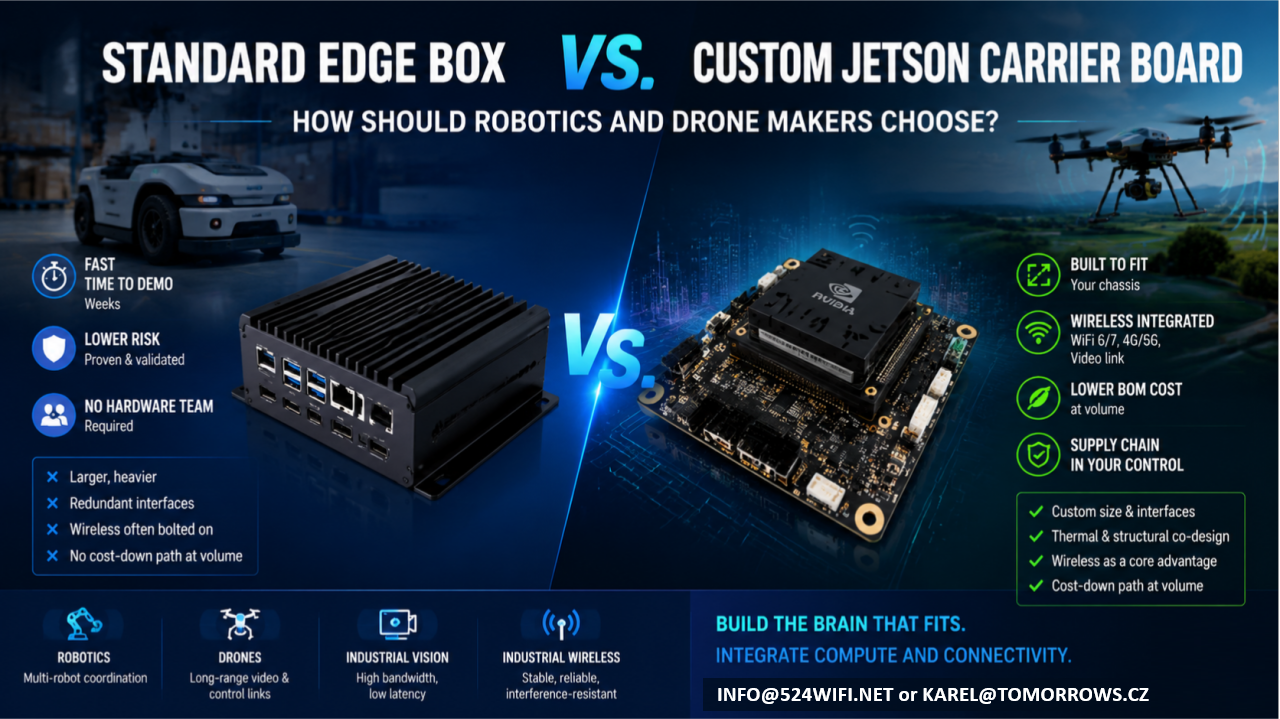
Standard Edge Computing Box vs. Custom Jetson Carrier Board: How Should Robotics and Drone Makers Choose?

If your team has already built the robot chassis or drone airframe, and what’s missing is the “brain” — an edge compute module that can run vision, navigation, and decision-making — you’re almost certainly weighing two paths:

Option A: Buy a standard edge computing box and bolt it onto your platform Option B: Design a custom carrier board around a Jetson module and integrate it directly into your product

Neither path is universally right. Each fits a different stage, scale, and product positioning. This article lays out the trade-offs so you can make the call with your eyes open.

The short version: it’s a trade between speed and long-term cost

  • A standard box trades a proven industrial design for development speed — at the cost of long-term compromises in cost, size, and reliability.
  • A custom carrier board trades a heavier upfront engineering investment for lasting product competitiveness.

Which one makes sense depends on where you are right now.

Option A: Standard Edge Box — Fast, but with a Low Ceiling

Off-the-shelf Jetson boxes — whether NVIDIA’s own dev-kit enclosures or third-party integrated industrial PCs — have one clear strength: speed.

Advantages

  • Fast time to demo: plug in power and network, and you’re running within weeks
  • Lower risk: standard products are already validated, so you’re not carrying hardware design risk
  • No hardware team required: your software team can get the system running without a dedicated hardware engineer

But the trade-offs are real

  1. Size and weight are the biggest problem. Standard boxes are built for broad compatibility and generic thermal margins, so they’re almost always bigger and heavier than what you actually need. For a drone, where every gram matters, that extra weight eats directly into flight time and payload. For a robot chassis that’s already been finalized, bolting on an external box often means re-tooling the enclosure and adding brackets — which breaks the industrial design you already locked in.
  2. Redundant interfaces you’re paying for. To serve “everyone,” standard boxes ship with a pile of ports you’ll never use — extra USB, HDMI, multiple Ethernet jacks. Each of those is both a cost line and a reliability liability: exposed connectors don’t hold up well against vibration and dust in industrial environments.
  3. Wireless connectivity is the most overlooked weak point of the bolt-on approach. Robots and drones need stable video links, control links, and multi-unit networking. The radios in standard boxes are usually consumer-grade, and they tend to drop connections and show latency jitter under the concurrent-device, high-interference conditions common in warehouses, farms, and industrial sites. That usually forces you to bolt on a second box — an industrial-grade wireless module — on top of the first. Now you’ve got a box on a box, with size, cabling, and power delivery spiraling out of control.
  4. No cost-down path at volume. Standard boxes are purchased per unit at a fixed price; the bigger your production run, the worse the economics get. And your supply chain sits entirely with someone else — you have no leverage if they raise prices or discontinue the part.

Who this fits: teams still in validation, prototypes or small batches (a few dozen units or fewer), teams that haven’t locked their final product form yet, or teams that just want to get the algorithm running before dealing with hardware.

Option B: Custom Jetson Carrier Board — Slower, but Built for Volume

A custom carrier board means keeping only the Jetson module itself and designing a new PCB around your actual product requirements — size, interfaces, power, wireless, thermal — so the compute unit is truly built into your chassis, not bolted on top of it.

Advantages

  1. The footprint follows your chassis, not the other way around. A carrier board can be shaped to fit into an arm, a body cavity, a drone gimbal bay — anywhere a standard box simply can’t go.
  2. Only the interfaces you actually need, with wireless (WiFi 6/7, 4G/5G, video links) integrated directly onto the same board instead of bolted on as a second module. One less board-to-board connection means one less failure point, plus far less cabling and structural volume to manage.
  3. Thermal and structural design can be co-engineered. The board can be designed to work with your chassis’s own thermal paths and metal structure, instead of carrying its own standalone fan or heatsink like a boxed unit does — critical for drones and sealed robot enclosures.
  4. Meaningfully lower BOM cost at volume, and your design assets and supply chain stay in your own hands, rather than being exposed to a single vendor’s pricing or discontinuation decisions.
  5. This is where wireless communication genuinely becomes part of your product’s competitive edge. Most customers who come to us asking for “a Jetson carrier board” eventually realize the real bottleneck is the wireless link — roaming latency during multi-robot coordination, interference resistance for video transmission, stability of long-range control links. Board-level integration lets you co-optimize the WiFi 6/7 RF front end, antenna placement, and EMC design together with the compute board in a single pass — something a box-plus-bolt-on-module combination can never achieve.

Trade-offs

  • Requires a proper design, prototyping, and validation cycle upfront (typically weeks to a few months, depending on complexity)
  • Requires a partner who understands both Jetson hardware design and RF engineering — teams with both skill sets aren’t common
  • At very small batch sizes (single digits to a few dozen units), the amortized development cost may not pencil out

Who this fits: teams whose product form is already locked and heading toward volume production (typically 100+ units), teams with hard requirements on size/weight/battery life, or teams for whom wireless performance — multi-robot coordination, long-range video, industrial-grade networking — is itself a core product differentiator.

Quick Decision Table

Dimension Standard Edge Box Custom Jetson Carrier Board Development timeline Weeks Weeks to months Upfront investment Low Medium-high (one-time) Per-unit cost at volume Fixed, no cost-down path Decreases with volume Size / weight Constrained by standard enclosure Fully customizable Wireless integration Usually bolted on, extra link in the chain Can be co-designed with the compute board Supply chain control Dependent on a single vendor Design assets owned in-house Best fit stage Validation / small batch Volume production / finalized product

What We Can Do for You

This is exactly what we do at 524WiFi and Wallys: custom carrier board design around Jetson modules, combined with our own track record in industrial-grade WiFi 6/7 and long-range wireless transmission — so compute and connectivity end up on a single board, instead of customers having to stitch together a “Jetson box + industrial wireless module” combo themselves.

If your team:

  • Already has a robot or drone product form and is weighing edge-compute options
  • Has validated a demo on a standard box and is now thinking about cost-down and miniaturization for volume production
  • Needs multi-robot coordination, long-range video transmission, or interference-resistant networking — not just raw compute

Reach out and let’s talk through your specific use case: info at 524wifi.net

We’re happy to start with a free assessment of your current setup to help you decide whether it’s time to keep iterating on a bolt-on box, or move straight to a fully integrated custom design.