Posted on

Qualcomm IPQ9574 with MLO support, dual 10G Ethernet, wide temperature industrial design – DR9574 support QSDK and OpenWRT 3 band MLO

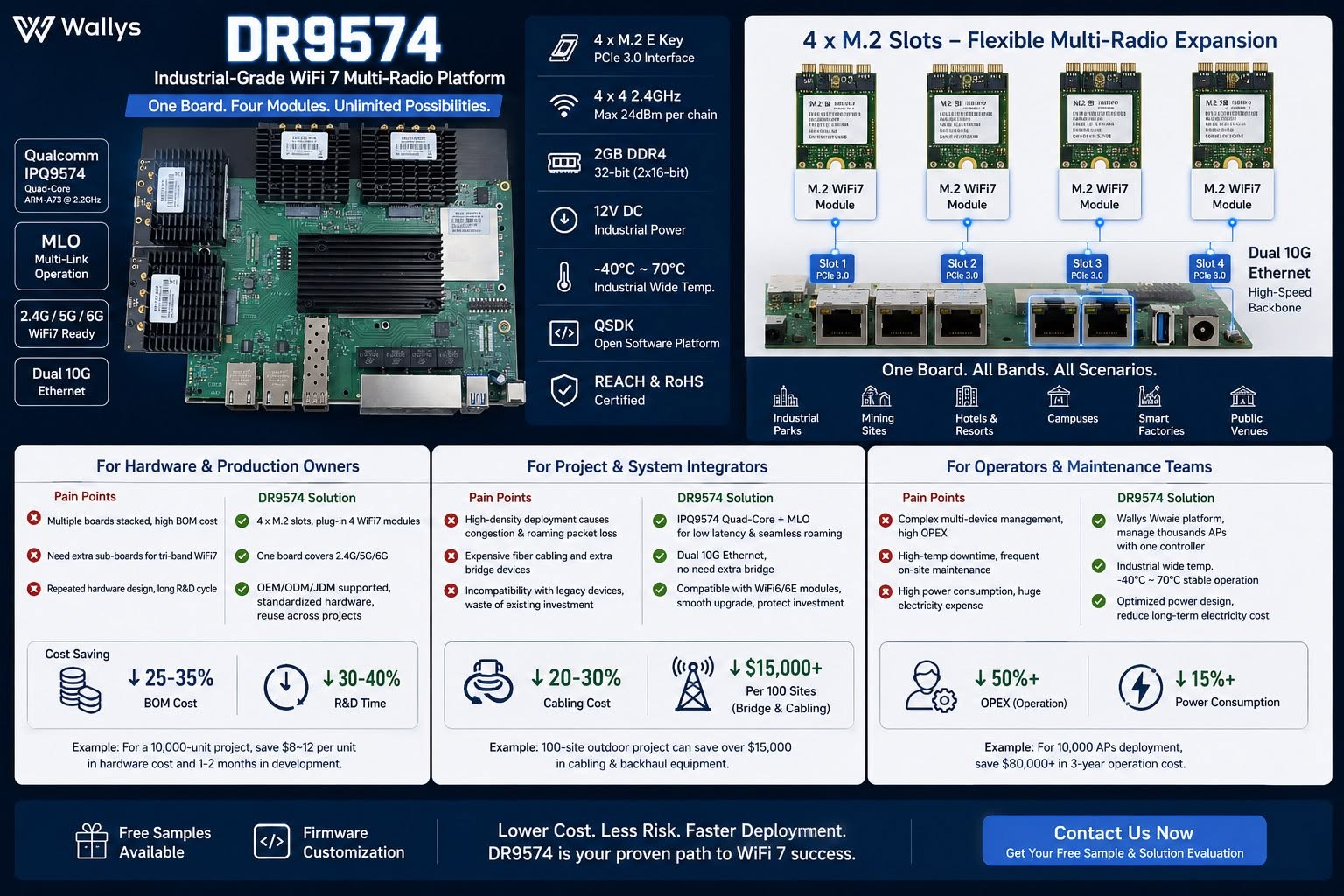
DR9574 Industrial WiFi7 Multi-Radio Board – One board, four M.2 radio modules, unlimited wireless deployment possibilities.

Built on Qualcomm IPQ9574 with MLO support, dual 10G Ethernet, wide temperature industrial design.

Lower BOM, less cabling cost, fewer maintenance workloads & power consumption for mass AP projects.

Ideal for system integrators, OEM hardware makers & wireless operators serving campuses, mining, smart factory & hospitality networks.

Testing samples & firmware customization available – DM to get your solution evaluation!
QSDK based firmware with QCA drivers is available , 3 card 3 band MLO support !! 4×4 MU MIMO or 2×2 MU MIMO configuration for 3 band MLO available.

https://wifi5.eu/dls/Wallys/DR9574

OpenWRT support available too !!

— working mainline OpenWrt port (10G + Wi-Fi 7 MLO)

Over the past few weeks we’ve brought the board up on a fully mainline stack — mainline Linux 6.12 + OpenWrt + ath12k, no QSDK and no out-of-tree datapath driver — and it now cold-boots from NAND into a working router/AP with both:

– 10G USXGMII ethernet (the AQR113C ports) bringing up a link and passing traffic with a DHCP lease, and
– a 3-link Wi-Fi 7 AP-MLD (one SSID across 6 / 5 / 2.4 GHz, WPA3-SAE) on mainline ath12k, with a real client associating and passing iperf traffic.

Getting the 10G working on mainline required root-causing and fixing an actual upstream kernel bug — a per-port clock that was left at the 10G rate regardless of the negotiated link speed. It’s a small, clean patch I’m preparing for the netdev mailing list, and it should help any IPQ95xx board with an Aquantia USXGMII PHY, not just this one.

Everything is public and reproducible here:
https://codeberg.org/insalata-fresca/openwrt-dr9574
(device tree, the patch set, and a write-up of the root cause.)

Why we think this could be interesting for you : a mainline-based firmware track means a current kernel with ongoing security fixes, an auditable, blob-minimal stack, and upstreamable patches — a strong story for customers who need long support windows, as a complement to the QSDK option.

W've pushed the mainline port further: the four 2.5G QCA8084 LAN ports are now the focus. The four copper PHYs come up and answer on mainline, and the 10G/USXGMII uplink and the 3-link Wi-Fi 7 MLO already work. But the 2.5G ports don't pass traffic yet,and I've traced it to one specific, well-understood gap.

In short: the QCA8084's internal XPCS never becomes reachable over MDIO. The chip's security-control config space (0xC90F000, which holds WORK_MODE and the SerDes/XPCS MDIO address fix-up) is readable but appears write-locked in our mainline bring-up. The driver writes the correct values (work mode 0x2f, XPCS MDIO address 7), but they don't take - so the XPCS stays at a default address, answers nowhere, and everything downstream (per-channel config, link, traffic) is blocked behind it. We are working on the final solution now.


The full write-up and the exact register evidence are on a public WIP page:

Status and the open question:
https://codeberg.org/insalata-fresca/openwrt-dr9574/src/branch/wip-qca8084-2p5g/docs/qca8084-2p5g-status.md

Register evidence (the actual readouts):
https://codeberg.org/insalata-fresca/openwrt-dr9574/src/branch/wip-qca8084-2p5g/docs/qca8084-2p5g-register-evidence.md

Repo root (device tree, 10G and Wi-Fi 7 patches):
https://codeberg.org/insalata-fresca/openwrt-dr9574

Posted on

How to Use 524WiFi MEDIATEK Wi-Fi 5, 6, 6E, and Wi-Fi 7 Modules

A practical integration guide with a full 524WiFi MEDIATEK chipset based module overview.

524WiFi provides a complete portfolio of industrial-grade Wi-Fi modules covering Wi-Fi 5 (802.11ac), Wi-Fi 6 (802.11ax), Wi-Fi 6E (ax + 6 GHz), and Wi-Fi 7 (802.11be). These modules are widely used in routers, gateways, industrial IoT, smart cities, robotics, and embedded Linux systems.

This guide explains how to select, install, configure, and deploy AsiaRF Wi-Fi modules, followed by a full comparison table of current Wi-Fi 5/6/6E/7 models.

1. Choosing the Right MEDIATEK Wi-Fi Module

When selecting a module, consider:

  • Wi-Fi generation
    • Wi-Fi 5 → cost-effective, mature ecosystem
    • Wi-Fi 6 → higher efficiency, OFDMA, MU-MIMO
    • Wi-Fi 6E → access to clean 6 GHz spectrum
    • Wi-Fi 7 → ultra-low latency, multi-link operation (MLO)
  • Form factor
    • Mini-PCIe (industrial & networking equipment)
    • M.2 Key-A / Key-E (embedded systems & SBCs)
  • MIMO & throughput
    • 2×2 for compact/low-power designs
    • 4×4 for gateways, APs, and routers
2. Hardware Installation

Physical installation

  1. Insert the module into the Mini-PCIe or M.2 slot
  2. Secure with a screw
  3. Connect antennas using U.FL / MHF4 connectors
  4. Ensure antenna count matches RF chains (2×2 or 4×4)

Power & thermal

  • High-performance Wi-Fi 6/7 modules require:
    • Stable 3.3 V supply
    • Adequate ground plane
    • Optional heatsink or airflow for sustained throughput
3. Driver & OS Support

Linux / OpenWrt

524WiFi MT Mediatek Wi-Fi 6 / 6E / 7 modules are primarily based on MediaTek chipsets and are supported by:

Typical steps:

opkg update

opkg install kmod-mt76 hostapd iw

AP / STA configuration

  • Use hostapd for AP mode
  • Use wpa_supplicant for client mode
  • Configure regulatory domain:

iw reg set US # example

4. Antenna & RF Best Practices
  • Place antennas away from metal enclosures
  • Maintain proper antenna spacing for MIMO
  • Use low-loss coax for external antennas
  • Verify antenna tuning for 2.4 GHz / 5 GHz / 6 GHz
5. Regulatory & 6 GHz Considerations

For Wi-Fi 6E and Wi-Fi 7:

  • 6 GHz availability depends on country regulations
  • Ensure:
    • Correct country code
    • Proper EIRP limits
    • DFS compliance (5 GHz)
6. Validation & Testing

Recommended tests:

  • Throughput: iperf3
  • Stability: 24–72 hr stress test
  • Multi-client load test
  • Thermal monitoring under peak load
7. Full 524WiFI MEDIATEK Wi-Fi Module Table (Wi-Fi 5 → Wi-Fi 7)
ModelWi-Fi StandardBandsForm FactorMIMOChipset FamilyTypical Use Case
AW7615-NP1Wi-Fi 5 (802.11ac)2.4 / 5 GHzMini-PCIe4×4MediaTek MT7615Legacy routers, cost-optimized gateways
AW7915-NP1Wi-Fi 62.4 / 5 GHzMini-PCIe4×4MediaTek MT7915Industrial APs, enterprise gateways
AW7915-NPDWi-Fi 62.4 / 5 GHzMini-PCIe2×2MediaTek MT7915Embedded Linux platforms
AW7915-AE1Wi-Fi 62.4 / 5 GHzM.2 Key-A4×4MediaTek MT7915SBCs, edge computing
AW7915-AEDWi-Fi 62.4 / 5 GHzM.2 Key-E2×2MediaTek MT7915Compact embedded designs
AW7916-NPDWi-Fi 6E2.4 / 5 / 6 GHzMini-PCIe2×3MediaTek MT79166 GHz industrial gateways
✅ AW7916-AEDWi-Fi 6E2.4 / 5 / 6 GHzM.2 Key-E2×3MediaTek MT7916Compact Wi-Fi 6E embedded systems
AW7990-NPDWi-Fi 7 (BE)2.4 / 5 / 6 GHzMini-PCIe3×3MediaTek MT7990Wi-Fi 7 gateways & APs
✅ AW7990-AEDWi-Fi 7 (BE)2.4 / 5 / 6 GHzM.2 Key-E3×3MediaTek MT7990Next-gen embedded Wi-Fi 7 devices
✅ AW7991-AE2Wi-Fi 7 (BE)2.4 / 5 / 6 GHzM.2 Key-A/E3×3MediaTek MT7991High-efficiency Wi-Fi 7 platforms
8. Typical Application Scenarios
  • Industrial IoT gateways
  • Smart city infrastructure
  • AIoT edge devices
  • Enterprise & carrier-grade routers
  • Wi-Fi 7 next-generation APs
  • OpenWrt-based networking products
Conclusion

MEDIATEK Wi-Fi modules provide a clear upgrade path from Wi-Fi 5 to Wi-Fi 7, with consistent Linux/OpenWrt support, industrial-ready form factors, and scalable RF performance. By choosing the right module, following best practices for installation, and leveraging open-source drivers, system integrators can rapidly deploy reliable wireless solutions across diverse markets.

Posted on

SparkLAN Client Wi-Fi Modules

Premium Wi-Fi Modules in various form factors. SparkLAN delivers premium industrial Wi-Fi solutions in connectorized and LGA form factors with a focus on maintaining high quality and functionality. Whether you’re looking for an M.2, mPCIe, or solder down solution, cutting-edge Wi-Fi 7, or a reliable USB dongle, SparkLAN has got you covered. Plese contact us to test samples !

Explore : SPARKLAN PREMIUM WI-FI modules

Posted on

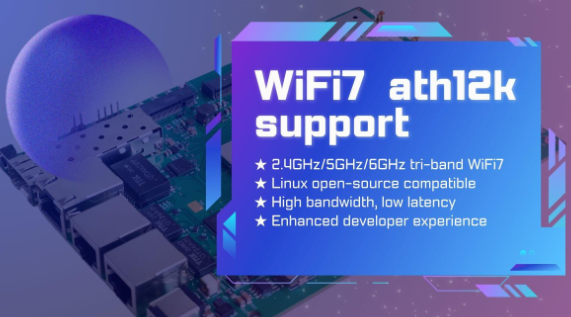
524 WiFi 7 modules from Wallys Now Fully Supports ath12k | Faster Performance & Open-Source Flexibility

524 WiFi 7 cards Now Fully Supports ath12k — Performance Unlocked, Connectivity Redefined

The evolution of WiFi 7 continues to accelerate, and open-source innovation is playing a key role in enabling faster development and deployment. We are excited to announce that our entire WiFi 7 product line now offers full compatibility with the ath12k driver — Qualcomm’s next-generation open-source wireless driver for Linux.

From high-performance router boards to enterprise-grade network cards, Wallys WiFi 7 platforms based on IPQ95xx, QCN92xx, and QCN62xx are now ready to take advantage of the powerful features and enhanced stability provided by ath12k.


Why ath12k Matters for WiFi 7 Development

As the successor to ath11k, the ath12k driver introduces major improvements tailored for WiFi 7’s advanced feature set. Developers, integrators, and enterprises gain stronger kernel support, increased flexibility, and a smoother path to building next-generation wireless systems.

Key Benefits of ath12k

  • Tri-band WiFi 7 support (2.4GHz / 5GHz / 6GHz) Supports core WiFi 7 technologies such as 4K-QAM, MLO, and Multi-Link Aggregation, unlocking higher throughput and reliability.
  • Deep compatibility with the Linux open-source ecosystem Ideal for companies building custom firmware or integrating WiFi 7 into specialized platforms.
  • Significant performance upgrades Improved speed, lower latency, and greater stability — perfect for enterprise networking, industrial IoT, MDUs, and outdoor deployments.
  • Developer-friendly architecture Open, flexible, and optimized for ODM/OEM workflows, reducing development time and increasing customization freedom.

WallysTech Products Now Supporting ath12k

With ath12k integration now complete across our WiFi 7 lineup, developers gain reliable and scalable platforms for their next wireless innovation.

1. DR9574 Series (IPQ9574)

A high-performance tri-band WiFi 7 router/AP mainboard designed for:

  • Enterprise WiFi networks
  • Industrial wireless systems
  • High-density environments
  • Multi-port, high-throughput applications

2. DR9274 & DR6274 WiFi 7 NICs (QCN9274 / QCN6274)

PCIe-based WiFi 7 network cards suitable for:

  • Custom Access Points
  • CPE devices
  • Industrial and outdoor wireless equipment
  • OEM/ODM hardware upgrades

3. Additional WiFi 7 SoC Mainboards

More WiFi 7 models are currently under development and will be added to the ath12k-enabled family soon, expanding options for integrators and solution providers.


Accelerating Real-World WiFi 7 Deployment

At 524WiFi and WallysTech, our mission is to deliver open, flexible, and production-ready wireless platforms to help customers shorten evaluation cycles and bring WiFi 7 products to market faster.

With full ath12k support, our WiFi 7 solutions now provide:

  • Greater openness for developers
  • Better compatibility with custom Linux systems
  • Improved performance for demanding use cases
  • A smoother upgrade path for companies transitioning to WiFi 7

Whether you’re building enterprise APs, industrial routers, outdoor IoT gateways, or custom wireless equipment, ours WiFi 7 platforms offer the performance and openness needed for next-generation deployments.

Article content

The integration of ath12k marks a major milestone for the WiFi 7 ecosystem. 524WiFi is proud to be among the first hardware solution providers to fully adopt the new driver across a broad product portfolio.

As WiFi 7 continues to redefine wireless performance, 524WiFi and WallysTech will keep delivering powerful, customizable, and future-ready solutions to help partners innovate with confidence.

Posted on

Compex Wi-Fi 7 Dual-Band Dual-Concurrent Modules are CE, FCC and IC certified and Ready for the World

𝗖𝗲𝗿𝘁𝗶𝗳𝗶𝗲𝗱 𝗮𝗻𝗱 𝗥𝗲𝗮𝗱𝘆 𝗳𝗼𝗿 𝘁𝗵𝗲 𝗪𝗼𝗿𝗹𝗱.

Compex Wi-Fi 7 Dual-Band Dual-Concurrent Modules are CE, FCC and IC certified, bringing together global compliance and industry-leading performance. Available in Standard MiniPCIe form factor and M.2 variants, our Qualcomm-powered modules deliver reliable and high-performance wireless connectivity for markets worldwide.

✅Powered by Qualcomm’s QCN6224 / QCN6274 / QCN9274 “Waikiki” series chipsets
✅Comes with band options: 2.4+5GHz, 2.4+6GHz, 5+5GHz and 5+6GHz
✅Multi-Link Operation (MLO) for higher throughput, lower latency and improved reliability
✅Diplexer Design to reduce the need for multiple Wi-Fi antennas for transmission
✅Open Source Ath12k Support

📩 Reach out to us at info@524wifi dot net or com to explore how we can power your next project.

Posted on

524 WiFi 7 DR9274E – QCN 9274 / 6274 Dual band concurrent miniPCIE Network Cards

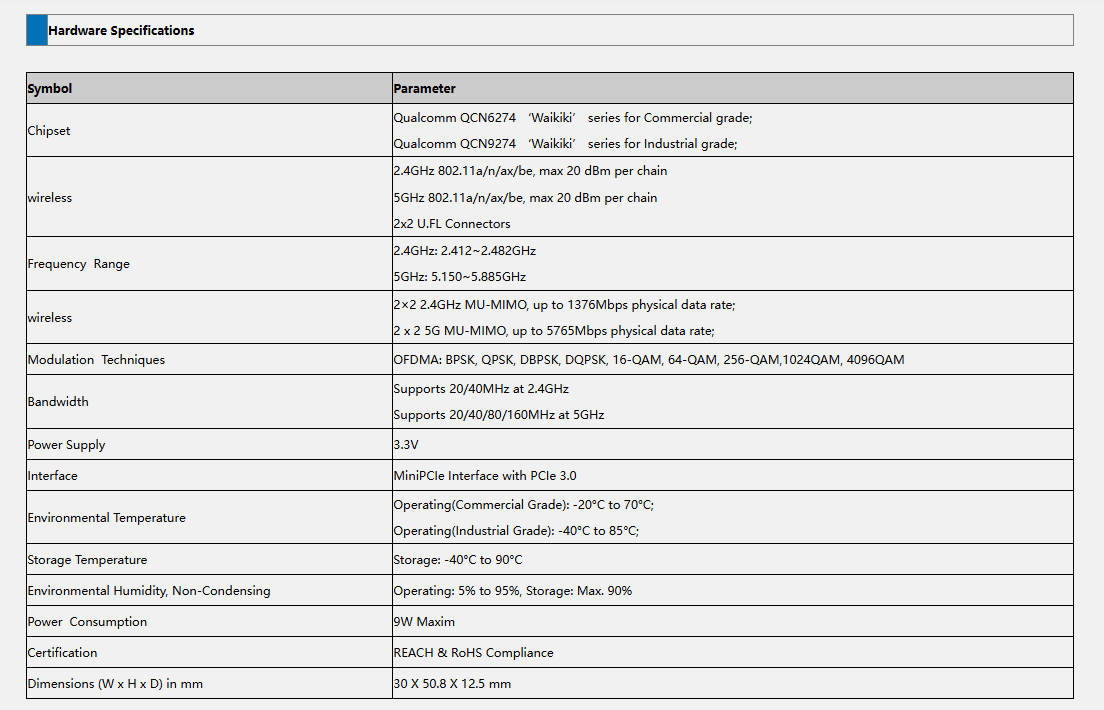
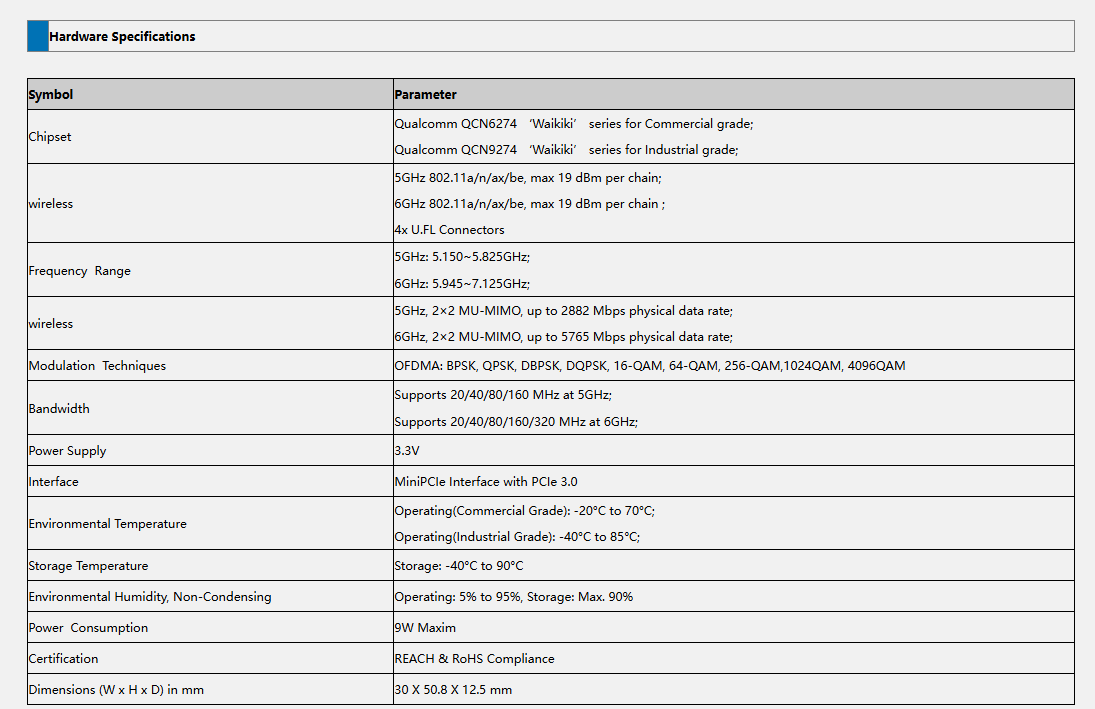
The DR9274E is a family of high-performance WiFi 7 radio modules built on Qualcomm’s QCN9274 or QCN6274 ‘Waikiki’ series chipsets.

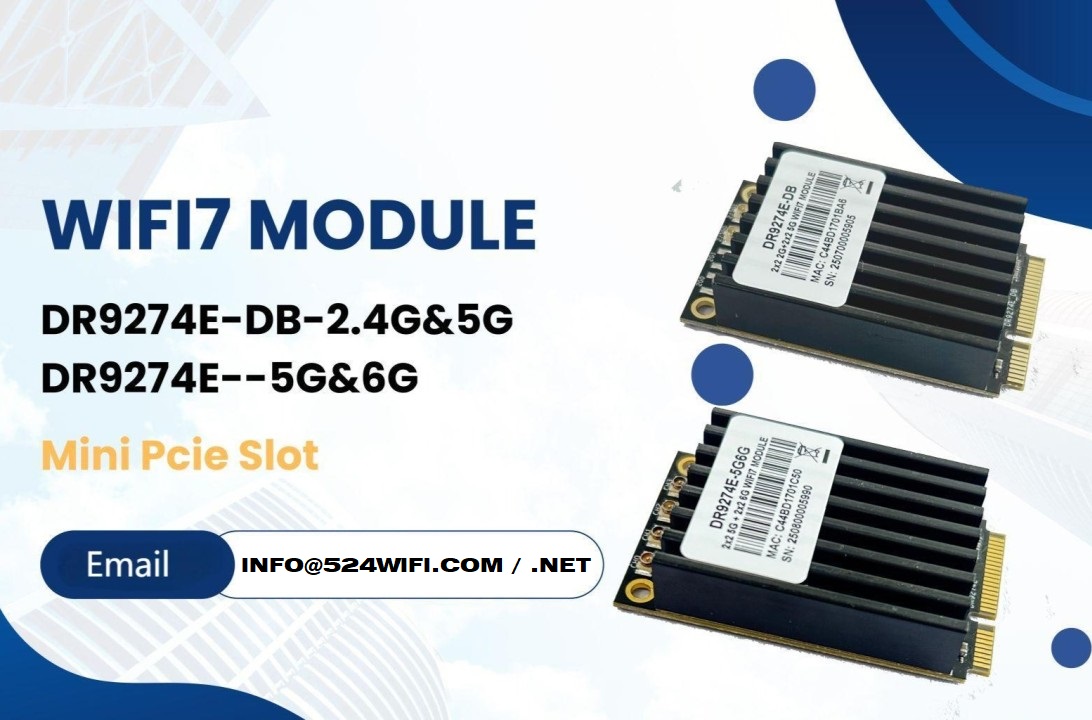
524WiFi is proud to announce the launch of two brand-new WiFi 7 MiniPCIe modules — the DR9274E-DB and DR9274E-5G6G, engineered to meet the demands of today’s most advanced industrial and commercial wireless applications.

These modules are part of the DR9274E family, built on Qualcomm’s QCN9274 / QCN6274 ‘Waikiki’ series chipsets, and designed to unlock the full potential of WiFi 7 in a compact MiniPCIe form factor. Samples available with QCN9274 chipset now !


🔧 Product Variants


⚙️ Key Features at a Glance

✅ Based on Qualcomm QCN6274 (Commercial Grade) or QCN9274 (Industrial Grade)

✅ Supports WiFi 7 (802.11be) for next-generation speed and efficiency

✅ 2×2 MU-MIMO at 5GHz and 6GHz

✅ Max throughput: 2882 Mbps (5GHz) and 5765 Mbps (6GHz)

✅ 320 MHz ultra-wide bandwidth support in 6GHz

✅ MiniPCIe interface with PCIe 3.0

✅ Ultra-rugged: Operating Temp up to -40°C to 85°C (Industrial)

✅ REACH & RoHS Compliant


🌐 Perfect for Demanding Applications

Whether you’re building the next smart city or designing rugged outdoor systems, the DR9274E modules are built for:

  • Industrial & Commercial WiFi Infrastructure
  • Security Surveillance Systems
  • Hotel and Campus Wireless Coverage
  • Forest Fire Monitoring Projects
  • Remote Area Connectivity
  • Custom Applications in Challenging Environments

📏 Tech Specs Snapshot

Article content
DR9274E-DB
Article content
DR9274E-5G6G

💼 Looking to Integrate WiFi 7 Into Your Product?

524WiFi and Wallys specialize in custom industrial wireless solutions, and we’re ready to support your projects with:

  • Hardware customization
  • Software/driver support
  • Long-term supply guarantee
  • Technical documentation and enclosure design references

📩 Contact our sales team today at [email protected] to request datasheets, samples, or technical consultation.

Posted on

Entering the Multi-Link Era of Wi-Fi 7 with 524WiFi. Maximize coverage. Boost performance.

Unlock the future.
By combining DR9274-2G5G and DR9274-5G6G, 524WiFi delivers a true tri-band Wi-Fi 7 platform ready for tomorrow’s wireless demands. X86 Linux supported!


Powered by Multi-Link Operation (MLO), our solution enables:


✅ Simultaneous dual 5GHz operation
✅ Aggregated bandwidth for higher throughput
✅ More resilient and flexible wireless networks


Ready to go Multi-Link? Contact us !

Posted on

524WiFi is driving the future of high-power 6GHz Wi-Fi 7 solutions—with full support for OpenWRT and OpenWiFi collaborative development!

As a global leader in wireless innovation, 524WiFi and WallysTech are advancing the next generation of connectivity with a tri-band platform built on the Qualcomm IPQ9574 + QCN9274/QCN6274 architecture—engineered for ultra-reliable, high-power 6GHz transmission.

🧠 We’re not just innovating in hardware—we’re also deeply engaged in the OpenWRT and OpenWiFi communities, empowering rapid development and seamless integration for our global partners.

🔧 Key Product Highlights:
✅ Tri-band concurrent operation (2.4GHz / 5GHz / 6GHz)
✅ High-power 6GHz RF design for long-range outdoor performance
✅ Fully compatible with OpenWRT and OpenWiFi software stacks
✅ Ideal for mesh backhaul, smart campuses, and industrial IoT deployments

🤝 We invite global partners—developers, system integrators, OEM/ODM teams—to collaborate with us in building the future of Wi-Fi 7.

📩 For product briefs, test boards, or partnership opportunities, reach out to us!

Posted on

IPQ5018 IPQ5010 Wallys DR5018S WiFi 6 Router Board Now Supports Tcpdump — Network Diagnostics Just Got Easier

In the world of embedded networking, visibility is everything. Whether you’re an engineer troubleshooting a client deployment or a developer fine-tuning a custom OpenWrt-based application, packet-level insights can save hours — if not days — of guesswork.

We’re excited to announce that tcpdump is now fully supported on our DR5018S router board, bringing enterprise-grade packet analysis directly to your industrial WiFi 6 hardware.

🧰 Why Tcpdump Matters

Tcpdump is a powerful, command-line packet analyzer tool that allows users to:

  • Monitor live traffic on specific interfaces
  • Capture and filter packets based on IP, port, protocol, and more
  • Export logs for deeper analysis or compliance purposes
  • Debug intermittent network issues with precision

Now with tcpdump on DR5018S, you don’t need a separate laptop or tap device — your router board becomes the diagnostic tool.

Article content

📡 About DR5018S

The DR5018S is based on the Qualcomm IPQ5018 SoC, designed for advanced industrial WiFi 6 applications. It supports:

  • 2.4G/5G concurrent dual-band
  • M.2 slot for LTE/5G modem expansion
  • Optional PoE support
  • Flexible OpenWrt/QSDK firmware environment

By adding tcpdump support, we’re giving system integrators, OEMs, and network developers more control and clarity at the edge.

📝 Documentation & Access

An updated user manual with tcpdump usage examples, interface configurations, and filtering tips will be released shortly. In the meantime, you can check out the DR5018S hardware details here:

https://www.524wifi.com/index.php/catalogsearch/result/?q=5018

Posted on

Ath11k Linux and OpenWRT driver for WiFi 6 QCN 9074 COMPEX WLE3002HX card

Hello Linux and OpenWRT users,

Last time we described  the reference guide how to run QCN 9024 / 9074 DR9074-Triband module with our ath11k driver on Rockship board with Ubuntu.

Today we share a guide how to make COMPEX WLE3002HX module work well under Linux 6.1.99 and OpenWRT

LINUX:

1 – Use Linux 6.1.99 kernel version and add ath11k related drivers

2 – Use QCN9074/hw1.0/2.7.0.1/WLAN.HK.2.7.0.1-01744-QCAHKSWPL_SILICONZ-1 firmware version

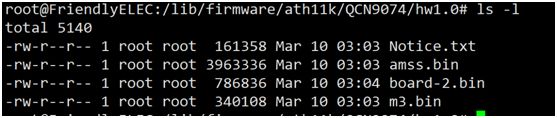
3 – Copy the firmware to the directory/lib/firmware/ath11k/QCN9074/hw1.0/directory, as shown in the following figure

4. Load the ath11k driver successfully, and the kernel prints as follows.

5. Use ifconfig to check that wlan0 has been recognized.

6.Scan external WiFi using the WPA_CLI scan and WPA_CLI scan_desult commands, only 5G band WiFi can be scanned

7.Connect to the scanned 5G frequency band WIFI for normal communication.

8. According to the previously provided document, replace the relevant firmware. The document content is as follows, please use serial console:

1.cd /lib/firmware
2.mkdir ath11k && cd ath11k
3.mkdir QCN9074 && cd QCN9074
4.mkdir hw1.0 && cd hw1.0
5.cp /directory/of/bdf.bin ./ (repeat this step for all above files)
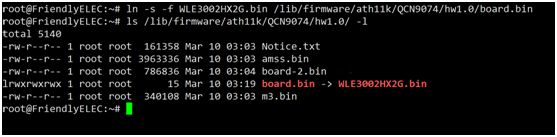
6.ln -s WLE3002HX_SPF11_4_2G.bin board.bin (for first attempt on symbolic link)

To change board data files after first attempt:
Change to 2G: ln -s -f WLE3002HX_SPF11_4_2G.bin board.bin
Change to 5G: ln -s -f WLE3002HX_SPF11_4_5G.bin board.bin

Please replace DBF completely, the file name needs to be changed to the name in your system as described in this file.

Please contact us and we will sned these files to our customers by email.

9. According to the understanding, WLE3002HX_SFP11_4_2G.bin needs to be soft connected to

/lib/firmware/ath11k/QCN9074/hw1.0/board.bin

OpenWRT:

Ultimately what we did was:

1. Deactivate ath11k-firmware from my openwrt custom builds

2. Get the verified firmware version from git – WLAN.HK.2.7.0.1-01744-QCAHKSWPL_SILICONZ-1 e.g. 2 files amss.bin and m3.bin

3. Never download/use board-2.bin from qualcomm firmware

4. cp WLE3002HX5G.bin /lib/firmware/ath11k/QCN9074/hw1.0/board.bin (instead of symlinking)

bonus – cron to recreate the fw folder with files from backup location if missin

so the /lib/firmware/ath11k/QCN9074/hw1.0 folder contains only 3 files: amss.bin   board.bin  m3.bin

bonus – startup cron to recreate the fw folder with files from backup location if missing

This way the adapter works fine.

Thank you for reading. Hope that this can help you too.