Posted on

Support 524 wifi 6 DR9074 Tri-band card on rockchip-5b

Dear Linux users,

Please see our reference guide how to run QCN 9024 / 9074 DR9074-Triband module with our ath11k driver on Rockship board .

The driver is sensitive to the hardware, so we refer you to use the Rockchip board to try these driver. If you have a bigger project, then lets discuss on the driver issues or send us the hardware description and we would help you to develope the ath11k driver for your application.

First step, download development for rockchip-5b:

you can get source code by

git clone https://github.com/Joshua-Riek/ubuntu-rockchip

Use -ko compilation option can only build the kernel to deb, -uo can only build uboot and -ro can only build rootfs.

Then, you can move to development create you img by

./build.sh –board=rock-5b –suite=oracular –flavor=desktop

Then download our ath11k driver from our ftp, dowload teh DR9074 rockchip.rar file :

https://wifi5.eu/dls/Wallys/DR9074

In order to support tri band cards, modifications need to be made to the kernel module.

Firstly, the ath11k_pci module needs to be added to support QCOM PCI cards. Move config.common.ubuntu to

build/linux-rockchip/debian.rockchip/config/config.common.ubuntu

in the compiled environment. This directory may not be available in the newly downloaded environment. You can compile the kernel to obtain this directory.

Move mac.c to

build/linux-rockchip/drivers/net/wireless/ath/ath11k/mac.c

Move reg.c to

build/linux-rockchip/drivers/net/wireless/ath/ath11k/reg.c

Compile the kernel so you can get a new kernel deb with ath11k_pci.

Secondly, the correct firmware of the WiFi card is also required to activate it, you can move our firmware (amss.bin, board-2.bin) to:

/lib/firmware/ath11k/QCN9074/hw1.0

and delete the amss.bin.zst and board-2.bin.zst from the directory.

Setup wireless on ubuntu

Download hostapd

 you can download hostapd by use command:

sudo apt-get install hostapd

Use hostapd to create a wireless access point

First, you should turn off ubuntu’s wifi tool by this command:

sudo nmcli radio wifi off

it will block you wifi function unblock wifi by use this command:

sudo rfkill unblock wifi

You can setup an access point by using command:

sudo hostapd hostapd.conf

hostapd.config is a configuration which has set the type of wi-fi you want to enable and the following figure shows its typical structure:

I have marked the most important part with a red box, where ssid represents the name of the wifi and interface represents the device selected to enable wifi. By the way if you don’t know your interface name, you can use command: ip addr    which can show you the information about the interface, the wireless interface always seem like wlan* or wlp*.

If you see following output after you use hostapd command:

this means you have successfully started the AP.

And when you see this:

it means a device connected to you access point.

This also means connect if you not set password:

Use wpa_supplicant to connect a access point

First, you should turn off ubuntu’s wifi tool by this command:

sudo nmcli radio wifi off

it will block you wifi function unblock wifi by use this command:

sudo rfkill unblock wifi

You can connect an access point by using command:

sudo wpa_supplicant  -Dnl80211 -iwlp1s0 -c wpa.conf

-i can set the interface you want to use to connect. wpa.config is a configuration which has set the type of wi-fi you want to connect and the following figure shows its typical structure:

you can change the ssid to which access point you want.

If you see following output after you use hostapd command:

this means connect successful.

If you want to connect a access point which has a password you should change the wpa_supplicant configuration like this:

the psk is the password proto and key_mgmt is the encryption options.

FAQ

when you see this output you can use: sudo rfkill unblock wifi

when you see this output that means you may run another wpa_supplicant, you should close it then you can run another wpa_supplicant if you don’t know where is it, you can use command: sudo killall wpa_supplicant to kill all wpa_supplicant.

Posted on

QCN9274 / QCN6274 Chip | x86 & Ubuntu Support | Enterprise Grade Networking

524WiFi DR9274 Wi-Fi 7 PCIe Card

QCN9274/QCN6274 Chip | x86 & Ubuntu Support | Enterprise-Grade Networking

High-Density, Low-Latency Wireless Solutions for Industrial IoT & Enterprise WiFi 7 Deployments

Introduction: The Next Era of Enterprise Wireless Connectivity

The rapid evolution of Wi-Fi 7 (IEEE 802.11be) is revolutionizing enterprise networks, demanding hardware that combines cutting-edge performance with seamless integration. The 524WiFi DR9274 PCIe Wireless Card, powered by Qualcomm QCN9274/QCN6274 chips, emerges as a game-changer. Designed for x86 architecture and fully compatible with Ubuntu systems, this module delivers multi-gigabit speeds, industrial-grade reliability, and future-proof scalability — ideal for high-stakes environments like smart factories, dense office networks, and mission-critical IoT deployments.

5 Key Advantages of 524WiFi DR9274 Wi-Fi 7 Modules

1. x86 & Ubuntu Compatibility: Unleash Developer Flexibility

  • Native x86 Support: Seamlessly integrates with Intel/AMD-based servers, industrial PCs, and edge gateways, eliminating driver conflicts.
  • Ubuntu 22.04 LTS Optimization: Pre-certified drivers and SDKs enable rapid deployment on Linux environments, with full access to OpenWRT/OpenWiFi for custom network policies.
  • Use Case: Deploy as a software-defined access point (SDAP) or cloud-managed wireless controller on existing x86 infrastructure.

2. Wi-Fi 7 Performance: Redefining Wireless Limits

  • 320MHz Channel Bandwidth: Achieves ~40Gbps aggregate throughput — 2x faster than WiFi 6E.
  • 4K QAM Modulation: Boosts data density by 20%, enhancing bandwidth-hungry applications like 8K video streaming and AR/VR.
  • Multi-Link Operation (MLO): Transmits data across 2.4GHz, 5GHz, and 6GHz bands, reducing latency to <1ms for industrial automation.

3. Flexible Deployment: Single/Dual-Band Configurations

  • Single-Band Models: Optimized for interference-free 6GHz backhaul or dedicated 5GHz IoT sensor networks.
  • Dual-Band Models: Combine 5GHz+6GHz for enterprise-grade mesh networks or 2.4GHz+5GHz for legacy device compatibility.
  • Example: Deploy 5GHz+6GHz dual-band cards in stadiums to handle 10,000+ concurrent users with zero packet loss.

4. Industrial Durability: Built for Harsh Environments

  • Extended Temperature Range: Operates at -40°C to +85°C, certified for outdoor smart grids and factory floors.
  • Hardened Security: Supports WPA3-Enterprise, AES-256 encryption, and Secure Boot to meet NIST compliance.
  • Open-Source Firmware: Customize QoS rules, VLAN tagging, and spectrum analysis via OpenWRT.

5. Qualcomm QCN9274/QCN6274: A Proven Silicon Foundation

  • 16-Stream MU-MIMO: Supports 500+ devices per card with dynamic beamforming.
  • Hardware Accelerators: Offloads CPU load for tasks like packet prioritization and intrusion detection.

Application Scenarios: Where Wi-Fi 7 Drives Transformation

1. Enterprise Wi-Fi 7 Networks

  • High-Density Offices: Support 200+ users per AP with zero buffering in 4K video conferencing.
  • HD Telemedicine: Enable real-time transmission of MRI/CT scans over 6GHz wireless links.

2. Industrial IoT & Automation

  • AGV Fleet Control: Achieve sub-millisecond latency for robotic coordination in smart warehouses.
  • Wireless PLCs: Replace wired EtherCAT networks with secure 5GHz wireless loops.

3. Carrier & Smart City Infrastructure

  • Wireless Backhaul: Replace fiber with 6GHz point-to-point links for 5G small cell aggregation.
  • Public Wi-Fi 7 Hotspots: Deploy in airports or malls with captive portals and AI-driven traffic shaping.

4. Defense & Mission-Critical Systems

  • Tactical Mesh Networks: Build self-healing wireless grids using MLO and 4K QAM.
  • Drone Command Centers: Stream 360° LiDAR data via 320MHz channels.

Conclusion: Future-Proof Your Wireless Infrastructure Today

The DR9274 Wi-Fi 7 PCIe Card transcends traditional wireless limitations by merging Qualcomm’s silicon excellence, x86/Ubuntu adaptability, and industrial resilience. Whether upgrading enterprise networks, automating factories, or building smart city backbones, this module delivers unparalleled speed, reliability, and control.

Posted on

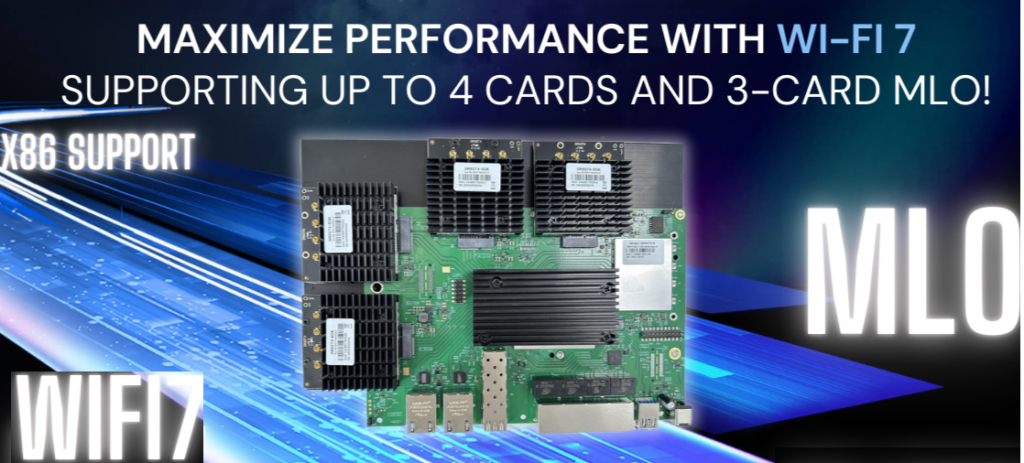
IPQ9574 Supports 4 QCN9274 Cards and Any 3-Card MLO Configuration Wi-Fi 7 Upgraded DR9574

Maximizing Wireless Performance with the Qualcomm IPQ9574: A Wi-Fi 7 Powerhouse

In today’s fast-paced digital world, industries are increasingly relying on advanced wireless technologies to support high-speed data transfer and seamless connectivity. The Qualcomm IPQ9574, a cutting-edge chipset powering the DR9574 router board, is revolutionizing wireless communication by supporting Wi-Fi 7 and offering industry-leading performance for demanding applications. This article delves into the key features and specifications of the IPQ9574 and DR9574, highlighting how they are shaping the future of wireless networking.

Why the Qualcomm IPQ9574 is a Game-Changer for Wi-Fi 7 Networks

The IPQ9574 chipset is at the heart of the DR9574, delivering unmatched wireless capabilities. It supports up to 4 Wi-Fi 7 cards, allowing flexibility for a variety of MLO (Multi-Link Operation) configurations, including compatibility with any 3-card MLO setup. This level of flexibility and performance ensures that industries can scale their networks to meet the growing demand for high-speed wireless communication.

Key Features of the IPQ9574-Based DR9574

  1. Advanced Quad-Core ARM Processor: The IPQ9574 chipset is powered by a Quad-Core ARM-A73 processor running at 2.2GHz. This ensures high-speed processing for data-intensive tasks and complex networking functions.
  2. Support for Wi-Fi 7: The IPQ9574 is designed to support the latest Wi-Fi 7 technology, providing faster speeds, better efficiency, and higher network capacity compared to its predecessors.
  3. Multiple M.2 E Key Interfaces: The DR9574 offers 4 M.2 E Key interfaces with PCIe 3.0, enabling support for up to four Wi-Fi 7 cards. This flexibility is crucial for environments that require high-performance networking.
  4. Excellent Power Efficiency: The board consumes 13W without the onboard Wi-Fi and up to 23W with Wi-Fi integrated, striking a balance between power efficiency and high-performance operation.
  5. Broad Operating Range: With operating temperatures between -20°C to 70°C and storage temperatures from -40°C to 90°C, the DR9574 is built to endure harsh industrial environments.
  6. Optimized for High-Speed Data: The 2.4GHz band supports 802.11b/g/n/ax standards, with data rates reaching 24dBm per chain, ensuring robust and fast wireless connections.

Key Hardware Specifications of the DR9574 Router Board

SpecificationDetails

ChipsetQualcomm IPQ9574 Quad-Core ARM-A73 @ 2.2GHz

System Memory2GB DDR4, 32-bit interface (2×16-bit)

PCIe InterfacePCIe 3.0

Frequency Range2.4GHz: 2.412~2.472GHz

Data Rates for WLAN2.4GHz 802.11b/g/n/ax, max 24dBm per chain

Modulation TechniquesBPSK, QPSK, DBPSK, DQPSK, 16-QAM, 64-QAM, 256-QAM, 1024QAM, 4096QAM

Operating Voltage12V

Power Consumption13W (Board only), 23W (with onboard Wi-Fi)

Temperature RangeOperating: -20°C to 70°C, Storage: -40°C to 90°C

Applications of the DR9574 in Industry

With its robust feature set and Wi-Fi 7 capabilities, the DR9574 is perfect for a variety of industries, including:

  • Smart Cities: The ability to support multiple Wi-Fi 7 cards and MLO configurations makes it ideal for managing the wireless backbone of smart cities, where high-speed and reliable communication are essential.
  • Industrial IoT (IIoT): As industrial applications increasingly rely on wireless technology for device communication, the DR9574 ensures reliable data transfer, low latency, and the ability to scale as the number of connected devices grows.
  • Telecommunications: The IPQ9574 chipset allows telecommunications providers to build next-generation infrastructures that offer superior performance and capacity.

Absolute Maximum Ratings for Reliable Operation

Parameter/RatingUnit

Operating Temperature-20 ~ 70ºC

Storage Temperature-40 ~ 90ºC

Operating Humidity5% ~ 95 (non-condensing)%

Storage Humidity0% ~ 90 (non-condensing)%

Conclusion: Future-Proof Your Network with IPQ9574 and DR9574

The Qualcomm IPQ9574 and DR9574 router board are poised to lead the charge in Wi-Fi 7 technology, providing businesses and industries with the high-performance, reliable, and scalable networking solutions they need. With support for multiple Wi-Fi 7 cards, MLO configurations, and the ability to operate in challenging environments, the DR9574 is an ideal choice for industries looking to upgrade their wireless networks for the future.

As Wi-Fi 7 continues to gain traction in the industry, the IPQ9574 is at the forefront of delivering the connectivity that next-gen applications demand, from industrial IoT to smart cities and beyond.

Posted on

Why OpenWrt + WiFi 6 = Future-Proof Networking? Unlock Next-Gen Networking with 524WiFi’ OpenWrt-Supported WiFi 6 Solutions

The demand for high-performance, customizable wireless solutions is surging across industries – from enterprise networks to industrial IoT and smart city deployments. At Wallys Communications, we bridge cutting-edge hardware with open-source flexibility through our OpenWrt-compatible WiFi 6 modules, engineered for reliability and scalability.

Why OpenWrt + WiFi 6 = Future-Proof Networking

OpenWrt Advantages: Full network stack control, lightweight operation (ideal for embedded systems), and 3,000+ software packages

WiFi 6 Benefits:

▶ 4× device capacity vs. WiFi 5

▶ 75% lower latency

▶ 1.8Gbps aggregate throughput (DR7915)

▶ BSS Coloring for dense deployments

Mediatek DR7915 MT7915

Featured Solutions: Enterprise-Grade WiFi 6 Modules

1. DR7915 Mini PCIe Module

✅ Chipset: MediaTek MT7915 + MT7975 (2×2 dual-band)

✅ Performance:

2.4GHz: 23dBm max power, 574Mbps

5GHz: 20dBm max power, 1201Mbps

-40°C to 70°C operating range

✅ Key Features:

DFS radar detection

MU-MIMO & OFDMA

LDPC/STBC encoding

Full OpenWrt 21.02+ support

2. DR4019 – The Robust Foundation for DR7915 WiFi 6 Solutions

DR4019 – The Robust Foundation for DR7915 WiFi 6 Solutions

Why Engineers Choose 524WiFi and Wallys?

🔧 Open-Source First:

Full driver source code access

Community-supported builds

🛠️ Design-to-Deployment Support:

RF layout optimization guidance

Thermal management consulting

FCC/CE pre-certification testing

🌐 Proven in Production:

Batch-to-batch consistency

Implementation Scenarios

• Industrial IoT gateways (5G + WiFi 6 edge computing)

• High-density office APs (200+ concurrent users)

• Outdoor mesh networks (-40°C hardened)

Posted on

Mediatek MT7915 : A Comprehensive Review of Its Features and Benefits

In the rapidly evolving world of wireless networking, the MT7915 stands out as a powerful and versatile solution for modern connectivity needs. Designed to deliver high performance, reliability, and flexibility, this WiFi 6 chip is ideal for a wide range of applications, from industrial IoT to enterprise networking. In this article, we’ll take a deep dive into the features and benefits of the MT7915, and explore why it’s a top choice for next-gen wireless solutions.

Key Features of the MT7915

1. WiFi 6 Technology

The MT7915 supports 802.11ax (WiFi 6), the latest wireless standard that offers significant improvements over previous generations. With features like OFDMA (Orthogonal Frequency Division Multiple Access) and MU-MIMO (Multi-User Multiple Input Multiple Output), it enables faster speeds, lower latency, and better performance in high-density environments.

2. Dual-Band Support

The MT7915 operates on both 2.4GHz and 5GHz bands, providing flexibility for various networking scenarios. Whether you need broader coverage or higher throughput, this chip delivers optimal performance.

3. High Throughput

With support for 2T2R (2 Transmit, 2 Receive) streams, the MT7915 offers impressive data rates, making it suitable for bandwidth-intensive applications like video streaming, online gaming, and industrial automation.

4. OpenWRT Compatibility

The MT7915 is compatible with OpenWRT, a popular open-source operating system for routers and networking devices. This allows for greater customization and flexibility, enabling developers to tailor the solution to their specific needs.

5. Mini PCIe and M.2 keay A+E or B+M Form Factor

The MT7915 comes in a Mini PCIe or m.2 module, making it easy to integrate into a wide range of devices, from routers and access points to industrial equipment and IoT devices.

6. Industrial-Grade Reliability

Designed for harsh environments, the MT7915 operates reliably in extreme temperatures and conditions, making it ideal for industrial applications.

Benefits of the MT7915

1. Enhanced Performance

The MT7915 delivers faster speeds and lower latency compared to previous-generation WiFi chips, ensuring a seamless user experience even in high-density environments.

2. Cost-Effective Solution

With its high performance and flexibility, the MT7915 offers excellent value for money, making it a cost-effective choice for businesses and developers.

3. Future-Proof Technology

By supporting WiFi 6, the MT7915 ensures that your network is ready for the future, with the ability to handle increasing data demands and new applications.

4. Easy Integration

The Mini PCIe form factor and OpenWRT compatibility make the MT7915 easy to integrate into existing systems, reducing development time and costs.

5. Versatility

From smart homes and offices to industrial IoT and smart cities, the MT7915 is suitable for a wide range of applications, providing reliable connectivity wherever it’s needed.

Applications of the MT7915

1. Industrial IoT

The MT7915’s industrial-grade reliability and high throughput make it ideal for industrial IoT applications, such as factory automation, remote monitoring, and smart logistics.

2. Enterprise Networking

With its support for WiFi 6 and high-density environments, the MT7915 is perfect for enterprise networks, providing fast and reliable connectivity for offices, campuses, and data centers.

3. Smart Homes

The MT7915’s dual-band support and high performance make it a great choice for smart home devices, ensuring seamless connectivity for streaming, gaming, and smart appliances.

4. Public WiFi

The MT7915’s ability to handle high-density environments makes it suitable for public WiFi hotspots, such as airports, malls, and stadiums.

Why Choose Mediatek MT7915 Solution?

At 524WiFi, we offer various MT7915 and MT7916 WiFi 6 / 6E module based on the Mediatek chip, designed to meet the needs of modern wireless networks. Our solution includes:

  • High-quality hardware: Built for durability and performance.
  • OpenWRT support: Enabling customization and flexibility.
  • Expert support: Our team is available to assist with integration and optimization.

To learn more about our MT7915-based solution, please read more : https://524wifi.net/?s=7915

Conclusion

The MT7915 is a powerful and versatile WiFi 6 chip that offers high performance, reliability, and flexibility for a wide range of applications. Whether you’re building an industrial IoT system, an enterprise network, or a smart home solution, the MT7915 is a future-proof choice that delivers exceptional value.

Posted on

QCN9274 & QCN6274 Wi-Fi 7 with Multi-Link Operation (MLO) on X86 Devices: A New Era of Connectivity

Wi-Fi 7 with Multi-Link Operation (MLO) on X86 Devices: A New Era of Connectivity

As the world of wireless technology continues to evolve, the introduction of Wi-Fi 7 is nothing short of a game-changer. With its potential for significantly higher speeds, lower latency, and enhanced reliability, Wi-Fi 7 is set to revolutionize industries and applications ranging from industrial IoT to high-performance consumer devices. At Wallys, we’re always driven by customer needs, and as part of our commitment to offering cutting-edge solutions, we’re focused on expanding the possibilities for Wi-Fi 7 technology—specifically by enabling Multi-Link Operation (MLO) support on X86 platforms.

Expanding the Reach of Wi-Fi 7: A New Level of Compatibility

Last year, we introduced X86 driver support for our Wi-Fi 6 module, DR9074, which enabled seamless integration across a broader range of motherboard platforms, not just Qualcomm devices. This support empowered our customers to experience high-quality, stable Wi-Fi data transmission and opened the door for new applications that demand reliable and high-throughput wireless connections.

With the introduction of Wi-Fi 7, cross-platform compatibility becomes even more critical. Wi-Fi 7 brings with it a new set of features designed to push the boundaries of wireless connectivity, and one of the most significant is Multi-Link Operation (MLO). But to harness the full potential of MLO, we need to ensure that our solutions can operate on multiple platforms—something we’re excited to announce we’re working on with our DR9274 (QCN9274) and QCN6274 Wi-Fi 7 modules.

wifi6 vs wifi7

What is MLO? And Why Does It Matter?

Multi-Link Operation (MLO) is one of the standout features of Wi-Fi 7. MLO allows devices to transmit data across multiple frequency bands (like 2.4 GHz, 5 GHz, and 6 GHz) simultaneously. This multi-band transmission significantly improves throughput and reliability, while reducing latency and congestion, making it an ideal solution for environments that require high-speed and low-latency communication.

In simple terms, MLO will enable your devices to leverage the full bandwidth potential of Wi-Fi 7, resulting in faster speeds, more stable connections, and more efficient use of available spectrum.

Introducing the QCN9274 & QCN6274 Wi-Fi 7 Modules

To enable the full potential of MLO, we’re leveraging the power of QCN9274 and QCN6274—two of Qualcomm’s latest Wi-Fi 7 chipsets, both designed for high-performance applications.

  1. QCN9274 (Waikiki)
  2. QCN6274 (Waikiki)
MLO

These two powerful chipsets represent the future of Wi-Fi 7 and provide the foundation for expanding compatibility across a variety of platforms. With MLO support, both the QCN9274 and QCN6274 enable better utilization of the 2.4, 5, and 6 GHz bands, delivering faster speeds and more reliable connections.

wifi7 new features

What Will MLO Bring to Your X86 Devices?

By introducing MLO support for X86 devices, we’re pushing the envelope on what’s possible in wireless networking. Users of X86 platforms will now be able to tap into the full power of Wi-Fi 7, unlocking:

  • Higher Throughput: With MLO, data is split across multiple channels, leading to faster speeds and higher data rates, ideal for bandwidth-hungry applications like streaming, gaming, and industrial IoT.
  • Enhanced Reliability: MLO ensures that devices can maintain stable connections, even in environments with interference or congestion, by balancing traffic across different frequency bands.
  • Reduced Latency: Faster communication between devices can significantly reduce lag and improve the responsiveness of real-time applications, from virtual reality to autonomous systems.

The implications are significant. Wi-Fi 7, combined with MLO, could transform industries that rely on seamless, high-performance wireless connectivity—think smart cities, industrial automation, healthcare, and beyond.

524WiFi Adapter Card (wifi7 adapter card coming soon)

What’s Next for Wi-Fi 7 on X86?

At 524WiFi, we’re committed to ensuring that our solutions are as versatile and adaptable as possible. With the upcoming X86 driver support for DR9274 and MLO functionality, you’ll be able to take full advantage of Wi-Fi 7 speeds and unlock new potential for your devices.

Thoughtput testing:achieve 8Gbps+ speed

This new capability will open up new opportunities for a variety of applications, and we’re eager to see how our customers will integrate this powerful technology into their own use cases.

DR9274 wifi7 M.2 card

Are You Ready for the Future of Wireless Connectivity?

With Wi-Fi 7’s blazing-fast speeds and MLO’s game-changing capabilities, the possibilities are endless. How do you envision using Wi-Fi 7 with MLO on your X86 platforms? Whether it’s enhancing your industrial IoT devices, supporting next-gen gaming applications, or powering high-bandwidth communications, the potential is vast.

At 524WiFi, we’re excited to continue innovating and providing the tools you need to stay ahead in the rapidly evolving wireless landscape. If you’re interested in learning more about our Wi-Fi 7 solutions or how we can help with your next project, feel free to reach out to us.

Let’s shape the future of connectivity, together.

Posted on

Unlocking the Future of Connectivity with Mediatek Wi-Fi 6, 6E, and 7 Modules

In today’s fast-paced digital landscape, the demand for robust and efficient wireless connectivity has never been greater. Mediatek’s cutting-edge Wi-Fi 6, Wi-Fi 6E, and Wi-Fi 7 modules are designed to meet these demands, providing seamless integration with various AI Linux PCs, including popular distributions like Debian, Ubuntu, Fedora, and more. These modules are set to revolutionize how users experience connectivity across multiple platforms.

Key Features of 524WiFi MIDIATEK’s Wi-Fi Modules

Wi-Fi 6 (802.11ax): This standard introduces significant improvements in speed, capacity, and efficiency. With features like Orthogonal Frequency Division Multiple Access (OFDMA) and Multi-User Multiple Input Multiple Output (MU-MIMO), Wi-Fi 6 can handle multiple devices simultaneously without compromising performance. This is particularly beneficial in environments with high device density, such as offices or public spaces.

Wi-Fi 6E: Expanding on the capabilities of Wi-Fi 6, Wi-Fi 6E operates in the newly available 6 GHz band. This additional spectrum allows for more channels, reducing congestion and enabling higher data rates for bandwidth-intensive applications like streaming and gaming. The increased capacity ensures that users can enjoy uninterrupted connectivity even in crowded environments.

Wi-Fi 7 (802.11be): As the latest advancement in wireless technology, Wi-Fi 7 promises even faster speeds and lower latency through features like 320 MHz channels and enhanced MU-MIMO capabilities. This will be a game-changer for applications requiring real-time data transmission, such as augmented reality (AR) and virtual reality (VR).

Compliance and Certifications

524WiFi’s commitment to quality and safety is underscored by its extensive certifications. Most of their modules have passed rigorous testing and obtained certifications from recognized international bodies, including:

  • FCC (Federal Communications Commission): Ensuring compliance with U.S. regulations for electronic devices.
  • CE (Conformité Européenne): Certifying that products meet European health, safety, and environmental protection standards.
  • IC (Industry Canada): Meeting Canadian regulatory requirements for communication devices.
  • RCM (Regulatory Compliance Mark): Compliance with Australian electrical safety standards.
  • NCC (National Communications Commission): Adhering to Taiwanese communication regulations.

These certifications emphasize the performance and reliability of 524WiFi’s products while demonstrating their dedication to creating a seamlessly connected IoT landscape.

Compatibility with Linux Distributions

Mediatek’s Wi-Fi modules are designed with compatibility in mind, ensuring that they work seamlessly across various Linux distributions:

  • Debian/Ubuntu: Users can easily install drivers through package managers or compile from source if necessary.
  • Fedora/CentOS: The modules support the latest kernels available in these distributions, providing out-of-the-box functionality for most users.
  • Arch Linux/OpenSUSE/Manjaro: These distributions often have up-to-date kernel support, allowing users to take advantage of the latest features offered by Mediatek’s modules.
  • Red Hat Enterprise Linux/Oracle/Linux Mint/Gentoo/Slackware: These distributions may require additional configuration but are fully capable of supporting Mediatek’s Wi-Fi technology with the right drivers.

Enhanced Performance for AI Applications

The integration of Mediatek’s Wi-Fi modules into AI-driven Linux PCs enhances performance significantly. The high throughput and low latency provided by these technologies enable faster data processing and improved communication between devices. This is crucial for applications such as machine learning models that require large datasets to be transmitted quickly and efficiently.Moreover, the power efficiency of Wi-Fi 6 and beyond means that devices can maintain longer operational times without frequent recharging or energy consumption concerns. This is particularly important for IoT devices that rely on continuous connectivity.

Conclusion

Mediatek’s Wi-Fi 6, 6E, and 7 modules represent a significant leap forward in wireless technology. Their compatibility with a wide range of Linux distributions makes them an ideal choice for users looking to enhance their AI Linux PC experience. With faster speeds, increased capacity, improved efficiency, and compliance with international standards, these modules are poised to transform how we connect in an increasingly digital world. Embrace the future of connectivity with 524WiFi’s innovative solutions today!

Posted on

IPQ6010 IPQ6018 Router Board with 1GbE + 2.5GbE Support: A High-Performance WiFi 6 Solution

IPQ6010 IPQ6018 Router Board with 1GbE + 2.5GbE Support: A High-Performance WiFi 6 Solution

With the growing demand for high-speed wireless connectivity in industrial and enterprise applications, the IPQ6010 IPQ6018 Router Board stands out as a powerful WiFi 6 solution. Designed with 1GbE + 2.5GbE ports, this board provides ultra-fast data transfer rates, making it ideal for networking, IoT, and AI applications.

Key Features of IPQ6010 IPQ6018 Router Board

  1. Qualcomm IPQ6010 IPQ6018 SoC – A high-performance WiFi 6 (802.11ax) processor.
  2. Dual Ethernet Ports – Supports 1GbE and 2.5GbE, allowing for high-speed wired connections.
  3. Dual-Band WiFi 6 Support – Operates on 2.4GHz and 5GHz bands, offering improved coverage and speed.
  4. MU-MIMO & OFDMA – Enhances network efficiency in high-density environments.
  5. OpenWRT & SDK Support – Enables developers to customize firmware and optimize performance.

Why 2.5GbE Matters for Modern Networking

Traditional 1GbE Ethernet has been the industry standard for years, but with the increasing demand for higher bandwidth, 2.5GbE is becoming a must-have feature for:

  • High-speed data centers
  • Cloud applications & AI workloads
  • 4K/8K video streaming
  • IoT and smart city networks

By integrating a 2.5GbE port, the IPQ6010 IPQ6018 router board ensures future-proof networking, providing faster wired connectivity without requiring expensive infrastructure upgrades.

Ideal Use Cases for the IPQ6010 IPQ6018 Router Board

  1. Enterprise WiFi 6 Networks – Supports high-speed internet for offices and commercial buildings.
  2. Industrial IoT (IIoT) Applications – Reliable connectivity for manufacturing and automation.
  3. Smart Cities & Surveillance Systems – Handles real-time video streaming and AI-powered analytics.
  4. Mesh Networking & Wireless ISP – Ideal for large-scale deployments.
with SFP version

Conclusion

The IPQ6010 IPQ6018 Router Board with 1GbE + 2.5GbE support is a game-changer in WiFi 6 networking. Whether you are building next-gen enterprise solutions, upgrading industrial networks, or deploying high-performance IoT applications, this router board delivers exceptional speed, reliability, and flexibility.

DR6018
Posted on

VLAN Applications in the Logistics Industry – Smart Warehouse & Automation Systems

As the logistics industry continues to evolve, there is a growing need for efficient, stable, and flexible networking solutions. Virtual Local Area Networks (VLANs) provide a powerful tool for managing network traffic, optimizing resources, and improving both efficiency and security within logistics operations. Below are several key VLAN application scenarios within the logistics industry.


1. Smart Warehouse & Automation Systems

Smart warehouses, equipped with automated systems like robotic arms, conveyor belts, sensors, and RFID systems, rely on a robust network for seamless data exchange. VLANs can improve network performance by segmenting traffic based on device type.

  • VLAN Segmentation:
  • VLAN 10 (Automated Guided Vehicle Network): Ensures low-latency, high-priority communication for automated guided vehicles (AGVs).
  • VLAN 20 (RFID & Scanners): Provides dedicated bandwidth for RFID systems and scanners, ensuring real-time tracking.
  • VLAN 30 (Surveillance Network): Segregates video surveillance data from other traffic to prevent congestion.

VLAN helps ensure that critical devices such as AGVs and RFID scanners can communicate without interference, enhancing warehouse efficiency.


2. Sorting Systems in Distribution Centers

Sorting systems in distribution centers often involve complex automation machinery that requires real-time communication to optimize the sorting of parcels. VLANs help ensure smooth operation by prioritizing the traffic of sorting equipment.

  • VLAN Segmentation:
  • VLAN 100 (Sorting Equipment Network): Dedicated VLAN for the machinery that handles sorting, minimizing delays caused by high data traffic.
  • VLAN 200 (Office Management Network): Separates office traffic from operational machinery, avoiding disruptions to real-time sorting tasks.
  • VLAN 300 (Customer Service Interface): Isolates customer-facing systems, ensuring customer data remains secure while other operational processes run smoothly.

VLANs optimize data flow within the sorting systems and prevent network congestion, increasing overall throughput.


3. IoT Devices and Wireless Networks

In the logistics industry, IoT devices such as temperature sensors, GPS trackers, and smart locks play an integral role in monitoring and managing goods during transit and storage. VLANs are essential for managing and securing wireless network traffic.

  • VLAN Segmentation:
  • VLAN 50 (IoT Device Network): Creates a dedicated VLAN for all IoT devices, ensuring reliable data transfer while isolating traffic from other networks.
  • VLAN 60 (Customer Wi-Fi Network): Segregates visitor and employee Wi-Fi access from critical business systems to ensure security.

Using VLANs ensures that sensitive logistics data from IoT devices is protected and prioritized, enabling real-time monitoring and secure communications.


4. Security and Data Isolation

The logistics industry handles sensitive customer data, inventory management information, and delivery details. VLANs are used to isolate these critical data streams from other less sensitive traffic, adding an additional layer of security.

  • VLAN Segmentation:
  • VLAN 10 (Management and Control Network): Isolates administrative systems and critical control networks to prevent unauthorized access.
  • VLAN 20 (Customer Data Network): Protects customer and order information by creating a separate VLAN for processing sensitive data.
  • VLAN 30 (Surveillance Network): Ensures video feeds from surveillance cameras are kept within a dedicated network, preventing bandwidth overload.

VLANs improve data security by isolating sensitive systems from regular traffic, reducing the risk of data breaches or unauthorized access.


5. Integration with 5G Networks

As logistics operations increasingly incorporate 5G technology, VLANs help ensure that high-priority devices, such as autonomous delivery vehicles and drones, have dedicated network resources for efficient communication.

  • VLAN Segmentation:
  • VLAN 70 (Autonomous Vehicle Network): Dedicated VLAN for vehicles and drones that require low-latency and high-bandwidth communication.
  • VLAN 80 (Public-facing Network): Provides separate VLANs for external systems, ensuring no interference with mission-critical logistics systems.

Integrating VLANs with 5G allows logistics companies to optimize network performance for high-demand devices, ensuring smooth and efficient operations.

Router board DR4019 Vlan Solution

✅ Industrial-Grade Performance

  • Qualcomm IPQ4019/IPQ4029 chipset for stable, 24/7 operation.

✅ High-Power Wireless Connectivity

  • Dual-band radios: 2×2 5GHz & 2×2 2.4GHz high-power modules.
  • Frequency range: 4.940GHz–5.825GHz & 2.400GHz–2.482GHz.
  • MMCX connectors for flexible antenna deployment.
  • Supports 5MHz/10MHz/20MHz/40MHz/80MHz bandwidth.

✅ VLAN & Network Optimization

  • VLAN-ready for secure network segmentation in logistics hubs.
  • 802.11s Mesh support for seamless warehouse connectivity.
  • Fixed data rate for AGVs, RFID, and IoT tracking.

✅ Flexible Firmware & Integration

  • Supports OpenWRT, QSDK, OpenWiFi.
  • Compatible with Quectel modules for LTE/5G expansion.

✅ Environmentally Safe

  • RoHS compliant, ensuring safety and sustainability.
DR4019 mainboard ipq4019

Conclusion

VLAN technology plays a crucial role in optimizing network performance, improving security, and supporting the growth of smart logistics systems. By segmenting traffic based on device type and use case, logistics companies can improve data flow, reduce congestion, and ensure secure communication across their networks. As the logistics industry continues to evolve with IoT, automation, and 5G, VLANs will remain a key component in driving efficiency, security, and innovation.

The Router board DR4019 Vlan Mesh Solution
Posted on

Compex Systems Expands Dual-Band Wi-Fi 7 Family – Now with M.2 Variants!

Wi-Fi 7 is here, ushering in a new era of wireless connectivity that promises to transform the way we experience the internet. At Compex, we are excited to introduce the new M.2 variants to our popular dual-band Wi-Fi 7 module lineup. Meet the new WLTB7002E25 with a M.2 B+M Key and the WLTE7002E25 with a M.2 E Key — both designed to complement our existing WLE7002E25, which features the popular standard miniPCIe form factor. Together, these Wi-Fi 7 modules offer a comprehensive solutions with enhanced performance, flexibility and compatibility — all at competitive Wi-Fi 6 prices!

Powered by Qualcomm’s QCN6224, QCN6274 and QCN9274 Waikiki series radio chipsets, the WLE/WLTE/WLTB7002E25 are dual-band concurrent 2.4+5GHz Wi-Fi 7 (802.11be) modules, offering wider signal coverage by transmitting both bands concurrently, reducing latency with Multi-Link Operation (MLO) support, featuring OFDMA and 4096 QAMs. Delivering up to 20dBm per chain, these 2×2 MU-MIMO models are ideal for enterprise, industrial, cybersecurity, transportation and SMB applications.

What are the features of the Compex Wi-Fi 7 Modules WLE/WLTE/WLTB7002E25?

  • Dual-Band Dual-Concurrent Operation: Support both 2.4GHz and 5GHz bands simultaneously.
  • Variants for Easy Adoption: WLE7002E25 features a MiniPCIe interface with PCIe 3.0, while the WLTE7002E25 and WLTB7002E25 both have M.2 connectors, supporting E Key and B+M Key respectively.
  • MLO: All Compex Wi-Fi 7 modules support Multi-Link Operation, a key performance advantage of Wi-Fi 7, which increases throughput, lowers latency and enhances reliability.
  • Open Source Ath12k Support: Compatible with Qualcomm and third-party platforms such as Marvell, NXP and x86 platform.