Posted on — Leave a comment

Qualcomm Wi-Fi 8 Chipset: What Hardware Developers Should Know

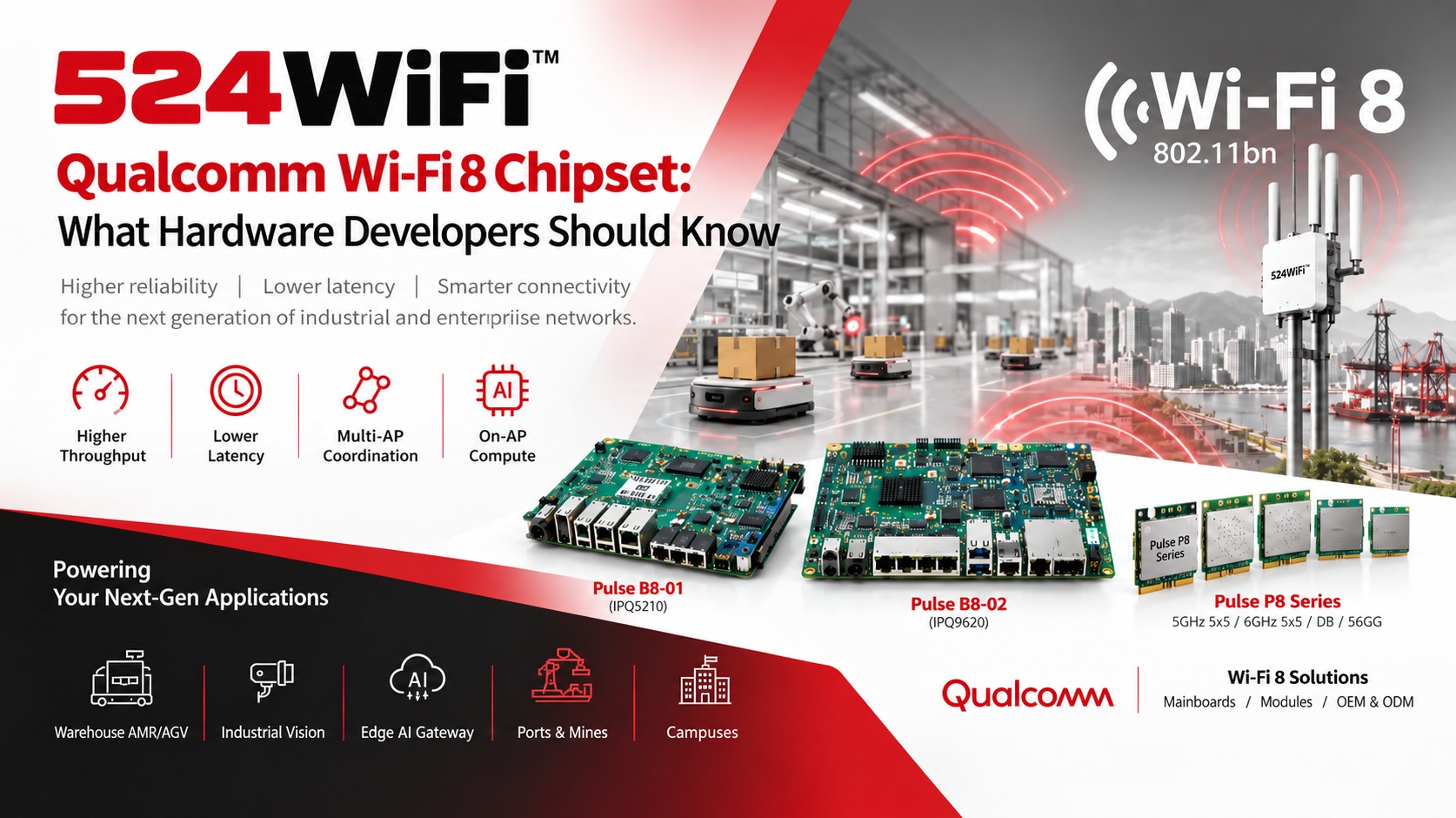
524WiFi™ Pulse B8 mainboards and Pulse P8 radio modules on Qualcomm Wi-Fi 8 technology

Wi-Fi 8 (IEEE 802.11bn) has moved from a standards discussion into silicon you can design around. Qualcomm’s MWC 2026 launch gave hardware teams a concrete platform to plan against. Here is what matters for developers building routers, industrial APs, gateways and robot connectivity.

What Is Qualcomm’s Wi-Fi 8 Platform, and Why Does It Matter?

Qualcomm launched a Wi-Fi 8 portfolio with a mobile chip (FastConnect 8800) and new Dragonwing networking platforms aimed at broadband gateways, enterprise access points and fixed wireless equipment. The infrastructure flagship is the Dragonwing NPro A8 Elite, part of the IPQ96 family. rcrwireless

The headline specs from Qualcomm’s materials:

  • A 5×5 Wi-Fi 8 radio system, with up to 40% more throughput at typical distances, 2.5x lower latency at peak usage, and up to 30% lower daily energy use than the previous generation techpowerup
  • A penta-core CPU up to 2.0 GHz, a Hexagon NPU, and a peak PHY rate of up to 33 Gbps qualcomm
  • Capacity for up to 1,500 clients in infrastructure gear dev

The design goal is reliability, not just peak speed. Wi-Fi 8 is meant to be about reliability rather than raw speed. For hardware developers, latency consistency, roaming behavior and performance under load matter more than the 33 Gbps figure, which is a peak PHY rate, not a throughput you will measure in the field. wifinowglobal

How Does Wi-Fi 8 Change Hardware Design?

1. Compute moves onto the access point. The NPro A8 Elite integrates an NPU and a packet processing engine. Your AP can run containerized services and network-optimization models locally instead of relying on a controller or the cloud.

2. Uplinks become the bottleneck. With PHY rates in the tens of Gbps, a 1G port will not do. Plan for 2.5G and 10G copper or SFP, and check your PoE budget. Qualcomm’s own IPQ96 documentation lists 2.5GbE and 25GbE-class interfaces, so board-level power, thermal and switch design need a fresh look.

3. 6 GHz becomes core, not optional. Wide channels and multi-radio designs put your antenna layout, RF shielding and connector choices (U.FL vs. MMCX) under more pressure than on Wi-Fi 6.

4. Roaming changes. Wi-Fi 8’s multi-AP coordination features, including the Single Mobility Domain (SMD) concept for seamless roaming without repeated re-authentication, target moving clients such as AMRs. Client-side support will be the limiting factor early on, so validate with real client devices.

Wi-Fi 8 vs. Wi-Fi 7: What Is Actually Different?

524WiFi™ Wi-Fi 8 and Wi-Fi 7 architecture comparison

Should you skip Wi-Fi 7? No. Wi-Fi 7 platforms such as IPQ9574 and IPQ5424 are shipping and stable, with mature software. Wi-Fi 8 makes sense when your product roadmap spans 2027 and beyond, or when roaming and latency in dense multi-robot environments are your main pain points.

Which Applications Benefit Most?

  • Warehouse AMR/AGV fleets: consistent latency and better roaming matter more than raw Gbps.
  • Industrial vision: multi-camera streams need stable uplinks and predictable performance under load.
  • Edge AI gateways: on-AP compute can pre-process data before it reaches an edge server.
  • Ports, mines and campuses: dense clients, mobile endpoints and harsh RF environments.

Where 524WiFi™ Fits: Wi-Fi 8 Hardware in Development

We are preparing Wi-Fi 8 routerboards and modules built on Qualcomm silicon. The modular platform roadmap combines dedicated mainboards and radio modules. The planned lineup:

Mainboards (no onboard radio, radios added via M.2 E-key):

  • Pulse B8-01 (IPQ5210): DDR4, NOR + NAND, 2× M.2 E-key, 1× 10G copper, 5× 2.5G, 12V
  • Pulse B8-02 (IPQ9620): DDR4, NOR + NAND, 3× M.2 E-key, 2× 10G copper, 4× 2.5G, 12V

Pulse P8 Series Wi-Fi 8 modules:

  • 5 GHz 5×5
  • 6 GHz 5×5
  • DB: 2×2 2.4 GHz + 3×3 5 GHz
  • 5G6G: 3×3 5 GHz + 2×2 6 GHz (VB only)

Connector options: VA = U.FL, VB = MMCX.

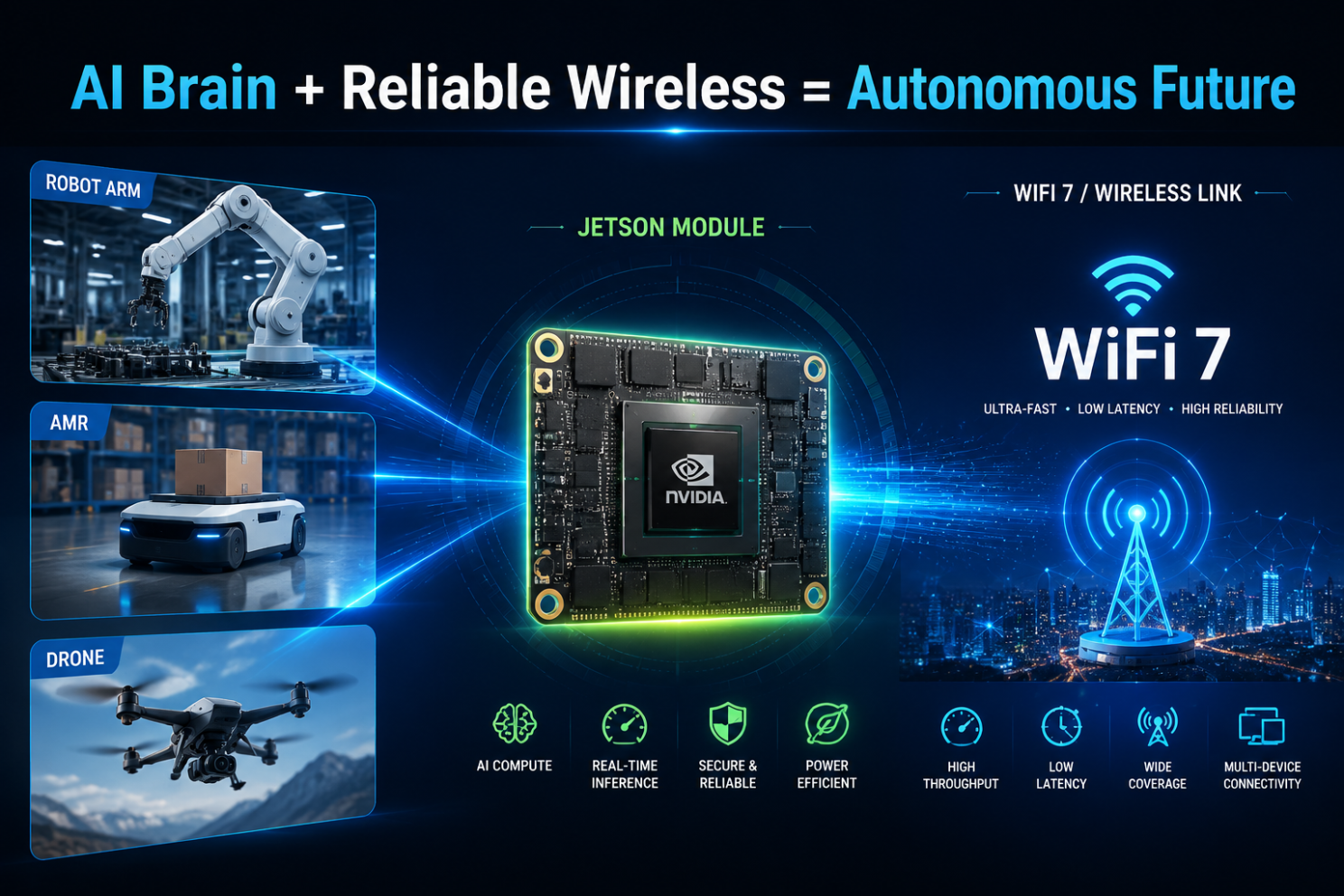
The mainboard-plus-module approach lets OEMs choose their radio configuration and enclosure, indoor or outdoor, without a full board respin. The same system planning can pair Qualcomm-based connectivity with Tomo AI Core NVIDIA for Jetson-based edge compute.

Quick Checklist for Hardware Teams

  1. Define whether you need peak throughput or reliability and roaming. The answer decides Wi-Fi 7 vs. Wi-Fi 8.
  2. Budget for 2.5G/10G uplinks, PoE and thermal headroom.
  3. Confirm client-device support before promising end-to-end Wi-Fi 8 gains.
  4. Get regulatory and certification timelines early, as Wi-Fi 8 products are new to test labs.
  5. Choose a modular architecture so you can upgrade radios without redesigning the mainboard.

Planning a Wi-Fi 8 or Wi-Fi 7 product? Talk to our engineering team about mainboards, modules and custom designs : info at 524wifi.net or .com

Platform references: DR5210_VA, DR9650_VA and DR9575.

Posted on

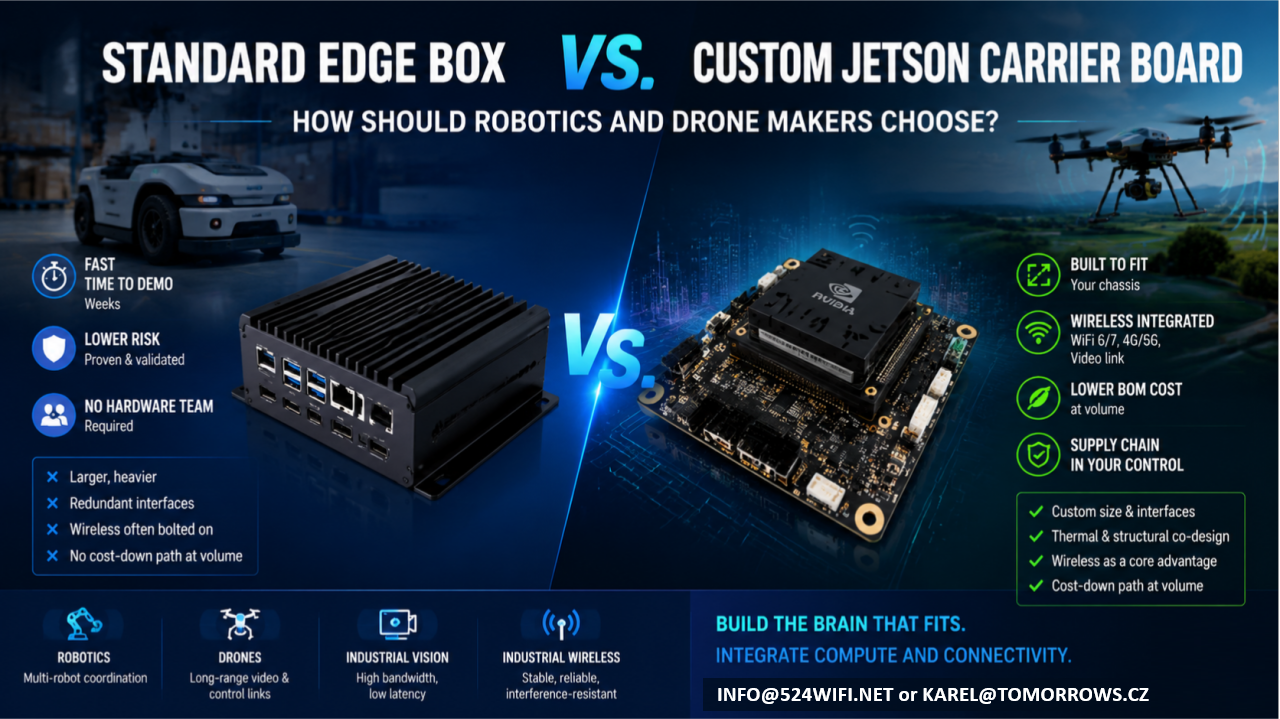
Standard Edge Computing Box vs. Custom Jetson Carrier Board: How Should Robotics and Drone Makers Choose?

If your team has already built the robot chassis or drone airframe, and what’s missing is the “brain” — an edge compute module that can run vision, navigation, and decision-making — you’re almost certainly weighing two paths:

Option A: Buy a standard edge computing box and bolt it onto your platform Option B: Design a custom carrier board around a Jetson module and integrate it directly into your product

Neither path is universally right. Each fits a different stage, scale, and product positioning. This article lays out the trade-offs so you can make the call with your eyes open.

The short version: it’s a trade between speed and long-term cost

  • A standard box trades a proven industrial design for development speed — at the cost of long-term compromises in cost, size, and reliability.
  • A custom carrier board trades a heavier upfront engineering investment for lasting product competitiveness.

Which one makes sense depends on where you are right now.

Option A: Standard Edge Box — Fast, but with a Low Ceiling

Off-the-shelf Jetson boxes — whether NVIDIA’s own dev-kit enclosures or third-party integrated industrial PCs — have one clear strength: speed.

Advantages

  • Fast time to demo: plug in power and network, and you’re running within weeks
  • Lower risk: standard products are already validated, so you’re not carrying hardware design risk
  • No hardware team required: your software team can get the system running without a dedicated hardware engineer

But the trade-offs are real

  1. Size and weight are the biggest problem. Standard boxes are built for broad compatibility and generic thermal margins, so they’re almost always bigger and heavier than what you actually need. For a drone, where every gram matters, that extra weight eats directly into flight time and payload. For a robot chassis that’s already been finalized, bolting on an external box often means re-tooling the enclosure and adding brackets — which breaks the industrial design you already locked in.
  2. Redundant interfaces you’re paying for. To serve “everyone,” standard boxes ship with a pile of ports you’ll never use — extra USB, HDMI, multiple Ethernet jacks. Each of those is both a cost line and a reliability liability: exposed connectors don’t hold up well against vibration and dust in industrial environments.
  3. Wireless connectivity is the most overlooked weak point of the bolt-on approach. Robots and drones need stable video links, control links, and multi-unit networking. The radios in standard boxes are usually consumer-grade, and they tend to drop connections and show latency jitter under the concurrent-device, high-interference conditions common in warehouses, farms, and industrial sites. That usually forces you to bolt on a second box — an industrial-grade wireless module — on top of the first. Now you’ve got a box on a box, with size, cabling, and power delivery spiraling out of control.
  4. No cost-down path at volume. Standard boxes are purchased per unit at a fixed price; the bigger your production run, the worse the economics get. And your supply chain sits entirely with someone else — you have no leverage if they raise prices or discontinue the part.

Who this fits: teams still in validation, prototypes or small batches (a few dozen units or fewer), teams that haven’t locked their final product form yet, or teams that just want to get the algorithm running before dealing with hardware.

Option B: Custom Jetson Carrier Board — Slower, but Built for Volume

A custom carrier board means keeping only the Jetson module itself and designing a new PCB around your actual product requirements — size, interfaces, power, wireless, thermal — so the compute unit is truly built into your chassis, not bolted on top of it.

Advantages

  1. The footprint follows your chassis, not the other way around. A carrier board can be shaped to fit into an arm, a body cavity, a drone gimbal bay — anywhere a standard box simply can’t go.
  2. Only the interfaces you actually need, with wireless (WiFi 6/7, 4G/5G, video links) integrated directly onto the same board instead of bolted on as a second module. One less board-to-board connection means one less failure point, plus far less cabling and structural volume to manage.
  3. Thermal and structural design can be co-engineered. The board can be designed to work with your chassis’s own thermal paths and metal structure, instead of carrying its own standalone fan or heatsink like a boxed unit does — critical for drones and sealed robot enclosures.
  4. Meaningfully lower BOM cost at volume, and your design assets and supply chain stay in your own hands, rather than being exposed to a single vendor’s pricing or discontinuation decisions.
  5. This is where wireless communication genuinely becomes part of your product’s competitive edge. Most customers who come to us asking for “a Jetson carrier board” eventually realize the real bottleneck is the wireless link — roaming latency during multi-robot coordination, interference resistance for video transmission, stability of long-range control links. Board-level integration lets you co-optimize the WiFi 6/7 RF front end, antenna placement, and EMC design together with the compute board in a single pass — something a box-plus-bolt-on-module combination can never achieve.

Trade-offs

  • Requires a proper design, prototyping, and validation cycle upfront (typically weeks to a few months, depending on complexity)
  • Requires a partner who understands both Jetson hardware design and RF engineering — teams with both skill sets aren’t common
  • At very small batch sizes (single digits to a few dozen units), the amortized development cost may not pencil out

Who this fits: teams whose product form is already locked and heading toward volume production (typically 100+ units), teams with hard requirements on size/weight/battery life, or teams for whom wireless performance — multi-robot coordination, long-range video, industrial-grade networking — is itself a core product differentiator.

Quick Decision Table

Dimension Standard Edge Box Custom Jetson Carrier Board Development timeline Weeks Weeks to months Upfront investment Low Medium-high (one-time) Per-unit cost at volume Fixed, no cost-down path Decreases with volume Size / weight Constrained by standard enclosure Fully customizable Wireless integration Usually bolted on, extra link in the chain Can be co-designed with the compute board Supply chain control Dependent on a single vendor Design assets owned in-house Best fit stage Validation / small batch Volume production / finalized product

What We Can Do for You

This is exactly what we do at 524WiFi and Wallys: custom carrier board design around Jetson modules, combined with our own track record in industrial-grade WiFi 6/7 and long-range wireless transmission — so compute and connectivity end up on a single board, instead of customers having to stitch together a “Jetson box + industrial wireless module” combo themselves.

If your team:

  • Already has a robot or drone product form and is weighing edge-compute options
  • Has validated a demo on a standard box and is now thinking about cost-down and miniaturization for volume production
  • Needs multi-robot coordination, long-range video transmission, or interference-resistant networking — not just raw compute

Reach out and let’s talk through your specific use case: info at 524wifi.net

We’re happy to start with a free assessment of your current setup to help you decide whether it’s time to keep iterating on a bolt-on box, or move straight to a fully integrated custom design.

Posted on

Long-Range Drone Video & Control Links: Choosing Between DR5322, DR9574S, and DR5424

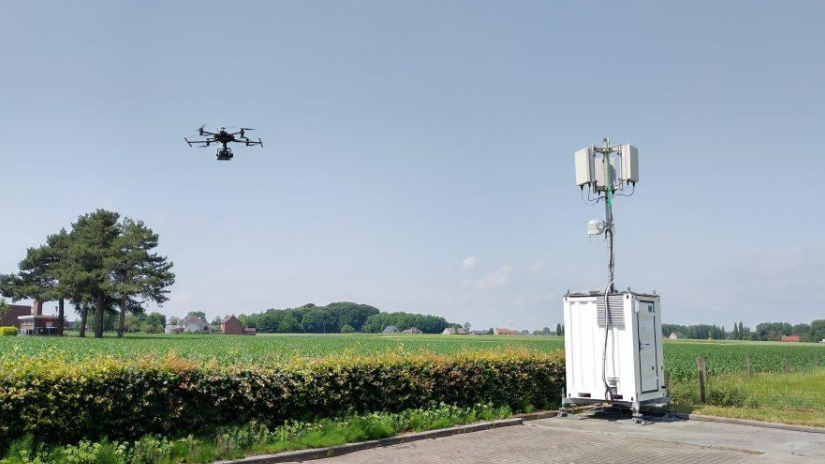
For agricultural, inspection, and mapping drones, the weakest link in the field is rarely the flight controller — it’s the wireless link. Video dropouts, control-command latency, and interference between multiple concurrent aircraft all directly affect operational efficiency and, in some cases, flight safety. Picking the right wireless hardware platform ultimately comes down to trade-offs between throughput, range, integration approach, and deployment environment.

524WiFi and Wallys currently offer three Qualcomm WiFi 7-based platforms that map to different drone video/control link scenarios: DR5322, DR9574S, and DR5424. Here’s how they differ, and which one fits which use case.

DR5322: Lightweight and modular, built for cost-sensitive edge nodes

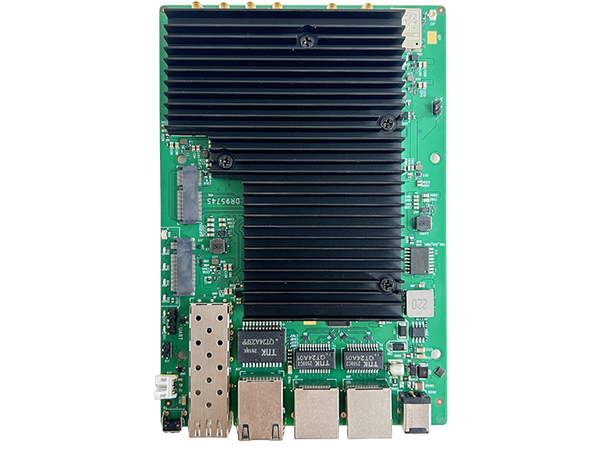
The DR5322 is built on Qualcomm’s IPQ5322 (quad-core Cortex-A53 @1.5GHz) and is essentially a compact routerboard: onboard 2×2 2.4GHz radio, with 5GHz/6GHz handled through an add-on QCN9274/QCN6274 WiFi 7 module, reaching up to roughly 5764Mbps physical data rate. It offers 4x 2.5G Ethernet ports plus 1x 10G SFP, with 802.3bt PoE support.

This “onboard 2.4G + pluggable high-band module” architecture makes the DR5322 well suited as a relay node or video-transmission hub for a single small multirotor — where the priority is small footprint, low power, and controlled cost rather than maximum throughput. Think field-deployable relay boxes or vehicle-mounted repeaters.

DR9574S: The modular flagship, built for relay towers and multi-drone coordination

The DR9574S runs on Qualcomm’s IPQ9574 (quad-core ARM-A73 @2.2GHz) and is the most configurable of the three — six version options (2×2/4×4, 5G/6G/5-7G) let you tailor the band mix to the project. It supports OFDMA, MU-MIMO, and multi-link operation (MLO), with 10G SFP, 10G Ethernet with PoE, and 2 Gigabit ports, plus optional GPS. Industrial-grade design supports operation from -20°C to 70°C.

This configuration is a better fit for fixed base stations, relay towers, or scenarios that need to manage video/control links for multiple drones at once — for example, a large-scale agricultural operation running several spraying drones simultaneously, where the ground station needs to reliably carry multiple concurrent video and control streams.

DR5424: High-throughput tri-band, built for aggregating high-definition multi-stream video

The DR5424 is the most integrated of the three: Qualcomm IPQ5424 (quad-core Cortex-A55 @1.8GHz), full onboard tri-band WiFi 7 (4×4 MU-MIMO), 320MHz channel width, with theoretical physical data rates up to 1376Mbps on 2.4GHz, 8647Mbps on 5GHz, and 11530Mbps on 6GHz. It also carries the strongest port configuration of the three: 4x 2.5G plus 2x 10G Ethernet.

One important clarification: DR5424’s tri-band design is switchable, not concurrent — the three bands are there to be switched between as needed to avoid interference, not to simultaneously carry separate traffic types (e.g., control on one band, video on another, backhaul on a third). This distinction matters when evaluating a project’s actual concurrent multi-video-stream capacity.

With onboard tri-band radios and multiple high-speed Ethernet ports, the DR5424 is well suited as an aggregation gateway for high-definition, multi-channel video feeds — for example, when several aerial video streams need to be backhauled simultaneously to a ground station for real-time stitching or AI-based analysis.

Side-by-side comparison

DR5322 DR9574S DR5424 Chipset IPQ5322 (A53 @1.5GHz) IPQ9574 (A73 @2.2GHz) IPQ5424 (A55 @1.8GHz) Radio architecture Onboard 2.4G + pluggable 5/6G module Modular, 6 version options (2×2/4×4) Full onboard tri-band, 4×4 Max theoretical rate ~5764Mbps ~5765Mbps (per radio) ~11530Mbps (6GHz) Channel width — Up to 160MHz Up to 320MHz Ethernet 4x 2.5G + 1x 10G SFP 2x 1G + 1x 10G+PoE + 1x 10G SFP 4x 2.5G + 2x 10G GPS No Optional No Typical use case Lightweight relay node / cost-sensitive projects Fixed base station / multi-drone relay tower High-definition multi-stream aggregation gateway

Which one should you choose?

  • Budget-constrained projects that only need to support a single drone or a small number of video links — a lightweight relay node: go with DR5322.
  • Larger operational radius, managing multiple drones online at once, needing a fixed base station or relay tower: go with DR9574S, selecting the version that matches your band requirements.
  • Concurrent high-definition multi-stream video backhaul with high Ethernet aggregation bandwidth requirements, needing an edge gateway: go with DR5424.

All three platforms support OEM/ODM customization, including long-range transmission software tuning, antenna selection, and enclosure design. If you’re evaluating wireless hardware for a drone video/control link project, reach out to info at 524wifi.net or 524wifi.com for selection guidance or to request samples.

Posted on — Leave a comment

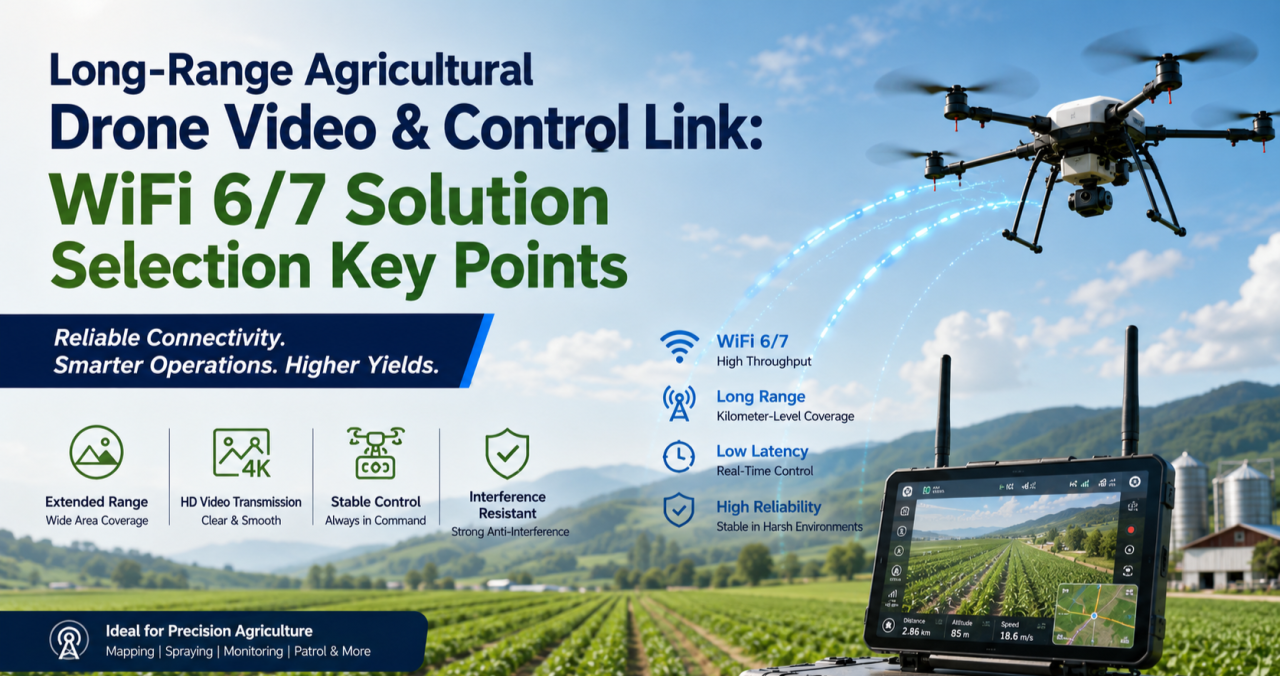
How to Design a Reliable Long-Range Wireless Link for Agricultural Drones (WiFi 6/7 Selection Guide)

If you’ve deployed drones for crop spraying, field mapping, or orchard inspection over any real distance, you’ve probably run into this: the link holds fine at 200 meters, then starts dropping commands or breaking up video well before you hit the range the datasheet promised. It’s rarely a bad chip. It’s almost always an architecture problem.

This guide walks through why long-range agricultural links behave differently from indoor or short-range WiFi deployments, what actually determines reliability at range, and how to select hardware — control-side and video-side — that holds up in the field.

Why Agricultural Drone Links Are a Different Problem

Most WiFi hardware is designed and benchmarked for indoor, short-range, high-density environments — offices, warehouses, retail. Agricultural drone deployments invert almost every one of those assumptions:

  • Distance is the default, not the exception. A single control link routinely needs to cover several hundred meters to a few kilometers across open farmland or orchards.
  • There’s no multipath to lean on. Indoor WiFi benefits from reflections off walls and ceilings. Open fields don’t offer that — and offer very little shielding from other interference either.
  • Control and video have opposite requirements. Control commands are small, frequent packets that need low, consistent latency and near-zero loss. Video (especially 4K, multispectral, or thermal payloads) needs sustained bandwidth and can tolerate some jitter. Serving both well on one link is hard.
  • One-to-many is common. A single ground station frequently needs to manage multiple aircraft flying formation or covering different zones of the same field, which means the AP side has to handle concurrent, fast-moving clients — not a single static link.
  • Power is capped by regulation, not by ambition. ISM-band transmit power and antenna gain both have legal ceilings. You can’t out-power your way to more range.

The Five Things That Actually Determine Reliability at Range

1. Band Strategy: Split the Link, Don’t Pick One Band

2.4GHz diffracts better around terrain, crops, and structures, which is why it’s traditionally the default choice for long-range control links. 5GHz and 6GHz offer far more spectrum and fewer competing signals, which is exactly what high-resolution video needs.

The reliable pattern in the field isn’t choosing one band for everything — it’s running a split architecture: control on 2.4GHz, video on 5GHz or 6GHz. That’s a strong argument for radio hardware where the band configuration is flexible (single-band, dual-band, or switchable tri-band) rather than fixed to one band at the factory.

2. Modulation and Spatial Streams: Know What They Actually Control

Specs like 4096-QAM and multi-stream MU-MIMO are real and useful — but they define your near-field ceiling, not your far-field floor. As distance increases and signal-to-noise ratio drops, the link automatically falls back to lower-order modulation regardless of the chip’s peak capability.

When evaluating hardware for a long-range deployment, the number that matters isn’t the “Gbps peak” on the datasheet. It’s the rate-adaptation curve under low SNR, and specifically the minimum usable data rate at the outer edge of your intended range. That’s the number that tells you whether video will break up or commands will get dropped when the aircraft is farthest from the ground station — which is exactly when you need the link most.

3. MLO (Multi-Link Operation): Redundancy, Not Traffic Splitting

WiFi 7 introduced Multi-Link Operation, which lets a device establish links across multiple bands or channels at once. There’s a common misconception worth clearing up here: MLO isn’t a way to route control traffic on one band, video on another, and backhaul on a third, each running independently.

What MLO actually does is transmit the same data redundantly across multiple links simultaneously, so that if one link momentarily fades or gets interfered with, the other link covers for it — improving reliability and reducing effective latency. For agricultural drones, where a lost link is often the trigger for a return-to-home failsafe, that kind of redundancy has real operational value, not just a spec-sheet checkbox.

4. Topology: Point-to-Point vs. One-to-Many

A single aircraft doing long-range mapping or inspection is often best served by a point-to-point link — a directional antenna setup trading beamwidth for range and stability. But if a ground station needs to manage multiple aircraft or ground terminals simultaneously, the AP side needs OFDMA multi-user scheduling and fast roaming/handoff behavior, or you’ll see queuing delay whenever multiple aircraft check in around the same time.

Know which problem you’re actually solving before you pick hardware — they call for different radio capabilities.

5. Form Factor: Airborne and Ground-Side Needs Diverge

The airborne side is constrained by payload weight and available power, so it needs a small, low-power radio module that can be integrated directly into a flight controller or gimbal payload — with just enough band flexibility to serve the control link without unnecessary weight or draw.

The ground station side is a different design problem entirely: it needs to aggregate multiple client connections, handle higher sustained throughput, and typically needs wired backhaul (Ethernet, sometimes 10GbE) to move the collected video and telemetry off to a local server or the cloud. That usually points toward a board-level platform rather than a compact module.

Mapping Hardware to the Problem

Once you’ve worked through the five factors above, hardware selection becomes a matter of matching platform to role rather than chasing a single “best” spec sheet.

Airborne / terminal-side radio module. You want something small, power-efficient, and configurable — ideally a module where you can select or trim the band configuration (single-band 2.4GHz for a dedicated control radio, or dual-band where the payload allows) without carrying unused radio hardware and power draw. This is the role a WiFi 7 M.2 module built on a chipset like Qualcomm’s QCN9274/QCN6274 platform is designed for, with configurations spanning single-band, dual-band, and 4×4 single-band variants depending on what the airframe needs.

Ground-station aggregation board. This is where you want a flagship-class multi-band platform — four simultaneous bands, wide channels (up to 320MHz), high-order modulation (4096-QAM), multiple M.2 slots for additional radio cards, and dual 10GbE-class wired uplinks. This tier handles concurrent multi-aircraft connections, dynamic channel selection (AFC) to work around interference, and reliably backhauling the aggregated video streams to wherever they’re processed.

Edge gateway with onboard compute. For deployments where you want to do video processing or stream aggregation closer to the field — rather than pushing everything raw to the cloud — a tri-band gateway platform with high-speed wired I/O (dual 10GbE + multiple 2.5GbE) and an onboard AI accelerator tuned for networking workloads is the better fit. It handles wireless backhaul while also doing local compute, cutting the bandwidth pressure on the uplink.

A Practical Decision Order

When you’re actually speccing a system, work through it in this order:

  1. Point-to-point or one-to-many? This determines whether OFDMA and fast roaming on the ground-station side are must-haves or nice-to-haves.
  2. Does the control link need to be physically separated from the video link? This determines whether a single-band module or a multi-band board is the right call for each end of the system.
  3. What are the payload’s power and space constraints? This determines module-level vs. board-level hardware on the airborne side.
  4. Does the back end need edge compute or multi-stream video aggregation? If yes, prioritize a gateway platform with onboard AI acceleration and high-speed wired I/O.

FAQ

Is 2.4GHz or 5GHz better for a long-range drone control link? 2.4GHz generally holds up better over distance and around obstructions like terrain or crop canopy, which is why it’s the more common choice for the control link specifically. 5GHz and 6GHz are typically reserved for the video link, where the extra bandwidth matters more than raw range.

Do I need WiFi 7, or is WiFi 6 enough? It depends on whether you need MLO’s link redundancy and whether your video payload actually needs the extra bandwidth WiFi 7’s wider channels provide. Many long-range control links work fine on WiFi 6; WiFi 7 becomes more valuable as video resolution, aircraft count, or reliability requirements increase.

What’s the actual benefit of MLO for a drone link? Redundancy. The same data is sent across multiple links at once, so a momentary fade on one link doesn’t cost you the connection — it isn’t a way to assign different traffic types to different bands independently.

Should the airborne radio and the ground-station radio be the same hardware? No — they’re solving different problems. The airborne side prioritizes size, weight, and power; the ground station prioritizes aggregate throughput, multi-client handling, and wired backhaul capacity.


If you’re evaluating or redesigning the wireless subsystem in a drone flight-control or video-transmission stack — or migrating an existing deployment from WiFi 5/6 to WiFi 7 — reach out to info at 524wifi.com or .net. We build radio hardware across all three tiers described above and can walk through the specifics of your deployment.

Posted on

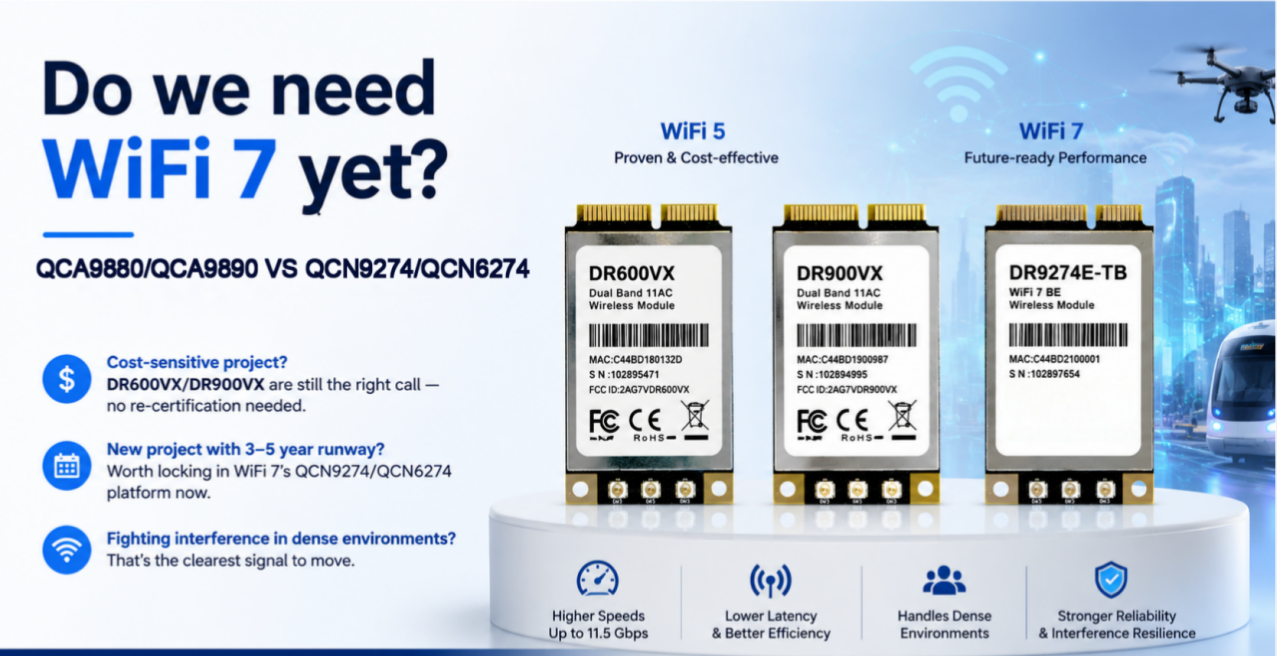
QCA9880 to QCN9274/QCN6274: A WiFi 5 to WiFi 7 Module Selection Guide — 524WiFi 600VX / 900VX and DR9274E-TB Compared

From QCA9880 to QCN9274/QCN6274: A WiFi 5-to-WiFi 7 Module Selection Guide — 524WiFi 600VX / 900VX, and DR9274E-TB Compared

For years, the Qualcomm-Atheros QCA9880 has been the default chipset behind a lot of industrial WiFi 5 designs — routers, CPEs, access points, embedded gateways. It’s mature, well-documented, and easy to source, which is exactly why so many product lines are still built around it. But the ground is shifting. As more networks have to handle a pile of devices talking at once — robot fleets on a warehouse floor, banks of industrial cameras, multiple video streams heading back to a controller — WiFi 5’s two crowded bands start to show their age, and WiFi 7 platforms have gotten mature enough to be a real option instead of just a roadmap item.

We get this question a lot from customers still speccing hardware around QCA9880: is it time to move, and if so, to what? Below is a practical comparison of two of our QCA9880 modules, 524WiFi 600VX / 900VX Pro+, against DR9274E-TB, which runs on Qualcomm’s newer QCN9274/QCN6274 platform.

The three modules

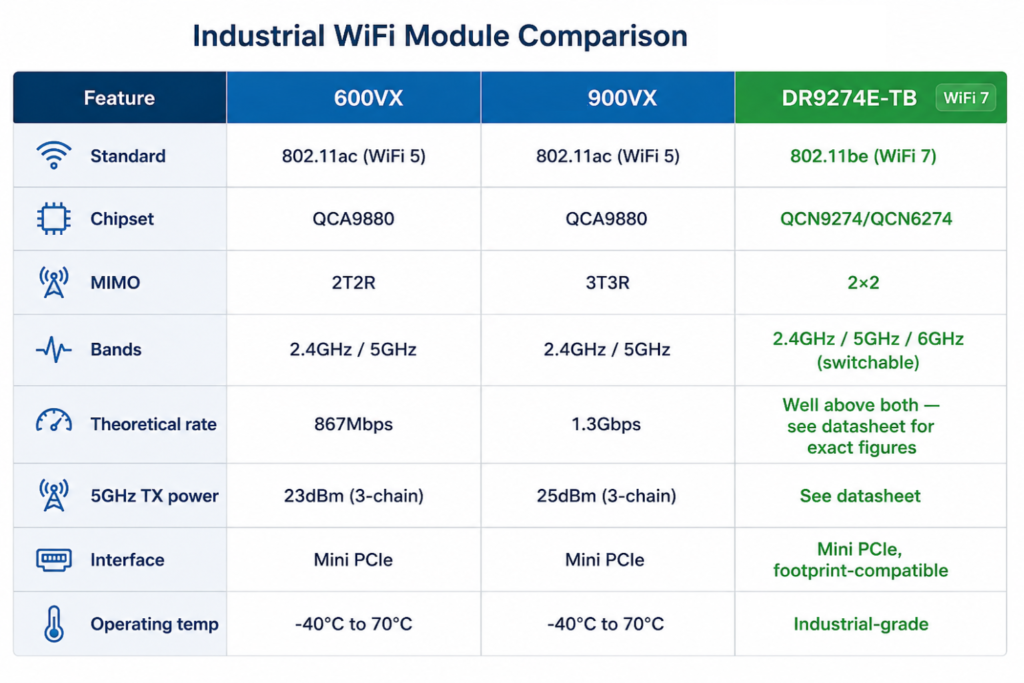
524WiFi 600VX Pro+ and DR600VX are a 2×2 MIMO 802.11ac module — 2T2R, theoretical throughput up to 867Mbps. Two UF.L antenna connectors, 2.4GHz and 5GHz (including 4.9GHz), TX power up to 24dBm/23dBm, Mini PCIe interface, -40°C to 70°C operating range. It’s a small board — 30.0 × 50.9 × 3.2mm — and it’s been a workhorse for cost-sensitive designs that don’t need a third antenna chain.

524WiFi 600VX Pro+ and DR600vx – QCA9880 2X2

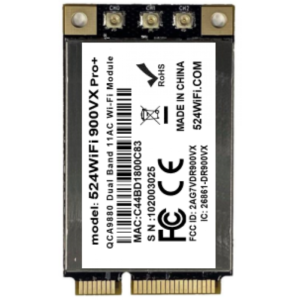
524WiFi 600VX Pro+ and DR900VX are the same chipset, same footprint, same pinout — but 3×3 MIMO instead of 2×2, pushing theoretical throughput to 1.3Gbps and TX power up a couple of dB (26dBm/25dBm) thanks to the extra chain. There’s also a DR900VX-i variant on QCA9890 rated for 85°C, and a DR900VX-4.9 with 4.9GHz support. Because the mechanical and electrical interface is identical to DR600VX, swapping between the two mostly comes down to whether your enclosure has room to route a third antenna.

524WiFi 900VX Pro+ and DR900vx – QCA9890 3X3

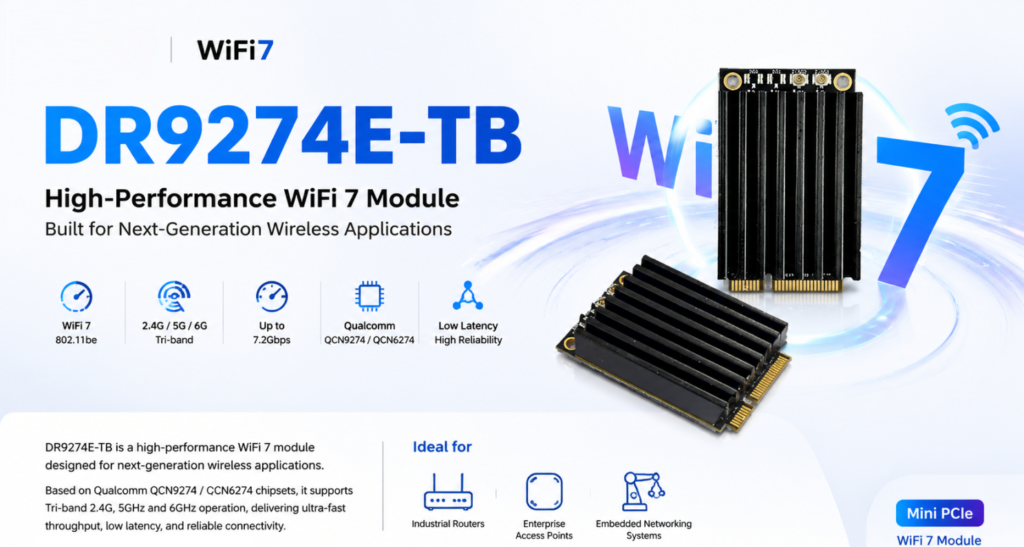
DR9274E-TB is a different generation entirely. It’s built on QCN9274/QCN6274 and supports WiFi 7 (802.11be) across three bands — 2.4GHz, 5GHz, and 6GHz. Worth being precise here: it’s tri-band switchable, meaning the module picks the best band to operate on, not three bands running separate traffic simultaneously. It’s a 2×2 MIMO design, Mini PCIe, and mechanically compatible with existing WiFi 5 module footprints, so it’s aimed at the same kinds of products — industrial routers, enterprise APs, outdoor CPEs and bridges, mesh systems, edge AI platforms — just with more headroom.

Side by side

QCA9880 VS QCN9274

What actually changes

Going from 2T2R to 3T3R (600VX to 900VX) is a fairly straightforward upgrade — one more spatial stream, a bit more throughput, and a bit more stability in multipath environments, since the extra chain gives the radio more to work with. If your enclosure has the space and the budget allows it, 524WiFi 900VX Pro+ is the easy call.

The jump to WiFi 7 is a different kind of change, and it’s not really about raw speed. The number that matters most is 6GHz — an almost entirely clean band with none of the legacy congestion that 2.4GHz and 5GHz have accumulated over a decade of deployments. In a warehouse or factory environment with dozens of APs and client devices fighting for airtime, that alone can matter more than any Mbps figure on a spec sheet. WiFi 7 also brings multi-link operation, which lets a device coordinate traffic across bands rather than being locked to one — though how much of that you actually get depends on chipset support and firmware, so it’s worth checking specifics for your use case rather than assuming every feature is turned on out of the box.

None of this means everyone needs WiFi 7 today. A lot of deployments — point-to-point links, smaller networks, applications without dozens of devices packed into one space — are still perfectly well served by QCA9880. The cases where it’s worth moving now are the ones already running into interference or density problems, or new designs with a long enough runway that the 6GHz advantage will keep paying off for years.

Which one fits your project

If you’ve already built a product around QCA9880 — PCB layout done, drivers sorted, certifications in hand — there’s usually no reason to change anything. 524WiFi 600VX Pro+ and 524WiFi 900VX Pro+ share a footprint and pinout, so you can pick between them based on cost and available antenna space without touching your certification.

If you’re starting a new design with a multi-year lifecycle ahead of it, DR9274E-TB is worth a serious look even though WiFi 7 silicon costs more up front. QCA9880 is an older chipset generation at this point, and long-term sourcing risk tends to creep up as a platform ages. Locking in 6GHz early also means you’re not scrambling to redesign in a couple of years when everyone else has already made the jump.

And if you’re already seeing throughput drop off or latency get jittery once you cross a certain device count — a common story with AMR fleets, multi-camera vision setups, dense AP coverage — that’s usually a clearer signal than any roadmap discussion. Tri-band switching, combined with sensible planning around which traffic goes where, tends to ease that bottleneck in a way a WiFi 5 dual-band design just can’t.

Bottom line

  • Sticking with an existing QCA9880 design, watching cost closely → 524WiFi 600VX or 524WiFi 900VX Pro+
  • New project, long lifecycle, want to be ahead of the spectrum curve → DR9274E-TB
  • Already fighting interference or density issues → DR9274E-TB

Every deployment is a little different, and the right call depends on your device density, antenna space, budget, and how long the product needs to stay in the field. If you want to talk through your specific case, or need test data, samples, or custom development — antenna layout, firmware tuning, OEM/ODM support — reach out info at 524wifi.net .

Posted on

WiFi 7 + TDMA:From Faster Wireless to Smarter Wireless

For years, WiFi innovation has been measured by one simple metric:

How fast can we transmit data?

WiFi 5 brought higher throughput.

WiFi 6 introduced OFDMA and improved efficiency.

WiFi 7 pushed the boundaries further with 320MHz channels, Multi-Link Operation (MLO), and 4096-QAM.

But for industrial networks, outdoor broadband, and mission-critical applications, speed alone is no longer enough.

The next question is:

Can wireless networks become more predictable, more scalable, and easier to manage?

This is where WiFi 7 + TDMA (Time Division Multiple Access) creates a new opportunity.


The Challenge: Traditional WiFi Was Not Designed for Large-Scale Industrial Networks

Traditional WiFi is based on contention mechanisms.

Multiple devices compete for airtime.

This works well for:

  • Homes
  • Offices
  • Public hotspots

But outdoor and industrial deployments face very different challenges:

  • Dozens or hundreds of connected devices
  • Long-distance wireless links
  • High-density IoT terminals
  • Video surveillance traffic
  • Autonomous machines and robots
  • Unstable RF environments

When many clients transmit at the same time, problems appear:

❌ Higher latency

❌ Unpredictable performance

❌ Reduced capacity

❌ Poor scalability

For industrial wireless networks, “fast” is not enough.

The network needs to be smart enough to control airtime resources.


TDMA: Turning Wireless Airtime into a Managed Resource

TDMA introduces scheduled communication.

Instead of allowing every device to compete randomly, the network assigns transmission time slots.

Think of it like a highway:

Traditional WiFi:

-Everyone enters the road whenever they want.

Result: Traffic congestion.

TDMA:

→ Time Slot 1  → Time Slot 2 → Time Slot 3

Result: Predictable traffic flow.

For outdoor PtMP networks, this means:

✅ Better airtime utilization

✅ More stable throughput

✅ Lower latency variation

✅ Higher client capacity

✅ Improved performance at long distances


Why WiFi 7 Makes TDMA Even More Powerful

TDMA itself is not new.

Many wireless technologies have used scheduling mechanisms for years.

The opportunity now is combining TDMA intelligence with the latest WiFi 7 capabilities.

1. Higher Capacity + Better Scheduling

WiFi 7 introduces:

  • 320MHz channel bandwidth
  • Multi-Link Operation (MLO)
  • 4096-QAM modulation

These features increase the available capacity.

TDMA helps intelligently distribute this capacity among multiple users.

Together:

More bandwidth + smarter scheduling = more efficient wireless infrastructure


2. Better Support for Industrial Applications

Modern industrial networks require more than internet access.

They support:

– Autonomous robots

– AI cameras

– Smart factories

– Drones

– Private wireless networks

– Outdoor broadband access

These applications require:

  • Stable latency
  • Predictable performance
  • Reliable connectivity

WiFi 7 + TDMA provides a path toward more deterministic wireless communication.


WiFi 7 + TDMA: A New Opportunity for Outdoor Wireless

For WISP and industrial networking companies, the future is not simply replacing existing wireless technology.

It is about creating a smarter wireless platform.

Applications include:

Outdoor Broadband / PtMP

  • Multi-client deployments
  • Rural broadband
  • Campus networks
  • Smart city connectivity

Industrial Networks

  • Mining
  • Ports
  • Warehouses
  • Transportation systems

Enterprise Wireless Infrastructure

  • Large-scale campuses
  • High-density environments
  • Mission-critical connectivity

From “Wireless Access Point” to “Wireless Infrastructure Platform”

The evolution of wireless networking is moving from:

Faster WiFi

↓

More Efficient WiFi

↓

Smarter and More Predictable Wireless

WiFi 7 provides the bandwidth.

TDMA provides the intelligence.

Together, they enable a new generation of industrial and outdoor wireless solutions.

The future of wireless is not only about transmitting more data.

It is about delivering the right data, to the right device, at the right time.


524WiFi: Building the Next Generation of Industrial WiFi 7 Platforms

At 524WiFi and Wallys, we focus on developing industrial-grade wireless platforms based on Qualcomm networking technologies.

With more than 20 years of wireless R&D experience, Wallys provides:

Qualcomm WiFi 7 Hardware Platforms

Our WiFi 7 platforms are based on advanced Qualcomm chipsets, including:

  • Qualcomm IPQ9574
  • Qualcomm IPQ5332
  • Qualcomm QCN9274/QCN6274 wireless solutions

Supporting next-generation features:

✓ Multi-Link Operation (MLO) ✓ 6GHz WiFi 7 connectivity ✓ 320MHz channels ✓ High-performance multi-radio designsSee content credentials

Article content

Designed for Industrial & Outdoor Applications

Wallys WiFi 7 platforms are designed for customers developing:

Outdoor Wireless Broadband

  • PtP / PtMP networks
  • Rural broadband
  • Campus connectivity
  • Smart city networks

Industrial Wireless

  • Factory automation
  • Robotics communication
  • AI vision systems
  • Autonomous machines

Enterprise Networking

  • High-density environments
  • Managed WiFi infrastructure
  • Private wireless networks

Beyond Hardware: Platform Customization Capability

Different markets have different requirements.

A carrier-grade outdoor wireless product may need:

  • Custom enclosure design
  • High-power RF optimization
  • External antenna solutions
  • PoE integration
  • Industrial temperature design
  • Customized firmware features

Wallys provides OEM/ODM/JDM support, helping wireless solution providers move from concept to production faster.


If your company is developing:

  • Industrial APs
  • Outdoor PtMP systems
  • Wireless broadband solutions
  • Private wireless networks

524WiFi and Wallys can help you build the next generation of WiFi 7 connectivity platforms.

WiFi 7 + TDMA: Moving from faster wireless to smarter wireless infrastructure.

Posted on

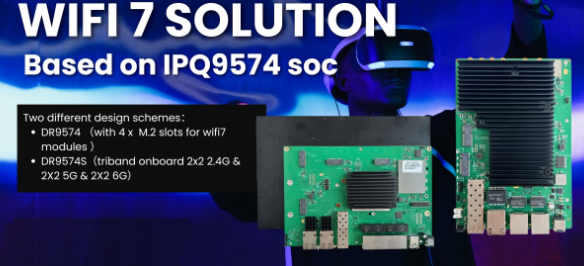
DR9574S: Building WiFi 7 Industrial APs with Qualcomm IPQ9574

The next generation of industrial wireless networks is not only about faster WiFi speeds.

For industrial applications, wireless infrastructure needs to deliver:

  • High-capacity connectivity
  • Reliable performance under heavy traffic
  • Low-latency communication
  • Multi-device scalability
  • Long-term platform stability

This is where WiFi 7 is becoming a key technology for the future of industrial networking.

However, transforming WiFi 7 technology into a reliable industrial product requires more than just a powerful chipset.

It requires a complete hardware platform, optimized RF design, thermal management, and industrial deployment experience.

Introducing DR9574S — A WiFi 7 Industrial AP Platform Powered by Qualcomm IPQ9574

DR9574S is built around the Qualcomm IPQ9574 networking platform, designed for high-performance enterprise and industrial wireless applications.

With advanced WiFi 7 capabilities, DR9574S provides a strong foundation for customers developing:

  • Industrial access points
  • Enterprise WiFi systems
  • Smart factory networks
  • AI edge connectivity solutions
  • Outdoor wireless infrastructure
  • Customized OEM/ODM wireless products
Article content

WiFi7 DR9574S

Why WiFi 7 Matters for Industrial Networks

Traditional WiFi upgrades mainly focus on higher throughput.

WiFi 7 introduces several technologies that improve not only speed, but also network efficiency and reliability.

1. Multi-Link Operation (MLO)

MLO allows devices to use multiple wireless links simultaneously.

Benefits include:

  • Higher throughput
  • Better connection stability
  • Improved latency performance
  • More reliable wireless communication

For industrial environments with robots, cameras, sensors, and mobile devices, maintaining stable connectivity is often more important than peak speed.

2. 320MHz Channel Support

WiFi 7 doubles channel bandwidth compared with previous generations.

This enables:

  • Higher wireless capacity
  • Better support for high-bandwidth applications
  • More efficient network utilization

Applications such as industrial vision inspection, AI cameras, and real-time data transmission can benefit from this increased capacity.

3. 4096-QAM

Higher-order modulation improves data efficiency, allowing more data transmission within the same spectrum conditions.

This helps maximize wireless performance in modern high-density networks.


Built for Industrial Product Development

DR9574S is designed for companies that need a reliable WiFi 7 hardware foundation without starting from zero.

Wallys provides:

Hardware Platform

  • Qualcomm IPQ9574 platform
  • WiFi 7 architecture
  • High-performance CPU processing
  • Enterprise-level wireless capability
  • Flexible hardware customization

Development Support

Our engineering team supports:

  • Hardware customization
  • Antenna optimization
  • Thermal design
  • Firmware integration
  • OEM/ODM/JDM projects

Helping customers accelerate their product development cycle.


WiFi 7 + Industrial AI: The Next Connectivity Era

As AI moves from the cloud to the edge, wireless networks are becoming a critical infrastructure component.

Future applications such as:

  • Autonomous mobile robots (AMR)
  • Industrial automation
  • AI vision systems
  • Smart factories
  • Drones
  • Edge computing devices

will require wireless networks that are faster, more stable, and more intelligent.

WiFi 7 is not just an upgrade in speed.

It is becoming the foundation for next-generation industrial connectivity.


Build Your Next WiFi 7 Product with 524WiFi

Whether you are developing an industrial AP, enterprise wireless solution, or customized networking product, DR9574S provides a powerful Qualcomm-based platform to accelerate your innovation.

Contact 524WiFi to explore your next WiFi 7 project!

Posted on

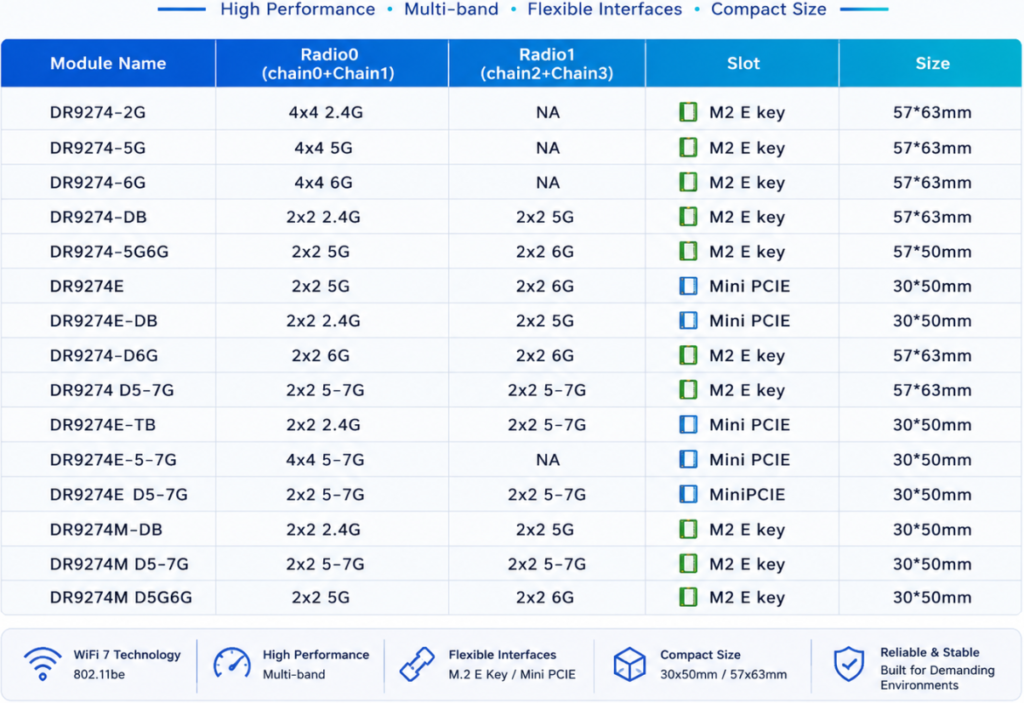
List of our Qualcomm WiFi 7 modules – new populer versions !

Module NameBDwlanRadio0
(chain0+Chain1)
Radio1
(chain2+Chain3)
SlotStatusNote
DR9274-2GB00014×4 2.4GNAM2 E keyavailable 
DR9274-5GB00024×4 5GNAM2 E keyavailableB0015
DR9274-6GB00044×4 6GNAM2 E keyavailableB0016
DR9274-DBB10032×2 2.4G2×2 5GM2 E keyavailable 
DR9274-5G6GB10062×2 5G2×2 6GM2 E keyavailable 
DR9274-5GKB00114×4 5GNAM2 E keyavailablebdwlanKCT.b0002
DR9274-6GKB00134×4 6GNAM2 E keyavailablebdwlanKCT.b0004
DR9274EB10182×2 5G2×2 6GMini PCIEavailableNew bdwlan
DR9274E-DBB10172×2 2.4G2×2 5GMini PCIEavailableNew bdwlan
DR9274-D6GB10192×2 6G2×2 6GM2 E keyavailableNew bdwlan
DR9274 D5-7GB100d2×2 5-7G2×2 5-7GM2 E keyavailableNew bdwlan
DR9274E-TBB100e2×2 2.4G2×2 5-7GMini PCIEComing soonNew bdwlan
DR9274E-5-7G 4×4 5-7GNAMini PCIEComing soon 
DR9274E D5-7G 2×2 5-7G2×2 5-7GMini PCIEComing soon 

Why Wi-Fi 7 Matters for Robotics

Wi-Fi 7 introduces several capabilities that directly address the requirements of next-generation robotics.

1. Higher Throughput for AI Data Streams

With features such as:

  • 320MHz channel bandwidth
  • 4096-QAM modulation
  • Multi-Link Operation (MLO)

Wi-Fi 7 significantly improves wireless capacity.

This enables robots to transmit and receive more data, supporting applications such as:

  • Real-time HD/4K video analysis
  • Multi-camera perception
  • Digital twin visualization
  • Remote robot operation

For industrial environments, higher bandwidth means more robots can operate simultaneously without creating network bottlenecks.


2. Lower Latency for Real-Time Control

Latency is critical for autonomous systems.

A delayed wireless connection can impact:

  • Robot navigation
  • Collision avoidance
  • Remote control
  • Human-machine collaboration

Wi-Fi 7’s Multi-Link Operation allows devices to utilize multiple frequency bands simultaneously, improving connection stability and reducing congestion.

For mobile robots operating in complex environments, maintaining a consistent connection is often more important than achieving maximum peak speed.


3. Better Connectivity in High-Density Environments

Future factories and warehouses may contain:

  • Hundreds of autonomous mobile robots (AMRs)
  • AI cameras
  • Industrial sensors
  • Wireless controllers
  • Edge computing nodes

A wireless infrastructure designed only for consumer environments may not be enough.

Industrial Wi-Fi requires:

  • Stable roaming
  • RF optimization
  • Enterprise-level management
  • Long-term hardware reliability

Wi-Fi 7 provides a stronger foundation for these high-density deployments.


Edge AI + Wi-Fi 7: Bringing Intelligence Closer to Machines

While cloud computing remains important, many robotic applications are moving toward edge AI.

Why?

Because robots need:

  • Faster response times
  • Reduced dependence on cloud connectivity
  • Better privacy protection
  • More reliable operation in industrial environments

Edge AI platforms process data locally, allowing robots to make decisions in real time.

But edge intelligence requires a powerful communication layer.

The relationship is simple:

Edge AI provides the intelligence. Wi-Fi 7 provides the nervous system.

Together, they enable robots to:

  • Understand their environment faster
  • Coordinate with other machines
  • Adapt to changing conditions
  • Operate autonomously at scale

Beyond Speed: Industrial Wireless Requires Reliability

A common misunderstanding is that the future of industrial wireless is simply about faster Wi-Fi.

In reality, industrial applications require much more:

Reliable roaming

Mobile robots need seamless handover between access points while moving across large facilities.

Stable performance under interference

Factories often contain metal structures, machinery, and RF noise.

Long-term platform support

Industrial customers expect hardware platforms that can operate reliably for years.

Flexible deployment options

Different environments require different designs:

  • Indoor industrial APs
  • Outdoor wireless bridges
  • Embedded Wi-Fi modules
  • Custom router platforms

The Future: AI Robots Need AI-Ready Networks

As robotics continues to evolve, wireless connectivity will become a strategic infrastructure layer.

The next generation of robots will not work alone.

They will communicate with:

  • Other robots
  • Edge servers
  • AI vision systems
  • Factory automation platforms
  • Cloud management systems

A powerful AI model without reliable connectivity cannot deliver its full value.

The future belongs to systems where:

AI intelligence + Edge computing + Advanced wireless connectivity work together.

Wi-Fi 7 is not just a faster wireless standard.

It is becoming the communication backbone for intelligent machines.


Building the Industrial Wireless Foundation for Tomorrow

At 524WiFi and Wallys, we are exploring the next generation of industrial wireless platforms by combining:

  • Qualcomm-based Wi-Fi 6 / Wi-Fi 7 solutions
  • Industrial-grade router boards
  • High-performance wireless modules
  • Edge AI application platforms
  • OEM/ODM customization capability

Our goal is to help robotics companies, AI developers, and industrial solution providers build reliable wireless infrastructure for the intelligent world.

Because the future of robotics will not only depend on smarter machines.

It will depend on how well those machines can communicate.

Posted on

The Wi-Fi 7 Revolution: Beyond Speed to Industrial Reliability and MLO

In the world of Industrial IoT, legacy wireless standards are more than just slow—they are bottlenecks. In high-density environments, waiting for a single free channel is a luxury enterprises can no longer afford. This is why Wi-Fi 7 MLO (Multi-Link Operation) is the true game-changer.

At 524WiFi, we view Wi-Fi 7 not just as a speed upgrade, but as an infrastructure overhaul. Imagine a congested highway: MLO doesn’t just increase the speed limit; it adds multiple lanes across 5GHz and 6GHz bands simultaneously, ensuring data flows without interruption.

We recognize that many of our clients are at a crossroads: you need Wi-Fi 7 performance but are locked into existing Mini PCIe architectures.

To bridge this gap, 524WiFi has introduced the AW7990-NPD, the world’s first Wi-Fi 7 BE3600 Mini PCIe module. Powered by the MediaTek MT7990 chipset, this module is specifically engineered to bring enterprise-grade connectivity to industrial robotics, edge computing, and security gateways—without requiring a total system overhaul.

Technical Core & Strategic Advantages :

  • Sub-1GHz Efficiency : Operating in the Sub-1GHz spectrum to ensure superior wall penetration and minimized interference.
  • 1KM+ Transmission : Achieves long-range connectivity exceeding 1 kilometer, ideal for remote sensor monitoring and agricultural IoT.
  • Plug-and-Play Integration : A versatile USB interface that simplifies the addition of Wi-Fi HaLow capabilities to existing gateways, PCs, or embedded controllers.
  • IEEE 802.11ah Standard : Optimized for high-density IoT networks, supporting thousands of nodes with significantly lower power consumption than traditional Wi-Fi.

Why the AW7990-NPD is a Strategic Asset:

  • Extreme Throughput : Leveraging BE3600 dual-band concurrency and 4096-QAM for unprecedented data density.
  • Deterministic Latency : MLO technology ensures a stable, “wire-like” connection even in the most crowded RF environments.
  • Industrial Heritage : A standard Mini PCIe form factor designed for the rigors of high-performance  industrial applications.

We know the industry’s open secret: great hardware is often crippled by poor drivers. At AsiaRF, we don’t just build modules; we build development platforms.

Our MediaTek-powered Wi-Fi 7 solutions are highly optimized for Linux and OpenWrt. We provide the robust software foundation your custom Enterprise APs demand, so your engineering team can stop debugging drivers and start building legendary systems.

Our growth is fueled by a single principle: Stability is everything. We are committed to being the reliable partner you need for the next generation of industrial deployment.

🔗 Explore 𝗼𝘂𝗿 𝗪𝗶-𝗙𝗶 𝟳 𝗰𝗼𝗹𝗹𝗲𝗰𝘁𝗶𝗼𝗻

Posted on

524WiFi 𝑨𝑾7990-𝑵𝑷𝑫: MediTatek Filogic 6 MT7990 𝑾𝒊-𝑭𝒊 7 𝑴𝒊𝒏𝒊 𝑷𝑪𝑰𝒆 𝑴𝒐𝒅𝒖𝒍𝒆


Infrastructure Preservation: Upgrade to 802.11be Without a PCB Redesign

In industrial computing, the lifecycle of your platform is critical. While the industry pivots to Wi-Fi 7, transitioning often necessitates a full-scale hardware overhaul—until the introduction of the 524WiFi AW7990-NPD Mediatek based module.

Technical Core & Strategic Advantages :

  • MediaTek Filogic 600 (MT7990) : Delivers BE3600 dual-band concurrent (DBDC) operation.
  • 4096-QAM Modulation : Achieves a 20% increase in peak data rates compared to Wi-Fi 6.
  • Multi-Link Operation (MLO) : Ensures deterministic latency and link reliability in congested environments.
  • Drop-In Upgrade : Bypasses R&D costs and time-to-market delays by utilizing the standard Mini PCIe form factor.

Optimized for Mission-Critical Verticals :

  • Industrial Robotics : High-bandwidth telemetry for AMRs/AGVs.
  • Edge AI Nodes : Rapid data synchronization for Smart Factory 4.0.
  • Security Gateways : High-throughput processing without thermal throttling.

AW7990-NPD: High-Performance Wi-Fi 7 BE3600 AP Module with MediaTek MT7990AN

AW7990-NPD is an Wi-Fi 7 AP module BE3600 by MediaTek MT7990AN chipset supports Wi-Fi 7 technology and feature IEEE802.11 a/ b/ g/ n/ ac/ ax/ be compliant, 2.4GHz 2×2, 5GHz
3×3 2ss BE3600 Wi-Fi subsystem. The MT7990AN offers feature-rich wireless connectivity at high standards and delivers reliable, cost-effective throughput from an extended distance.

The optimized Wi-Fi baseband algorithms provide superb performance. The intelligent MAC design deploys a highly efficient offload engine and hardware data processing accelerators,
which fully offload Wi-Fi task of the host processor. The MT7976CN is designed to support standard-based features in the areas of security, quality of service, and international regulations, giving end users the greatest performance at any time and in any circumstances.

Pre-certified with CE / FCC / IC, this solution helps accelerate product deployment while lowering certification cost and complexity.

Features

WLAN

  • Wi-Fi compliant
  • IEEE 802.11a, b, g, n, ac, ax, be compliant
  • 2.4GHz 20 and 40 MHz, 2×2
  • 5GHz: 20, 40, 80 and 160 MHz, 3×3 2ss
  • Dual-Band Dual Concurrent (DBDC) iFEM
  • Supports up to 4096-QAM
  • Data rate of up to 688Mbps for 40MHz channel in 2.4Ghz and 2882Mbps for 160MHz in 5GHz mode
  • Integrated power detector to support per packet Tx power control
  • Multi-user multiple input multiple output (MU-MIMO) for Tx and Rx
  • Multi-user Orthogonal Frequency-Division Multiple Access (MU-OFDMA) for Tx and Rx
  • Support STBC, LDPC, Tx beamformer and Rx beamformee
  • Support greenfield mode, mixed mode, and legacy mode

Platform

  • 32bit RISC-V MCU for Wi-Fi protocol and Wi-Fi offload
  • Embedded SRAM and ROM
  • PCIe3.0 interface

Security

  • WFA, WPA, WPA2, WPA3 personal, WPS 2.0

QoS

  • WFA WMM and WMM-PS

Standard

ChipsetMT7990AN with MT7976CN
Memory8M byte
Host InterfaceMini PCIe
Operating VoltageDC 3.3V ± 5%
Power Consumption11.5W
Wireless2.4GHz 2T2R 802.11b/g/n/ac/ax/be5GHz 3T3R 2ss 802.11a/n/ac/ax/be
Frequency Range2.4GHz: 2.412~2.472GHz5GHz: 5.15~5825GHz
Channel Spectrum WidthsSupports 20/40MHz at 2.4GHzSupports 20/40/80/160MHz at 5GHz
AntennaExternal Antenna connector (IPEX) x3
Operating SystemLinux
Environmental TemperatureOperating:-10°C to 70°C, Storage:-20°C to 90°C
Environmental HumidityOperating: 10% to 90%, Storage: Max. 90%
Dimensions (mm)30(W)*51(L)*5.1(H)mm
WeightTBD
CertificationTBD

Package with Heatsink 30x40x25mm Aluminum material

Power consumption maximum is 9W, average is 4 – 8W.
Main board Power Supply design please provide 3.3V 3A, minimum 3.3V 2.5A.

Additional information

Weight0.0255 kg
Dimensions9.5 × 6.5 × 1.5 cm