Posted on

How AP Controllers Simplify Industrial Wireless Network Management

In industrial environments, managing a wireless network is no small feat. The complex layout, high device density, and diverse use cases make ensuring seamless connectivity a challenging task. Fortunately, AP (Access Point) Controllers offer a centralized solution to manage, optimize, and secure industrial wireless networks efficiently.


The Complexity of Industrial Wireless Network Management

Industrial wireless networks must contend with a host of challenges, including:

  • High Device Density: Hundreds or even thousands of devices may need to connect simultaneously.
  • Dynamic Environments: Equipment relocation and layout changes require adaptive network configurations.
  • Security Risks: Critical operations demand robust security to prevent unauthorized access.

Manual management of individual APs becomes impractical in such scenarios. This is where AP controllers come in, providing a centralized and intelligent approach to network management.


Core Features of AP Controllers

AP controllers revolutionize network management with the following key functionalities:

1. Centralized Management

AP controllers enable administrators to manage multiple APs from a single interface.

  • Configure SSIDs, encryption settings, and channels simultaneously.
  • Simplify large-scale network deployments and reduce manual effort.

2. Wireless Optimization

Enhancing performance and reliability is a priority in industrial networks. AP controllers achieve this through:

  • Automatic Channel Selection: Reduces interference by dynamically assigning optimal channels.
  • Power Adjustment: Optimizes coverage by adjusting transmission power based on environmental conditions.
  • Load Balancing: Distributes devices evenly across APs to prevent overloads.(concept feature)

3. Enhanced Security Management

Industrial operations require stringent security protocols. AP controllers deliver:

  • Access Control: Employ whitelists, blacklists, or MAC-based ACLs to restrict access.
  • VLAN Isolation: Separate production, monitoring, and management traffic to ensure data integrity.
  • Wireless Firewalls: Detect and block unauthorized attempts to access the network.

Applications of AP Controllers

The versatility of AP controllers makes them essential in various industrial scenarios:

Factory Floors and Production Lines

  • Support seamless connectivity for IoT devices, sensors, and automated machinery.
  • Ensure low-latency communication for real-time monitoring and control.

Smart Cities and Public WiFi

  • Manage high-density user connections in public areas.
  • Optimize performance for diverse applications like public safety and urban planning.

Video Surveillance and Security Systems

  • Enable stable connections for high-resolution cameras.
  • Facilitate quick data transmission for immediate threat detection and response.

Why Wallystech’s AP Controllers Stand Out

Wallystech offers industry-leading AP controllers that excel in performance and adaptability:

1. Powered by IPQ6010

Our AP controllers leverage the Qualcomm IPQ6010 platform, providing robust performance and scalability for demanding industrial applications.

2. Simplified Expansion

With plug-and-play capabilities, new APs can be quickly integrated into the existing network. This reduces the time and cost associated with network upgrades.

3. Proactive Monitoring and Fault Management

Real-time monitoring detects and addresses AP issues promptly. Automatic fault recovery ensures network resilience in case of failures.

Posted on

Enter Target Wake Time – TWT – the unsung hero of wireless communication!

Ever wondered how modern WiFi networks manage to keep countless devices connected without a hitch? Enter Target Wake Time (TWT) — the unsung hero of wireless communication!

 Here’s how it works:TWT schedules when devices should wake up and communicate, reducing interference and conserving energy. The result? Faster, more efficient networks and smoother IoT operations.

At 524WiFi, we’re pushing the boundaries of WiFi 7 innovation with our cutting-edge wireless cards. Our WiFi 7 cards support customization and are compatible with a variety of motherboard platforms, making them perfect for industrial and enterprise applications.

Struggling with High-Density Networks? WiFi 7 on Ubuntu Has the Answer

In the fast-evolving world of wireless technology, staying ahead means embracing innovation. WiFi 7, the latest generation of wireless networking, is not just an incremental upgrade—it’s a game changer. Combined with the flexibility and reliability of Ubuntu, deploying WiFi 7 network cards can open doors to unparalleled performance, adaptability, and security. Let’s explore how this powerful duo can address the growing demands of modern networks.

How WiFi 7 Network Cards on Ubuntu Can Future-Proof Your Networking Needs

In the fast-evolving world of wireless technology, staying ahead means embracing innovation. WiFi 7, the latest generation of wireless networking, is not just an incremental upgrade—it’s a game changer. Combined with the flexibility and reliability of Ubuntu, deploying WiFi 7 network cards can open doors to unparalleled performance, adaptability, and security. Let’s explore how this powerful duo can address the growing demands of modern networks.

Meeting High-Performance Networking Demands

  1. High-Speed Local Area Networks (LANs) Enterprises require robust and ultra-fast LANs to handle data-intensive operations. WiFi 7’s Multi-Link Operation (MLO) and wider channel bandwidths deliver a seamless, high-speed experience for local connections.
  2. High-Speed Wireless Bridging Connecting remote sites without sacrificing performance is a critical challenge. WiFi 7 enables stable, high-speed wireless bridges, making it ideal for industries like smart cities, ports, and remote offices.
  3. Optimizing Networks in High-Density Scenarios Managing heavy traffic in environments like stadiums, campuses, and smart factories demands superior technology. WiFi 7’s advanced features, such as improved spectral efficiency and enhanced MU-MIMO capabilities, ensure optimal performance even under peak loads.

Why Ubuntu?

Ubuntu, as an open-source operating system, offers unparalleled flexibility for developers and enterprises. Its active community support, security features, and adaptability make it the ideal platform for integrating WiFi 7 network cards. Together, they create an ecosystem where innovation thrives and networks operate at their full potential.

Advantages of WiFi 7 Network Cards on Ubuntu

  • Performance: Exceptional speeds and reduced latency redefine network efficiency.
  • Flexibility: Open-source compatibility allows tailored solutions for unique use cases.
  • Security: Enhanced encryption and network integrity to protect sensitive data.

Why 524WiFi ?

For 22 years, 5254WiFi and Wallys R&D teams have specialized in WiFi protocols, continuously innovating to meet the needs of industrial and enterprise clients. Whether you’re building cutting-edge WiFi 7 solutions or optimizing existing networks, our team is here to support your goals.

Posted on

Is Your Mining Operation Struggling with Connectivity? Discover the IPQ4019 Solution!

In today’s fast-paced mining industry, reliable connectivity is crucial for operational efficiency, safety, and productivity. However, many mining operations face significant challenges when it comes to maintaining stable and robust wireless communication in remote and rugged environments. If you’re grappling with connectivity issues, it’s time to consider a solution that can meet your unique needs – the DR 4029 / 4019 Wi-Fi 5 Router Board from Wallys Communications, powered by the IPQ4019 chipset.

DR4019SOM(Left),DR4019(Right)

The Challenge of Connectivity in Mining

Mining operations often take place in isolated locations, where traditional wired connections are impractical. The reliance on wireless networks means that any connectivity disruption can lead to delays, safety hazards, and financial losses. Factors such as rugged terrain, mobile equipment, and the need for IoT devices can complicate this further, highlighting the importance of a robust wireless solution.

Introducing the DR4019 Wi-Fi 5 Router Board

Wallys Communications is proud to present the DR4019, a high-performance, cost-effective Wi-Fi 5 router board specifically designed to address the connectivity challenges faced in the mining sector. Here’s why the DR4019, based on the IPQ4019 solution, could be the game-changing answer for your mining operations:

High Performance

The DR4019 is powered by the Qualcomm IPQ4019 chipset, ensuring reliable and robust wireless connectivity even in demanding environments. With high data throughput and low latency, you can trust that your communication systems will remain operational when it matters most.

Cost-Effective Solution

Designed with budget-conscious customers in mind, the DR4019 offers exceptional value without compromising on quality. It provides a reliable connectivity solution that won’t break the bank, making it an ideal choice for mining operations of all sizes.

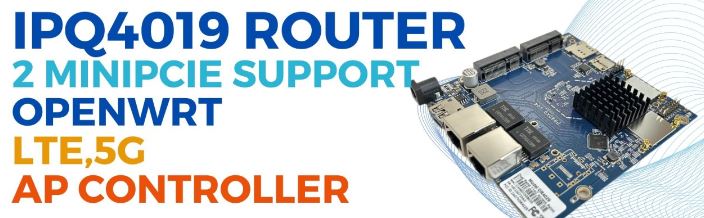
DR4019,LTE,5G,OPENWRT,AP,IPQ4019

Advanced Features

The DR 4029 / 4019 comes packed with advanced features that set it apart:

  • OpenWrt 23.05 Support: This latest firmware enables unparalleled customization and flexibility, allowing you to tailor the router’s performance to your specific needs.
  • Mesh Networking Capabilities: This feature facilitates extended, seamless coverage across large mining sites, ensuring connectivity even in the most expansive operations.
MESH FUNCTION
  • Seamless Roaming: With the ability to maintain uninterrupted connectivity for mobile devices and equipment, the DR4019 enhances overall operational efficiency.

Perfect for Mining Applications

The DR 4029 / 4019 is built to meet the unique demands of the mining industry. It provides consistent and reliable connectivity for:

  • IoT devices used in monitoring and managing mining operations.
  • Secure communication networks that protect the safety of personnel.
  • Worker safety and monitoring systems that ensure the well-being of your team.

Partnering for Success

At Wallys Communications, we combine cutting-edge technology with industry expertise to deliver solutions that empower our customers. The DR 4029 / 4019 is not just a router; it’s your trusted partner for enhanced connectivity in mining, leveraging the powerful IPQ4019 solution.

Posted on

How to Upgrade the Wallys DR4019 Router Board to OpenWrt 23.05 – A Step-by-Step Guide

How to Upgrade the Wallys DR4019 Router Board to OpenWrt 23.05 – A Step-by-Step Guide for Industrial Networks

In the world of industrial WiFi, staying ahead of the curve is key to ensuring your network operates at peak efficiency. That’s why we’re excited to share a new tutorial on upgrading the Wallys DR4019 router board to the latest OpenWrt 23.05 firmware.

Here’s what you’ll learn in the video:

  1. Hardware Setup: The first step is ensuring you have all the required components for the upgrade, including your Wallys DR4019 router board, Ethernet cable, and UART cable. We’ll walk you through the setup to get everything ready for the firmware flash.
  2. Loading the Firmware: Once you’re set up, we guide you through the process of loading the latest OpenWrt 23.05 firmware via TFTP. This simple process ensures your router is ready to take advantage of the latest features.
  3. Verifying the Upgrade: After rebooting, we show you how to check that the firmware has been successfully installed. You’ll learn how to access the updated OpenWrt interface and ensure everything is running smoothly.

Stay Ahead of the Game

This tutorial simplifies the upgrade process for you, helping you stay ahead with the latest technology. If you’re looking for customized industrial WiFi solutions or have any hardware inquiries, feel free to reach out to us at [email protected].

Don’t Miss Out on Our Next Tutorial!

In our upcoming video, we’ll dive deeper into the DR4019’s Mesh capabilities and test its performance across multiple devices. Be sure to follow us for more insights and updates!

Watch the video now to upgrade your DR4019 router board and unlock the full potential of your industrial wireless network!

Posted on

QCN9274 vs QCN6274 -How Does 320MHz Bandwidth in the 6GHz Band Improve Data Transfer Speeds Compared to Previous WiFi Generations?

How Does 320MHz Bandwidth in the 6GHz Band Improve Data Transfer Speeds Compared to Previous WiFi Generations?

The world of wireless technology is rapidly evolving, and with the introduction of WiFi 7, we are entering a new era of high-speed, low-latency wireless connectivity. One of the standout features of WiFi 7, also known as 802.11be, is its support for a 320MHz channel width in the 6GHz band, doubling the 160MHz width available in WiFi 6E. This significant increase in bandwidth directly translates into faster data transfer rates and improved network performance. In this article, we will explore how this enhanced bandwidth in the 6GHz band boosts speeds and why WallysTech’s DR9274-6G module, equipped with Qualcomm’s latest QCN9274 and QCN6274 chips, is perfectly suited to take advantage of this technology.

Technical Features of the DR9274-6G

The DR9274-6G is a high-performance wireless network card designed for modern high-bandwidth, low-latency applications. It is fully compatible with the latest WiFi 7 (802.11be) standard, which offers substantial improvements over previous WiFi generations, particularly when it comes to speed and reliability.

1. WiFi 7 Standard Support

WiFi 7 offers several key advancements over its predecessor, WiFi 6E:

  • Higher Bandwidth Support: The channel width in WiFi 7 is increased to 320MHz, doubling the capacity from WiFi 6E’s 160MHz. This expanded bandwidth enables faster data transfer rates by allowing more data to be transmitted at once.
  • Multi-Link Operation (MLO): WiFi 7 introduces MLO technology, which aggregates multiple frequency bands into a single connection. This improves both bandwidth and connection reliability.
  • Enhanced 4K QAM: WiFi 7 supports 4096-QAM (Quadrature Amplitude Modulation), significantly increasing the efficiency of data transmission compared to the 1024-QAM used in WiFi 6E. This leads to better data throughput, especially in high-demand environments.

2. Cutting-Edge Chipset

The DR9274-6G uses Qualcomm’s QCN9274 and QCN6274 chips, which offer several advanced features:

  • 4×4 MU-MIMO: This technology improves the module’s ability to handle multiple devices simultaneously, providing stable connections even in high-density environments.
  • Efficient Signal Processing: These chips feature advanced signal processing capabilities, reducing latency and ensuring stable connections in challenging conditions.
  • Power Efficiency: The DR9274-6G is designed for low power consumption, making it ideal for long-term deployments in industrial, IoT, and smart city applications.

3. Modular Design and Interfaces

The DR9274-6G is designed with flexibility in mind. It features an M.2 connector and supports PCI Express 3.0, making it easy to integrate into a wide range of devices. It also offers a choice of UFL or MMCX antenna interfaces, providing options for customization based on the application.

DR9274-6E 4X4 QCN9074 QCN9024 WIFI7

Application Scenarios

The DR9274-6G is well-suited for various use cases across different sectors. Its high bandwidth and low latency make it ideal for demanding applications:

  • Home and Business Networks: In homes, this network card offers ultra-fast wireless connections, supporting bandwidth-heavy activities like 4K/8K video streaming and online gaming. In business environments, it ensures stable and fast connections for numerous devices, making it ideal for high-density deployments such as conference rooms or large offices.
  • Industrial Internet of Things (IIoT): Industrial applications demand reliable, low-latency connectivity, and the DR9274-6G delivers just that, making it perfect for complex networking needs in IIoT environments.
  • Smart Cities and Public Spaces: Public WiFi hotspots and smart city deployments require support for many concurrent devices. The DR9274-6G, with its multi-band support and MU-MIMO technology, ensures stable connections even in high-traffic areas like public transportation hubs and city centers.
DR9274-6G

Advantages of WiFi 7

The leap from WiFi 6E to WiFi 7 brings numerous benefits to both individual users and large-scale network deployments:

  • Greater Channel Bandwidth (320 MHz): With double the bandwidth of WiFi 6E, WiFi 7 enables significantly faster data transfer rates, improving overall network performance.
  • Multi-Link Operation (MLO): This feature allows WiFi 7 devices to use multiple frequency bands for data transmission, which enhances both speed and connection stability.
  • Enhanced QAM (4096-QAM): The higher modulation density in WiFi 7 means better data efficiency, leading to faster, more reliable wireless communication.

Why 524WiFi’s DR9274-6G?

DR9274-6G wireless network card is at the forefront of WiFi 7 technology. Based on Qualcomm’s powerful QCN9274 and QCN6274 chips, this module fully supports the latest WiFi 7 standard, offering significant advantages in terms of bandwidth, latency, and device connectivity. Whether deployed in homes, businesses, industrial environments, or public spaces, the DR9274-6G ensures robust and stable network performance.

As WiFi 7 continues to gain traction and become the new standard in wireless communication, the DR9274-6G is poised to play a pivotal role in high-performance network deployments.

Posted on

QCA9880 or QCA9882: The Wi-Fi Showdown You Need to Know

QCA9880 vs QCA9882: A Comprehensive Comparison of Qualcomm-Atheros Wi-Fi Chipsets for Industrial and Enterprise Applications

In today’s rapidly evolving wireless communication landscape, selecting the right Wi-Fi chipset can make a significant difference in the performance and reliability of a network. Qualcomm-Atheros, a leader in wireless technology, offers a range of Wi-Fi chipsets tailored for different applications. Among these, the QCA9880 and QCA9882 are two highly-regarded chipsets known for their strong performance and versatility. But which one is the best fit for your needs? In this article, we will break down the key differences between these two chipsets, their technical features, and their ideal applications.

1. Introduction to QCA9880 and QCA9882

  • QCA9880: This high-end Wi-Fi chipset supports the 802.11ac standard and features 3×3 MIMO technology, enabling higher throughput and broader coverage. It is ideal for applications where performance and robust connectivity are critical, such as enterprise-grade routers, access points, and wireless gateways.
  • QCA9882: Positioned as a cost-effective solution, the QCA9882 also supports the 802.11ac standard but uses a 2×2 MIMO configuration. While offering slightly lower throughput than the QCA9880, its compact design and energy-efficient operation make it suitable for embedded systems, industrial devices, and smaller-scale networking applications.

2. Key Technical Specifications

Key Technical Specifications

3. Performance Comparison: QCA9880 vs QCA9882

MIMO Technology

  • QCA9880 is equipped with 3×3 MIMO (Multiple Input Multiple Output) technology, allowing it to transmit and receive data on three spatial streams simultaneously. This setup is especially useful in environments with high device density, such as large office buildings or public spaces, where the demand for reliable, high-speed Wi-Fi is constant. The ability to handle multiple streams means greater bandwidth and less interference, which translates into a superior user experience.
  • QCA9882, on the other hand, uses a 2×2 MIMO configuration. While this is more than adequate for smaller networks or embedded devices, it does not offer the same level of performance as the QCA9880. However, its reduced complexity makes it ideal for environments where cost, power consumption, and space are more critical considerations, such as in IoT devices or compact industrial gateways.

Dual-band Operation

Both QCA9880 and QCA9882 support dual-band operation on the 2.4GHz and 5GHz frequency bands. The 2.4GHz band is commonly used for longer-range communications, while the 5GHz band provides faster data transfer speeds over shorter distances. This flexibility ensures that both chipsets can be used in a variety of scenarios, allowing devices to switch between frequency bands based on network demand and interference.

Data Rates

  • QCA9880 supports data rates of up to 1.3 Gbps, making it an excellent choice for high-bandwidth applications such as video streaming, online gaming, or large data transfers. The 3×3 MIMO configuration ensures that it can handle multiple simultaneous connections without a dip in performance, making it ideal for enterprise-level networks.
  • QCA9882, with its 2×2 MIMO configuration, supports data rates of up to 867 Mbps, which is still a significant improvement over older Wi-Fi standards but not quite as fast as the QCA9880. For smaller-scale applications, such as smart industrial devices or IoT gateways, this data rate is more than sufficient.

4. Core Applications and Use Cases

QCA9880: High-performance Wireless Networking

Due to its powerful 3×3 MIMO capabilities and high data rates, QCA9880 is well-suited for environments that require robust, high-speed wireless communication, including:

  • Enterprise networks: QCA9880 is ideal for use in enterprise-level access points (APs) and wireless gateways where multiple devices need to connect simultaneously without compromising speed or reliability.
  • Public Wi-Fi hotspots: Its ability to manage high-density device environments makes it perfect for deployment in public spaces like shopping malls, airports, and stadiums.
  • Video streaming and gaming: With its high throughput, the QCA9880 can handle bandwidth-heavy applications such as 4K video streaming and online gaming with minimal latency.

QCA9882: Embedded Systems and Industrial IoT

The QCA9882 is designed for more specialized use cases where power efficiency and space optimization are critical. Some typical applications include:

  • Industrial IoT (IIoT): In environments such as factories or remote sensor networks, the QCA9882’s compact design and reliable performance are perfect for maintaining stable wireless connections across devices in challenging conditions.
  • Embedded systems: For products like industrial gateways or compact routers, the QCA9882 offers a cost-effective, low-power solution that still delivers high-speed 802.11ac Wi-Fi performance.
  • Small and medium businesses (SMBs): QCA9882 can be integrated into networking products for SMBs that require a balance between performance and cost, ensuring reliable Wi-Fi without the need for enterprise-grade features.

5. Choosing the Right Chipset for Your Needs

When choosing between QCA9880 and QCA9882, the decision ultimately depends on the specific requirements of your application:

  • QCA9880 is the better choice for high-performance, enterprise, or high-density networking environments. Its 3×3 MIMO configuration and high data rates make it a powerful solution for demanding use cases.
QCA9880 VS QCA9882
  • QCA9882 is ideal for applications where space, power consumption, and cost are critical considerations, such as in industrial IoT and embedded systems.
QCA9880 VS QCA9882

6. Conclusion

Both the QCA9880 and QCA9882 from Qualcomm-Atheros are excellent Wi-Fi chipsets that cater to different market segments. The QCA9880 excels in high-performance networking scenarios, while the QCA9882 is a perfect fit for cost-conscious applications with lower power requirements. Whether you’re building a cutting-edge enterprise network or integrating Wi-Fi into an industrial IoT device, Qualcomm’s chipsets offer reliable, scalable, and future-proof solutions for every need.

524WiFi 600VX / 900VX modules for industrial applications :

Posted on

Stop Using Unencrypted WiFi: Secure Your Network with WPA3

In today’s hyperconnected world, WiFi has become essential for work, entertainment, and daily communication. However, many networks are still operating on outdated or unencrypted protocols, leaving them highly vulnerable to cyber threats. If your network security is not up to date, it’s time to consider upgrading to WPA3, the latest and most secure WiFi encryption standard available.

The Risks of Unencrypted WiFi

Using unencrypted or weakly encrypted WiFi opens your network to a variety of threats, including:

  • Data Interception: Without proper encryption, hackers can easily capture sensitive information such as passwords, bank details, and private messages.
  • Man-in-the-Middle Attacks: In unprotected networks, attackers can insert themselves between your device and the network to spy on your activity or modify the information being exchanged.
  • Unauthorized Network Access: Attackers can infiltrate your network and exploit connected devices, leaving them vulnerable to malware or ransomware attacks.

WPA3 encryption prevents these attacks by securing the data transmitted over your network, ensuring that only authorized users have access.

What Makes WPA3 More Secure?

WPA3 (Wi-Fi Protected Access 3) represents the most advanced WiFi security protocol to date. It is designed to address the weaknesses of earlier standards like WPA2, providing more robust encryption and additional layers of protection.

Here’s why WPA3 is the best choice for securing your WiFi:

  1. Stronger Encryption: WPA3 uses 192-bit encryption for enterprise environments and 128-bit encryption for personal use, making it much harder for attackers to break into your network.
  2. Simultaneous Authentication of Equals (SAE): This replaces the pre-shared key (PSK) system used by WPA2, significantly enhancing protection against brute-force attacks.
  3. Forward Secrecy: Even if a hacker intercepts data in the future, they cannot decrypt previously captured traffic, thanks to forward secrecy.
  4. Improved Protection for IoT Devices: WPA3’s Easy Connect feature simplifies the process of securely adding IoT devices, which are often a weak link in network security.
  5. Enhanced Safeguards for Public Networks: WPA3 improves protection on open networks, such as those in public places, by encrypting individual connections, preventing eavesdropping and data theft.

Benefits of Upgrading to WPA3

Upgrading to WPA3 provides numerous benefits that protect your network and enhance your user experience:

  • Peace of Mind: With WPA3, you know that your network is protected by the latest encryption standards, keeping your data secure from unauthorized access.
  • Future-Proof Security: As cyber threats continue to evolve, WPA3 is designed to provide long-term protection, ensuring that your network stays secure even as new vulnerabilities emerge.
  • Better IoT Security: With the growing number of smart devices in homes and businesses, WPA3’s improved security features for IoT devices reduce the risk of these devices being exploited.
  • Easier Network Management: WPA3 allows for easier management of network devices while maintaining high security standards, making it ideal for both personal and enterprise use.

How to Upgrade to WPA3

To upgrade your network to WPA3, follow these steps:

  1. Check Your Router’s Compatibility: Ensure that your router supports WPA3. Many newer models include WPA3 support, but older routers may need a firmware update or replacement.
  2. Update Router Firmware: If your router supports WPA3, update its firmware to enable the latest security features.
  3. Configure WPA3 Settings: Access your router settings and enable WPA3 encryption. Most routers have this option under the wireless security or network settings tab.
  4. Device Compatibility: Ensure that your devices (laptops, smartphones, tablets) support WPA3. Many devices released after 2019 are WPA3-compatible.
  5. Mixed Mode for Legacy Devices: If you have older devices that don’t support WPA3, you can use WPA2/WPA3 mixed mode, which maintains backward compatibility while improving security for newer devices.

524WiFi WPA3-Enabled Routerboards

524WiFi and WallysTech offer a range of high-performance routerboards that support WPA3, making them ideal for industrial and extreme usage scenarios where network security is critical. 524WiFi specializes in industrial wireless communication products, ensuring that their hardware is optimized for even the most demanding environments. Here are a few of their top routerboards that support WPA3:

  • DR5018S (IPQ5018) This tri-band routerboard supports 2.4GHz, 5GHz, and 6GHz WiFi 6 bands with MU-MIMO and OFDMA, providing exceptional speed and security, including WPA3 encryption. Ideal for high-traffic networks.
  • DR8072 (IPQ8072) Powered by the Qualcomm IPQ8072A chipset, this board supports OpenWRT, WiFi 6, and WPA3 encryption. Its 10GE port and 10G SFP make it a great choice for data-heavy applications.
  • DR9574 (IPQ9574) A WiFi 7-ready routerboard, the DR9574 delivers top-of-the-line performance with WPA3 support and multiple high-speed Ethernet ports, making it a future-proof option for businesses.
  • DR5332 (IPQ5332) Featuring WiFi 7 and the IPQ5332 chipset, this routerboard offers 10G SFP connectivity, WPA3 encryption, and exceptional processing power for demanding industrial applications.
Posted on

How the Signal-to-Noise Ratio SNR can affect communication quality depending on the environment?

Here’s a breakdown of how SNR varies in different settings and its implications:

1. Urban Environment

In urban areas, numerous electronic devices—like smartphones and Wi-Fi routers—create electromagnetic interference, raising noise levels. Additionally, high-rise buildings can obstruct signals, leading to attenuation. This reduction in signal strength lowers SNR, resulting in more data transmission errors and unstable connections.

2. Rural Environment

Contrarily, rural regions typically experience less interference, leading to lower noise levels. However, being too far from the base station can result in insufficient signal strength, decreasing SNR. This can affect the reliability and speed of communication in these areas.

3. Indoor Environment

Inside buildings, materials such as walls and furniture can absorb or reflect signals, causing attenuation. Different materials impact signal strength differently. Moreover, indoor environments often lead to multipath effects, where signals take various paths to reach the receiver, increasing noise and lowering SNR. This can result in packet loss or delays.

4. Mobile Environment

In moving vehicles or devices, signal strength and noise levels can fluctuate, leading to unstable SNR. This instability may cause frequent connection drops or variations in speed. Additionally, while on the move, devices may switch between base stations, and changes in SNR can affect the smoothness of these transitions.

5. Severe Weather

Weather conditions like rain and snow can attenuate signals, reducing SNR—particularly affecting satellite and microwave communications. Furthermore, strong winds and lightning can increase noise levels, further compromising signal stability.

A high SNR generally signifies better communication quality, with lower error rates and faster data transfer. Variations in SNR across environments directly influence signal strength, stability, and reliability, impacting overall communication performance.

Posted on

Fast Roaming Test: Seamless Video Camera Transmission During AP Switch!

Exciting Updates on Fast Roaming Testing!

Today, we’re thrilled to share the results of our latest fast roaming test, demonstrating how STA (client devices) can seamlessly switch between access points (APs) while on the move! DR4029 routers used for all devices.

Testing Setup Overview

The theory behind our testing is straightforward: as the STA moves, it should automatically disconnect from weaker APs and connect to the strongest ones, ensuring uninterrupted data flow between PC1 and PC2. We verified this by using PC1 to ping PC2.

Testing Setup Overview

Testing Topology

In our simplified validation, we used SSH to lower the transmission power of AP1 while increasing that of AP2, simulating the STA moving away from AP1 and closer to AP2. Throughout the test, PC1 continuously displayed footage from the camera connected to the STA, with data flowing smoothly from PC2 to PC1—flawless and seamless!

Testing Topology

Next, we’ll delve deeper into real-world scenarios involving fast roaming, including the STA switching between multiple APs. Stay tuned for the latest updates and exciting content!

Complete Testing Video:

Posted on

IPQ5332 vs. IPQ4019 : The Best WiFi for Oil and Gas Industries

In the oil and gas industry, selecting the right WiFi solution is crucial for ensuring operational stability and efficiency. Recently, the IPQ5332 and IPQ4019 chips have emerged as prominent choices. This article will compare these two chips to help you determine which WiFi solution best meets the needs of the oil and gas sector.

Performance Comparison

IPQ5332:

Core: The IPQ5332 is a high-performance quad-core processor from Qualcomm, featuring the latest WiFi 6E technology and supporting the 6GHz frequency band. It offers higher bandwidth and lower latency.

Data Transfer Speed: It supports data transfer speeds of up to 10 Gbps, suitable for applications requiring high-speed data transfer, such as real-time monitoring and large-scale data processing.

Applications: Ideal for scenarios demanding extreme stability and data transfer speed, such as real-time monitoring systems and intelligent sensor networks in the oil and gas industry.

IPQ4019:

Core: The IPQ4019 is a mid-to-high-end processor from Qualcomm, supporting WiFi 5 (802.11ac) technology with a quad-core processor.

Data Transfer Speed: It supports data transfer speeds of up to 1.7 Gbps, which is sufficient for most applications but lower compared to the IPQ5332.

Applications: Suitable for applications with less extreme data transfer requirements, such as general wireless communication and less data-intensive tasks.

Interference Resistance

IPQ5332: With support for WiFi 6E technology, the IPQ5332 offers better interference resistance in multi-user and high-density network environments. This is particularly important in the oil and gas industry, where there may be various electronic devices and signal interference sources.

IPQ4019: The IPQ4019 provides good interference resistance but is not as advanced as the IPQ5332. It performs well in environments with fewer interference sources.

Power Consumption and Heat Management

IPQ5332: While delivering high performance, the IPQ5332 may require more power and heat management. In the oil and gas industry, equipment needs to operate reliably in harsh environments, so effective heat dissipation solutions are necessary.

IPQ4019: The lower power consumption of the IPQ4019 means it has less stringent heat management requirements, making it suitable for applications where power consumption is a concern.

Cost-Effectiveness

IPQ5332: Higher performance comes with a higher cost. For applications needing extreme data transfer speeds and low latency, the IPQ5332 offers exceptional performance, though it may be more expensive.

IPQ4019: The IPQ4019 provides a more cost-effective option, making it suitable for scenarios with budget constraints while still requiring efficient wireless solutions.

Conclusion

When choosing a WiFi solution, the IPQ5332 and IPQ4019 each have their advantages. For applications in the oil and gas industry requiring high performance, high bandwidth, and strong interference resistance, the IPQ5332 is undoubtedly the better choice. It provides exceptional data transfer speeds and stability, making it suitable for complex environments. On the other hand, the IPQ4019 is a high-value option for scenarios with less extreme performance requirements or tighter budgets.