Posted on

Which is better for industrial WiFi: IPQ6010 with QCN9074 or IPQ5332 with QCN9274?

Industrial-Grade WiFi Solutions: IPQ6010 with QCN9074 vs IPQ5332 with QCN9274

In industrial-grade applications, reliable and high-performance wireless solutions are critical. Here we compare two advanced options tailored for such demanding environments: the IPQ6010 with QCN9074 and the IPQ5332 with QCN9274. These solutions are designed to meet the rigorous standards of industrial settings, providing robust connectivity and performance.

IPQ6010 with QCN9074

The IPQ6010 chipset paired with the QCN9074 is a powerful WiFi 6E solution suitable for industrial applications. It supports enhanced network capacity and efficiency, making it ideal for environments that demand high performance and reliability.

Key Features:

  • Chipset: Qualcomm IPQ6010
  • Wireless Standard: WiFi 6E (802.11ax)
  • Wireless Configuration: 4×4 MIMO
  • Bands Supported: 2.4GHz, 5GHz, 6GHz
  • Ethernet Ports:Multiple 1Gbps and 2.5Gbps portsSFP interfaces for fiber connections
  • OFDMA Support: Yes
  • MU-MIMO Support: Yes
  • Power Options: Flexible POE support, DC power
  • Memory & Storage: Up to 512MB DDR, various Flash options

Advantages for Industrial Applications:

  • Robust Performance: Enhanced wireless performance with support for the 6GHz band.
  • Versatile Connectivity: Multiple Ethernet ports and SFP interfaces for diverse networking needs.
  • Backward Compatibility: Supports legacy WiFi standards for seamless integration.
  • Enhanced Efficiency: OFDMA and MU-MIMO support ensure efficient network traffic management.

IPQ5332 with QCN9274

The IPQ5332 chipset paired with the QCN9274 is a next-generation WiFi 7 solution designed for industrial-grade applications that require ultra-high-speed network connections with low latency. This setup is future-proof, ensuring top-notch performance for years to come.

Key Features:

  • Chipset: Qualcomm IPQ5332
  • Wireless Standard: WiFi 7 (802.11be)
  • Wireless Configuration:2×2 2.4GHz MIMO4x4 5GHz MIMO4x4 6GHz MIMO
  • Bands Supported: 2.4GHz, 5GHz, 6GHz
  • Ethernet Ports:Multiple 2.5Gbps ports10Gbps SFP interfaces for high-speed fiber connections
  • OFDMA Support: Yes
  • MU-MIMO Support: Yes
  • Power Options: DC Jack, POE support
  • Memory & Storage: 1GB DDR4, 512MB NAND Flash, 8MB NOR Flash

Advantages for Industrial Applications:

  • Future-Proof Technology: Cutting-edge WiFi 7 performance with high bandwidth and low latency.
  • High Capacity: Advanced MIMO configurations for efficient handling of multiple simultaneous connections.
  • Ultra-High-Speed Connectivity: Supports up to 10Gbps Ethernet and SFP interfaces for fiber optic connections.
  • Scalable and Reliable: Designed to meet the rigorous demands of industrial environments with scalable network options.

Comparative Table

Recommendation for Industrial-Grade Applications

For WiFi 6E Triband Solution: The IPQ6010 with QCN9074 is highly recommended. It provides robust performance and supports the new 6GHz band, making it ideal for industrial applications requiring enhanced capacity and efficiency.

For WiFi 7 Triband Solution: The IPQ5332 with QCN9274 is the best choice. It offers cutting-edge performance with high bandwidth and low latency, ensuring it meets the demands of high-performance industrial applications and is future-proof for upcoming wireless technology needs.

Posted on

How High-Performance WiFi is Paving the Way for Smart Mining

In the dynamic and demanding environment of modern mining, high-performance WiFi is proving to be an essential asset for boosting data transmission and communication efficiency. The complex terrain and expansive operational areas in mines pose significant challenges for traditional wired communication methods. Here’s how high-performance WiFi is transforming the mining industry:

Enhanced Data Transmission: High-performance WiFi provides rapid and stable data transfer. This is critical for real-time monitoring of equipment status, environmental conditions, and operational progress. With its high bandwidth and low latency, high-performance WiFi ensures that data is swiftly transmitted to control centers, enabling managers to make informed decisions quickly.

Improved Communication: Reliable and wide-ranging WiFi coverage ensures seamless communication between workers and control centers. This eliminates the limitations posed by traditional communication methods, ensuring smooth operations and better coordination.

Support for Automation and Intelligence: High-performance WiFi is the backbone of mining automation and smart technologies. From remotely operated unmanned mining trucks to intelligent drilling equipment, wireless connectivity facilitates remote control and data sharing, enhancing operational safety and efficiency.

High-performance WiFi not only revolutionizes data transmission and communication in mining but also lays the foundation for the future of intelligent and automated mining operations. As WiFi technology continues to advance, we can expect mining operations to become more efficient, safer, and smarter. 🌟

hashtag#MiningWiFi hashtag#HighPerformanceWiFi hashtag#IndustrialWiFi hashtag#SmartMining hashtag#MiningAutomation hashtag#WallysTech hashtag#EfficiencyInMining hashtag#MiningSolutions hashtag#WirelessTechnology

Posted on

Network Deployment in Industrial Parks: Comparative Analysis of IPQ9574 and IPQ4029

Introduction

As industrial parks evolve into smart, interconnected hubs, the demand for robust and reliable wireless networks has never been greater. Two prominent chipsets that have emerged as frontrunners in this space are Qualcomm’s IPQ9574 and IPQ4029. This article delves into a comparative analysis of these two chipsets, focusing on their application in industrial parks.

Overview of IPQ9574 and IPQ4029

IPQ9574 is a high-performance chipset designed for WiFi 7 solutions, offering advanced features such as higher throughput, improved latency, and enhanced multi-device connectivity. It is particularly suitable for demanding environments where performance and reliability are critical.

IPQ4029, on the other hand, is a versatile chipset that caters to WiFi 5 applications. While it does not boast the latest features of WiFi 7, it remains a solid choice for many industrial applications due to its proven stability and cost-effectiveness.

Performance and Throughput

One of the key differentiators between the IPQ9574 and IPQ4029 is performance. The IPQ9574, with its support for WiFi 7, offers significantly higher throughput, making it ideal for high-density environments commonly found in industrial parks. It can handle multiple high-bandwidth applications simultaneously, ensuring seamless operation of various industrial processes.

In contrast, the IPQ4029, while capable, does not match the throughput levels of the IPQ9574. It is more suited for environments where the demand for data bandwidth is moderate. This makes it a cost-effective solution for less demanding applications.

Latency and Reliability

Latency is a critical factor in industrial applications where real-time communication is essential. The IPQ9574 excels in this regard, providing lower latency compared to the IPQ4029. This translates to faster response times and more reliable communication between devices, which is crucial for automated systems and real-time monitoring.

The IPQ4029, although reliable, has higher latency compared to the IPQ9574. For applications where real-time performance is not as critical, the IPQ4029 remains a viable option.

Scalability and Flexibility

Industrial parks often require scalable network solutions that can grow with their needs. The IPQ9574, with its advanced features, offers greater scalability, supporting a larger number of connected devices without compromising performance. This makes it ideal for large-scale deployments where future-proofing is a priority.

The IPQ4029 offers adequate scalability for smaller to medium-sized deployments. Its flexibility and cost-effectiveness make it a suitable choice for industrial parks that do not foresee rapid expansion in their network requirements.

Power Efficiency

Power efficiency is another crucial consideration in industrial settings. The IPQ9574, despite its high performance, is designed to be power-efficient, ensuring that devices can operate for extended periods without excessive energy consumption. This is particularly important in environments where power availability may be limited.

The IPQ4029 is also known for its power efficiency, though it does not match the levels of the IPQ9574. For applications where power efficiency is a critical factor but extreme performance is not required, the IPQ4029 offers a balanced solution.

Cost Considerations

Cost is always a factor in network deployment decisions. The IPQ9574, with its advanced features and superior performance, comes at a higher price point compared to the IPQ4029. For industrial parks with demanding network requirements and the budget to match, the IPQ9574 represents a sound investment.

The IPQ4029, being more affordable, offers excellent value for industrial parks where budget constraints are a primary concern. It provides reliable performance at a lower cost, making it an attractive option for cost-sensitive deployments.

Wallys Solutions: IPQ9574 and IPQ4029

Wallys offers advanced solutions based on both IPQ9574 and IPQ4029 chipsets, catering to various industrial needs. The DR9574 board leverages the power of the IPQ9574 chipset, providing unparalleled performance and scalability for high-demand environments. It features 4×4 2.4G, 4xM.2 slots, and multiple Ethernet ports, making it a versatile choice for industrial applications. More details can be found here.

For those seeking a cost-effective solution without compromising on reliability, the DR40X9 board based on the IPQ4029 chipset is an excellent choice. It supports dual-band 802.11AC Wave2 MU-MIMO and onboard WiFi radio, and can be embedded with LTE. This makes it a suitable option for industrial parks with moderate network demands. More information is available here.

For inquiries and custom solutions, contact the 524WiFi sales team please

Conclusion

In summary, both the IPQ9574 and IPQ4029 have their merits when it comes to network deployment in industrial parks. The IPQ9574 is the clear choice for high-performance, scalable, and future-proof networks, suitable for environments with demanding applications and high device density. The IPQ4029, while less powerful, offers a cost-effective and reliable solution for industrial parks with moderate network demands and tighter budgets.

Choosing between these two chipsets ultimately depends on the specific needs and priorities of the industrial park in question. By carefully considering factors such as performance, scalability, power efficiency, and cost, industrial parks can make an informed decision that best meets their current and future networking requirements.

Posted on

MT7915 vs QCN9074:What’s the Performance Differences in WiFi 6 SoCs?

In the realm of WiFi 6 SoCs (System on Chips), two prominent players stand out: MediaTek’s MT7915 and Qualcomm’s QCN9074. Both offer advanced features catering to various wireless networking needs, but discerning the performance differences between them is crucial for making informed decisions.

### Overview of MT7915

MediaTek’s MT7915 is a WiFi 6 SoC designed to deliver robust wireless connectivity with a focus on cost-effectiveness. It boasts support for the latest WiFi 6 standard, promising enhanced speeds, capacity, and coverage compared to its predecessors. The MT7915 is often favored for its affordability, making it a popular choice for budget-conscious applications.

### Overview of QCN9074

On the other hand, Qualcomm’s QCN9074 represents a premium offering in the WiFi 6 SoC landscape. Renowned for its exceptional performance and stability, the QCN9074 is equipped with advanced features tailored for demanding networking environments. It supports MU-MIMO (Multi-User, Multiple Input, Multiple Output) technology, enabling simultaneous data transmission to multiple devices, thus ensuring seamless connectivity in high-density scenarios.

### Performance Comparison

When comparing the performance of MT7915 and QCN9074, several factors come into play:

1. **Speed and Throughput**: While both SoCs support WiFi 6 standards, the QCN9074 typically outperforms the MT7915 in terms of raw speed and throughput. With its advanced signal processing capabilities and optimized architecture, the QCN9074 can deliver faster data rates and lower latency, ideal for bandwidth-intensive applications such as video streaming and online gaming.

2. **Coverage and Range**: The QCN9074 often excels in providing extended coverage and range compared to the MT7915. Its superior radio frequency performance and beamforming technology contribute to better signal penetration and wider coverage areas, making it suitable for large-scale deployments in industrial settings or expansive office spaces.

3. **Stability and Reliability**: While both SoCs are designed to deliver reliable wireless connectivity, the QCN9074 is renowned for its stability and robustness in challenging RF (Radio Frequency) environments. Its advanced interference mitigation techniques and dynamic channel selection algorithms ensure optimal performance even in crowded wireless networks, minimizing packet loss and network disruptions.

4. **Cost and Affordability**: One area where the MT7915 holds an advantage is in cost-effectiveness. As a more budget-friendly option, it offers compelling performance at a lower price point, making it a viable choice for applications where budget constraints are a primary concern.

### Conclusion

In summary, while both MT7915 and QCN9074 are capable WiFi 6 SoCs catering to different market segments, their performance differences are evident. The MT7915 excels in affordability, making it a practical choice for cost-conscious deployments, whereas the QCN9074 stands out for its superior performance, stability, and reliability, particularly in demanding networking environments. Ultimately, the choice between the two SoCs depends on the specific requirements of the deployment, balancing performance, cost, and scalability to meet the needs of the intended application.

524WiFi DRiver MT 7915

DR 7915, incorporating the MT7915 and MT7975 Chipset, stands as an enterprise wireless module. It seamlessly integrates a 2×2 2.4G high-power Radio module alongside a 2×2 5G high-power Radio module. Engineered with a precise focus, it aims to furnish users with mobile access, catering to high-bandwidth requirements encompassing video streaming, voice communication, and data transmission. Its application scope extends to offices and challenging RF environments found in factories and warehouse establishments.

– Chipset: MT7915 + MT7975

– Host Interface: Mini PCI Express 2.1

– Antenna Connector: 2 x UF.L

– Frequency Range:

– 2.4GHz: 2.412GHz to 2.472GHz

– 5GHz: 5.180GHz to 5.825GHz

– Operating Voltage: 3.3 Volts (V) Direct Current (DC)

– Power Consumption: To Be Determined (TBD)

– Modulation Techniques: Orthogonal Frequency-Division Multiplexing (OFDM): Binary Phase Shift Keying (BPSK), Quadrature Phase Shift Keying (QPSK), Differential BPSK (DBPSK), Differential QPSK (DQPSK), 16-Quadrature Amplitude Modulation (QAM), 64-QAM, 256-QAM

– Environmental Temperature:

– Operating: -40°C to 70°C

– Storage: -40°C to 90°C

– Environmental Humidity, non-condensing:

– Operating: 5% to 95%

– Storage: Maximum 90%

– ROHS Compliance: YES

– Dimensions (Width x Height xDepth): 51mm x 30mm x 5.8mm

524WiFi DRiver 9074-Triband

DR9074-Triband based on QCN9024 Chipset is an enterprise wireless module integrated with 4×4 MU-MIMO Dual Band Wireless Module designed specifically to provide users with mobile access to high-bandwidth video streaming, voice, and data transmission for office and challenging RF environment in factories, warehouses establishment.

– Chipset: Qualcomm Atheros QCN9024

– WLAN Host Interface: PCI Express 3.0 Interface

– System Memory: 2 Megabits (Mbit) serial I²C bus EEPROM

– Standard Operating Voltage: 5 Volts (V)

– Operating Systems: QSDK

– Host Interface: M.2 E Key

– Antenna Cable / Port: 4 x ufl Connectors, 4 Transmit, 4 Receive (4T4R)

– Frequency Range: 2.412 Gigahertz (GHz) to 2.472 GHz & 5.18 GHz to 5.825 GHz & 5.925 GHz to 7.125 GHz

– Data Rates: Maximum 23 Decibel-milliwatts (dBm) per chain, up to 4804 Megabits per second (Mbps)

– Channel Spectrum Widths: Support 20/40/80/160 Megahertz (MHz)

– Modulation Techniques: Orthogonal Frequency-Division Multiple Access (OFDMA): Binary Phase Shift Keying (BPSK), Quadrature Phase Shift Keying (QPSK), Differential BPSK (DBPSK), Differential QPSK (DQPSK), 16-QAM, 64-QAM, 256-QAM, 1024-QAM

– Temperature Range: Operating: -20°C to 70°C, Storage: -40°C to 90°C

– Humidity: Operating: 5% to 95% (non-condensing), Storage: Maximum 90% (non-condensing)

– Certification: To Be Determined (TBD)

– Reference Design: PN02 .7

– Dimensions (Width x Height x Depth): 57 millimeters (mm) x 63 mm x 6 mm

https://www.524wifi.com/index.php/catalogsearch/result/?q=7915

https://www.524wifi.com/index.php/catalogsearch/result/?q=9074

Posted on

Wodaplug EOC slave with WIFI (EOC1121R4WL and EOC1121R4WL-R units) FAQ

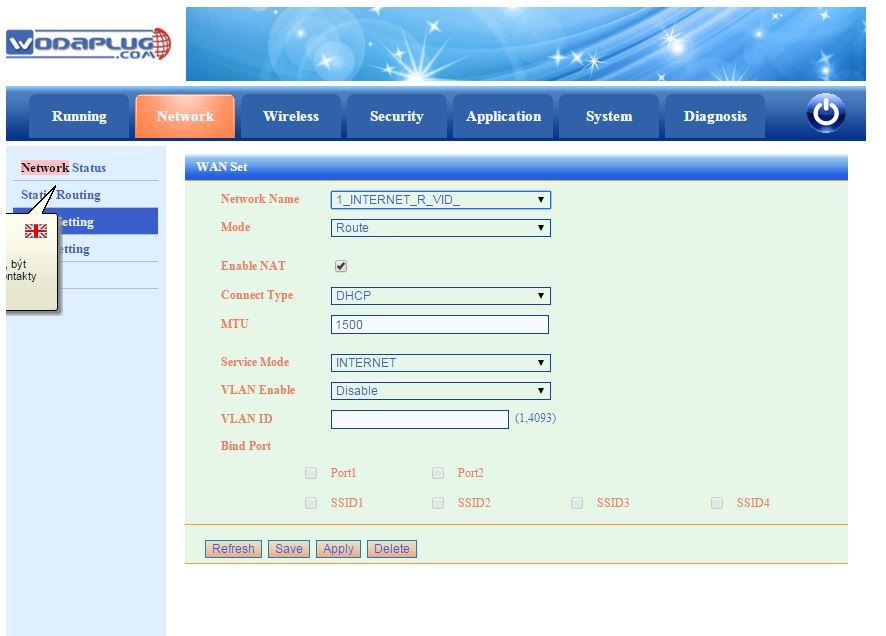
Attention – default config setup for newer EOC1121R4WL-R is with enabled VLANs for WAN configuration, so you need to check and set WAN configuration first and disbale VLANs if you not use them. Then i can work as before.

DEFAULT IP FOR MANAGEMENT : HTTP://192.168.1.1

For the software, there is no difference between the old and new slave. Upon different usage, the new version have two login information. You can use admin and user acount. The admin name and password both are „admin“, while older EOC1121R4WL used super admin, the user name is adminisp, pwd: adminisp , this super admin login is used in latest SW versions for EOC1121R4WL.

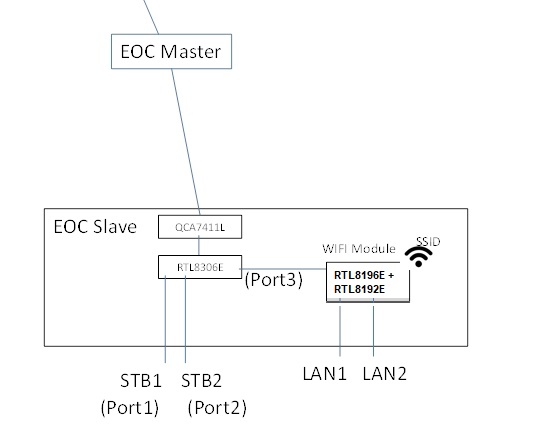
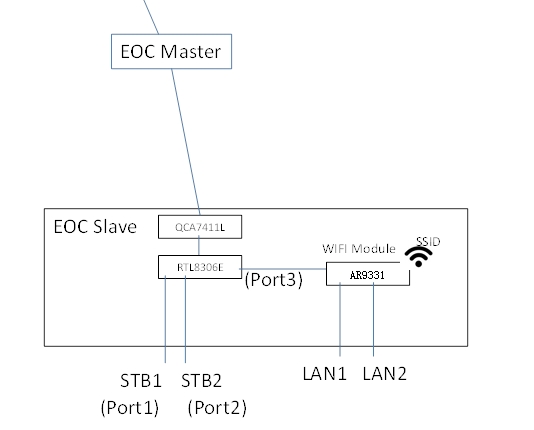
Newer HW version EOC1121R4WL-R use admin/admin for default super user access and user/user login for end user login to manage wifi and LAN only. The new version wifi slave is more flexible in the application than before. On the hardware revision, we add the 8306E switch chipset in the modem. It can controls the STB1 and STB2 ports which used as the Ethernet ports to setting the VLAN, rate-limiting, configuration,etc.

The LAN1 and LAN2 have the router feature which support the PPPoE. Moreover,the two mode can work at the same time.

QUESTIONS:

1. what is template 301 (and 302), I can’t find it in the list of template and modify it?

Template function is for user configure the slave convenient. There are a default template named “1”, is for the all slave as a default configuration. You can modify the template 1 in the SlaveàTemplate.

As you enter a slave configuration windows (it use the template 1), when you changed the configuration, the system will save a private template for this slave. The private template number will be 300+Slave ID. The private template is used only for this slave.

2. how many admins can be loged in? Where can I find loged in users?

No limit now. No record for it.

3. if I understad right, WAN means interface to WIFI module (oposite to port3) not the RF interface? Due to this STB1 (port1) and STB2 (port2) interfaces are always in bridge mode with or without VLAN?

Yes. WAN is connect to the port3.

STB1(Port1) and STB2(port2) is always in bridge mode.

STB1, STB2 is out from the 8305E switch chipset.

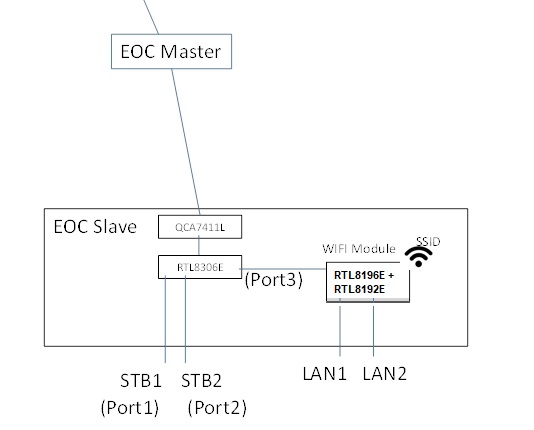
older version EOC1121R4WL slave internal structure Newer EOC1121R4WL-R slave internal structure

Differences : new version : RTL8196E(Routing Master Chip)+ RTL8192E(Wireless Transmitter Chip) replaced AR9331 (Routing chip integrated wireless transmission) in older version

3 – 3 .The way to change STB port as LAN port

Here is the way how to change this default configuration, if you need 4 LAN ports , then please proceed these steps:

Telnet to the slave unit (to its IP), Account: root/root626

command:

nvram_set stb_port 1 //1 means 2lan, 0  means 4 lan

reboot

The command to change status:

ralink_init show 2860 |grep stb

ralink_init show 2860 |grep wan

4. If i’am right in 3, why in WAN configuration of a slave over master web there are 4 LAN ports? In WAN setting from direct Slave web are only ports PORT1 and PORT2 that means LAN1 and LAN2 I think.

Because the WIFI module support 4 port max. In this slave, it have 2 ports LAN1 and LAN2. In other type , it have 4 ports. The WIFI management window display LAN1, LAN2, LAN3, LAN4 is compatible the 4Port product.

We will distinguish between different product in later version.

5. What does it mean PIB and NVM? –

NVM is the software for EOC 74 chipset (used low level Homeplug communication) .

PIB is configuration file of this chipset.

6. Where is connected router inside the box?

Please see figure in 3.

7. Where are VLANs processed?

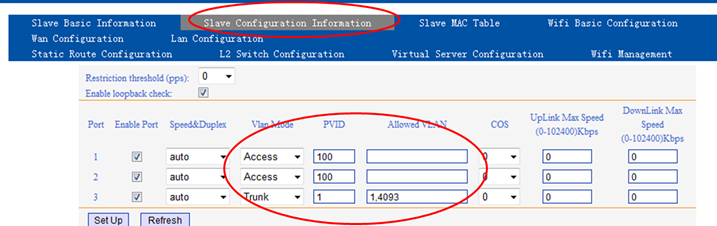
Slave – Online – Click the MAC you want to configure , enter the window as below.

attention – Please not use VLANs 1,2,4092 and 4093 , this VLANs are used for internal communication between Master and Slave !! So please not use this VLANs for your network.

8. When I set management VLAN I can’t set dynamic IP resp. I can but without effect, eth0 has no IP. The DHCP server was configured properly, there was no DISCOVER for DHCP from master.

This version do not support the DHCP+VLAN function.

It only support DHCP (no VLAN) and Static IP (VLAN or not).

9. I can’t disable SNMP on master

Software design so. It do not support disable SNMP.

10. Enable web access in WAN Conf of a slave over master web always fails.

Master and WIFI used the VLAN 4093 for OAM. Please try add this VLAN.

We will try to optimize it to configure in default. Solved in latest firmware versions.

11. Change setting in WAN Conf of a slave over master web doesn’t work. I set mode to route and after Apply I see change it to bridge etc, etc, etc. I’m not able to set what i want.

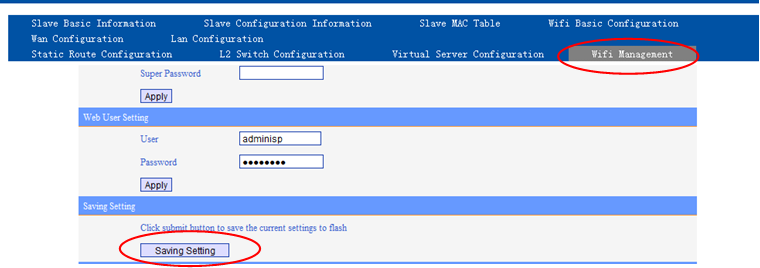
You need saving configuration as below.

12. How to set WiFi to bridge mode and use higher DHCP server for WiFi clients ?

attention – firmware 2.02 for EOC1121R4WL-R unit had a bug in bridge mode configuration, WiFi can not work in bridge. Please use latest 2.06 firmware or newer.

There are two ways for wifi client to get the DHCP IP address:

1. Using PC to link STB port directly, it can get the IP address automatically.

2. Set WAN to bridge mode, need to bind corresponding LAN port, PC link the bound LAN port, it can get the IP automatically.

STPES :

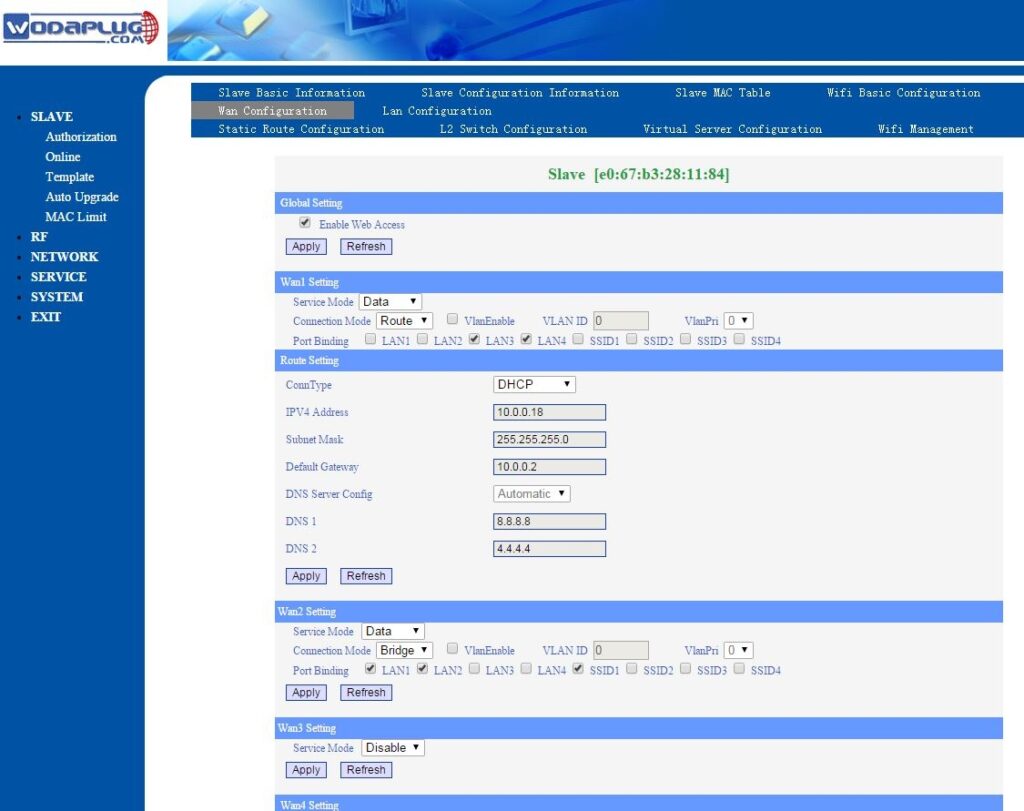
1 – open EOC WiFi slave web management (using its IP address), open Network and then WAN config. You will see dfault WAN1 config

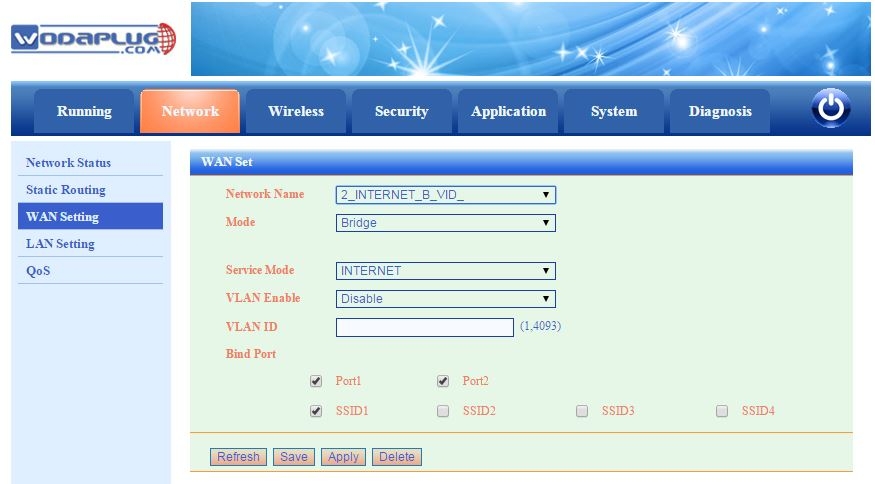
2 – Add new WAN2 and configure is as Bridge and Bind ports Port1 (LAN1), Port2 (LAN2) and requested SSID

3. – in lAN settings you can disable internal DHCP server.4. – in master WEB management you will see this WAN configuration of online EOC slave with WiFi :

Same setup for newer EOC1121R4WL-R unit : – attention, firmware 2.02 for EOC1121R4WL-R unit had a bug in bridge mode configuration, WiFi can not work in bridge. Please use latest 2.03 firmware or newer.Attention – default config setup for newer EOC1121R4WL-R is with enabled VLANs for WAN configuration, so you need to check and set WAN configuration first and disbale VLANs if you not use them.13 – How we can use 13 WiFi channels for Europe in EOC1121R4WL-R Slave unit? You can use US country to use 11 channels, or you can set Europe country domain using Telnet and CLI commands as shown bellow:telnet the onu IPlogin as root/root626flash set HW_WLAN0_REG_DOMAIN 1 //USAflash set HW_WLAN0_REG_DOMAIN 3 //Europereboot.

Posted on

How to run QCA 9880 / 9882 based WiFi modules in Windows 10

Do you need to run the very popular QCA 9880 / 9882 wifi modules in Wndows 10 PC ? Finaly you can !

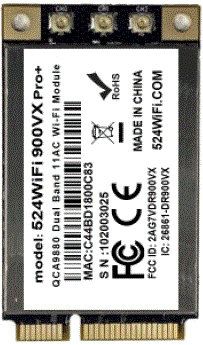
Tested with 524wifi 600VX Pro+ modules with QCA9880 chipset. This modules are better than all other QCA988x based module sthat we ever tested.

Qualcomm unsfortunately not released Windows drivers for their 802.11ac chipsets. This Chipset comes with Linux / OpenWRT driver sonly. But ….

The card has the same PCI ID (168c:003c) as the Killer NIC 1420 (Qualcomm Atheros QCA9862) listed at https://deviwiki.com/wiki/List_of_802.11ac_Hardware/Wireless_Adapters

The driver for this card can be downloaded from dell

http://downloads.dell.com/FOLDER01573133M/2/WiFi_BT_QCA_Killer1202_Win84_A03_Setup-KM22Y_ZPE.exe

Do not start the .exe, instead unzip the .exe to a folder

The driver is located at .\inf\production\<windows version>\ak1420\

Install the driver in Windows. For me the Windows 8 64bit driver works in Windows 10.

I can connect to 5 GHz and 2,4 GHz in client mode and I can also start in AP-Mode (2,4 GHz only).

Enjoy!