Posted on

Maximizing Wi-Fi Connectivity while Minimizing Environmental Impact: The Case for Spectrum Efficiency in the 6 GHz Band

Maximizing Wi-Fi Connectivity while Minimizing Environmental Impact: The Case for Spectrum Efficiency in the 6 GHz Band

Maximizing Spectrum Efficiency for Wi-Fi Connectivity

In the ever-evolving landscape of wireless communication, Wi-Fi technology stands as a cornerstone, providing ubiquitous connectivity in homes, businesses, and public spaces. However, the seamless operation of Wi-Fi networks relies heavily on access to the radio spectrum—a finite and carefully managed resource governed by national regulatory bodies worldwide.

Challenges in Spectrum Management

As demand for wireless connectivity continues to soar, regulators face the complex task of managing spectrum allocation to meet diverse needs while ensuring equitable access and minimizing interference. This balancing act requires careful consideration of competing priorities, ranging from economic growth and technological innovation to environmental sustainability and social equity.

The Crucial Role of the 6 GHz Band

Among the various frequency bands allocated for wireless communication, the 6 GHz band has emerged as a focal point in spectrum policy discussions. With its relatively wide bandwidth and favorable propagation characteristics, the 6 GHz band holds immense potential for supporting high-performance Wi-Fi networks, especially with the advent of Wi-Fi CERTIFIED 7.

Importance of Full 6 GHz Access for Wi-Fi Performance

For Wi-Fi technology to fully leverage the capabilities of the latest standards and deliver optimal performance, unrestricted access to the entire 6 GHz band is essential. This allows for the deployment of wider channels, enabling higher data throughput rates, lower latencies, improved mobility, and better support for densely populated areas.

Global Regulatory Responses

Recognizing the significance of the 6 GHz band for Wi-Fi connectivity, several countries have taken proactive measures to expand Wi-Fi access to this spectrum. By doing so, they aim to meet the growing demand for indoor and outdoor connectivity while promoting innovation and economic development.

Environmental Considerations in Spectrum Policy

In recent years, environmental sustainability has emerged as a critical consideration in spectrum policy formulation. The deployment of wireless technologies, including Wi-Fi networks, has implications for energy consumption, carbon emissions, and electronic waste generation. As such, regulators are increasingly mindful of the environmental footprint associated with spectrum allocation decisions.

Impact on Connectivity and Energy Consumption

A comprehensive study, titled “Sustainability Benefits of 6 GHz Spectrum Policy,” provides empirical evidence of the environmental advantages of prioritizing Wi-Fi access in the 6 GHz band. By comparing different spectrum utilization scenarios, the study demonstrates that unrestricted Wi-Fi access leads to significant reductions in energy consumption and carbon emissions compared to alternative deployments.

Furthermore, the study highlights the tangible benefits of ensuring full Wi-Fi access to the 6 GHz band in terms of connectivity and energy efficiency. Restricted spectrum access not only hampers Wi-Fi performance but also drives users towards alternative cellular networks, resulting in higher energy consumption and associated environmental costs.

Conclusion: Balancing Connectivity and Environmental Impact

In conclusion, maximizing spectrum efficiency for Wi-Fi connectivity requires a multifaceted approach that considers technological advancements, regulatory frameworks, and environmental sustainability goals. By prioritizing Wi-Fi access in the 6 GHz band and optimizing spectrum utilization, policymakers can support the expansion of high-performance wireless networks while mitigating their environmental footprint. In doing so, they can achieve a harmonious balance between connectivity needs and environmental stewardship in the digital age.

524WiFi WiFi7 6E Modules

DR9274-5G6G|DBDC QCN6224 QCN9274 QCN6274 WIFI7 5GHZ&6Ghz Network Card
DR9274-5G6G based on QCN9274 Chipset is an enterprise wireless module integrated with 2×2 5G & 2×2 6G MU-MIMO Dual Band Wireless Module designed specifically to provide users with mobile access to high-bandwidth video streaming, voice, and data transmission for office and challenging RFenvironment in factories, warehouses establishment.

Chipset: Qualcomm Atheros QCN9274

WLAN Host Interface: PCI Express 3.0 Interface

System Memory: 2Mbit serial I²C bus EEPROM

Standard Operating Voltage: 5V

Operating Systems: QSDK

Host Interface: M.2 E Key interface with PCIe 3.0

Antenna Cable / Port: 4 x ufl Connectors

Frequency Range:

– 5GHz: 5.15~5.825GHz

– 6GHz: 5.925GHz-7.125GHz

Data Rates for WLAN:

– 5GHz 802.11a/n/ax/be: max 22dBm per chain

– 6GHz 802.11a/n/ax/be: max 22dBm per chain

Channel Spectrum Widths for WLAN:

– Supports 20/40/80/160MHz at 5GHz

– Supports 20/40/80/160/320MHz at 6GHz

Modulation Techniques: OFDMA – BPSK, QPSK, DBPSK, DQPSK, 16-QAM, 64-QAM, 256-QAM,1024QAM, 4096QAM

Temperature Range:

– Operating: -20 °C to 70 °C

– Storage: -40 °C to 85 °C

Humidity:

– Operating: 5% to 95%

– Storage: Max. 90%

Certification: REACH & RoHS Compliance

Power Consumption:

– Maximum: 10W

– Normally: 8W

Dimensions (WxHxD): 30mm x 50mm x 14.5mm

DR9274-6GK|4T4R QCN6224 QCN9274 QCN6274 WiFi7 Lower Power Consumption Network Card

Wallys DR9274-6GK

The 524WiFi Dream DR9274-6GK is an industrial grade wireless module based on the QCN9274 (QCN6274) chipset. It is designed to provide high-bandwidth video streaming, voice, and data transmission in office and challenging RF environments such as factories and warehouses.
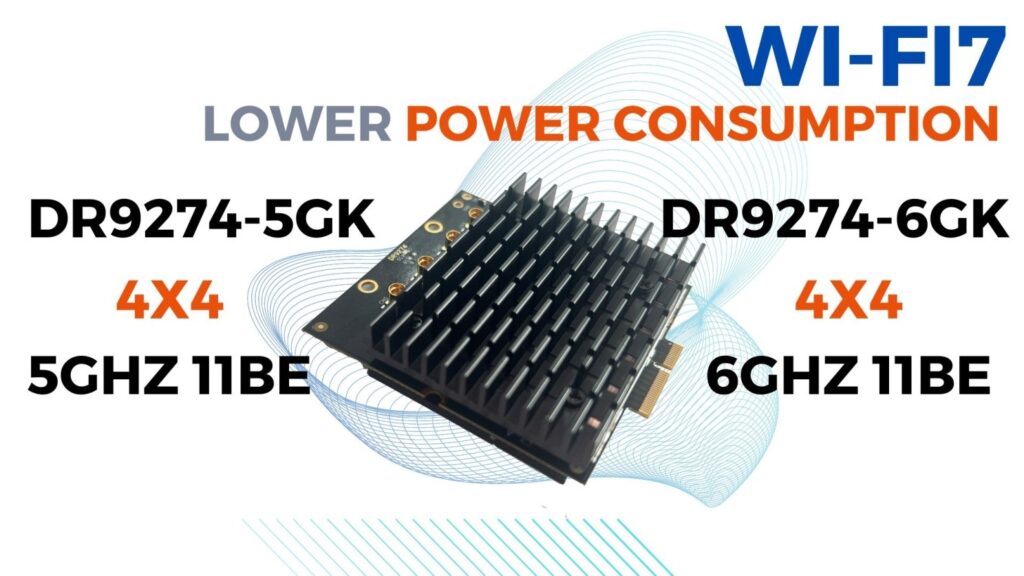
Specifications:

Chipset: Qualcomm Atheros QCN9274 (QCN6274)

WLAN Host Interface: PCI Express 3.0

System Memory: 2Mbit serial I²C bus EEPROM

Standard Operating Voltage: 5V

Operating Systems: QSDK

Host Interface: M.2 E Key interface with PCIe 3.0

Antenna Cable/Port: 4 x MMCX Connectors

Data Rates for WLAN: 6GHz 802.11ax/be, max 22dBm per chain

Channel Spectrum Widths for WLAN: Supports 20/40/80/160/320MHz at 6GHz

Modulation Techniques: OFDMA: BPSK, QPSK, DBPSK, DQPSK, 16-QAM, 64-QAM, 256-QAM, 1024QAM, 4096QAM

Temperature Range: Operating: -20 °C to 70 °C, Storage: -40 °C to 85 °C

Humidity: Operating: 5% to 95%, Storage: Max. 90%

Certification: REACH & RoHS Compliance

Power Consumption: 10W (Maximum), 7W (Normally)

Dimensions (WxHxD): 30mm x 50mm x 14.5mm

Additionally, 524WiFi and Wallys offers a new version of the 4×4 5GHz lower power consumption WiFi7 network card, the DR9274-5GK.

Inquiries:

524WiFi is dedicated to continuous innovation, constantly pushing the boundaries of WiFi technology. In addition to its hardware products, Wallys also offers a range of ODM/OEM services, including:

Customization: We can customize its WiFi 5/6/7 products and embedded boards to meet the specific needs of its customers.

Engineering support

Testing and certification
Posted on

QCA9882, QCA9880, and MT7915 WiFi cards for OpenWrt:What are the difference?

Title: A Comparative Analysis of QCA9882, QCA9880, and MT7915 WiFi Cards for OpenWrt

In the realm of OpenWrt-compatible WiFi cards, selecting the right one can significantly impact your network’s performance and reliability. Among the options available, the QCA9882, QCA9880, and MT7915 stand out as popular choices. In this article, we will delve into the differences between these WiFi cards to help you make an informed decision.

**QCA9882**

The QCA9882 WiFi card boasts a robust chipset designed to deliver exceptional performance. It supports various wireless standards, including WiFi 5 (802.11ac), ensuring compatibility with modern networks. Performance metrics such as throughput and range are commendable, making it suitable for demanding applications. QCA9882 is known for its seamless integration with OpenWrt, offering extensive configuration options and stability. While pricing may vary, it generally falls within a reasonable range, providing value for money.

**QCA9880**

Similar to the QCA9882, the QCA9880 WiFi card features a reliable chipset optimized for high-performance networking. It also supports WiFi 5 standards, guaranteeing compatibility with modern networks. Performance metrics are commendable, although specific benchmarks may vary. QCA9880 is well-supported by OpenWrt, offering users a plethora of configuration options and stability. Pricing for the QCA9880 is competitive, making it an attractive choice for budget-conscious consumers seeking reliable performance.

**MT7915**

The MT7915 WiFi card is another contender in the OpenWrt ecosystem, boasting a chipset designed to deliver robust performance. It supports WiFi 6 (802.11ax) standards, offering enhanced throughput and efficiency compared to its predecessors. Performance metrics such as throughput and latency are impressive, catering to demanding networking requirements. While OpenWrt compatibility may vary, efforts are underway to ensure seamless integration with the platform. Pricing for the MT7915 tends to be higher compared to WiFi 5 alternatives, reflecting its advanced features and capabilities.

**Comparative Analysis**

When comparing these WiFi cards, several factors come into play. Performance-wise, the MT7915 holds an edge with its support for WiFi 6 standards, offering superior throughput and efficiency. However, both the QCA9882 and QCA9880 remain competitive choices, especially for users with WiFi 5 networks. In terms of OpenWrt compatibility, all three options offer varying degrees of support, with QCA9882 and QCA9880 being more established within the community.

**Conclusion**

In conclusion, the choice between the QCA9882, QCA9880, and MT7915 WiFi cards depends on your specific requirements and budget constraints. If you prioritize cutting-edge performance and have the budget for it, the MT7915 is an excellent option. However, for users seeking reliable performance at a more affordable price point, both the QCA9882 and QCA9880 are viable alternatives. Regardless of your choice, each WiFi card offers unique features and capabilities that can enhance your OpenWrt experience.

524WiFi Modules and Platform

524WiFi Dream882 (QCA9882): – high power

Chipset: Atheros QCA9882

2×2 5G high-power radio card

Frequency range: 4.940GHz to 5.825GHz

2x 5G MMCX connectors

Bandwidth: 20MHz/40MHz/80MHz

Supports 802.11ac/an standards

RoHS compliant

524WiFi 900VX Pro+

Chipset: Qualcomm-Atheros QCA9880

Output power: 2.4GHz max 26dBm, 5GHz max 25dBm

IEEE 802.11a/b/g/n/ac compliant and backward compatible

3×3 MIMO technology, up to 1.3Gbps

Mini PCI Express edge connector

RoHS compliant

Supports various technologies and IEEE standards (e.g., spatial multiplexing, LDPC codes, MRC, STBC, DFS)

FCC, CE, and IC certification

524WiFi 600VX Pro+

Chipset: Qualcomm-Atheros QCA9880

Output power: 2.4GHz max 24dBm, 5GHz max 23dBm

IEEE 802.11a/b/g/n compliant and backward compatible

2×2 MIMO technology, up to 867Mbps

Mini PCI Express edge connector

Frequency support: 4920MHz~5825MHz

RoHS compliant

Supports various technologies and IEEE standards (e.g., spatial multiplexing, LDPC codes, MRC, STBC, DFS)

FCC, CE certification

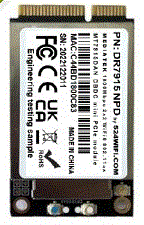
524WiFi 6 DR7915 – NPD DBDC

Chipset: MT7915+MT7975

Host Interface: Mini PCI Express 2.1

Antenna Connector: 2 x UF.L

Frequency Range: 2.4GHz: 2.412GHz to 2.472GHz, 5GHz: 5.180GHz to 5.825GHz

Operating Voltage: 3.3V DC

Power Consumption: 4-8w

Modulation Techniques: OFDM: BPSK, QPSK, DBPSK, DQPSK, 16-QAM, 64-QAM, 256-QAM

Environmental Temperature: Operating: -40°C to 70°C, Storage: -40°C to 90°C

Environmental Humidity, non-condensing: Operating: 5% to 95%, Storage: Max. 90%

ROHS Compliance: YES

Dimensions (W×H×D): 51mm × 30mm × 5.8mm

Platform: 524WiFi Dream DR4029

Featuring with industrial-grade IPQ4019/IPQ4029 chipset

Integrated with 2x 2 5G high power Radio module and 2×2 2.4G high power Radio module

Support 4.940GHz to 5.825GHz Frequency Range

Support 2.400GHz to 2.482GHz

Support 2 x 5G MMCX Connectors and 2×2.4G MMCX

Support 5MHz/10MHz/20MHz/40MHz/80MHz Bandwidth

Support 11ABGN/AC

Support fixed data rate

RoHS compliance ensure a high level protection of human health and the environment from risks that can be posed by chemicals

Our Firmware supports all the modules of Quectel

Support Openwifi

Support QSDK

Support Openwrt

Feel free to share your thoughts on QCA9882, QCA9880, and MT7915 WiFi cards for OpenWrt in the comments section below.

Posted on

IEEE 1588 (802.1AS) and Time-Sensitive Networks (TSN): What Sets Them Apart?

IEEE 1588 (802.1AS) and Time-Sensitive Networks (TSN): What Sets Them Apart? 🛸👇

1588 Soft Synchronization
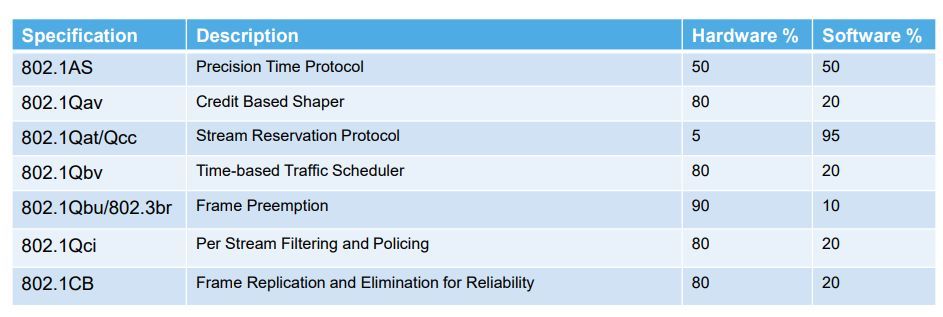
IEEE 1588-2008, also known as IEEE 1588v2, is a synchronization method designed specifically for wired networks. It facilitates clock sharing among devices by allowing the automatic selection of a grandmaster device, which then distributes timing packets to nodes in the network, synchronizing their system clocks. With 1588 soft synchronization, timing is guaranteed to be within 1 millisecond or less, although less stringent compared to hardware-timed synchronization due to latency introduced during packet transmission, reception, and data processing. IEEE-1588 exhibits robustness; in the event of the removal of a grandmaster from the network, an election process occurs to select a new grandmaster, ensuring continued operation. 💡
While any industrial switch can support 1588 soft synchronization, a switch compliant with 1588 may exhibit tighter synchronization among devices.

Time-Sensitive Networks (TSN)
TSN is a timing and synchronization standard built upon the Ethernet standard, utilizing a profile of IEEE-1588 hardware synchronization. TSN shares hardware considerations with 1588 hardware-timed sync, requiring a direct connection from the Network Interface Card (NIC) to the timing source. TSN, however, differs from 1588 hardware sync in that TSN networks generate an error if synchronization deviates from expected bounds. Additionally, TSN timing packets feature priority scheduling, meaning they are sent from the grandmaster and TSN-enabled switching devices without waiting for other packets in the buffer. This ensures tight synchronization regardless of network traffic. TSN and 1588 networks are not interoperable and require bridging with compliant hardware. 💡
TSN necessitates switches that comply with 802.1AS to enable priority packet scheduling.

Recently, in response to client requests, our engineers are actively researching the integration of 1588v2 and TSN features into our DR6018 – IPQ6010 Wifi6 and DR9574 – IPQ9574 Wifi7 target hardware, respectively.

No project is too small, and no challenge is too big! Feel free to reach out to 524Wifi and Wallys teams if you seek solutions, be it hardware customization or software development, from concept to mass production. Let’s create value together!

Posted on

Why Mesh Networking is the Recommended Choice Today?

Mesh networking is the answer to the growing demand for extended wireless coverage. Its primary purpose is to overcome obstacles like walls, addressing the need for connectivity throughout your home.

🌐 Mesh vs. EasyMesh
It’s important to clarify that the term “Mesh” in this context refers to “EasyMesh.” Mesh, fundamentally, is a network topology, while EasyMesh is the specific technology used in Wi-Fi.

🔌 The Simplicity of EasyMesh
EasyMesh is a more straightforward solution, designed for ease of use. Many manufacturers offer EasyMesh routers that are essentially ready to use out of the box. Users can set them up without requiring in-depth technical knowledge.

📶 Mesh Before EasyMesh
Before the advent of EasyMesh, other methods like WDS or 802.11s were used to extend Wi-Fi coverage. However, these approaches often required technical expertise for configuration. In contrast, EasyMesh simplifies the process significantly.

🏡 Mesh’s Original Purpose
Traditional Mesh networking aimed at redundancy and backup, particularly in scenarios where network link failures needed to be avoided, such as in wireless setups. For home use, the primary goal of Mesh is to expand coverage. Therefore, EasyMesh is better suited for this purpose compared to earlier Mesh technologies.

In conclusion, Mesh networking, or more specifically EasyMesh, is the go-to solution for extending your wireless coverage effortlessly, especially in home environments. Its simplicity, user-friendliness, and coverage enhancement capabilities make it an ideal choice for today’s connected world.

Posted on

What is WiFi-SON

WIFI-SON(Wi-Fi self-organizing network) is Qualcomm’s wireless AD hoc network solution. It has perfect band steering, ap steering, APS and other functions. wifison requires nodes to support dual-frequency (or 3-frequency). The wifison network consists of one CAP(Adaptive path selection) and several RE(Range extender), and connects to the gateway through the CAP.

📢 The introduction of Wi-Fi SON technology aims to reduce the maintenance cost of Wi-Fi networks, improve network performance, and provide users with a better experience. This technology is often used in conjunction with Wi-Fi standards such as 802.11k, 802.11v, and 802.11r for more efficient network management.

📢 CAP (Central AP) : A wifison network connects to an external network through a CAP. A wifison network has only one CAP.
Range Extender (RE) : All nodes in the wifison network except the CAP are RE.
Whole Home Coverage (WHC) : Some wifison configuration names start with this parameter, for example, iwpriv ath0 | grep whc You can see some wifison configuration.
🔊 repacd (RE Placement and Auto-Configuration Daemon) : a script in the SDK that is used to automatically maintain wireless configurations related to wifison and start wifison services.
📣 Load balancing daemon (ldb) : used for Band Steering on a single node. However, if hyd is used, the Band Steering process is managed by hyd and is therefore unnecessary.
📣 hyd (Hy-Fi daemon) : Used to manage Band Steering, AP Steering, APS, and dual-band anti-ring. wifison is the core process.
HyFi (Hybrid wifi) : Some module names start with this parameter.
Self-organizing network (SON) : The main mode of wifison networking, based on WPS.
📯 BSS transition management (BTM) : Supports 802.11v device steering.
Wi-Fi SON Placement Configuration Daemon (wsplcd) : A process used in the SDK to synchronize configurations between nodes.
hyfi-bridging: The wifison key kernel module for APS and ring prevention.

Posted on

Introducing PD-25: Powering Progress with Precision!

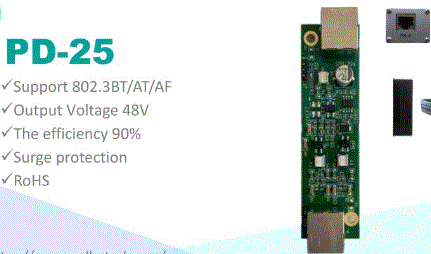
Unleash the potential of your network with our cutting-edge PD-25, a powerhouse designed for efficiency and reliability. Here’s a glimpse of its remarkable features:

🔌 Input Voltage Mastery:
Accepts a robust input voltage range of 42~56V, ensuring compatibility with diverse power sources.

⚡ Optimized Output:
Delivers a stable output voltage of 48V, with a maximum capability of 56V for those power-demanding scenarios.

🚀 Gigabit Connectivity:
Equipped with 2x RJ45 ports for 10/100/1000Mbps Gigabit Ethernet. One RJ45 serves as input, while the other stands ready for seamless output.

⚙️ Surge Protection Shield:
Fortified with surge protection, PD-25 safeguards your network against unexpected surges, providing uninterrupted connectivity.

🌡️ Extreme Environment Endurance:
Fear no climate extremes! PD-25 operates flawlessly in temperatures ranging from -40 to +70°C, making it a reliable choice for varied environments.

💧 Adaptable Humidity Handling:
From 5% to 95% operating humidity and 0% to 90% storage humidity (non-condensing), PD-25 adapts to the changing moisture levels with ease.

🌿 Eco-Friendly Assurance:
Embrace sustainability with ROHS Compliance – PD-25 is designed with the environment in mind.

Revolutionize your network infrastructure with PD-25 – where power meets precision, and connectivity knows no limits! 🚀🔗

Posted on

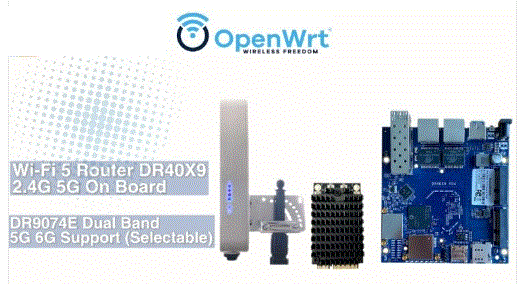
Explore the DR40x9 for your 11ac PTP PTMP hardware solution needs!

Key Features:
Long-range 20km transfer capability 🌐
Industrial-grade solution ⚙️
Dualband support: 2.4G/5G 📡
OpenWRT compatibility 🧩
High compatibility with DR9074/DR7915/DR882 🤝

FCC certified

Additionally, Wallys R&D team supports hardware customization and software feature development services! 🛠️ Feel free to inquire and explore more about our collaborative solutions!

Posted on

What Does Wi-Fi 7 Actually Bring?

QCN9274 QCN6274 IPQ9574|What Does Wi-Fi 7 Actually Bring?

Amidst the flurry of technical discussions surrounding Wi-Fi 7, let’s bypass the intricate details and delve into its tangible benefits. Wi-Fi 7 represents a significant leap forward in data throughput and reliability, promising to transform the connectivity landscape for homes and offices alike.

At its core, Wi-Fi 7 aims to address the ever-growing demand for bandwidth in environments teeming with multiple devices vying for connectivity. By optimizing frequency space utilization, Wi-Fi 7 endeavors to minimize latency and maximize data transmission rates. The result? An enhanced user experience marked by smoother connectivity and fewer frustrations.

One of the standout features of Wi-Fi 7 is its remarkable speed capabilities. With a theoretical top speed of 46.4Gbps—four times faster than its predecessors—Wi-Fi 7 sets a new benchmark for wireless performance. Real-world tests have demonstrated Wi-Fi 7-capable devices achieving speeds around 5.8Gbps, a noteworthy 2.4 times faster than Wi-Fi 6/6E. Such impressive speeds open up possibilities for seamless streaming, faster downloads, and smoother online experiences.

In addition to speed, Wi-Fi 7 introduces Multi-Link Operation (MLO), a game-changer in frequency management. MLO enables devices to intelligently utilize the 2.4GHz, 5GHz, and 6GHz frequencies, seamlessly switching between them to avoid congestion and minimize interference. This dynamic frequency switching translates to lower latency, reduced packet loss, and heightened reliability—a boon for gamers, video streamers, and anyone reliant on a stable internet connection.

Consider the scenario of a Wi-Fi 7-equipped VR gamer immersed in an intense online battle. As interference threatens to disrupt the gaming experience, MLO swiftly kicks into action, seamlessly transitioning to a less congested frequency. The result? Lag-free gameplay and uninterrupted immersion, without the frustration of delayed responses or missed opportunities.

Moreover, Wi-Fi 7’s advanced frequency management holds immense promise for mission-critical applications like 4K/8K CCTV systems. Equipped with Wi-Fi 7, surveillance cameras can dynamically switch bands using MLO, ensuring uninterrupted footage capture even in the face of interference or network congestion. This means that crucial moments captured by high-resolution cameras remain intact, safeguarding security and enabling swift action when needed.

In essence, Wi-Fi 7 represents a paradigm shift in wireless connectivity, offering unparalleled speed, reliability, and efficiency. With its enhanced capacity, reduced latency, and refined spectrum management, Wi-Fi 7 is poised to redefine the way we connect and communicate, ushering in a new era of seamless digital experiences. So, whether you’re gaming, streaming, or safeguarding your property, Wi-Fi 7 ensures that connectivity remains steadfast and dependable—truly a game-changer in the world of wireless technology.

Posted on

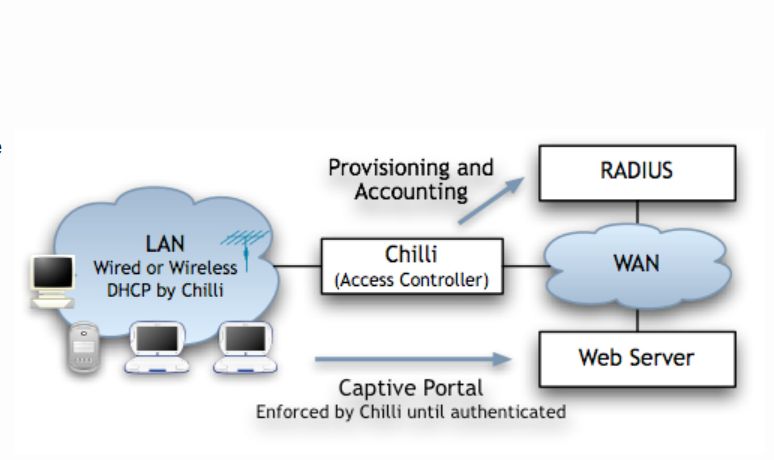
What are the Captive WiFi Portal Applications Across Industries?

Retail Stores: 🛍️ In retail, a captive WiFi portal can be used to offer customers exclusive discounts or coupons when they connect to the network. It can also showcase new product releases, promotions, or loyalty programs to encourage engagement and drive sales.

Restaurants and Cafes: 🍽️ Restaurants and cafes can use captive WiFi portals to provide customers with access to menus, online ordering systems, or feedback forms. They can also promote special events, live entertainment, or happy hour deals to enhance the dining experience.

Hotels and Resorts: 🏨 Hotels and resorts can use captive WiFi portals to welcome guests, provide information about onsite amenities and services, and offer concierge assistance. They can also collect guest feedback, promote spa treatments or restaurant reservations, and provide access to streaming services or virtual tours of the property.

Healthcare Facilities: 🏥 In healthcare settings, captive WiFi portals can be used to streamline patient registration, provide access to educational resources or appointment scheduling tools, and deliver important announcements or updates from medical staff. They can also offer entertainment options in waiting areas or facilitate telemedicine appointments for remote consultations.

Event Venues: 🎉 Event venues can use captive WiFi portals to provide attendees with event schedules, maps, and directions. They can also offer interactive features such as live polls, social media integration, or photo booths to enhance the overall event experience. Additionally, they can collect attendee feedback and facilitate networking opportunities among participants.

Educational Institutions: 🎓 Schools, colleges, and universities can use captive WiFi portals to provide students with access to course materials, online resources, and academic support services. They can also communicate campus announcements, event calendars, and emergency alerts to students, faculty, and staff members.

Transportation Hubs: 🚆 Airports, train stations, and bus terminals can use captive WiFi portals to provide travelers with real-time flight or transit information, boarding passes, and transportation options. They can also offer entertainment options, shopping deals, and dining recommendations to enhance the travel experience.

Posted on

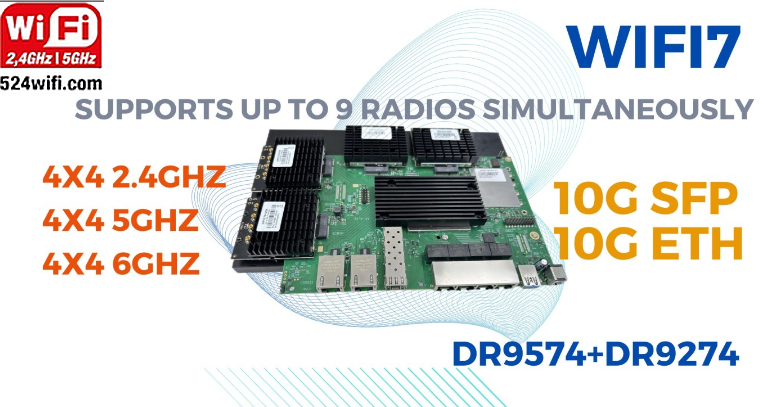
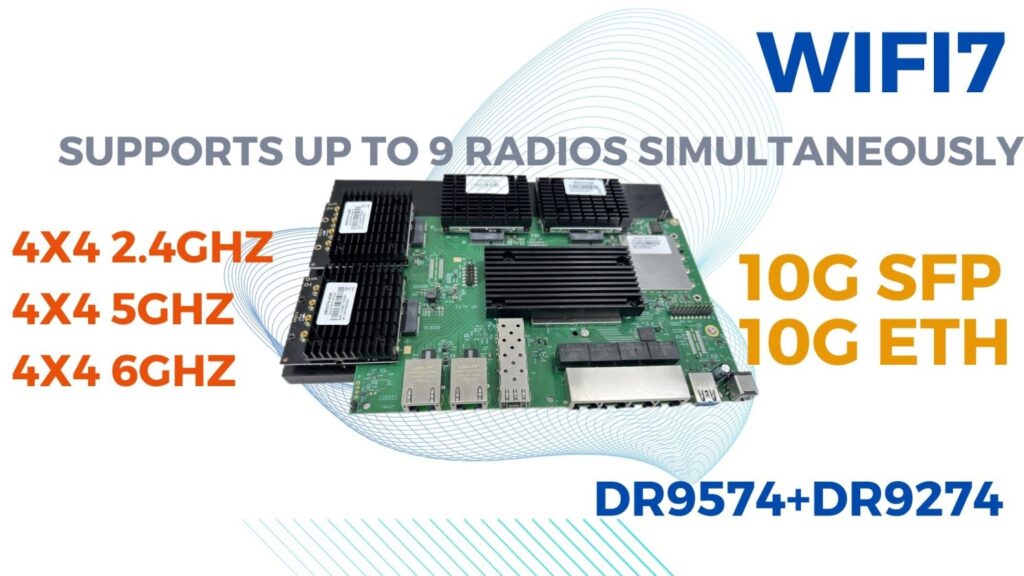
WiFi7 IOT Solution IPQ9574 with QCN9274 Supports Up to 9 Radios Simultaneously What does it brings?

What does it brings?

Imagine a scenario where an industrial-grade WiFi access point (AP) equipped with the capability to operate nine physical radios simultaneously is deployed across logistics, warehousing, ports, industries, and smart cities. Here’s what could happen:

1. Logistics Centers: In logistics centers, these APs could enable real-time tracking and management of goods. Each physical radio could connect to different sensors and devices, monitoring the location, temperature, humidity, and other information of goods. This data could be transmitted to a central control center over the network, enabling precise monitoring and management of logistics operations.

2. Warehousing Facilities: In warehousing facilities, these APs could optimize inventory management and goods allocation. Each physical radio could connect to different shelves or storage areas, synchronizing inventory information in real-time with warehouse management systems, improving inventory turnover rates, and operational efficiency.

3. Ports and Logistics Parks: In ports and logistics parks, these APs could facilitate real-time monitoring and dispatching of ships, containers, and transportation vehicles. Each physical radio could connect to different devices such as security cameras, sensors, and onboard equipment, transmitting data to a monitoring center over the network, ensuring the safe transport and efficient handling of goods.

4. Industrial Production: In industrial production, these APs could optimize the operation of production lines and equipment monitoring. Each physical radio could connect to different production equipment and sensors, transmitting equipment status and production data in real-time to production management systems, enabling automation and intelligence in the production process.

5. Smart Cities: In smart cities, these APs could enable intelligent management of city infrastructure and public services. Each physical radio could connect to different city facilities and sensors, monitoring information such as traffic flow, environmental pollution, energy consumption, and transmitting data to city operation centers over the network, enabling efficient utilization of city resources and sustainable development of the environment.

In summary, deploying an industrial-grade WiFi access point with nine physical radios across logistics, warehousing, ports, industries, and smart cities could lead to more efficient operations, smarter manufacturing, and intelligent city management.

In industrial Application

Configuring all nine radios as access points (APs) can bring several benefits:

1. Increased Device Connectivity: Industrial environments often require connectivity for numerous devices such as machinery, sensors, monitoring equipment, and mobile terminals. By utilizing nine APs, the network can accommodate a larger number of devices simultaneously, facilitating seamless communication and data exchange across various equipment and systems.

2. Enhanced Coverage and Reliability: Industrial facilities often have complex layouts and challenging environments, such as large warehouses, manufacturing floors, or outdoor areas. With multiple APs strategically deployed, the network coverage is extended, ensuring that devices throughout the facility can maintain a reliable connection with minimal dead zones or signal interference.

3. Load Balancing and Traffic Management: Distributing client connections across multiple APs allows for efficient load balancing and traffic management. This helps prevent network congestion and ensures that critical applications or devices receive sufficient bandwidth and priority access to resources, optimizing overall network performance.

4. Redundancy and Fault Tolerance: In industrial applications where uninterrupted operation is crucial, having redundant APs can provide fault tolerance and resilience against network failures. If one AP experiences issues or downtime, nearby devices can seamlessly connect to alternate APs, minimizing disruptions to critical operations.

5. Support for Mobile and IoT Devices: Many industrial processes rely on mobile terminals or IoT devices for data collection, monitoring, and control. With nine APs, the network can accommodate the growing number of wireless devices used in industrial automation, asset tracking, inventory management, and predictive maintenance applications.

Overall, configuring nine radios as APs in industrial environments enhances connectivity, coverage, reliability, and scalability, supporting the demanding requirements of modern industrial operations.

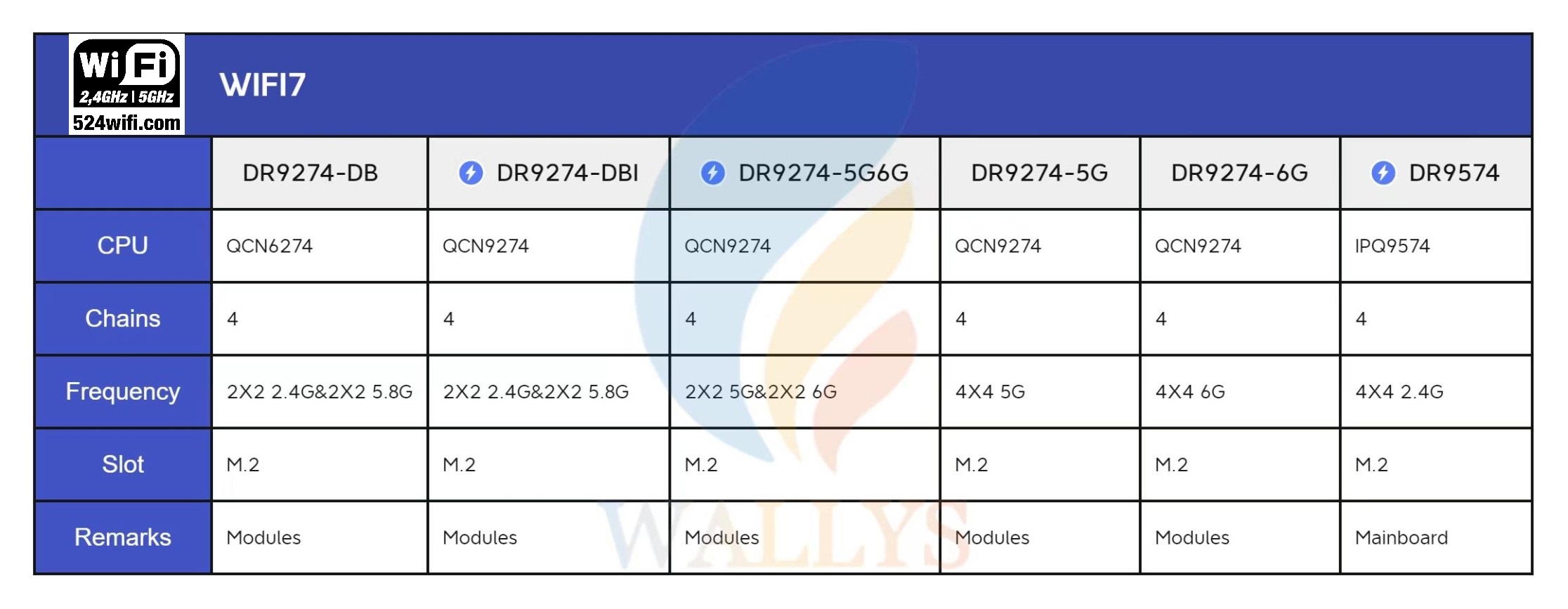
A Quick Overview for 524WiFi Dream WiFi7 modules

1. DR9274-QCN9274|QCN6274 WiFi7 Single Band 5G

2. DR9274-QCN9274|QCN6274 WiFi7 Single Band 6G

3. DR9274-QCN9274|QCN6274 WiFi7 Dual Band Dual Concurrent-2.4G&5G

4. DR9274-QCN9274|QCN6274 WiFi7 Dual Band Dual Concurrent-5G&6G