Posted on — Leave a comment

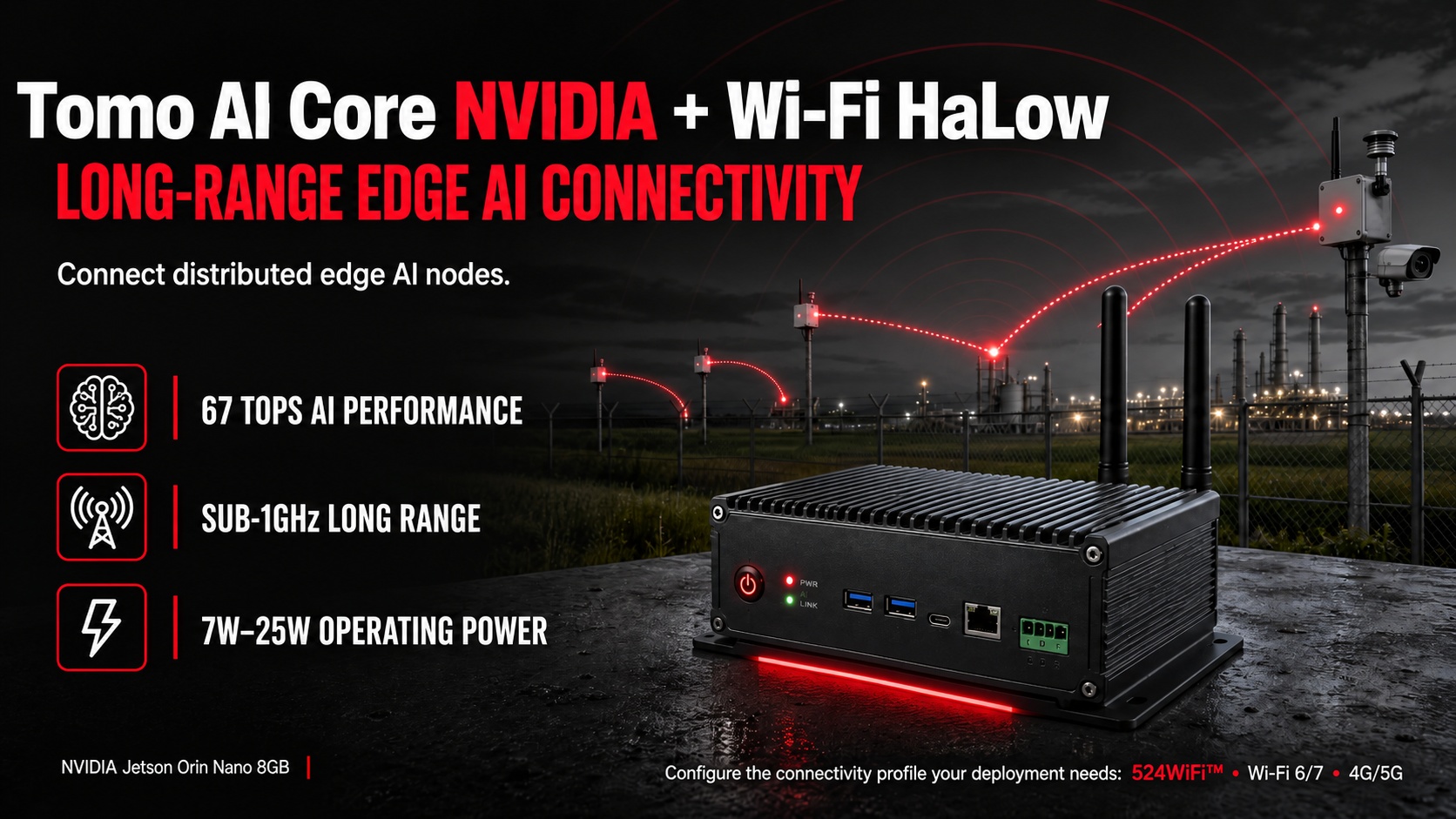
Tomo AI Core NVIDIA + Wi-Fi HaLow: Long-Range Edge AI Connectivity

524WiFi™ Tomo AI Core NVIDIA with Wi-Fi HaLow for distributed edge AI connectivity

Edge AI devices are only as useful as the network they run on. A vision model that can detect a defect or a person in real time is worthless if the data can’t get back to the control system — especially in outdoor, long-range, or power-constrained deployments where traditional 2.4GHz/5GHz Wi-Fi simply doesn’t reach. That’s the gap Wi-Fi HaLow (IEEE 802.11ah) is built to close, and it’s now available as a connectivity option for the 524WiFi™ Tomo AI Core NVIDIA, our NVIDIA Jetson Orin Nano-based edge AI platform.

What Is Wi-Fi HaLow and Why Does Edge AI Need It?

Wi-Fi HaLow operates in the sub-1GHz spectrum (900MHz ISM band in most regions) instead of the 2.4GHz/5GHz bands used by conventional Wi-Fi. Lower frequency signals travel farther and penetrate walls, foliage, and structural obstacles far more effectively — which is exactly why HaLow is positioned by the Wi-Fi Alliance for long-range, low-power IoT and sensor connectivity rather than high-bandwidth video streaming.

For edge AI deployments, this matters in a specific way: many Jetson-based inference nodes don’t need gigabit throughput — they need to reliably send detection results, telemetry, or compressed metadata back to a gateway from hundreds of meters away, often on battery or solar power. That’s a connectivity profile standard Wi-Fi and even LTE/5G aren’t always the right fit for, either on range, power draw, or cost.

How Wi-Fi HaLow Connects with the Tomo AI Core NVIDIA

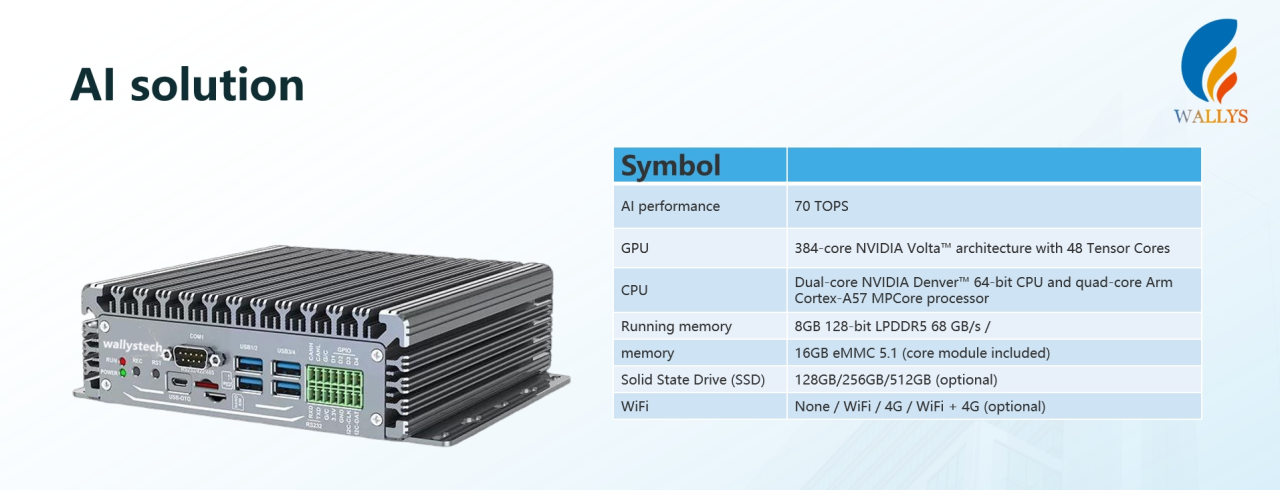
The Tomo AI Core NVIDIA pairs an NVIDIA Jetson Orin Nano 8GB SOM (67 TOPS AI performance, 1024-core Ampere GPU, 6-core Arm Cortex-A78AE CPU) with a industrial carrier board built for industrial edge deployment — 5x Ethernet (including PoE), CAN FD, RS485, GPIO, and M.2 PCIe NVMe expansion.

Wi-Fi HaLow is integrated as a module option on that same carrier board, alongside the existing 2.4G/5.8G Wi-Fi and optional 4G/5G cellular paths. In practice this means a single AI Box can be configured for the connectivity profile the deployment actually needs: short-range high-bandwidth Wi-Fi for a warehouse, cellular for a mobile asset, or HaLow for a long-range, low-power sensor or camera node spread across an outdoor site.

Wi-Fi HaLow vs. Traditional Wi-Fi for Long-Range Edge AI

The two technologies solve different problems rather than competing head-to-head.

Range: traditional 2.4/5GHz Wi-Fi typically covers tens of meters indoors; Wi-Fi HaLow’s 900MHz band extends to hundreds of meters, up to roughly 1km line-of-sight.

Obstacle penetration: traditional Wi-Fi signal degrades quickly through walls and foliage; HaLow’s lower frequency travels through obstacles more effectively.

Power consumption: traditional Wi-Fi draws more power, which is fine for mains-powered devices; HaLow’s lower power draw suits battery- or solar-powered nodes that need to run for months between service visits.

Throughput: traditional Wi-Fi 6/7 scales up to multi-Gbps for video and high-bandwidth workloads; HaLow trades throughput for range and efficiency, which is enough for sensor telemetry and detection metadata but not for streaming video.

Best fit: traditional Wi-Fi suits dense, high-bandwidth environments like a multi-camera inspection line; HaLow suits long-range, low-power, distributed nodes like an outdoor perimeter or a field spread across acres.

A multi-camera vision inspection line still needs Wi-Fi 6/7 for bandwidth; a perimeter sensor network spread across a farm or port doesn’t — which is why the Tomo AI Core NVIDIA supports both as configurable options rather than picking one.

Edge AI Applications Enabled by Wi-Fi HaLow

  • Agriculture: Jetson-based cameras or sensor nodes spread across large fields, sending detection or telemetry data back to a central gateway without running cable or relying on cellular coverage.
  • Perimeter and outdoor security: long-range camera nodes in ports, campuses, or industrial yards where mesh Wi-Fi backhaul isn’t practical.
  • Logistics and asset tracking: distributed sensor nodes across a yard or warehouse exterior, where battery life matters more than throughput.
  • Smart infrastructure: environmental or condition-monitoring sensors feeding low-power edge AI nodes over long distances.

524WiFi™ Tomo AI Core NVIDIA + Wi-Fi HaLow: Hardware Summary

  • Compute: NVIDIA Jetson Orin Nano 8GB SOM (part of the Jetson Nano/Orin Nano product family), 67 TOPS AI performance, 1024-core Ampere GPU with 32 tensor cores, 6-core Arm Cortex-A78AE CPU, 8GB 128-bit LPDDR5
  • Connectivity options: Wi-Fi HaLow (long-range, sub-1GHz), onboard 2.4G/5.8G Wi-Fi, optional 4G/5G (Nano SIM), 5x Ethernet (1x independent PoE 48V RJ45 + 4x shared RJ45)
  • Interfaces: CAN FD, RS485, RS232, 4x USB 3.0, USB-OTG, 4x GPIO, HDMI 2.0, M.2 PCIe NVMe 2280
  • Power: 7W–25W operating range

If you’re evaluating long-range or low-power connectivity for a Jetson-based edge AI deployment, we’re happy to talk through whether Wi-Fi HaLow, industrial Wi-Fi 6/7, or a hybrid configuration fits your use case. Reach us at info at 524wifi.net or .com

Platform reference: DR Cube.
Posted on

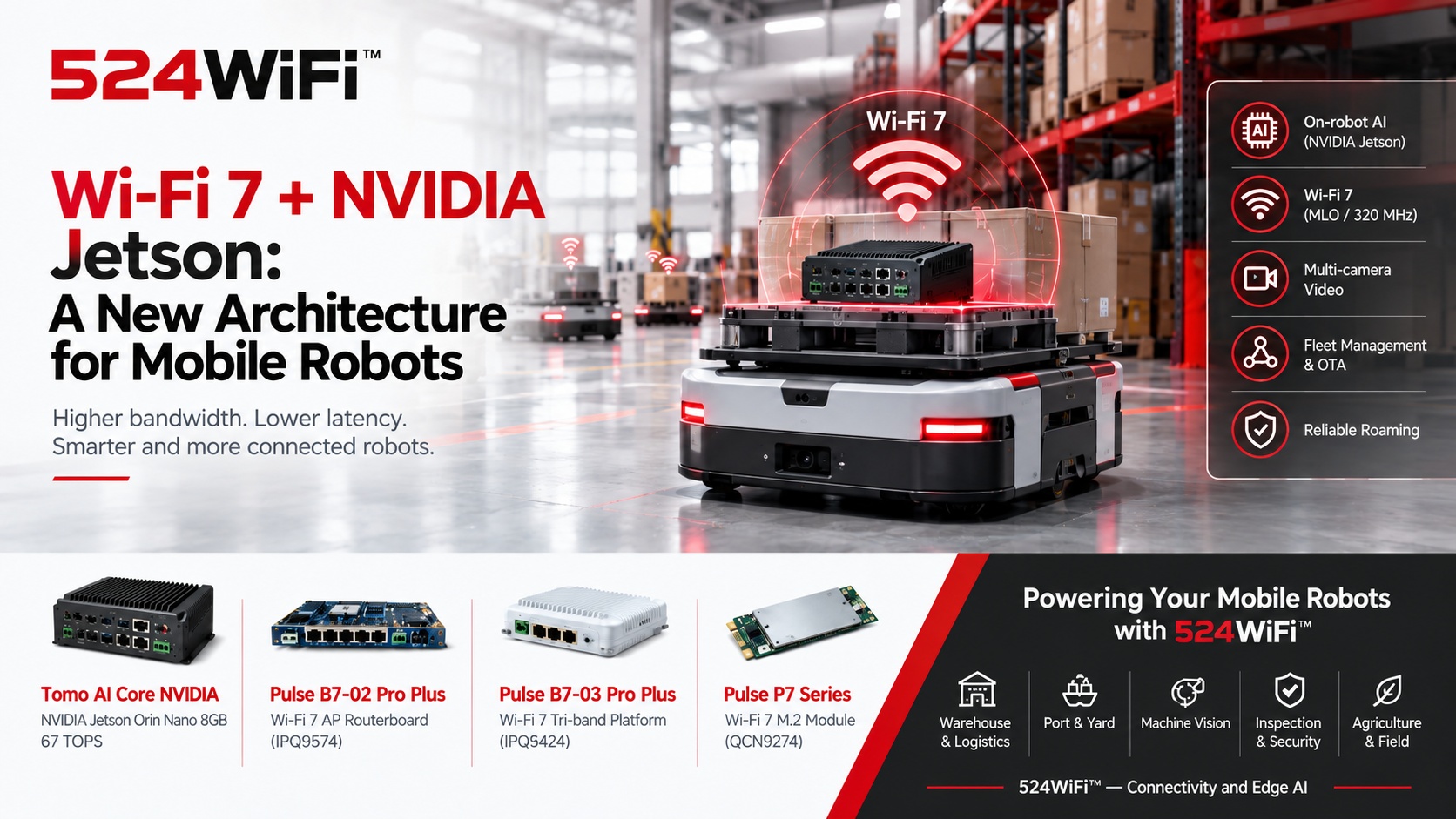
Wi-Fi 7 + Jetson: A New Architecture for Mobile Robots

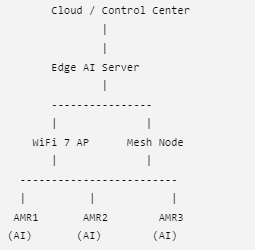
524WiFi™ mobile robot architecture with Tomo AI Core NVIDIA and Pulse Wi-Fi 7 platforms

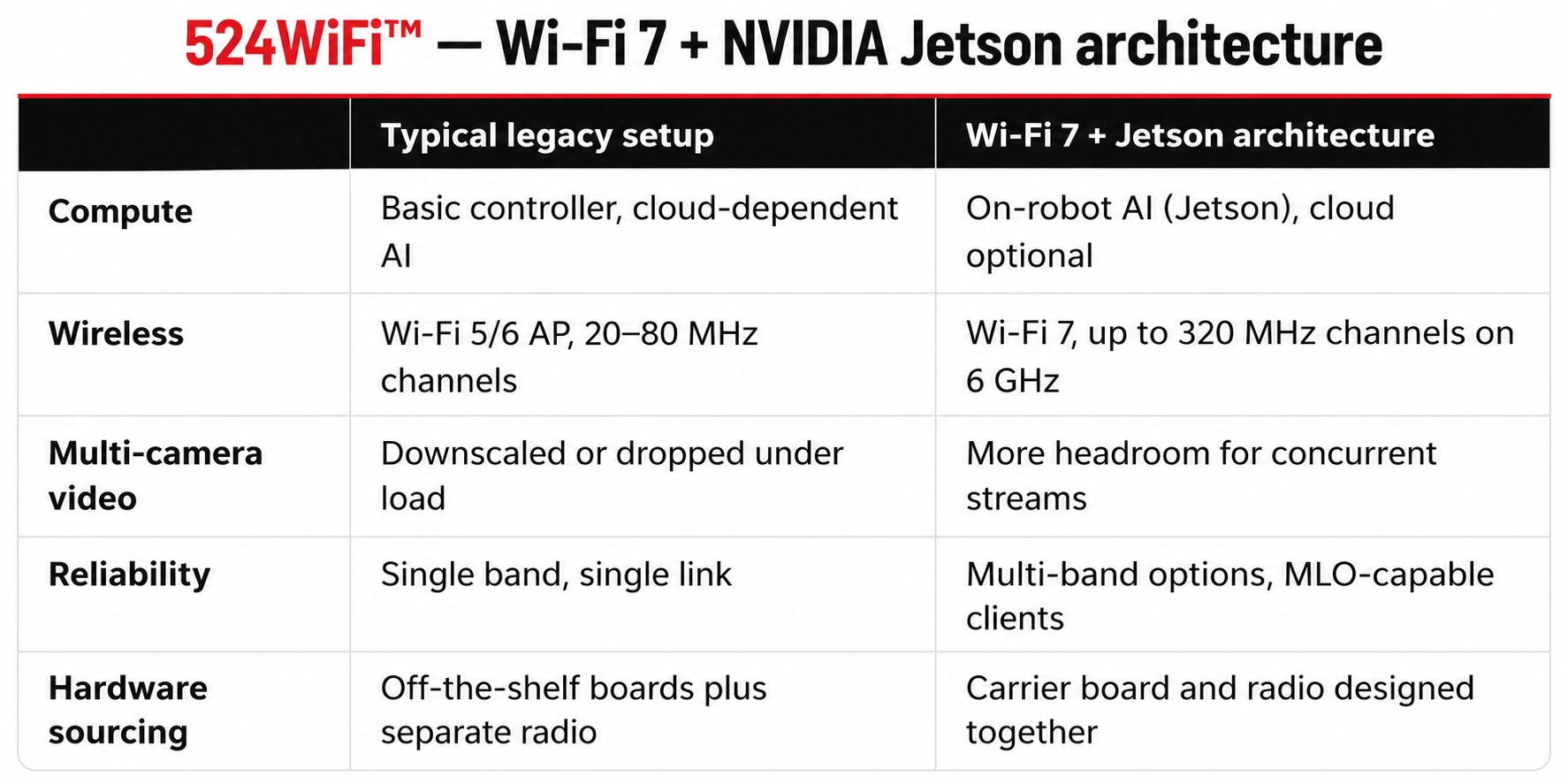
Mobile robots used to be limited mainly by batteries and mechanics. Increasingly, the limit is data movement. A modern AMR or UGV carries multiple cameras, LiDAR, and depth sensors. It runs perception models on board, and it has to stay connected while roaming across a warehouse, port, or factory floor. Compute has advanced quickly with NVIDIA Jetson. The wireless link has often stayed one generation behind.

Pairing Jetson-class edge compute with a Wi-Fi 7 network is one practical way to close that gap.

Why Jetson and Wi-Fi 7 belong in the same architecture

Jetson runs perception, localization, and navigation on the robot itself, so the robot does not depend on the network for real-time decisions. But the network still carries the data that matters at fleet level:

  • Compressed multi-camera streams for remote monitoring and teleoperation
  • Map and model updates pushed to many robots at once
  • Fleet telemetry, task dispatch, and OTA firmware
  • Handover of the robot’s connection between access points while moving

Wi-Fi 7 (IEEE 802.11be) addresses these directly. Channels of up to 320 MHz in the 6 GHz band raise per-link capacity. 4K-QAM raises spectral efficiency. Multi-Link Operation (MLO) lets a client use more than one band to improve reliability and reduce latency variation. Multi-RU scheduling helps when many small clients share a channel, which is the typical multi-robot case.

How the pieces fit together: 524WiFi™ edge platform

At 524WiFi™, we treat the robot’s compute and its radio as one design problem rather than two separate purchases.

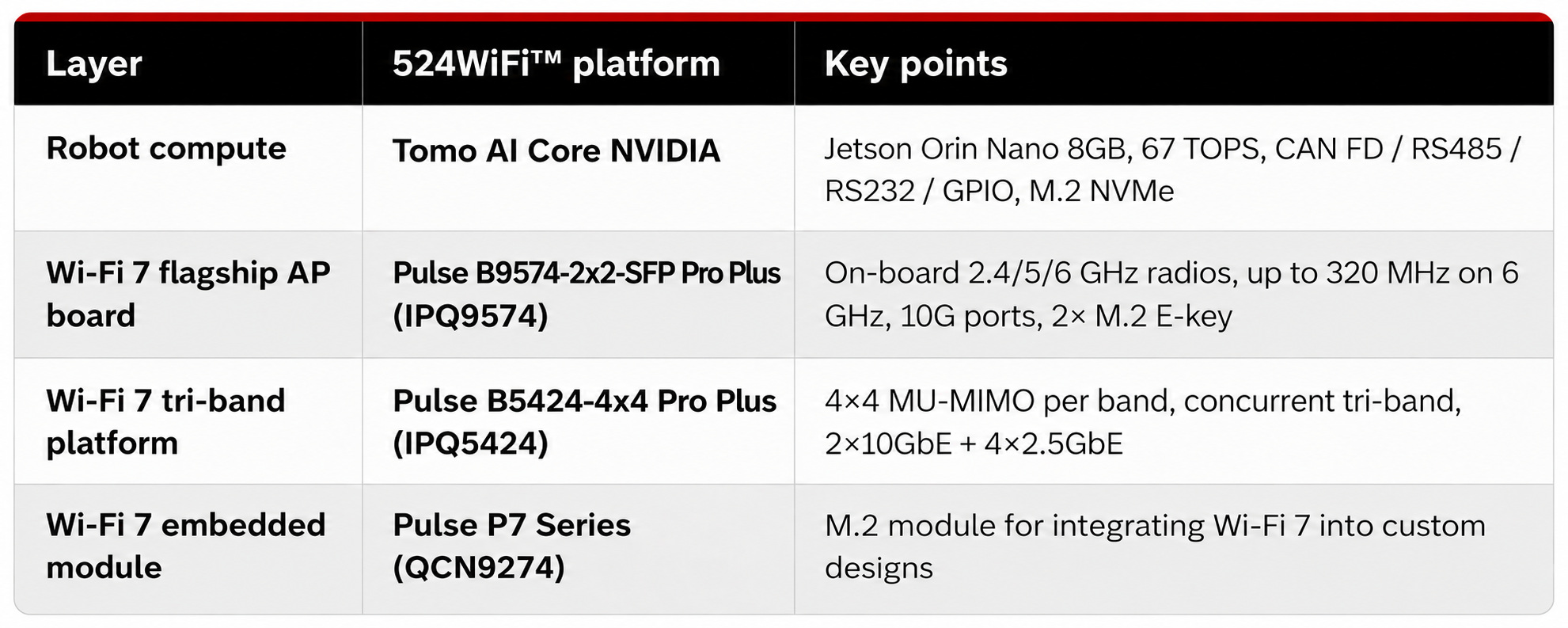
On the robot: the Tomo AI Core NVIDIA is built on the NVIDIA Jetson Orin Nano 8GB module with an industrial carrier board. It offers 67 TOPS of AI performance. Connectivity includes Gigabit Ethernet (one port with 48V PoE), optional Wi-Fi, and optional 4G/5G. Robot-side I/O includes CAN FD, RS485, RS232, GPIO, USB 3.0, and an M.2 NVMe slot. Select the compute, carrier I/O and wireless configuration around the requirements of the robot application.

On the infrastructure side: Wi-Fi 7 platforms based on Qualcomm silicon serve as the access point layer. Examples are the Pulse B9574-2×2-SFP Pro Plus (IPQ9574), the Pulse B5424-4×4 Pro Plus (IPQ5424), and the Pulse P7 Series M.2 modules (QCN9274) for embedding Wi-Fi 7 into your own hardware.

One point worth stating clearly: tri-band does not always mean the same thing. On the Pulse B5424-4×4 Pro Plus and Pulse B9574-2×2-SFP Pro Plus, the 2.4 GHz, 5 GHz, and 6 GHz radios are three independent chains running concurrently. Some tri-band cards are tri-band switchable, meaning one radio moves between bands to avoid interference. Both approaches are useful, but they suit different designs, so check which one a product actually is before planning around it.

Compared with the usual approach

Wi-Fi 7 is not a magic fix. Real roaming performance still depends on AP placement, channel planning, and client support. But the higher-capacity link and the multi-band tools give the network more room to work with.

Where this architecture applies

  • Warehouse and logistics AMRs: dense multi-robot fleets with steady roaming and continuous telemetry
  • Port and yard vehicles: long-range coverage with camera-based monitoring
  • Machine vision on the move: multi-camera, high-resolution image transfer to inspection systems
  • Inspection and security robots: live video plus on-board detection
  • Agricultural and field robotics: long-range control and video links, with custom transmission software where needed

Hardware summary

Talk to us

If you are building mobile robots on Jetson and would rather not develop the wireless hardware yourself, we can supply the modules, routerboards, and custom carrier boards, and discuss the application software and transmission requirements of the complete system.

Explore Pulse B9574-2×2-SFP Pro Plus, Pulse B5424-4×4 Pro Plus and Pulse P7 radio modules.

Platform references: DR Cube, DR9574S, DR5424 and DR9274.

Posted on

Why Your Next Edge AI Platform Needs a Tri-Band WiFi 7 Module, Not Just Dual-Band

Wireless is usually the last spec finalized on an edge AI hardware design and the first thing that becomes a bottleneck in the field. Worth a closer technical look before your next carrier board revision locks in.

The RF problem, precisely

Dual-band designs (2.4GHz + 5GHz) share spectrum with every consumer device, AP, and IoT sensor in range. In dense deployments — multi-robot fleets, factory floors, warehouses — this shows up as elevated retransmission rates, unpredictable jitter, and tail latency spikes under contention. For a control loop or a real-time inference pipeline streaming sensor data upstream, tail latency is what actually breaks the system, not average throughput.

WiFi 7 (802.11be) addresses this at the PHY/MAC level in three ways relevant to edge AI hardware:

  • 6GHz band access — largely unlicensed spectrum with far lower device density than 2.4/5GHz today, meaning lower channel contention and more predictable airtime
  • 320MHz channel bandwidth (vs. 160MHz max on WiFi 6) — higher raw throughput ceiling per link
  • Multi-Link Operation (MLO) — the ability to aggregate or fail over across bands simultaneously, so a device isn’t fully dependent on the health of a single channel

For an edge AI box pushing multi-camera streams, sensor fusion data, and periodic model/OTA updates concurrently, MLO plus 6GHz access is the difference between throughput that holds up under real RF load and throughput that only looks good on an open-air bench test.

Module-level implementation: DR9274E-TB

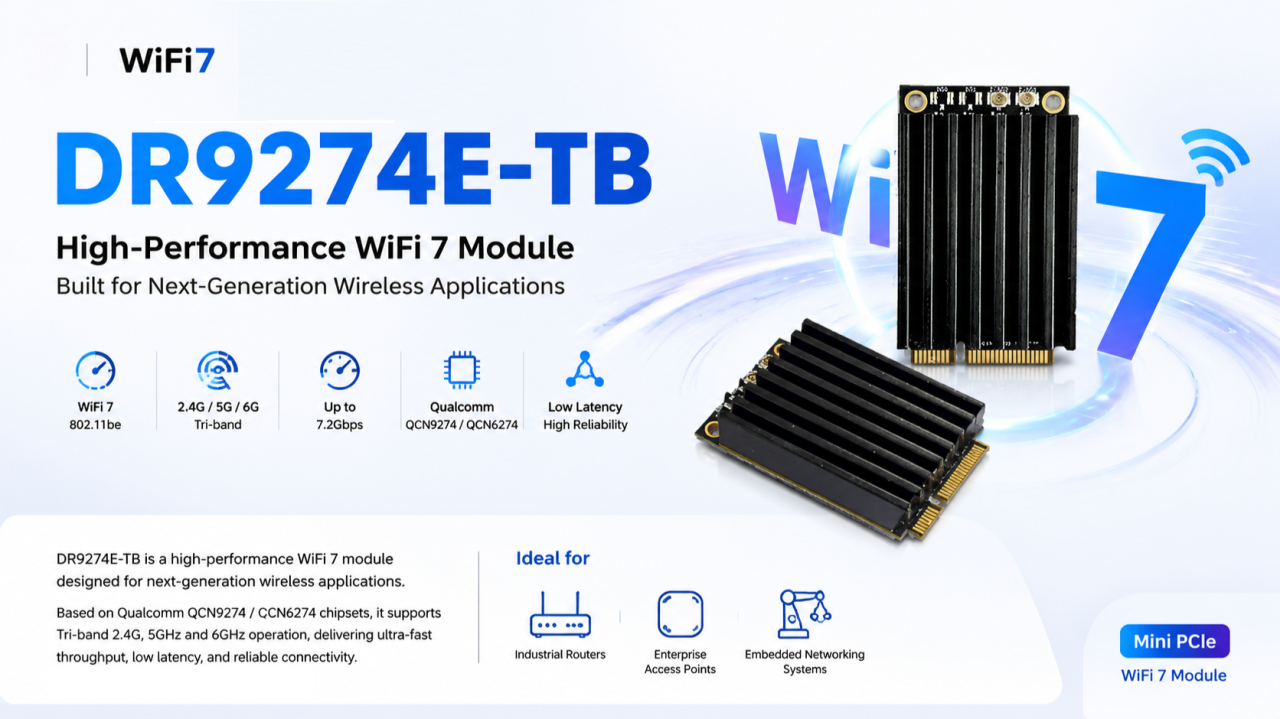
We built the DR9274E-TB around this exact requirement — a Mini PCIe WiFi 7 module for teams integrating wireless into embedded and industrial platforms rather than designing RF from scratch.

Specs:

  • Chipset: Qualcomm QCN9274 (5G/6G radio) + QCN6274 (2.4GHz radio) — Qualcomm’s WiFi 7 platform, not a rebadged WiFi 6E part
  • Band support: Tri-band, 2.4GHz / 5GHz / 6GHz
  • Antenna config: 2×2 MIMO
  • Interface: Mini PCIe — integrates without a carrier board redesign on most existing embedded platforms
  • OS support: Linux-compatible — relevant if your stack runs on JetPack, Yocto, or a custom embedded distro
  • Build: Industrial-grade components rated for continuous operation, not consumer-grade parts pushed into an industrial enclosure

Where the tri-band architecture actually matters

Not every application needs 6GHz. It matters specifically where you have:

  • High device density (multi-robot fleets, dense AP deployments)
  • Latency-sensitive control or telemetry loops
  • Concurrent high-bandwidth streams (multi-camera vision, sensor fusion payloads)
  • Environments where 2.4/5GHz spectrum is already saturated by other systems

That covers most edge AI computing platforms, industrial routers/IoT gateways, enterprise APs in high-density environments, outdoor CPE/wireless bridges, and mesh networking nodes.

The engineering takeaway

Specifying wireless the way you did for a WiFi 5/6 design — pick a dual-band module, move on — leaves latency and reliability headroom on the table that your compute stack has already outgrown. Tri-band WiFi 7 with MLO isn’t a marketing checkbox; it’s a direct answer to the contention and jitter problems that show up specifically under production RF conditions, not lab conditions.

Happy to go deeper on channel planning, MLO configuration, or driver-level integration for teams currently specifying wireless for a Jetson-based or other edge AI carrier board.

📩 Reach out to 524WiFi for datasheets, samples, or OEM customization.

Posted on

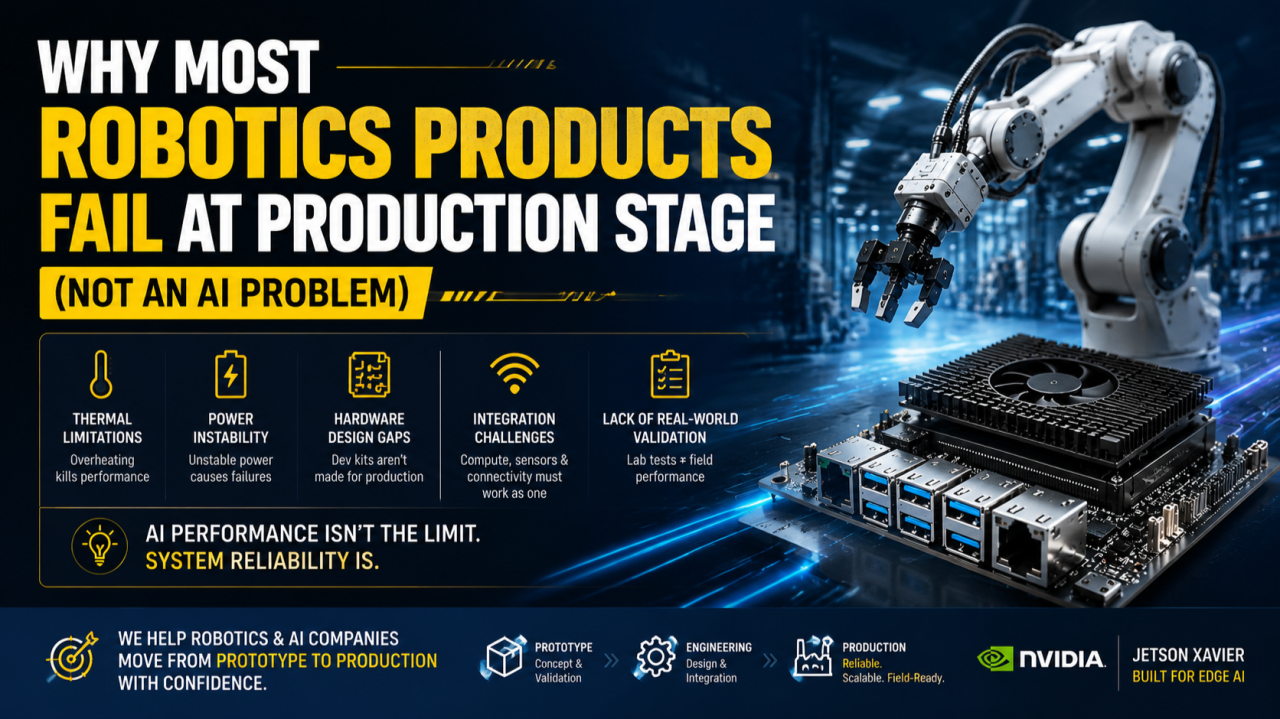
Why most robotics products fail at production stage (not an AI problem)

Introduction

In the robotics and edge AI industry, there is a common assumption:

If the AI model works, the product is ready.

But in reality, many robotics products fail not because of AI algorithms — but because of system-level engineering challenges that only appear in real-world deployment.

After working with industrial wireless systems and edge AI hardware platforms, we consistently observe the same pattern:

The gap between prototype and production is where most products break.


1. The real problem is not AI — it is system engineering

Most robotics teams are strong in:

  • Computer vision
  • Deep learning models
  • Path planning / autonomy algorithms

However, production environments introduce constraints that are often underestimated:

  • Continuous workload (not short demos)
  • Temperature variations
  • Power fluctuations
  • Mechanical constraints
  • Interference in wireless environments

These are not AI problems — they are system integration problems.


2. Why Jetson-based systems still fail in production

Even with powerful platforms like Jetson Xavier, many teams encounter issues when scaling:

❌ Thermal limitations

AI workloads in production run continuously, not intermittently like in lab tests.

❌ Power instability

Robotics platforms often operate in environments with fluctuating power conditions.

❌ Carrier board limitations

Development kits are not designed for enclosure integration or mass manufacturing.

❌ System integration gaps

Compute, sensors, and wireless modules are often designed separately, leading to instability.

❌ Lack of production validation

Many systems are never tested under real industrial conditions before deployment.

Article content

3. Prototype vs Production gap

In prototype stage:

  • Functionality is the focus
  • Short test cycles
  • Controlled environment

In production stage:

  • Reliability becomes critical
  • Continuous operation
  • Real-world environmental stress

This transition is where many robotics products fail.


4. The missing layer: system-level engineering

Successful robotics products require more than AI models.

They require:

✔ Production-grade hardware design

✔ Thermal and power system engineering

✔ Embedded system optimization

✔ Wireless + compute integration

✔ Field deployment validation

Without these, even the most advanced AI system will struggle in real-world environments.


5. Key insight

Robotics success is not determined by AI capability alone, but by how well the entire system is engineered for reality.


6. How we approach this problem

We work with robotics and AI vision companies to help bridge the gap between prototype and production by supporting:

  • Edge AI hardware platform design
  • Carrier board development
  • System integration for industrial deployment
  • Wireless + embedded system architecture optimization
  • Production readiness engineering

Our focus is on helping teams move from concept validation to scalable real-world products.


Conclusion

The future of robotics will not be defined only by better AI models.

It will be defined by systems that are:

  • Reliable
  • Scalable
  • Deployable in real environments

Because in the real world:

AI that works in demo is not enough — it must work in production.

Article content
Posted on

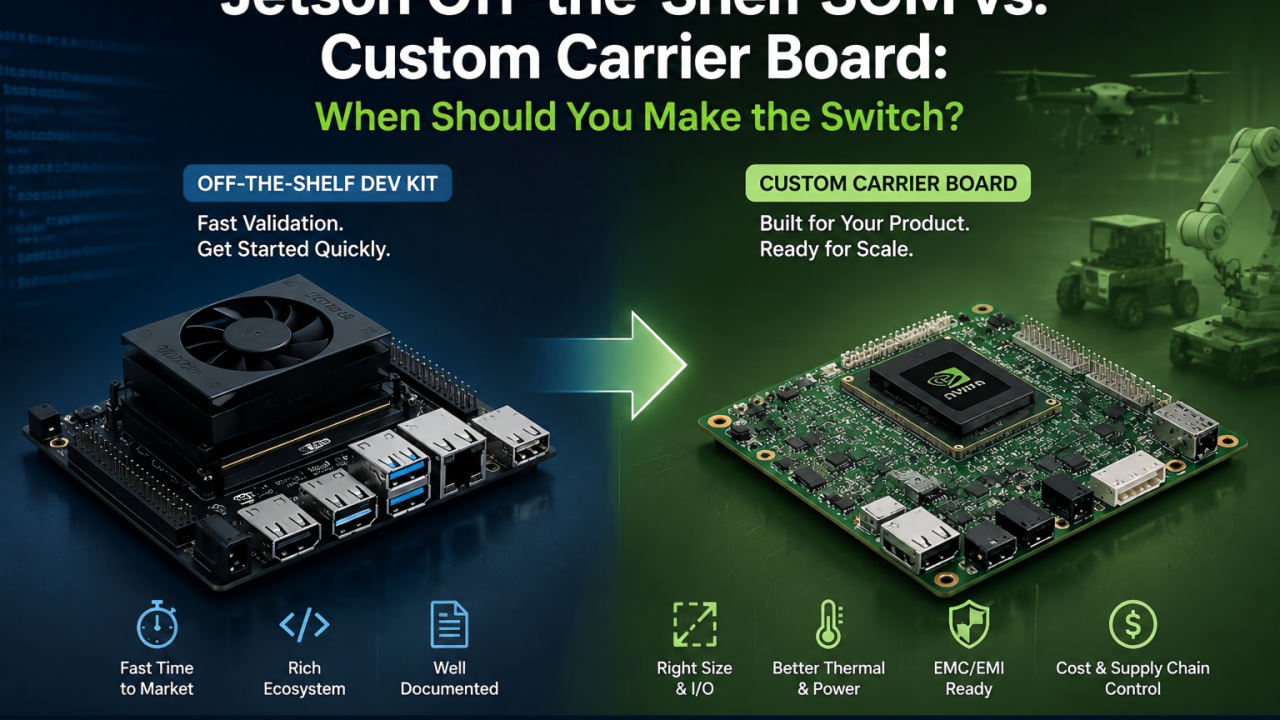
Jetson Off-the-Shelf SOM vs. Custom Carrier Board: When Should You Make the Switch?

The question I get asked most often in edge AI hardware consulting is: “We’ve already got our demo running on a Jetson off-the-shelf dev kit — is it time to move to a custom carrier board?”

There’s no one-size-fits-all answer, but there are a few clear signals worth sharing.

First, Know What the Stock Dev Kit Is Good For

The Jetson ecosystem’s off-the-shelf dev kits are mature and well-documented, and their real value is fast algorithm validation. If you’re still tuning models and debugging your pipeline, sticking with the stock board is almost always the right call — you don’t want to split your team’s focus between hardware design and algorithm iteration at that stage.

Moving to a custom carrier board too early is a common trap: hardware design can’t keep pace with fast-moving algorithm changes, and every board respin ends up slowing the whole project down.

Signals That It’s Time to Switch to a Custom Carrier Board

Signal 1: Physical space becomes a hard constraint Drones, robotic arm end-effectors, and small inspection robots are all extremely sensitive to size and weight. In these cases, the stock module’s dimensions and connector overhead often can’t meet mechanical requirements. A custom carrier board can be laid out around your actual mechanical envelope, instead of forcing your design to fit the stock form factor.

Signal 2: Your I/O requirements don’t match the stock board Needing a specific number of CSI camera interfaces, industrial buses like CAN or RS485, or wanting to strip out unused interfaces to cut cost and power draw — these customization needs are hard to satisfy with an off-the-shelf board.

Signal 3: Production cost and supply chain control Once off-the-shelf modules go into volume production, unit pricing and lead times aren’t fully in your hands. A custom carrier board has higher upfront design cost, but at mid-to-high volume it typically gives you better control over BOM cost and lead times — especially relevant given ongoing supply chain volatility.

Signal 4: Power and thermal performance are core to your application Drones care deeply about weight and flight time; outdoor equipment needs wide operating temperature ranges and passive cooling. These requirements need to be addressed at the carrier board design stage — a generic thermal solution on a stock board rarely gets you there.

An Often-Overlooked Factor: EMC/EMI Design

For drones and industrial equipment operating in electrically noisy environments especially, if the carrier board layout isn’t designed with EMC in mind from the start, you’re likely to run into certification issues later — and the rework cost at that point far exceeds the extra design time it would have taken upfront.


Bottom line: an off-the-shelf module answers “can it run?” — a custom carrier board answers “can it run reliably, cost-effectively, and at scale?” Deciding when to switch really comes down to identifying the point where your project moves from validation to productization.

If you’re evaluating a custom carrier board for a Jetson-based platform, happy to talk through your specific application and technical requirements.

Posted on

From NVIDIA Jetson Development Kit to Production: What Robotics Companies Need to Consider Beyond AI Computing

For many robotics companies, the NVIDIA Jetson Development Kit is the first step when building a new product.

It allows engineers to quickly evaluate system concepts, connect peripherals, test software, and verify whether the hardware platform can support their application.

However, after the prototype stage, many teams face a different challenge:

The development kit is not the final product.

A development board is designed for flexibility and evaluation.

A commercial product needs to be designed for:

  • Specific mechanical dimensions
  • Required interfaces
  • Stable power supply
  • Thermal conditions
  • Manufacturing process
  • Long-term availability

This transition from evaluation platform to production hardware is where many engineering teams start facing challenges.

The question changes from:

“Can we make the prototype work?”

to:

“Can we build thousands of units with consistent quality?”


Development Kit Is Only the Beginning

A Jetson Development Kit is an excellent engineering tool.

It helps teams quickly verify:

  • Processor performance
  • Camera connection
  • Sensor integration
  • Software environment
  • Application functionality

During early development, engineers usually focus on functionality.

They may connect:

  • USB cameras
  • External sensors
  • Network devices
  • Additional modules

Everything works on the lab desk.

But when moving into a real product, these temporary solutions often become limitations.

A production device cannot simply place a development kit inside an enclosure.


What Changes When Moving to Production?

1. The hardware needs to fit the product

One of the first challenges is mechanical integration.

A development kit has fixed:

  • Size
  • Connector locations
  • Mounting structure

But the final product may have strict requirements.

For example:

A mobile robot may need all electronics installed inside a compact chassis.

An industrial inspection device may require a specific enclosure.

A customized carrier board allows engineers to redesign the hardware around the actual product.


2. Interfaces need to match the application

Different products require different hardware configurations.

A development kit provides general interfaces.

A production system often needs customized combinations.

Examples:

  • Multiple camera inputs
  • Ethernet ports
  • CAN interface
  • RS232/RS485
  • GPIO control
  • Sensor interfaces
  • Storage expansion

Instead of adding external conversion boards, a custom carrier board can integrate the required functions directly.

This reduces:

  • System complexity
  • Cable connections
  • Assembly difficulty

3. Power design becomes more important

Power is often underestimated during prototype development.

A desktop environment provides stable power.

A production device has different conditions.

Engineers need to consider:

  • Input voltage range
  • Power distribution
  • Protection circuits
  • Power consumption
  • Startup sequence

For industrial products, unstable power design can create reliability problems that are difficult to diagnose.


4. Thermal design cannot be ignored

Higher computing performance also creates thermal challenges.

During prototype testing, engineers may use:

  • Open-air environments
  • Standard heatsinks
  • Development accessories

Production products require:

  • Designed heat dissipation
  • Enclosure consideration
  • Long-term operating stability

Thermal design needs to happen together with mechanical design.


Common Challenges During Custom Board Development

Based on our experience working on embedded hardware projects, several challenges appear frequently.

Challenge 1:

Prototype works, but the design is difficult to manufacture

A prototype may use:

  • Evaluation boards
  • Additional modules
  • Manual wiring

This is acceptable for engineering verification.

However, mass production requires:

  • Optimized PCB design
  • Simplified assembly
  • Stable component sourcing
  • Manufacturing testing

The production design needs to consider the entire lifecycle.


Challenge 2:

Balancing performance and cost

The highest specification is not always the best product design.

Engineers need to balance:

  • Computing requirements
  • Hardware cost
  • Power consumption
  • Manufacturing complexity

The right design depends on the application.


Challenge 3:

From prototype samples to stable production

A few working prototypes do not mean the product is ready.

Before production, companies usually need to complete:

  • Hardware verification
  • Reliability testing
  • Manufacturing validation
  • Quality control process

This stage requires cooperation between engineering and manufacturing teams.


Key Considerations When Designing a Jetson Production Platform

1. Start hardware planning early

Many companies first focus on software development.

However, hardware decisions made later can affect:

  • Product size
  • Cost
  • Schedule
  • Manufacturing

Early hardware planning can reduce redesign cycles.


2. Select the right development partner

A production hardware project involves multiple disciplines:

  • Hardware design
  • PCB layout
  • Embedded software
  • Testing
  • Manufacturing

A partner with both engineering and production experience can help shorten the transition.


3. Think about future product versions

A good hardware platform should consider future needs:

  • Interface expansion
  • Component availability
  • Product upgrades

The first production design often becomes the foundation for future products.


524WiFi Perspective

At 524WiFi and Wallys, we have been involved in embedded communication hardware development since 2005.

Our engineering capabilities include:

  • Hardware design
  • PCB development
  • Embedded system integration
  • Prototype validation
  • Production support
  • OEM/ODM/JDM services

With the increasing adoption of NVIDIA Jetson platforms in industrial applications, we are expanding our hardware development capability to support companies that need customized Jetson-based platforms.

Our focus is not only building a prototype board.

It is helping engineering teams move from:

Concept → Prototype → Production

through practical hardware design and manufacturing experience.


Conclusion

The NVIDIA Jetson Development Kit provides engineers with a fast way to start development.

But successful products require much more than selecting a computing module.

The transition to production requires careful consideration of:

  • Hardware customization
  • Interface design
  • Power management
  • Thermal solution
  • Manufacturing requirements

For robotics and industrial equipment companies, the biggest challenge is often not proving that the technology works.

It is turning a working prototype into a reliable product.

What challenges have you experienced when moving from development boards to production hardware?

Posted on

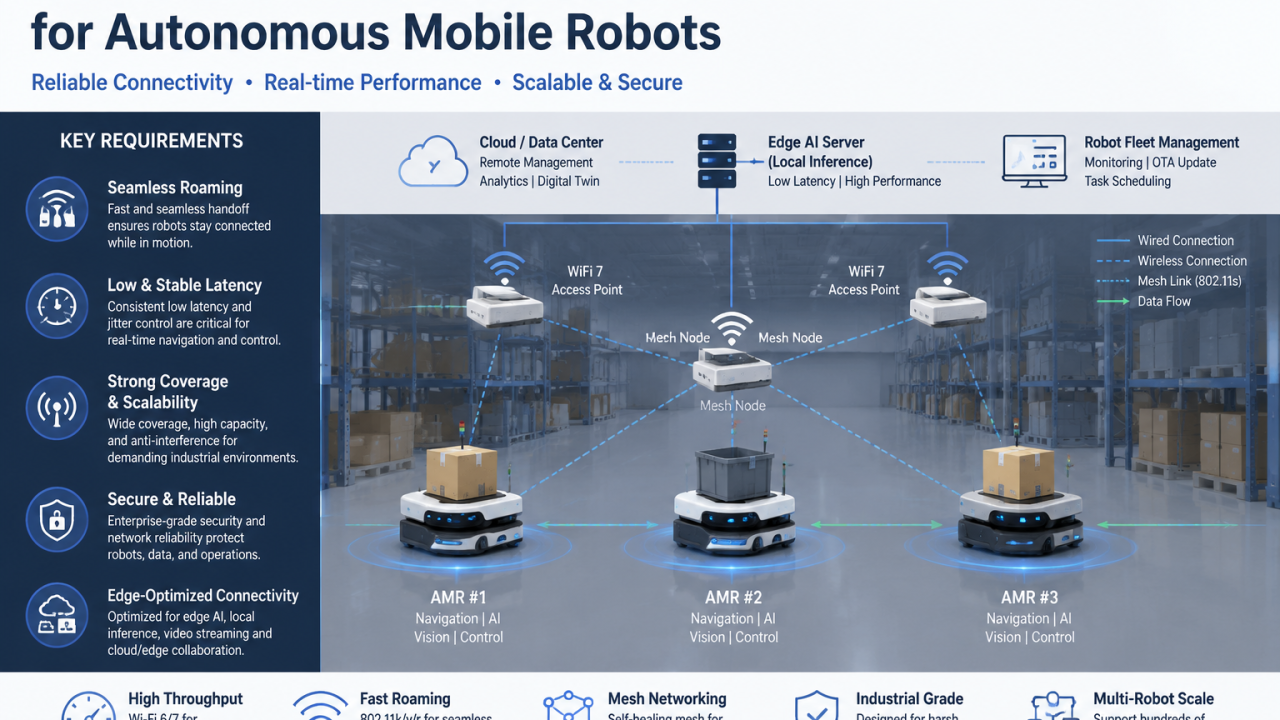
How to Build Reliable Wireless Infrastructure for Autonomous Mobile Robots?

When companies deploy autonomous mobile robots (AMRs) in real environments, the biggest challenge is often not the robot itself.

It is the network that keeps the robot connected.

An AMR depends on continuous communication for:

– Real-time navigation

  • Vision data transmission

⚡ Edge AI inference

– Fleet coordination

☁️ Cloud and remote management

A short network interruption may result in:

  • Navigation delays
  • Video stream drops
  • Task interruptions
  • Reduced operational efficiency

So, what does a reliable wireless infrastructure for AMRs require?

1. Seamless Roaming

AMRs continuously move through different areas.

A reliable network must allow robots to switch between access points without interrupting communication.

2. Low and Stable Latency

For autonomous systems, average speed is not enough.

What matters is consistent response time.

Network jitter and packet loss can directly impact robot performance.

3. Strong Coverage and Scalability

Factories and warehouses often have:

  • Large areas
  • Metal structures
  • RF interference
  • Hundreds of connected devices

A scalable wireless architecture is essential.

4. Edge-Optimized Connectivity

Modern robots combine:

– AI computing – Wireless communication – Sensors ⚙️ Real-time control

Email: [email protected] or [email protected]

The wireless network is no longer just an access layer.

It becomes part of the AI system.

As Physical AI moves from laboratories into factories, warehouses, and outdoor environments, reliable connectivity will become a key factor determining whether autonomous systems can scale.

AI gives robots intelligence.

Connectivity gives robots the ability to operate.

What challenges have you experienced when deploying wireless networks for autonomous robots?

Building the next generation of AI-powered edge devices requires reliable connectivity. Explore how WallysTech helps robotics, AI vision, and industrial applications achieve stable wireless performance.

Article content