Posted on — Leave a comment

How to Design a Reliable Long-Range Wireless Link for Agricultural Drones (WiFi 6/7 Selection Guide)

If you’ve deployed drones for crop spraying, field mapping, or orchard inspection over any real distance, you’ve probably run into this: the link holds fine at 200 meters, then starts dropping commands or breaking up video well before you hit the range the datasheet promised. It’s rarely a bad chip. It’s almost always an architecture problem.

This guide walks through why long-range agricultural links behave differently from indoor or short-range WiFi deployments, what actually determines reliability at range, and how to select hardware — control-side and video-side — that holds up in the field.

Why Agricultural Drone Links Are a Different Problem

Most WiFi hardware is designed and benchmarked for indoor, short-range, high-density environments — offices, warehouses, retail. Agricultural drone deployments invert almost every one of those assumptions:

  • Distance is the default, not the exception. A single control link routinely needs to cover several hundred meters to a few kilometers across open farmland or orchards.
  • There’s no multipath to lean on. Indoor WiFi benefits from reflections off walls and ceilings. Open fields don’t offer that — and offer very little shielding from other interference either.
  • Control and video have opposite requirements. Control commands are small, frequent packets that need low, consistent latency and near-zero loss. Video (especially 4K, multispectral, or thermal payloads) needs sustained bandwidth and can tolerate some jitter. Serving both well on one link is hard.
  • One-to-many is common. A single ground station frequently needs to manage multiple aircraft flying formation or covering different zones of the same field, which means the AP side has to handle concurrent, fast-moving clients — not a single static link.
  • Power is capped by regulation, not by ambition. ISM-band transmit power and antenna gain both have legal ceilings. You can’t out-power your way to more range.

The Five Things That Actually Determine Reliability at Range

1. Band Strategy: Split the Link, Don’t Pick One Band

2.4GHz diffracts better around terrain, crops, and structures, which is why it’s traditionally the default choice for long-range control links. 5GHz and 6GHz offer far more spectrum and fewer competing signals, which is exactly what high-resolution video needs.

The reliable pattern in the field isn’t choosing one band for everything — it’s running a split architecture: control on 2.4GHz, video on 5GHz or 6GHz. That’s a strong argument for radio hardware where the band configuration is flexible (single-band, dual-band, or switchable tri-band) rather than fixed to one band at the factory.

2. Modulation and Spatial Streams: Know What They Actually Control

Specs like 4096-QAM and multi-stream MU-MIMO are real and useful — but they define your near-field ceiling, not your far-field floor. As distance increases and signal-to-noise ratio drops, the link automatically falls back to lower-order modulation regardless of the chip’s peak capability.

When evaluating hardware for a long-range deployment, the number that matters isn’t the “Gbps peak” on the datasheet. It’s the rate-adaptation curve under low SNR, and specifically the minimum usable data rate at the outer edge of your intended range. That’s the number that tells you whether video will break up or commands will get dropped when the aircraft is farthest from the ground station — which is exactly when you need the link most.

3. MLO (Multi-Link Operation): Redundancy, Not Traffic Splitting

WiFi 7 introduced Multi-Link Operation, which lets a device establish links across multiple bands or channels at once. There’s a common misconception worth clearing up here: MLO isn’t a way to route control traffic on one band, video on another, and backhaul on a third, each running independently.

What MLO actually does is transmit the same data redundantly across multiple links simultaneously, so that if one link momentarily fades or gets interfered with, the other link covers for it — improving reliability and reducing effective latency. For agricultural drones, where a lost link is often the trigger for a return-to-home failsafe, that kind of redundancy has real operational value, not just a spec-sheet checkbox.

4. Topology: Point-to-Point vs. One-to-Many

A single aircraft doing long-range mapping or inspection is often best served by a point-to-point link — a directional antenna setup trading beamwidth for range and stability. But if a ground station needs to manage multiple aircraft or ground terminals simultaneously, the AP side needs OFDMA multi-user scheduling and fast roaming/handoff behavior, or you’ll see queuing delay whenever multiple aircraft check in around the same time.

Know which problem you’re actually solving before you pick hardware — they call for different radio capabilities.

5. Form Factor: Airborne and Ground-Side Needs Diverge

The airborne side is constrained by payload weight and available power, so it needs a small, low-power radio module that can be integrated directly into a flight controller or gimbal payload — with just enough band flexibility to serve the control link without unnecessary weight or draw.

The ground station side is a different design problem entirely: it needs to aggregate multiple client connections, handle higher sustained throughput, and typically needs wired backhaul (Ethernet, sometimes 10GbE) to move the collected video and telemetry off to a local server or the cloud. That usually points toward a board-level platform rather than a compact module.

Mapping Hardware to the Problem

Once you’ve worked through the five factors above, hardware selection becomes a matter of matching platform to role rather than chasing a single “best” spec sheet.

Airborne / terminal-side radio module. You want something small, power-efficient, and configurable — ideally a module where you can select or trim the band configuration (single-band 2.4GHz for a dedicated control radio, or dual-band where the payload allows) without carrying unused radio hardware and power draw. This is the role a WiFi 7 M.2 module built on a chipset like Qualcomm’s QCN9274/QCN6274 platform is designed for, with configurations spanning single-band, dual-band, and 4×4 single-band variants depending on what the airframe needs.

Ground-station aggregation board. This is where you want a flagship-class multi-band platform — four simultaneous bands, wide channels (up to 320MHz), high-order modulation (4096-QAM), multiple M.2 slots for additional radio cards, and dual 10GbE-class wired uplinks. This tier handles concurrent multi-aircraft connections, dynamic channel selection (AFC) to work around interference, and reliably backhauling the aggregated video streams to wherever they’re processed.

Edge gateway with onboard compute. For deployments where you want to do video processing or stream aggregation closer to the field — rather than pushing everything raw to the cloud — a tri-band gateway platform with high-speed wired I/O (dual 10GbE + multiple 2.5GbE) and an onboard AI accelerator tuned for networking workloads is the better fit. It handles wireless backhaul while also doing local compute, cutting the bandwidth pressure on the uplink.

A Practical Decision Order

When you’re actually speccing a system, work through it in this order:

  1. Point-to-point or one-to-many? This determines whether OFDMA and fast roaming on the ground-station side are must-haves or nice-to-haves.
  2. Does the control link need to be physically separated from the video link? This determines whether a single-band module or a multi-band board is the right call for each end of the system.
  3. What are the payload’s power and space constraints? This determines module-level vs. board-level hardware on the airborne side.
  4. Does the back end need edge compute or multi-stream video aggregation? If yes, prioritize a gateway platform with onboard AI acceleration and high-speed wired I/O.

FAQ

Is 2.4GHz or 5GHz better for a long-range drone control link? 2.4GHz generally holds up better over distance and around obstructions like terrain or crop canopy, which is why it’s the more common choice for the control link specifically. 5GHz and 6GHz are typically reserved for the video link, where the extra bandwidth matters more than raw range.

Do I need WiFi 7, or is WiFi 6 enough? It depends on whether you need MLO’s link redundancy and whether your video payload actually needs the extra bandwidth WiFi 7’s wider channels provide. Many long-range control links work fine on WiFi 6; WiFi 7 becomes more valuable as video resolution, aircraft count, or reliability requirements increase.

What’s the actual benefit of MLO for a drone link? Redundancy. The same data is sent across multiple links at once, so a momentary fade on one link doesn’t cost you the connection — it isn’t a way to assign different traffic types to different bands independently.

Should the airborne radio and the ground-station radio be the same hardware? No — they’re solving different problems. The airborne side prioritizes size, weight, and power; the ground station prioritizes aggregate throughput, multi-client handling, and wired backhaul capacity.


If you’re evaluating or redesigning the wireless subsystem in a drone flight-control or video-transmission stack — or migrating an existing deployment from WiFi 5/6 to WiFi 7 — reach out to info at 524wifi.com or .net. We build radio hardware across all three tiers described above and can walk through the specifics of your deployment.

Posted on

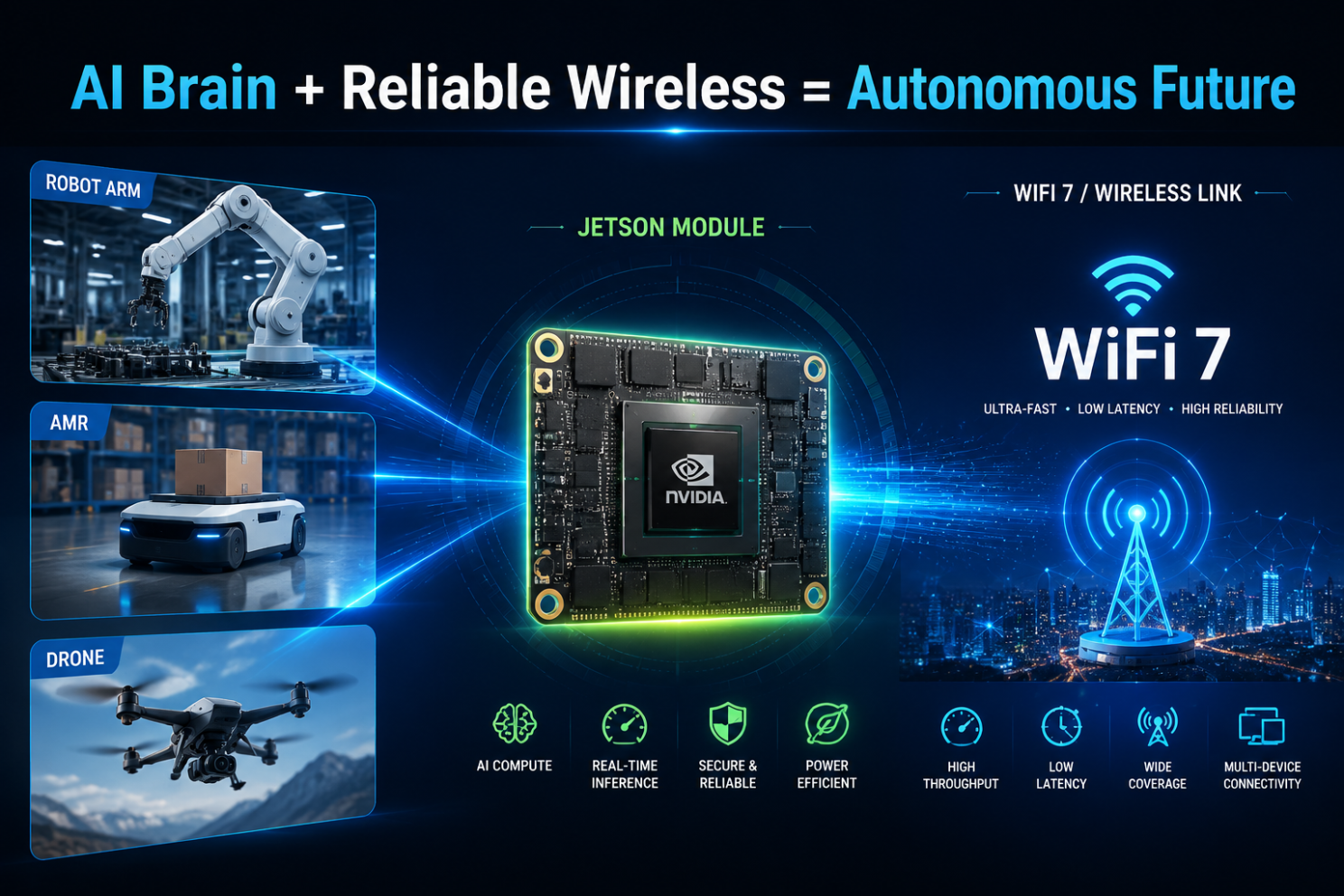
Why Your Next Edge AI Platform Needs a Tri-Band WiFi 7 Module, Not Just Dual-Band

Wireless is usually the last spec finalized on an edge AI hardware design and the first thing that becomes a bottleneck in the field. Worth a closer technical look before your next carrier board revision locks in.

The RF problem, precisely

Dual-band designs (2.4GHz + 5GHz) share spectrum with every consumer device, AP, and IoT sensor in range. In dense deployments — multi-robot fleets, factory floors, warehouses — this shows up as elevated retransmission rates, unpredictable jitter, and tail latency spikes under contention. For a control loop or a real-time inference pipeline streaming sensor data upstream, tail latency is what actually breaks the system, not average throughput.

WiFi 7 (802.11be) addresses this at the PHY/MAC level in three ways relevant to edge AI hardware:

  • 6GHz band access — largely unlicensed spectrum with far lower device density than 2.4/5GHz today, meaning lower channel contention and more predictable airtime
  • 320MHz channel bandwidth (vs. 160MHz max on WiFi 6) — higher raw throughput ceiling per link
  • Multi-Link Operation (MLO) — the ability to aggregate or fail over across bands simultaneously, so a device isn’t fully dependent on the health of a single channel

For an edge AI box pushing multi-camera streams, sensor fusion data, and periodic model/OTA updates concurrently, MLO plus 6GHz access is the difference between throughput that holds up under real RF load and throughput that only looks good on an open-air bench test.

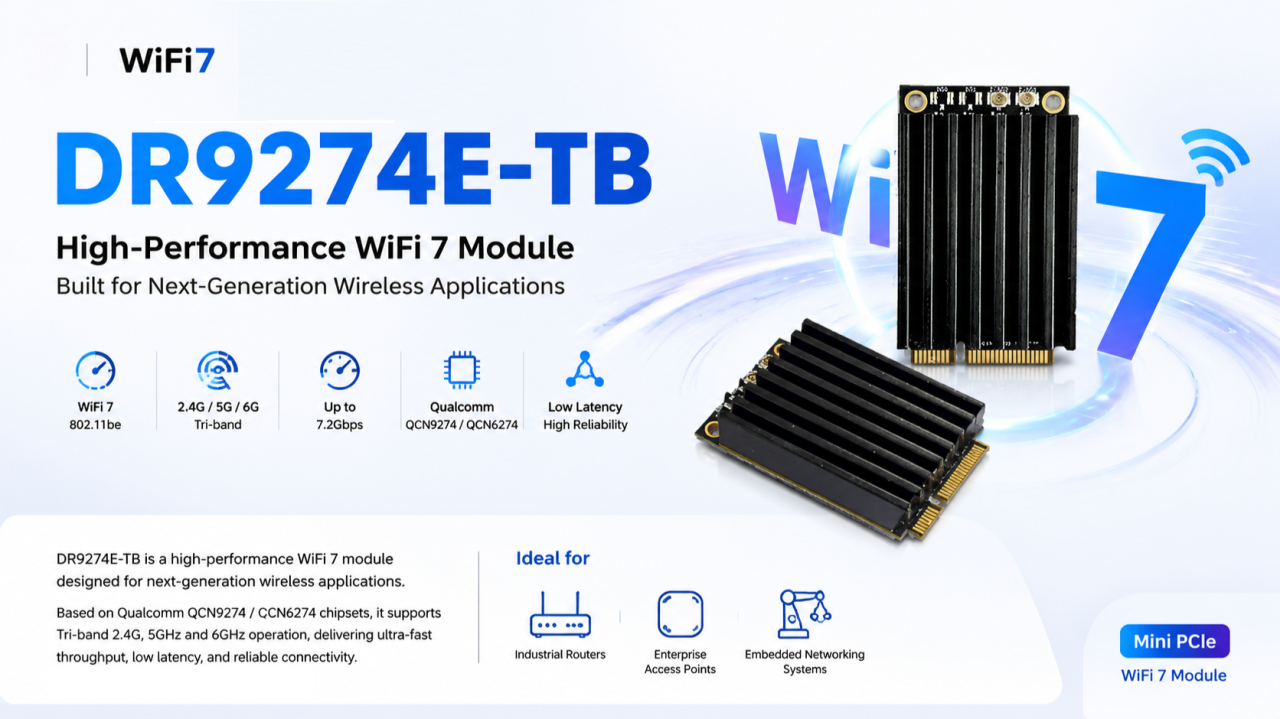
Module-level implementation: DR9274E-TB

We built the DR9274E-TB around this exact requirement — a Mini PCIe WiFi 7 module for teams integrating wireless into embedded and industrial platforms rather than designing RF from scratch.

Specs:

  • Chipset: Qualcomm QCN9274 (5G/6G radio) + QCN6274 (2.4GHz radio) — Qualcomm’s WiFi 7 platform, not a rebadged WiFi 6E part
  • Band support: Tri-band, 2.4GHz / 5GHz / 6GHz
  • Antenna config: 2×2 MIMO
  • Interface: Mini PCIe — integrates without a carrier board redesign on most existing embedded platforms
  • OS support: Linux-compatible — relevant if your stack runs on JetPack, Yocto, or a custom embedded distro
  • Build: Industrial-grade components rated for continuous operation, not consumer-grade parts pushed into an industrial enclosure

Where the tri-band architecture actually matters

Not every application needs 6GHz. It matters specifically where you have:

  • High device density (multi-robot fleets, dense AP deployments)
  • Latency-sensitive control or telemetry loops
  • Concurrent high-bandwidth streams (multi-camera vision, sensor fusion payloads)
  • Environments where 2.4/5GHz spectrum is already saturated by other systems

That covers most edge AI computing platforms, industrial routers/IoT gateways, enterprise APs in high-density environments, outdoor CPE/wireless bridges, and mesh networking nodes.

The engineering takeaway

Specifying wireless the way you did for a WiFi 5/6 design — pick a dual-band module, move on — leaves latency and reliability headroom on the table that your compute stack has already outgrown. Tri-band WiFi 7 with MLO isn’t a marketing checkbox; it’s a direct answer to the contention and jitter problems that show up specifically under production RF conditions, not lab conditions.

Happy to go deeper on channel planning, MLO configuration, or driver-level integration for teams currently specifying wireless for a Jetson-based or other edge AI carrier board.

📩 Reach out to 524WiFi for datasheets, samples, or OEM customization.

Posted on

WiFi 7 + TDMA:From Faster Wireless to Smarter Wireless

For years, WiFi innovation has been measured by one simple metric:

How fast can we transmit data?

WiFi 5 brought higher throughput.

WiFi 6 introduced OFDMA and improved efficiency.

WiFi 7 pushed the boundaries further with 320MHz channels, Multi-Link Operation (MLO), and 4096-QAM.

But for industrial networks, outdoor broadband, and mission-critical applications, speed alone is no longer enough.

The next question is:

Can wireless networks become more predictable, more scalable, and easier to manage?

This is where WiFi 7 + TDMA (Time Division Multiple Access) creates a new opportunity.


The Challenge: Traditional WiFi Was Not Designed for Large-Scale Industrial Networks

Traditional WiFi is based on contention mechanisms.

Multiple devices compete for airtime.

This works well for:

  • Homes
  • Offices
  • Public hotspots

But outdoor and industrial deployments face very different challenges:

  • Dozens or hundreds of connected devices
  • Long-distance wireless links
  • High-density IoT terminals
  • Video surveillance traffic
  • Autonomous machines and robots
  • Unstable RF environments

When many clients transmit at the same time, problems appear:

❌ Higher latency

❌ Unpredictable performance

❌ Reduced capacity

❌ Poor scalability

For industrial wireless networks, “fast” is not enough.

The network needs to be smart enough to control airtime resources.


TDMA: Turning Wireless Airtime into a Managed Resource

TDMA introduces scheduled communication.

Instead of allowing every device to compete randomly, the network assigns transmission time slots.

Think of it like a highway:

Traditional WiFi:

-Everyone enters the road whenever they want.

Result: Traffic congestion.

TDMA:

→ Time Slot 1  → Time Slot 2 → Time Slot 3

Result: Predictable traffic flow.

For outdoor PtMP networks, this means:

✅ Better airtime utilization

✅ More stable throughput

✅ Lower latency variation

✅ Higher client capacity

✅ Improved performance at long distances


Why WiFi 7 Makes TDMA Even More Powerful

TDMA itself is not new.

Many wireless technologies have used scheduling mechanisms for years.

The opportunity now is combining TDMA intelligence with the latest WiFi 7 capabilities.

1. Higher Capacity + Better Scheduling

WiFi 7 introduces:

  • 320MHz channel bandwidth
  • Multi-Link Operation (MLO)
  • 4096-QAM modulation

These features increase the available capacity.

TDMA helps intelligently distribute this capacity among multiple users.

Together:

More bandwidth + smarter scheduling = more efficient wireless infrastructure


2. Better Support for Industrial Applications

Modern industrial networks require more than internet access.

They support:

– Autonomous robots

– AI cameras

– Smart factories

– Drones

– Private wireless networks

– Outdoor broadband access

These applications require:

  • Stable latency
  • Predictable performance
  • Reliable connectivity

WiFi 7 + TDMA provides a path toward more deterministic wireless communication.


WiFi 7 + TDMA: A New Opportunity for Outdoor Wireless

For WISP and industrial networking companies, the future is not simply replacing existing wireless technology.

It is about creating a smarter wireless platform.

Applications include:

Outdoor Broadband / PtMP

  • Multi-client deployments
  • Rural broadband
  • Campus networks
  • Smart city connectivity

Industrial Networks

  • Mining
  • Ports
  • Warehouses
  • Transportation systems

Enterprise Wireless Infrastructure

  • Large-scale campuses
  • High-density environments
  • Mission-critical connectivity

From “Wireless Access Point” to “Wireless Infrastructure Platform”

The evolution of wireless networking is moving from:

Faster WiFi

↓

More Efficient WiFi

↓

Smarter and More Predictable Wireless

WiFi 7 provides the bandwidth.

TDMA provides the intelligence.

Together, they enable a new generation of industrial and outdoor wireless solutions.

The future of wireless is not only about transmitting more data.

It is about delivering the right data, to the right device, at the right time.


524WiFi: Building the Next Generation of Industrial WiFi 7 Platforms

At 524WiFi and Wallys, we focus on developing industrial-grade wireless platforms based on Qualcomm networking technologies.

With more than 20 years of wireless R&D experience, Wallys provides:

Qualcomm WiFi 7 Hardware Platforms

Our WiFi 7 platforms are based on advanced Qualcomm chipsets, including:

  • Qualcomm IPQ9574
  • Qualcomm IPQ5332
  • Qualcomm QCN9274/QCN6274 wireless solutions

Supporting next-generation features:

✓ Multi-Link Operation (MLO) ✓ 6GHz WiFi 7 connectivity ✓ 320MHz channels ✓ High-performance multi-radio designsSee content credentials

Article content

Designed for Industrial & Outdoor Applications

Wallys WiFi 7 platforms are designed for customers developing:

Outdoor Wireless Broadband

  • PtP / PtMP networks
  • Rural broadband
  • Campus connectivity
  • Smart city networks

Industrial Wireless

  • Factory automation
  • Robotics communication
  • AI vision systems
  • Autonomous machines

Enterprise Networking

  • High-density environments
  • Managed WiFi infrastructure
  • Private wireless networks

Beyond Hardware: Platform Customization Capability

Different markets have different requirements.

A carrier-grade outdoor wireless product may need:

  • Custom enclosure design
  • High-power RF optimization
  • External antenna solutions
  • PoE integration
  • Industrial temperature design
  • Customized firmware features

Wallys provides OEM/ODM/JDM support, helping wireless solution providers move from concept to production faster.


If your company is developing:

  • Industrial APs
  • Outdoor PtMP systems
  • Wireless broadband solutions
  • Private wireless networks

524WiFi and Wallys can help you build the next generation of WiFi 7 connectivity platforms.

WiFi 7 + TDMA: Moving from faster wireless to smarter wireless infrastructure.

Posted on

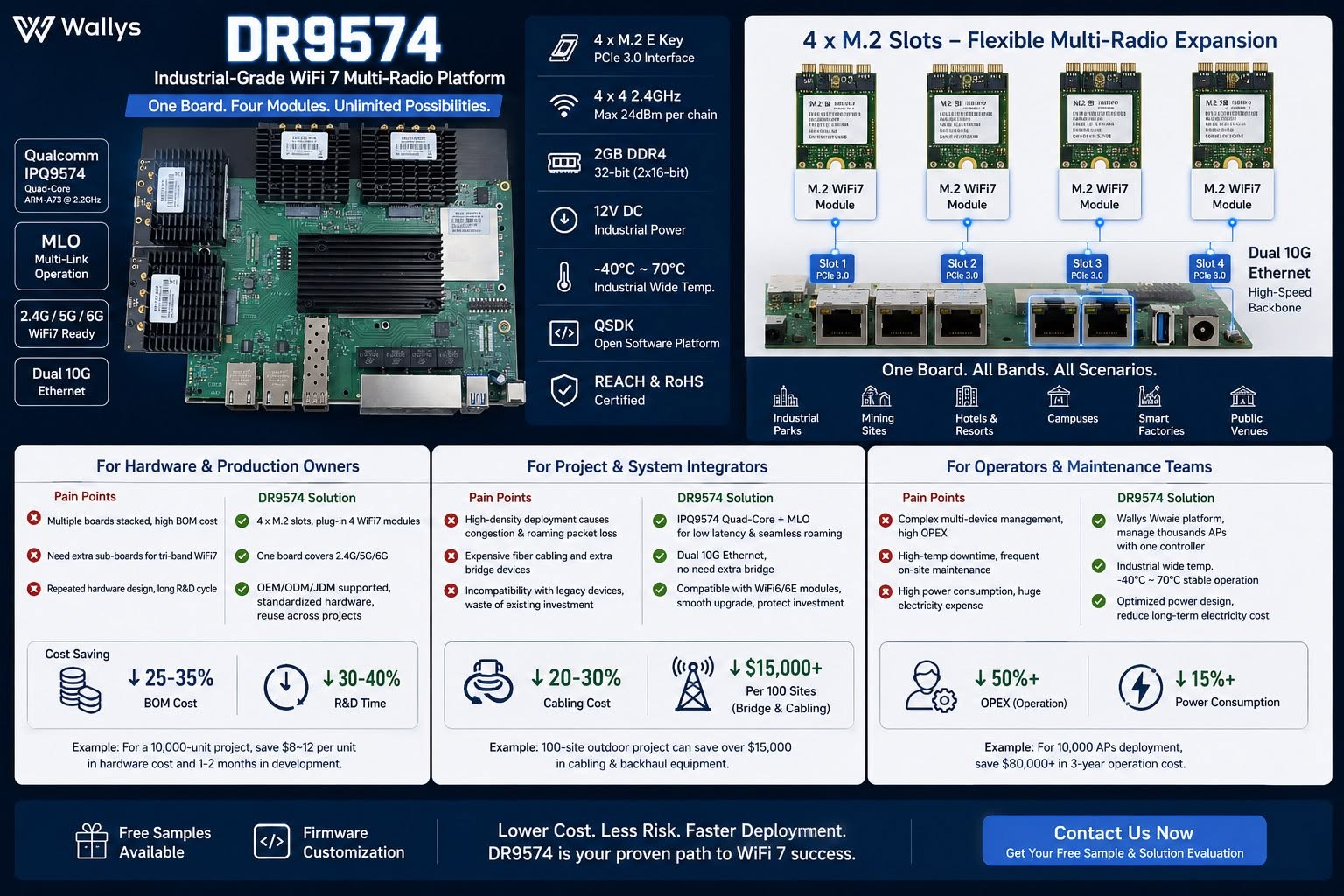
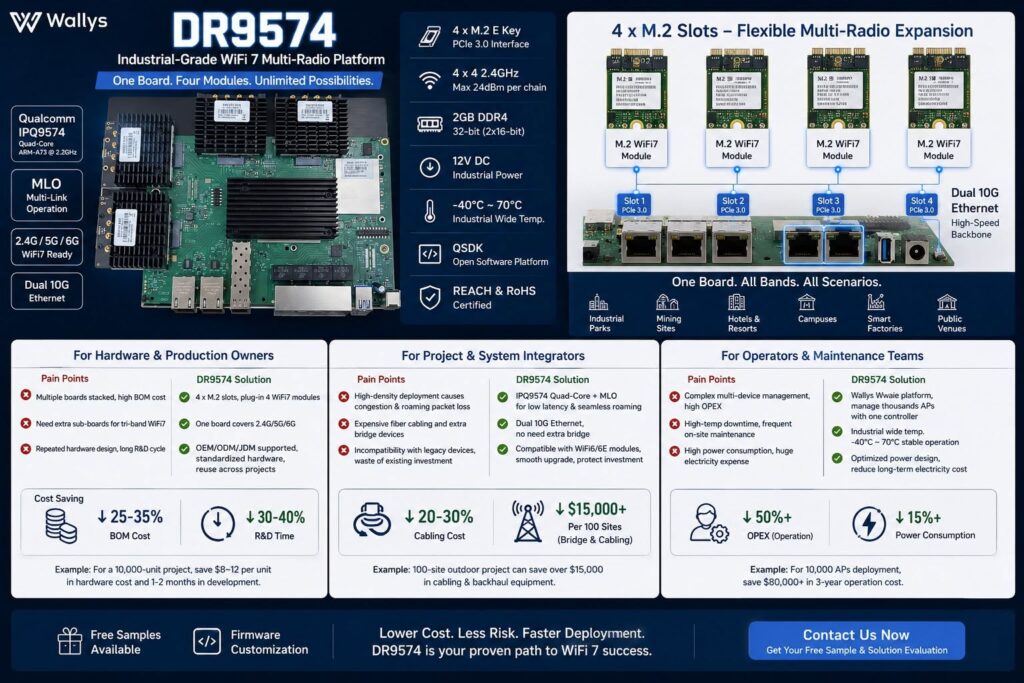
Qualcomm IPQ9574 with MLO support, dual 10G Ethernet, wide temperature industrial design – DR9574 support QSDK and OpenWRT 3 band MLO

DR9574 Industrial WiFi7 Multi-Radio Board – One board, four M.2 radio modules, unlimited wireless deployment possibilities.

Built on Qualcomm IPQ9574 with MLO support, dual 10G Ethernet, wide temperature industrial design.

Lower BOM, less cabling cost, fewer maintenance workloads & power consumption for mass AP projects.

Ideal for system integrators, OEM hardware makers & wireless operators serving campuses, mining, smart factory & hospitality networks.

Testing samples & firmware customization available – DM to get your solution evaluation!

QSDK based firmware with QCA drivers is available , 3 card 3 band MLO support !! 4×4 MU MIMO or 2×2 MU MIMO configuration for 3 band MLO available.

https://wifi5.eu/dls/Wallys/DR9574

OpenWRT support available too !!

— working mainline OpenWrt port (10G + Wi-Fi 7 MLO)

Over the past few weeks we’ve brought the board up on a fully mainline stack — mainline Linux 6.12 + OpenWrt + ath12k, no QSDK and no out-of-tree datapath driver — and it now cold-boots from NAND into a working router/AP with both:

– 10G USXGMII ethernet (the AQR113C ports) bringing up a link and passing traffic with a DHCP lease, and
– a 3-link Wi-Fi 7 AP-MLD (one SSID across 6 / 5 / 2.4 GHz, WPA3-SAE) on mainline ath12k, with a real client associating and passing iperf traffic.

Getting the 10G working on mainline required root-causing and fixing an actual upstream kernel bug — a per-port clock that was left at the 10G rate regardless of the negotiated link speed. It’s a small, clean patch I’m preparing for the netdev mailing list, and it should help any IPQ95xx board with an Aquantia USXGMII PHY, not just this one.

Everything is public and reproducible here:
https://codeberg.org/insalata-fresca/openwrt-dr9574
(device tree, the patch set, and a write-up of the root cause.)

Why we think this could be interesting for you : a mainline-based firmware track means a current kernel with ongoing security fixes, an auditable, blob-minimal stack, and upstreamable patches — a strong story for customers who need long support windows, as a complement to the QSDK option.

W've pushed the mainline port further: the four 2.5G QCA8084 LAN ports are now the focus. The four copper PHYs come up and answer on mainline, and the 10G/USXGMII uplink and the 3-link Wi-Fi 7 MLO already work. But the 2.5G ports don't pass traffic yet,and I've traced it to one specific, well-understood gap.

In short: the QCA8084's internal XPCS never becomes reachable over MDIO. The chip's security-control config space (0xC90F000, which holds WORK_MODE and the SerDes/XPCS MDIO address fix-up) is readable but appears write-locked in our mainline bring-up. The driver writes the correct values (work mode 0x2f, XPCS MDIO address 7), but they don't take - so the XPCS stays at a default address, answers nowhere, and everything downstream (per-channel config, link, traffic) is blocked behind it. We are working on the final solution now.


The full write-up and the exact register evidence are on a public WIP page:

Status and the open question:
https://codeberg.org/insalata-fresca/openwrt-dr9574/src/branch/wip-qca8084-2p5g/docs/qca8084-2p5g-status.md

Register evidence (the actual readouts):
https://codeberg.org/insalata-fresca/openwrt-dr9574/src/branch/wip-qca8084-2p5g/docs/qca8084-2p5g-register-evidence.md

Repo root (device tree, 10G and Wi-Fi 7 patches):
https://codeberg.org/insalata-fresca/openwrt-dr9574

Posted on

524WiFi 𝑨𝑾7990-𝑵𝑷𝑫: MediTatek Filogic 6 MT7990 𝑾𝒊-𝑭𝒊 7 𝑴𝒊𝒏𝒊 𝑷𝑪𝑰𝒆 𝑴𝒐𝒅𝒖𝒍𝒆


Infrastructure Preservation: Upgrade to 802.11be Without a PCB Redesign

In industrial computing, the lifecycle of your platform is critical. While the industry pivots to Wi-Fi 7, transitioning often necessitates a full-scale hardware overhaul—until the introduction of the 524WiFi AW7990-NPD Mediatek based module.

Technical Core & Strategic Advantages :

  • MediaTek Filogic 600 (MT7990) : Delivers BE3600 dual-band concurrent (DBDC) operation.
  • 4096-QAM Modulation : Achieves a 20% increase in peak data rates compared to Wi-Fi 6.
  • Multi-Link Operation (MLO) : Ensures deterministic latency and link reliability in congested environments.
  • Drop-In Upgrade : Bypasses R&D costs and time-to-market delays by utilizing the standard Mini PCIe form factor.

Optimized for Mission-Critical Verticals :

  • Industrial Robotics : High-bandwidth telemetry for AMRs/AGVs.
  • Edge AI Nodes : Rapid data synchronization for Smart Factory 4.0.
  • Security Gateways : High-throughput processing without thermal throttling.

AW7990-NPD: High-Performance Wi-Fi 7 BE3600 AP Module with MediaTek MT7990AN

AW7990-NPD is an Wi-Fi 7 AP module BE3600 by MediaTek MT7990AN chipset supports Wi-Fi 7 technology and feature IEEE802.11 a/ b/ g/ n/ ac/ ax/ be compliant, 2.4GHz 2×2, 5GHz
3×3 2ss BE3600 Wi-Fi subsystem. The MT7990AN offers feature-rich wireless connectivity at high standards and delivers reliable, cost-effective throughput from an extended distance.

The optimized Wi-Fi baseband algorithms provide superb performance. The intelligent MAC design deploys a highly efficient offload engine and hardware data processing accelerators,
which fully offload Wi-Fi task of the host processor. The MT7976CN is designed to support standard-based features in the areas of security, quality of service, and international regulations, giving end users the greatest performance at any time and in any circumstances.

Pre-certified with CE / FCC / IC, this solution helps accelerate product deployment while lowering certification cost and complexity.

Features

WLAN

  • Wi-Fi compliant
  • IEEE 802.11a, b, g, n, ac, ax, be compliant
  • 2.4GHz 20 and 40 MHz, 2×2
  • 5GHz: 20, 40, 80 and 160 MHz, 3×3 2ss
  • Dual-Band Dual Concurrent (DBDC) iFEM
  • Supports up to 4096-QAM
  • Data rate of up to 688Mbps for 40MHz channel in 2.4Ghz and 2882Mbps for 160MHz in 5GHz mode
  • Integrated power detector to support per packet Tx power control
  • Multi-user multiple input multiple output (MU-MIMO) for Tx and Rx
  • Multi-user Orthogonal Frequency-Division Multiple Access (MU-OFDMA) for Tx and Rx
  • Support STBC, LDPC, Tx beamformer and Rx beamformee
  • Support greenfield mode, mixed mode, and legacy mode

Platform

  • 32bit RISC-V MCU for Wi-Fi protocol and Wi-Fi offload
  • Embedded SRAM and ROM
  • PCIe3.0 interface

Security

  • WFA, WPA, WPA2, WPA3 personal, WPS 2.0

QoS

  • WFA WMM and WMM-PS

Standard

ChipsetMT7990AN with MT7976CN
Memory8M byte
Host InterfaceMini PCIe
Operating VoltageDC 3.3V ± 5%
Power Consumption11.5W
Wireless2.4GHz 2T2R 802.11b/g/n/ac/ax/be5GHz 3T3R 2ss 802.11a/n/ac/ax/be
Frequency Range2.4GHz: 2.412~2.472GHz5GHz: 5.15~5825GHz
Channel Spectrum WidthsSupports 20/40MHz at 2.4GHzSupports 20/40/80/160MHz at 5GHz
AntennaExternal Antenna connector (IPEX) x3
Operating SystemLinux
Environmental TemperatureOperating:-10°C to 70°C, Storage:-20°C to 90°C
Environmental HumidityOperating: 10% to 90%, Storage: Max. 90%
Dimensions (mm)30(W)*51(L)*5.1(H)mm
WeightTBD
CertificationTBD

Package with Heatsink 30x40x25mm Aluminum material

Power consumption maximum is 9W, average is 4 – 8W.
Main board Power Supply design please provide 3.3V 3A, minimum 3.3V 2.5A.

Additional information

Weight0.0255 kg
Dimensions9.5 × 6.5 × 1.5 cm
Posted on

Compex Wi-Fi 7 Dual-Band Dual-Concurrent Modules are CE, FCC and IC certified and Ready for the World

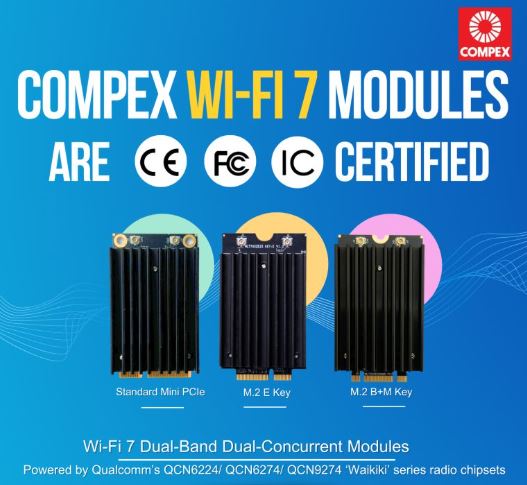
𝗖𝗲𝗿𝘁𝗶𝗳𝗶𝗲𝗱 𝗮𝗻𝗱 𝗥𝗲𝗮𝗱𝘆 𝗳𝗼𝗿 𝘁𝗵𝗲 𝗪𝗼𝗿𝗹𝗱.

Compex Wi-Fi 7 Dual-Band Dual-Concurrent Modules are CE, FCC and IC certified, bringing together global compliance and industry-leading performance. Available in Standard MiniPCIe form factor and M.2 variants, our Qualcomm-powered modules deliver reliable and high-performance wireless connectivity for markets worldwide.

✅Powered by Qualcomm’s QCN6224 / QCN6274 / QCN9274 “Waikiki” series chipsets
✅Comes with band options: 2.4+5GHz, 2.4+6GHz, 5+5GHz and 5+6GHz
✅Multi-Link Operation (MLO) for higher throughput, lower latency and improved reliability
✅Diplexer Design to reduce the need for multiple Wi-Fi antennas for transmission
✅Open Source Ath12k Support

📩 Reach out to us at info@524wifi dot net or com to explore how we can power your next project.

Posted on

Wallystech DR9574 with DR9274-2G DR9274-5G DR9274-6G Card 4×4 Triband MLO Configuration Tutorial

Welcome back to 524WiFi! In today’s video, we’ll walk you through the process of loading firmware and configuring MLO for the IPQ9574 board.

If you’re setting up advanced hardware, this guide will help you get everything up and running smoothly. Let’s dive in! First, we’ll connect the hardware.

You’ll need a UART cable, and here’s how to connect the pins:

GND connects to the black cable, TX to the white cable, RX to the green cable. Remember, VCC is not needed.

Once that’s connected, we can move on to the software configuration.

Next, we’ll load the firmware. Make sure the firmware file is in the same folder as tftpd32. Follow these steps:

Open the terminal and enter U-Boot mode. Modify the machid and configure the card slots.

If you’re using the DR9274-2G, DR9274-5G, and DR9274-6G modules, input the following commands: Open the tftpd32 tool and input the following command to re-flash the firmware:

Finally, input reset to reboot the system and proceed with AP configuration.

Now, we’ll configure the Access Points (AP). After the reboot, log in as root with the password asdf1234. Then, input the following command to edit the wireless configuration file: Modify the AP settings as needed.

Here’s an example configuration: Once done, press ESC, then shift+zz to save and exit.

To finalize the setup, enable the configuration by typing:wifi

Then, check if the radios are up by entering:iwconfig

And that’s it! Your APs are configured, and the new firmware has been successfully loaded! Next, we’ll be testing the DR9574kit’s MLO throughput performance. Stay tuned to our channel for the latest updates and test results. Don’t forget to hit the notification bell, so you don’t miss out! Thank you for watching this firmware loading and MLO configuration tutorial! If you found this video helpful, make sure to give us a thumbs up and subscribe to Wallystech for more technical guides and hardware tutorials. See you in the next video!

You can download related files here : https://wifi5.eu/dls/Wallys/DR9574/

Posted on

Entering the Multi-Link Era of Wi-Fi 7 with 524WiFi. Maximize coverage. Boost performance.

Unlock the future.
By combining DR9274-2G5G and DR9274-5G6G, 524WiFi delivers a true tri-band Wi-Fi 7 platform ready for tomorrow’s wireless demands. X86 Linux supported!


Powered by Multi-Link Operation (MLO), our solution enables:


✅ Simultaneous dual 5GHz operation
✅ Aggregated bandwidth for higher throughput
✅ More resilient and flexible wireless networks


Ready to go Multi-Link? Contact us !

Posted on

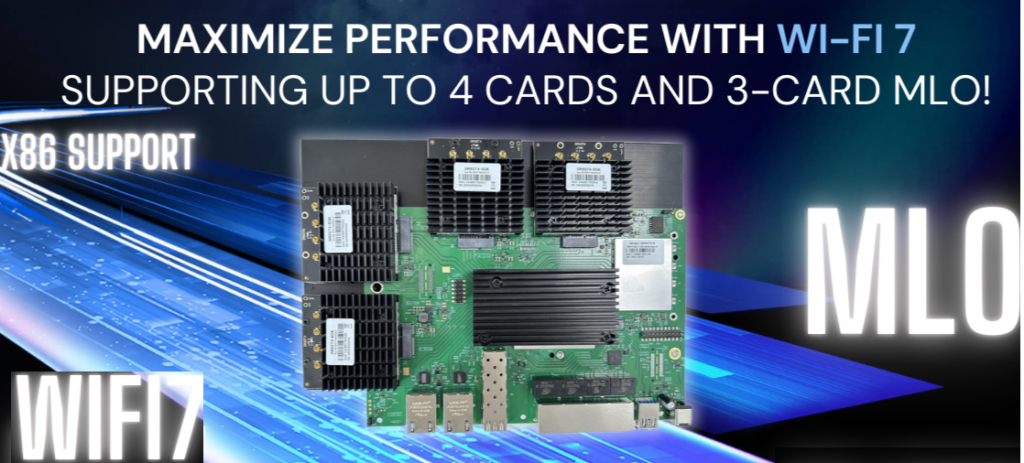
IPQ9574 Supports 4 QCN9274 Cards and Any 3-Card MLO Configuration Wi-Fi 7 Upgraded DR9574

Maximizing Wireless Performance with the Qualcomm IPQ9574: A Wi-Fi 7 Powerhouse

In today’s fast-paced digital world, industries are increasingly relying on advanced wireless technologies to support high-speed data transfer and seamless connectivity. The Qualcomm IPQ9574, a cutting-edge chipset powering the DR9574 router board, is revolutionizing wireless communication by supporting Wi-Fi 7 and offering industry-leading performance for demanding applications. This article delves into the key features and specifications of the IPQ9574 and DR9574, highlighting how they are shaping the future of wireless networking.

Why the Qualcomm IPQ9574 is a Game-Changer for Wi-Fi 7 Networks

The IPQ9574 chipset is at the heart of the DR9574, delivering unmatched wireless capabilities. It supports up to 4 Wi-Fi 7 cards, allowing flexibility for a variety of MLO (Multi-Link Operation) configurations, including compatibility with any 3-card MLO setup. This level of flexibility and performance ensures that industries can scale their networks to meet the growing demand for high-speed wireless communication.

Key Features of the IPQ9574-Based DR9574

  1. Advanced Quad-Core ARM Processor: The IPQ9574 chipset is powered by a Quad-Core ARM-A73 processor running at 2.2GHz. This ensures high-speed processing for data-intensive tasks and complex networking functions.
  2. Support for Wi-Fi 7: The IPQ9574 is designed to support the latest Wi-Fi 7 technology, providing faster speeds, better efficiency, and higher network capacity compared to its predecessors.
  3. Multiple M.2 E Key Interfaces: The DR9574 offers 4 M.2 E Key interfaces with PCIe 3.0, enabling support for up to four Wi-Fi 7 cards. This flexibility is crucial for environments that require high-performance networking.
  4. Excellent Power Efficiency: The board consumes 13W without the onboard Wi-Fi and up to 23W with Wi-Fi integrated, striking a balance between power efficiency and high-performance operation.
  5. Broad Operating Range: With operating temperatures between -20°C to 70°C and storage temperatures from -40°C to 90°C, the DR9574 is built to endure harsh industrial environments.
  6. Optimized for High-Speed Data: The 2.4GHz band supports 802.11b/g/n/ax standards, with data rates reaching 24dBm per chain, ensuring robust and fast wireless connections.

Key Hardware Specifications of the DR9574 Router Board

SpecificationDetails

ChipsetQualcomm IPQ9574 Quad-Core ARM-A73 @ 2.2GHz

System Memory2GB DDR4, 32-bit interface (2×16-bit)

PCIe InterfacePCIe 3.0

Frequency Range2.4GHz: 2.412~2.472GHz

Data Rates for WLAN2.4GHz 802.11b/g/n/ax, max 24dBm per chain

Modulation TechniquesBPSK, QPSK, DBPSK, DQPSK, 16-QAM, 64-QAM, 256-QAM, 1024QAM, 4096QAM

Operating Voltage12V

Power Consumption13W (Board only), 23W (with onboard Wi-Fi)

Temperature RangeOperating: -20°C to 70°C, Storage: -40°C to 90°C

Applications of the DR9574 in Industry

With its robust feature set and Wi-Fi 7 capabilities, the DR9574 is perfect for a variety of industries, including:

  • Smart Cities: The ability to support multiple Wi-Fi 7 cards and MLO configurations makes it ideal for managing the wireless backbone of smart cities, where high-speed and reliable communication are essential.
  • Industrial IoT (IIoT): As industrial applications increasingly rely on wireless technology for device communication, the DR9574 ensures reliable data transfer, low latency, and the ability to scale as the number of connected devices grows.
  • Telecommunications: The IPQ9574 chipset allows telecommunications providers to build next-generation infrastructures that offer superior performance and capacity.

Absolute Maximum Ratings for Reliable Operation

Parameter/RatingUnit

Operating Temperature-20 ~ 70ºC

Storage Temperature-40 ~ 90ºC

Operating Humidity5% ~ 95 (non-condensing)%

Storage Humidity0% ~ 90 (non-condensing)%

Conclusion: Future-Proof Your Network with IPQ9574 and DR9574

The Qualcomm IPQ9574 and DR9574 router board are poised to lead the charge in Wi-Fi 7 technology, providing businesses and industries with the high-performance, reliable, and scalable networking solutions they need. With support for multiple Wi-Fi 7 cards, MLO configurations, and the ability to operate in challenging environments, the DR9574 is an ideal choice for industries looking to upgrade their wireless networks for the future.

As Wi-Fi 7 continues to gain traction in the industry, the IPQ9574 is at the forefront of delivering the connectivity that next-gen applications demand, from industrial IoT to smart cities and beyond.

Posted on

QCN9274 & QCN6274 Wi-Fi 7 with Multi-Link Operation (MLO) on X86 Devices: A New Era of Connectivity

Wi-Fi 7 with Multi-Link Operation (MLO) on X86 Devices: A New Era of Connectivity

As the world of wireless technology continues to evolve, the introduction of Wi-Fi 7 is nothing short of a game-changer. With its potential for significantly higher speeds, lower latency, and enhanced reliability, Wi-Fi 7 is set to revolutionize industries and applications ranging from industrial IoT to high-performance consumer devices. At Wallys, we’re always driven by customer needs, and as part of our commitment to offering cutting-edge solutions, we’re focused on expanding the possibilities for Wi-Fi 7 technology—specifically by enabling Multi-Link Operation (MLO) support on X86 platforms.

Expanding the Reach of Wi-Fi 7: A New Level of Compatibility

Last year, we introduced X86 driver support for our Wi-Fi 6 module, DR9074, which enabled seamless integration across a broader range of motherboard platforms, not just Qualcomm devices. This support empowered our customers to experience high-quality, stable Wi-Fi data transmission and opened the door for new applications that demand reliable and high-throughput wireless connections.

With the introduction of Wi-Fi 7, cross-platform compatibility becomes even more critical. Wi-Fi 7 brings with it a new set of features designed to push the boundaries of wireless connectivity, and one of the most significant is Multi-Link Operation (MLO). But to harness the full potential of MLO, we need to ensure that our solutions can operate on multiple platforms—something we’re excited to announce we’re working on with our DR9274 (QCN9274) and QCN6274 Wi-Fi 7 modules.

wifi6 vs wifi7

What is MLO? And Why Does It Matter?

Multi-Link Operation (MLO) is one of the standout features of Wi-Fi 7. MLO allows devices to transmit data across multiple frequency bands (like 2.4 GHz, 5 GHz, and 6 GHz) simultaneously. This multi-band transmission significantly improves throughput and reliability, while reducing latency and congestion, making it an ideal solution for environments that require high-speed and low-latency communication.

In simple terms, MLO will enable your devices to leverage the full bandwidth potential of Wi-Fi 7, resulting in faster speeds, more stable connections, and more efficient use of available spectrum.

Introducing the QCN9274 & QCN6274 Wi-Fi 7 Modules

To enable the full potential of MLO, we’re leveraging the power of QCN9274 and QCN6274—two of Qualcomm’s latest Wi-Fi 7 chipsets, both designed for high-performance applications.

  1. QCN9274 (Waikiki)
  2. QCN6274 (Waikiki)
MLO

These two powerful chipsets represent the future of Wi-Fi 7 and provide the foundation for expanding compatibility across a variety of platforms. With MLO support, both the QCN9274 and QCN6274 enable better utilization of the 2.4, 5, and 6 GHz bands, delivering faster speeds and more reliable connections.

wifi7 new features

What Will MLO Bring to Your X86 Devices?

By introducing MLO support for X86 devices, we’re pushing the envelope on what’s possible in wireless networking. Users of X86 platforms will now be able to tap into the full power of Wi-Fi 7, unlocking:

  • Higher Throughput: With MLO, data is split across multiple channels, leading to faster speeds and higher data rates, ideal for bandwidth-hungry applications like streaming, gaming, and industrial IoT.
  • Enhanced Reliability: MLO ensures that devices can maintain stable connections, even in environments with interference or congestion, by balancing traffic across different frequency bands.
  • Reduced Latency: Faster communication between devices can significantly reduce lag and improve the responsiveness of real-time applications, from virtual reality to autonomous systems.

The implications are significant. Wi-Fi 7, combined with MLO, could transform industries that rely on seamless, high-performance wireless connectivity—think smart cities, industrial automation, healthcare, and beyond.

524WiFi Adapter Card (wifi7 adapter card coming soon)

What’s Next for Wi-Fi 7 on X86?

At 524WiFi, we’re committed to ensuring that our solutions are as versatile and adaptable as possible. With the upcoming X86 driver support for DR9274 and MLO functionality, you’ll be able to take full advantage of Wi-Fi 7 speeds and unlock new potential for your devices.

Thoughtput testing:achieve 8Gbps+ speed

This new capability will open up new opportunities for a variety of applications, and we’re eager to see how our customers will integrate this powerful technology into their own use cases.

DR9274 wifi7 M.2 card

Are You Ready for the Future of Wireless Connectivity?

With Wi-Fi 7’s blazing-fast speeds and MLO’s game-changing capabilities, the possibilities are endless. How do you envision using Wi-Fi 7 with MLO on your X86 platforms? Whether it’s enhancing your industrial IoT devices, supporting next-gen gaming applications, or powering high-bandwidth communications, the potential is vast.

At 524WiFi, we’re excited to continue innovating and providing the tools you need to stay ahead in the rapidly evolving wireless landscape. If you’re interested in learning more about our Wi-Fi 7 solutions or how we can help with your next project, feel free to reach out to us.

Let’s shape the future of connectivity, together.