Posted on

The Hidden Challenge in Robot Fleets: Roaming, Latency, and Wireless Stability

When people talk about autonomous robots, the conversation usually focuses on AI models, sensors, cameras, and navigation algorithms.

But there is another critical layer that often determines whether a robot system succeeds in real-world deployment:

Wireless connectivity.

A robot can have advanced AI capabilities, but without reliable communication, even the smartest robot may struggle in a dynamic industrial environment.

For large-scale robot fleets, connectivity is no longer just a networking feature. It becomes part of the robot’s operational reliability.

The Reality of Wireless Challenges in Robot Deployments

In warehouses, factories, farms, and outdoor industrial environments, robots are constantly moving.

An AMR (Autonomous Mobile Robot), for example, may need to:

  • Move across different areas with changing RF conditions
  • Maintain real-time communication with control systems
  • Upload high-resolution camera data
  • Receive navigation and task instructions
  • Coordinate with other robots in the same environment

During these operations, wireless networks face several challenges:

1. Roaming: Staying Connected While Moving

A robot moving through a large facility often needs to transition between multiple access points.

A poor roaming experience can cause:

  • Packet loss
  • Video interruption
  • Control delays
  • Temporary disconnection

For industrial robots, even a short communication interruption can affect efficiency and safety.

Advanced roaming mechanisms such as 802.11k/v/r help devices make faster and smarter roaming decisions by improving network awareness and reducing handover time.

However, successful roaming also depends on:

  • Proper RF planning
  • AP deployment strategy
  • Client behavior optimization
  • Network management

2. Latency: Every Millisecond Matters

Many industrial robot applications require real-time communication.

Examples include:

  • Remote monitoring
  • Vision-based inspection
  • Autonomous navigation
  • Robot fleet coordination

High latency can impact:

  • Motion control
  • Response time
  • Task execution efficiency

The challenge is not only achieving high throughput.

A network can provide high speed but still suffer from unstable latency due to:

  • Network congestion
  • Interference
  • Poor link quality
  • Inefficient routing

Reliable industrial wireless networks need predictable performance, not just peak speed.

3. Wireless Stability in Complex Environments

Industrial environments are very different from homes or offices.

Factories and outdoor deployments may include:

  • Metal structures causing reflections
  • Moving equipment blocking signals
  • Multiple wireless networks creating interference
  • Large numbers of connected devices

A robot fleet may experience changing wireless conditions every moment.

This requires networks that can adapt dynamically.

Important capabilities include:

  • Intelligent channel management
  • Interference detection
  • Dynamic path optimization
  • Mesh networking
  • Traffic prioritization

Why Traditional Wi-Fi Approaches Are Not Always Enough

A standard Wi-Fi deployment may work well for static users.

However, robot fleets introduce new requirements:

  • Mobility
  • High device density
  • Continuous connectivity
  • Low latency
  • Reliable uplink performance

The network needs to be designed around the robots’ movement and operational workflow.

Building the Wireless Foundation for Next-Generation Robots

The future of autonomous systems will depend on the combination of:

AI + Robotics + Reliable Connectivity

Advanced wireless technologies such as Wi-Fi 6 and Wi-Fi 7 bring important improvements:

  • Higher capacity
  • Better multi-device performance
  • Lower latency
  • Multi-band operation with MLO
  • Improved reliability in demanding environments

But technology alone is not enough.

Successful industrial deployments require:

  • The right wireless architecture
  • Proper RF optimization
  • Reliable hardware platforms
  • Long-term firmware support
  • Real-world validation

Final Thoughts

Autonomous robots are becoming smarter every day.

But intelligence alone does not guarantee successful deployment.

Behind every reliable robot fleet is a reliable communication infrastructure.

The next generation of industrial automation will not only depend on better AI algorithms — it will depend on wireless networks that can keep robots connected, responsive, and operational in the real world.

Reliable connectivity is the foundation that allows autonomous robots to truly become autonomous.

Posted on

Physical AI Connectivity – AI Robots Don’t Run on AI Alone. They Run on Connectivity.

Every week, we see exciting breakthroughs in robotics.

Smarter vision models. Faster inference. More powerful edge AI hardware.

But when robots leave the lab and enter factories, warehouses, farms, or outdoor environments, something interesting happens.

The biggest challenge often isn’t AI.  It’s connectivity !

An autonomous robot may have enough computing power to understand its surroundings, but it still needs to:

  • Receive sensor data in real time
  • Stream video reliably
  • Exchange information with other robots
  • Connect to edge servers and cloud platforms
  • Roam seamlessly across large facilities without interruption

If the wireless network becomes unstable, even the most advanced AI model can’t perform as intended.

In real-world deployments, we’ve learned that customers rarely complain about TOPS or benchmark scores.

Instead, they ask questions like:

• Can the connection stay stable after days or weeks of continuous operation?

• Will roaming interrupt navigation?

• How does the network perform in environments with heavy RF interference?

• Can hundreds of devices operate simultaneously without impacting latency?

These are deployment questions—not benchmark questions.

As Physical AI continues to evolve, networking is no longer just supporting the system.

It is becoming part of the AI infrastructure itself.

The future of intelligent robots won’t be built by AI alone.

It will be built by the combination of:

  • AI Computing
  • Reliable Wireless Connectivity

⚡ Edge Networking

  • Seamless Mobility

The industry has spent years optimizing AI models.

Perhaps it’s time we give the same attention to the networks that keep those models connected.

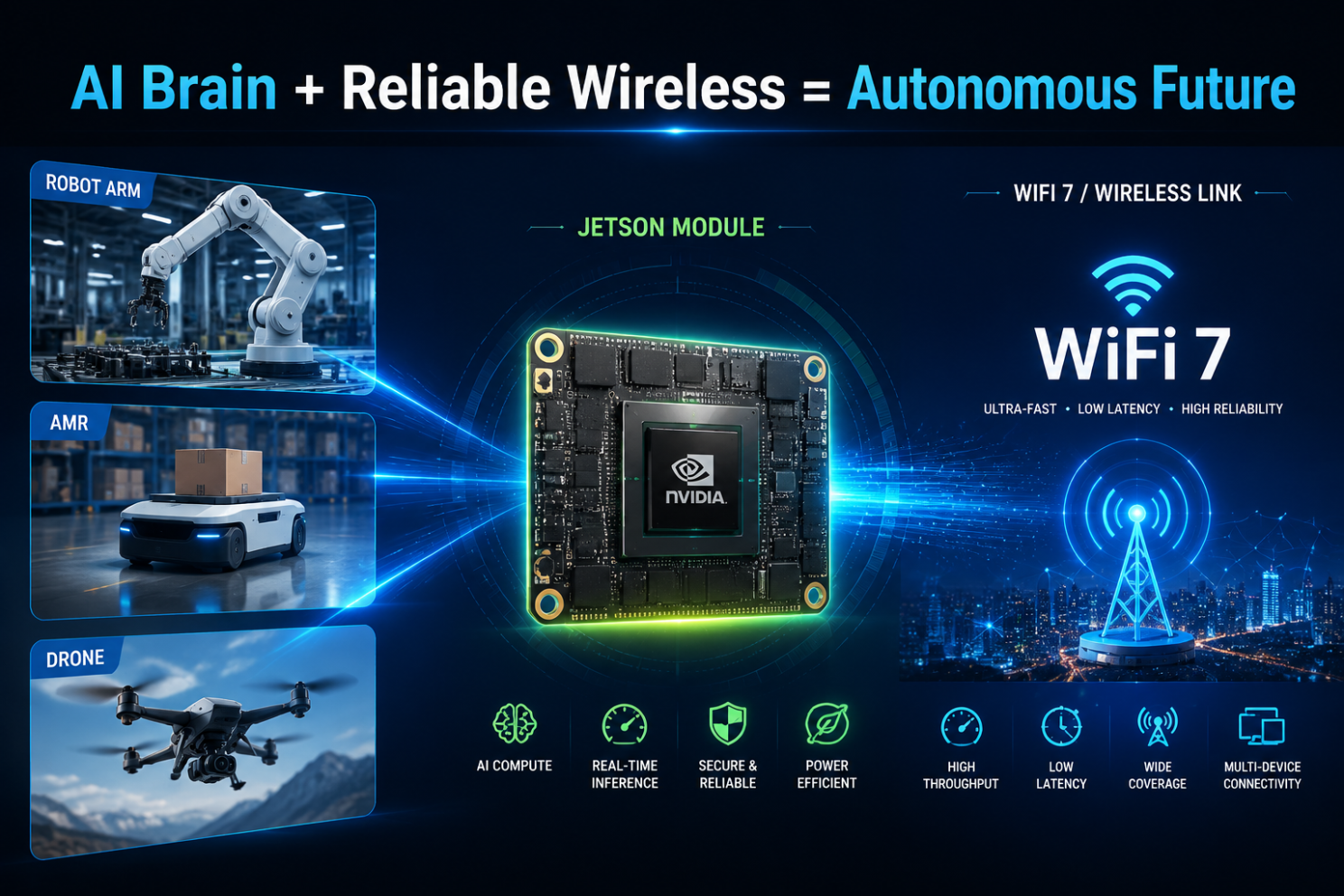
AI may be the brain.  Connectivity is the nervous system.

I’d love to hear your perspective:

What has been the biggest networking challenge in your robotics or Edge AI deployments?

Posted on — Leave a comment

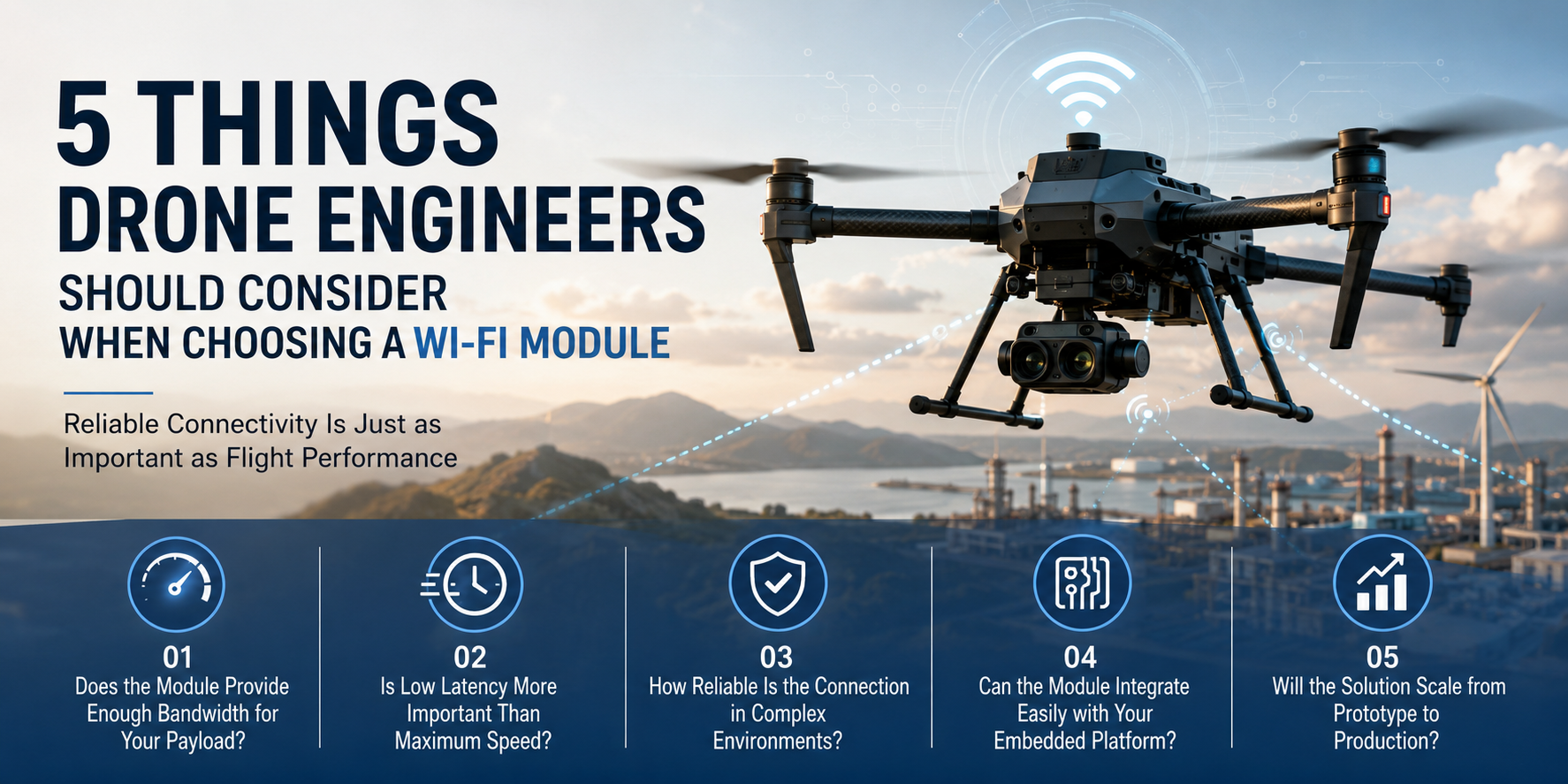
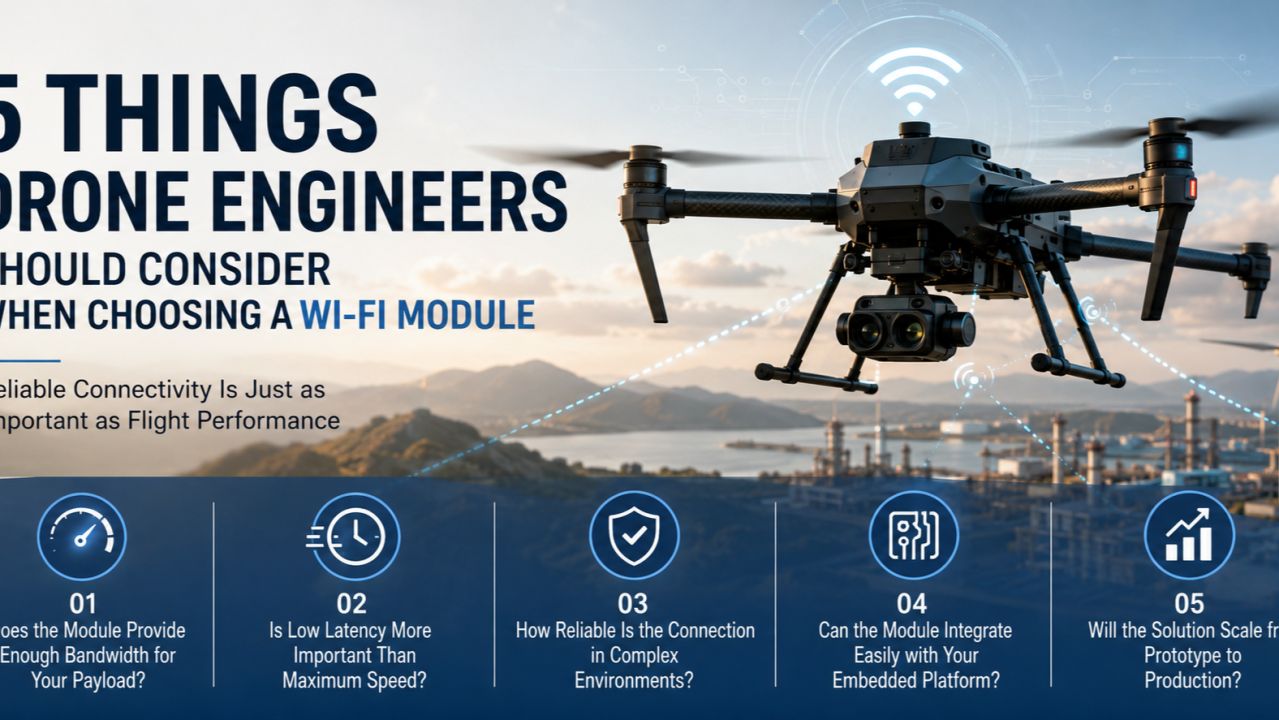
5 Things Drone Engineers Should Consider When Choosing a Wi-Fi Module

Reliable Connectivity Is Just as Important as Flight Performance

Modern drones are becoming far more than flying cameras.

Today, drones are used for:

  • Infrastructure inspection
  • Precision agriculture
  • Public safety
  • Mapping and surveying
  • Warehouse inventory
  • Mining operations
  • Industrial monitoring

At the same time, onboard computing is evolving rapidly. AI processors, multiple cameras, LiDAR, thermal imaging, and edge computing are becoming standard components of professional UAV platforms.

While engineers often spend months selecting flight controllers, sensors, and AI hardware, one component is frequently underestimated:

The wireless communication module.

Article content

A poorly chosen Wi-Fi module can become the bottleneck of an otherwise excellent drone design.

Here are five key factors every drone engineer should evaluate before selecting a wireless communication solution.


1. Does the Module Provide Enough Bandwidth for Your Payload?

Not every drone transmits the same type of data.

A basic inspection drone may only send telemetry and compressed video.

An AI-powered drone may simultaneously transmit:

  • Multiple HD video streams
  • AI inference results
  • Telemetry data
  • Sensor information
  • Remote control commands

As payloads become more sophisticated, wireless bandwidth quickly becomes a limiting factor.

When evaluating a Wi-Fi module, consider:

  • Maximum throughput
  • Number of spatial streams
  • Channel bandwidth
  • Support for Wi-Fi 6 or Wi-Fi 7

Higher bandwidth doesn’t simply improve video quality—it also creates more capacity for future upgrades.


2. Is Low Latency More Important Than Maximum Speed?

Many engineers focus on peak data rates.

However, drones often benefit more from consistent low latency than from maximum theoretical throughput.

For applications such as:

  • Remote piloting
  • Autonomous navigation
  • AI-assisted obstacle avoidance
  • Real-time monitoring

Stable communication is far more valuable than occasional bursts of high speed.

Look beyond the headline specifications and evaluate how the wireless solution performs under continuous, real-world workloads.


3. How Reliable Is the Connection in Complex Environments?

Drones rarely operate in ideal radio environments.

They may fly near:

  • Buildings
  • Metal structures
  • Industrial equipment
  • Trees
  • Utility infrastructure

These environments introduce interference, signal reflections, and changing link conditions.

A reliable Wi-Fi module should support features that help maintain stable communication under challenging conditions.

Modern technologies such as Wi-Fi 6 and Wi-Fi 7 introduce significant improvements in efficiency, interference management, and overall reliability compared with earlier generations.

For industrial UAVs, connection stability is often more important than achieving the highest benchmark speeds.


4. Can the Module Integrate Easily with Your Embedded Platform?

Selecting a Wi-Fi module is not only about radio performance.

Engineers should also consider integration.

Questions worth asking include:

  • Does it support Linux or OpenWrt?
  • Are software drivers actively maintained?
  • Is the hardware interface compatible with your design?
  • Is documentation readily available?
  • Can the module integrate with NVIDIA Jetson or other edge AI platforms?

Reducing development complexity can significantly shorten time-to-market.

Choosing a well-supported platform often saves more engineering time than selecting a module based solely on specifications.


5. Will the Solution Scale from Prototype to Production?

Many wireless solutions perform well during prototyping.

Production introduces different challenges:

  • Long-term availability
  • Industrial reliability
  • Certification requirements
  • Thermal performance
  • Supply chain stability

Choosing a communication platform with a clear product roadmap helps avoid redesigns later in the project lifecycle.

Engineers should think beyond the first prototype and evaluate whether the wireless solution can support future production volumes and product evolution.


Connectivity Is Becoming Part of the Drone Architecture

Modern drones are evolving into flying edge computing platforms.

A typical professional UAV now combines:

  • Flight control systems
  • AI processors
  • Vision sensors
  • Navigation systems
  • High-speed wireless communication

Each subsystem depends on the others.

Even the most advanced AI algorithms become less effective if communication is unstable.

Reliable wireless connectivity is no longer just another hardware component.

It has become part of the overall system architecture.


Looking Ahead

The next generation of drones will continue to demand:

  • Higher bandwidth
  • Lower latency
  • More reliable wireless links
  • Better support for AI workloads
  • Faster integration with embedded computing platforms

Selecting the right Wi-Fi module today is not simply about improving communication performance.

It is about building a platform that can support the future of autonomous aerial systems.

As drones become smarter, wireless connectivity will play an increasingly important role in enabling safe, efficient, and scalable operations.

Because in autonomous systems, intelligence may guide the mission—but connectivity keeps it flying.


What factors matter most when your team selects a wireless communication solution for UAV projects?

I’d be interested to hear how other drone engineers approach this decision.

Posted on

From NVIDIA Jetson Development Kit to Production: What Robotics Companies Need to Consider Beyond AI Computing

For many robotics companies, the NVIDIA Jetson Development Kit is the first step when building a new product.

It allows engineers to quickly evaluate system concepts, connect peripherals, test software, and verify whether the hardware platform can support their application.

However, after the prototype stage, many teams face a different challenge:

The development kit is not the final product.

A development board is designed for flexibility and evaluation.

A commercial product needs to be designed for:

  • Specific mechanical dimensions
  • Required interfaces
  • Stable power supply
  • Thermal conditions
  • Manufacturing process
  • Long-term availability

This transition from evaluation platform to production hardware is where many engineering teams start facing challenges.

The question changes from:

“Can we make the prototype work?”

to:

“Can we build thousands of units with consistent quality?”


Development Kit Is Only the Beginning

A Jetson Development Kit is an excellent engineering tool.

It helps teams quickly verify:

  • Processor performance
  • Camera connection
  • Sensor integration
  • Software environment
  • Application functionality

During early development, engineers usually focus on functionality.

They may connect:

  • USB cameras
  • External sensors
  • Network devices
  • Additional modules

Everything works on the lab desk.

But when moving into a real product, these temporary solutions often become limitations.

A production device cannot simply place a development kit inside an enclosure.


What Changes When Moving to Production?

1. The hardware needs to fit the product

One of the first challenges is mechanical integration.

A development kit has fixed:

  • Size
  • Connector locations
  • Mounting structure

But the final product may have strict requirements.

For example:

A mobile robot may need all electronics installed inside a compact chassis.

An industrial inspection device may require a specific enclosure.

A customized carrier board allows engineers to redesign the hardware around the actual product.


2. Interfaces need to match the application

Different products require different hardware configurations.

A development kit provides general interfaces.

A production system often needs customized combinations.

Examples:

  • Multiple camera inputs
  • Ethernet ports
  • CAN interface
  • RS232/RS485
  • GPIO control
  • Sensor interfaces
  • Storage expansion

Instead of adding external conversion boards, a custom carrier board can integrate the required functions directly.

This reduces:

  • System complexity
  • Cable connections
  • Assembly difficulty

3. Power design becomes more important

Power is often underestimated during prototype development.

A desktop environment provides stable power.

A production device has different conditions.

Engineers need to consider:

  • Input voltage range
  • Power distribution
  • Protection circuits
  • Power consumption
  • Startup sequence

For industrial products, unstable power design can create reliability problems that are difficult to diagnose.


4. Thermal design cannot be ignored

Higher computing performance also creates thermal challenges.

During prototype testing, engineers may use:

  • Open-air environments
  • Standard heatsinks
  • Development accessories

Production products require:

  • Designed heat dissipation
  • Enclosure consideration
  • Long-term operating stability

Thermal design needs to happen together with mechanical design.


Common Challenges During Custom Board Development

Based on our experience working on embedded hardware projects, several challenges appear frequently.

Challenge 1:

Prototype works, but the design is difficult to manufacture

A prototype may use:

  • Evaluation boards
  • Additional modules
  • Manual wiring

This is acceptable for engineering verification.

However, mass production requires:

  • Optimized PCB design
  • Simplified assembly
  • Stable component sourcing
  • Manufacturing testing

The production design needs to consider the entire lifecycle.


Challenge 2:

Balancing performance and cost

The highest specification is not always the best product design.

Engineers need to balance:

  • Computing requirements
  • Hardware cost
  • Power consumption
  • Manufacturing complexity

The right design depends on the application.


Challenge 3:

From prototype samples to stable production

A few working prototypes do not mean the product is ready.

Before production, companies usually need to complete:

  • Hardware verification
  • Reliability testing
  • Manufacturing validation
  • Quality control process

This stage requires cooperation between engineering and manufacturing teams.


Key Considerations When Designing a Jetson Production Platform

1. Start hardware planning early

Many companies first focus on software development.

However, hardware decisions made later can affect:

  • Product size
  • Cost
  • Schedule
  • Manufacturing

Early hardware planning can reduce redesign cycles.


2. Select the right development partner

A production hardware project involves multiple disciplines:

  • Hardware design
  • PCB layout
  • Embedded software
  • Testing
  • Manufacturing

A partner with both engineering and production experience can help shorten the transition.


3. Think about future product versions

A good hardware platform should consider future needs:

  • Interface expansion
  • Component availability
  • Product upgrades

The first production design often becomes the foundation for future products.


524WiFi Perspective

At 524WiFi and Wallys, we have been involved in embedded communication hardware development since 2005.

Our engineering capabilities include:

  • Hardware design
  • PCB development
  • Embedded system integration
  • Prototype validation
  • Production support
  • OEM/ODM/JDM services

With the increasing adoption of NVIDIA Jetson platforms in industrial applications, we are expanding our hardware development capability to support companies that need customized Jetson-based platforms.

Our focus is not only building a prototype board.

It is helping engineering teams move from:

Concept → Prototype → Production

through practical hardware design and manufacturing experience.


Conclusion

The NVIDIA Jetson Development Kit provides engineers with a fast way to start development.

But successful products require much more than selecting a computing module.

The transition to production requires careful consideration of:

  • Hardware customization
  • Interface design
  • Power management
  • Thermal solution
  • Manufacturing requirements

For robotics and industrial equipment companies, the biggest challenge is often not proving that the technology works.

It is turning a working prototype into a reliable product.

What challenges have you experienced when moving from development boards to production hardware?

Posted on

WiFi 7 + TDMA:From Faster Wireless to Smarter Wireless

For years, WiFi innovation has been measured by one simple metric:

How fast can we transmit data?

WiFi 5 brought higher throughput.

WiFi 6 introduced OFDMA and improved efficiency.

WiFi 7 pushed the boundaries further with 320MHz channels, Multi-Link Operation (MLO), and 4096-QAM.

But for industrial networks, outdoor broadband, and mission-critical applications, speed alone is no longer enough.

The next question is:

Can wireless networks become more predictable, more scalable, and easier to manage?

This is where WiFi 7 + TDMA (Time Division Multiple Access) creates a new opportunity.


The Challenge: Traditional WiFi Was Not Designed for Large-Scale Industrial Networks

Traditional WiFi is based on contention mechanisms.

Multiple devices compete for airtime.

This works well for:

  • Homes
  • Offices
  • Public hotspots

But outdoor and industrial deployments face very different challenges:

  • Dozens or hundreds of connected devices
  • Long-distance wireless links
  • High-density IoT terminals
  • Video surveillance traffic
  • Autonomous machines and robots
  • Unstable RF environments

When many clients transmit at the same time, problems appear:

❌ Higher latency

❌ Unpredictable performance

❌ Reduced capacity

❌ Poor scalability

For industrial wireless networks, “fast” is not enough.

The network needs to be smart enough to control airtime resources.


TDMA: Turning Wireless Airtime into a Managed Resource

TDMA introduces scheduled communication.

Instead of allowing every device to compete randomly, the network assigns transmission time slots.

Think of it like a highway:

Traditional WiFi:

-Everyone enters the road whenever they want.

Result: Traffic congestion.

TDMA:

→ Time Slot 1  → Time Slot 2 → Time Slot 3

Result: Predictable traffic flow.

For outdoor PtMP networks, this means:

✅ Better airtime utilization

✅ More stable throughput

✅ Lower latency variation

✅ Higher client capacity

✅ Improved performance at long distances


Why WiFi 7 Makes TDMA Even More Powerful

TDMA itself is not new.

Many wireless technologies have used scheduling mechanisms for years.

The opportunity now is combining TDMA intelligence with the latest WiFi 7 capabilities.

1. Higher Capacity + Better Scheduling

WiFi 7 introduces:

  • 320MHz channel bandwidth
  • Multi-Link Operation (MLO)
  • 4096-QAM modulation

These features increase the available capacity.

TDMA helps intelligently distribute this capacity among multiple users.

Together:

More bandwidth + smarter scheduling = more efficient wireless infrastructure


2. Better Support for Industrial Applications

Modern industrial networks require more than internet access.

They support:

– Autonomous robots

– AI cameras

– Smart factories

– Drones

– Private wireless networks

– Outdoor broadband access

These applications require:

  • Stable latency
  • Predictable performance
  • Reliable connectivity

WiFi 7 + TDMA provides a path toward more deterministic wireless communication.


WiFi 7 + TDMA: A New Opportunity for Outdoor Wireless

For WISP and industrial networking companies, the future is not simply replacing existing wireless technology.

It is about creating a smarter wireless platform.

Applications include:

Outdoor Broadband / PtMP

  • Multi-client deployments
  • Rural broadband
  • Campus networks
  • Smart city connectivity

Industrial Networks

  • Mining
  • Ports
  • Warehouses
  • Transportation systems

Enterprise Wireless Infrastructure

  • Large-scale campuses
  • High-density environments
  • Mission-critical connectivity

From “Wireless Access Point” to “Wireless Infrastructure Platform”

The evolution of wireless networking is moving from:

Faster WiFi

↓

More Efficient WiFi

↓

Smarter and More Predictable Wireless

WiFi 7 provides the bandwidth.

TDMA provides the intelligence.

Together, they enable a new generation of industrial and outdoor wireless solutions.

The future of wireless is not only about transmitting more data.

It is about delivering the right data, to the right device, at the right time.


524WiFi: Building the Next Generation of Industrial WiFi 7 Platforms

At 524WiFi and Wallys, we focus on developing industrial-grade wireless platforms based on Qualcomm networking technologies.

With more than 20 years of wireless R&D experience, Wallys provides:

Qualcomm WiFi 7 Hardware Platforms

Our WiFi 7 platforms are based on advanced Qualcomm chipsets, including:

  • Qualcomm IPQ9574
  • Qualcomm IPQ5332
  • Qualcomm QCN9274/QCN6274 wireless solutions

Supporting next-generation features:

✓ Multi-Link Operation (MLO) ✓ 6GHz WiFi 7 connectivity ✓ 320MHz channels ✓ High-performance multi-radio designsSee content credentials

Article content

Designed for Industrial & Outdoor Applications

Wallys WiFi 7 platforms are designed for customers developing:

Outdoor Wireless Broadband

  • PtP / PtMP networks
  • Rural broadband
  • Campus connectivity
  • Smart city networks

Industrial Wireless

  • Factory automation
  • Robotics communication
  • AI vision systems
  • Autonomous machines

Enterprise Networking

  • High-density environments
  • Managed WiFi infrastructure
  • Private wireless networks

Beyond Hardware: Platform Customization Capability

Different markets have different requirements.

A carrier-grade outdoor wireless product may need:

  • Custom enclosure design
  • High-power RF optimization
  • External antenna solutions
  • PoE integration
  • Industrial temperature design
  • Customized firmware features

Wallys provides OEM/ODM/JDM support, helping wireless solution providers move from concept to production faster.


If your company is developing:

  • Industrial APs
  • Outdoor PtMP systems
  • Wireless broadband solutions
  • Private wireless networks

524WiFi and Wallys can help you build the next generation of WiFi 7 connectivity platforms.

WiFi 7 + TDMA: Moving from faster wireless to smarter wireless infrastructure.

Posted on

From Wi-Fi 6 to Wi-Fi 7: Why IPQ9574 Sets a New Performance Benchmark

From IPQ8074 to IPQ9574: How Wi-Fi 7 Redefines Wireless Performance

As wireless networks evolve, the leap from Qualcomm’s IPQ8074 (Wi-Fi 6/6E) to the next-generation IPQ9574 (Wi-Fi 7) represents one of the most significant performance shifts in recent years. For industrial, enterprise, and high-density environments, this upgrade isn’t just incremental—it’s transformational. In this article, we break down what changes with Wi-Fi 7, why IPQ9574 is a major step forward, and how it unlocks new possibilities for advanced wireless solutions.


1. The Legacy of IPQ8074: A Strong Wi-Fi 6 Foundation

Qualcomm’s IPQ8074 helped establish Wi-Fi 6/6E in demanding applications by offering:

  • High throughput via 8×8 5 GHz + 4×4 2.4 GHz capabilities
  • OFDMA and MU-MIMO for better multi-user efficiency
  • Enhanced reliability through higher modulation and optimized scheduling
  • Support for 6 GHz (Wi-Fi 6E) in many deployments

This platform has been widely used in enterprise APs, outdoor CPEs, industrial gateways, and operator-grade devices. But growing demand for ultra-low latency, multi-link performance, and higher spectrum efficiency set the stage for the next leap: Wi-Fi 7.


2. Enter IPQ9574: Qualcomm’s Wi-Fi 7 Powerhouse

The IPQ9574 brings a new architecture, improved RF design, and cutting-edge Wi-Fi 7 features. Key upgrades include:

✔ 320 MHz Channel Support

Wi-Fi 7 doubles the maximum channel width from 160 MHz (Wi-Fi 6) to 320 MHz, enabling much higher peak throughput.

✔ Multi-Link Operation (MLO)

One of the biggest breakthroughs:

  • Devices can simultaneously use multiple bands
  • Improved reliability, near-zero latency, and seamless failover
  • Ideal for industrial and mission-critical networks

✔ Higher Modulation: 4096-QAM

Compared to IPQ8074’s 1024-QAM, Wi-Fi 7 pushes spectral efficiency even further.

✔ Enhanced OFDMA & Preamble Puncturing

Better resource allocation in congested spectrum environments.

✔ Multi-RU Capability

More flexible scheduling across users and channels.


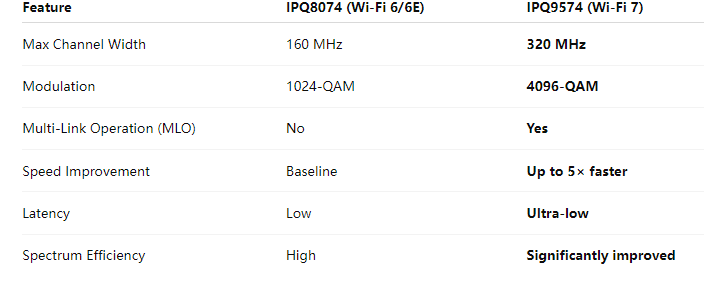
3. Performance Comparison: IPQ8074 vs IPQ9574

Article content

The IPQ9574 isn’t just faster—it is more stable, adaptive, and efficient, especially in congested or industrial environments.


4. Real-World Impact: Why the Upgrade Matters

✔ Industrial IoT

  • Stable multi-link communication
  • Reduced packet loss in noisy RF environments
  • Higher throughput for camera streams, sensors, and gateway devices

✔ Enterprise and Public Networks

  • Better performance in stadiums, airports, shopping malls
  • Improved roaming and handoff with MLO

✔ Outdoor Wireless & WISP

  • Stronger long-range performance
  • Less interference due to flexible spectrum use

✔ AI, Edge Computing & Real-Time Apps

  • Consistent high-speed connection
  • Enabling latency-sensitive applications such as robotics and AR/VR

5. Hardware Evolution: DR8074 → DR9574

As the chipset evolves, so do high-performance hardware platforms. Our DR9574 brings the full power of the IPQ9574 Wi-Fi 7 SoC into a production-ready board designed for:

  • 2× 10G Ethernet + 4× 1G Ethernet
  • 4× M.2 slots for QCN9274/6274 Wi-Fi 7 radios
  • Industrial-grade operation
  • High-power RF design for long-range wireless
  • Customizable firmware and OpenWrt/QSDK support

It is an ideal upgrade path for users currently deploying DR8074/IPQ8074 platforms but looking to move into Wi-Fi 7 performance levels.


6. Conclusion: Wi-Fi 7 Redefines What’s Possible

The transition from IPQ8074 to IPQ9574 is more than a chipset upgrade—it is a shift to a new era of wireless networking:

  • Faster speeds
  • Lower latency
  • Higher reliability
  • Better performance in crowded environments
  • New capabilities through MLO and 320 MHz channels

For industrial, enterprise, and high-density deployments, adopting Wi-Fi 7 solutions such as the IPQ9574-based DR9574 creates a stronger, more scalable wireless infrastructure ready for the future.

Posted on

IPQ5018 Inside: DR5018S Board Redefines Industrial WiFi 6 Connectivity

🌐 Introducing DR5018S — Industrial-Grade Tri-Band WiFi 6 Board for OpenWRT and OpenWiFi development

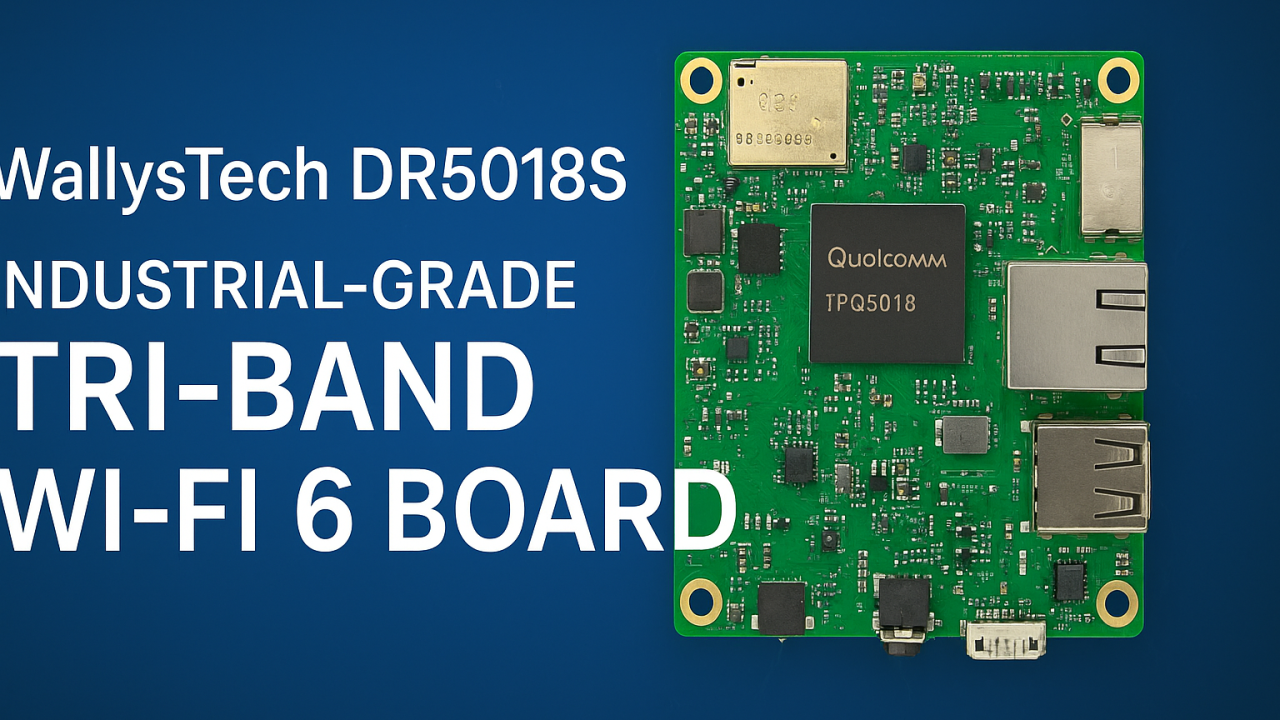
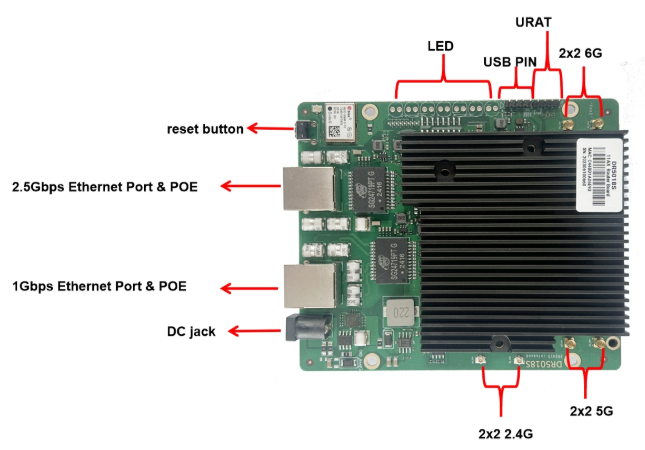
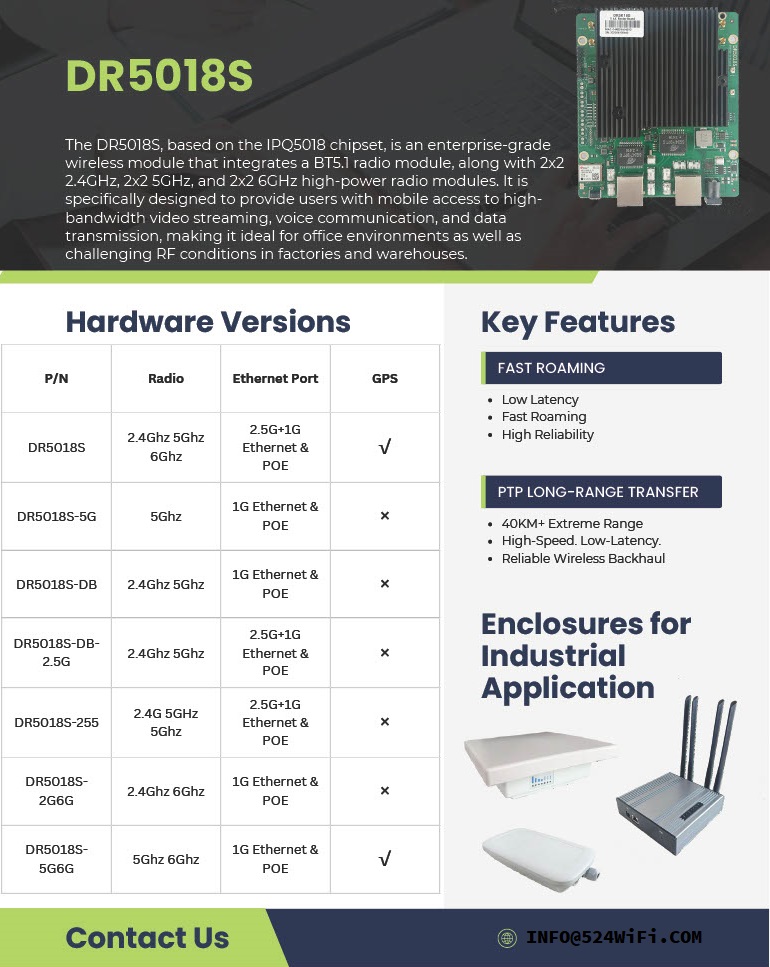
524WiFi introduces the WallysTech DR5018S, a high-performance industrial-grade WiFi 6 platform built for the next generation of wireless networks. Powered by the Qualcomm IPQ5018 SoC, the DR5018S integrates 2.4GHz, 5GHz, and 6GHz bands into one compact board — offering exceptional throughput, low latency, and strong adaptability for modern wireless environments.


⚙️ Key Features

  • Qualcomm IPQ5018 SoC — Dual-core ARM 64-bit A53 @1.0GHz
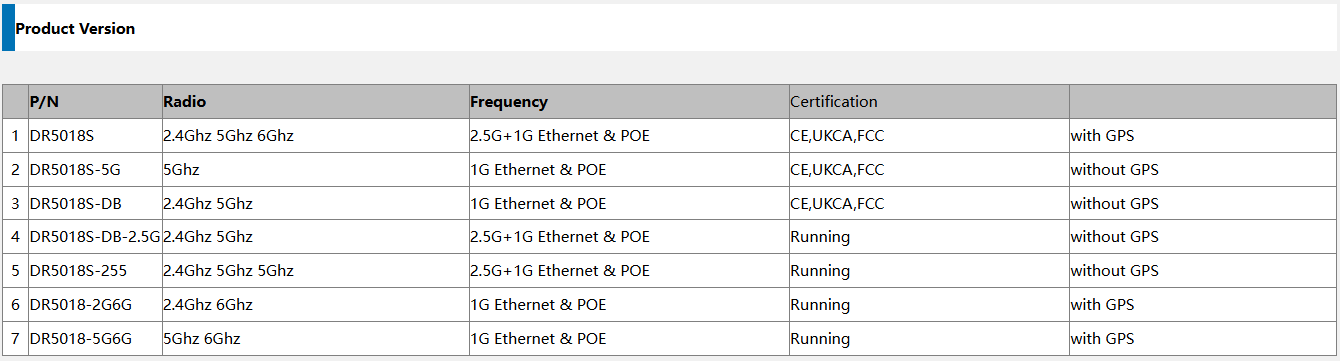
  • Tri-band support: 2.4GHz (573 Mbps) + 5GHz (2402 Mbps) + 6GHz (2402 Mbps)
  • WiFi 6 (802.11ax) with OFDMA, MU-MIMO, 1024-QAM
  • Memory & Storage: 512 MB DDR3L + 128 MB NAND Flash
  • Networking: 1× 2.5 GbE + 1× 1 GbE + USB 2.0 + SGMII + UART
  • Optional modules: GPS and Bluetooth 5.1
  • Power: 12–52 V DC or 802.3at/bt PoE
  • Operating temperature: –40 °C ~ +70 °C (industrial-grade)
  • Certifications: CE / FCC / UKCA
Article content

💡 Why DR5018S Stands Out

✅ Tri-band flexibility — handle high-density environments and interference-free operations

✅ Future-ready with 6GHz — prepared for WiFi 6E and early WiFi 7 transition

✅ Industrial-grade reliability — wide temperature, PoE, and durable design

✅ Open-source platform — OpenWRT/OpenWiFi for customization and fast development

✅ 2.5GbE interface — for high-throughput backhaul and mesh deployments

Article content

🏭 Real-World Applications

The DR5018S is designed for industrial and enterprise-grade wireless networks, enabling reliable connectivity in demanding conditions:

🔹 Mining & Oilfield Operations — establish long-distance wireless mesh links for remote monitoring, sensors, and field communication networks.

🔹 Smart Cities & Urban Infrastructure — build tri-band APs and gateways for IoT devices, cameras, and autonomous systems.

🔹 Industrial IoT & Automation — integrate into factory APs or gateways with OpenWRT for flexible control and connectivity.

🔹 Edge Computing & AI Gateways — combine compute + tri-band WiFi for edge data collection and analysis.

🔹 Warehouse & Logistics — enable low-latency mesh communication for autonomous AGVs and real-time tracking.

🔹 Outdoor Mesh & Backhaul Nodes — leverage 6GHz as a dedicated backhaul channel for high-speed, interference-free wireless mesh.

Its flexibility also makes DR5018S an excellent foundation for OEM/ODM wireless solutions, custom AP design, and smart industrial routers.


🚀 Empowering Wireless Innovation

At 524WiFi, we help partners accelerate product development and reduce evaluation costs through open, modular, and stable platforms. The DR5018S continues our mission to bridge industrial-grade reliability with open-source innovation — enabling faster time-to-market and future-ready WiFi 6/6E connectivity.

Posted on

Introducing the DR5018S – Built for Industrial Grade Wireless – Qualcomm IPQ5018

🚀 Introducing the DR5018S – Built for Industrial-Grade Wireless

From smart ports to logistics hubs to long-range PTP connections, the DR5018S is engineered to deliver:
✅ Fast Roaming
✅ 40km+ PTP Long-Range Transmission
✅ Flexible Enclosures for Any Industrial Application

Whether it’s powering connectivity in smart cities, transportation, or critical infrastructure, the DR5018S ensures powerful performance with reliability you can trust.

https://www.524wifi.com/index.php/catalogsearch/result/?q=5018s

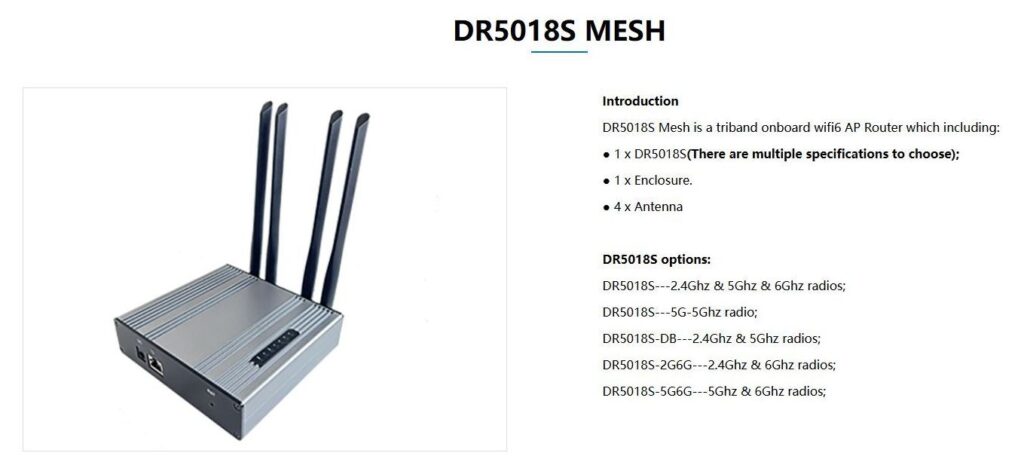
xperience next-level WiFi 6 tri-band performance with the DR5018S Mesh – designed for industrial, enterprise, and large-scale applications. Seamless connectivity, EasyMesh support, and robust hardware all in one compact solution.
💡 Learn more and explore full specifications on our website:

https://524wifi.net/?s=dr5018s

: Introducing the DR5018S – Built for Industrial Grade Wireless – Qualcomm IPQ5018

🚀 When 5G NR Meets Mesh: Filling the Coverage Gaps

5G NR provides standardized, high-performance connectivity — but there are still scenarios where base station deployment is difficult or impractical:

Drone swarms requiring real-time coordination in remote airspace
Robots in underground mines where signals can’t penetrate
Military field operations demanding resilient, ad-hoc communication
In such environments, Mesh networks step in as a complementary layer, ensuring local connectivity even when 5G NR coverage is limited.

👉 Question for the community: Do you see Mesh as a temporary patch until 5G expands everywhere, or as a long-term complement to 3GPP 5G NR in mission-critical deployments?

Posted on

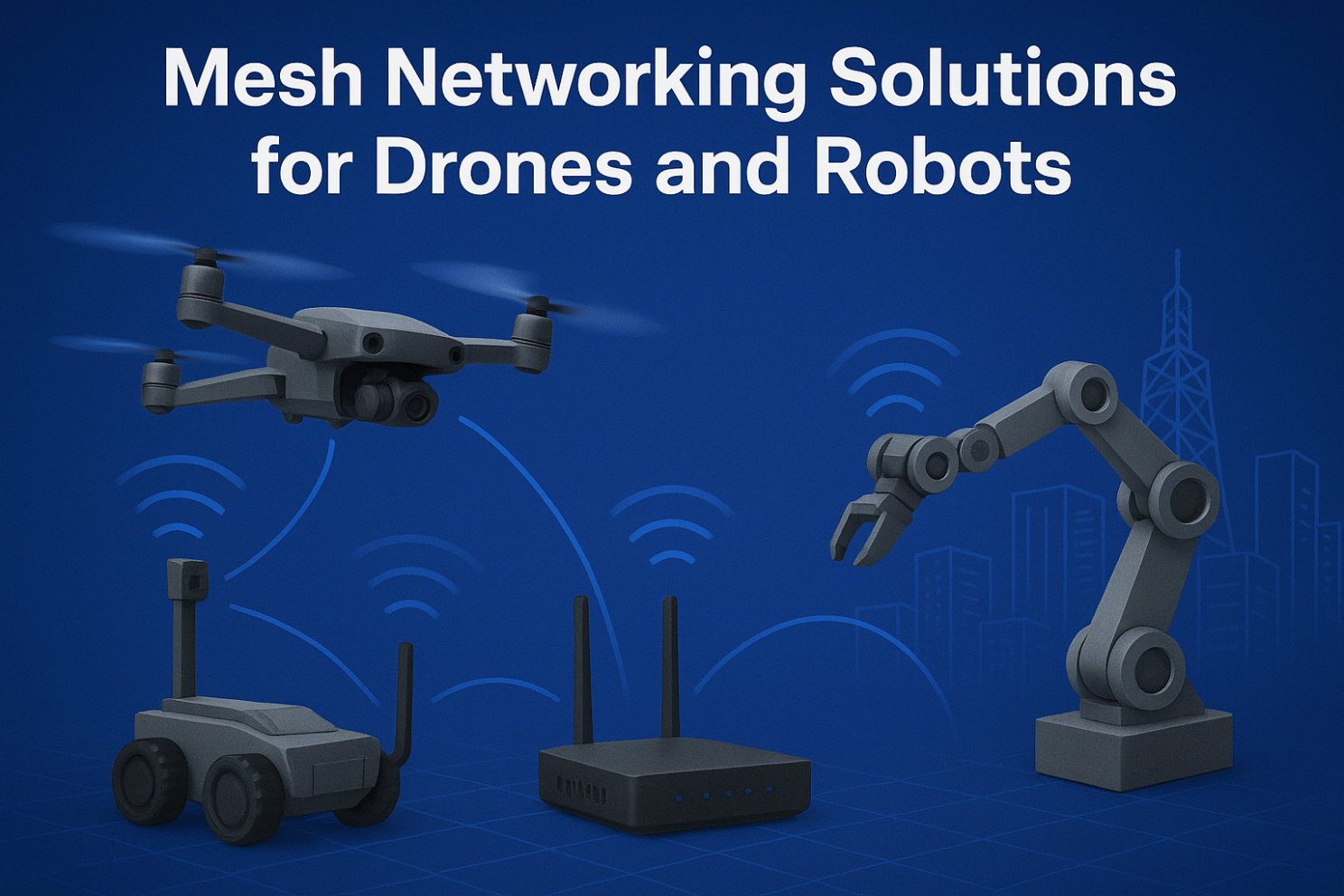
Mesh Networking Solutions for Drones and Robots

Mesh Networking Solutions for Drones and Robots

1. Introduction: Why Mesh for Drones and Robots?

Traditional wireless setups (AP + client) often fail in dynamic, mobile, and large-scale environments. Drones and robots require:

  • Low-latency links for real-time control
  • Resilient communication when nodes move or fail
  • Flexible scalability for adding new devices instantly

This is where Mesh networking shines — offering self-healing, self-configuring, and adaptive connectivity.


2. Mesh Networking for Drones

  • Formation Flying & Swarm Operations Drones in formation need constant synchronization of GPS, sensor, and video feeds. Mesh ensures each drone acts as a node, maintaining real-time links.
  • Emergency Response & Disaster Recovery In areas without cellular coverage, drones can instantly deploy a Mesh network, relaying data back to the command center for faster rescue operations.
  • Beyond Line-of-Sight Missions Mesh allows drones to extend their communication range via relays, enabling operators to control them far beyond visual range.

3. Mesh Networking for Robots

  • Smart Warehouses & Industrial Automation Robots need to stay connected across large spaces with moving inventory. Mesh avoids single-point AP failures and supports seamless roaming.
  • Security & Patrol Robots Continuous connectivity is essential for live video streaming and real-time threat detection. Mesh keeps robots online without service drops.
  • Collaborative Swarm Robots Multiple robots can share sensory data, distribute tasks, and adapt dynamically using Mesh as their backbone.

4. Key Technical Aspects of Drone & Robot Mesh

  • Dynamic Routing Protocols (OLSR, B.A.T.M.A.N, HWMP) ensure optimal paths in mobile networks.
  • Frequency Bands:
  • 2.4 GHz for longer range
  • 5 GHz / 6 GHz for high throughput
  • Wi-Fi 6/7 with MLO for ultra-stable multi-link performance
  • Security: WPA3, AES encryption, and private protocols protect mission-critical data.
  • Low Latency Optimization: Necessary for navigation and collision avoidance in autonomous systems.

5. Real-World Use Cases

  • Drone Relay Networks for Search & Rescue
  • Mesh-Enabled Warehouse Robots for Amazon-like Logistics
  • Hybrid Mesh + 5G Networks for Smart City Patrols

6. Future Trends

  • Wi-Fi 7 with Multi-Link Operation (MLO): Brings reliability and speed to swarms of robots and drones.
  • Integration with 6G & Edge AI: Mesh networks will work hand-in-hand with edge computing for local decision-making.
  • Larger-Scale Autonomous Systems: From 5 drones to 500 robots, Mesh will scale efficiently.

Mesh networking is transforming how drones and robots communicate in real time. Whether for industrial automation, emergency missions, or smart city deployments, Mesh provides the backbone for reliability and scalability.

👉 At 524WiFi and Wallys, we design industrial-grade router boards and network cards (IPQ5018, IPQ9574, QCN9074, etc.) that support advanced Mesh networking. Our hardware enables drone and robotics developers to build custom, robust, and scalable Mesh solutions.

Article content
Posted on

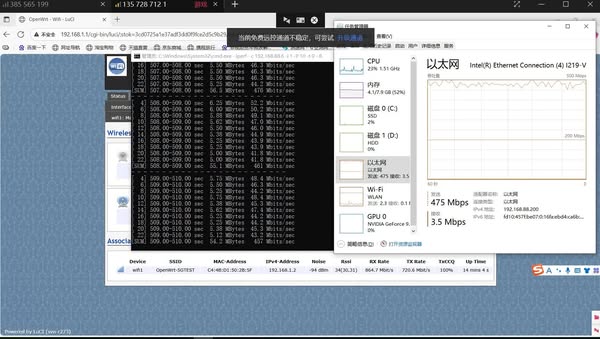
The DR5018S-AP crushed a 14 km 5 GHz link test – hitting 475 Mbps unidirectional throughput!

Wallystech DR5018S-AP crushed a 14 km 5 GHz link test in Dongbei at 50 m high — hitting 475 Mbps unidirectional throughput! We prepare more detailed test report.