Posted on

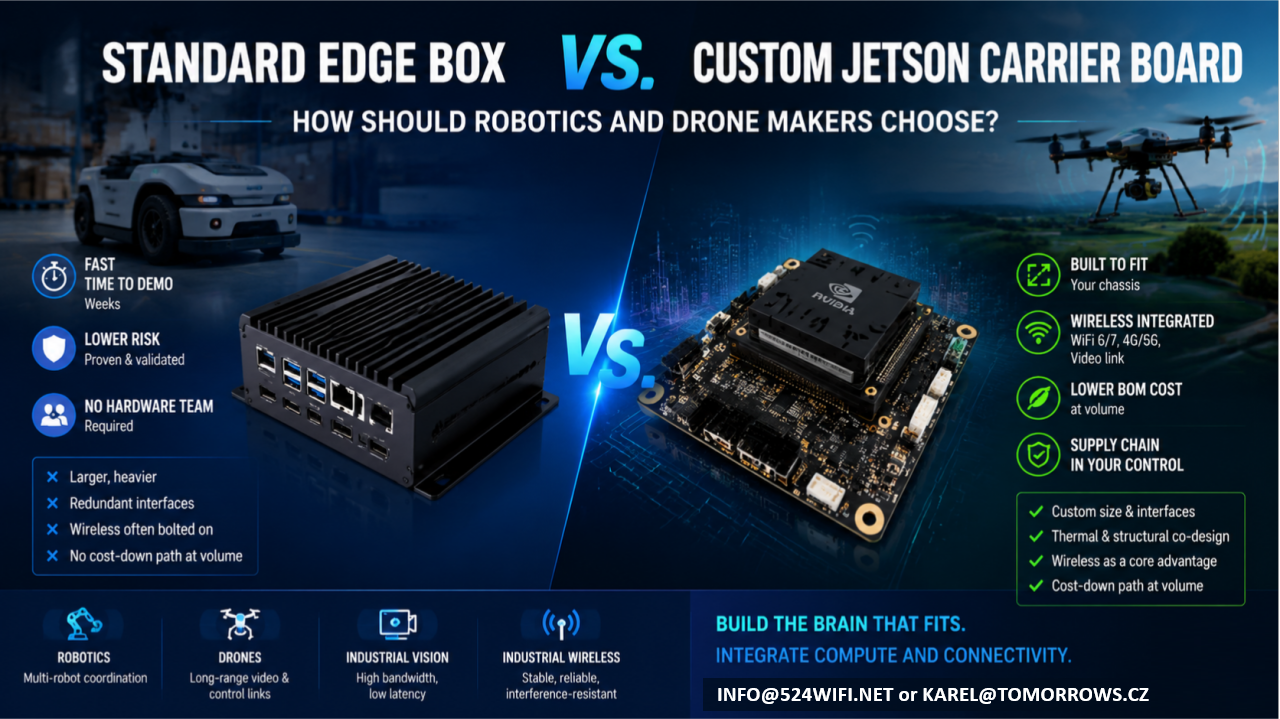
Standard Edge Computing Box vs. Custom Jetson Carrier Board: How Should Robotics and Drone Makers Choose?

If your team has already built the robot chassis or drone airframe, and what’s missing is the “brain” — an edge compute module that can run vision, navigation, and decision-making — you’re almost certainly weighing two paths:

Option A: Buy a standard edge computing box and bolt it onto your platform Option B: Design a custom carrier board around a Jetson module and integrate it directly into your product

Neither path is universally right. Each fits a different stage, scale, and product positioning. This article lays out the trade-offs so you can make the call with your eyes open.

The short version: it’s a trade between speed and long-term cost

  • A standard box trades a proven industrial design for development speed — at the cost of long-term compromises in cost, size, and reliability.
  • A custom carrier board trades a heavier upfront engineering investment for lasting product competitiveness.

Which one makes sense depends on where you are right now.

Option A: Standard Edge Box — Fast, but with a Low Ceiling

Off-the-shelf Jetson boxes — whether NVIDIA’s own dev-kit enclosures or third-party integrated industrial PCs — have one clear strength: speed.

Advantages

  • Fast time to demo: plug in power and network, and you’re running within weeks
  • Lower risk: standard products are already validated, so you’re not carrying hardware design risk
  • No hardware team required: your software team can get the system running without a dedicated hardware engineer

But the trade-offs are real

  1. Size and weight are the biggest problem. Standard boxes are built for broad compatibility and generic thermal margins, so they’re almost always bigger and heavier than what you actually need. For a drone, where every gram matters, that extra weight eats directly into flight time and payload. For a robot chassis that’s already been finalized, bolting on an external box often means re-tooling the enclosure and adding brackets — which breaks the industrial design you already locked in.
  2. Redundant interfaces you’re paying for. To serve “everyone,” standard boxes ship with a pile of ports you’ll never use — extra USB, HDMI, multiple Ethernet jacks. Each of those is both a cost line and a reliability liability: exposed connectors don’t hold up well against vibration and dust in industrial environments.
  3. Wireless connectivity is the most overlooked weak point of the bolt-on approach. Robots and drones need stable video links, control links, and multi-unit networking. The radios in standard boxes are usually consumer-grade, and they tend to drop connections and show latency jitter under the concurrent-device, high-interference conditions common in warehouses, farms, and industrial sites. That usually forces you to bolt on a second box — an industrial-grade wireless module — on top of the first. Now you’ve got a box on a box, with size, cabling, and power delivery spiraling out of control.
  4. No cost-down path at volume. Standard boxes are purchased per unit at a fixed price; the bigger your production run, the worse the economics get. And your supply chain sits entirely with someone else — you have no leverage if they raise prices or discontinue the part.

Who this fits: teams still in validation, prototypes or small batches (a few dozen units or fewer), teams that haven’t locked their final product form yet, or teams that just want to get the algorithm running before dealing with hardware.

Option B: Custom Jetson Carrier Board — Slower, but Built for Volume

A custom carrier board means keeping only the Jetson module itself and designing a new PCB around your actual product requirements — size, interfaces, power, wireless, thermal — so the compute unit is truly built into your chassis, not bolted on top of it.

Advantages

  1. The footprint follows your chassis, not the other way around. A carrier board can be shaped to fit into an arm, a body cavity, a drone gimbal bay — anywhere a standard box simply can’t go.
  2. Only the interfaces you actually need, with wireless (WiFi 6/7, 4G/5G, video links) integrated directly onto the same board instead of bolted on as a second module. One less board-to-board connection means one less failure point, plus far less cabling and structural volume to manage.
  3. Thermal and structural design can be co-engineered. The board can be designed to work with your chassis’s own thermal paths and metal structure, instead of carrying its own standalone fan or heatsink like a boxed unit does — critical for drones and sealed robot enclosures.
  4. Meaningfully lower BOM cost at volume, and your design assets and supply chain stay in your own hands, rather than being exposed to a single vendor’s pricing or discontinuation decisions.
  5. This is where wireless communication genuinely becomes part of your product’s competitive edge. Most customers who come to us asking for “a Jetson carrier board” eventually realize the real bottleneck is the wireless link — roaming latency during multi-robot coordination, interference resistance for video transmission, stability of long-range control links. Board-level integration lets you co-optimize the WiFi 6/7 RF front end, antenna placement, and EMC design together with the compute board in a single pass — something a box-plus-bolt-on-module combination can never achieve.

Trade-offs

  • Requires a proper design, prototyping, and validation cycle upfront (typically weeks to a few months, depending on complexity)
  • Requires a partner who understands both Jetson hardware design and RF engineering — teams with both skill sets aren’t common
  • At very small batch sizes (single digits to a few dozen units), the amortized development cost may not pencil out

Who this fits: teams whose product form is already locked and heading toward volume production (typically 100+ units), teams with hard requirements on size/weight/battery life, or teams for whom wireless performance — multi-robot coordination, long-range video, industrial-grade networking — is itself a core product differentiator.

Quick Decision Table

Dimension Standard Edge Box Custom Jetson Carrier Board Development timeline Weeks Weeks to months Upfront investment Low Medium-high (one-time) Per-unit cost at volume Fixed, no cost-down path Decreases with volume Size / weight Constrained by standard enclosure Fully customizable Wireless integration Usually bolted on, extra link in the chain Can be co-designed with the compute board Supply chain control Dependent on a single vendor Design assets owned in-house Best fit stage Validation / small batch Volume production / finalized product

What We Can Do for You

This is exactly what we do at 524WiFi and Wallys: custom carrier board design around Jetson modules, combined with our own track record in industrial-grade WiFi 6/7 and long-range wireless transmission — so compute and connectivity end up on a single board, instead of customers having to stitch together a “Jetson box + industrial wireless module” combo themselves.

If your team:

  • Already has a robot or drone product form and is weighing edge-compute options
  • Has validated a demo on a standard box and is now thinking about cost-down and miniaturization for volume production
  • Needs multi-robot coordination, long-range video transmission, or interference-resistant networking — not just raw compute

Reach out and let’s talk through your specific use case: info at 524wifi.net

We’re happy to start with a free assessment of your current setup to help you decide whether it’s time to keep iterating on a bolt-on box, or move straight to a fully integrated custom design.
Posted on — Leave a comment

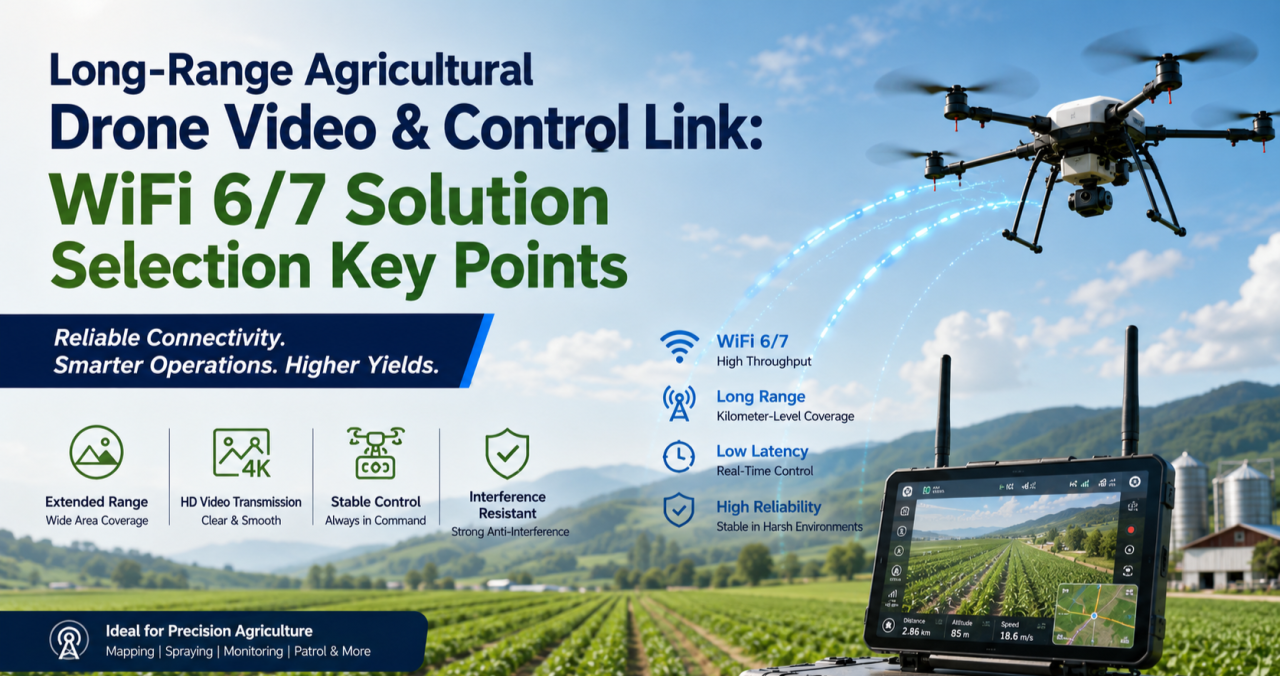
How to Design a Reliable Long-Range Wireless Link for Agricultural Drones (WiFi 6/7 Selection Guide)

If you’ve deployed drones for crop spraying, field mapping, or orchard inspection over any real distance, you’ve probably run into this: the link holds fine at 200 meters, then starts dropping commands or breaking up video well before you hit the range the datasheet promised. It’s rarely a bad chip. It’s almost always an architecture problem.

This guide walks through why long-range agricultural links behave differently from indoor or short-range WiFi deployments, what actually determines reliability at range, and how to select hardware — control-side and video-side — that holds up in the field.

Why Agricultural Drone Links Are a Different Problem

Most WiFi hardware is designed and benchmarked for indoor, short-range, high-density environments — offices, warehouses, retail. Agricultural drone deployments invert almost every one of those assumptions:

  • Distance is the default, not the exception. A single control link routinely needs to cover several hundred meters to a few kilometers across open farmland or orchards.
  • There’s no multipath to lean on. Indoor WiFi benefits from reflections off walls and ceilings. Open fields don’t offer that — and offer very little shielding from other interference either.
  • Control and video have opposite requirements. Control commands are small, frequent packets that need low, consistent latency and near-zero loss. Video (especially 4K, multispectral, or thermal payloads) needs sustained bandwidth and can tolerate some jitter. Serving both well on one link is hard.
  • One-to-many is common. A single ground station frequently needs to manage multiple aircraft flying formation or covering different zones of the same field, which means the AP side has to handle concurrent, fast-moving clients — not a single static link.
  • Power is capped by regulation, not by ambition. ISM-band transmit power and antenna gain both have legal ceilings. You can’t out-power your way to more range.

The Five Things That Actually Determine Reliability at Range

1. Band Strategy: Split the Link, Don’t Pick One Band

2.4GHz diffracts better around terrain, crops, and structures, which is why it’s traditionally the default choice for long-range control links. 5GHz and 6GHz offer far more spectrum and fewer competing signals, which is exactly what high-resolution video needs.

The reliable pattern in the field isn’t choosing one band for everything — it’s running a split architecture: control on 2.4GHz, video on 5GHz or 6GHz. That’s a strong argument for radio hardware where the band configuration is flexible (single-band, dual-band, or switchable tri-band) rather than fixed to one band at the factory.

2. Modulation and Spatial Streams: Know What They Actually Control

Specs like 4096-QAM and multi-stream MU-MIMO are real and useful — but they define your near-field ceiling, not your far-field floor. As distance increases and signal-to-noise ratio drops, the link automatically falls back to lower-order modulation regardless of the chip’s peak capability.

When evaluating hardware for a long-range deployment, the number that matters isn’t the “Gbps peak” on the datasheet. It’s the rate-adaptation curve under low SNR, and specifically the minimum usable data rate at the outer edge of your intended range. That’s the number that tells you whether video will break up or commands will get dropped when the aircraft is farthest from the ground station — which is exactly when you need the link most.

3. MLO (Multi-Link Operation): Redundancy, Not Traffic Splitting

WiFi 7 introduced Multi-Link Operation, which lets a device establish links across multiple bands or channels at once. There’s a common misconception worth clearing up here: MLO isn’t a way to route control traffic on one band, video on another, and backhaul on a third, each running independently.

What MLO actually does is transmit the same data redundantly across multiple links simultaneously, so that if one link momentarily fades or gets interfered with, the other link covers for it — improving reliability and reducing effective latency. For agricultural drones, where a lost link is often the trigger for a return-to-home failsafe, that kind of redundancy has real operational value, not just a spec-sheet checkbox.

4. Topology: Point-to-Point vs. One-to-Many

A single aircraft doing long-range mapping or inspection is often best served by a point-to-point link — a directional antenna setup trading beamwidth for range and stability. But if a ground station needs to manage multiple aircraft or ground terminals simultaneously, the AP side needs OFDMA multi-user scheduling and fast roaming/handoff behavior, or you’ll see queuing delay whenever multiple aircraft check in around the same time.

Know which problem you’re actually solving before you pick hardware — they call for different radio capabilities.

5. Form Factor: Airborne and Ground-Side Needs Diverge

The airborne side is constrained by payload weight and available power, so it needs a small, low-power radio module that can be integrated directly into a flight controller or gimbal payload — with just enough band flexibility to serve the control link without unnecessary weight or draw.

The ground station side is a different design problem entirely: it needs to aggregate multiple client connections, handle higher sustained throughput, and typically needs wired backhaul (Ethernet, sometimes 10GbE) to move the collected video and telemetry off to a local server or the cloud. That usually points toward a board-level platform rather than a compact module.

Mapping Hardware to the Problem

Once you’ve worked through the five factors above, hardware selection becomes a matter of matching platform to role rather than chasing a single “best” spec sheet.

Airborne / terminal-side radio module. You want something small, power-efficient, and configurable — ideally a module where you can select or trim the band configuration (single-band 2.4GHz for a dedicated control radio, or dual-band where the payload allows) without carrying unused radio hardware and power draw. This is the role a WiFi 7 M.2 module built on a chipset like Qualcomm’s QCN9274/QCN6274 platform is designed for, with configurations spanning single-band, dual-band, and 4×4 single-band variants depending on what the airframe needs.

Ground-station aggregation board. This is where you want a flagship-class multi-band platform — four simultaneous bands, wide channels (up to 320MHz), high-order modulation (4096-QAM), multiple M.2 slots for additional radio cards, and dual 10GbE-class wired uplinks. This tier handles concurrent multi-aircraft connections, dynamic channel selection (AFC) to work around interference, and reliably backhauling the aggregated video streams to wherever they’re processed.

Edge gateway with onboard compute. For deployments where you want to do video processing or stream aggregation closer to the field — rather than pushing everything raw to the cloud — a tri-band gateway platform with high-speed wired I/O (dual 10GbE + multiple 2.5GbE) and an onboard AI accelerator tuned for networking workloads is the better fit. It handles wireless backhaul while also doing local compute, cutting the bandwidth pressure on the uplink.

A Practical Decision Order

When you’re actually speccing a system, work through it in this order:

  1. Point-to-point or one-to-many? This determines whether OFDMA and fast roaming on the ground-station side are must-haves or nice-to-haves.
  2. Does the control link need to be physically separated from the video link? This determines whether a single-band module or a multi-band board is the right call for each end of the system.
  3. What are the payload’s power and space constraints? This determines module-level vs. board-level hardware on the airborne side.
  4. Does the back end need edge compute or multi-stream video aggregation? If yes, prioritize a gateway platform with onboard AI acceleration and high-speed wired I/O.

FAQ

Is 2.4GHz or 5GHz better for a long-range drone control link? 2.4GHz generally holds up better over distance and around obstructions like terrain or crop canopy, which is why it’s the more common choice for the control link specifically. 5GHz and 6GHz are typically reserved for the video link, where the extra bandwidth matters more than raw range.

Do I need WiFi 7, or is WiFi 6 enough? It depends on whether you need MLO’s link redundancy and whether your video payload actually needs the extra bandwidth WiFi 7’s wider channels provide. Many long-range control links work fine on WiFi 6; WiFi 7 becomes more valuable as video resolution, aircraft count, or reliability requirements increase.

What’s the actual benefit of MLO for a drone link? Redundancy. The same data is sent across multiple links at once, so a momentary fade on one link doesn’t cost you the connection — it isn’t a way to assign different traffic types to different bands independently.

Should the airborne radio and the ground-station radio be the same hardware? No — they’re solving different problems. The airborne side prioritizes size, weight, and power; the ground station prioritizes aggregate throughput, multi-client handling, and wired backhaul capacity.


If you’re evaluating or redesigning the wireless subsystem in a drone flight-control or video-transmission stack — or migrating an existing deployment from WiFi 5/6 to WiFi 7 — reach out to info at 524wifi.com or .net. We build radio hardware across all three tiers described above and can walk through the specifics of your deployment.

Posted on

Do you need original QCA Linux DBDC driver for Sparklan WNFQ or WPEQ 268AXI WiFi6 module? Or is better to use open source Ath11k driver ?

Let us share our experience with Qualcomm Atheros WCN6856 based Wi-Fi 6 Triband modules from Sparklan. These WiFi6 modules are very popular. Many professional customers are requesting testing samples and want to use them for their projects.

Open Source Linux ath11k driver is available, works but has limitations.

If the customer needs DBS, they will need to apply the ath11k patch. However, after applying the patch, DFS will not be available, and many functions will not work with ath11k. In many cases, we have already suggested using the official QCA driver. Unfortunately original QCA driver is for older Linux kernel only – WNFQ-269AX(BT) Qualcomm official driver supports Linux Kernel version 5.4 & 5.10 & 5.15.

“For DFS and support for more client connections (+60) , they will need to use the official QCA driver.”

Sparklan can provide the original driver but every customer has to sign the NDA . If you are interested in , then please contact us and provide your project description and company details. We will send the NDA for you.

Here is the latest driver for 268AXI module :

Change WPEQ-268AXI.tar.xz Firmware BDF

SOP 

#rm -r /lib/firmware/ath11k/WCN6855

#cp WPEQ-268AXI.tar.xz /lib/firmware/ath11k

#cd /lib/firmware/ath11k

#tar xvf WPEQ-268AXI.tar.xz

Please follow the steps higher to replace the firmware BDF.

Here is an older success story from our customer, maybe thsi can help to many other to develop relaibel working x86 Linux based device with WCN6856 based Wi-Fi 6 Triband modules :

I think we will have to stick with the open source ath11k driver for now since we already are committed to 6.1.x.

I have since migrated this project to Debian 12, also on 6.1.x. I can confirm the exact kernel version. However I was able to install ath11k on Debian 12 core (no X since this will run headless) along with the open source firmware and I do have hostapd working now. I am yet to activate dnsmasq, a bridge that includes the lan interface, etc. So far it seems that what I am stuck on is 2.4GHz + 5GHz DBDC. I’ve experimented with hostapd.conf quite a bit and I cannot seem to figure out how to do this. Typically with DBDC I have seen two wifi interfaces enumerate in linux. I only see one (named wlp1s0) in my case. Performing sudo iw list does show all of the correct frequencies in the supported list (including 6GHz which is not necessary for my application).

Strangely, after a reboot, the only way that I can correctly set the regulatory region (sudo iw reg set US in my case here) is after I perform a manual sudo iwlist scan. This could be an issue because I will want the appliance to reboot with hostapd activated automatically (presumably by systemd?)

I would be happy to share my hostapd.conf and anything else from my configurations to get this working. I feel that I am quite close to success and with just a few more configuration file adjustments plus the correct systemd service definition this project will be complete.

The hostapd.conf and dnsmasq.conf are attached. These are working well except:

No SDBC. I don’t seem to see in a scan anything except the 5GHz radio.

Trying after boot:

armbian@nanopi-r5c:/$ sudo hostapd /etc/hostapd.conf
wlp1s0: interface state UNINITIALIZED->COUNTRY_UPDATE
Frequency 5180 (primary) not allowed for AP mode, flags: 0x100853 NO-IR
Primary frequency not allowed
wlp1s0: IEEE 802.11 Configured channel (36) or frequency (5180) (secondary_channel=1) not found from the channel list of the current mode (2) IEEE 802.11a
wlp1s0: IEEE 802.11 Hardware does not support configured channel
Could not select hw_mode and channel. (-3)
wlp1s0: interface state COUNTRY_UPDATE->DISABLED
wlp1s0: AP-DISABLED 
wlp1s0: interface state DISABLED->DISABLED
wlp1s0: AP-DISABLED 
wlp1s0: CTRL-EVENT-TERMINATING 
hostapd_free_hapd_data: Interface wlp1s0 wasn’t started
nl80211: deinit ifname=wlp1s0 disabled_11b_rates=0

Produces hostapd failure every time. However if I instead first:

armbian@nanopi-r5c:/$ sudo ip link set wlp1s0 up
armbian@nanopi-r5c:/$ sudo iwlist scan
armbian@nanopi-r5c:/$ sudo iw reg set US
armbian@nanopi-r5c:/$ sudo hostapd /etc/hostapd.conf
wlp1s0: interface state UNINITIALIZED->COUNTRY_UPDATE
wlp1s0: interface state COUNTRY_UPDATE->HT_SCAN
wlp1s0: interface state HT_SCAN->ENABLED
wlp1s0: AP-ENABLED


Doing these steps produces a perfectly running ap bridged with one of the two ethernet NICs and with a working DHCP server. It seems stuck in 5GHz and at lower speed classes. But otherwise it’s working. These extra steps are quite tricky to run without a bunch of shell scripts called by systemd which is not as reliable as I would prefer.

sudo iw reg set US

Does nothing unless I first: sudo iwlist scan

NetworkManager (NM) is disabled and I am using systemd-networkd. This is a headless micro-server and NM just got in the way of everything.

I feel like I am very close to having this working perfectly!

More system information follows. Thanks.

armbian@nanopi-r5c:/$ uname -a
Linux nanopi-r5c 6.6.31-current-rockchip64 #1 SMP PREEMPT Fri May 17 10:02:40 UTC 2024 aarch64 GNU/Linux

armbian@nanopi-r5c:/$ inxi -b
System:
  Host: nanopi-r5c Kernel: 6.6.31-current-rockchip64 arch: aarch64 bits: 64 Console: pty pts/0
    Distro: Armbian GNU/Linux 12 (bookworm)
Machine:
  Type: ARM System: FriendlyElec NanoPi R5C details: N/A serial: 43d60e96d20b8351
CPU:
  Info: quad core Model N/A [MCP] speed (MHz): avg: 1800 min/max: 408/1992
Graphics:
  Device-1: display-subsystem driver: rockchip_drm v: N/A
  Device-2: rk3568-mali driver: panfrost v: kernel
  Device-3: rk3568-dw-hdmi driver: dwhdmi_rockchip v: N/A
  Display: server: No display server data found. Headless machine? tty: 167×44
    resolution: 3840×2160
  API: N/A Message: No display API data available in console. Headless machine?
Network:
  Device-1: Qualcomm QCNFA765 Wireless Network Adapter driver: ath11k_pci
  Device-2: Realtek RTL8125 2.5GbE driver: r8169
  Device-3: Realtek RTL8125 2.5GbE driver: r8169
Drives:
  Local Storage: total: 58.63 GiB used: 7.9 GiB (13.5%)
Info:
  Processes: 206 Uptime: 14m Memory: 3.65 GiB used: 416 MiB (11.1%) Init: systemd
  target: graphical (5) Shell: Bash inxi: 3.3.26

Here is the solution for this customer.

1. Kernel config —> enable “CONFIG_ATH_REG_DYNAMIC_USER_REG_HINTS”

2. iw reg get —> phy#0 (self-managed) country ?

3. iw reg set US

4. iw list —> Check 5G Frequencies “NO-IR” disappears

However, I must remind you again that they will need to apply the ath11k patch for DBS.

Result – Super helpful and I can report I have success, I have an AP, I have rather good performance for a software AP, and I’m going to send this to testing.

In case anyone else was wondering: on current Debian the wifi needed a new file /usr/lib/firmware/ath11k/WCN6855/hw2.0/board-2.bin which was extracted from either Debian unstable or https://git.kernel .org/pub/scm/linux/kernel/git/firmware/linux-firmware.git/

Posted on

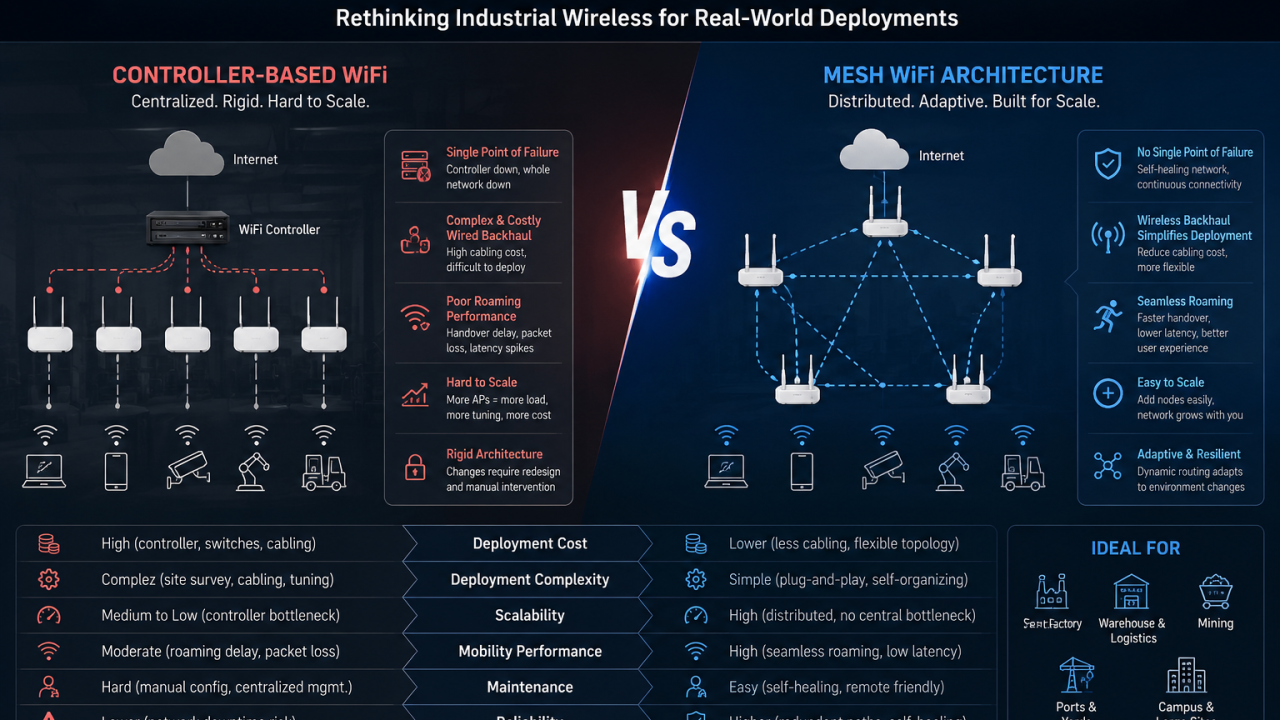
Why Controller-Based Industrial WiFi Is Breaking in Real Deployments

Most industrial WiFi networks are still built on a controller-based architecture.

And in controlled lab environments, it works.

But in real industrial deployments, the story is very different.

Factories, mines, ports, and warehouses are not static environments. They are dynamic, noisy, and constantly changing systems.

And that’s exactly where controller-based WiFi starts to fail.


The Hidden Assumption Behind Controller WiFi

Traditional enterprise WiFi is built on one assumption:

A centralized controller can efficiently manage the entire network.

That assumption only holds when the environment is predictable.

Industrial environments are not.

Once you scale into real deployment scenarios, WiFi becomes less about “AP management” and more about:

  • mobility
  • interference
  • topology changes
  • real-time traffic behavior

And centralized control starts becoming a limitation rather than an advantage.


Where Controller-Based WiFi Fails in Practice

1. Roaming is still not truly seamless

Even with controller-based optimization:

  • handover delay still exists
  • packet loss happens during movement
  • latency spikes under load are unavoidable

This is especially critical for AGVs, mobile robots, and real-time monitoring systems.


2. Wired backhaul limits deployment flexibility

Controller-based architectures heavily depend on wired infrastructure.

But industrial sites are:

  • expensive to cable
  • frequently reconfigured
  • physically difficult to retrofit

This creates a gap between “ideal network design” and “real deployment reality”.


3. Scaling introduces complexity, not simplicity

Adding more APs does not mean linear scalability.

Instead, it introduces:

  • higher controller load
  • complex RF planning
  • continuous tuning effort
  • increased operational cost

At scale, the network becomes harder to manage, not easier.


4. Centralized failure domains are too rigid

In controller-based systems:

  • architecture is tightly coupled
  • dependencies are centralized
  • failure impact can cascade

A small issue can affect a disproportionately large part of the network.


Why Mesh Architecture Is Gaining Real Adoption

Mesh WiFi is not new—but industrial requirements are forcing a structural shift.

Instead of forcing traffic through a central controller, Mesh builds a distributed network where nodes collaborate dynamically.

Key advantages include:

Distributed control

No single point of dependency for network decisions.

Self-healing topology

Traffic dynamically adapts when nodes fail or conditions change.

Flexible expansion

New nodes can be added without redesigning the entire system.

This aligns far better with how industrial environments actually evolve.


Important Reality Check: Mesh Is Not a Silver Bullet

Mesh does NOT eliminate RF physics.

In real deployments, you still need to consider:

  • interference in industrial environments
  • bandwidth sharing between backhaul and access
  • multi-hop latency trade-offs
  • proper RF planning

But the key difference is:

Mesh adapts to real-world constraints instead of fighting against them.


The Real Shift in Industrial WiFi

This is not a feature comparison between Mesh and Controller WiFi.

It is a structural shift in architecture thinking:

  • From centralized control → distributed intelligence
  • From static topology → adaptive topology
  • From planned deployments → evolving networks

Industrial WiFi is no longer about perfect design.

It is about surviving real-world complexity.


Final Thought

Controller-based WiFi still works in controlled enterprise environments like offices and campuses.

But in industrial deployments, the question is no longer:

“How powerful is your controller?”

It becomes:

“Why are you still forcing a centralized architecture into a distributed environment?”


If you are building industrial networking products…

If you are currently working on:

  • Industrial routers
  • Mesh WiFi systems
  • OEM/ODM networking platforms
  • Edge connectivity devices
  • WiFi solutions for AGVs, robotics, or smart factories

and are facing challenges such as roaming instability, deployment complexity, or scalability limitations—

We can share practical architecture insights based on real-world industrial WiFi deployments, including Qualcomm-based WiFi 6 Mesh platform designs.

Feel free to connect or message me to discuss your project.

Article content
Posted on

How to Use 524WiFi MEDIATEK Wi-Fi 5, 6, 6E, and Wi-Fi 7 Modules

A practical integration guide with a full 524WiFi MEDIATEK chipset based module overview.

524WiFi provides a complete portfolio of industrial-grade Wi-Fi modules covering Wi-Fi 5 (802.11ac), Wi-Fi 6 (802.11ax), Wi-Fi 6E (ax + 6 GHz), and Wi-Fi 7 (802.11be). These modules are widely used in routers, gateways, industrial IoT, smart cities, robotics, and embedded Linux systems.

This guide explains how to select, install, configure, and deploy AsiaRF Wi-Fi modules, followed by a full comparison table of current Wi-Fi 5/6/6E/7 models.

1. Choosing the Right MEDIATEK Wi-Fi Module

When selecting a module, consider:

  • Wi-Fi generation
    • Wi-Fi 5 → cost-effective, mature ecosystem
    • Wi-Fi 6 → higher efficiency, OFDMA, MU-MIMO
    • Wi-Fi 6E → access to clean 6 GHz spectrum
    • Wi-Fi 7 → ultra-low latency, multi-link operation (MLO)
  • Form factor
    • Mini-PCIe (industrial & networking equipment)
    • M.2 Key-A / Key-E (embedded systems & SBCs)
  • MIMO & throughput
    • 2×2 for compact/low-power designs
    • 4×4 for gateways, APs, and routers
2. Hardware Installation

Physical installation

  1. Insert the module into the Mini-PCIe or M.2 slot
  2. Secure with a screw
  3. Connect antennas using U.FL / MHF4 connectors
  4. Ensure antenna count matches RF chains (2×2 or 4×4)

Power & thermal

  • High-performance Wi-Fi 6/7 modules require:
    • Stable 3.3 V supply
    • Adequate ground plane
    • Optional heatsink or airflow for sustained throughput
3. Driver & OS Support

Linux / OpenWrt

524WiFi MT Mediatek Wi-Fi 6 / 6E / 7 modules are primarily based on MediaTek chipsets and are supported by:

Typical steps:

opkg update

opkg install kmod-mt76 hostapd iw

AP / STA configuration

  • Use hostapd for AP mode
  • Use wpa_supplicant for client mode
  • Configure regulatory domain:

iw reg set US # example

4. Antenna & RF Best Practices
  • Place antennas away from metal enclosures
  • Maintain proper antenna spacing for MIMO
  • Use low-loss coax for external antennas
  • Verify antenna tuning for 2.4 GHz / 5 GHz / 6 GHz
5. Regulatory & 6 GHz Considerations

For Wi-Fi 6E and Wi-Fi 7:

  • 6 GHz availability depends on country regulations
  • Ensure:
    • Correct country code
    • Proper EIRP limits
    • DFS compliance (5 GHz)
6. Validation & Testing

Recommended tests:

  • Throughput: iperf3
  • Stability: 24–72 hr stress test
  • Multi-client load test
  • Thermal monitoring under peak load
7. Full 524WiFI MEDIATEK Wi-Fi Module Table (Wi-Fi 5 → Wi-Fi 7)
ModelWi-Fi StandardBandsForm FactorMIMOChipset FamilyTypical Use Case
AW7615-NP1Wi-Fi 5 (802.11ac)2.4 / 5 GHzMini-PCIe4×4MediaTek MT7615Legacy routers, cost-optimized gateways
AW7915-NP1Wi-Fi 62.4 / 5 GHzMini-PCIe4×4MediaTek MT7915Industrial APs, enterprise gateways
AW7915-NPDWi-Fi 62.4 / 5 GHzMini-PCIe2×2MediaTek MT7915Embedded Linux platforms
AW7915-AE1Wi-Fi 62.4 / 5 GHzM.2 Key-A4×4MediaTek MT7915SBCs, edge computing
AW7915-AEDWi-Fi 62.4 / 5 GHzM.2 Key-E2×2MediaTek MT7915Compact embedded designs
AW7916-NPDWi-Fi 6E2.4 / 5 / 6 GHzMini-PCIe2×3MediaTek MT79166 GHz industrial gateways
✅ AW7916-AEDWi-Fi 6E2.4 / 5 / 6 GHzM.2 Key-E2×3MediaTek MT7916Compact Wi-Fi 6E embedded systems
AW7990-NPDWi-Fi 7 (BE)2.4 / 5 / 6 GHzMini-PCIe3×3MediaTek MT7990Wi-Fi 7 gateways & APs
✅ AW7990-AEDWi-Fi 7 (BE)2.4 / 5 / 6 GHzM.2 Key-E3×3MediaTek MT7990Next-gen embedded Wi-Fi 7 devices
✅ AW7991-AE2Wi-Fi 7 (BE)2.4 / 5 / 6 GHzM.2 Key-A/E3×3MediaTek MT7991High-efficiency Wi-Fi 7 platforms
8. Typical Application Scenarios
  • Industrial IoT gateways
  • Smart city infrastructure
  • AIoT edge devices
  • Enterprise & carrier-grade routers
  • Wi-Fi 7 next-generation APs
  • OpenWrt-based networking products
Conclusion

MEDIATEK Wi-Fi modules provide a clear upgrade path from Wi-Fi 5 to Wi-Fi 7, with consistent Linux/OpenWrt support, industrial-ready form factors, and scalable RF performance. By choosing the right module, following best practices for installation, and leveraging open-source drivers, system integrators can rapidly deploy reliable wireless solutions across diverse markets.

Posted on

SparkLAN Client Wi-Fi Modules

Premium Wi-Fi Modules in various form factors. SparkLAN delivers premium industrial Wi-Fi solutions in connectorized and LGA form factors with a focus on maintaining high quality and functionality. Whether you’re looking for an M.2, mPCIe, or solder down solution, cutting-edge Wi-Fi 7, or a reliable USB dongle, SparkLAN has got you covered. Plese contact us to test samples !

Explore : SPARKLAN PREMIUM WI-FI modules

Posted on

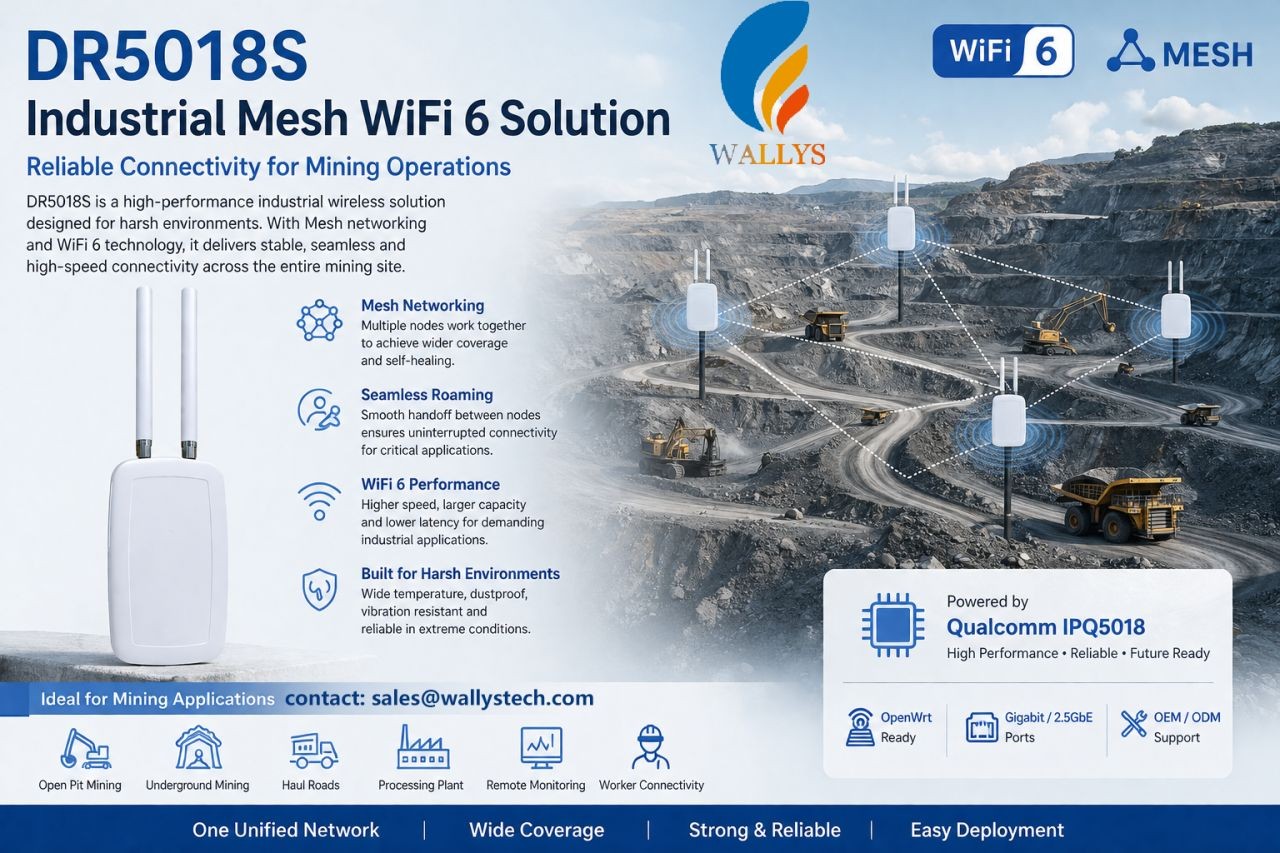
Wi-Fi 6 Mesh Development with IPQ5018 & IPQ5010: WallysTech DR5018S Source Code Now on GitHub

🚀 WallysTech Releases Open-Source DR5018S Mesh Solution on GitHub!

We’re excited to announce that the DR5018S Mesh solution — optimized, tested, and production-ready — has now been fully open-sourced on GitHub.
Built on OpenWrt and enhanced through extensive real-world deployments, this solution is designed for teams working on Wi-Fi 6 / ath11k Mesh networks.

🔍 Why We Open-Sourced It

Mesh networking is essential in industrial IoT, outdoor coverage, enterprise networking, and large-scale distributed systems.
Yet many teams still struggle with:
• Unstable links
• Slow backhaul recovery
• Performance drops in high-density environments
• Limited ath11k Mesh reference designs

After deep testing and tuning in our own projects, we’ve created a stable, engineering-grade Mesh implementation — and we want to share it with the community.

⭐ What’s Inside

✔ Optimized Mesh link logic
✔ Faster reconnection & self-healing
✔ Lower latency during link interruptions
✔ NSS-accelerated forwarding
✔ Mesh configs, tuning parameters, and deployment guides
✔ Driver & firmware-related adjustments for ath11k

💡 About DR5018S

Powered by the Qualcomm IPQ5018 Wi-Fi 6 SoC, DR5018S is proven in harsh environments such as mines, oil fields, campuses, smart cities, and enterprise networks.
It supports flexible roles as both access and backhaul nodes — and is available with an industrial IP68 outdoor enclosure.

📦 GitHub Repository

🔗 [ GitHub link]

We’ve included examples, configs, debugging tips, and FAQs to help teams go from “it works” to “it works reliably.”

🤝 Join the Mesh Open-Source Community

If you’re building on Wi-Fi 6 or ath11k Mesh, we invite you to try the solution, share feedback, open issues, or submit PRs.
For large-scale deployments or custom requirements, our team is happy to support — just reach out.

Let’s build the next generation of Mesh networks together. 💡🌐

🚀 Key Features

1. High-Performance Platform Based on IPQ5018

  • Qualcomm IPQ5018 chip, dual-core ARM Cortex-A53 @ 1.0GHz
  • 512MB DDR3L system memory, 128MB NAND Flash storage
  • Hardware NAT acceleration supporting high-concurrency network connections

2. Complete Mesh Network Support

  • Natively integrated B.A.T.M.A.N. Advanced Mesh protocol
  • Supports multi-hop routing and dynamic topology discovery
  • Automatic link quality assessment and routing optimization

3. Enterprise-Level Functions

  • Supports WPA3 enterprise-grade security encryption
  • VLAN isolation and multi-SSID management
  • Centralized network management and monitoring
  • Supports Captive Portal and billing systems

DR5018S Mesh product family : https://524wifi.net/?s=mesh&post_type=product

Posted on

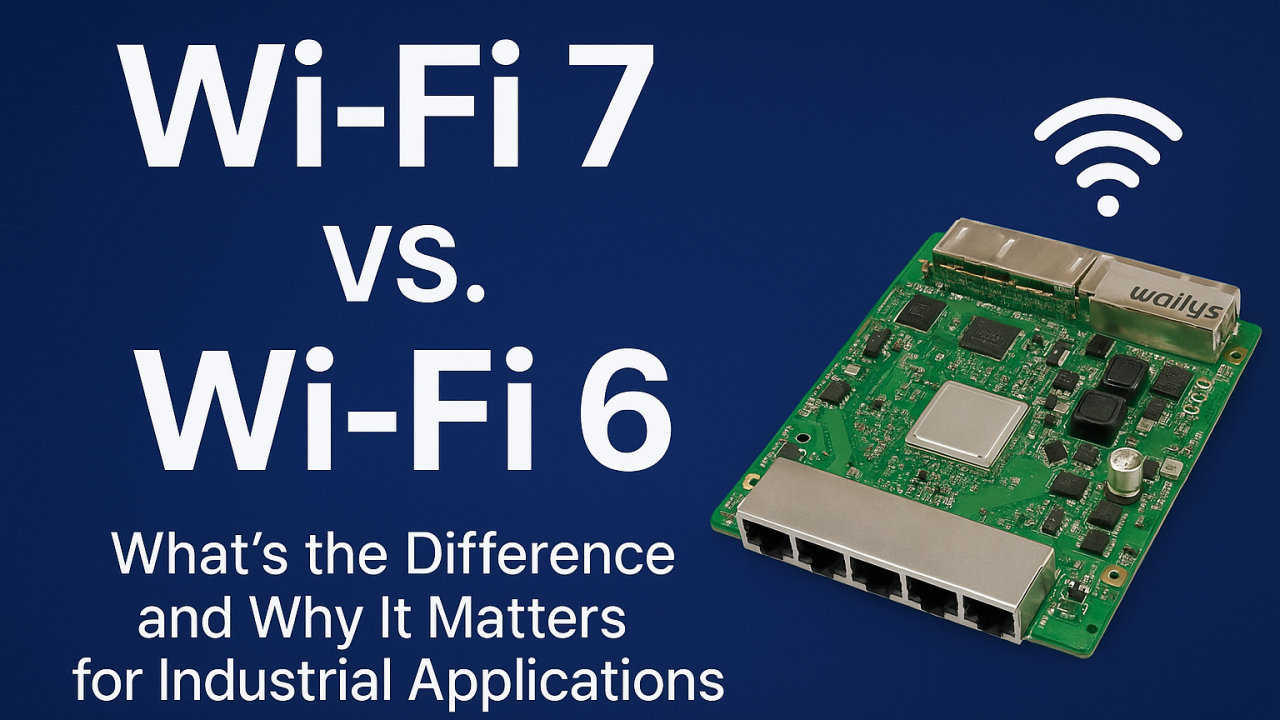
Wi-Fi 7 vs. Wi-Fi 6: What’s the Difference and Why It Matters for Industrial Applications?

As industrial environments become more automated, connected, and data-driven, the demand for a faster, more reliable wireless network continues to grow. Wi-Fi 6 has served industries well in recent years, but Wi-Fi 7 introduces features that fundamentally reshape performance, latency, and reliability—especially in mission-critical industrial applications.

Many factories, warehouses, and outdoor industrial sites are now evaluating whether upgrading to Wi-Fi 7 is worth it. The answer becomes clear once you understand the major improvements Wi-Fi 7 brings compared to Wi-Fi 6.


What’s New in Wi-Fi 7 Compared to Wi-Fi 6?

Wi-Fi 7 introduces several breakthroughs that directly benefit industrial environments:

Faster Speeds and Higher Throughput Wi-Fi 7 supports up to 320 MHz channels and 4K QAM, providing significantly higher bandwidth. This is especially beneficial for AI vision systems, 4K/8K video streams, and large volumes of sensor data in industrial scenarios.

Multi-Link Operation (MLO) This is the most important upgrade for industrial automation. MLO allows devices to connect to multiple Wi-Fi bands at the same time, dramatically enhancing:

  • Reliability
  • Latency
  • Roaming
  • Interference resistance

When one link experiences congestion or interference, data continues flowing through the other link—ideal for AGVs, AMRs, and robotic control systems.

Lower Latency for Real-Time Control Wi-Fi 7 reduces latency to sub-millisecond levels, enabling smoother machine-to-machine communication, PLC data exchange, and industrial robot coordination.

Better Performance in Noisy Industrial Environments Factories, ports, and warehouses contain many devices that create interference. Wi-Fi 7 handles these challenges through:

  • Intelligent multi-link scheduling
  • Faster channel switching
  • Improved OFDMA efficiency

This results in more stable wireless networks, even in heavily congested areas.


Why Wi-Fi 7 Matters for Industrial Applications

Enhanced Reliability for Smart Factories Real-time monitoring, predictive maintenance, and machine communication depend on uninterrupted connectivity. Wi-Fi 7 ensures stable links for sensors, controllers, and production lines.

Seamless Mobility for AGV and AMR Fleets Automated robots cannot afford Wi-Fi dead zones or packet loss. MLO supports smoother roaming, faster handovers, and high-precision navigation.

Better Edge Computing and AI Performance Industrial AI workloads often transmit large amounts of data for inference or analysis. Wi-Fi 7 accommodates high-throughput data without compromising stability.

Higher Density Support for IIoT Deployments Factories may have thousands of connected devices. Wi-Fi 7’s improved scheduling and wider channels support larger device ecosystems without congestion.

Strengthening Industrial Video Surveillance AI-enhanced cameras and real-time analytics benefit from Wi-Fi 7’s higher bitrate capacity and lower latency.


Real-World Industrial Use Cases for Wi-Fi 7

  • AGV/AMR navigation and fleet management
  • Smart logistics and warehouse management systems
  • Industrial video surveillance with AI analytics
  • Real-time sensor networks in smart factories
  • Wireless backhaul bridging for ports and outdoor sites
  • Edge computing devices with high data demands
  • Autonomous machines and robotics

Wi-Fi 7 enables smoother, safer, and more efficient industrial operations.


Why Choose 524WiFi and Wallys Wi-Fi 7 Routerboards?

We provide industrial-grade Wi-Fi 7 routerboards such as DR5322S (IPQ5322) and next-generation DR9574 (IPQ9574) that support:

  • Wi-Fi 7 + MLO
  • POE/POE Out
  • Long-distance transmission
  • Industrial temperature rating
  • Customizable hardware and firmware
  • Mesh & roaming solutions
  • OEM/ODM/JDM services for industry customers

Each board is optimized for harsh industrial deployment and supports custom configurations for automation, logistics, or edge computing projects.


Wi-Fi 7 is not just an incremental improvement over Wi-Fi 6—it’s a major leap designed for industries that require reliability, speed, and real-time responsiveness. For industrial automation companies planning future-proof networks, upgrading to Wi-Fi 7 can unlock significant performance and operational advantages.

For customized Wi-Fi 7 routerboards and industrial wireless solutions, contact us !

Posted on

IPQ5018 Inside: DR5018S Board Redefines Industrial WiFi 6 Connectivity

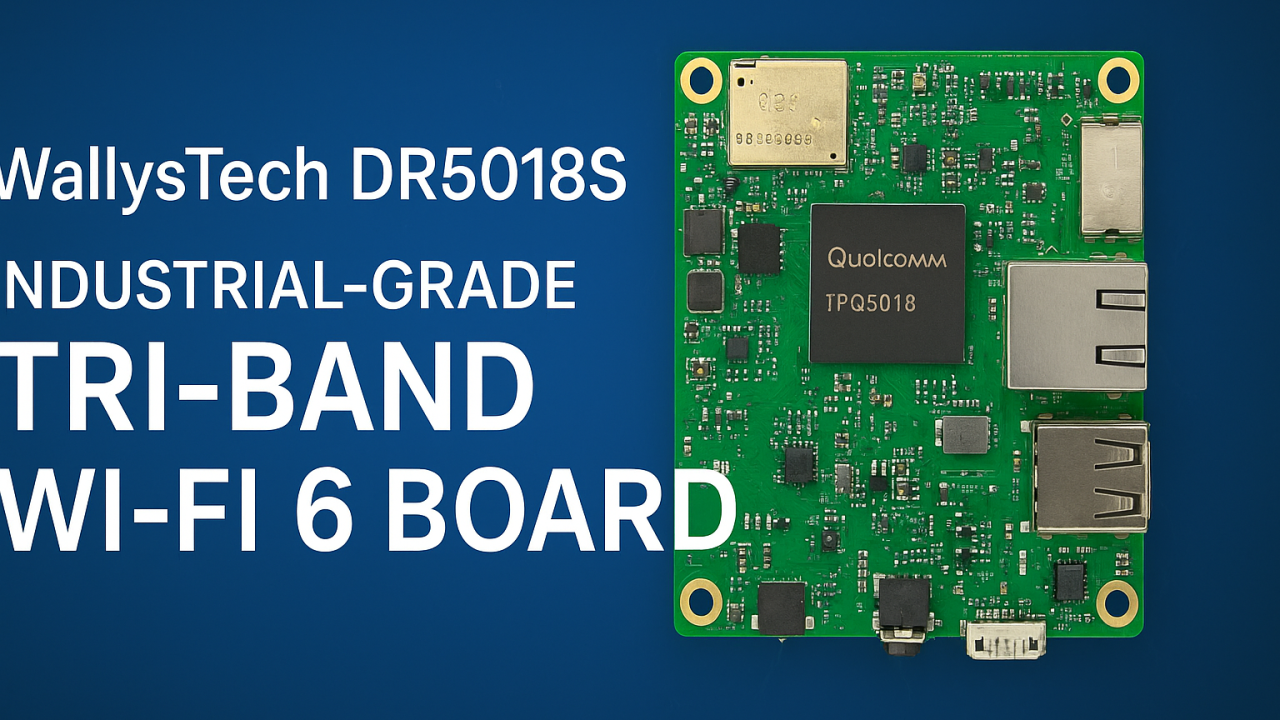
🌐 Introducing DR5018S — Industrial-Grade Tri-Band WiFi 6 Board for OpenWRT and OpenWiFi development

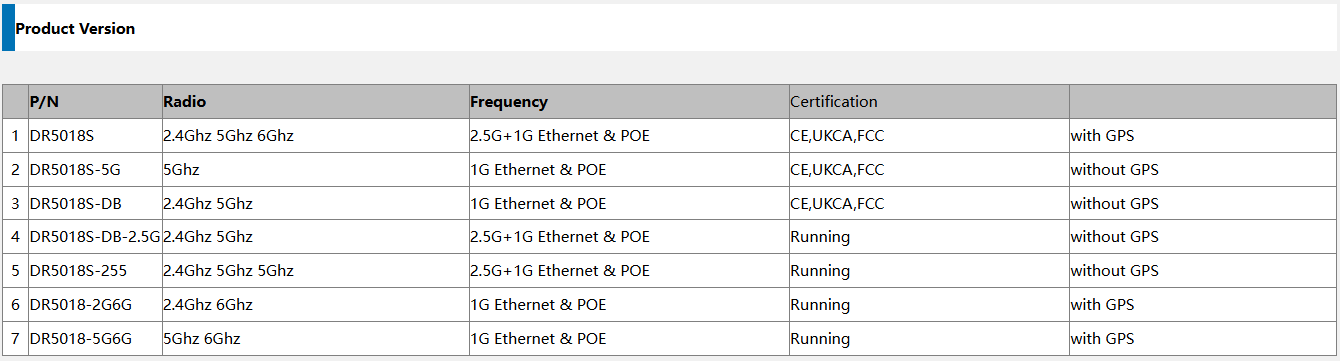
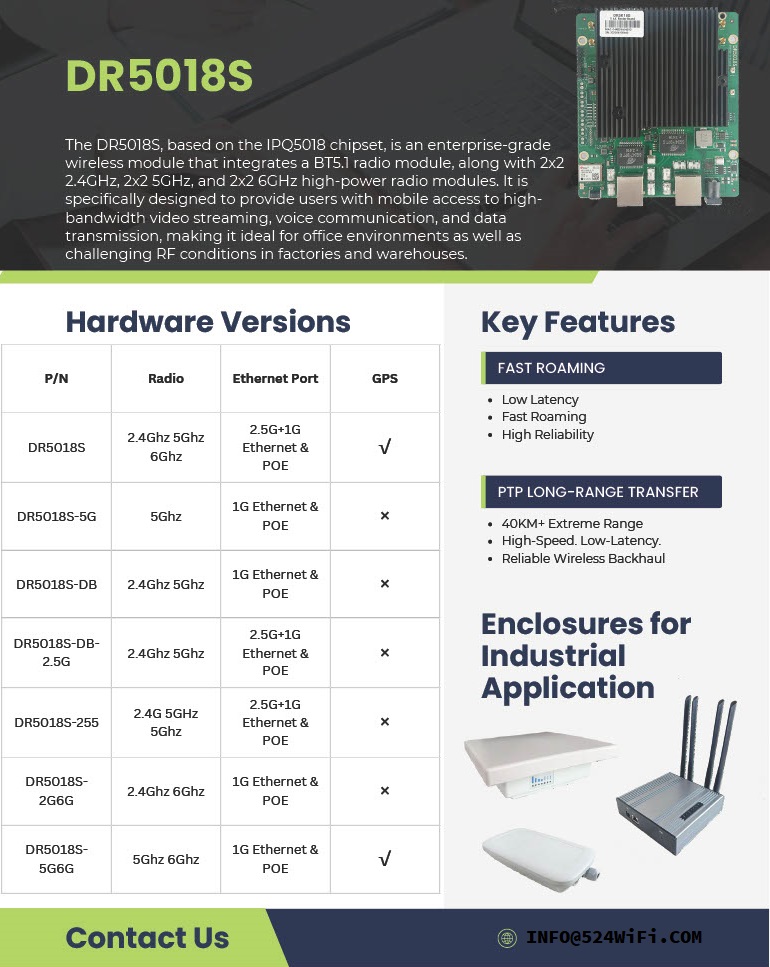
524WiFi introduces the WallysTech DR5018S, a high-performance industrial-grade WiFi 6 platform built for the next generation of wireless networks. Powered by the Qualcomm IPQ5018 SoC, the DR5018S integrates 2.4GHz, 5GHz, and 6GHz bands into one compact board — offering exceptional throughput, low latency, and strong adaptability for modern wireless environments.


⚙️ Key Features

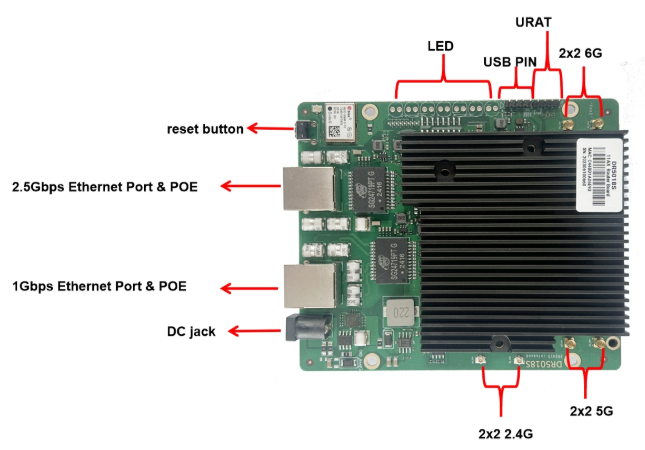
  • Qualcomm IPQ5018 SoC — Dual-core ARM 64-bit A53 @1.0GHz
  • Tri-band support: 2.4GHz (573 Mbps) + 5GHz (2402 Mbps) + 6GHz (2402 Mbps)
  • WiFi 6 (802.11ax) with OFDMA, MU-MIMO, 1024-QAM
  • Memory & Storage: 512 MB DDR3L + 128 MB NAND Flash
  • Networking: 1× 2.5 GbE + 1× 1 GbE + USB 2.0 + SGMII + UART
  • Optional modules: GPS and Bluetooth 5.1
  • Power: 12–52 V DC or 802.3at/bt PoE
  • Operating temperature: –40 °C ~ +70 °C (industrial-grade)
  • Certifications: CE / FCC / UKCA
Article content

💡 Why DR5018S Stands Out

✅ Tri-band flexibility — handle high-density environments and interference-free operations

✅ Future-ready with 6GHz — prepared for WiFi 6E and early WiFi 7 transition

✅ Industrial-grade reliability — wide temperature, PoE, and durable design

✅ Open-source platform — OpenWRT/OpenWiFi for customization and fast development

✅ 2.5GbE interface — for high-throughput backhaul and mesh deployments

Article content

🏭 Real-World Applications

The DR5018S is designed for industrial and enterprise-grade wireless networks, enabling reliable connectivity in demanding conditions:

🔹 Mining & Oilfield Operations — establish long-distance wireless mesh links for remote monitoring, sensors, and field communication networks.

🔹 Smart Cities & Urban Infrastructure — build tri-band APs and gateways for IoT devices, cameras, and autonomous systems.

🔹 Industrial IoT & Automation — integrate into factory APs or gateways with OpenWRT for flexible control and connectivity.

🔹 Edge Computing & AI Gateways — combine compute + tri-band WiFi for edge data collection and analysis.

🔹 Warehouse & Logistics — enable low-latency mesh communication for autonomous AGVs and real-time tracking.

🔹 Outdoor Mesh & Backhaul Nodes — leverage 6GHz as a dedicated backhaul channel for high-speed, interference-free wireless mesh.

Its flexibility also makes DR5018S an excellent foundation for OEM/ODM wireless solutions, custom AP design, and smart industrial routers.


🚀 Empowering Wireless Innovation

At 524WiFi, we help partners accelerate product development and reduce evaluation costs through open, modular, and stable platforms. The DR5018S continues our mission to bridge industrial-grade reliability with open-source innovation — enabling faster time-to-market and future-ready WiFi 6/6E connectivity.

Posted on

Introducing the DR5018S – Built for Industrial Grade Wireless – Qualcomm IPQ5018

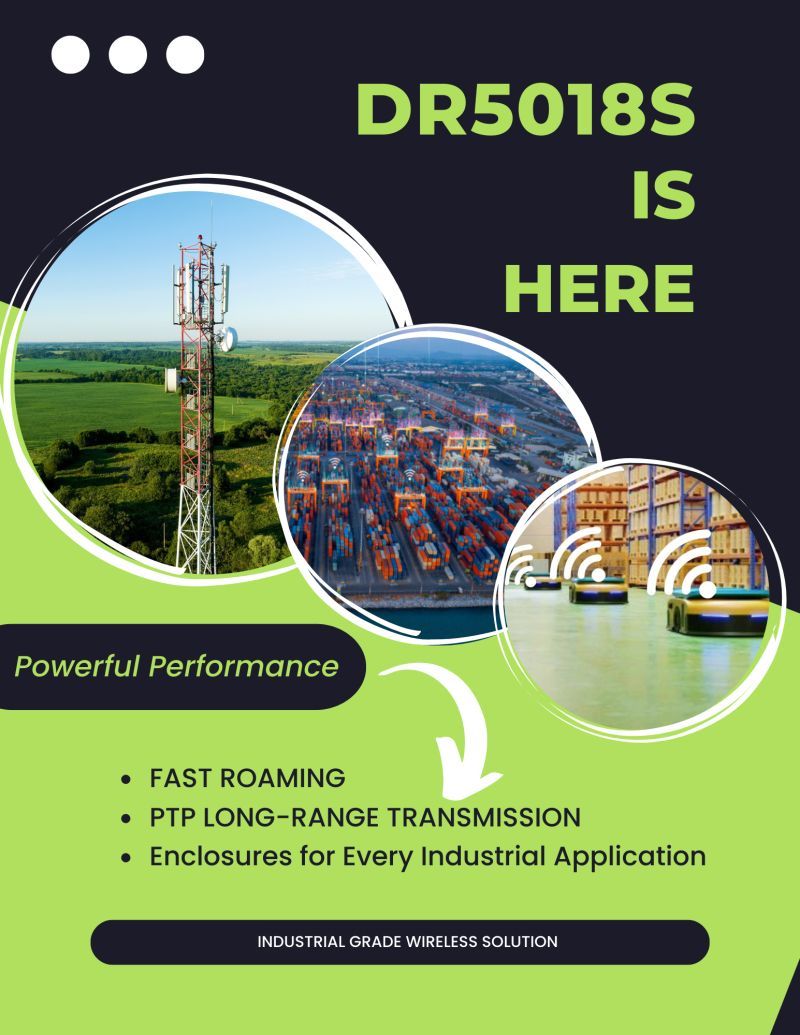
🚀 Introducing the DR5018S – Built for Industrial-Grade Wireless

From smart ports to logistics hubs to long-range PTP connections, the DR5018S is engineered to deliver:
✅ Fast Roaming
✅ 40km+ PTP Long-Range Transmission
✅ Flexible Enclosures for Any Industrial Application

Whether it’s powering connectivity in smart cities, transportation, or critical infrastructure, the DR5018S ensures powerful performance with reliability you can trust.

https://www.524wifi.com/index.php/catalogsearch/result/?q=5018s

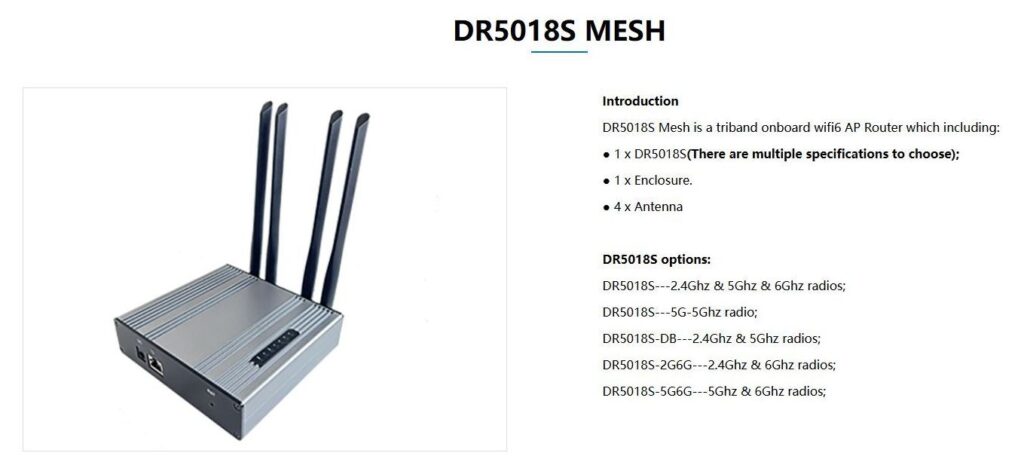
xperience next-level WiFi 6 tri-band performance with the DR5018S Mesh – designed for industrial, enterprise, and large-scale applications. Seamless connectivity, EasyMesh support, and robust hardware all in one compact solution.
💡 Learn more and explore full specifications on our website:

https://524wifi.net/?s=dr5018s

: Introducing the DR5018S – Built for Industrial Grade Wireless – Qualcomm IPQ5018

🚀 When 5G NR Meets Mesh: Filling the Coverage Gaps

5G NR provides standardized, high-performance connectivity — but there are still scenarios where base station deployment is difficult or impractical:

Drone swarms requiring real-time coordination in remote airspace
Robots in underground mines where signals can’t penetrate
Military field operations demanding resilient, ad-hoc communication
In such environments, Mesh networks step in as a complementary layer, ensuring local connectivity even when 5G NR coverage is limited.

👉 Question for the community: Do you see Mesh as a temporary patch until 5G expands everywhere, or as a long-term complement to 3GPP 5G NR in mission-critical deployments?