

A boot-time setting that is easy to miss can cost developers hours of debugging.
If you are bringing up the DR9574, a Wi-Fi 7 routerboard built on the Qualcomm IPQ9574 platform, you may hit a confusing situation. The system boots, Wi-Fi works, but neither 10G port shows link or responds.
At that point, most engineers start replacing things: cables, SFP+ modules, link partners, and sometimes the board itself. In many cases, the board is fine. A single boot-time step is missing.
What Does the Problem Look Like?
- The DR9574 boots into the system normally
- Wi-Fi radios and other functions work as expected
- Both 10G ports show no link light, no traffic, and no helpful message in the logs
- Different cables, modules, and link partners give the same result
Because half of the board works, this pattern is easy to misread as a hardware fault.
Why Do the 10G Ports Stay Silent?
The 10G ports are driven by external PHY chips, and those PHYs need their firmware loaded before the network stack can use them. If U-Boot boots straight into the system without loading that firmware, the PHYs stay inactive and the ports do not respond, even though the rest of the board looks healthy.
This also explains why a working Wi-Fi radio tells you nothing about the state of the 10G side. The two use different paths.
How to Fix It: Update bootcmd in U-Boot
Step 1. Connect to the serial console and interrupt the boot countdown to reach the U-Boot prompt.
Step 2. Run:
setenv bootcmd 'aq_load_fw 0x0&&aq_load_fw 0x8&&bootipq'
saveenv
Step 3. Reboot:
resetU-Boot now loads the PHY firmware for both 10G ports first, then continues to boot the system with bootipq. Because saveenv writes the value to flash, this is a one-time change.
How to Verify
- At the U-Boot prompt, run printenv bootcmd and confirm the value matches.
- After boot, connect your 10G link partner to the first port and check for link.
- Repeat on the second port. Both should come up.
Three Pitfalls to Avoid
- Typos can stop the board from booting. Keep the single quotes and the && operators exactly as shown.
- Reflashing can undo the fix. A new firmware image or a reset of the U-Boot environment may overwrite bootcmd. If the 10G ports stop working after an update, check this first.
- A working radio does not mean a working 10G path. Always verify both separately.
About the DR9574
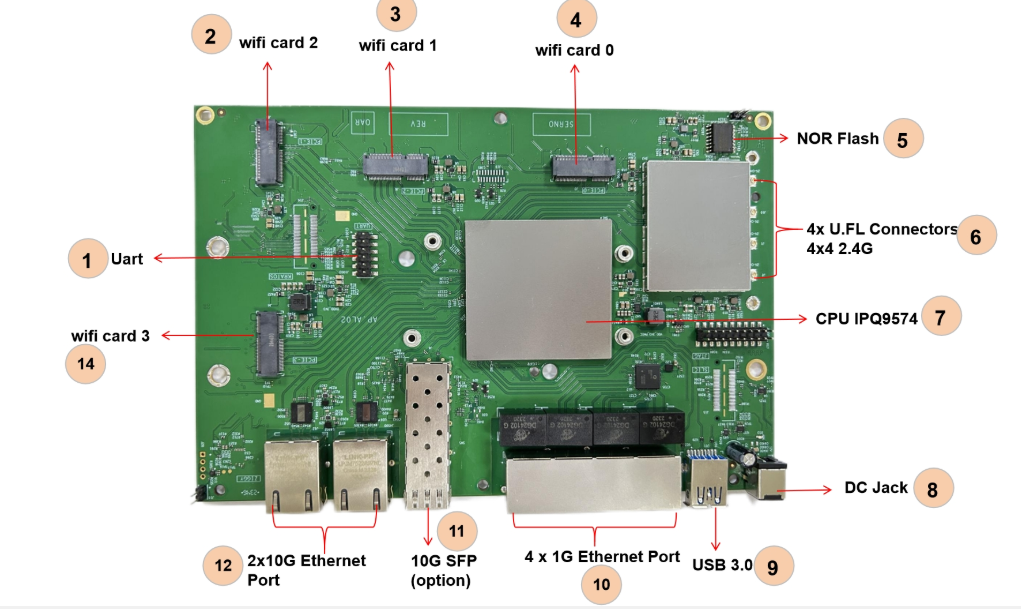
The DR9574 is a Wi-Fi 7 routerboard built on the Qualcomm IPQ9574 platform, designed for enterprise APs, industrial gateways, and OEM/ODM development. It combines on-board multi-band radios with 10G Ethernet and M.2 expansion slots for additional Wi-Fi modules.
Need Hands-On Help? Talk to the our R&D and Support Team
We hope this article saves you some debugging time. If you’re stuck on a hardware or software issue, the 524WiFi and Wallys R&D and support team offers hands-on debugging services to shorten your development cycle and reduce R&D costs.
We had focused on Qualcomm platform development for over 16 years. Our team can help with:
- Low-level BSP development
- Custom features such as roaming and mesh
- Down-converting 2.4 GHz radios to 900 MHz
- Driver development
- Custom board design
- Protocol integration