OpenWRT, OpenWiFi, LEDE and Linux supported HW for your heavy loaded WiFI applications and outdoor long range Wi-Fi links and Embeded projects.
Develop OpenWRT or OpenWIFi on reliable hardware from 524wifi! Wallys is a member of the OpenWIFI project. Please if you are a company, first create account and mail to us for business login with discount.
We develop OpenWRT – LEDE Github with our suppliers (manufacturers) to help our customers load OpenWRT onto our Embedded Boards and use our WiFi modules, providing opportunities to develop powerful features and customized versions of OpenWRT.
524WiFi and Wallys also provide Software development support to customers utilizing their embedded boards and developing OpenWRT features. Wallys is a member of the OpenWIFI project.
Informations regarding Linux and OpenWRT drivers – The ath11k code from github can’t support the dual / tri band card now, it needs modification. Wallystech and 524WiFi did some changes and applied in Linux kernel version 5.17.0 – if you use different kernel version, then 524WiFi will do some work for you. That is a Linux issue, there are some incompatible with different kernel versions. So the Customer need tell us the kernel version, then we release the ath11k and board-2.bin, bdf and amss.bin to customer – all is binary. Jason, chief of development, told us : “We will build it based on the Customer’s Linux version, The kernel should be 5.17 up. The Card can be AP or Client mode on x86. We do it better than Compex, 8devices and others, DR9074 Triband and Dualband cards are very good and its is powerfull opportunity for all customers developing WiFi6 devices. We have software engineers and we we have resources to support Customers tu use our WiFI6 modules, but we have add lock to amss, so the Customer can’t use our asmss on other vendor’s card“
If The Customer has big volume order, then we can open the ath11k code to the customer customer based on NDA, SLA.
Since its inception in 2010, Wallys has had a strong team, including dozens of research and development personnel, a complete set of assembly lines, they play an irreplaceable role.
Under the premise of ensuring the product quality, we will deliver the goods at the fastest speed and maximize the product benefit. Wallys is a member of the OpenWIFI project.
We are trustworthy, trust us, choose us!
ODM
Wallys provides all services from r&d, design to production and post-maintenance. There can be a buyout or an unbuyout mode.
China has a complete wireless communication industry group, which enables ODM manufacturers to obtain the supply of low-cost components. Years of reform and opening-up have made China an ideal low-cost manufacturing base. Compared with the rapid development of the market, ODM services which focus more on design capability and production experience become more competitive.
OUR ADVANTAGES
Lower production costs
Strong design capability
Rich production experience
Higher productivity
Complete after-sales service
Wallys is a member of the OpenWIFI project.
SCHEMATIC DESIGN
Wallys introduced senior talents and built a strong technical team integrating hardware and software design, providing firm support for the company’s ODM services. We undertake all the design of wireless communication because of enthusiasm and professional. Make any modifications based on our existing solutions to better meet customer needs. From idea to market, Wallys is a one-stop shop.
PROTOTYPE
Wallys could help clients build Prototype. We have a professional technical team supporting.
Helping you realize your idea is our aspiration. Everything on RF is our enthusiasm. Different chipsets, different materials, different features, different designs…we could realize all you want.
Making your idea visible and alive is what we persuit.
SOFTWARE & HARDWARE DESIGN
We have experienced R&D engineer team with a demonstrated history of working in the wireless industry. Skilled in RF and embedded communications , network protocol, firmware ,openwrt ,linux system development , analog and Digital Circuit Design, Network Processors, Power supplies ,PCB design and layout and etc.,
Many years of expertise in software and hardware design allow us to deliver solutions based on your specification list for commercial and industrial applications. We are able to think ahead and deliver design that meet and exceed customer requirement.
Wallys is a member of the OpenWIFI project.
RF
In addition to the most commonly used 2.4G and 5G, Wallys can meet customers’ requirements for special spectrum. Our technicians are skilled in up-conversion and down-conversion technologies to meet your various RF requirements.
The enthusiasm of technicians for RF and wifi drives Wallys to make continuous progress and innovation. We use advanced equipment to produce the most suitable products for the market and meet the needs of customers. We are reliable radio experts.
In an era where connectivity is paramount, the evolution of wireless networking technology never ceases to amaze. WiFi 6, also known as 802.11ax, represents the latest leap forward, building upon the strong foundation laid by its predecessor, WiFi 5 (802.11ac), and introducing a host of groundbreaking enhancements.
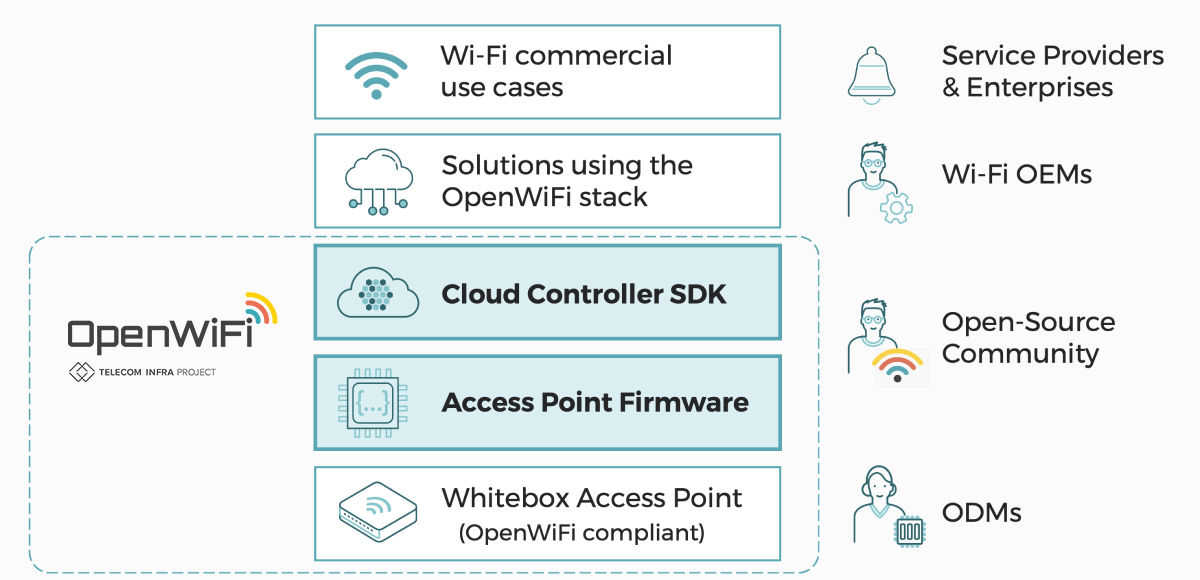
But WiFi 6 isn’t the only star of the show. Enter OpenWiFi, an industry movement that’s reshaping the landscape of Wi-Fi infrastructure innovation. OpenWiFi is an open-sourced, community-driven Wi-Fi software system, comprising a cloud controller SDK and enterprise-grade Access Point (AP) firmware, meticulously designed to work in perfect harmony.
The Power of OpenWiFi
OpenWiFi is a game-changer in several aspects:
Cost-Efficiency: Developing enterprise-grade Wi-Fi solutions can be a costly endeavor. OpenWiFi significantly reduces R&D costs, empowering both existing and new suppliers to deliver top-notch Wi-Fi products with less development effort.
Accelerated Innovation: OpenWiFi fosters open innovation by providing a common foundation for suppliers and service providers. With shared control, data, and management layers, the focus shifts from reinventing Wi-Fi basics to service innovation.
Seamless Integration: The cloud controller SDK offers open north-bound APIs, enabling over-the-top Wi-Fi applications to integrate effortlessly with multiple vendor solutions. This not only saves integration costs but also accelerates time to market.
Economic Benefits: For service providers and enterprises alike, OpenWiFi translates into substantial savings. With reduced deployment costs (CAPEX) and automation-driven operational efficiency (OPEX), the Total Cost of Ownership (TCO) drops significantly compared to proprietary solutions.
Diverse Choice: OpenWiFi offers a wide selection of cloud controllers and access points from multiple vendors, providing flexibility and choice in enterprise-grade Wi-Fi infrastructure.
Meet the QCA IPQ 601 DR6018 board from Wallys
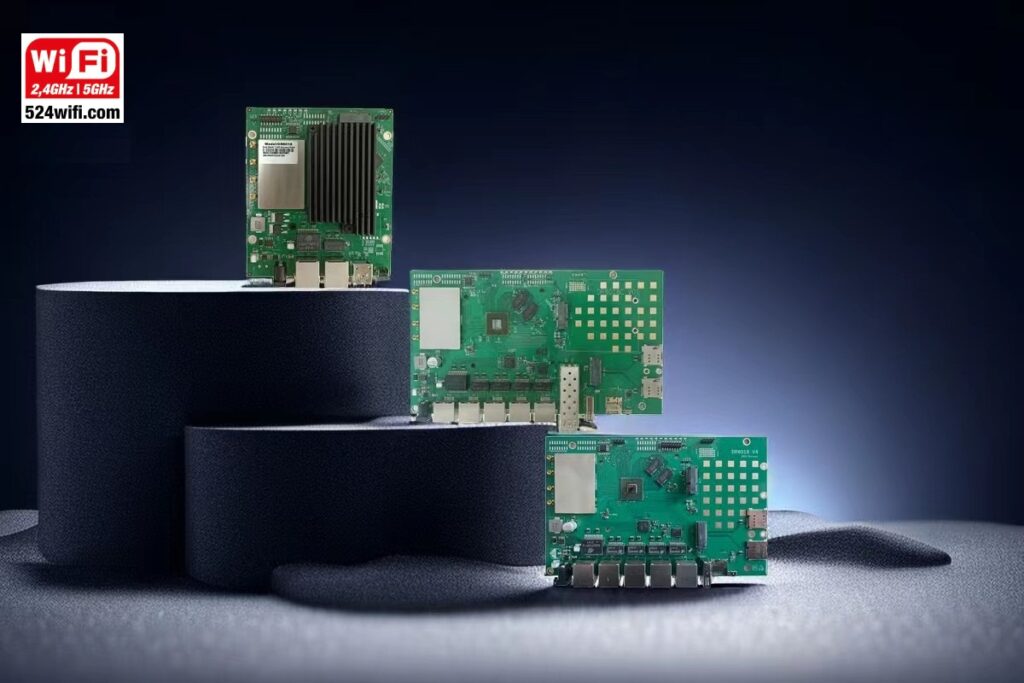
Empowering the OpenWiFi revolution is the Wallys DR6018—an industrial-grade, concurrent dual-band Wi-Fi 6 Routerboard. Let’s explore what makes it a standout choice:
Processing Prowess: Equipped with the Qualcomm-Atheros IPQ6010, a quad-core ARM 64-bit A53 processor running at 1.8GHz, it’s designed for exceptional performance.
Ample Memory: With 1GB of DDR3L system memory and a clever memory bus design, it’s ready for demanding networking tasks.
Wireless Wizardry: Onboard 2×2 2.4GHz and 5GHz radios with support for MU-MIMO and OFDMA technologies deliver top-tier wireless performance.
Connectivity Galore: Multiple Ethernet ports, including a 2.5Gbps Ethernet port, offer a wealth of wired connectivity options.
POE Versatility: Whether you need passive POE or active POE (802.3bt), the DR6018 has you covered.
Compact Form: At 185mm x 116mm, it packs power into a compact design.
Unlocking New Possibilities
What’s truly remarkable is that the DR6018 series routers have recently undergone rigorous long-distance testing, achieving an astonishing 23 km long-distance transmission.
To explore how the Wallys DR6018 can transform your connectivity, check out WallysTech.
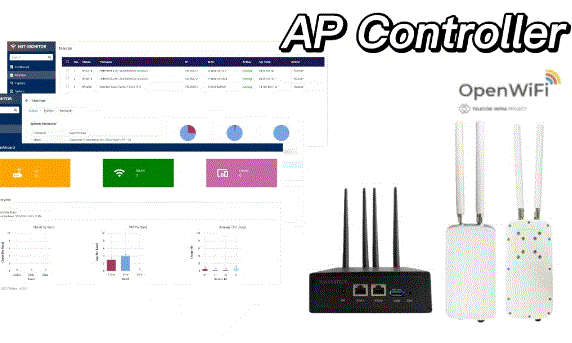
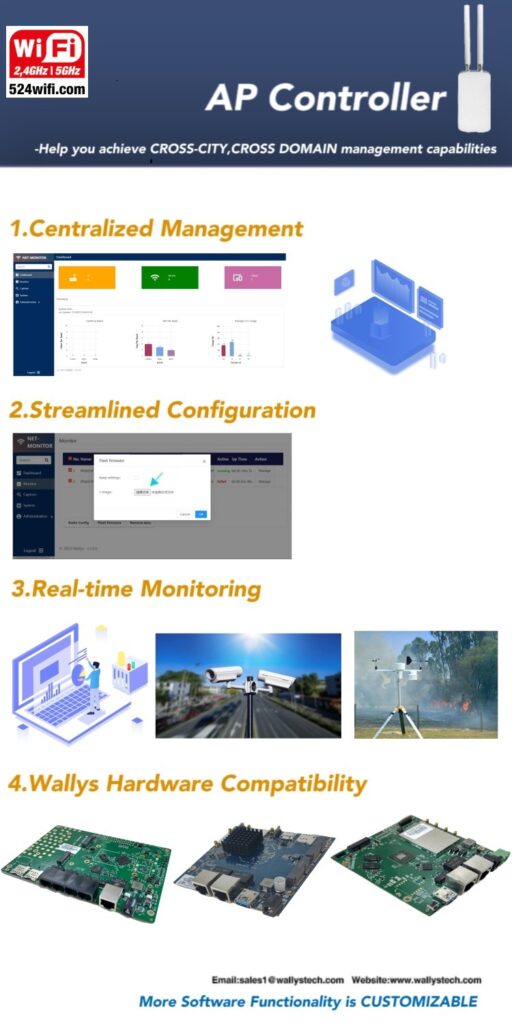
Furthermore, 524WIFI and Wallystech offers the opportunity to customize your own AC+AP Solution (AP Controller). Their AC software is designed to enable cross-city, cross-domain management capabilities, with customizable special functions. Reach out to our sales team to learn more.
Clone the main branch and update it git clone https://git.openwrt.org/openwrt/openwrt.git cd openwrt ./scripts/feeds update -a ./scripts/feeds install -a
Kernel modules/Wireless drivers/kmod-mt7916-firmware Kernel modules/Wireless drivers/kmod-mt76x2 Kernel modules/Wireless drivers/kmod-mt7915e Kernel modules/Wireless Drivers/kmod-cfg80211 Kernel modules/Wireless Drivers/kmod-mac80211 (*optional for ap)Network/WirelessAPD/wpad (*optional for ap)Network/WirelessAPD/hostapd-common (*optional for iw tools)Base system/wireless-tools (*optional for web server)LuCI/Collections/luci (*optional for web server)LuCI/Collections/luci-ssl
1-5. (*optional) Turn on wireless ap in default
Revise the file /openwrt/package/kernel/mac80211/files/lib/wifi/mac80211.sh
set wireless.${name}.disabled=0
Save and compile.
1-6. Compile
make -j $(nproc) kernel_menuconfig
make -j $(nproc) defconfig download clean world V=s
2. Starting AP7621 platform for verify
After burning and booting your AP7621, you can check the interface on OpenWRT by the command:
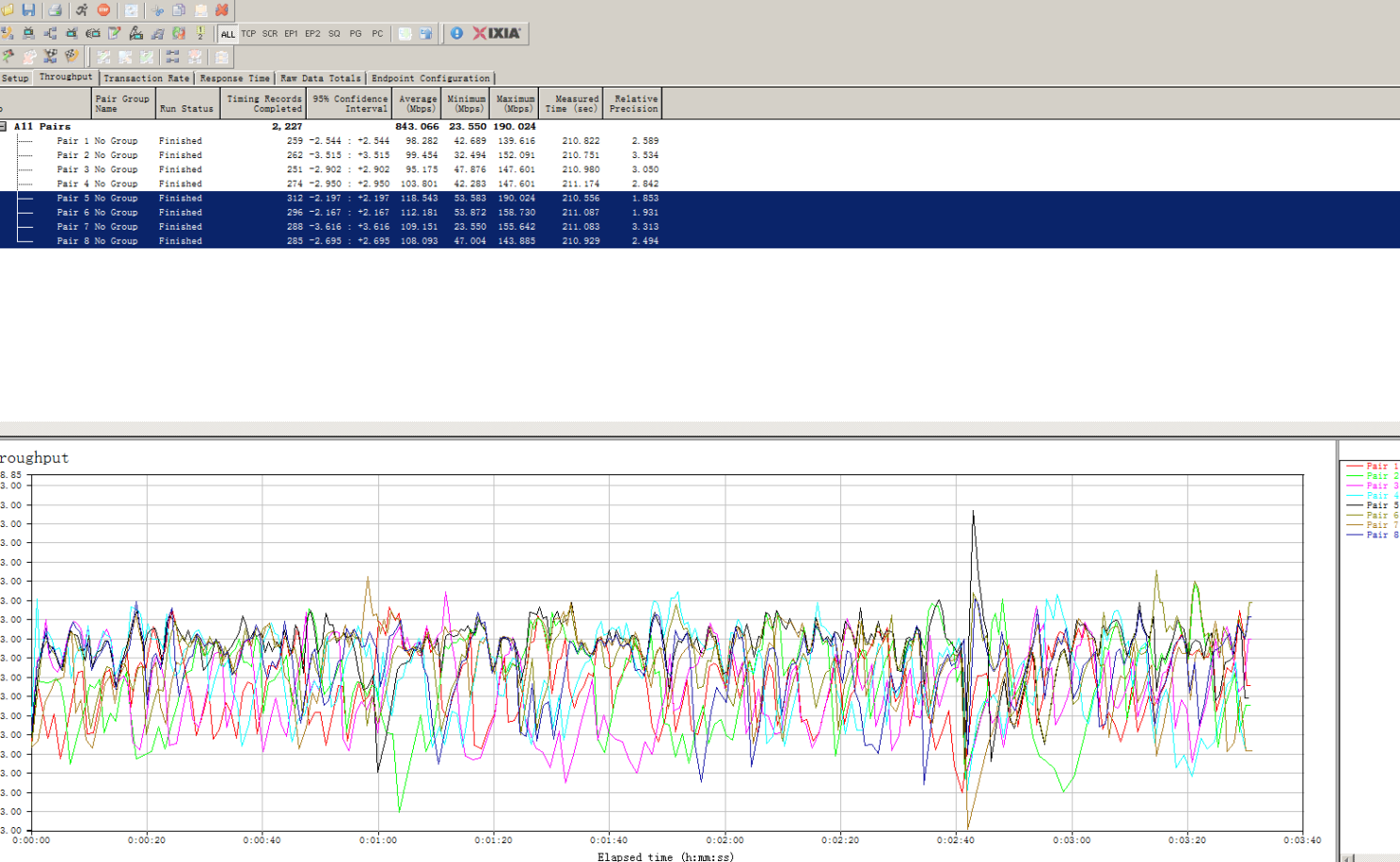
524WIFI 6 MT7915 WITH IPQ4019/IPQ4029 5G RADIO ACHIEVE 843 MBPS THROUGHPUT | DBDC NETWORK CARD
The throughput of a network card refers to the data transfer rate or the amount of data that the network card can handle in a specific period. It is usually measured in bits per second (bps) or its multiples like kilobits per second (Kbps), megabits per second (Mbps), or gigabits per second (Gbps).
The throughput of a network card is influenced by various factors, including the hardware capabilities of the card, the quality of the network cables, the network environment, and the protocols being used. Different network card models may have varying throughputs based on their design and capabilities.
Modern network cards, especially those designed for high-speed networks like Gigabit Ethernet (1000 Mbps) or even faster, can handle data transfers at very high rates. The throughput of a network card is an important consideration in network performance, as it directly impacts the data transmission speed and overall efficiency of the network.
It’s worth noting that the actual throughput experienced in a network may be lower than the maximum throughput of the network card due to factors like network congestion, latency, and other network bottlenecks. Network administrators often perform tests and optimizations to achieve the best possible throughput in their specific network setups.
Today, we are excited to showcase the recent test results for the DR7915 Network Card’s throughput.
Equipment Used:
PC x 2
DR40X9 x 2
DR7915 x 2
Feeder Line, UART
IXChariot
Test Setup
Test with indoor 5dbi @ 5G omni antenna
Test with 1G Ethernet port
Here are the key highlights of our findings:
DR40X9 Throughput: 552 Mbps
The DR40X9 device showcased its prowess with an impressive throughput of 552 Mbps. This outstanding wireless data transmission capability highlights the device’s reliability and top-notch performance in real-world scenarios.
DR7915 Throughput: 843 Mbps
Equally impressive, the DR7915 Network Card delivered an astounding throughput of 843 Mbps! This network card demonstrated its exceptional ability to handle data packets and maintain high-speed connections with ease.
DR40X9 or DR40X9 Work with DR7915 have good performance in 5G test.We will change the setting of the software and test in better environment to get higher performance,then we will update it.
Here comes the 524WiFi IPQ4019/IPQ4029 With MT7915 wireless solution:
1.DR40X9:
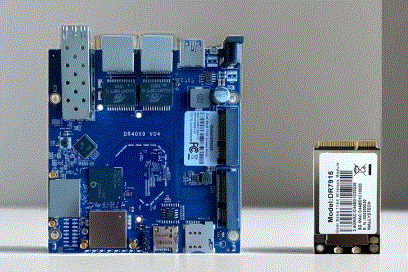
The DR40x9 is an industrial-grade wireless solution that stands out with its robust IPQ4019/IPQ4029 chipset. This powerful chipset provides a solid foundation for reliable and high-performance wireless connectivity. With its integrated 2x 5G high-power radio modules and 2×2.4G high-power radio modules, the DR40x9 ensures excellent coverage and enhanced signal strength.
Frequency Range and Bandwidth Support:
The DR40x9 offers an extensive frequency range, supporting frequencies from 4.940GHz to 5.825GHz for optimal wireless performance. Additionally, it supports frequencies from 2.400GHz to 2.482GHz, ensuring compatibility with various wireless devices. The solution also offers flexibility in bandwidth selection, supporting 5MHz, 10MHz, 20MHz, 40MHz, and 80MHz options for efficient data transmission.
Connectivity Options:
Equipped with 2 x 5G MMCX connectors and 2×2.4G MMCX connectors, the DR40x9 enables flexible connectivity options. These connectors ensure secure and stable connections, allowing for seamless integration into different setups and environments.
Support for Wireless Standards:
The DR40x9 supports wireless standards such as 11ABGN and 11AC, guaranteeing compatibility with a wide range of devices. Whether you’re connecting legacy devices or modern wireless devices, the solution ensures smooth and reliable connectivity.
RoHS Compliance:
The DR40x9 adheres to RoHS compliance standards, ensuring a high level of protection for both human health and the environment. This commitment to environmental safety mitigates risks posed by potentially harmful chemicals, making it a responsible choice for wireless solutions.
Firmware Support:
The DR40x9 firmware provides comprehensive support for all modules of Quectel, a leading provider of wireless communication modules. This compatibility ensures seamless integration and optimized performance when using Quectel modules alongside the DR40x9 solution.
Open Source Support:
The DR40x9 firmware supports popular open-source firmware options like Openwifi and OpenWrt. These open-source platforms provide users with extensive customization capabilities and flexibility, allowing for tailored configurations and advanced networking features.
In conclusion, the DR40x9 is an industrial-grade wireless solution featuring a powerful IPQ4019/IPQ4029 chipset. With its high-power radio modules, broad frequency range, flexible bandwidth support, and compliance with RoHS standards, the DR40x9 provides reliable wireless connectivity while prioritizing environmental safety. Additionally, its firmware support for Quectel modules and compatibility with open-source firmware options like Openwifi and OpenWrt further enhance its versatility and customization options.
The DR7915 is equipped with a 2×2 2.4G high-power radio module and a 2×2 5G high-power radio module. This dual-band capability ensures reliable and efficient wireless connectivity in both the 2.4GHz and 5GHz frequency bands. The high-power design enhances signal strength and coverage, enabling seamless access to bandwidth-intensive applications and reducing signal dropouts in challenging RF environments.
High-Bandwidth Video Streaming and Data Transmission:
With the DR7915 (hashtag#MT7915), enterprises can enjoy uninterrupted high-bandwidth video streaming and data transmission. The module’s advanced capabilities and efficient data processing ensure smooth video conferencing, multimedia content delivery, and fast file transfers. This enables teams to collaborate seamlessly and boosts productivity in the office or industrial settings.
Enhanced Voice Communication:
The DR7915 (hashtag#MT7915) prioritizes voice communication, offering clear and reliable voice transmissions for enterprise communication needs. Whether it’s conference calls, VoIP applications, or real-time voice communication, the DR7915 ensures crystal-clear voice quality, reducing background noise and providing a seamless communication experience for teams.
Robust Connectivity in Challenging RF Environments:
Enterprise environments often pose challenges for wireless connectivity due to interference and obstacles. The DR7915 (hashtag#MT7915) is designed to excel in such environments, with features that mitigate interference and ensure robust connectivity. The high-power radio modules and advanced signal processing algorithms enable stable connections, even in RF-dense areas or locations with physical obstructions.
Using Network Manager to setup a wifi connection is quick and automatic once the configuration is in place. Install the Wi-Fi card and make sure the device shows up in your Linux system with:
The Qualcomm 900vx wifi module we have plugged in here shows up as expected. If that is not the case, make sure that the card is properly seated, pin-compatible and that the host system has correct drivers installed!
What drivers are being utilized can be found using the index in the previous code snippet:
sudo find /sys | grep drivers.*01:00.0
/sys/bus/pci/drivers/ath10k_pci/0000:01:00.0
Here we see that the device is using the kernel built-in wifi driver ath10k which is compatible 524wifi 900VX Pro+ module used here.
Next step is to check that NM finds the device:
sudo nmcli
wlp1s0: unavailable
“Qualcomm Atheros QCA986x/988x”
wifi (ath10k_pci), 04:F3:21:4F:0A:A2, sw disabled, hw, mtu 1500
Here it is found by NM but in disabled state, activate it using:
sudo nmcli radio wifi on //activate wifi
wlp1s0: disconnected
“Qualcomm Atheros QCA986x/988x”
0 connections available
wifi (ath10k_pci), 04:F3:21:4F:0A:A2, hw, mtu 1500
sudo nmcli dev wifi //lists available wifi access points

sudo nmcli dev wifi connect 'SSID' password 'password' //connect to a network/access point
To setup an automatic connection instead of manual direct-connect follow the below steps:
nmcli con add con-name 'wifi' ifname 'wlp1s0' type wifi ssid 'SSID'

nmcli con modify 'wifi' wifi-sec.key-mgmt 'wpa-psk' //Add security layer matching the access point

nmcli con modify 'wifi' wifi-sec.psk 'password' //Add the access point password to the connection

nmcli con up 'wifi'//Activate the connection

nmcli dev set 'wlp1s0' autoconnect yes //Set connection to autoconnect
There are also a number of different settings that can be changed to your liking. Below you can see an example of how to set which band an existing connection should use:
nmcli connection edit wifi

goto wifi //Access general wifi settings

goto band //Access band settings

set a //Sets the band to 5GHz

save //Persistent save

quit //Quit the interactive terminal

sudo systemctl restart network-manager //Restart to apply settings
IW is a configuration utility for wireless devices and supports most if not all drivers implemented officially in the Linux kernel. It can be used to setup and connect to wifi networks as well as configure access points/hotspots on supported modems. It replaces the older iwconfig utility which is not recommended for use. The IP utility is a routing tool that is used to configure network interfaces on your linux host and to configure bridges between devices.
To list all wireless devices the command iw dev or /sbin/iw dev can be used and the response could look something like this:
phy#0
Interface wlp1s0
ifindex 4
wdev 0x1
addr 04:f0:21:3f:0a:a3
type managed
txpower 23.00 dBm
multicast TXQ:
qsz-byt qsz-pkt flows drops marks overlmt hashcol tx-bytes tx-packets
0 0 0 0 0 0 0 0 0
To make sure that the device is up and running issue: ip link show wlp1s0
In this case, the wireless device is wlp1s0 and for which command return the following:
4: wlp1s0: UP> mtu 1500 qdisc noqueue state DOWN mode DORMANT group default qlen 1000
Make sure that the country parameter is correct, if not you can set the country code with the following: sudo iw reg set SE
This ensures that the modem follows country-specific frequency regulations!
To connect to a password protected network (e.g. WPA version 1,2 or 3) a configuration file called wpa_supplicant.conf that handles the security protocol is needed:
wpa_passphrase SSID >> /etc/wpa_supplicant.conf
enter wifi password and hit enter
The generated output would look something like this:
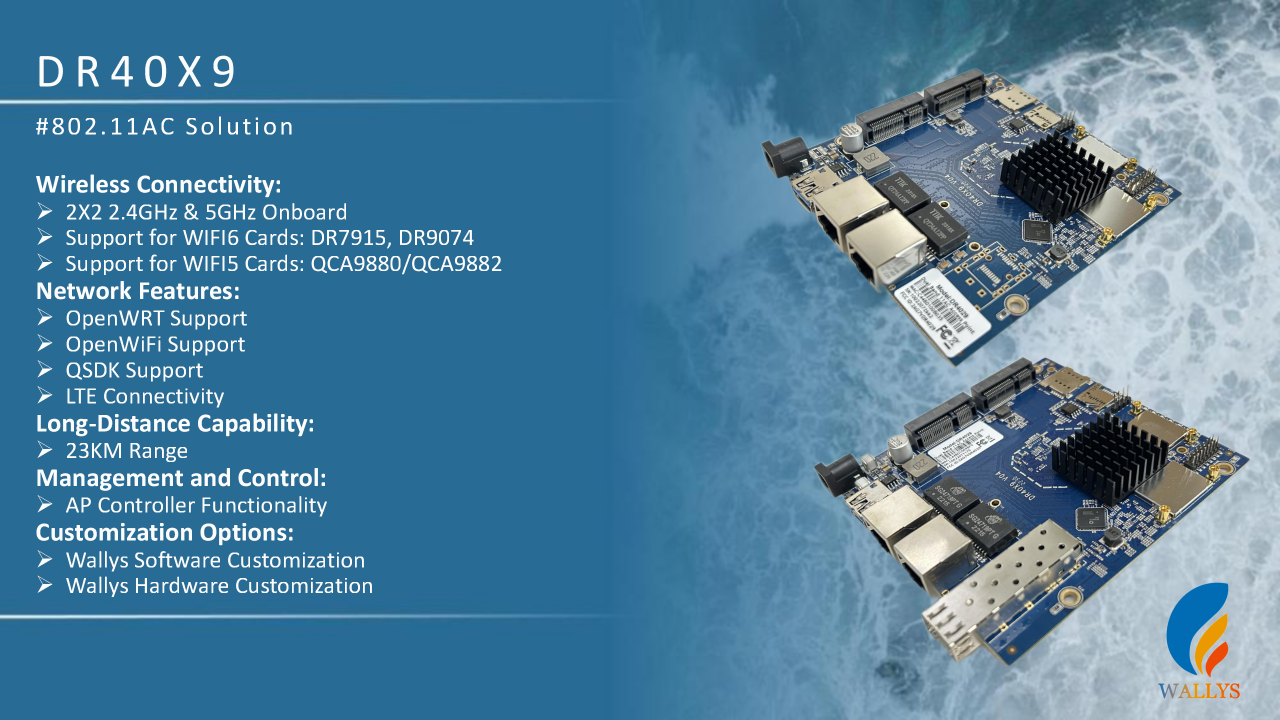
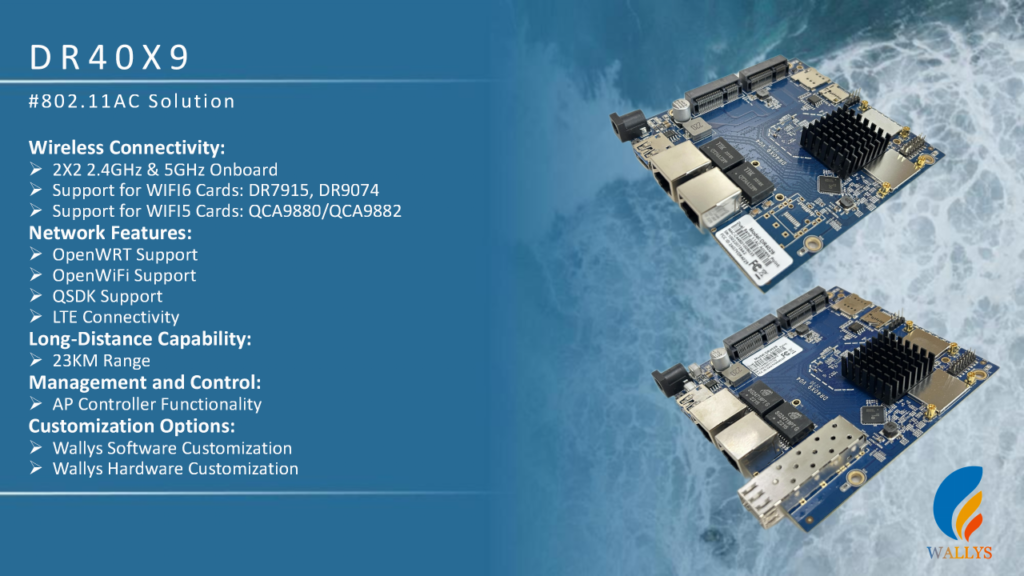
In the rapidly evolving digital era, reliable wireless connectivity is paramount. The DR40X9 stands out with its advanced 802.11AC solution, delivering an unparalleled wireless networking experience for users.
Overview of Wireless Connectivity Performance:
2X2 2.4GHz & 5GHz Onboard: The DR40X9 supports dual-frequency bands, 2.4GHz and 5GHz, providing users with a broader wireless spectrum to meet diverse networking needs.
WIFI6 and WIFI5 Card Support:WIFI6 Cards DR7915, DR9074: Integrating advanced WIFI6 cards such as DR7915 and DR9074, the DR40X9 ensures faster and more reliable wireless connections.
WIFI5 Cards QCA9880/QCA9882: Beyond WIFI6 support, the DR40X9 is compatible with WIFI5 cards like QCA9880/QCA9882, ensuring backward compatibility.
Network Features:
Open Operating System Support: Utilizing the OpenWRT operating system, the DR40X9 provides users with high flexibility and customization options.
Open Wireless Support: Compatible with OpenWiFi, provides developers with extensive tools and resources to customize and optimize the wireless networking experience.
QSDK Support: Wallystech provide customize and optimize function based on QSDK.(For more details,Please inquire Wallys sales team.)
LTE Connectivity: The DR40X9 supports LTE connectivity, offering users an alternative high-speed internet option to ensure network reliability and stability.
Long-Distance Transmission:
23km Coverage Range: Demonstrating exceptional long-distance transmission capabilities, the DR40X9 covers distances up to 23 kilometers, suitable for various long-range communication needs.
Management and Control:
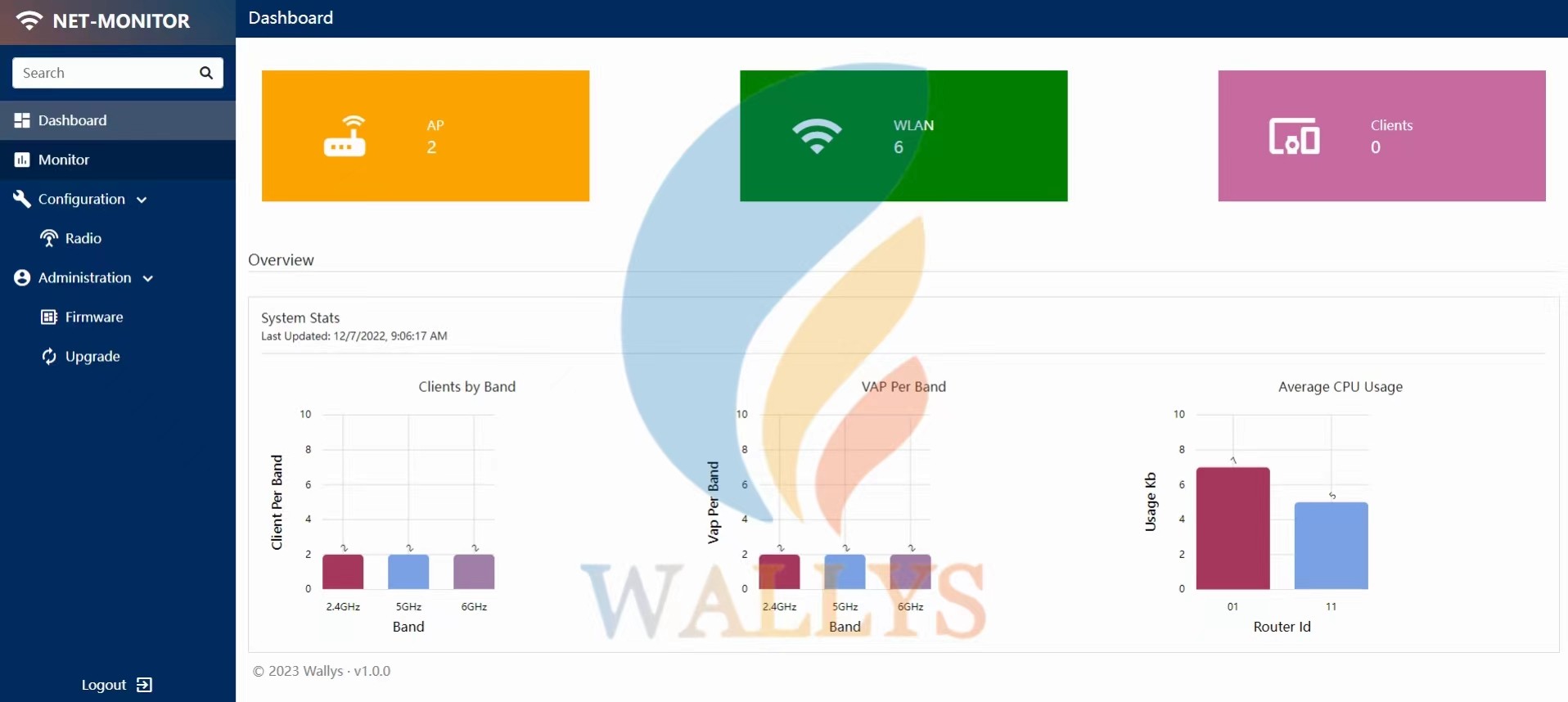
AP Controller Functionality: Equipped with AP control functionality, the DR40X9 enables users to effortlessly manage and monitor multiple access points, facilitating intelligent network management.
Customization Options:
Software Customization: Users can tailor 524WiFi + Wallys software team to their specific needs, achieving a personalized network experience.
Hardware Customization: The DR40X9 also offers hardware customization services, ensuring hardware meets specific user requirements and standards.
Overall, the DR40X9, with its outstanding performance, wide compatibility, and flexible customization options, emerges as a leader in the field of wireless networking. Whether for home users, enterprises, or developers, the DR40X9’s powerful features and scalability benefit a diverse range of users. As the digital era continues to advance, the DR40X9 provides a seamless, efficient, and reliable wireless networking experience, laying a robust foundation for the future of network connectivity.
Furthermore, Wallystech offers the opportunity to customize your own AC+AP Solution (AP Controller). Their AC software is designed to enable cross-city, cross-domain management capabilities, with customizable special functions. Reach out to our sales team to learn more.
Exciting News:
524WiFi 6 Cards DR9074 series Now Compatible with DR4029 Platform (WiFi 5) and OpenWrt Driver – A Game-Changer in Wireless Tech!
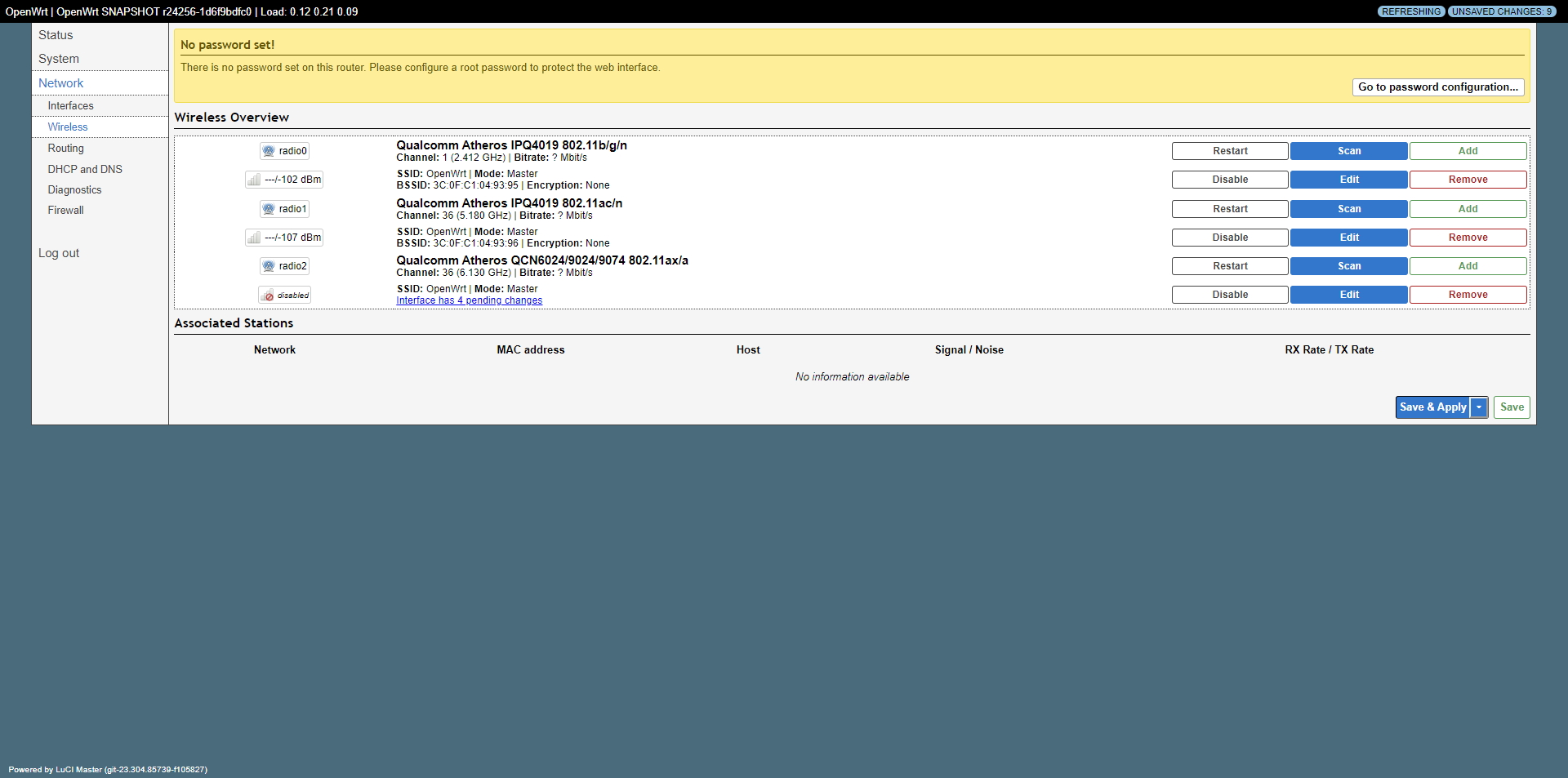
We are thrilled to bring you some exciting news! Our 524WiFi 6 Dual Band Card DR9074E has just taken a giant leap forward. Did you know it now offers support for the DR4019 Platform (WiFi 5) and is compatible with openwrt driver? This is a game-changer in the world of wireless technology. We couldn’t wait to show you, so here’s an exclusive sneak peek with some interface screenshots to give you a taste of what’s in store.
A World of Possibilities: With this groundbreaking update, we’re diving into a new era of tech innovation. This compatibility means open source, and open source means endless possibilities.
What’s Next? We’re not stopping here. Stay tuned for more updates as we continue to push the boundaries of what’s possible in the world of WiFi technology. If you’re as excited as we are, don’t hesitate to reach out for more details or to experience it for yourself.
This is not just about WiFi 5 and WiFi 6; it’s about innovation, customization, and providing you with the best wireless solutions available. We’re here to make your wireless experience seamless and cutting-edge. So, join us on this journey, and let’s explore the limitless possibilities of 524WiFi together.
–
524WiFi 6 MT7915 with IPQ4019/IPQ4029 5G Radio Achieve 843 Mbps Throughput | DBDC Network Card
The throughput of a network card refers to the data transfer rate or the amount of data that the network card can handle in a specific period. It is usually measured in bits per second (bps) or its multiples like kilobits per second (Kbps), megabits per second (Mbps), or gigabits per second (Gbps).
The throughput of a network card is influenced by various factors, including the hardware capabilities of the card, the quality of the network cables, the network environment, and the protocols being used. Different network card models may have varying throughputs based on their design and capabilities.
Modern network cards, especially those designed for high-speed networks like Gigabit Ethernet (1000 Mbps) or even faster, can handle data transfers at very high rates. The throughput of a network card is an important consideration in network performance, as it directly impacts the data transmission speed and overall efficiency of the network.
It’s worth noting that the actual throughput experienced in a network may be lower than the maximum throughput of the network card due to factors like network congestion, latency, and other network bottlenecks. Network administrators often perform tests and optimizations to achieve the best possible throughput in their specific network setups.
Today, we are excited to showcase the recent test results for the DR7915 Network Card’s throughput.
Equipment Used:
PC x 2
DR40X9 x 2
DR7915 x 2
Feeder Line, UART
IXChariot
Test Setup
Test with indoor 5dbi @ 5G omni antenna
Test with 1G Ethernet port
Here are the key highlights of our findings:
DR40X9 Throughput: 552 Mbps
The DR40X9 device showcased its prowess with an impressive throughput of 552 Mbps. This outstanding wireless data transmission capability highlights the device’s reliability and top-notch performance in real-world scenarios.
DR7915 Throughput: 843 Mbps
Equally impressive, the DR7915 Network Card delivered an astounding throughput of 843 Mbps! This network card demonstrated its exceptional ability to handle data packets and maintain high-speed connections with ease.
DR40X9 or DR40X9 Work with DR7915 have good performance in 5G test.We will change the setting of the software and test in better environment to get higher performance,then we will update it.
Here comes the Wallys IPQ4019/IPQ4029 With MT7915 wireless solution:
The DR40x9 is an industrial-grade wireless solution that stands out with its robust IPQ4019/IPQ4029 chipset. This powerful chipset provides a solid foundation for reliable and high-performance wireless connectivity. With its integrated 2x 5G high-power radio modules and 2×2.4G high-power radio modules, the DR40x9 ensures excellent coverage and enhanced signal strength.
Frequency Range and Bandwidth Support:
The DR40x9 offers an extensive frequency range, supporting frequencies from 4.940GHz to 5.825GHz for optimal wireless performance. Additionally, it supports frequencies from 2.400GHz to 2.482GHz, ensuring compatibility with various wireless devices. The solution also offers flexibility in bandwidth selection, supporting 5MHz, 10MHz, 20MHz, 40MHz, and 80MHz options for efficient data transmission.
Connectivity Options:
Equipped with 2 x 5G MMCX connectors and 2×2.4G MMCX connectors, the DR40x9 enables flexible connectivity options. These connectors ensure secure and stable connections, allowing for seamless integration into different setups and environments.
Support for Wireless Standards:
The DR40x9 supports wireless standards such as 11ABGN and 11AC, guaranteeing compatibility with a wide range of devices. Whether you’re connecting legacy devices or modern wireless devices, the solution ensures smooth and reliable connectivity.
RoHS Compliance, FCC certified:
The DR40x9 adheres to RoHS compliance standards, ensuring a high level of protection for both human health and the environment. This commitment to environmental safety mitigates risks posed by potentially harmful chemicals, making it a responsible choice for wireless solutions.
FCC certified, FCC ID is 2AG7VDR4029 (CE certification possible, needs higher volume order and complete device setup)
Firmware Support:
The DR40x9 firmware provides comprehensive support for all modules of Quectel, a leading provider of wireless communication modules. This compatibility ensures seamless integration and optimized performance when using Quectel modules alongside the DR40x9 solution.
Open Source Support:
The DR40x9 firmware supports popular open-source firmware options like Openwifi and OpenWrt. These open-source platforms provide users with extensive customization capabilities and flexibility, allowing for tailored configurations and advanced networking features.
In conclusion, the DR40x9 is an industrial-grade wireless solution featuring a powerful IPQ4019/IPQ4029 chipset. With its high-power radio modules, broad frequency range, flexible bandwidth support, and compliance with RoHS standards, the DR40x9 provides reliable wireless connectivity while prioritizing environmental safety. Additionally, its firmware support for Quectel modules and compatibility with open-source firmware options like Openwifi and OpenWrt further enhance its versatility and customization options.
The DR7915 (#MT7915) is equipped with a 2×2 2.4G high-power radio module and a 2×2 5G high-power radio module. This dual-band capability ensures reliable and efficient wireless connectivity in both the 2.4GHz and 5GHz frequency bands. The high-power design enhances signal strength and coverage, enabling seamless access to bandwidth-intensive applications and reducing signal dropouts in challenging RF environments.
High-Bandwidth Video Streaming and Data Transmission:
With the DR7915 (#MT7915), enterprises can enjoy uninterrupted high-bandwidth video streaming and data transmission. The module’s advanced capabilities and efficient data processing ensure smooth video conferencing, multimedia content delivery, and fast file transfers. This enables teams to collaborate seamlessly and boosts productivity in the office or industrial settings.
Enhanced Voice Communication:
The DR7915 (#MT7915) prioritizes voice communication, offering clear and reliable voice transmissions for enterprise communication needs. Whether it’s conference calls, VoIP applications, or real-time voice communication, the DR7915 ensures crystal-clear voice quality, reducing background noise and providing a seamless communication experience for teams.
Robust Connectivity in Challenging RF Environments:
Enterprise environments often pose challenges for wireless connectivity due to interference and obstacles. The DR7915 (#MT7915) is designed to excel in such environments, with features that mitigate interference and ensure robust connectivity. The high-power radio modules and advanced signal processing algorithms enable stable connections, even in RF-dense areas or locations with physical obstructions.
QCN9074 vs QCN9024 | WIFI 6E IOT 4X4 Triband 2.4G 5G 6G Network Card and Application
What are the applications of an industrial Tri-Band network card supporting 2.4GHz, 5GHz, and 6GHz?
Imagine the boundless possibilities that come with an industrial Tri-Band network card, seamlessly embracing the 2.4GHz, 5GHz, and lightning-fast 6GHz frequency bands. Here’s a glimpse into the exciting realms of its potential applications:
1. Smart Manufacturing & IoT Revolution: In the heart of smart manufacturing, these Tri-Band cards orchestrate a symphony of devices. From factory robots to floor sensors, they unite the Internet of Things (IoT) to make real-time data analytics and intelligent production a reality.
2. Robotic Precision & Automation: When it comes to industrial robots and automated machinery, precision and speed are paramount. Tri-Band network cards deliver high-speed data transfers and unwavering connections, ensuring uninterrupted automation.
3. Surveillance with Clarity: Industrial sites demand top-tier security. Tri-Band cards support high-definition video streams, fortifying security systems. They extend the eyes and ears of surveillance networks, enhancing vigilance.
4. Scientific Excellence: In the world of scientific research and high-performance computing, these network cards are the lifeline. They enable lightning-fast data transfer, facilitating experiments, simulations, and data analysis at astonishing speeds.
5. Connecting the Unreachable: When it’s about connecting distant devices in remote locations, Tri-Band cards are the bridge. They make remote monitoring, diagnostics, and maintenance a breeze, minimizing downtime.
6. Agriculture & Environmental Guardians: In the fields of agriculture and environmental monitoring, they enable large-scale sensor networks. These networks collect invaluable data for better decision-making, crop management, and environmental preservation.
7. Aerospace & Beyond: Think of satellite communications and aerospace ventures. Tri-Band cards empower high-speed data exchanges between spacecraft, satellites, and ground stations, venturing into the far reaches of the cosmos.
With the 6GHz band, an integral part of the WiFi 6E, industrial Tri-Band network cards offer an abundance of spectrum resources. They cater to the insatiable appetites of high bandwidth and low latency. The future of industrial connectivity shines brighter than ever before!
524WiFi 6E IOT 4X4 Triband 2.4G 5G 6G Network Card:DR9074
Both the QCN9074 and QCN9024 are Qualcomm chips, and 524WiFi has chosen this platform for the development of Tri-Band card due to its exceptional stability and superior performance.
Let me share the fascinating story of its inception. Before the advent of the remarkable DR9074 Tri-Band Network card, Wallys had already pioneered single-band network cards like the DR9074-2.4G, DR9074-5G, and DR9074-6E, each earning a reputation for top-notch performance.
Then came an intriguing request from one of our valued customers: ‘The DR9074-5G and DR9074-6E deliver exceptional performance; do you have plans for a Tri-Band version of this card?’ As an innovation-centric company, this question ignited a spark among our engineers.
Fuelled by passion and driven by the pursuit of excellence, our engineers toiled day and night. And voilà, Wallys proudly presents the DR9074 Tri-Band Network card, a testament to our commitment to innovation and customer satisfaction.
Now, let’s dive into the exciting features of this groundbreaking card!
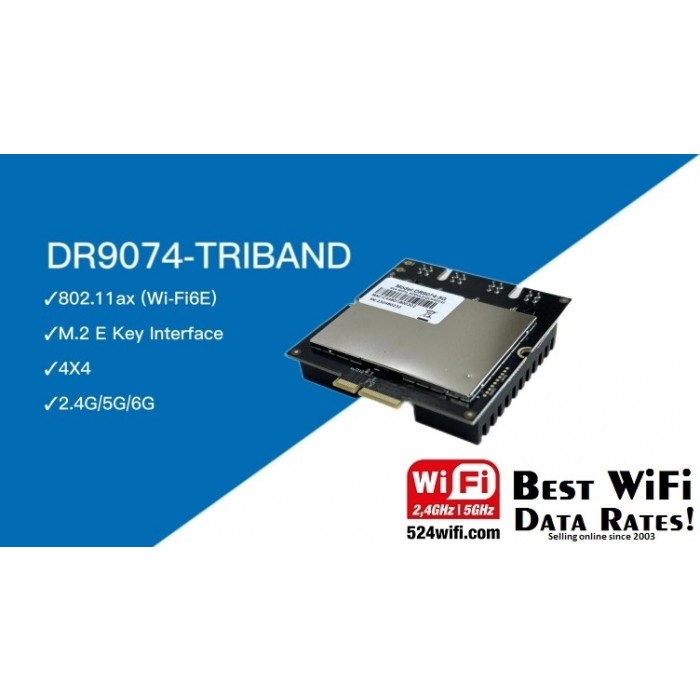
DR9074-TRIBAND
■ Qualcomm Atheros QCN9024
■ Maxim 23 dBm per chain,up to 4949Mbps
■ Data Rateup to 4949Mbps
■ Support Tri Band 2.4GHz&5GHz&6GHz 4×4 WiFi 6E (802.11ax)
■ 4 spatial streams (4SS)
■ M.2 E Key Interface
■ PCI Express 3 .0 Interface
Symbol/Parameter
Chipset:Qualcomm Atheros QCN9024
WLAN Host Interface:PCI Express 3.0 Interface
System Memory:2Mbit serial I²C bus EEPROM
Standard Operating Voltage:5V
Operating Systems:QSDK
Host Interface:M.2 E Key
Antenna Cable / Port:4 x MMCX Connectors,4T4R
Frequency Range:2.412GHz-2.472GHz & 5.18GHz-5.825GHz & 5.925GHz-7.125GHz
Data Rates for WALN:Maxim 23dBm per chain, up to 4949Mbps
Channel Spectrum Widths for WLAN:Support 20/40/80/160MHz
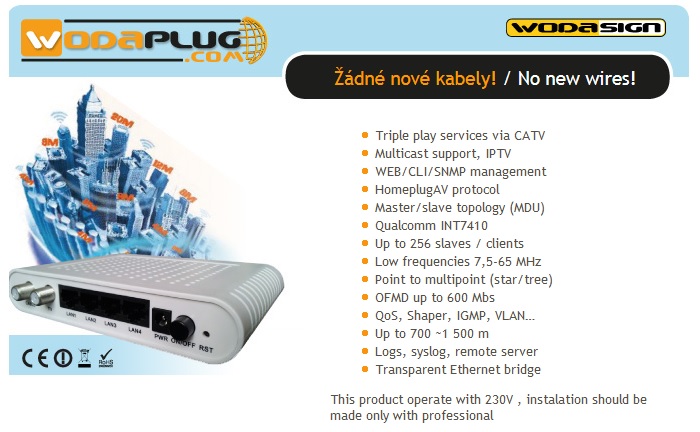
WODAPLUG EOC – Ethernet Data ( Internet ) over Coax cable Applications
Wodaplug Cable Data series EOC products are an equipment which used for triple play service in a new generation broadcasting network. Wodaplug EOC network is built with EOC Master and EOC Slave. It can provides the users with a complete EOC solution of the CATV and the internet network construction. EOC is used for the broadcasting network from optical node to end users.
Wodaplug GE PON Optical Networks Product Applications
PON OPTICAL NETWORKING
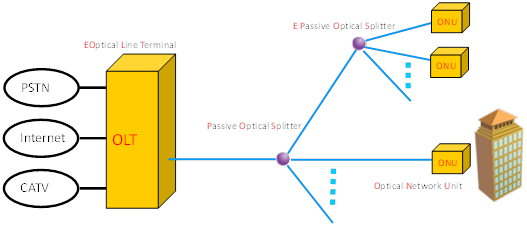
Passive Optical Network ( PON , Passive Optical Network ) consists of an optical line termination ( Optical Line Termination , OLT) at the central side of the network to which is attached a branched structure of optical splitters – splitters . These are connected end optical network unit ( Optical Network Unit , ONU ), most often in a tree , or ring or star topologies . The distance between the OLT and ONU can be up to 20 km .
GE PON is Passive Optical network based on standard Ethernet protocol with Gugabit troughput full duplex. So this is best solution for your new Enterprise LAN with easy configuration, management and mantainance !
EPON OLT units WDS1U4PGE are equiped by well known brand chipset Cortina CS8032, therefor wodaplug power and signal level is very high and provide for your future network fast stable conection. Heat rezistance was tested in long time period in real setups and its very good even in temperatures over 40C. Wodaplug OLT units are equiped with redudant dual powersources, which is very important for reliable non breaking usage!
Wodaplug Pizza-Box OLT serie is standard sizing for 1U 19″ „rack mount“. Advantages are simple: compact size, easy instalation, management, flexibility and power output.
Wodpalug OLT are very good when used for “Triple-Play” applications, CPN, IP kamery, Enterprise LAN networks and IOT apps. Its possible thanks to using newest – CORTINA CS8032 Chipset !
Wodaplug WDS1U4PGE offers 4GE a 4 SFP slots – interface for uplink, and 4 EPON ports for downstream. Supports up to 256 (4*64) ONU in 1:64 splits PLC by passive wodaplug splitters .
Optical netwok behave transparently as smart switch, VLAN can be configured for each port of end ONU units. Configuration of ONU is easy thanks to preconfigured templates ( 4 and 8 ports OLT units has template management in base version ! ! ) Newly connected ONU unit automaticly downloads configuration from previosely set template (provisioning). Configuration OLT unit is possible 1. thru supplied EMS configuration software – central management ) based on SNMP (needs mySQL and reqiure additional SW instalation on master managing PC) or 2. by telnet and CLI (standard command line interface). Wodaplug units supports SNMP (mibs) protocol.
Enhanced security operations such as physical security and surveillance analytics are required by almost all industries, including banking, retail, critical infrastructure, government, corporate, education and public transportation. Such security measures provide real-time intelligence for live detection of safety and security events and are instrumental not only in safeguarding business intelligence but also in facilitating efficient workforce management and optimizing operational decisions.
STABLE CONNECTIVITY
Stable networks guarantee for the ongoing continuity of your video surveillance. Our boards could establish a stable connected wireless environment which is critical for a security surveillance system.
SHOPPING MALL WIFI / COMMERCIAL WIFI COVERAGE
Commercial processes and communications are all managed utilising wireless technologies, and the number of users, devices and apps are only going to increase. Therefore, it is essential to have a robust, secure and high performing WiFi solution that is future-proofed, mobile, and scalable. Not only is business WiFi vital for your workforce and organisation, it is now imperative for visitors to be able to access a secure guest wireless network.
Shopping malls are a major tourist attraction, with thousands of people visiting the malls every day. The demand for wi-fi has increased significantly. A reliable and high-speed WIFI system can increase the time spent by passengers and enhance the image of shopping malls.
HOTEL WIRELESS APPLICATION
BACKGROUND ANALYSIS
With the rapid development of the current mobile network, tablets, smartphones, laptops and other devices can be widely used.As a temporary residence for business travelers and tourists, wireless network has become an indispensable part of hotel services.
SOLUTION :
1. The layout of the hotel is relatively regular, which shall meet the requirement of full wireless coverage of all rooms without blind areas; 2. The hotel has a relatively complete wired system. The AP adopts the model 86 panel design to make full use of the existing wiring cartridges; 3. Considering the later development needs of the hotel, network equipment should have good expansibility to meet the diversified marketing requirements of subsequent WEB certification, SMS certification, We Chat certification, etc.; 4. Automatic switching of access points in the process of wireless terminal movement, continuous network line, namely wireless roaming; 5. High-end hotel decoration, AP appearance should be elegant, PoE power supply should be supported to meet the needs of fire protection and wiring; 6. AP supports unified management and configuration, and real-time monitoring of the working state of each AP, making operation and maintenance simple.
COUNTRY COVERAGE – INTRODUCTION
In an era of wireless shuttle, sparsely populated, wireless construction is easier than wired, save a lot of cable wiring time and cost, so rural also a fashion.
Because rural information is also relatively backward, wireless network coverage is really necessary.
Within a kilometer or so of the village, a wireless network is required to cover the whole village through wifi cellular base stations. All users in the village can connect to broadband network through various PC terminals, enabling convenient and smooth Internet access.
DEMAND ANALYSIS
1. convenience: as long as the selection of the ground pole frame or low-rise building roof and other appropriate location can be erected, the adoption of omnidirectional antenna mode, no need to adjust any Angle, the signal by radio wave transmission.
2. Stability: it has the stability of the telecommunication level to ensure the good network communication quality and the long-term stable operation of the wireless network. 3, security: support WEP, WPA, WPA2, 802.1x, RADIUS and other rich encryption methods, to ensure the security of network communication, to ensure user security. 4. High quality: high quality wireless products are adopted to ensure indoor transmission quality, strong anti-interference ability, ensure users’ network bandwidth, and satisfy users’ various network applications. 5. Maintainability: remote management, maintenance, configuration and software upgrade can be carried out on any node on the network. 6. Economy: the wireless network system can achieve the most satisfying network access effect by using as few wifi cellular base stations as possible, which has a relatively high economy.
WIFI FOR PASSENGERS – RAILWAY / AIRPORT / BUS WIFI INTRODUCTION
Railway is the main artery of national economy. With the rapid development of railway industry, the improvement of information technology plays an important role in the overall service quality, work efficiency and operation safety of railway industry. Wallys wireless bridge /AP can quickly assemble wireless monitoring and data transmission systems. Combined with the application needs of the railway industry, wallys proposed a complete set of wireless solutions.
RELIABLE CONNECTION
1. Data and language communication
Communication around the orbit Communication of maintenance team Train operator operator’s worksheet update service Vehicle detection and train diagnostic services 2. Integrated services Staff wireless office services Passenger wifi service Train/station electronic AD service 3. Wireless monitoring Video monitoring of stations, video surveillance of intersections video surveillance inside the train 4 Mobile service Video, language and data communication between the train and the ground.
Hudratores from 524wifi.com & wifi6.eu how-to setup LTE 4G / 5G modules on COMPEX router boards
Hudratores from 524wifi.com & wifi6.eu how-to setup LTE / 4G / 5G modems on COMPEX router board:
May I have your attention please ………. (dramatic pause)
Today we all gather on this place to learn how to à
Save the world & souls and how to successfully connect a board with LTE support ( for example WPJ419 WPJ428 and WPJ563) with modems ( I used cat 4 EC25-E, cat 6 EP06-E + Sierra Wireless EM7455 and cat 12 Quectel EM12-G ) and not to become crazy:
First,make it clear > You have found this document, because you probably belong to 98% of society majority, whom never gets routerboard products work at first shot, well, pls note, nobody does, because manufacturers usually make great products, but they think that we all follow they’re logic and we know everything (btw. Its waste of time to try to convince them other ways, they too good to get on our low miserable level of knowlidge )
LIST OF ALREADY SUPPORT LTE MODULES IN V 6.2.12 FIRMWARE:
MiniPCIe v2.0
Huawei Me909s: WPJ563, WPJ419, WPQ864 and WPQ865, Huawei Me909s
Sierra Wireless MC7455: WPJ563, WPJ419, WPQ864 and WPQ865
Quectel EC25: WPJ563, WPJ419, WPQ865, WPQ864
Quectel EP06-E, A: WPJ563, WPJ419, WPQ864, WPQ864
M.2 B key v3.0
Sierra Wireless EM7455: WPJ428, WPQ865
Huawei ME906s: WPJ428, WPQ865
Quectel EM06, EM12-G: WPJ428, WPJ563A (with adapter to mniPCIe slot) – same setup as below, pls scroll down for detailed HowTo sect 3.
M.2 5G PCIE3.0 B key
Quectel RM500Q-GL: WPQ873 and newer Wi-Fi 6 boards like WPQ618
First of all, you need to know secret access to all “must know” information, that beside of web interface management on 192.168.1.1 standardly used by default – you have to know status of your try-outs, because why would anyone put such not important information as SIM and modem status for LTE board to main page, am I right , so use this link to make it work:
Wow – so I actually can see something important, good, and what’s next?
Don’t push it guys, or I’ll stop… ok ok …. And now the happy part, how to read secret sneaky file – not to be added to main status page for god only know why reasons – found on this address:
<1.find where the modem name is shown (you will see PCIe not detected), but worry not, you look for modem type (EP06, EC25E, EM7455) – beside of this non important info you will see port used by system (USB2 USB3 etc) and that you will put into WAN part (not work for EC25E)
<!2.as you can see in our case EC25E cat 4 LTE module is not even detected, BUT (see, there is always but) at USB LTE: you can read USB2 , and that ladies and gentleman is our port to be put in WAN interface besides of APN and dial informations, if nessesary
second, Folks please, refer to picture “compexsimotherwaythanallothers.jpg” because they put sim other way than rest of the world. Don’t we love this I something and Compex silly moves to be separated from others?
3. for Quectel EM12G you wont see SIM info in …/info.txt , + needs fw MimoAP v6.4.02_spf61_b200825 or above, simply check wifi6.eu / wifi5.eu, pls note that WPJ428 only works with some SIM cards (in my case its not supporting Vodafone, but works with O2 and T-Mobile SIM), on the other hand WPJ563 works with Vodafone and with O2 (pls dont ask me anything about this – you have to investigate what provider will work for you in your area) – another point- pls note for wpj428 SIMBAY 0 is marked as sim 4 on board while SIMbay 1 is marked as sim 3 onboard (again dont dare to ask me why)
Third, if you still fail to make it work, you can 1. shoot yourself 2. start crying or 3. refer to this article:
pls if you don’t have access to Compex very sacred web manuals, all pictures are on the end starting by LTE Modules Configuration Steps
BUT, I tried to use some recommended mods to make modem works and I always returned to old good LTE / UMTS / GPRS / EV-DO protocol for simple reason, it works for all tested modems, yes ill show you which one is fastest, I know you want to see it (Quectel EC25E, EP06E ,Sierra EM7455). Oh, back to idea, I used this protocol because…… I need to connect to O2, Vodafone and T-Mobile here using not only APN: internet, but dial *99# as well, and that is impossible with other mods (and now you know another secret might help to make it work)
Readme for COMPEX v6.4.02_spf61_b200825 firmware for WPJ428 and WPJ563 boards : test firmware to support Quectel EM12 modem
please use mbim protocol and /dev/cdc-wdm0 device for this modem
Use this command to show sim card iccid: gcom -d /dev/ttyUSB2 -s /etc/gcom/geticcidq.gcom
Now probably your board and module and SIM works smoothly and you are dancing around the table celebrating , that your compex 419 board works and you know, it was worth it, because guys, this tested wpj419 board is smoking gun in compare to speeds , wifi load (who doesnt know compex profi wifi moduls right? ) and stability, and i have tested many LTE boards, believe me – you know what, ill put here simple measuring made at the table with samsung s9+ over wifi 5 ac 160width in my hand, voila:
BTW if you don’t read Czech (believe it or not, there may be still few uneducated readers out there ), note that left number is download, right number upload & …… this Sierra Wireless modem module is little devil isn’t it – Oh and for this modem we used adapter
Now is the time to clap your hands, say Thanks Hud and if necessary, to read boring files below. See ya at testing more expansive boards (when they give them to me)
Always yours (in love with Compex, Quectel, Sierra Wireless)
Hud & Dan from 524wifi.com email Daniel at 524wifi dot com
Compex stolen “how to” file follows, but i suggest you go to this page directly, as its dynamic and still evolving :
Before setup the Cellular Network, you may prompt to yourserverip/prod/info.txtto verify the LTE modules and SIM card was able to detect by Compex Embedded Board. Check on the USB LTE and LTE SIM column, you may able to see the information listed on each column.
* Remarks, serverip is refer to your Luci Interface IP address.
Click Edit on WAN interface.
2. Configure the SIM slot to either 0/1. (Depend on the Cellular SIM card install on which SIM slot).
3. For Modem device, configure to either ttyUSB0/ttyUSB1/ttyUSB2.
4.For Service Type, you may configure it based on your requirement, in this example we will configure it to LTE only.
5. Leave others column blank and click on Save & Apply button.
6. At Last, the Cellular Network is established, and you may browse Internet by using the Cellular Network. To verify the internet connection, you may notice the Internet Icon on top right side is Light up.
Protocol – NCM mode Some of the LTE modules able to run in Network Control Mode (NCM mode). NCM protocol is Ethernet over USB protocol used by some fast speed USB modems/dongles, for example: Huawei ME906E, Huawei ME909 model etc. can run in this mode. To setup the LTE modules run in NCM mode, you may setup as steps below:
Choose NCM mode under protocol.
Choose the SIM slot using. Depend on the SIM card is located on which port. If the board only have one SIM slot, it probably located at Slot 0.
For Modem device, you are required to manually figure out the Modem device located on which interface. In this example
For Service type, you may choose your preferred operating mode such as LTE mode.
For IP protocol, you may choose it to allocate IP based on IPv4 format.
At last, the cellular network is establish and now you may browse Internet by using Cellular Network, To verify the Internet connectivity, you may either setup AP on your wireless card and connected on the particular AP or you may notice the Internet Icon on top right side Light up.
Protocol – QMI mode Some of the LTE modules able to run in QMI Cellular mode or may known as MBIM mode. QMI protocol is proprietary by Qualcomm, for example Sierra Wireless EM7455, Quectel EC25 and EP06 LTE Modules etc. To setup LTE module run in QMI mode, you may setup as steps below:
Choose QMI Mode under protocol.
Choose the SIM slot using. Depend on the SIM card located on which SIM slot.
For Modem Device, you may choose either wdm0 or wdm1.
Ignore others column and proceed to Save & Apply.
At last, the cellular network is established and now you may browse Internet by using Cellular Network,. To verify the Internet connectivity, you may either setup AP on your wireless card and connected on the particular AP or you may notice the Internet Icon on top right-side Light up.
Protocol – MBIM mode Regarding to MBIM protocol, the setup is same as QIM mode. You are required to setup the Service Type and IP Protocol compared to QMI mode.
**Remarks: If after you switch the protocol, you found the WAN interface is Down, without any IP address assigned, you may try to Reboot the board and tried the steps again.
Ffs stop reading this and go to do something useful instead

 COMPEX and Wallys develop Patches and GitHubs to help our customers load OpenWRT and LEDE onto our Embedded Boards, providing opportunities to develop powerful features and customized versions of OpenWRT and LEDE. We provide OpenWRT patches up to latest Chaos Calmer. Wodaplug LTE routers use Golden Orb – Rooter firmeare for 4G / 5G applications.You can check https://github.com/Wallystech/openwrt and https://github.com/compex-systems/Mediatek MT7915 and MT7916 github : https://github.com/openwrt/mt76/tree/master/mt7915MT7916 OpenWRT porting guide example – read hereWe recommend CANDELA TECH QCA Ath10k frimware and Linux driver to use with our WiFi QCA 9880 / 9882 modules > http://www.candelatech.com/ath10k.php