Posted on

524WiFi DR5424S Is Here: Fiber, PoE, and Dual M.2 on IPQ 5424 QCA Wi-Fi 7 Platform

524WiFi™ Pulse B5424-4x4-2x2-2x2-SFP Pro Plus — Qualcomm IPQ5424 Marina Wi-Fi 7 Tri-Band Router Board with 10GbE, 2.5GbE and 10G SFP — hardware detail

DR5424S Design-In Checklist: 10G SFP, PoE, and M.2 E-key on a Qualcomm IPQ5424 Wi-Fi 7 Platform

A Wi-Fi 7 board looks simple on a spec sheet. The wireless platform is one line. The work that decides whether your product ships on time sits in the other lines: the uplink, the power input, the expansion slots, the heat, and the enclosure.

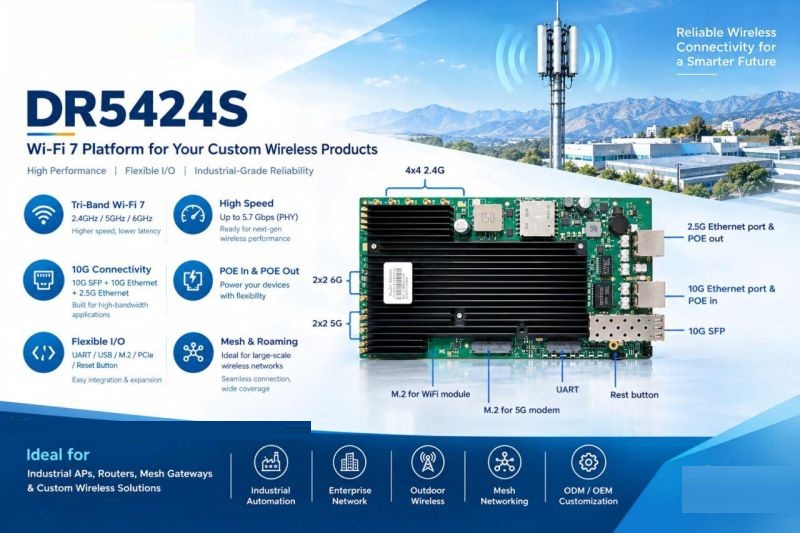
DR5424S is a tri-band Wi-Fi 7 platform built on Qualcomm IPQ5424. It shares its wireless platform with DR5424 but spends its interface budget differently: a 10G SFP uplink, 10GbE PoE input, 2.5GbE PoE output, and 2× M.2 E-key PCIe 3.0 slots, instead of a bank of RJ45 ports.

This article walks through what each interface changes in a real design, what to verify before committing, and where the board stops and system engineering begins.


What does DR5424S change in a product design?

Between DR5424 and DR5424S, the Wi-Fi 7 platform stays the same (Qualcomm IPQ5424). The wired side and the expansion side change.

Article content

For a product team, that is not a spec swap. It changes four parts of the product at once: how the device is cabled, how it is powered, how it is extended, and how it is cooled and housed. Each one has its own checks below.


Fiber uplink: 10G SFP

A 10G SFP port replaces a copper uplink with a cage that accepts a fiber module. That helps where nodes sit far from the backbone, as in industrial parks, warehouses, ports, and large facilities.

What to check:

  • Module type and reach. The cage doesn’t decide your fiber type or distance. Choose the module for the deployment, then confirm it works on the board.
  • Module compatibility. Test the specific SFP modules you plan to ship or recommend, not only one reference module.
  • Module power and heat. An optical module adds heat inside or next to the enclosure. Include it in the thermal plan.
  • Mechanical access. Decide how the cage is reached through the enclosure, and how the fiber is strain-relieved and sealed in an outdoor design.

Power: 10GbE PoE input and 2.5GbE PoE output

DR5424S combines a 10GbE PoE input with a 2.5GbE PoE output. In sites where a separate power run is inconvenient, such as industrial floors, outdoor nodes, and distributed devices, a well-planned PoE design can simplify installation.

A port name does not define a power design. Take these from the official datasheet and confirm them on your bench:

  • PoE standard supported on the input and on the output
  • Power budget: what the input can deliver, and how much is left for the output after the board and any modules draw their share
  • Power direction: which port receives power and which one sources it
  • Simultaneous load: behavior when radios, both M.2 modules, the SFP, and the PoE output all run at once
  • Startup and fault behavior: inrush, brown-out, and what happens to downstream powered devices

If you plan to power a downstream device from the 2.5GbE output, write down that device’s worst-case draw early. It is the number most likely to push the input budget.

For reference when budgeting: the DR5424 board is specified at DC 12V 5A input with 39.3W maximum board-only power consumption. DR5424S power figures must come from its own datasheet. Don’t carry DR5424 numbers over.


Expansion: 2× M.2 E-key PCIe 3.0

Two M.2 E-key PCIe 3.0 slots let you evaluate expansion modules instead of fixing every function on the mainboard. Different models can share a core platform and differ in their expansion configuration.


Thermal and enclosure: where the board stops

A board is not an enclosure. For indoor aluminum designs and outdoor designs alike, the work around the board includes:

  • Heat path from the SoC, radios, SFP module, and any M.2 modules to the enclosure surface
  • Behavior with both M.2 slots populated and the PoE output loaded
  • Antenna placement, cable routing, and isolation across bands
  • For outdoor use: a waterproof and dustproof enclosure, surge protection, and wide-temperature validation

The DR5424S board itself should not be treated as an IP67 or wide-temperature industrial product. Those properties belong to the finished, validated device. Plan the thermal and sealing work from the first mechanical sketch, not after the first prototype overheats.


Radio and antennas: confirm the configuration

DR5424 uses three independent radio chains operating concurrently, with 4×4 MU-MIMO on each band, and exposes 12× U.FL antenna connectors. That is true tri-band concurrent operation, and it should not be confused with a tri-band switchable card, which moves one radio between 2.4GHz, 5GHz, and 6GHz.

For DR5424S, confirm the exact radio configuration, antenna connector count, and per-band channel widths against its datasheet before you finalize antenna design. Antenna count and layout drive enclosure size, cable routing, and cost.


Which board for which design?

Article content

DR5424S is not an across-the-board upgrade over DR5424. They are application-oriented choices on one Wi-Fi 7 platform. The shared platform also doesn’t prove that software, RF performance, thermal behavior, or firmware are identical, so verify each board for your product.


Hardware summary: what we can state today

DR5424 (Qualcomm IPQ5424): quad-core Cortex-A53 at 1.5GHz; 4GB DDR4 standard, 8GB optional; 4×4 MU-MIMO on 2.4GHz, 5GHz, and 6GHz; up to 240MHz channel width on 5GHz and 320MHz on 6GHz; 2×10GbE plus 4×2.5GbE RJ45; USB 2.0, USB 3.0, JTAG, UART; 12× U.FL antenna connectors; DC 12V 5A input; 39.3W maximum board power consumption (board only); 215 × 180 × 29mm including heatsink; REACH and RoHS.

DR5424S (Qualcomm IPQ5424): tri-band Wi-Fi 7 platform; 10G SFP; 10GbE PoE input; 2.5GbE PoE output; 2× M.2 E-key PCIe 3.0. Refer to the DR5424S datasheet for full radio, memory, power, and mechanical specifications.


The question to start with

Before you pick a board, write down five numbers for your product: how many wired ports it needs, what uplink it uses, what power source it runs from, which expansion modules it must support, and what enclosure volume it has to fit. The right platform is the one that matches those five, not the one with the longest spec list.

What is the first constraint in your current AP or gateway design: ports, power, thermals, or space?

If you’re looking for a Qualcomm IPQ5424 Wi-Fi 7 platform for an industrial access point, wireless gateway, or edge network device, with the option of a 10G SFP uplink, PoE, and M.2 expansion, 524WiFi can help. We can walk you through DR5424 and DR5424S against your requirements, share the datasheet, and discuss OEM/ODM customization.
Posted on

IPQ5424 vs IPQ9574: Which Wi-Fi 7 Board for Your AP or Router?

Choosing a Wi-Fi 7 board by speed alone is how you end up redesigning your PCB.

Both boards below are Qualcomm-based. Both are tri-band Wi-Fi 7.

They are built for very different products.

The real questions are:

  • How many antennas does 2.4GHz need?
  • Which wired ports does your design use?
  • How does the device get power?
  • What modules must fit inside?

Wireless speed answers none of these.

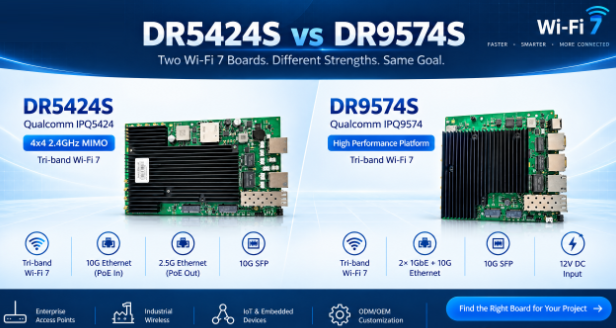
DR5424S Qualcomm IPQ5424

Built for designs that need:

  • 4×4 MIMO on 2.4GHz (2×2 on 5GHz and 6GHz)
  • 10G Ethernet with PoE in
  • 2.5G Ethernet with PoE out
  • 10G SFP
  • M.2 for Wi-Fi + M.2 for a 5G modem

The PoE-out port can power a downstream device, such as a camera.

DR9574S Qualcomm IPQ9574

Built for designs that need:

  • 2×2 MIMO on all three bands
  • Two 1GbE ports + one 10G port
  • 10G SFP
  • 12V DC input
  • M.2 for Wi-Fi + M.2 for a Quectel modem

The 10G port is marked for PoE. Confirm the power setup for your hardware version.

Side by side

Article content

Pick DR5424S if you need:

  • A 4×4 radio on 2.4GHz
  • PoE in and PoE out on one board
  • 2.5G Ethernet next to 10G SFP
  • A 5G modem slot

Pick DR9574S if you need:

  • The IPQ9574 platform
  • Separate 1GbE ports plus 10G
  • A dedicated 12V DC input
  • A Quectel modem slot

The final choice depends on:

  • Target throughput
  • Software functions
  • Power budget
  • System design

We do hardware and software customization on both platforms.

Tell us your application, interfaces and power budget. We will help you shortlist.

Posted on

Why Your Next Edge AI Platform Needs a Tri-Band WiFi 7 Module, Not Just Dual-Band

Wireless is usually the last spec finalized on an edge AI hardware design and the first thing that becomes a bottleneck in the field. Worth a closer technical look before your next carrier board revision locks in.

The RF problem, precisely

Dual-band designs (2.4GHz + 5GHz) share spectrum with every consumer device, AP, and IoT sensor in range. In dense deployments — multi-robot fleets, factory floors, warehouses — this shows up as elevated retransmission rates, unpredictable jitter, and tail latency spikes under contention. For a control loop or a real-time inference pipeline streaming sensor data upstream, tail latency is what actually breaks the system, not average throughput.

WiFi 7 (802.11be) addresses this at the PHY/MAC level in three ways relevant to edge AI hardware:

  • 6GHz band access — largely unlicensed spectrum with far lower device density than 2.4/5GHz today, meaning lower channel contention and more predictable airtime
  • 320MHz channel bandwidth (vs. 160MHz max on WiFi 6) — higher raw throughput ceiling per link
  • Multi-Link Operation (MLO) — the ability to aggregate or fail over across bands simultaneously, so a device isn’t fully dependent on the health of a single channel

For an edge AI box pushing multi-camera streams, sensor fusion data, and periodic model/OTA updates concurrently, MLO plus 6GHz access is the difference between throughput that holds up under real RF load and throughput that only looks good on an open-air bench test.

Module-level implementation: DR9274E-TB

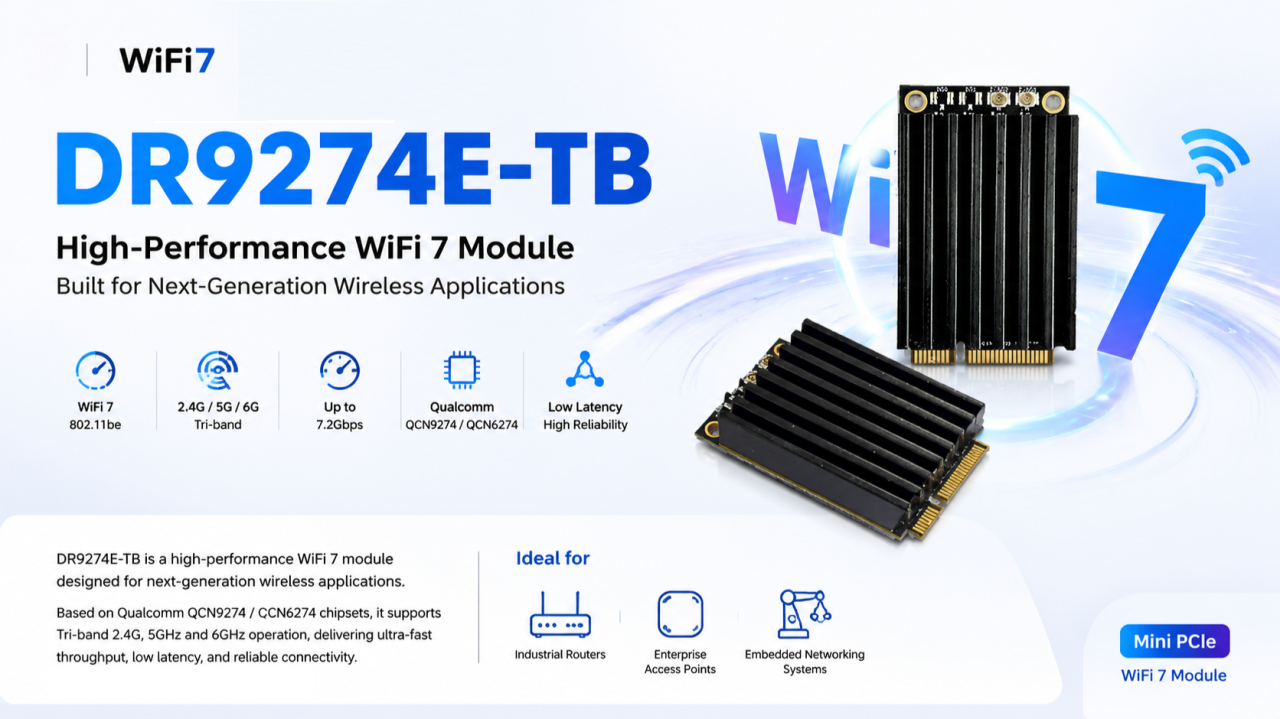
We built the DR9274E-TB around this exact requirement — a Mini PCIe WiFi 7 module for teams integrating wireless into embedded and industrial platforms rather than designing RF from scratch.

Specs:

  • Chipset: Qualcomm QCN9274 (5G/6G radio) + QCN6274 (2.4GHz radio) — Qualcomm’s WiFi 7 platform, not a rebadged WiFi 6E part
  • Band support: Tri-band, 2.4GHz / 5GHz / 6GHz
  • Antenna config: 2×2 MIMO
  • Interface: Mini PCIe — integrates without a carrier board redesign on most existing embedded platforms
  • OS support: Linux-compatible — relevant if your stack runs on JetPack, Yocto, or a custom embedded distro
  • Build: Industrial-grade components rated for continuous operation, not consumer-grade parts pushed into an industrial enclosure

Where the tri-band architecture actually matters

Not every application needs 6GHz. It matters specifically where you have:

  • High device density (multi-robot fleets, dense AP deployments)
  • Latency-sensitive control or telemetry loops
  • Concurrent high-bandwidth streams (multi-camera vision, sensor fusion payloads)
  • Environments where 2.4/5GHz spectrum is already saturated by other systems

That covers most edge AI computing platforms, industrial routers/IoT gateways, enterprise APs in high-density environments, outdoor CPE/wireless bridges, and mesh networking nodes.

The engineering takeaway

Specifying wireless the way you did for a WiFi 5/6 design — pick a dual-band module, move on — leaves latency and reliability headroom on the table that your compute stack has already outgrown. Tri-band WiFi 7 with MLO isn’t a marketing checkbox; it’s a direct answer to the contention and jitter problems that show up specifically under production RF conditions, not lab conditions.

Happy to go deeper on channel planning, MLO configuration, or driver-level integration for teams currently specifying wireless for a Jetson-based or other edge AI carrier board.

📩 Reach out to 524WiFi for datasheets, samples, or OEM customization.

Posted on

Why Edge AI Hardware Is Becoming the Next Competitive Advantage

Artificial Intelligence has evolved at an incredible pace over the past few years. From large language models to computer vision and predictive analytics, AI software has become increasingly powerful and accessible.

But as AI adoption accelerates, I’ve noticed a shift in conversations with customers and partners.

The discussion is no longer just about models.

It’s about deployment.

AI Doesn’t Create Value Until It Reaches the Edge

Training an AI model is only part of the journey. Real business value is created when AI runs where decisions need to be made—inside factories, warehouses, vehicles, retail stores, hospitals, and smart cities.

For many applications, relying entirely on cloud computing creates several challenges:

  • High latency
  • Expensive bandwidth
  • Privacy concerns
  • Unstable network connectivity
  • Ongoing cloud operating costs

This is why Edge AI has become one of the fastest-growing segments of the AI industry.

Processing data locally enables faster responses, better reliability, and greater control over sensitive information.

The New Bottleneck Isn’t Software

Five years ago, companies asked:

“Which AI framework should we use?”

Today they ask:

“Which hardware platform should we build on?”

Many AI startups have exceptional software teams, yet hardware development often delays commercialization.

Designing an embedded AI system involves far more than selecting a processor. Teams must address thermal management, power optimization, connectivity, storage, operating system support, long-term component availability, manufacturing, and certification.

For companies whose core strength lies in AI algorithms or industry expertise, developing custom hardware from scratch may not be the best use of resources.

Why OEM and ODM Partnerships Matter More Than Ever

Instead of reinventing the hardware platform, many companies are choosing to collaborate with experienced OEM and ODM manufacturers.

This approach allows engineering teams to focus on what truly differentiates their products:

  • AI applications
  • Software platforms
  • User experience
  • Industry-specific solutions

Meanwhile, hardware partners provide mature platforms that reduce development risk and shorten time-to-market.

In today’s competitive environment, launching six months earlier can be more valuable than achieving marginal improvements in hardware performance.

Flexibility Is Becoming More Important Than Raw Performance

The AI industry often focuses on TOPS, GPU cores, and benchmark scores.

While computing power certainly matters, customers increasingly ask different questions:

  • Can this platform be customized?
  • Does it support industrial environments?
  • Can wireless connectivity be added?
  • Is storage expandable?
  • Will the platform still be available in three years?
  • Can it scale from prototype to mass production?

These practical considerations often determine whether a product succeeds in the market.

Performance attracts attention.

Flexibility wins projects.

Looking Ahead

Edge AI is no longer an emerging trend—it is becoming the standard architecture for many intelligent devices.

Whether it’s machine vision, robotics, industrial automation, transportation, or smart retail, demand for reliable, customizable AI hardware continues to grow.

I believe the next wave of innovation won’t come solely from more powerful AI models.

It will come from making AI easier to deploy in real-world environments.

Companies that can combine intelligent software with reliable, scalable hardware will be best positioned to deliver practical AI solutions.

As someone working closely with Edge AI platforms, it’s exciting to see how quickly the industry is evolving.

I’m curious to hear your perspective.

What do you think will become the biggest challenge for Edge AI over the next five years—computing power, deployment, cost, or something else?

Let’s discuss.

Posted on

OEM Customization Support

OpenWRT, OpenWiFi, LEDE and Linux supported HW for your heavy loaded WiFI applications and outdoor long range Wi-Fi links and Embeded projects.

Develop OpenWRT or OpenWIFi on reliable hardware from 524wifi! Wallys is a member of the OpenWIFI project. Please if you are a company, first create account and mail to us for business login with discount.

We develop OpenWRT – LEDE Github with our suppliers (manufacturers) to help our customers load OpenWRT onto our Embedded Boards and use our WiFi modules, providing opportunities to develop powerful features and customized versions of OpenWRT. 

524WiFi and Wallys also provide Software development support to customers utilizing their embedded boards and developing OpenWRT features. Wallys is a member of the OpenWIFI project.


Please read this full prodcut report as an example of customisation possibilities :  https://www.524wifi.com/index.php/dr4029board/


lede openwrt COMPEX and Wallys develop Patches and GitHubs to help our customers load OpenWRT and LEDE onto our Embedded Boards, providing opportunities to develop powerful features and customized versions of OpenWRT and LEDE. We provide OpenWRT patches up to latest Chaos Calmer. Wodaplug LTE routers use Golden Orb – Rooter firmeare for 4G / 5G applications.You can check https://github.com/Wallystech/openwrt  and https://github.com/compex-systems/Mediatek MT7915 and MT7916 github : https://github.com/openwrt/mt76/tree/master/mt7915MT7916 OpenWRT porting guide example – read hereWe recommend CANDELA TECH QCA Ath10k frimware and Linux driver to use with our WiFi QCA 9880 / 9882 modules > http://www.candelatech.com/ath10k.php

ATH11K driver delelopment for LINUX x86 and OpenWRT platforms : 

Informations regarding Linux and OpenWRT drivers – The ath11k code from github can’t support the dual / tri band card now, it needs modification. Wallystech and 524WiFi did some changes and applied in Linux kernel version 5.17.0 – if you use different kernel version, then 524WiFi will do some work for you. That is a Linux issue, there are some incompatible with different kernel versions. So the Customer need tell us the kernel version, then we release the ath11k and board-2.bin, bdf and amss.bin to customer – all is binary. Jason, chief of development, told us : “We will build it based on the Customer’s Linux version, The kernel should be 5.17 up. The Card can be AP or Client mode on x86. We do it better than Compex, 8devices and others, DR9074 Triband and Dualband cards are very good and its is powerfull opportunity for all customers developing WiFi6 devices. We have software engineers and we we have resources to support Customers tu use our WiFI6 modules, but we have add lock to amss, so the Customer can’t use our asmss on other vendor’s card“

If The Customer has big volume order, then we can open the ath11k code to the customer customer based on NDA, SLA.

NEW WIFI 6 TRIBAND AND DUAL BAND MODULES LIST. 

OEM from Wallys & 524WiFi Communications :

    Since its inception in 2010, Wallys has had a strong team, including dozens of research and development personnel, a complete set of assembly lines, they play an irreplaceable role.

    Under the premise of ensuring the product quality, we will deliver the goods at the fastest speed and maximize the product benefit.  Wallys is a member of the OpenWIFI project.

    We are trustworthy, trust us, choose us!

ODM

ODM

    Wallys provides all services from r&d, design to production and post-maintenance. There can be a buyout or an unbuyout mode.

    China has a complete wireless communication industry group, which enables ODM manufacturers to obtain the supply of low-cost components. Years of reform and opening-up have made China an ideal low-cost manufacturing base. Compared with the rapid development of the market, ODM services which focus more on design capability and production experience become more competitive.

OUR ADVANTAGES

OUR ADVANTAGES

Lower production costs

Strong design capability

Rich production experience

Higher productivity

Complete after-sales service

Wallys is a member of the OpenWIFI project.

SCHEMATIC DESIGN

SCHEMATIC DESIGN

    Wallys introduced senior talents and built a strong technical team integrating hardware and software design, providing firm support for the company’s ODM services. We undertake all the design of wireless communication because of enthusiasm and professional. Make any modifications based on our existing solutions to better meet customer needs. From idea to market, Wallys is a one-stop shop.

PROTOTYPE

    Wallys could help clients build Prototype. We have a professional technical team supporting.

    Helping you realize your idea is our aspiration. Everything on RF is our enthusiasm. Different chipsets, different materials, different features, different designs…we could realize all you want.

    Making your idea visible and alive is what we persuit.

Software & Hardware Design

SOFTWARE & HARDWARE DESIGN

    We have experienced R&D engineer team with a demonstrated history of working in the wireless industry. Skilled in RF and embedded communications  , network protocol, firmware ,openwrt ,linux system  development , analog and Digital Circuit Design, Network Processors, Power supplies ,PCB design and layout and etc.,

    Many years of expertise in software and hardware design allow us to deliver solutions based on your specification list for commercial and industrial applications. We are able to think ahead and deliver design that meet and exceed customer requirement.

 Wallys is a member of the OpenWIFI project. 

RF

RF

    In addition to the most commonly used 2.4G and 5G, Wallys can meet customers’ requirements for special spectrum. Our technicians are skilled in up-conversion and down-conversion technologies to meet your various RF requirements.

    The enthusiasm of technicians for RF and wifi drives Wallys to make continuous progress and innovation. We use advanced equipment to produce the most suitable products for the market and meet the needs of customers. We are reliable radio experts.

online baner