Multi-AP Coordination changes access points from independent competitors into coordinated network participants.
Coordinated airtime and spatial reuse can improve consistency in dense, interference-heavy deployments.
Implementation quality will determine how effectively products translate the standard into real performance.
Among the technologies defining Wi-Fi 8 (IEEE 802.11bn), Multi-AP Coordination stands out as the one that changes network architecture, not just radio performance.
The Mechanism Traditionally, each access point schedules its own transmissions independently — even when it’s sitting a few meters from another AP on an overlapping channel. Multi-AP Coordination replaces this with a shared, real-time scheduling layer: participating APs exchange timing and channel-state information, then jointly decide transmission order, channel assignment, and power levels. The two core techniques are coordinated beamforming (nulling interference toward neighboring cells) and coordinated spatial reuse (letting multiple APs transmit simultaneously without stepping on each other).
How This Differs From Wi-Fi 6/7 Wi-Fi 6E and 7 pushed hard on per-AP spectral efficiency and standardized faster handoff mechanisms (802.11k/v/r), but interference management between APs remained largely reactive — each radio senses and avoids, rather than actively coordinating. Multi-AP Coordination is proactive and network-initiated: the system prevents interference by design instead of working around it after the fact.
Applications Enabled
Seamless, network-managed roaming for AMR/AGV fleets moving continuously across many AP cells
Stable control-link performance in multi-robot cells with tight overlap tolerances
Higher effective throughput in high-density outdoor deployments (ports, yards, campuses) where channel reuse was previously constrained by self-interference
Simplified RF planning in environments where AP density was previously capped by interference budgets, not coverage needs
Bottom Line Multi-AP Coordination turns a group of APs from independent competitors into a coordinated system — which is exactly the shift dense industrial and robotics deployments have been waiting for.
—
For projects evaluating Wi-Fi 8, our Pulse B8 routerboard and Pulse P8 radio platform planning focuses on complete host, firmware and RF integration. Contact [email protected] to discuss the platform configuration and engineering requirements for your application.
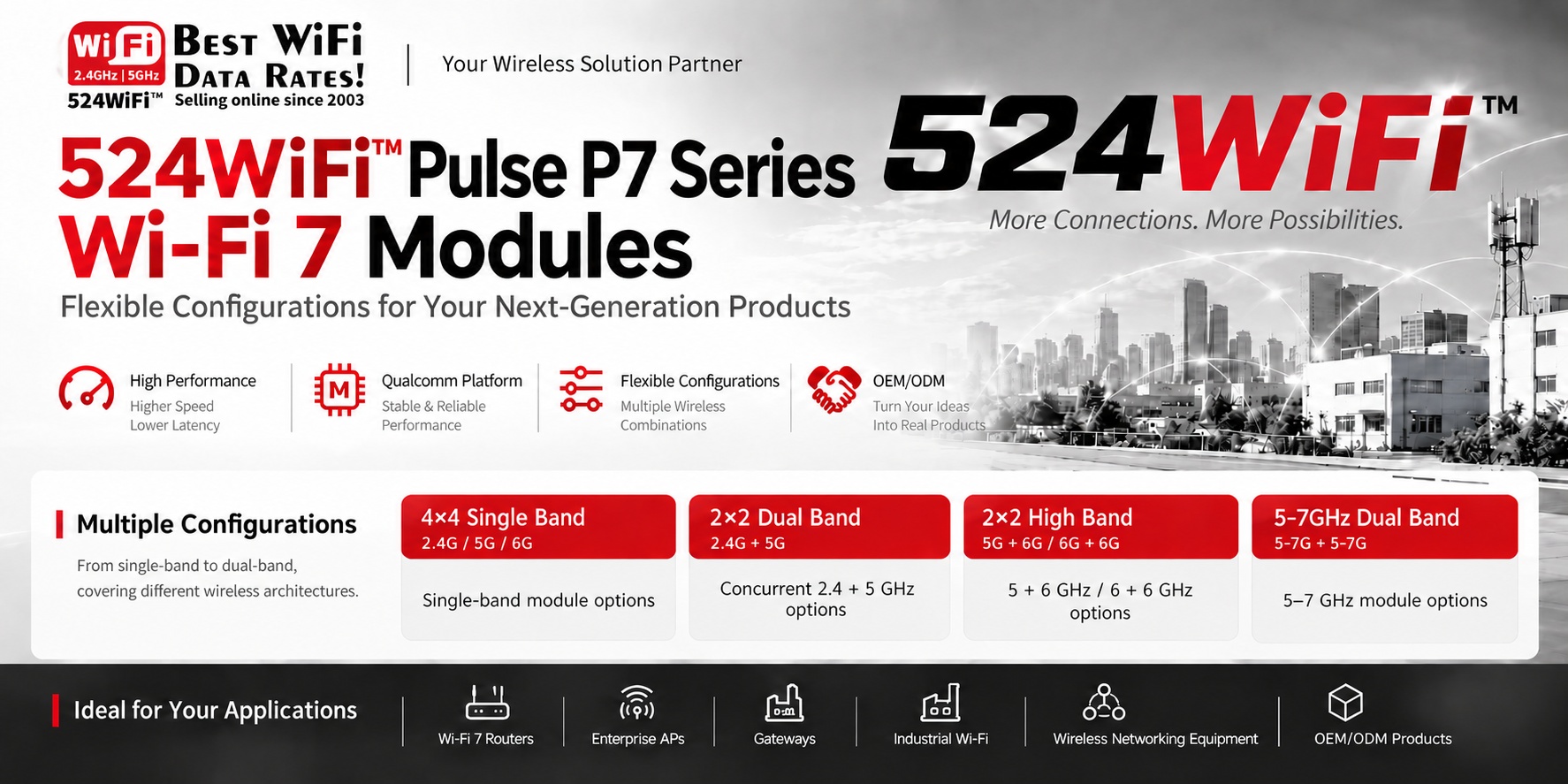
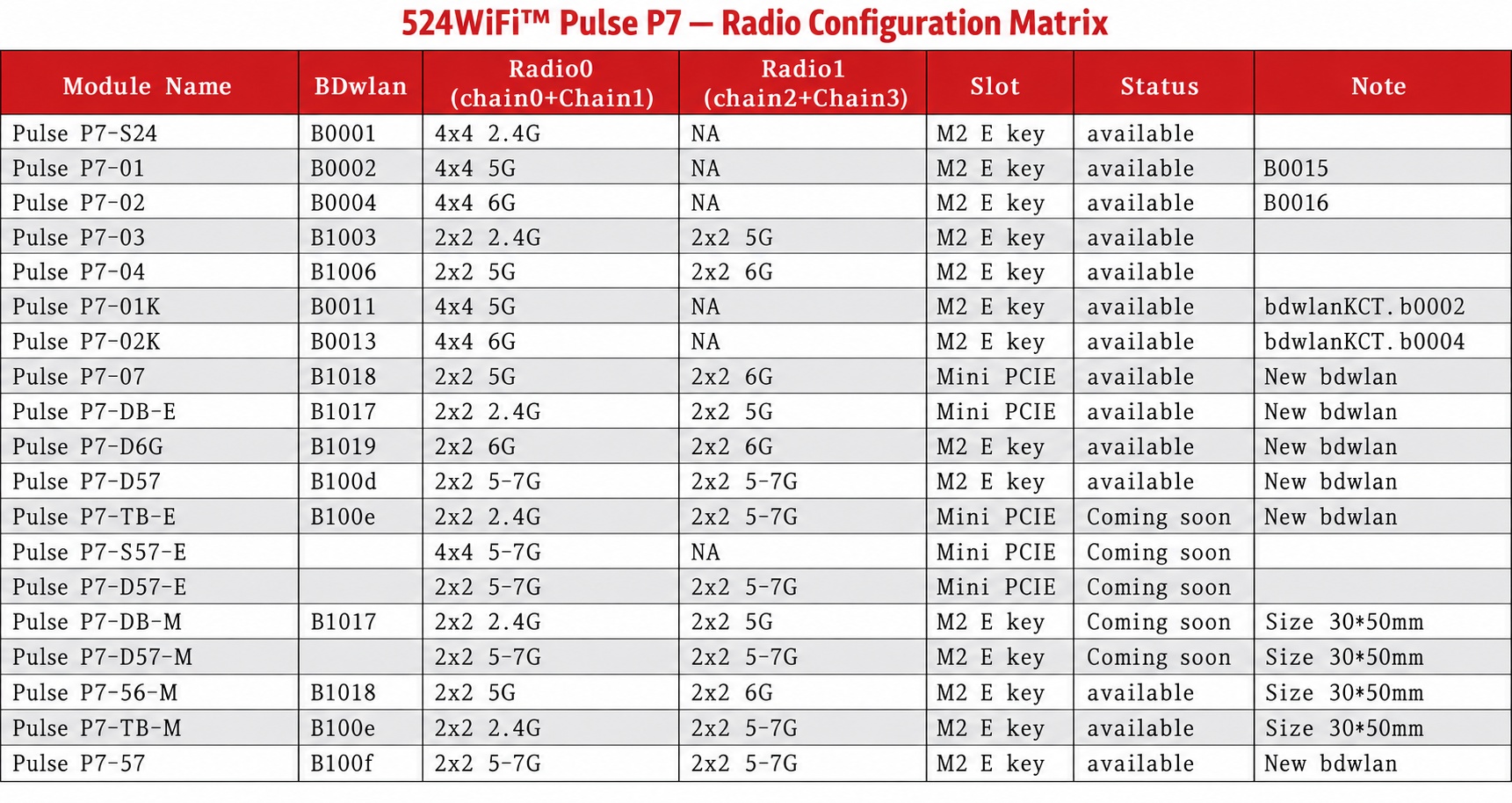
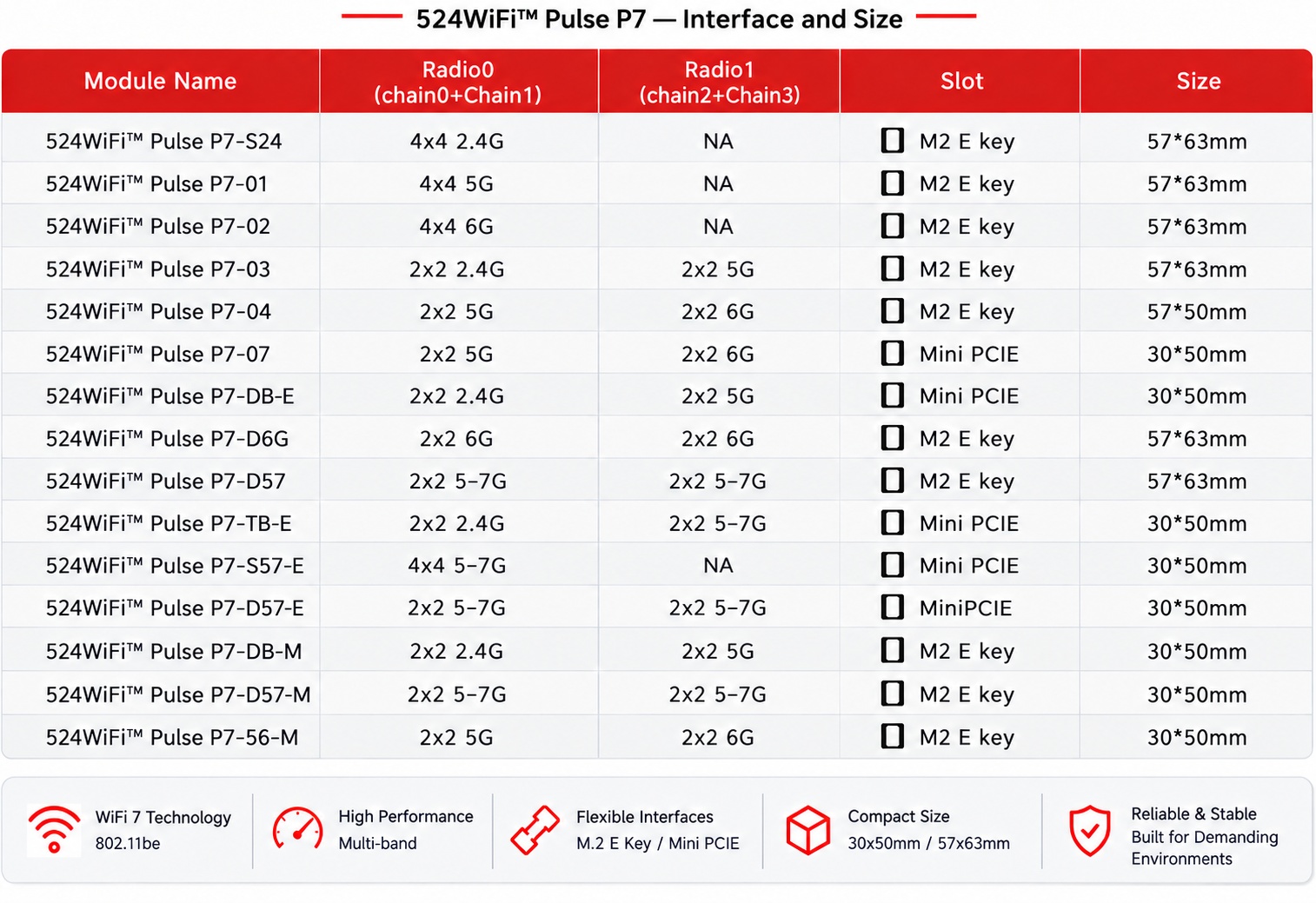
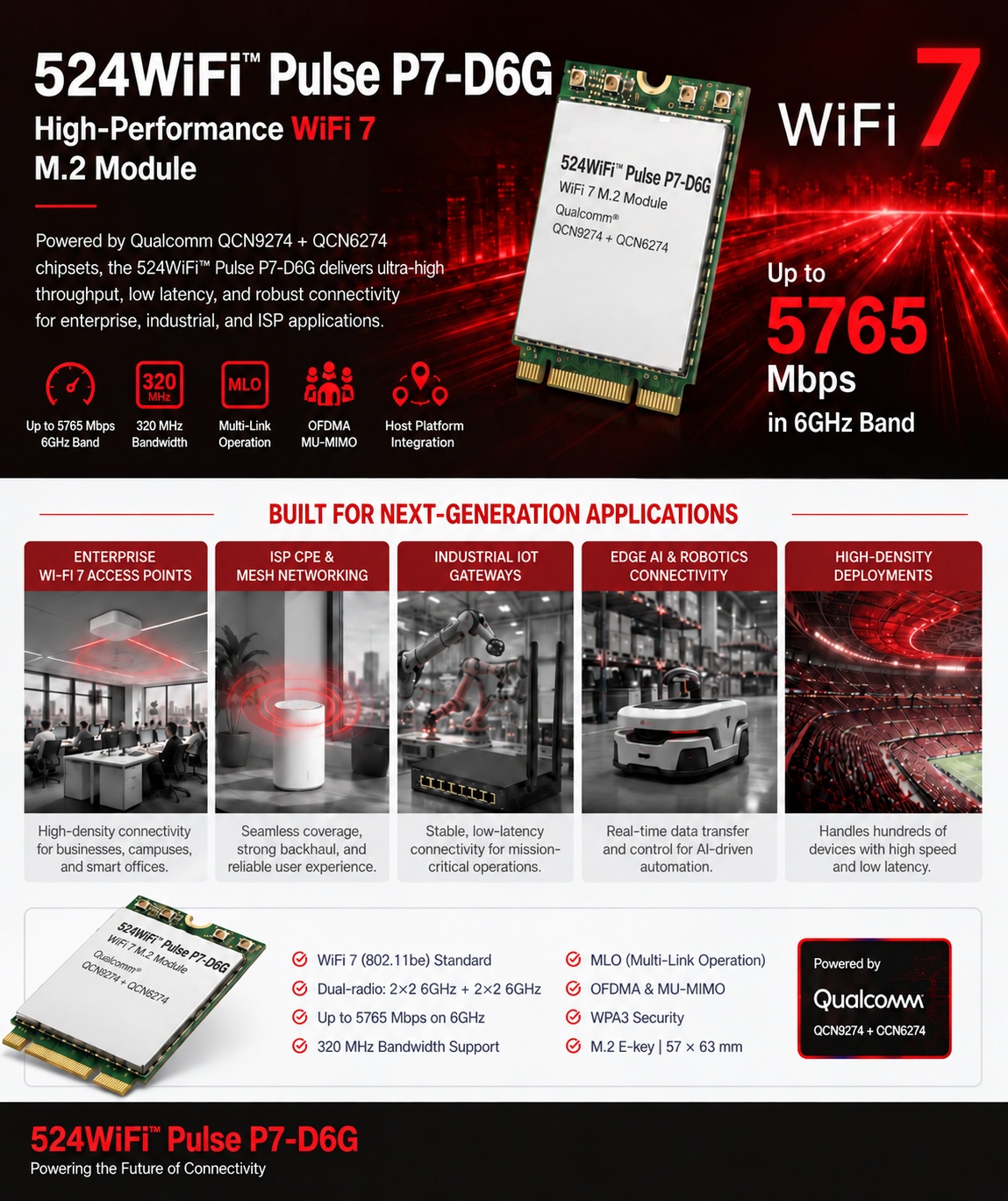
Our catalogue includes Pulse P7-01 Pro Plus (4×4, 5 GHz), P7-02 (4×4, 6 GHz), P7-03 (2×2 dual-band, 2.4 + 5 GHz), P7-04 (2×2 dual-band, 5 + 6 GHz) and P7-07 (5 + 6 GHz, Mini PCIe). The architecture matrices also cover variants for project evaluation; confirm the selected radio profile, board data, dimensions and host software when specifying a system.
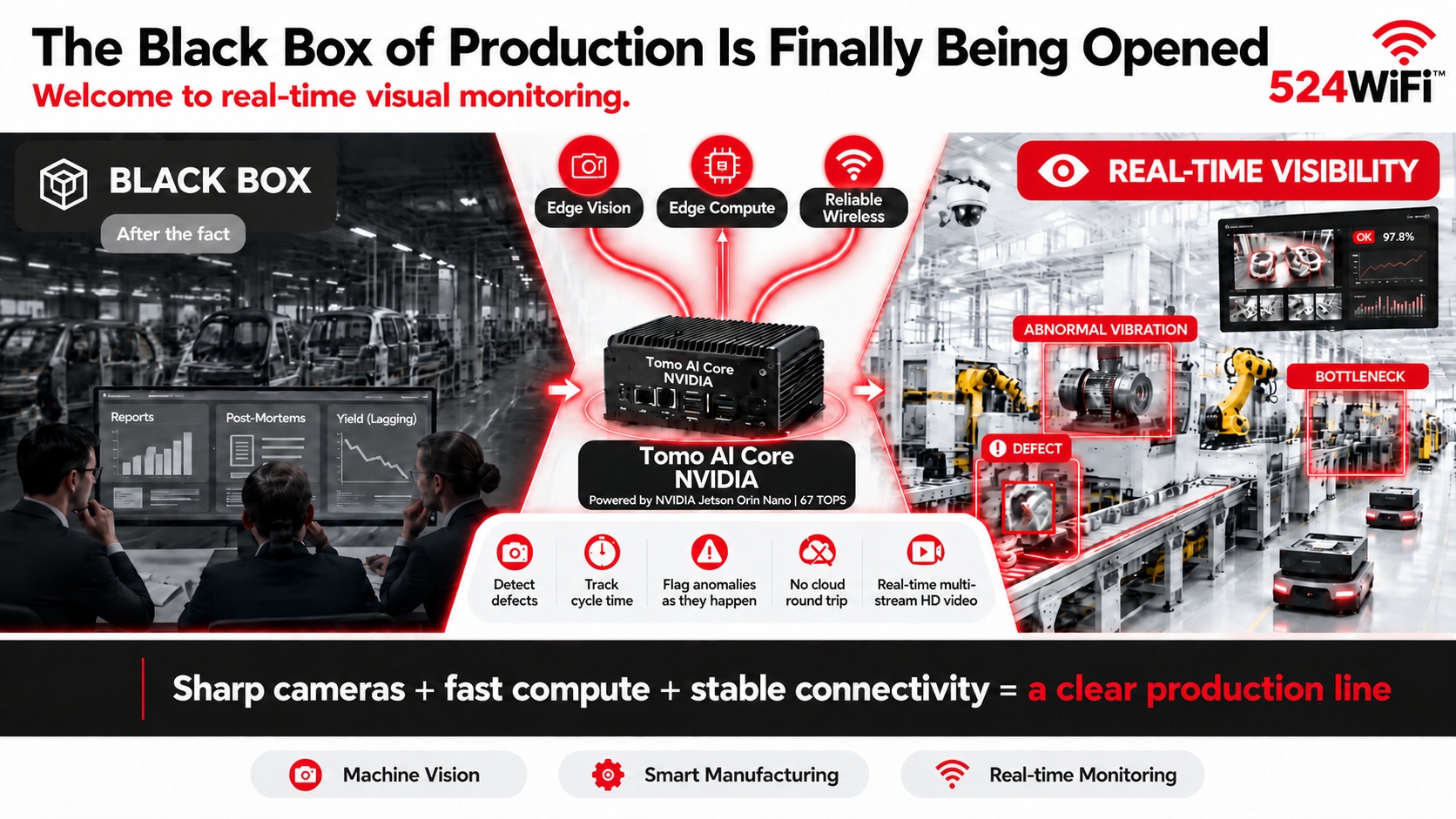
Real-time visual monitoring turns production data into immediate operational context instead of after-the-fact reports.
Edge processing keeps inference close to cameras and production equipment for faster response.
An integrated compute and wireless platform simplifies deployment of industrial vision applications.
For decades, the factory floor has been a black box. Managers could only reconstruct what went wrong after the fact — from yield reports, from post-mortems, from a supervisor’s memory of “something felt off.” When did that motor start vibrating abnormally? Which station is quietly becoming the bottleneck? At what exact second did that defective part slip through inspection? Manual checks and lagging data simply can’t answer these questions in time.
That black box is finally being opened.
Three technologies maturing together are making it possible:
📷 Edge vision — high-resolution industrial cameras + edge AI let equipment actually “see” the line: detecting defects, tracking cycle time, flagging anomalies as they happen ⚡ Edge compute — platforms like NVIDIA Jetson Orin Nano (e.g. our Tomo AI Core NVIDIA, 67 TOPS) run inference locally on the line, no round trip to the cloud, no waiting 📡 Reliable wireless — multi-stream HD video demands far more than standard WiFi can deliver; only WiFi 7’s high throughput, low latency, and multi-stream concurrency turn “real-time” into something real, instead of a buffering spinner
None of the three works alone. Sharp cameras, fast compute, and stable connectivity together are what turn a production line into a pane of clear glass — instead of a black box you can only guess at.
524WiFi™ supplies industrial-grade WiFi 6/7 modules and routerboards + custom Jetson carrier board solutions, purpose-built for multi-camera setups, high-density robot/AGV fleets, and machine vision inspection environments.
If you’re building a production visualization or monitoring project and need a wireless + edge-compute hardware partner, let’s talk: [email protected]
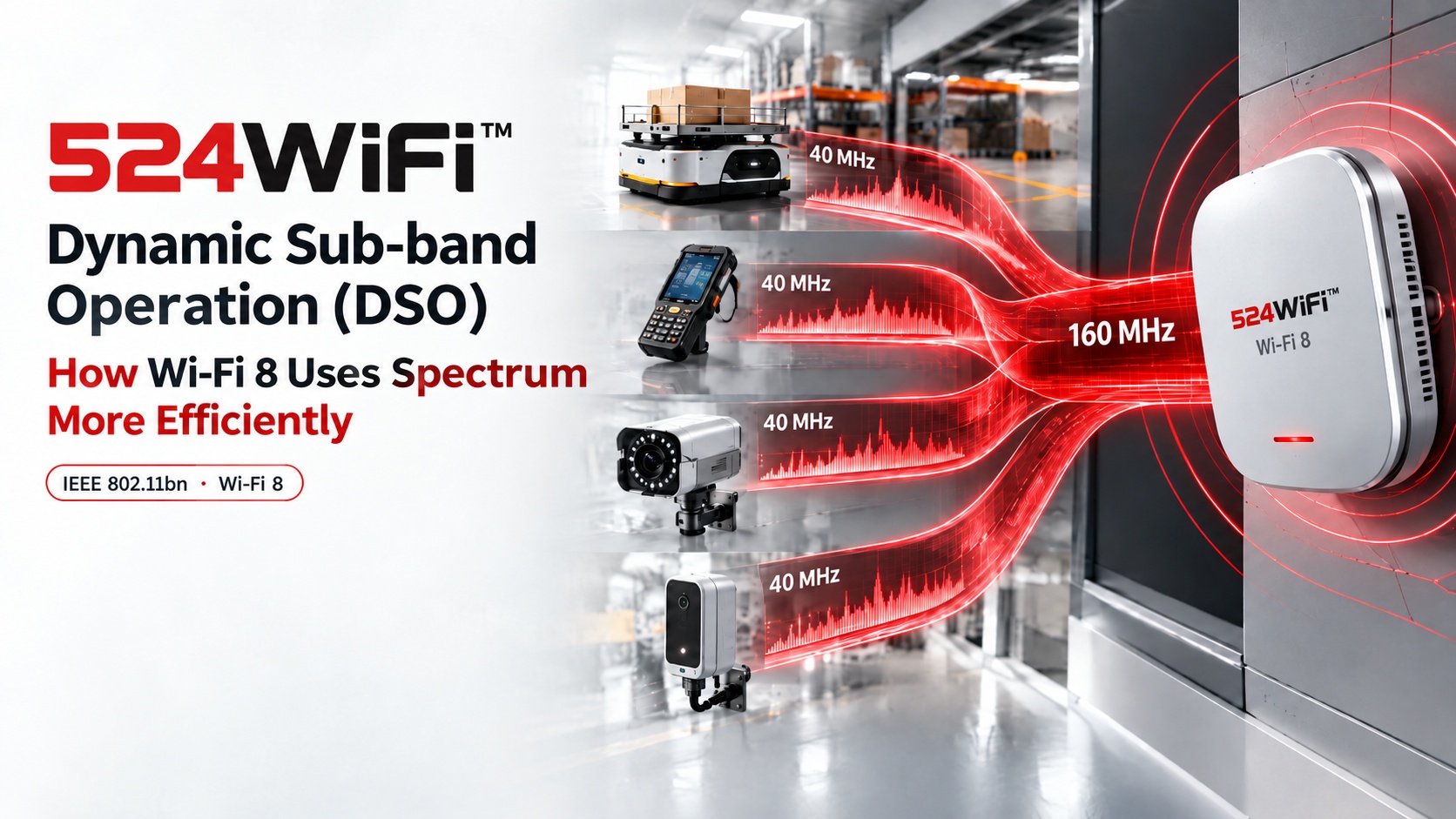
DSO addresses capability mismatches between wide-channel access points and narrower-channel clients.
More flexible sub-band allocation can preserve capacity instead of forcing the network to the lowest common denominator.
The feature matters most in mixed fleets and dense industrial networks with varied client radios.
What is DSO, and why does it exist?
IEEE 802.11bn (Wi-Fi 8) introduces Dynamic Sub-band Operation (DSO) — sometimes called Dynamic Sub-Channel Operation — to solve a very concrete problem: the capability gap between access points and client devices. A modern AP chipset can run 160 MHz or even 320 MHz channels. Most connected stations — sensors, cameras, handheld scanners, mobile robots — only support 20 MHz or 40 MHz. Under Wi-Fi 6/7 rules, once an AP grants a TXOP (transmit opportunity) to a narrow-band station, the rest of that wide channel sits idle for the whole transmission window. A 160 MHz AP serving a 40 MHz station wastes 120 MHz on every single TXOP.
DSO fixes this at the MAC layer. Instead of allocating the full wide channel to one narrow-band station, the AP schedules multiple stations onto different sub-channels within the same TXOP, using an ICF/ICR (Intra-TXOP Control Frame / Response) exchange to coordinate who transmits where before data starts flowing. Four 40 MHz stations can now share a single 160 MHz TXOP concurrently instead of taking four separate turns.
How this changes AP/module design
For hardware teams building on Qualcomm Wi-Fi 7/8 platforms (IPQ9574, IPQ5424, QCN9274-class silicon), DSO isn’t just a MAC firmware feature — it changes how you think about channel width provisioning. Wide-channel APs stop being “wasted” on mixed-capability deployments; the same 320 MHz radio design that used to only pay off with all-320 MHz clients now scales efficiency gracefully down to 20 MHz legacy devices in the same BSS.
DSO vs. the Wi-Fi 7 alternative (static OFDMA/channel bonding only)
Wi-Fi 7 already gave us Multi-Link Operation and preamble puncturing, but scheduling flexibility within one TXOP for mixed-bandwidth clients wasn’t part of the toolkit. DSO is a Wi-Fi 8-specific MAC mechanism that works alongside Non-Primary Channel Access (NPCA) — where a station can move off a busy primary channel — to squeeze real throughput out of dense, mixed-device networks rather than relying purely on wider channels or more spectrum.
Applications this enables
Dense AMR/AGV warehouse fleets where robots, handheld scanners, and fixed cameras all share one AP with very different bandwidth capabilities
Any industrial site consolidating mixed-generation devices onto one Wi-Fi 8 AP instead of running parallel 6/7/8 networks
Where we’re headed
We’re preparing our Wi-Fi 8 routerboard platform now, building on the same IPQ9574/IPQ5424-class hardware lineage we already ship in 524WiFi™ Pulse B9574-4M2 Pro Plus and 524WiFi™ Pulse B5424-4×4 Pro Plus. If DSO-level MAC efficiency matters for your next-gen industrial AP or robot connectivity design, happy to compare notes.
Frequency changes propagation and link budget, but the complete RF design determines real performance.
PtP links prioritize directional gain and interference rejection; PtMP networks prioritize controlled sector coverage.
MIMO, polarization, cable loss, connectors and mounting must be engineered as one antenna system.
Choosing Between 2.4GHz, 5GHz and 6GHz Antennas: A PtP/PtMP Design Guide
When designing a wireless link, it’s tempting to simplify antenna selection down to:
Pick the right connector → pick the highest-gain antenna → connect it to the radio.
For industrial wireless, point-to-point (PtP), and point-to-multipoint (PtMP) deployments, that approach often produces disappointing real-world results.
What actually determines link performance is a combination of frequency, antenna gain, radiation pattern, polarization, bandwidth, cable loss, mounting position, and the physical environment. This becomes especially clear when comparing 2.4GHz, 5GHz and 6GHz side by side.
Why Frequency Changes the Whole Design Approach
Higher frequency means shorter wavelength:
Band Approx. Wavelength Typical Role 2.4GHz ~12.5 cm Long-range coverage, better penetration 5GHz ~6 cm Balance of capacity and range 6GHz ~5 cm High capacity, cleaner spectrum
At the same distance under otherwise comparable conditions, higher frequencies suffer greater free-space path loss: 5GHz has roughly 6.4 dB more path loss than 2.4GHz, and 6GHz has roughly 8 dB more than 2.4GHz. The gap between 5GHz and 6GHz, however, is only about 1.6 dB.
So the common claim that “6GHz doesn’t go far” is an oversimplification. The better engineering question is:
What link budget, antenna gain, channel width, and propagation environment does this specific application actually require?
2.4GHz: When Coverage Matters More Than Capacity
2.4GHz has the longest wavelength of the three bands, which gives it an edge when the RF path includes obstacles, vegetation, walls, or other obstructions — and it can deliver better coverage at a given transmit power than higher bands.
The trade-off is that 2.4GHz spectrum is crowded: Bluetooth, legacy WiFi, IoT devices, and other systems all compete for the same limited channel space. In PtMP deployments, this matters because a sector serving multiple clients is effectively sharing airtime across all of them.
2.4GHz tends to make sense when coverage matters more than peak throughput, when the path has obstacles, when clients are spread far apart, in rural or low-congestion environments, or for lower-bandwidth industrial telemetry/IoT applications. But for a high-capacity PtP backhaul, 2.4GHz is usually not the first choice.
5GHz: The Practical Workhorse for PtP and PtMP
For most outdoor wireless networks, 5GHz strikes a useful balance between propagation and capacity: more usable spectrum, wider channel options, higher potential throughput, more practical directional antenna designs, and better support for high-capacity PtP/PtMP links. The trade-off is greater path loss and generally weaker penetration than 2.4GHz.
This is why 5GHz remains widely used for wireless backhaul, WISP networks, building-to-building links, and industrial PtP/PtMP deployments. For PtP, directional options include parabolic dishes, panel antennas, horn antennas, or high-gain directional arrays — but the goal isn’t simply “more dBi.” It’s a better link budget and stronger interference rejection.
6GHz: More Capacity, More Demanding RF Design
6GHz opens up substantially more spectrum for WiFi 6E and WiFi 7 systems — more spectrum means wider channels and potentially higher capacity. But it also demands more careful RF design: the shorter wavelength means somewhat higher path loss than 5GHz, and building materials or obstructions can have a stronger impact.
That said, the real-world gap between 5GHz and 6GHz is often overstated — free-space propagation difference is typically only around 1–2 dB. So for a clear, line-of-sight outdoor PtP link, the right question isn’t “can 6GHz reach far enough?” It’s:
“Can my antenna and link budget deliver the required SNR and throughput at the target distance?”
Don’t Choose an Antenna by dBi Alone
A 20 dBi antenna is not automatically better than a 12 dBi antenna. Antenna gain describes how tightly RF energy is concentrated in space — higher gain usually means a narrower beam.
PtP: a narrow, high-gain beam is exactly what you want between two fixed endpoints.
PtMP: the base station needs to cover a defined sector, not a single point — so beamwidth, front-to-back ratio, side-lobe suppression, and polarization performance matter just as much as peak gain. An excessively narrow, ultra-high-gain antenna can actually be the wrong choice when clients are spread across a wide area.
Polarization and MIMO: Antenna Ports Can’t Be Designed in Isolation
Modern WiFi radios use multiple spatial streams. For a 2×2 radio, the antenna system needs coordinated polarization, port isolation, impedance matching, radiation characteristics, and spatial separation — poor isolation between elements increases coupling and degrades MIMO performance. This matters most with compact integrated antennas or multiple external antennas mounted close together. Efficiency matters too: realized gain depends on both directivity and efficiency, not the headline gain number alone.
PtP vs. PtMP: Two Different Design Priorities
PtP prioritizes link budget: distance → path loss → antenna gain → SNR → modulation → throughput. A high-gain directional antenna delivers higher received signal, stronger interference rejection, a narrower beam, and better spatial reuse — which is why 5GHz or 6GHz directional systems are attractive with a clear line of sight.
PtMP prioritizes coverage and capacity: the base station must serve multiple remote stations at once, so the antenna pattern becomes critical — sector width (60°/90°/120°), client distribution, distance variation, elevation differences, co-channel interference, polarization, and airtime utilization all come into play.
Antenna Selection in Practice: The IPQ 6010 524WiFi™ Pulse B6010-2×2-SFP Pro Plus Platform
Antenna selection becomes part of system design once you’re building around a specific platform.
The 524WiFi™ Pulse B6010-2×2-SFP Pro Plus is built on Qualcomm’s IPQ6010 platform, supporting dual-band WiFi 6 with 2×2 at 2.4GHz and 2×2 at 5GHz, plus Gigabit Ethernet, PoE support, and M.2 expansion — making it a solid foundation for industrial WiFi, outdoor wireless, and custom networking equipment. Three example configurations:
Example 1 — Industrial PtP bridge: Two factories need a wireless link. A 524WiFi™ Pulse B6010-2×2-SFP Pro Plus + 5GHz directional antenna focuses energy toward the remote site, with 5GHz balancing capacity and propagation. Design priorities: high gain, narrow beam, good polarization isolation, and a clear line of sight.
Example 2 — Industrial PtMP network: One site needs to connect several remote buildings. Instead of a narrow directional antenna, a 524WiFi™ Pulse B6010-2×2-SFP Pro Plus + 5GHz sector antenna is usually the better fit. The key question shifts from “how many dBi?” to “how wide does the sector need to be, and how much capacity does each client require?”
Example 3 — Mixed-frequency network: Use 2.4GHz for wider-area, lower-bandwidth devices, and 5GHz for PtP/PtMP backhaul and higher-capacity clients. This division of labor is often more practical than trying to solve every connectivity requirement with a single band.
For projects that need true concurrent tri-band operation rather than a switched implementation, the 524WiFi™ Pulse B5424-4×4 Pro Plus (built on Qualcomm’s IPQ5424 platform) runs 2.4GHz, 5GHz, and 6GHz as three independent, simultaneous radio chains, with up to 320MHz channel width on 6GHz — a step up from 524WiFi™ Pulse B6010-2×2-SFP Pro Plus for higher-capacity scenarios. This is a meaningfully different architecture from tri-band-switchable modules on the market, which operate on only one of the three bands at any given moment; the distinction is worth confirming during platform selection.
Six Things to Check Before Selecting an Antenna
Frequency range — Don’t just check “5GHz compatible.” Verify the antenna’s actual operating range against the radio’s supported channels; this matters even more for 6GHz designs given the wider spectrum span.
Antenna gain — Look at gain across the entire operating band, not just the peak advertised figure.
Radiation pattern — Narrow beam and high front-to-back ratio for PtP; controlled sector coverage and low side lobes for PtMP.
Polarization — Confirm the antenna supports the polarization configuration and isolation your MIMO system requires.
Cable loss — Often overlooked. If the antenna sits several meters from the radio, coax loss eats directly into the link budget — and this effect grows at higher frequencies. The power delivered at the radio is not the same as the power that actually reaches the antenna.
Connector and impedance — Check 50Ω system matching, connector type, cable type, adapter losses, and weatherproofing for outdoor installs. A good radio behind a poor RF chain still produces a poor wireless link.
The Antenna Is Part of the Radio System — Not an Accessory
For PtP and PtMP deployments, it helps to think of the entire RF chain as one system:
Radio → connector → cable → antenna → propagation environment → antenna → cable → connector → radio
— rather than the simpler “radio + antenna” mental model. As WiFi moves from 5GHz toward 6GHz and beyond, this system-level thinking only becomes more important.
The best antenna is never simply the one with the highest gain — it’s the one that delivers the right combination of frequency coverage, radiation pattern, polarization, efficiency, and link budget for the actual deployment. That’s why a platform like 524WiFi™ Pulse B6010-2×2-SFP Pro Plus is worth more than the sum of its WiFi module — it’s a starting point for a custom industrial AP, outdoor wireless bridge, or PtP/PtMP CPE.
If you’re evaluating antenna and RF platform selection for an industrial PtP/PtMP wireless project, reach out to [email protected] to discuss your application.
Wi-Fi 7 emphasizes link capacity through wide channels, 4K-QAM and Multi-Link Operation.
Wi-Fi 8 targets continuity across access points through SMD and coordinated network operation.
The right generation depends on whether the application prioritizes fixed high throughput or mobile reliability.
Wi-Fi 8 vs Wi-Fi 7: What Really Changes?
Every generation of Wi-Fi promises “faster, more reliable, more efficient.” Most of the time, that just means bigger numbers on a spec sheet. Wi-Fi 8 (IEEE 802.11bn) is different — it’s the first generation explicitly designed around reliability and continuity, not just peak throughput. For anyone building multi-AP environments — warehouses full of AMRs, ports, factory floors — that shift matters more than another jump in Mbps.
What Is Wi-Fi 8, and Why Does It Exist?
Wi-Fi 7 (802.11be) was a throughput and latency story: Multi-Link Operation (MLO), 320MHz channels, 4K-QAM. Wi-Fi 8 keeps that PHY-layer foundation but adds something industrial users have been asking for since the first multi-AP AMR deployment: continuity across the coordinated network as a device moves across access points.
The headline feature is Single Mobility Domain (SMD) — a framework where multiple APs behave as one logical network from the client’s point of view. Instead of a robot or handheld scanner disassociating from AP-A and re-authenticating with AP-B, SMD is designed to make that transition invisible: no re-auth handshake, no dropped session, no packet-loss spike at the handoff point.
Wi-Fi 8 also formalizes Multi-AP Coordination (MAC) for interference management and pushes further on deterministic latency for time-sensitive traffic — both aimed less at “how fast” and more at “how consistent.”
How This Changes the Multi-Robot Network Problem
A manufacturer-reported 10-hop Wi-Fi 6 mesh test showed near-zero attenuation and a sustained 400Mbps — solid mesh performance. But mesh and multi-AP roaming are two different problems. Throughput across hops doesn’t tell you what happens in the 50–150ms window when a device actually switches APs — and in a warehouse with dozens of AMRs on the same floor, that handoff window is where control-link glitches and localization errors happen.
Wi-Fi 7’s MLO already reduces link disruption by keeping multiple radio links active in parallel. Wi-Fi 8’s SMD goes a layer further: it targets the roaming event itself, not just the link redundancy around it. For fleets doing continuous SLAM and real-time motion control, that’s the difference between “fast Wi-Fi” and “Wi-Fi designed for continuous mobility.”
Wi-Fi 8 vs Wi-Fi 7: The Practical Contrast
Wi-Fi 7 = maximize throughput and reduce latency on a single link (320MHz channels, 4K-QAM, MLO across bands)
Wi-Fi 8 = maximize continuity across a network of APs (SMD, multi-AP coordination, deterministic handoff)
They’re not competing generations so much as sequential layers: Wi-Fi 7 solved “how much data, how fast,” Wi-Fi 8 is solving “what happens when the client keeps moving.” For fixed-location industrial gear, Wi-Fi 7 already covers most needs. For anything mobile — AMRs, AGVs, tracked assets, handheld scanners — Wi-Fi 8’s roaming model is the more relevant upgrade.
Where This Applies
Warehouse AMR/AGV fleets: multi-AP floors where dozens of robots roam continuously between zones
Port and yard operations: long, multi-AP corridors where vehicles and cranes move across cell boundaries constantly
Mining and tunnel environments: point-to-point roaming where any re-auth gap means a control-link blackout, not just a slow download
Mobile industrial vision: multi-camera inspection carts that can’t tolerate a frame drop mid-handoff
Where We’re Positioned
524WiFi™ are preparing our Wi-Fi 8 routerboard line now, building on the same IPQ/QCN industrial platform architecture behind our current Wi-Fi 7 boards (524WiFi™ Pulse B9574-4M2 Pro Plus, 524WiFi™ Pulse B5424-4×4 Pro Plus) and Wi-Fi 6 roaming series (524WiFi™ Pulse R6 roaming series). If you’re evaluating multi-AP roaming for a robotics, port, or industrial mobility deployment — or want to talk through where Wi-Fi 7 is still the right call versus waiting on Wi-Fi 8 — reach out [email protected].
Wi-Fi 8 shifts the design target from peak speed toward reliable performance in dense and mobile networks.
Single Mobility Domain and Multi-AP Coordination directly address industrial roaming and interference.
Robotics, machine vision and edge AI are natural use cases for a reliability-first wireless architecture.
Wi-Fi 8 Explained: Features, Benefits and Applications
Wi-Fi 7 (IEEE 802.11be) is still rolling out across industrial and enterprise deployments, but the next standard is already taking shape: Wi-Fi 8 (IEEE 802.11bn). Unlike previous generations, which chased bigger peak throughput numbers, Wi-Fi 8’s headline goal is different — guaranteed reliability and consistent latency, even in dense, interference-heavy, or mobile environments. For anyone building AMR fleets, industrial vision networks, or edge AI devices that depend on a wireless link, that shift matters more than another “Gbps” milestone.
What Is Wi-Fi 8, and Why Does It Matter?
Wi-Fi 8 is being developed under the banner of Ultra High Reliability (UHR). Instead of optimizing purely for maximum data rate, the standard targets:
Deterministic, low-latency performance under real-world conditions (congestion, interference, mobility)
Seamless multi-AP roaming without re-authentication delays
Coordinated multi-AP operation, where multiple access points share scheduling and spectrum decisions instead of acting independently
Backward compatibility with Wi-Fi 6/6E/7 devices, easing migration
For industrial and robotics use cases, this reliability-first design directly addresses the pain points that throughput-focused standards never fully solved: a robot moving between access points, a camera feed that can’t tolerate a stall, or a control link that needs bounded worst-case latency rather than a high average speed.
The Feature Engineers Should Actually Care About: Single Mobility Domain (SMD)
One of the most relevant Wi-Fi 8 capabilities for multi-robot environments is Single Mobility Domain (SMD) — a mechanism that lets a client roam across multiple APs within the same logical domain without dropping the session or re-authenticating. In a warehouse with dozens of AMRs crossing AP coverage cells continuously, every re-authentication handshake is a moment of packet loss and control-link jitter. SMD is designed to remove that gap almost entirely, which is exactly the kind of improvement that turns “mostly reliable” wireless into “control-loop reliable” wireless.
This is where Wi-Fi 8 stops being a marketing number and starts being a systems-engineering decision.
How Wi-Fi 8 Fits Into an Industrial Wireless + Edge AI Stack
At 524WiFi™, our current Wi-Fi 7 platforms — including the 524WiFi™ Pulse B9574-4M2 Pro Plus (IPQ9574-based flagship routerboard) and the 524WiFi™ Pulse B5424-4×4 Pro Plus (IPQ5424-based tri-band platform) — already push toward the low-latency, high-density direction Wi-Fi 8 formalizes. We’re actively preparing our next-generation Wi-Fi 8 routerboards, built to carry forward:
Multi-radio concurrent operation (as validated on 524WiFi™ Pulse B5424-4×4 Pro Plus / 524WiFi™ Pulse B9574-2×2-SFP Pro Plus)
High-density AP deployment for warehouses, ports, and factory floors
Compatibility with edge AI hardware like our Jetson Orin Nano–based AI Box (Tomo AI Core NVIDIA), where the wireless module and the compute module are designed together rather than bolted on afterward
Pairing UHR-class wireless with an edge AI compute platform means the camera, the inference engine, and the network no longer have to be sourced, qualified, and integrated separately — a meaningful advantage for teams that don’t want to build an in-house hardware team just to get a robot or vision system talking reliably.
Best fit: bandwidth-hungry applications (multi-camera video)
Wi-Fi 8 (802.11bn, in development):
Primary goal: guaranteed reliability, low latency
Roaming: Single Mobility Domain — seamless handoff
AP coordination: coordinated multi-AP scheduling
Best fit: latency-sensitive, mobile, high-density deployments
Wi-Fi 7 isn’t going away — for multi-camera, high-resolution vision transmission, its wide channels and multi-link operation still matter. Wi-Fi 8 is best understood as the layer that makes mobility and density reliable on top of that bandwidth.
Applications This Unlocks
Warehouse and port AMR/AGV fleets — continuous roaming across dozens of APs without control-link interruption
Industrial vision inspection networks — stable multi-camera feeds even as APs handle many simultaneous high-bandwidth clients
Mining, tunnel, and campus environments — point-to-point and point-to-multipoint links where mobile assets cross multiple coverage cells
Edge AI robotics platforms — pairing UHR wireless with Jetson-class compute for a single integrated hardware layer, instead of separately sourced radio and compute modules
Where We Are Today
Wi-Fi 8 standardization is still in progress, with ratification expected later in the decade — but the direction is clear enough that hardware teams should be planning for it now, the same way early Wi-Fi 6E adopters got ahead of the 6GHz transition. We – 524WiFi™ – are already engineering toward this: our Wi-Fi 7 platforms are the foundation for our upcoming Wi-Fi 8 routerboards, and our Jetson-based edge AI hardware is being designed to pair with them from day one.
If you’re evaluating wireless infrastructure for a robotics, vision, or edge AI product roadmap and want to talk through where Wi-Fi 8 fits, reach out [email protected].
Welcome to 524wifi – home of the best WiFi & LTE 5G NR & Internet over Coax & GEPON Passive Optical networks! Certified by UK Joscar Hellios, from automotive for sample by VW group , telecomunications Nokia, for onlne Google certified … and tons of others big companies we have over 40 security clearances and certificates for to sale and for implement into USA and EU and globally.
There is no continent, where we would not have a satisfied customer! Yes, our modules works and we have already delivered our Wi-Fi modules even to Antarctica ! You can find our modules, for example, in wind turbines, drones, ships, trains (Norway, Czech SK and many more),public transportation comm systems, aircrafts, both civil, acrobatic and military… on land, on water and in the air. NASA has also ordered samples, so the next goal is to get them into the outer Space! 524WiFi Pro+ modules! Well if you do someting well for almost 25 years, you have lot of customers…..
With more than 24 years of experience in the Networking Industry, our partners as Wodaplug Quectel & SIMcom, Compex & Wallys communications and lot more. Wodaplug offers reliable solution for Ethernet Data over Coax (EOC), G EPON and 4G 5G LTE routers & backup units. Quectel leads market in LTE 5G 4G modules & IoT technologies. 524wifi is part of Google Customers Reviews program to assure customers satisfaction – Google Approved. Eshop owner is located in EU – CZ.
If that huge time period we developed ourselves as connecting bridge between modules and chips designers, drivers designers and practical users , industrial aplications
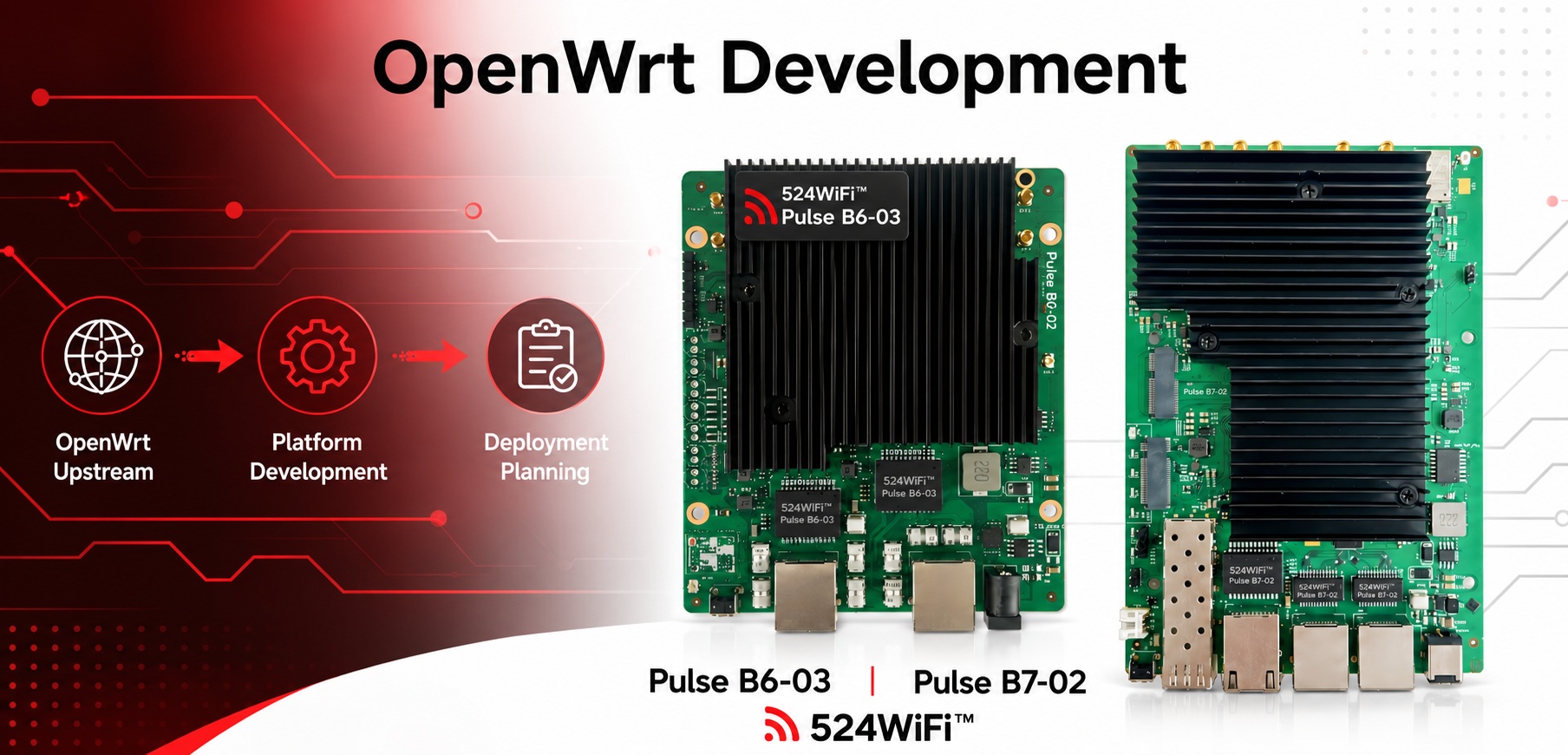
Start OpenWrt planning with chipset, kernel and upstream-support direction rather than a feature checklist.
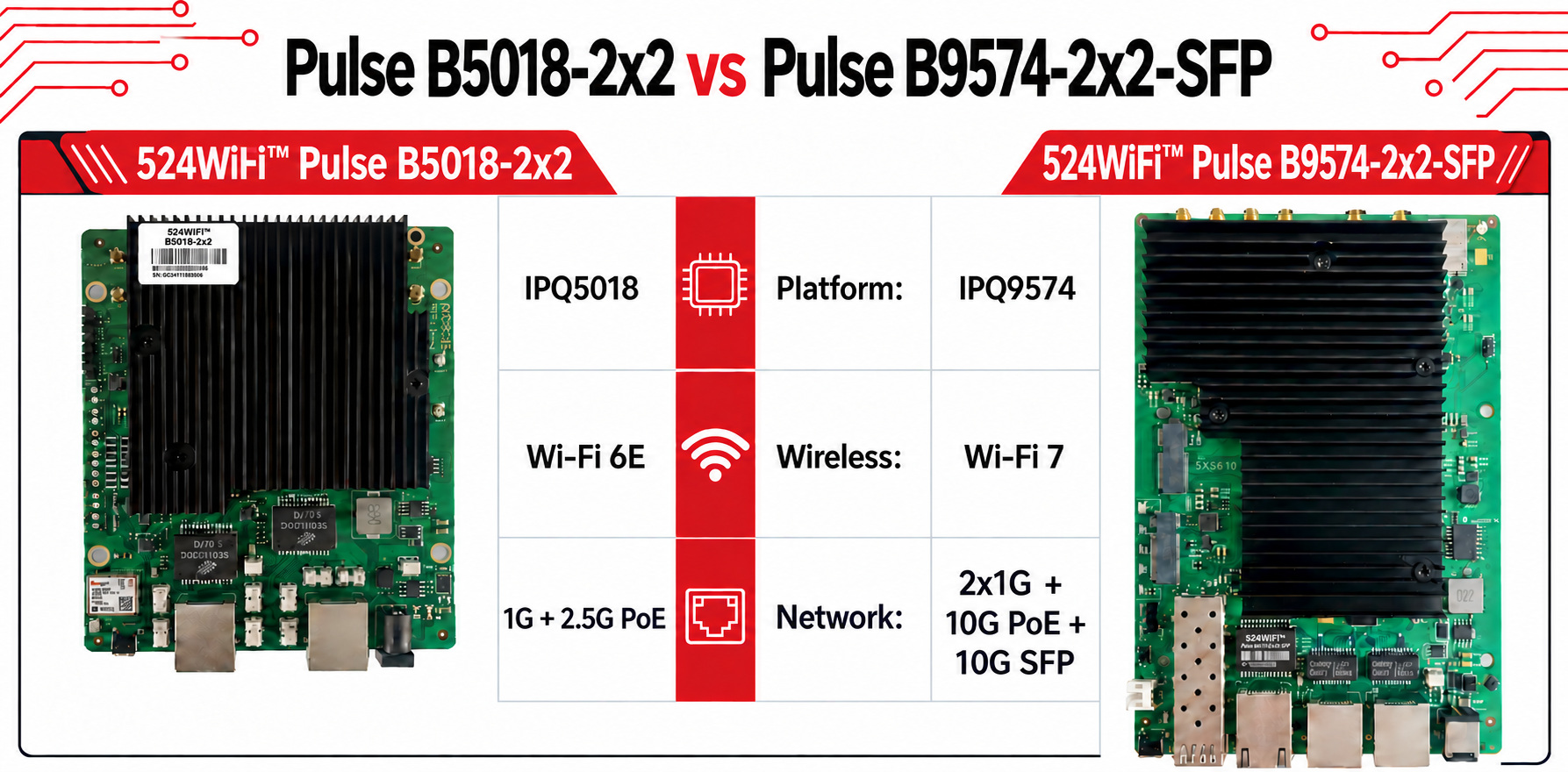
524WiFi™ Pulse B5018-2×2 Pro Plus provides an IPQ5018-based Wi-Fi 6/6E path with a public OpenWrt contribution.
524WiFi™ Pulse B9574-2×2-SFP Pro Plus provides a separate IPQ9574-based Wi-Fi 7 path for next-generation product planning.
When an industrial wireless project is evaluating OpenWrt, the most useful starting point is not a feature checklist. It is the direction of the platform path itself. For 524WiFi™ Pulse B5018-2×2 Pro Plus, the platform-specific OpenWrt contribution is here: https://github.com/openwrt/openwrt/pull/24910
This contribution adds 524WiFi™ Pulse B5018-2×2 Pro Plus support to the qualcommax/ipq50xx target and gives engineering teams a useful reference point for platform planning. For 524WiFi™ Pulse B9574-2×2-SFP Pro Plus, the current OpenWrt development line uses Linux 6.18. This gives Wi-Fi 7-oriented projects a separate planning track when teams are considering architecture, integration scope, and future software maintenance.
Hardware snapshot: 524WiFi™ Pulse B5018-2×2 Pro Plus is built on Qualcomm IPQ5018 with tri-band Wi-Fi 6/6E. 524WiFi™ Pulse B9574-2×2-SFP Pro Plus (2.4 + 5 + 6 GHz) uses Qualcomm IPQ9574 with tri-band Wi-Fi 7 and 10G network interfaces. See the comparison above for the exact public datasheet fields.
The practical comparison is less about declaring a winner. A Wi-Fi 6E-oriented 524WiFi™ Pulse B5018-2×2 Pro Plus path may suit a project that values an upstream review path today; a Wi-Fi 7-oriented 524WiFi™ Pulse B9574-2×2-SFP Pro Plus path may fit teams planning their next platform generation. In both cases, define radio requirements, lifecycle expectations, and validation
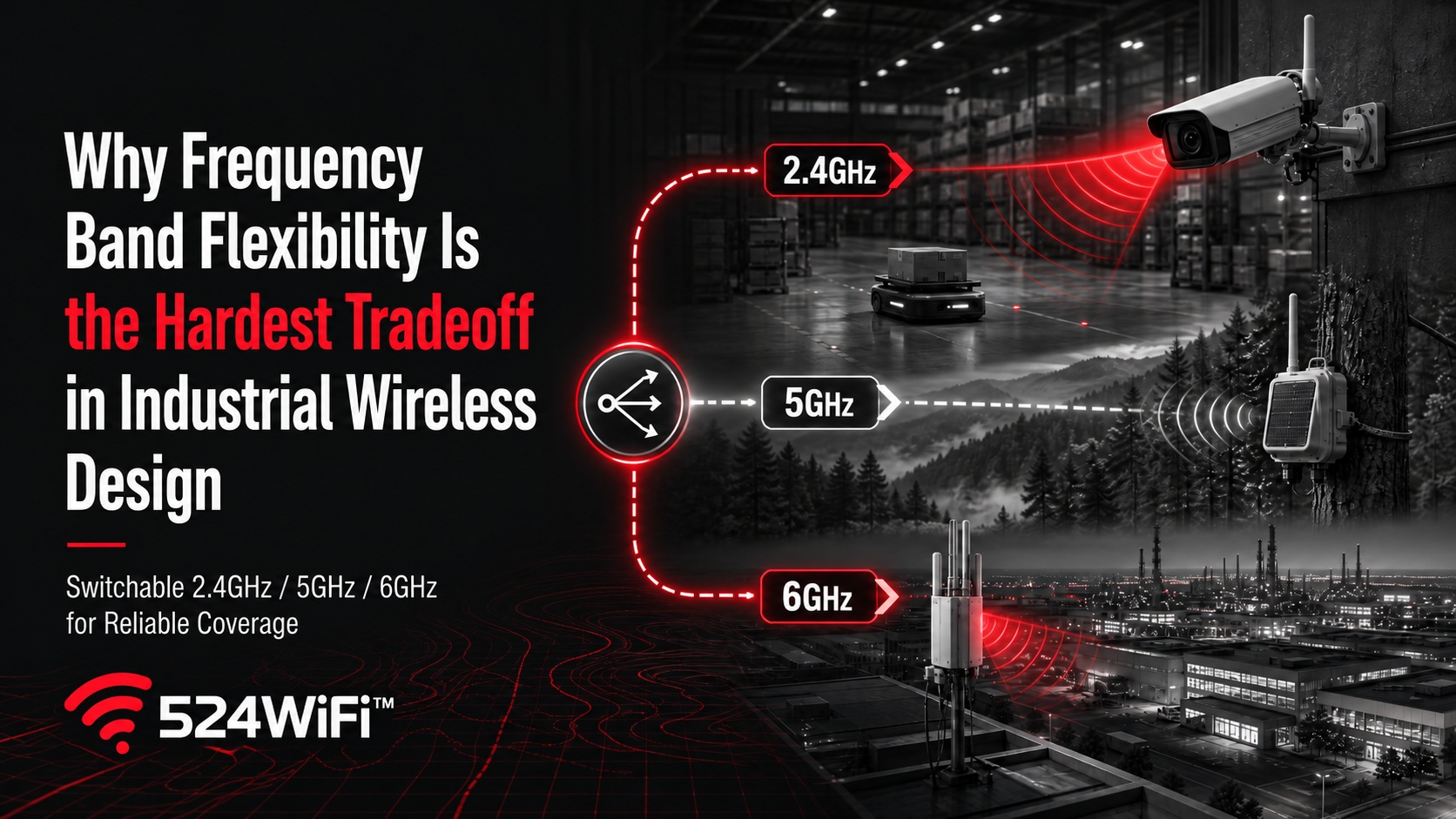
Band selection should follow propagation, interference and capacity requirements—not generation labels alone.
A switchable tri-band radio gives integrators one hardware platform that can be tuned to different RF environments.
Transmit power, MIMO design and the complete antenna chain remain essential to stable coverage.
Choppy security camera feeds. Hotel guests complaining about WiFi. Remote forest sensors dropping in and out. Large sites with stubborn dead zones. These issues show up in operations chats across industries almost every day. What’s strange is that many of these sites already run the “latest” WiFi gear — and the problems persist anyway. Is the hardware simply not good enough, or did we pick the wrong approach from the start?
The answer usually isn’t “how new is the equipment,” but “how clean is the spectrum, and how stable is the coverage.”
2.4GHz is congested almost everywhere — too many devices, too much interference, no way around it.
5GHz has limited penetration; thick walls, metal structures, and complex terrain all cause fast signal decay.
Most deployments still run on a single band. When that band gets jammed or congested, there’s no fallback — the system just has to tough it out.
In other words, the core issue isn’t a lack of bandwidth. It’s the lack of a clean path to begin with.
Put this principle into concrete scenarios and the conflict becomes obvious:
Security surveillance: HD and AI-driven analytics keep pushing bandwidth requirements higher — a single 4K stream can demand several times the bandwidth of a typical scenario. Yet many installations still connect through consumer-grade routers. Once interference or multiple concurrent streams hit, packet loss and lag become almost inevitable — and unlike video streaming services, surveillance footage has no buffer to absorb the hit, so the stutter happens in real time.
Hotel wireless: This is one of the most complained-about scenarios in the past couple of years. Guests rarely say “your RF planning is weak” — they say the WiFi keeps dropping, or the room signal is worse than the lobby’s. The commonly cited root cause is insufficient AP density — one AP covering eight to a dozen-plus rooms, leaving marginal signal at the far end. Worse, simply adding bandwidth doesn’t always fix it; many performance problems actually trace back to network design and band management.
Forest fire monitoring and remote-area coverage: The conflict here is more extreme — it’s not a lack of bandwidth, it’s often no usable network at all. Mountainous and forested areas typically lack stable public network coverage. When a fire breaks out, communication has to be established within minutes, and any band congestion or coverage gap can mean a delayed warning.
Large-site and commercial coverage: Whether it’s a campus, an industrial park, or a large commercial venue, the bigger the footprint, the more a single band’s limitations get magnified — signal can be solid in one corner and drop off entirely around the next.
These scenarios look completely different on the surface, but they share the same underlying problem: once the band in use gets “jammed,” the device has no alternate route.
A genuinely stable solution isn’t about chasing a higher theoretical throughput number — it’s about giving the network a fallback. When 2.4GHz is congested and 5GHz can’t penetrate far enough, is there a clean, open band it can switch to instead?
That’s exactly the value of tri-band switchable design: a single card covering 2.4GHz, 5GHz, and 6GHz, switching to whichever band is cleanest for the current environment, instead of sticking with a band that’s already jammed. It’s worth being precise here: this is “switchable,” not three bands running concurrently on different traffic at once. It solves the deployment problem of “always having a clean path available,” not a throughput-stacking problem.
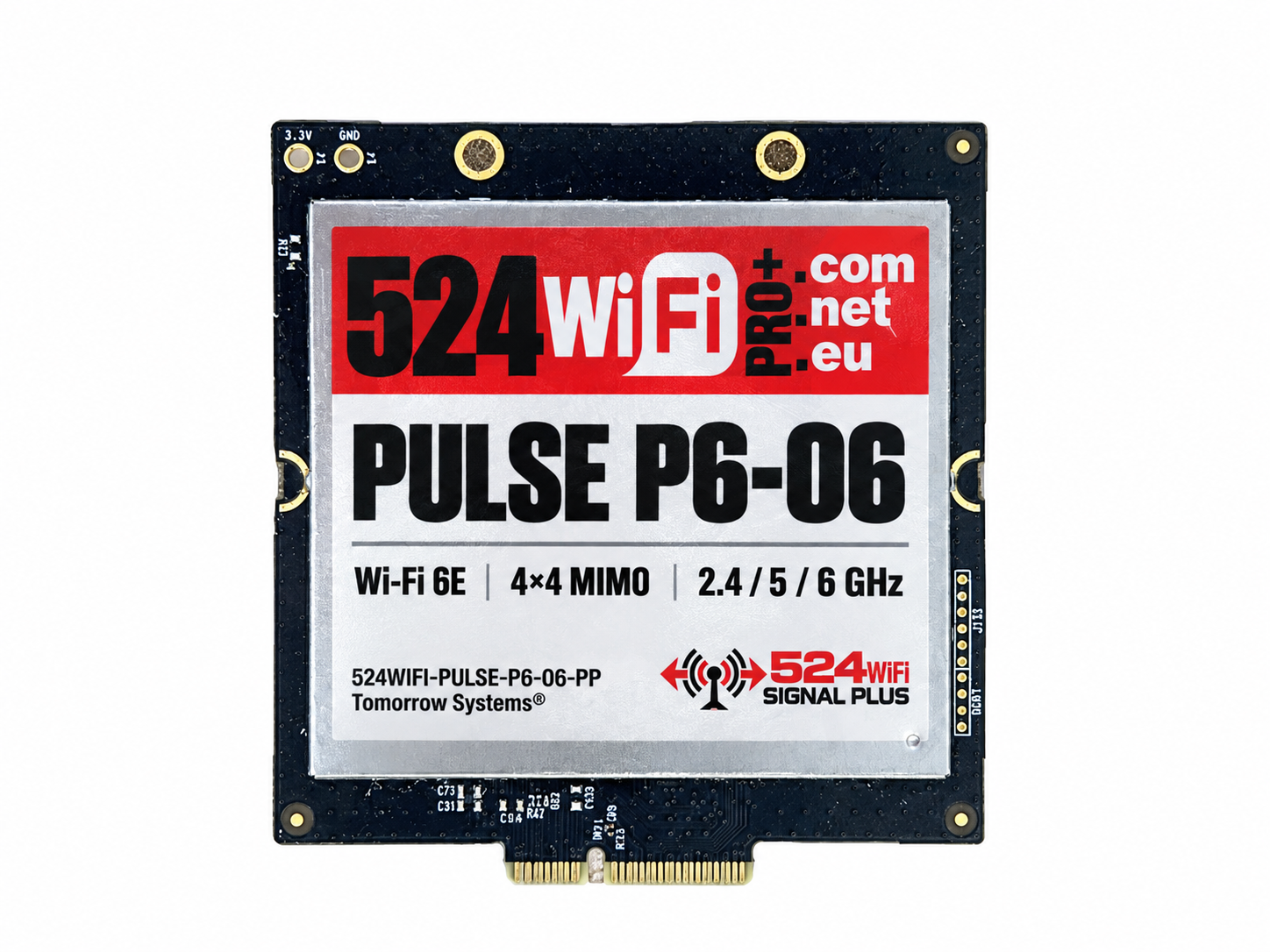
Take 524WiFi™ Pulse P6-06 Pro Plus as an example — a WiFi 6E (802.11ax) module built on the Qualcomm QCN9024 platform, using an M.2 E Key interface over PCIe 3.0, supporting switchable operation across 2.4GHz/5GHz/6GHz, with a 4T4R (4-spatial-stream) design, up to 23dBm per chain, and a theoretical rate of up to 4949Mbps.
524WiFi™ Pulse P6-06 Pro Plus
Mapped back to the scenarios above, here’s where that matters in practice:
Security surveillance: 6GHz is cleaner spectrum — in high-density camera deployments or environments with heavy WiFi interference, switching to it can cut packet loss and lag.
Hotel wireless: For the classic pain point of dense rooms and congested bands, there’s no need to deploy different band-specific hardware per floor or interference profile — one card switches as needed to cover multiple conditions.
Forest fire / remote areas: 23dBm transmit power combined with 4T4R spatial streams helps deliver a more stable coverage radius across open or complex terrain.
Large-site coverage: The ability to switch flexibly across three bands lets deployers tune each area to its actual interference conditions, instead of applying one fixed configuration everywhere.
Wireless network stability was never really about the numbers on a spec sheet — it’s about whether the system can keep finding a usable path in a real, complex, interference-heavy environment. Band-switching capability, transmit power, and multi-stream design all ultimately serve the same goal: keeping the network from failing you when it matters most.
If you’re evaluating wireless solutions for surveillance, hospitality, remote monitoring, or large-site coverage, reach out to talk through the details.