Posted on

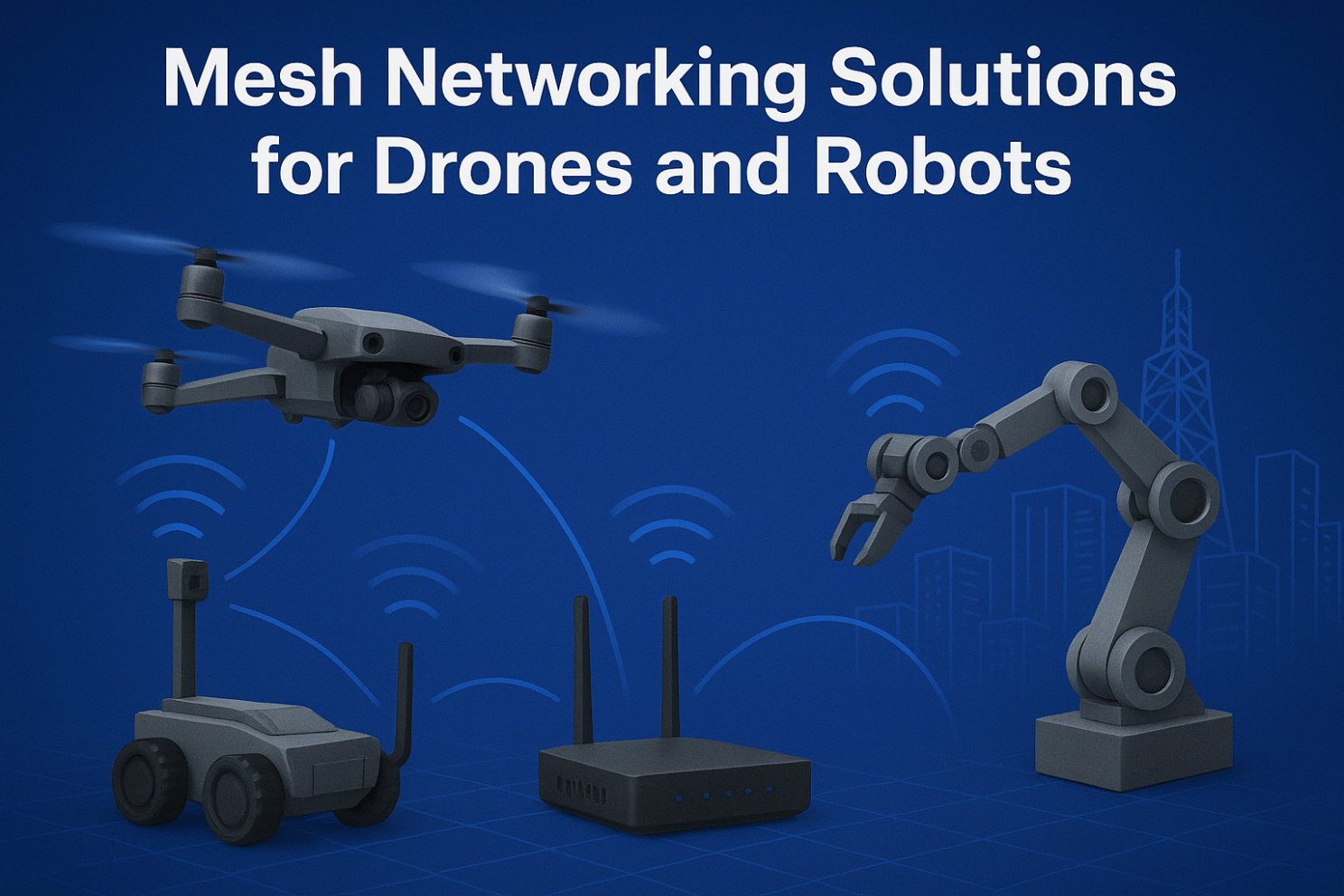
Mesh Networking Solutions for Drones and Robots

Mesh Networking Solutions for Drones and Robots

1. Introduction: Why Mesh for Drones and Robots?

Traditional wireless setups (AP + client) often fail in dynamic, mobile, and large-scale environments. Drones and robots require:

  • Low-latency links for real-time control
  • Resilient communication when nodes move or fail
  • Flexible scalability for adding new devices instantly

This is where Mesh networking shines — offering self-healing, self-configuring, and adaptive connectivity.


2. Mesh Networking for Drones

  • Formation Flying & Swarm Operations Drones in formation need constant synchronization of GPS, sensor, and video feeds. Mesh ensures each drone acts as a node, maintaining real-time links.
  • Emergency Response & Disaster Recovery In areas without cellular coverage, drones can instantly deploy a Mesh network, relaying data back to the command center for faster rescue operations.
  • Beyond Line-of-Sight Missions Mesh allows drones to extend their communication range via relays, enabling operators to control them far beyond visual range.

3. Mesh Networking for Robots

  • Smart Warehouses & Industrial Automation Robots need to stay connected across large spaces with moving inventory. Mesh avoids single-point AP failures and supports seamless roaming.
  • Security & Patrol Robots Continuous connectivity is essential for live video streaming and real-time threat detection. Mesh keeps robots online without service drops.
  • Collaborative Swarm Robots Multiple robots can share sensory data, distribute tasks, and adapt dynamically using Mesh as their backbone.

4. Key Technical Aspects of Drone & Robot Mesh

  • Dynamic Routing Protocols (OLSR, B.A.T.M.A.N, HWMP) ensure optimal paths in mobile networks.
  • Frequency Bands:
  • 2.4 GHz for longer range
  • 5 GHz / 6 GHz for high throughput
  • Wi-Fi 6/7 with MLO for ultra-stable multi-link performance
  • Security: WPA3, AES encryption, and private protocols protect mission-critical data.
  • Low Latency Optimization: Necessary for navigation and collision avoidance in autonomous systems.

5. Real-World Use Cases

  • Drone Relay Networks for Search & Rescue
  • Mesh-Enabled Warehouse Robots for Amazon-like Logistics
  • Hybrid Mesh + 5G Networks for Smart City Patrols

6. Future Trends

  • Wi-Fi 7 with Multi-Link Operation (MLO): Brings reliability and speed to swarms of robots and drones.
  • Integration with 6G & Edge AI: Mesh networks will work hand-in-hand with edge computing for local decision-making.
  • Larger-Scale Autonomous Systems: From 5 drones to 500 robots, Mesh will scale efficiently.

Mesh networking is transforming how drones and robots communicate in real time. Whether for industrial automation, emergency missions, or smart city deployments, Mesh provides the backbone for reliability and scalability.

👉 At 524WiFi and Wallys, we design industrial-grade router boards and network cards (IPQ5018, IPQ9574, QCN9074, etc.) that support advanced Mesh networking. Our hardware enables drone and robotics developers to build custom, robust, and scalable Mesh solutions.
Article content
Posted on

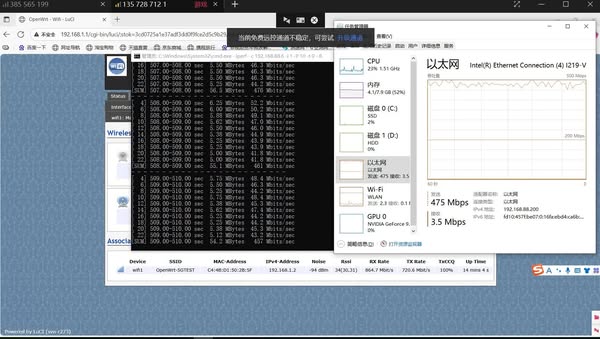
The DR5018S-AP crushed a 14 km 5 GHz link test – hitting 475 Mbps unidirectional throughput!

Wallystech DR5018S-AP crushed a 14 km 5 GHz link test in Dongbei at 50 m high — hitting 475 Mbps unidirectional throughput! We prepare more detailed test report.

Posted on

IPQ4019 IPQ4029 Phase Out Alert: Secure Your Upgrade Path with IPQ5018 IPQ5010

Introduction

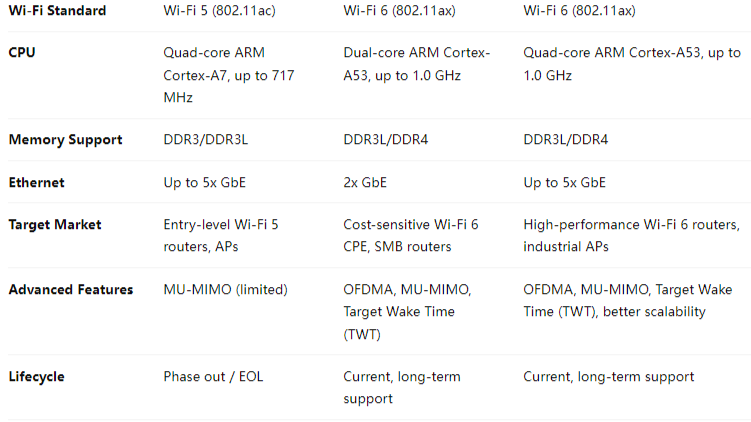
The Qualcomm IPQ4019 and IPQ4029 chipsets have long been popular choices for cost-effective Wi-Fi 5 router boards and networking solutions. However, as Wi-Fi technology advances and demand for higher throughput, better efficiency, and longer product lifecycles grows, these chipsets are now entering the phase out stage.

For product developers and OEMs/ODMs who have built solutions around IPQ4019/IPQ4029, this shift raises a key question: What’s next?

The answer lies in Qualcomm’s next-generation IPQ5018 and IPQ5010 chipsets — designed to deliver superior Wi-Fi 6 performance while offering a cost-effective and future-proof path for industrial and enterprise networking solutions.


Why IPQ4019 / IPQ4029 Are Phasing Out

  • Wi-Fi 5 Limitations: With Wi-Fi 6 becoming the industry standard, Wi-Fi 5 chipsets like IPQ4019/4029 struggle to meet the growing requirements of high-density and high-throughput networks.
  • Lifecycle End
  • Market Demand: Clients now expect advanced features such as OFDMA, MU-MIMO, and improved energy efficiency — capabilities not fully supported by IPQ40xx chipsets.

Why Transition to IPQ5018 / IPQ5010?

1. Wi-Fi 6 Performance

  • Support for OFDMA and MU-MIMO, ensuring stable performance in dense environments.
  • Higher throughput and lower latency compared to IPQ4019/IPQ4029.

2. Cost-Effective Upgrade Path

  • IPQ5010 is ideal for entry-level Wi-Fi 6 solutions, providing a balance of performance and affordability.
  • IPQ5018 offers more robust capabilities for industrial and enterprise-grade products.

3. Extended Lifecycle

  • Qualcomm’s roadmap ensures that IPQ50xx series chipsets will receive long-term support, securing your product investments.

4. Industrial-Grade Applications

  • Rugged and reliable for deployments in smart cities, industrial Wi-Fi, surveillance, and long-distance outdoor networking.
  • Future-ready platform to support customized software development including OpenWrt and QSDK.

Our Solutions Based on IPQ5018/IPQ5010

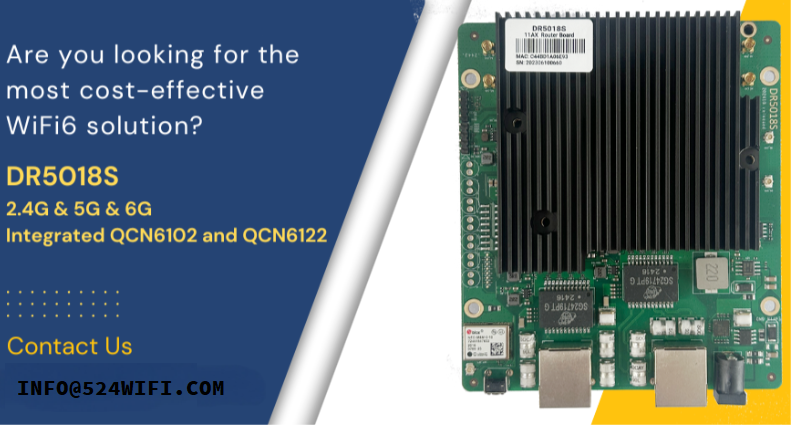
At 524WIFI and Wallys Communications (Suzhou) Co., Ltd., we have developed a range of router boards and wireless solutions built on the IPQ50xx series. Our latest product, the DR5018S, leverages the IPQ5018 chipset to deliver:

  • High-performance Wi-Fi 6 connectivity
  • Multiple Gigabit Ethernet ports
  • Support for industrial applications
  • Flexible OEM/ODM/JDM customization options

With strong hardware and software expertise, we ensures a smooth migration from IPQ40xx-based platforms to IPQ50xx solutions.


Conclusion

The phase-out of Qualcomm’s IPQ4019/IPQ4029 chipsets signals the end of an era — but also the beginning of a new one. By adopting the IPQ5018 and IPQ5010, businesses can secure a future-proof, cost-effective, and high-performance upgrade path that aligns with the growing demand for Wi-Fi 6 technology.

For more details on our IPQ5018/IPQ5010 solutions, or to discuss OEM/ODM opportunities, please visit www.524wifi.com / .net or contact us at info@524wifi dot com or net

Quick Review / More Info:

Both DR4019 and DR5018S support:

  • Wallys AP Controller
  • Hardware SOM version
  • VLAN functionality

The latest DR5018S VLAN configuration guide is first published here: Blog Article

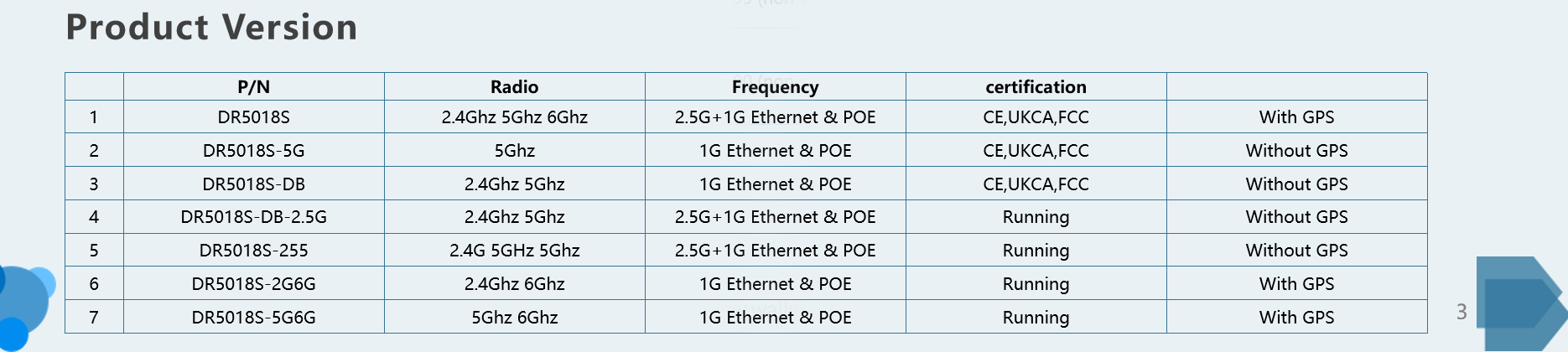
All available DR5018S Versions

Additional DR5018S features:

  • Mesh networking & seamless roaming
  • Long-range PTP over 30 km
  • GPS support
  • Tri-band option
  • FCC, CE, and UKCA certified
  • Proven performance: DR5018S-AP achieved a 14 km 5 GHz link test in Dongbei at 50 m height, with one-way throughput reaching 475 Mbps!
Posted on

IPQ8072 vs IPQ9574: Why Upgrade to Wi-Fi 7 for Your Next Wireless Project

The Qualcomm IPQ8072 has long been a reliable choice for Wi-Fi 6 networking hardware. Many enterprise routers, carrier CPEs, and industrial access points are still powered by IPQ8072 due to its strong balance of cost and performance. However, with the rapid evolution of Wi-Fi 7 (802.11be), the Qualcomm IPQ9574 offers significant technical advantages that make it the logical upgrade path for next-generation solutions.

In this article, we compare IPQ8072 vs IPQ9574, highlighting the major differences and why developers should consider migrating to Wi-Fi 7 hardware.


Overview of IPQ8072 (Wi-Fi 6 SoC)

The Qualcomm IPQ8072 is part of the IPQ807x family, designed for Wi-Fi 6. It features:

  • Quad-core ARM Cortex-A53 processor
  • 8×8 MU-MIMO capability
  • Up to 160 MHz channel bandwidth
  • 1024-QAM modulation
  • Robust support for enterprise and carrier-grade networking

While still capable, the IPQ8072 has reached maturity, and limitations in throughput and latency become noticeable in demanding applications.


Overview of IPQ9574 (Wi-Fi 7 SoC)

The Qualcomm IPQ9574 represents the new generation of Wi-Fi 7 platforms, optimized for ultra-high throughput and low latency. Key features include:

  • Enhanced multi-core CPU architecture for higher processing power
  • 320 MHz channel bandwidth (double that of IPQ8072)
  • 4096-QAM modulation for higher spectral efficiency
  • Support for Multi-Link Operation (MLO)
  • Designed for advanced enterprise, industrial, and carrier networks

This makes IPQ9574 ideal for data-heavy applications such as 8K video streaming, AR/VR, industrial IoT, and low-latency control systems.


IPQ8072 vs IPQ9574 Technical Comparison

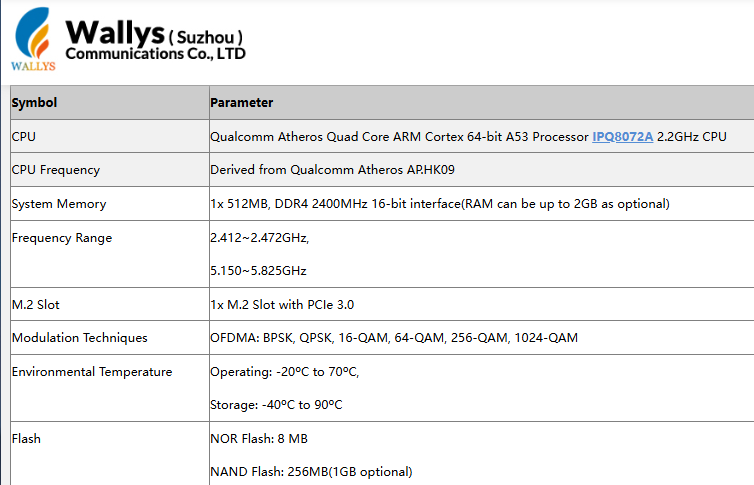
The Qualcomm IPQ8072 is a Wi-Fi 6 (802.11ax) SoC built with a quad-core Cortex-A53 processor. It supports channel bandwidths of up to 160 MHz and uses 1024-QAM modulation, making it a strong choice for enterprise routers, carrier CPE, and industrial APs.

Article content
Data from Wallys DR8072 Webpage

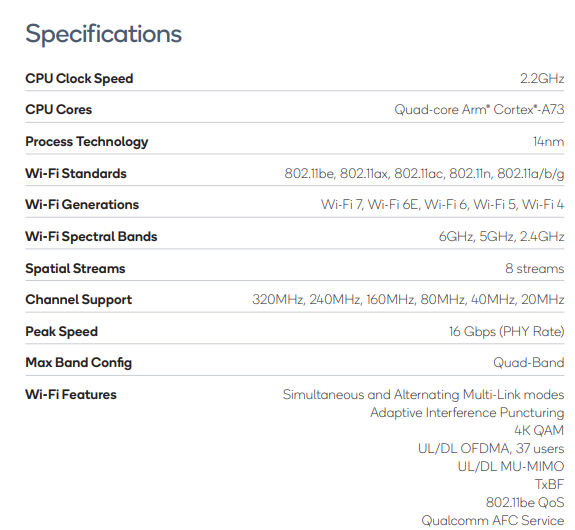
By contrast, the Qualcomm IPQ9574 belongs to the Wi-Fi 7 (802.11be) generation. It features a more advanced multi-core CPU architecture, supports 320 MHz channel bandwidth (double that of IPQ8072), and enables 4096-QAM modulation for higher spectral efficiency. Unlike IPQ8072, it also supports Multi-Link Operation (MLO), a Wi-Fi 7 feature that allows simultaneous use of multiple frequency bands to reduce latency and improve stability. These enhancements make IPQ9574 ideal for next-generation enterprise networks, industrial IoT deployments, low-latency applications, and high-density environments.

Article content
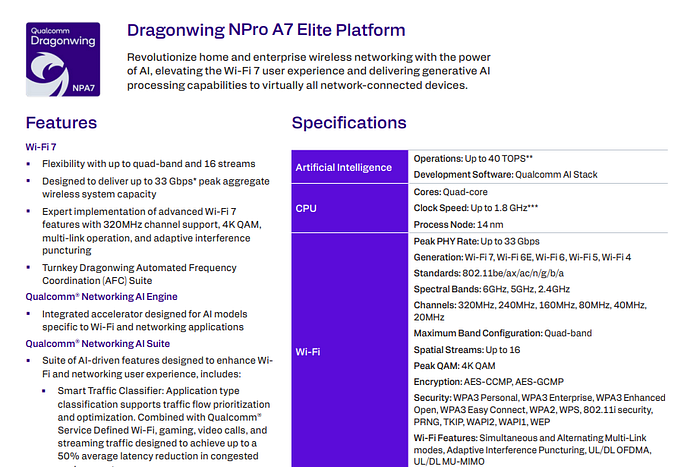
Data from Qualcomm IPQ9574 Datasheet

Why Upgrade from IPQ8072 to IPQ9574?

  1. Performance Leap – Wi-Fi 7 doubles available channel bandwidth and introduces 4096-QAM for significantly higher throughput.
  2. Ultra-Low Latency – MLO ensures faster and more reliable connectivity, critical for real-time applications.
  3. Future-Proofing – As Wi-Fi 6 hardware reaches end of lifecycle, Wi-Fi 7 ensures long-term product competitiveness.
  4. Scalability – IPQ9574’s stronger CPU supports more devices, traffic, and complex networking tasks.

524WiFi and Wallys’ IPQ9574 Router Board Solution

At 524WiFi, we provide hardware solutions based on Qualcomm IPQ9574, including the DR9574 Router Board, designed for Wi-Fi 7 networks. With strong processing power, advanced wireless features, and industrial-grade reliability, it is the perfect upgrade path for developers currently using IPQ8072-based designs.

Frequently Asked Questions (FAQ)

1. Is IPQ8072 still good in 2025?

Yes. The Qualcomm IPQ8072 is still a stable and cost-effective Wi-Fi 6 chipset, suitable for enterprise routers and industrial APs. However, for new projects that require higher throughput, lower latency, and longer product lifecycle, Wi-Fi 7 chipsets such as IPQ9574 are strongly recommended.

Article content
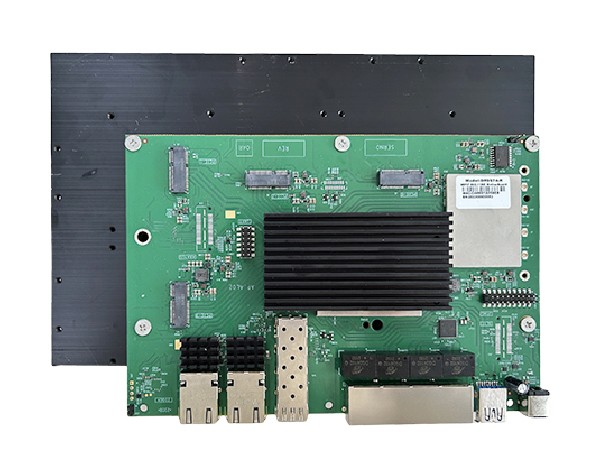
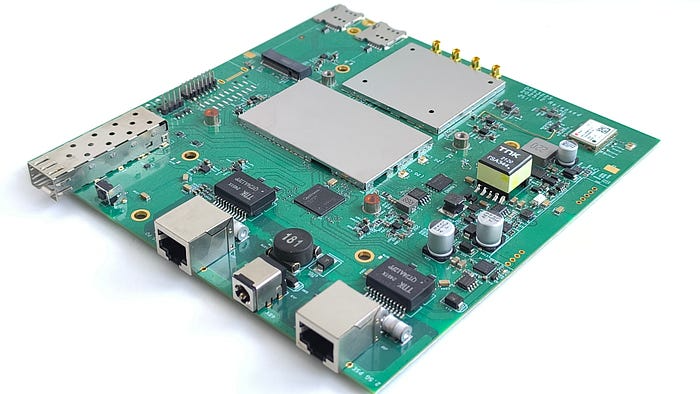
DR9574 board

2. What is the difference between IPQ8072 and IPQ9574?

The IPQ8072 is a Wi-Fi 6 (802.11ax) SoC, supporting up to 160 MHz bandwidth and 1024-QAM. The IPQ9574 is a Wi-Fi 7 (802.11be) SoC with 320 MHz bandwidth, 4096-QAM, and Multi-Link Operation (MLO), enabling much higher throughput and lower latency.

3. Why upgrade from Wi-Fi 6 to Wi-Fi 7?

Upgrading to Wi-Fi 7 provides faster data rates, reduced latency, and better efficiency in high-density environments. For applications such as AR/VR, 8K streaming, and industrial automation, Wi-Fi 7 ensures future-proof performance and competitiveness.

4. Does 524WiFi provide IPQ9574-based solutions?

Yes. 524WiFi and Wallys Communications offer router boards and network modules based on Qualcomm IPQ9574, including the DR9574 Router Board. These solutions are designed for enterprise, carrier, and industrial use cases that demand next-generation Wi-Fi 7 performance.

Posted on

Wi-Fi 7 for AIoT: How IPQ9574 and QCN9274 Enable Real-Time Edge AI

When we talk about Wi-Fi 7 (802.11be), most discussions focus on its impressive speed upgrades — and rightly so. But beneath the surface, Wi-Fi 7 is quietly becoming a critical enabler for Artificial Intelligence (AI) and AIoT (Artificial Intelligence of Things). It’s not just about faster wireless — it’s about making intelligent devices truly efficient, real-time, and scalable.

🚀 What Makes Wi-Fi 7 Different?

Wi-Fi 7 introduces groundbreaking features like:

  • Multi-Link Operation (MLO) — enabling devices to connect across multiple bands simultaneously, improving reliability and reducing latency.
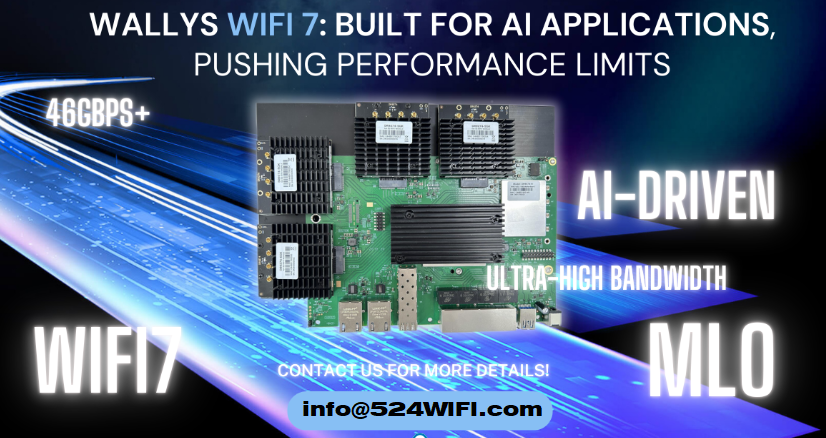
  • Higher throughput — supporting up to 46 Gbps, ideal for high-data AI workloads.
  • Lower latency — essential for real-time AI inference.
  • Improved concurrency — allowing more smart devices to communicate simultaneously without congestion.

These capabilities make Wi-Fi 7 a natural fit for the AI revolution — both in the cloud and at the edge.


🧠 AI + Wi-Fi 7: A Perfect Match

1. Faster Real-Time Inference at the Edge

Edge AI devices like smart cameras, traffic sensors, or inspection drones require:

  • Constant data streams
  • Real-time decision-making
  • High connection reliability

Wi-Fi 7 ensures ultra-low latency and high bandwidth — perfect for AI models processing data in real time, directly on edge devices.

📍 Example: In smart manufacturing, a defect detection system running AI vision models can send high-resolution images instantly over Wi-Fi 7 for sub-second inference.


2. Scalable AIoT Networks

AIoT means connecting and managing hundreds or thousands of smart devices, often with edge AI capabilities.

Wi-Fi 7 supports:

  • Massive device concurrency
  • Dynamic bandwidth allocation
  • Superior QoS (Quality of Service)

This allows factories, campuses, or smart buildings to scale up their AIoT systems without overloading the network.

📍 Example: A smart office can deploy hundreds of AI-enabled occupancy sensors and environmental monitors — all reporting in real time — without lag.


3. Wireless Edge AI Gateways

Many AIoT systems use a local AI gateway that:

  • Aggregates data from various sensors
  • Runs local AI models
  • Connects wirelessly to the cloud or central system

Wi-Fi 7’s multi-band capabilities ensure that these gateways maintain stable, high-speed connections — even in noisy RF environments.

📍 Example: In a hospital, an AI-powered patient monitoring system can use a Wi-Fi 7-enabled gateway to transmit continuous multi-sensor data with minimal delay or risk of interruption.


🌐 AI-Powered Devices Need a Smarter Network — That’s Wi-Fi 7

As AI models become more complex and real-time applications more common, the network needs to evolve as well. Wi-Fi 7 is not just keeping up — it’s paving the way forward.

Whether it’s in:

  • Retail analytics
  • Autonomous vehicles
  • Healthcare monitoring
  • Smart agriculture
  • or Industrial robotics…

AI + Wi-Fi 7 is the new power couple for connected intelligence.


🔧 524WiFi and Wallys Wi-Fi 7 Hardware: Designed for AI and AIoT Deployments

At 524WiFi and Wallys, we offer industrial-grade Wi-Fi 7 solutions based on Qualcomm platforms such as IPQ9574 and QCN9274. Our high-performance router boards and wireless modules are ideal for:

  • AI-enabled edge computing devices
  • Custom AIoT gateways
  • High-bandwidth data streaming systems

🔹 DR9574 Router Board – (CPU:Qualcomm IPQ9574) Perfect for AI gateways with multiple high-speed interfaces

🔹 DR9274 Mini PCIe Module – (CPU:Qualcomm QCN9274/QCN6274) Compact and powerful Wi-Fi 7 module for embedded AI system

🔹 Custom ODM/OEM support – Tailor-made solutions for your AI product roadmap

👉 Contact our team at info@524wifi dor net or com to discuss your AI project and how Wi-Fi 7 can help you scale it smarter and faster.

Posted on

Chipset Comparison: IPQ5322 vs IPQ5424-What’s the Difference and Which One Fits Your Project?

DR5332S vs DR5424: What’s the Difference and Which One Fits Your Project?

As Wi-Fi 7 enters the spotlight of next-gen wireless connectivity, developers and OEMs are seeking powerful, cost-effective router boards to power AIoT, edge computing, mesh networking, and enterprise-grade gateways. At Wallys, we provide two flagship tri-band Wi-Fi 7 router boards: the DR5332S and the DR5424. While they share a common mission — delivering ultra-reliable, high-throughput connectivity — they are built on different SoC platforms and tailored for slightly different project needs.

Let’s break down the differences and help you decide which one is the right fit for your application.

1. Chipset Comparison: IPQ5322 vs IPQ5424

CPU Architecture: A53 vs A55

  • The IPQ5424 uses a Cortex-A55 @1.8GHz, which is newer, more efficient, and more powerful than the Cortex-A53 @1.5GHz in IPQ5332.
  • A55 supports out-of-order execution, making it significantly better for multitasking and edge workloads.

IPQ5424 offers superior computing performance, making it ideal for intensive processing and multitasking at the edge.

AI Acceleration

  • IPQ5424 benefits from its more capable CPU architecture and overall system bandwidth for smoother AI task handling.
Article content

If you’re considering router boards such as Wallys DR5332S (IPQ5332) or DR5424 (IPQ5424):

  • 🧩 DR5332S + IPQ5332: Great for budget-sensitive, compact, quick-to-market solutions
  • 🚀 DR5424 + IPQ5424: Built for edge intelligence, multi-client environments, and future-proof mesh deployments

🔍 DR5424 offers higher performance and better power efficiency at the same time the costs will be higher than DR5322S.

Article content

2. Wireless Capabilities (Tri-Band Wi-Fi 7)

Both boards support tri-band (2.4GHz + 5GHz + 6GHz) Wi-Fi 7, including:

  • Multi-Link Operation (MLO) for increased stability
  • 320MHz bandwidth support on 6GHz band
  • 4096-QAM for enhanced throughput
  • Onboard radio modules for space-saving and simplified integration

However, DR5424 has more headroom for advanced use cases involving concurrent client management, AI inference at the edge, or industrial-grade networking.

3. Use Case Suitability

💡 Recommendation:

  • Choose DR5332S if your project prioritizes cost, compactness, and moderate throughput.
  • Choose DR5424 if you need higher computing power, better future-proofing, and support for intensive applications like edge inference, video analytics, or high-density mesh.

4. Hardware Interface & Customization

Both boards offer:

  • 2.5G Ethernet
  • Multiple UART, I2C, SPI
  • M.2 / USB3.0 / GPIO
  • Support for OpenWRT SDK
  • Optional expansion for LTE/5G/Storage modules

Customization and ODM services are available for both platforms.

5. Pricing & Availability

Both models are available for sampling, with volume support for OEM/ODM integration. DR5332S is generally more affordable and available sooner for entry-level or mid-range products, while DR5424 is geared for premium products with long-term lifecycle planning.

📬 For pricing, datasheets, or demo kits, contact us at: 📧 info@524wifi dot net or com

🧠 Final Thoughts

Whether you’re building a smart city gateway, an industrial mesh router, or a next-gen enterprise AP, 524WiFi and Wallys’ Wi-Fi 7 router boards offer flexible, powerful foundations.

  • DR5332S → Cost-effective, compact, fast-to-market
  • DR5424 → High-performance, future-ready, edge-AI capable

Need help choosing or customizing for your unique application? 

Posted on

IPQ5018 | 524WiFi and Wallys DR5018S VLAN Configuration Guide

1. Introduction

The 524WiFi and Wallys DR5018S router board, based on the Qualcomm IPQ5018 chipset, is widely used in industrial wireless applications. VLAN functionality allows network segmentation, optimized traffic management, and enhanced security. This guide provides a step-by-step tutorial to configure Access VLAN and Trunk VLAN on the DR5018S.

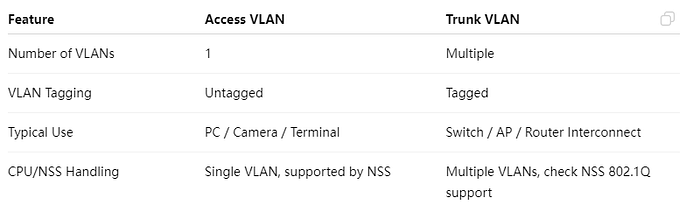
2. Understanding VLAN, Access, and Trunk

Article content

Access VS Trunk

3. Prerequisites

  • Wallys DR5018S router, firmware: wallys firmware
  • Admin access via Web GUI or SSH
  • VLAN ID plan and IP addressing plan
  • Optional: VLAN-aware NIC or Vlan Switch for testing

4. VLAN Configuration on DR5018S

Steps:

  1. Log in to the Web GUI.
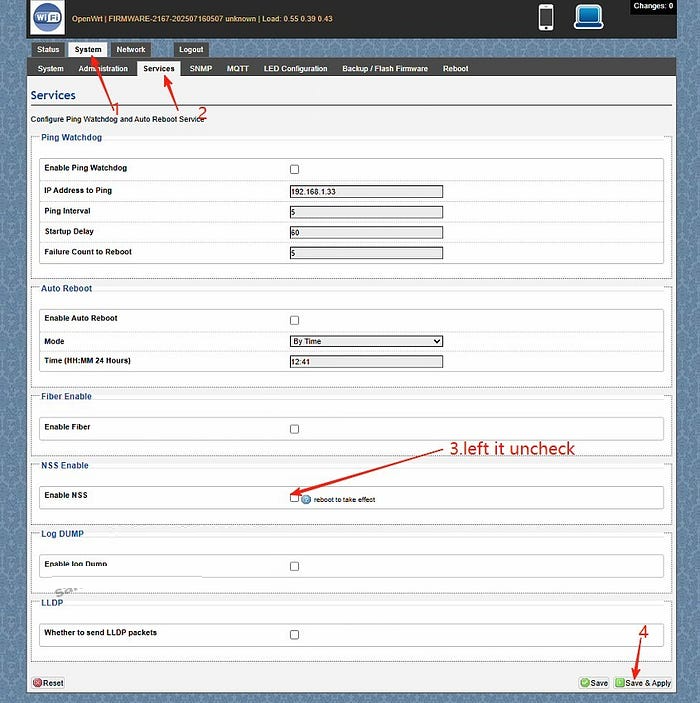
  2. Go to System → Services. Left the Enable NSS uncheck and click “save and apply”
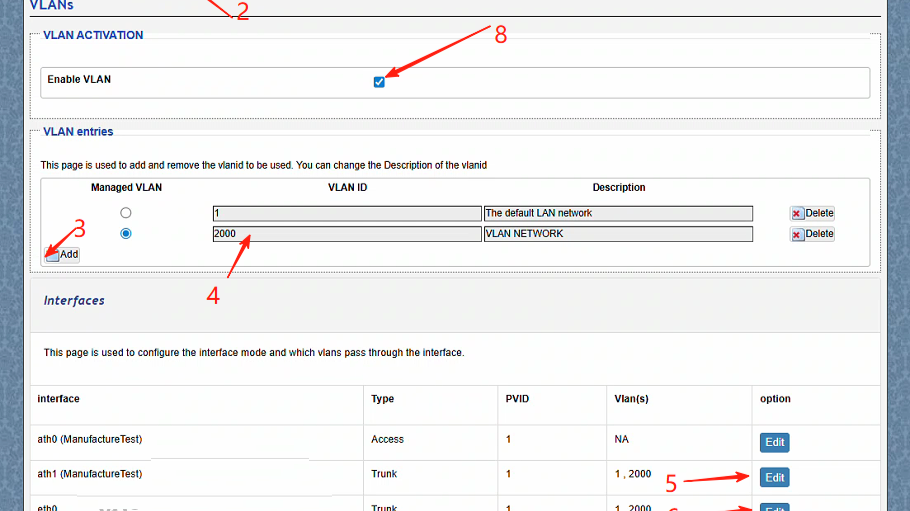
  3. Go to Network → Vlans.Create a VLAN (e.g., VLAN 2000).
  4. Edit the ath1(the working radio) and eth0(the ethernet port connected) port mode to Trunk.
  5. ath1 setting:Select type Trunk,Assign the PVID as 1,select Vlans 2000,save changes
  6. ath1 setting:Select type Trunk,Assign the PVID as 1,select Vlans 2000,save changes.
  7. Assign an IP address to the VLAN interface (static or DHCP).
  8. Save and apply the configuration.
  9. Test connectivity: connect a PC to the port, get an IP, and ping the radio.

5. Troubleshooting

  • Cannot access the device → check VLAN ID, PVID, and tagging.
  • Trunk traffic lost → verify VLAN configuration on the remote end.
  • PC cannot ping → ensure the IP address is in the VLAN subnet.
  • Check NSS hardware acceleration

With this guide, you can easily configure Access VLAN and Trunk VLAN on the DR5018S router board. VLANs help isolate traffic, improve security, and optimize performance in industrial wireless networks.

For more technical support and inquiry for industrial wireless products, contact 524WiFi at info@524wifi dot com or net!

Posted on

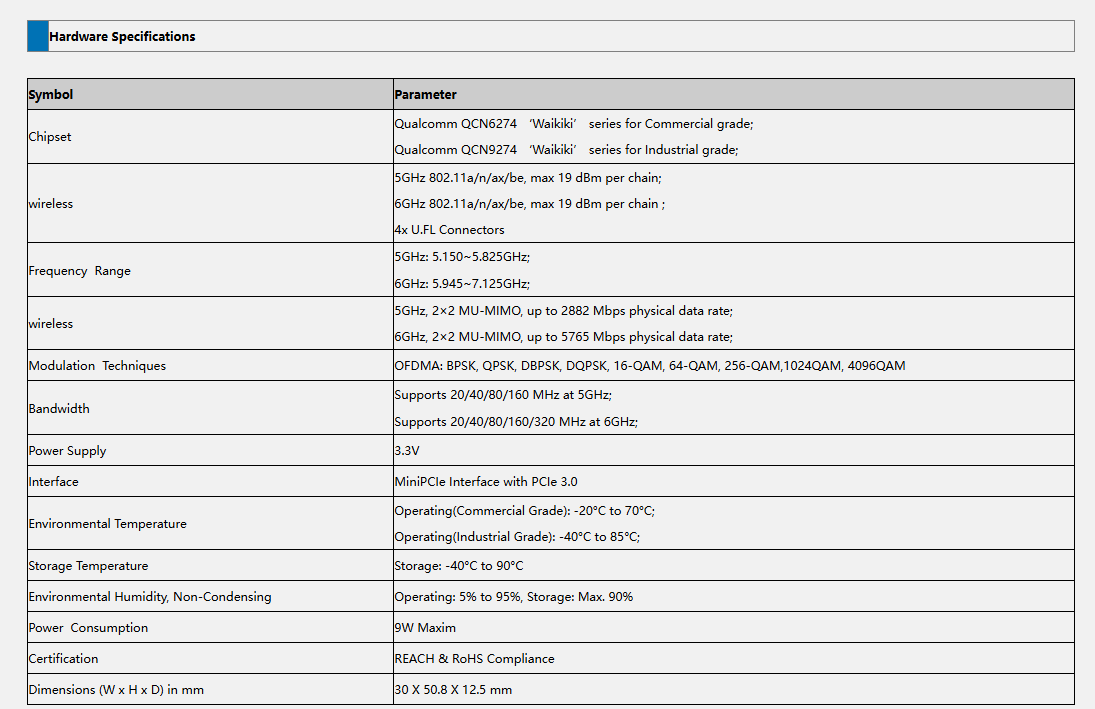
524 WiFi 7 DR9274E – QCN 9274 / 6274 Dual band concurrent miniPCIE Network Cards

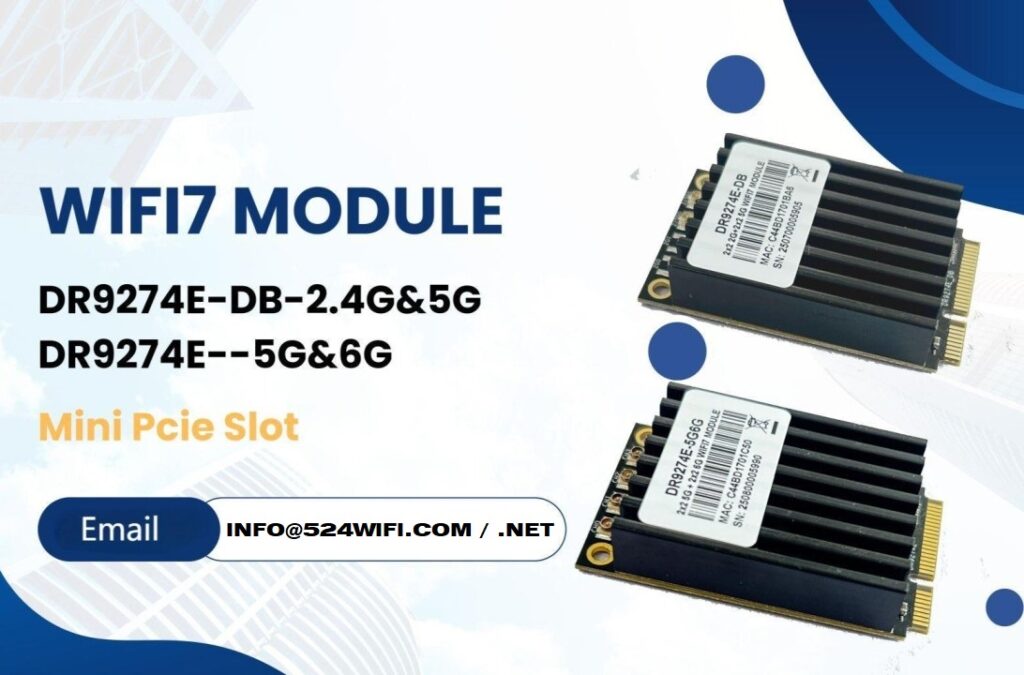
The DR9274E is a family of high-performance WiFi 7 radio modules built on Qualcomm’s QCN9274 or QCN6274 ‘Waikiki’ series chipsets.

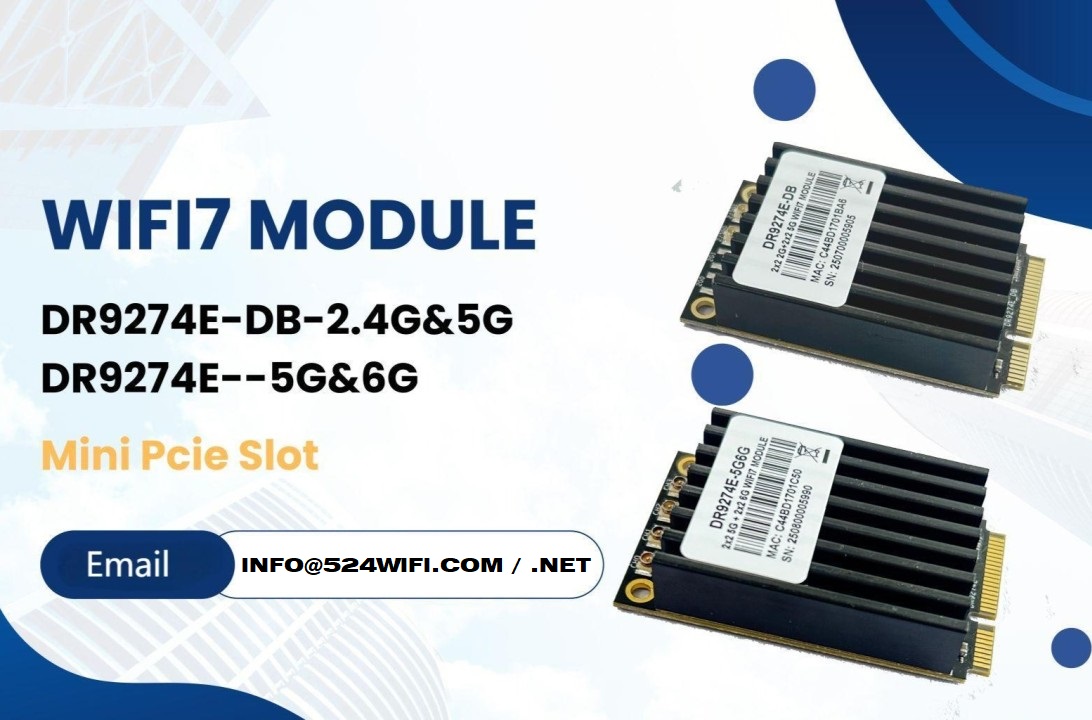
524WiFi is proud to announce the launch of two brand-new WiFi 7 MiniPCIe modules — the DR9274E-DB and DR9274E-5G6G, engineered to meet the demands of today’s most advanced industrial and commercial wireless applications.

These modules are part of the DR9274E family, built on Qualcomm’s QCN9274 / QCN6274 ‘Waikiki’ series chipsets, and designed to unlock the full potential of WiFi 7 in a compact MiniPCIe form factor. Samples available with QCN9274 chipset now !


🔧 Product Variants


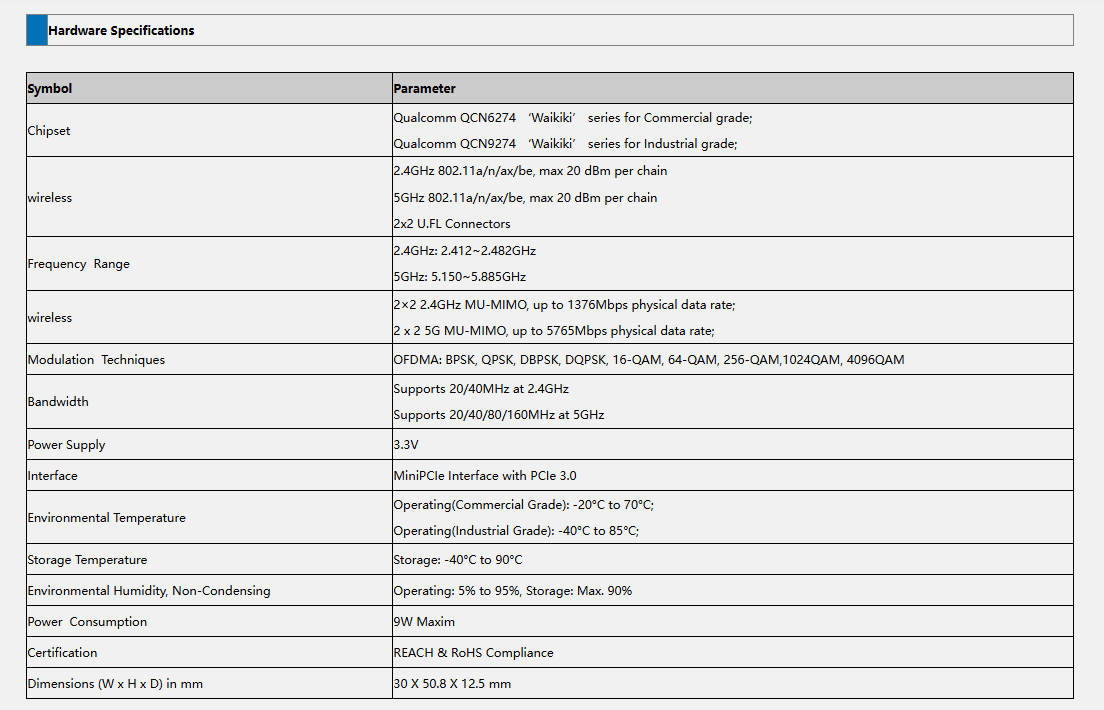
⚙️ Key Features at a Glance

✅ Based on Qualcomm QCN6274 (Commercial Grade) or QCN9274 (Industrial Grade)

✅ Supports WiFi 7 (802.11be) for next-generation speed and efficiency

✅ 2×2 MU-MIMO at 5GHz and 6GHz

✅ Max throughput: 2882 Mbps (5GHz) and 5765 Mbps (6GHz)

✅ 320 MHz ultra-wide bandwidth support in 6GHz

✅ MiniPCIe interface with PCIe 3.0

✅ Ultra-rugged: Operating Temp up to -40°C to 85°C (Industrial)

✅ REACH & RoHS Compliant


🌐 Perfect for Demanding Applications

Whether you’re building the next smart city or designing rugged outdoor systems, the DR9274E modules are built for:

  • Industrial & Commercial WiFi Infrastructure
  • Security Surveillance Systems
  • Hotel and Campus Wireless Coverage
  • Forest Fire Monitoring Projects
  • Remote Area Connectivity
  • Custom Applications in Challenging Environments

📏 Tech Specs Snapshot

Article content
DR9274E-DB
Article content
DR9274E-5G6G

💼 Looking to Integrate WiFi 7 Into Your Product?

524WiFi and Wallys specialize in custom industrial wireless solutions, and we’re ready to support your projects with:

  • Hardware customization
  • Software/driver support
  • Long-term supply guarantee
  • Technical documentation and enclosure design references

📩 Contact our sales team today at [email protected] to request datasheets, samples, or technical consultation.

Posted on

How Mesh Networks Intelligently Select the Best Path: Enhancing Wireless Stability and Efficiency

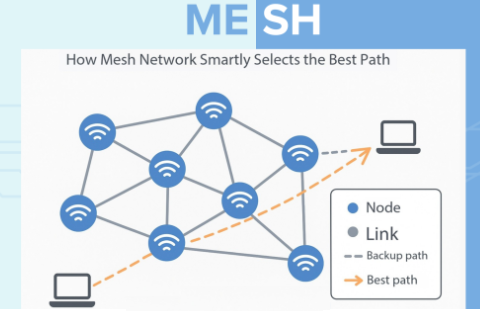
In modern multi-node, multi-band wireless environments, traditional Wi-Fi often struggles to maintain stable, high-speed connections. Mesh networks solve this by enabling collaboration and intelligent routing between nodes — ensuring that data always follows the “best path” for efficiency and stability.


🔍 Intelligent Routing: The Core of Mesh Networks

In a Mesh network, every node is not just an access point, but also a relay and router. Data paths are dynamic, continuously optimized in real time based on link quality and traffic conditions.

Key mechanisms include:

  1. Link Quality Assessment – Nodes monitor RSSI, latency, bandwidth, and packet loss.
  2. Multi-Path Selection – Data can take multiple possible routes, with the system choosing the best one.
  3. Dynamic Load Balancing – Traffic shifts when a link is congested, preventing bottlenecks.
  4. Self-Healing Capability – If a node or link fails, the network reroutes instantly.

📊 Key Metrics in Path Selection

Mesh networks combine metrics such as:

  • Signal strength
  • Latency
  • Bandwidth capacity
  • Packet loss rate

These factors are translated into a “path weight.” The system then automatically selects the lowest-weight path for transmission.


🌍 Real-World Applications

  • Industrial & Mining Sites – Reliable connections across tunnels, multi-floor buildings, and wide open areas.
  • Enterprise Offices – Optimized bandwidth distribution for dense device environments.
  • Smart Homes & IoT – Smooth connectivity across distributed sensors and devices.

✅ Conclusion

Mesh networks achieve stable, efficient, and adaptive wireless communication through intelligent routing, dynamic balancing, and self-healing features. By ensuring each device always follows the best available path, Mesh technology delivers reliable performance across industries — from smart factories to everyday IoT environments.

At 524WiFi and Wallys, we design industrial-grade router boards and network cards (IPQ5018, IPQ9574, QCN9074, etc.) that support advanced Mesh networking. Our hardware enables drone and robotics developers to build custom, robust, and scalable Mesh solutions.

Posted on

SIMCom 5G R16 module SIM8262E-M2 has received a wide range of international certifications, including CE (RED), RoHS, REACH, JATE, TELEC, GCF, ANATEL, and Deutsche Telekom approval

SIMCom’s 5G R16 Module SIM8262E-M2 Earns Global Certifications, Accelerating 5G Device Deployment Worldwide

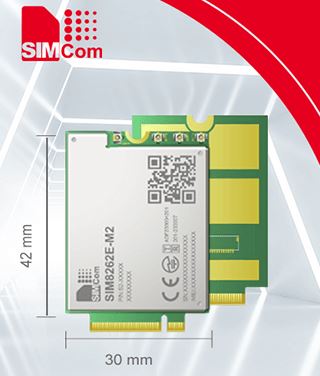
SIMCom, a global leader in IoT communication solutions, is proud to announce that its 5G R16 module SIM8262E-M2 has received a wide range of international certifications, including CE (RED), RoHS, REACH, JATE, TELEC, GCF, ANATEL, and Deutsche Telekom approval. These certifications reinforce SIMCom’s commitment to global market and accelerate the adoption of 3GPP Release 16 5G devices across the world.

Based on the Qualcomm Snapdragon X62 platform, the SIM8262E-M2 supports Sub-6GHz TDD/FDD and WCDMA, delivering enhanced data throughput and broader network coverage. Engineered for performance, flexibility, and scalability, the module is well-suited for a variety of IoT scenarios—including CPE, MIFI, industrial IoT, connected vehicles, and more.

The SIM8262E-M2 features a compact M.2 form factor (30.0 × 42.0 × 2.3mm), aligned with industry interface standards. With support for USB 3.1, PCIe, and GPIO, it simplifies system design and integration, helping developers reduce time-to-market.

With major global certifications secured, the SIM8262E-M2 is already enabling large-scale 5G rollouts and helping partners around the world unlock new opportunities in next-generation IoT. As SIMCom continues to expand its 5G product portfolio, it remains committed to delivering certified, market-ready solutions that drive the global digital transformation.