Posted on

WiFi 7 M.2 E Key PCIe Module for Embedded Systems

DR9274 QCN9274 QCN6274 WiFi 7 Single Band M.2 E Key Module Datasheet

Overview

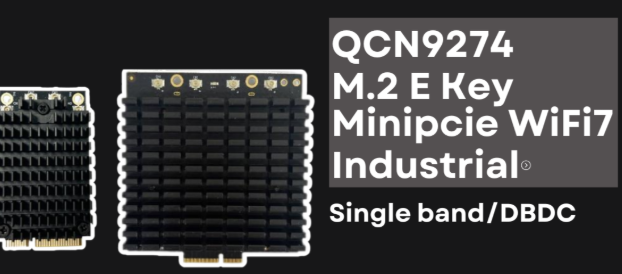
The DR9274 WiFi 7 Single Band M.2 E Key module is based on the Qualcomm® QCN9274 or QCN6274 chipset, delivering exceptional wireless performance for industrial, enterprise, and embedded applications. With Single Band (5 GHz or 6 GHz) capability and M.2 E Key form factor, it offers high-speed, low-latency connectivity optimized for modern networking solutions.


Key Features

  • Chipset Options: Qualcomm® QCN9274 or QCN6274
  • WiFi Standard: IEEE 802.11be (WiFi 7)
  • Band Support: Single Band (5 GHz or 6 GHz)
  • Form Factor: M.2 E Key
  • Interface: PCIe Gen 3
  • Modulation: Up to 4096-QAM for higher throughput
  • Security: WPA3, Enhanced Encryption
  • Industrial Temperature Range: -40°C to +85°C

Performance Advantages

  1. Ultra-High Throughput – Supports up to 320 MHz channel bandwidth for faster data transfer.
  2. Low Latency – Ideal for time-sensitive industrial control, AR/VR, and streaming applications.
  3. Improved Spectrum Efficiency – Thanks to Multi-Link Operation (MLO) and advanced modulation.
  4. Long-Range Capability – High-gain antennas and optimized RF design extend coverage.
  5. Power Efficiency – Optimized for battery-powered or embedded devices.

Applications

  • Industrial Wireless APs
  • 5G/WiFi 7 Gateways
  • Smart Cities and IoT
  • AR/VR and Immersive Media
  • High-Speed Enterprise Networking
  • Embedded Systems with M.2 E Key Interface

Technical Specifications

ParameterDescriptionChipsetQCN9274 / QCN6274StandardWiFi 7 (IEEE 802.11be)BandSingle Band (5 GHz / 6 GHz)InterfaceM.2 E Key, PCIe Gen 3Channel BandwidthUp to 320 MHzModulationUp to 4096-QAMAntenna ConnectorIPEX MHF4Temperature Range-40°C to +85°CSecurityWPA3


Why Choose Wallys DR9274 Module from 524WiFi ?

Wallys and 524WiFi specializes in custom industrial wireless solutions, offering:

  • Optimized firmware for WiFi 7 performance
  • Custom hardware design based on QCN9274/QCN6274
  • OEM/ODM/JDM services for industrial clients
  • Global technical support
Posted on

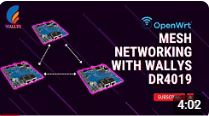
IPQ4019 IPQ4029 Mesh Networking Setup: DR4019 Router Boards in Action

Learn how to set up and test a robust mesh network using three Wallystech DR4019 router boards. Watch as we:

Upgrade firmware with Wallys OpenWrt Mesh. Configure unique IPs for seamless communication.

Test network resilience, proving reliable data transmission even during power disruptions.

Perfect for smart cities, IoT, and industrial applications!

You can also read previous article How to Upgrade DR4019 with OpenWrt 23.05 – Simple Steps! Enjoy.

Posted on

Wallystech DR9574 with DR9274-2G DR9274-5G DR9274-6G Card 4×4 Triband MLO Configuration Tutorial

Welcome back to 524WiFi! In today’s video, we’ll walk you through the process of loading firmware and configuring MLO for the IPQ9574 board.

If you’re setting up advanced hardware, this guide will help you get everything up and running smoothly. Let’s dive in! First, we’ll connect the hardware.

You’ll need a UART cable, and here’s how to connect the pins:

GND connects to the black cable, TX to the white cable, RX to the green cable. Remember, VCC is not needed.

Once that’s connected, we can move on to the software configuration.

Next, we’ll load the firmware. Make sure the firmware file is in the same folder as tftpd32. Follow these steps:

Open the terminal and enter U-Boot mode. Modify the machid and configure the card slots.

If you’re using the DR9274-2G, DR9274-5G, and DR9274-6G modules, input the following commands: Open the tftpd32 tool and input the following command to re-flash the firmware:

Finally, input reset to reboot the system and proceed with AP configuration.

Now, we’ll configure the Access Points (AP). After the reboot, log in as root with the password asdf1234. Then, input the following command to edit the wireless configuration file: Modify the AP settings as needed.

Here’s an example configuration: Once done, press ESC, then shift+zz to save and exit.

To finalize the setup, enable the configuration by typing:wifi

Then, check if the radios are up by entering:iwconfig

And that’s it! Your APs are configured, and the new firmware has been successfully loaded! Next, we’ll be testing the DR9574kit’s MLO throughput performance. Stay tuned to our channel for the latest updates and test results. Don’t forget to hit the notification bell, so you don’t miss out! Thank you for watching this firmware loading and MLO configuration tutorial! If you found this video helpful, make sure to give us a thumbs up and subscribe to Wallystech for more technical guides and hardware tutorials. See you in the next video!

You can download related files here : https://wifi5.eu/dls/Wallys/DR9574/

Posted on

Entering the Multi-Link Era of Wi-Fi 7 with 524WiFi. Maximize coverage. Boost performance.

Unlock the future.
By combining DR9274-2G5G and DR9274-5G6G, 524WiFi delivers a true tri-band Wi-Fi 7 platform ready for tomorrow’s wireless demands. X86 Linux supported!


Powered by Multi-Link Operation (MLO), our solution enables:


✅ Simultaneous dual 5GHz operation
✅ Aggregated bandwidth for higher throughput
✅ More resilient and flexible wireless networks


Ready to go Multi-Link? Contact us !

Posted on

What is Spectrum Scan and Why Does It Matter for Industrial WiFi Deployment?

📡 What is Spectrum Scan?

Spectrum Scan is a feature that provides real-time visibility into the radio frequency (RF) environment. Instead of guessing which WiFi channel is free, Spectrum Scan analyzes the surrounding RF spectrum, detects interference sources, and helps select the best channel for reliable communication.

In simpler terms: it lets your WiFi system “see” the airwaves before making critical deployment decisions.

Article content

⚠️ The Challenge in Industrial WiFi Deployment

Industrial environments — such as factories, ports, airports, smart cities, and warehouses — are filled with wireless devices and interference sources:

  • Heavy machinery emitting electromagnetic noise
  • Multiple WiFi access points overlapping channels
  • IoT sensors and industrial controllers competing for bandwidth
  • Even non-WiFi devices (e.g., Bluetooth, microwave ovens, radar) interfering with 2.4/5/6 GHz bands

Without visibility, network planners often rely on trial and error, leading to:

  • Frequent disconnections
  • Reduced throughput
  • Unstable latency (which is critical for industrial control systems)

🔍 How Spectrum Scan Helps

Spectrum Scan offers actionable insights for industrial deployments:

  • Interference Detection
  • Identify overlapping WiFi signals or non-WiFi noise sources.
  • Helps avoid congested channels and minimize packet loss.
  • Optimized Channel Selection
  • Choose the best frequency channels with the least interference.
  • Boosts overall network stability and throughput.
  • Proactive Troubleshooting
  • Engineers can diagnose problems faster with live RF visibility.
  • Reduce downtime in mission-critical applications.
  • Industrial-Grade Reliability
  • Ensures consistent performance in harsh environments like manufacturing plants, logistics hubs, and outdoor smart infrastructure.

🏭 Real-World Use Cases

  • Smart Factory: Prevent interference from robotic controllers and wireless sensors.
  • Smart Port: Maintain stable long-distance WiFi backhaul between cranes and control centers.
  • City Surveillance: Avoid WiFi channel congestion from overlapping APs in urban deployments.
  • Energy & Utilities: Ensure reliable wireless communication in substations or wind farms.

💡 524WiFi Spectrum Scan Advantage

524WiFi and Wallys integrates Spectrum Scan into its custom industrial firmware, available on selected router boards and WiFi modules.

Key benefits:

  • Hardware-bound license for secure, stable operation
  • Real-time RF scanning tailored for industrial-grade deployments
  • Affordable licensing model

This means industrial clients can plan, deploy, and maintain WiFi networks with maximum efficiency and reliability — without expensive third-party tools.


✅ Conclusion

Spectrum Scan is no longer a “nice-to-have” — it is a must-have tool for industrial WiFi deployment. By enabling RF visibility and intelligent channel management, it ensures networks are stable, interference-free, and future-ready.

👉 To learn more about Wallys’ Spectrum Scan-enabled solutions, contact us at info@524wifi dot com or net.

Posted on

DR6018 + QCN9024: Reliable WiFi 6 for Real-World Industrial Deployments

When it comes to building high-performance wireless infrastructure for industrial or outdoor use, stability and scalability matter just as much as speed.

At 524WiFi and Wallys, we continue to support our customers with proven, cost-effective WiFi 6 solutions — like the DR6018 router board paired with the QCN9024 module — designed for real-world performance in smart cities, surveillance networks, and rugged environments.

🔧 DR6018: Built to Perform

Powered by the Qualcomm IPQ6010/IPQ6018 platform, the DR6018 is one of our most popular and versatile router boards. It features:

  • ✅ Dual-band concurrent 2.4GHz + 5GHz support
  • ✅ Mini PCIe and M.2 slots for modular expansion
  • ✅ 5x Gigabit Ethernet ports
  • ✅ USB 3.0, SD card, SIM support
  • ✅ PoE optional
  • ✅ OpenWrt and QSDK compatibility

Its modularity and robustness make it a go-to choice for OEM/ODM clients who need a balance of performance, flexibility, and cost.

📶 Why QCN9024?

QCN9024 is Qualcomm’s high-throughput WiFi 6 radio chip:

  • 🔁 Supports 4×4 MU-MIMO
  • 📡 Optimized for DFS, long-range & outdoor stability
  • ⚙️ Excellent Linux/OpenWrt driver support
  • 🔩 Easily integrated into DR6018 or DR5018S for consistent results

Whether you’re setting up outdoor CPEs, APs for city-wide WiFi, or reliable backhaul links for security systems, QCN9024 delivers where it counts.

🧠 For Developers & System Integrators

Wallys offers:

  • 🔧 Fully assembled kits or PCBA-only versions
  • ✏️ Custom software/firmware tuning (MIMO, TX power, DFS channels)
  • 📞 Pre-sales and post-sales engineering support

Your project is unique — and our team is here to help you tailor the right solution.

📢 Coming Soon: IPQ5424 Support

Looking ahead? Our R&D team is preparing a new line based on Qualcomm IPQ5424 (Marina Series), featuring Quad-Core ARM-A55 @1.8GHz. Ideal for next-gen industrial APs and higher-end deployments. Stay tuned!

Posted on

DR5322S + QCN9274: Next-Gen WiFi 7 for Industrial Networks

WiFi 7 is here — and 524WiFi is ready.

Our latest solution, the DR5332 and DR5322s router boards, combine the power of Qualcomm IPQ 5332 / IPQ5322 and the high-speed QCN9274 wireless module to deliver multi-gigabit connectivity, ultra-low latency, and industrial-grade reliability.

🧠 Key Platform Specs — DR5322

  • ✅ Based on Qualcomm IPQ5322 SoC
  • ✅ Dual 2.5G Ethernet ports + 10G SFP
  • ✅ Supports Tri-band: 2.4G / 5G / 6G (via QCN9274/QCN6274)
  • ✅ PCIe 3.0 slot for flexible radio support
  • ✅ DDR4 1GB, eMMC 8GB onboard
  • ✅ Fully OpenWrt/QSDK customizable

📶 Why QCN9274?

  • ✅ 4×4 MIMO
  • ✅ 320 MHz channel width
  • ✅ Multi-Link Operation (MLO) ready
  • ✅ Supports WiFi 7 (802.11be) features

Paired with DR5322s, this combo brings elite wireless performance to OEM/ODM platforms in:

  • Industrial APs
  • Outdoor wireless CPEs
  • Edge mesh gateways

🔧 Future-Proof Your Wireless Projects

This isn’t just a board. It’s a WiFi 7 infrastructure base built for the next 5–10 years. And yes — QCN6274, QCN9024, and even QCN9074 (WiFi 6) are all supported too, for backward compatibility.

📩 Want to test a DR5322s sample or request a spec sheet? Contact us!

Posted on

524WiFi is driving the future of high-power 6GHz Wi-Fi 7 solutions—with full support for OpenWRT and OpenWiFi collaborative development!

As a global leader in wireless innovation, 524WiFi and WallysTech are advancing the next generation of connectivity with a tri-band platform built on the Qualcomm IPQ9574 + QCN9274/QCN6274 architecture—engineered for ultra-reliable, high-power 6GHz transmission.

🧠 We’re not just innovating in hardware—we’re also deeply engaged in the OpenWRT and OpenWiFi communities, empowering rapid development and seamless integration for our global partners.

🔧 Key Product Highlights:
✅ Tri-band concurrent operation (2.4GHz / 5GHz / 6GHz)
✅ High-power 6GHz RF design for long-range outdoor performance
✅ Fully compatible with OpenWRT and OpenWiFi software stacks
✅ Ideal for mesh backhaul, smart campuses, and industrial IoT deployments

🤝 We invite global partners—developers, system integrators, OEM/ODM teams—to collaborate with us in building the future of Wi-Fi 7.

📩 For product briefs, test boards, or partnership opportunities, reach out to us!

Posted on

IPQ5018 IPQ5010 Wallys DR5018S WiFi 6 Router Board Now Supports Tcpdump — Network Diagnostics Just Got Easier

In the world of embedded networking, visibility is everything. Whether you’re an engineer troubleshooting a client deployment or a developer fine-tuning a custom OpenWrt-based application, packet-level insights can save hours — if not days — of guesswork.

We’re excited to announce that tcpdump is now fully supported on our DR5018S router board, bringing enterprise-grade packet analysis directly to your industrial WiFi 6 hardware.

🧰 Why Tcpdump Matters

Tcpdump is a powerful, command-line packet analyzer tool that allows users to:

  • Monitor live traffic on specific interfaces
  • Capture and filter packets based on IP, port, protocol, and more
  • Export logs for deeper analysis or compliance purposes
  • Debug intermittent network issues with precision

Now with tcpdump on DR5018S, you don’t need a separate laptop or tap device — your router board becomes the diagnostic tool.

Article content

📡 About DR5018S

The DR5018S is based on the Qualcomm IPQ5018 SoC, designed for advanced industrial WiFi 6 applications. It supports:

  • 2.4G/5G concurrent dual-band
  • M.2 slot for LTE/5G modem expansion
  • Optional PoE support
  • Flexible OpenWrt/QSDK firmware environment

By adding tcpdump support, we’re giving system integrators, OEMs, and network developers more control and clarity at the edge.

📝 Documentation & Access

An updated user manual with tcpdump usage examples, interface configurations, and filtering tips will be released shortly. In the meantime, you can check out the DR5018S hardware details here:

https://www.524wifi.com/index.php/catalogsearch/result/?q=5018

Posted on

IPQ5424 Sneak Peek: The Cost-Effective Path to WiFi 7 Starts Here

As WiFi 7 begins to reshape industrial and commercial networking, not every project requires the horsepower (or cost) of top-tier platforms like IPQ9574. That’s where Qualcomm’s IPQ5424 comes into play — offering a balanced, quad-core solution designed to bring the Marina family of chipsets to the mainstream market.

Wallys is excited to announce that IPQ5424-based router boards are in the pipeline, aiming to help developers and OEMs transition smoothly into WiFi 7 with a cost-effective and scalable solution.

🌟 Key Specs of IPQ5424 (Preview)

  • Processor: Quad-core ARM Cortex-A55 @ 1.8GHz
  • Target Use: SMB routers, industrial APs, mesh nodes
  • WiFi Support: 4×4 2.4GHz / 4×4 5GHz (potential MLO support)
  • Firmware: OpenWrt/QSDK support in progress
  • Memory Support: DDR4 up to 2GB
  • I/O: USB 3.0, PCIe Gen3, SGMII/USXGMII

This makes the IPQ5424 a strategic choice for:

  • Mid-tier WiFi 7 CPE development
  • Smart building and IoT gateway integration
  • Compact enterprise wireless solutions

🔗 Positioned Between Performance and Affordability

If you’re currently using platforms like IPQ5018 or IPQ6018, the IPQ5424 offers a smooth upgrade path — unlocking multi-gig capabilities without the power draw or cost of premium SoCs.

It also complements high-end modules like QCN9074 or QCN9024, allowing system integrators to build hybrid solutions: high-performance uplinks powered by QCN modules, with local routing managed by IPQ5424.

And of course, for users already deploying IPQ9574, the IPQ5424 can serve as a cost-optimized secondary node in distributed mesh or WiFi 7 extender environments.


📦 Stay Tuned: Wallys Upcoming IPQ5424-Based Board

We’re currently developing a new IPQ5424 router board, which will feature:

  • Industrial-grade stability
  • WiFi 7-ready MLO
  • Open SDK support
  • Flexible PCIe for WiFi modules like QCN9274 or QCN6274

👉 Want early access or technical previews? Contact us!


📌 Related 524WiFi and Wallys Products You Can Explore Now:

  • DR5018S – WiFi 6 router board with tcpdump support
  • DR9574 – High-performance WiFi 7 board based on IPQ9574
  • DR9274 – M.2 module based on QCN9274
  • DR8072A – Mature WiFi 6 AP based on IPQ8072
  • DR6018 – Cost-effective solution based on IPQ6018