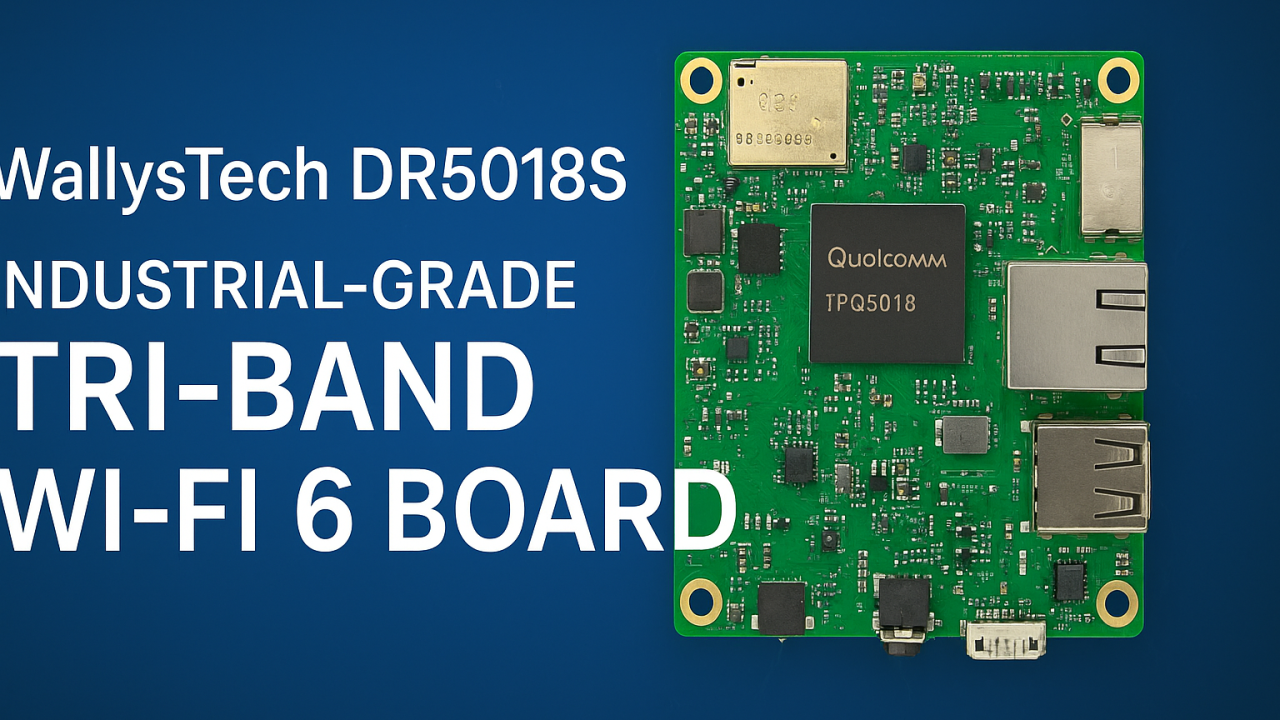
🌐 Introducing DR5018S — Industrial-Grade Tri-Band WiFi 6 Board for OpenWRT and OpenWiFi development
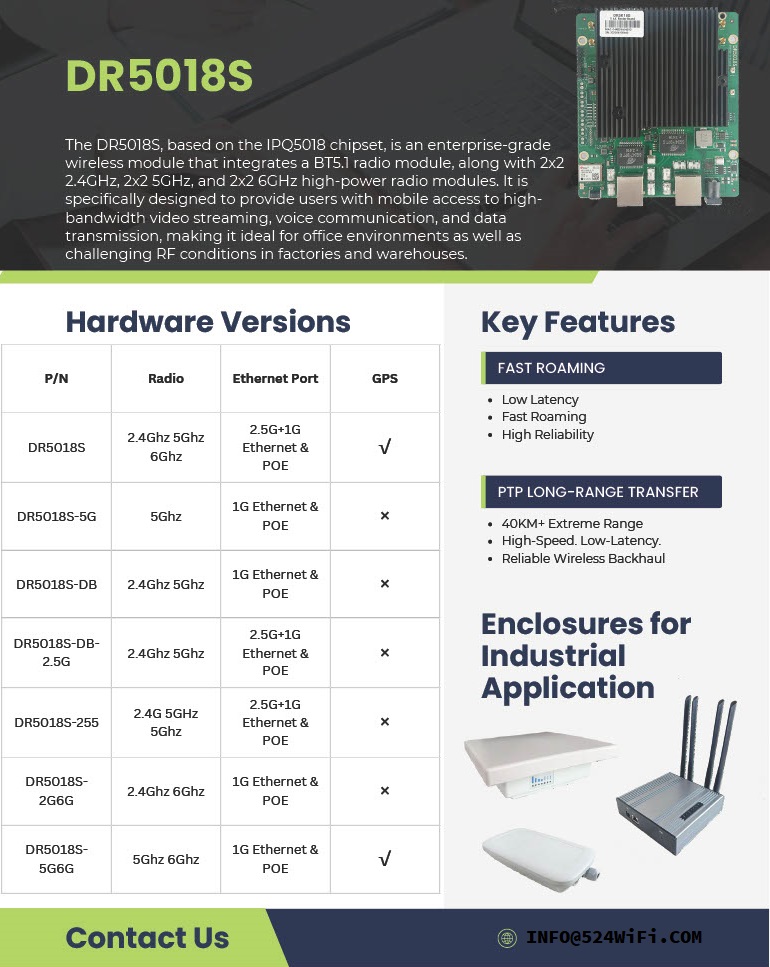
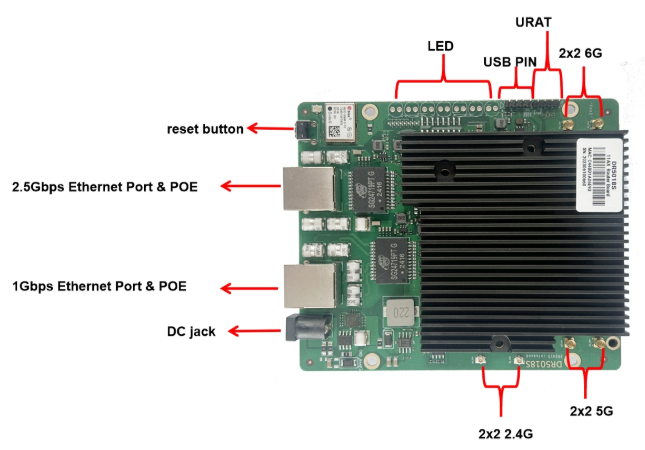
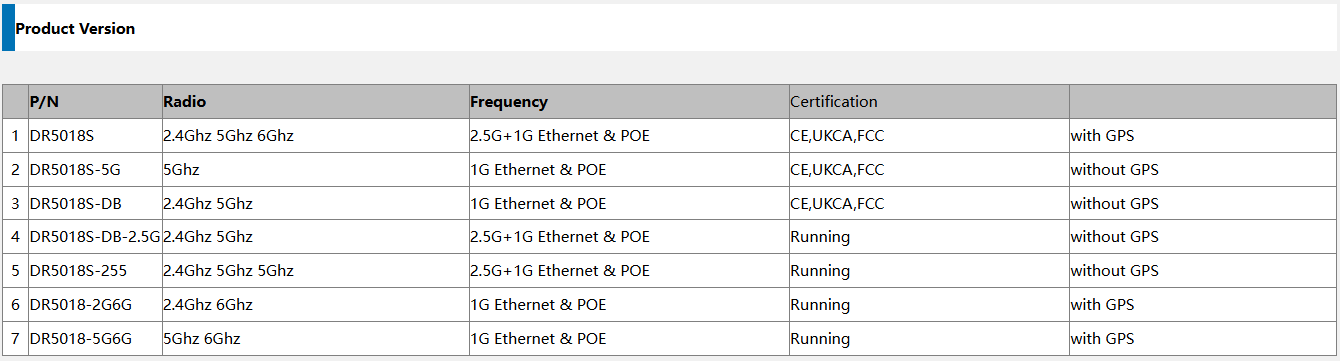
524WiFi introduces the WallysTech DR5018S, a high-performance industrial-grade WiFi 6 platform built for the next generation of wireless networks. Powered by the Qualcomm IPQ5018 SoC, the DR5018S integrates 2.4GHz, 5GHz, and 6GHz bands into one compact board — offering exceptional throughput, low latency, and strong adaptability for modern wireless environments.
⚙️ Key Features
Qualcomm IPQ5018 SoC — Dual-core ARM 64-bit A53 @1.0GHz
Operating temperature: –40 °C ~ +70 °C (industrial-grade)
Certifications: CE / FCC / UKCA
💡 Why DR5018S Stands Out
✅ Tri-band flexibility — handle high-density environments and interference-free operations
✅ Future-ready with 6GHz — prepared for WiFi 6E and early WiFi 7 transition
✅ Industrial-grade reliability — wide temperature, PoE, and durable design
✅ Open-source platform — OpenWRT/OpenWiFi for customization and fast development
✅ 2.5GbE interface — for high-throughput backhaul and mesh deployments
🏭 Real-World Applications
The DR5018S is designed for industrial and enterprise-grade wireless networks, enabling reliable connectivity in demanding conditions:
🔹 Mining & Oilfield Operations — establish long-distance wireless mesh links for remote monitoring, sensors, and field communication networks.
🔹 Smart Cities & Urban Infrastructure — build tri-band APs and gateways for IoT devices, cameras, and autonomous systems.
🔹 Industrial IoT & Automation — integrate into factory APs or gateways with OpenWRT for flexible control and connectivity.
🔹 Edge Computing & AI Gateways — combine compute + tri-band WiFi for edge data collection and analysis.
🔹 Warehouse & Logistics — enable low-latency mesh communication for autonomous AGVs and real-time tracking.
🔹 Outdoor Mesh & Backhaul Nodes — leverage 6GHz as a dedicated backhaul channel for high-speed, interference-free wireless mesh.
Its flexibility also makes DR5018S an excellent foundation for OEM/ODM wireless solutions, custom AP design, and smart industrial routers.
🚀 Empowering Wireless Innovation
At 524WiFi, we help partners accelerate product development and reduce evaluation costs through open, modular, and stable platforms. The DR5018S continues our mission to bridge industrial-grade reliability with open-source innovation — enabling faster time-to-market and future-ready WiFi 6/6E connectivity.
As industries evolve toward automation and intelligent infrastructure, connectivity has become the invisible backbone of every operation. From smart factories to autonomous logistics, reliable wireless communication defines success. And when the network must cover kilometers, handle hundreds of devices, and stay always online — DR5018S delivers.
⚙️ Powered by Qualcomm IPQ5018 — Designed for Industrial Mesh Intelligence
At the heart of the 524WiFi WallysTech DR5018S lies the Qualcomm IPQ5018 dual-core processor, paired with QCN6102 (5GHz) and QCN6122 (6GHz) radios. This tri-band WiFi 6 architecture enables true Mesh networking — where every node communicates, learns, and heals automatically.
✅ Auto-discovery & self-organization ✅ Dynamic mesh joining without manual setup ✅ Instant rerouting when nodes fail
It’s not just a router board — it’s an intelligent wireless ecosystem that keeps your network alive, aware, and adaptive.
🚶♂️ 802.11k/v/r Seamless Roaming — Stay Connected Without Thinking About It
Imagine walking through a smart factory or logistics park while streaming video or managing AGVs. With DR5018S, your devices switch between access points instantly, thanks to advanced roaming support:
802.11k — Finds nearby APs faster
802.11v — Guides clients to the best AP
802.11r — Enables fast handover with no dropouts
From office corridors to outdoor yards, DR5018S keeps your network uninterrupted — wherever you move.
🏭 Industrial-Grade Reliability — Built for the Harshest Environments
The DR5018S is more than powerful — it’s purpose-built for tough conditions:
🌧 IP68 waterproof & dustproof
🌡 Wide temperature tolerance
⚡ PoE power input for flexible deployment
📍 Integrated GPS for tracking and synchronization
Whether it’s a mining site, oil field, logistics base, or city infrastructure, DR5018S is engineered to stay online where others fail.
🌐 Fully Open Platform — OpenWRT & OpenWiFi Ready
Developers and integrators love flexibility. That’s why DR5018S is fully open-source friendly, supporting OpenWRT and OpenWiFi. It’s ideal for:
Custom control logic
Centralized controller management
Cloud-based applications
Integration with third-party systems
Build your own network intelligence on top of a proven industrial foundation.
The next generation of wireless isn’t just about speed — it’s about continuity. The 524WiFi WallysTech DR5018S combines Qualcomm’s IPQ5018 performance with Mesh and Roaming intelligence, giving industries the one thing that matters most: unbreakable connectivity.
In our hyper-connected world, we think of networks in terms of Wi-Fi signals, ethernet cables, and blazing 5G. But beneath the surface of every email sent, every stream buffered, and every video call connected, lies a critical piece of software that rarely gets the spotlight: the network driver. These digital workhorses are the essential interpreters that allow your computer’s operating system to have a meaningful conversation with the physical hardware that connects you to the world.
Understanding them isn’t just academic; it’s key to troubleshooting a flaky connection, boosting performance, or simply appreciating the hidden complexity of a networked world.
The Universal Translator for Your Hardware
At its core, a network driver is a specialized software module that acts as a universal translator. It sits between a computer’s operating system (like Windows, Linux, or macOS) and its Network Interface Card (NIC)—the physical or virtual hardware that sends and receives data.
The operating system speaks in high-level, standardized commands (“send this packet,” “check the connection”). The NIC, whether it’s a gigabit ethernet port, a Wi-Fi adapter, or a 5G modem, has its own unique, hardware-specific language. The driver’s sole purpose is to translate the OS’s generic commands into the precise instructions the specific NIC model needs to function. Without the correct driver, even the most advanced, expensive network card is a useless piece of silicon.
A Spectrum of Drivers: From Universal to Specialized
Not all drivers are created equal. They exist on a spectrum, designed to meet different needs for compatibility, performance, and cost.
In-Box Drivers: These are the generic drivers built directly into an operating system. They provide basic functionality for a wide range of common hardware, allowing you to get online immediately after a fresh OS install. Think of them as a phrasebook—it gets the basic job done but lacks the nuance for high-performance tasks.
Vendor-Supplied Drivers: This is where the real magic happens. These are the optimized drivers written and maintained by the hardware manufacturer (like Intel, Broadcom, or Qualcomm). They are finely tuned to unlock the full potential of their specific hardware, offering enhanced features, better power management, superior stability, and lower latency. For any serious application, these are the gold standard.
Generic NDIS Drivers: The Network Driver Interface Specification (NDIS) is a standard framework, primarily in Windows, that provides a universal API. This allows hardware vendors to write a single driver that can interface with multiple versions of the Windows OS, simplifying development and ensuring broad compatibility.
Why Drivers Matter: The Practical Impact
You might only think about a driver when something goes wrong, but their quality and configuration have a daily impact on your experience.
Performance: A well-tuned driver can maximize throughput (speed) and minimize latency (lag), which is crucial for online gaming, video conferencing, and large data transfers. A poorly optimized driver can create a bottleneck, leaving you with slower-than-expected speeds.
Stability & Reliability: The infamous “Blue Screen of Death” or a persistent, dropped connection can often be traced back to a corrupt, outdated, or buggy network driver. A stable driver is the foundation of a reliable network connection.
Security: Drivers operate at a privileged level in the system. As such, they can be a target for security vulnerabilities. Manufacturers regularly release driver updates to patch these security holes, making keeping your drivers current a critical cybersecurity practice.
Feature Enablement: Advanced hardware features like Wake-on-LAN, traffic prioritization (QoS), or teaming multiple network ports together are almost always dependent on support from the vendor-specific driver.
The Evolution: Virtualization and the Cloud
The role of the driver is evolving beyond physical hardware. In virtualized and cloud environments, the physical NIC is shared among multiple virtual machines (VMs). Here, virtual network drivers become crucial.
Technologies like virtio-net (for Linux/KVM) and VMXNET3 (for VMware) are paravirtualized drivers. They are not tied to any specific physical hardware but are designed for optimal performance within a virtualized ecosystem. They communicate directly with the hypervisor, drastically reducing overhead and providing near-native network performance to VMs, which is the lifeblood of modern cloud infrastructure.
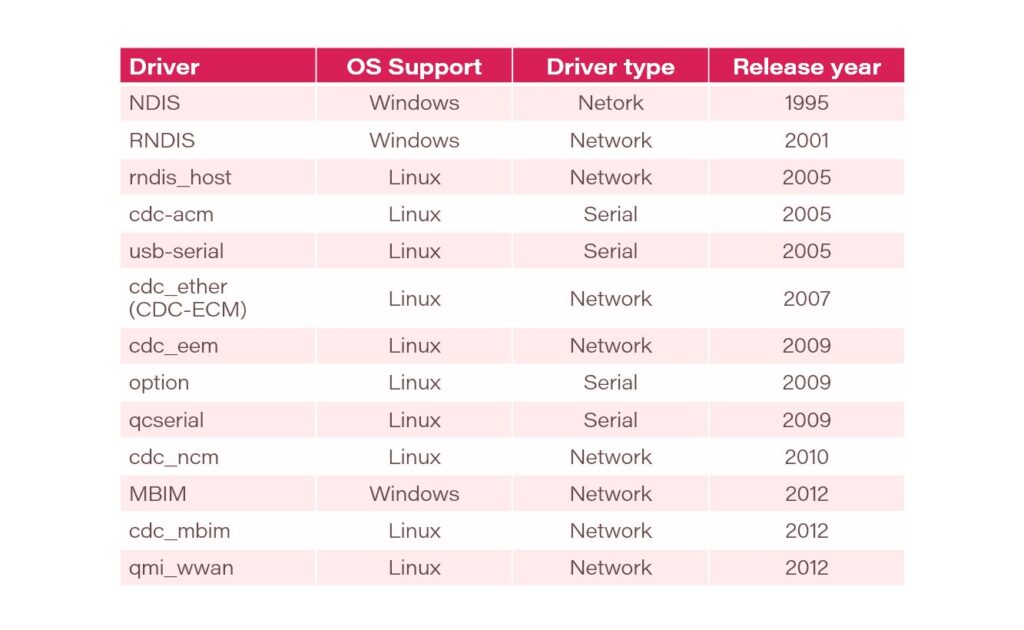
Here is a history of the network drivers:
The Bottom Line
Network drivers are a fundamental, if invisible, component of our digital lives. They are the diligent interpreters that transform abstract data into electrical signals and radio waves, connecting our devices to the global network. By understanding their role—from the basic in-box version to the high-performance vendor driver—we gain a deeper appreciation for the complexity of connectivity and the tools to build faster, more stable, and more secure networked systems. The next time you have a flawless video call, remember to thank the unsung interpreter working behind the scenes.
For years, the promise of 5G has been a tale of two extremes. On one end, high-speed smartphones and fixed wireless access demanding gigabit speeds. On the other, massive IoT sensors requiring years of battery life but minimal data. In the vast, fertile middle ground, a crucial category of devices has been left waiting for a cost-effective, power-efficient, yet capable wireless solution.
That wait is over. The arrival of 5G Reduced Capability (RedCap) is not just an incremental update; it’s the key that unlocks the full, diverse potential of the 5G ecosystem.
Bridging the 5G Divide: What is RedCap?
Think of the 5G spectrum as a highway system. You have the Formula 1 lanes for eMBB (enhanced Mobile Broadband) and the specialized, low-power bike paths for mMTC (massive Machine-Type Communications). RedCap effectively creates a new, smart “commuter lane”—perfectly balanced for devices that need more than a trickle of data but don’t require the expense and power drain of a full 5G modem.
Formally defined in the 3GPP Release 17 standard, 5G RedCap (also known as NR-Light) is a optimized version of 5G. It’s designed specifically for devices that fall between the high-performance and low-power extremes. By strategically reducing complexity, antenna count, and supported features, RedCap achieves a critical goal: it brings the inherent benefits of 5G—security, low latency, and mobility—to a much wider array of applications at a fraction of the cost and power consumption.
The Engineering Trade-Off: How RedCap “Slims Down”
RedCap isn’t a watered-down version of 5G; it’s a purpose-built one. It achieves its efficiency through several intelligent design choices:
Reduced Bandwidth: While high-end 5G can use up to 100 MHz in sub-7 GHz spectra, RedCap operates on a leaner 20 MHz. For most industrial sensors, health monitors, and wearables, this is more than sufficient and drastically cuts complexity.
Fewer Antennas: A flagship smartphone might have 4 receive antennas (4Rx). RedCap devices can operate with just 1 or 2 (1Rx or 2Rx). This simplification is a major driver behind reducing device size, cost, and power needs.
Half-Duplex FDD: This allows the device to either transmit or receive at a time, but not both simultaneously. By eliminating the need for a duplexer (a component that prevents interference), RedCap devices become significantly cheaper and more power-efficient. For many applications that send bursts of data, this slight trade-off is unnoticeable.
Lower Order Modulation: RedCap primarily uses 64 QAM instead of the 256 QAM found in high-end 5G. This is a more than capable modulation scheme that reduces power demands on the device’s power amplifier.
The Real-World Impact: RedCap’s Killer Applications
The theoretical benefits are clear, but where will we actually see RedCap make a difference? The answer is in three key verticals that have been hamstrung by the limitations of existing technologies.
Industrial IoT 2.0: The factory floor is a perfect environment for RedCap. Think of wireless video surveillance cameras for safety and quality control, condition monitoring sensors on high-value machinery, and programmable logic controllers (PLCs). These devices need more bandwidth than a simple LPWAN sensor but can’t justify the cost of a full 5G module. RedCap fits perfectly, offering the reliable, low-latency connection needed for modern automation.
The Next Generation of Wearables: While smartwatches today use a mix of 4G and proprietary technologies, RedCap paves the way for a new class of advanced wearables. Imagine high-performance augmented reality (AR) glasses for enterprise or rich video-streaming capabilities in a fitness band. RedCap provides the data throughput for these experiences while ensuring the device doesn’t overheat and has a usable battery life.
A New Era for Video Surveillance: City-wide and industrial security systems require high-quality, real-time video streaming. RedCap modems are powerful enough to handle 1080p or even 4K video, and their native support for network slicing means a city can guarantee a secure, uninterrupted video feed for public safety, separate from consumer traffic on the same network.
The Road Ahead: Integration and Coexistence
The rollout of RedCap is a masterclass in seamless network integration. A key feature is its “fallback” capability. RedCap devices can connect to both modern 5G Standalone (SA) networks and older 4G LTE networks, ensuring broad coverage from day one. For network operators, enabling RedCap is often a simple software upgrade to existing 5G SA cellsites, making deployment swift and cost-effective.
Looking forward, RedCap doesn’t replace existing technologies like LTE-M or NB-IoT; it complements them. It fills a crucial performance and cost gap, creating a more complete and versatile connectivity portfolio. As we move toward 3GPP Releases 18 and beyond, we can expect further enhancements in power saving and integration, solidifying RedCap’s role as the backbone for the mid-tier IoT revolution.
In summary, 5G RedCap is the missing piece in the connectivity puzzle. By making a few smart engineering trade-offs, it brings the robust power of 5G to the devices that will define the next decade of innovation—from smarter factories to advanced wearables. The 5G revolution is no longer just about speed; it’s about intelligent, scalable, and efficient connectivity for everything. And with RedCap, that future is finally within reach.
Experience the next generation of wireless performance — faster, smarter, and more reliable.
Sample units and demo tests are now available.
Actually. The Customer can use our board-2.bin from our ftp or from Compex on our DR9274 Cards. Because these Cards are standard Card of Qualcomm. There is no reason for any differences. You can download board-2.bin for all our 524WiFi DR9274 modules from our link : https://wifi5.eu/dls/Wallys/DR9274/
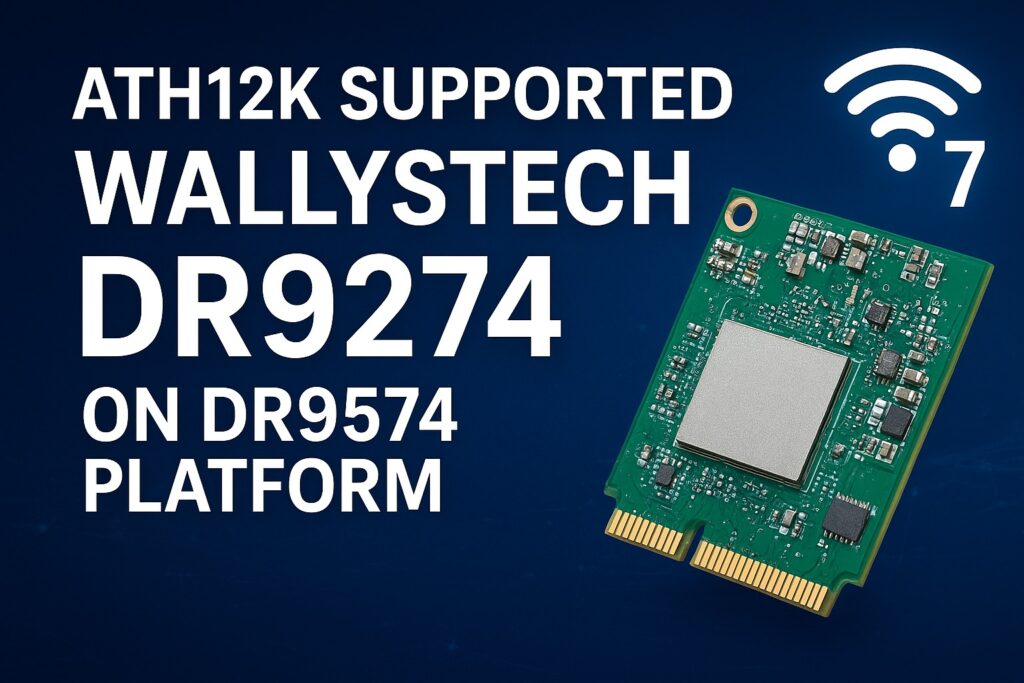
Additionally. If a Customer needs ath12k support, then we can do demo ath12k on our DR9574 boards to support DR9274 cards. Customer can take it as reference. If Customer need support for their own software, it needs check the project scale and then we can offer our support for LINUX / OpenWRT development.
———————————————————————————————-
Dear customers,
You can log in the link and can find latest sources for your development using Ath12k firmware. If there is any mistake, please let us know.
This is general frimware for QCN 9274 / 6274 based modules. For special function, you need ask the vendor to develop special firmware. They do not provide it for free. For example COMPEX need you to buy it , but the price is about $50000.
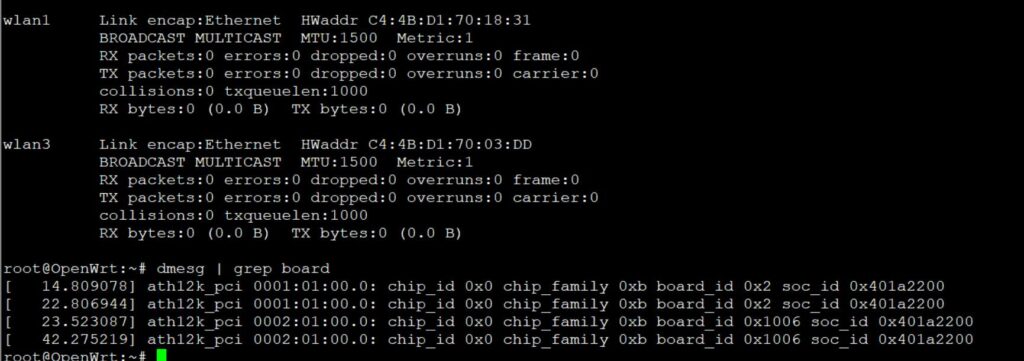
For 524wifi DR9274 and also COMPEX modules the bdf is not changed, so you can use the generic board-2, firmware-2 and add your board-id of your module if not included in already. Please read bellow how to use and debug Ath12k driver for our dual band modules.
There are also many known Ath12k bugs and limitations, you can solve known issues using a driver patch – for example :
A modified general board-2.bin file for all QCN6274 modules (including dual band 5G6G) is available here. The public file doesn’t support board-id 0x1006 (dual band 5G+6G) , our engineer added support for 0x1006 in to the file :
For example WLE7002-E56 or DR9274-5G6G by 524WiFi modules require this modified board-2.bin file, then 6GHz issue is solved via regulatory db. signing the file. And you will also need to apply an existing driver patch from Patchwork.kernel.org
After this setup tuning and modifications you can achieve working WiFi 7 Dual band card under Linux or OpenWRT. For example openwrt latest trunk is working excellent, + adding right board-2.bin file as mentioned higher. After appling the 160MHZ channel patch we are testing DR9274-5G6G and WLE7002-E56 with MLO support:
current transfer is about 1400MBps for 6GHz/320Mhz with iphone 15 pro max
and 1500MBps for 5GHz/160Mhz with iphone 15 pro max. Distance is half a meter for this testing.
For big customers , there is a good solution – like this : the customer can evaluate the wifi card on a QCA based router board, like for example DR9574 , and if performance and features are good then they will have confidence to put project to 524WiFi and Wallys to develop software for ath12k. We can allocate a engineer to fix these Customers requirements and if the Customer has a good project with us. MOQ and SW development contract is required.
Are you interested in in testing and development on dr9574 board using DR9274-5G6G module ? You will see how it works with original QCA driver. Please contact us !
Unfortunaly, it seems only single band modules can work with current ath12k without extra development, unfortunately dual band support requires additional development as we show you for wle7002-e25 card bellow:
————————————————————————————————————————————————
COMPEX WLE7002E25 dual band needs to separate phy firmware.
The official firmware It can be downloaded from the following link https://git.codelinaro.org/clo/ath-firmware/ath12k-firmware/-/blob/main/QCN9274/hw2.0/testing/1.1.1/WLAN.WBE.1.1.1-00210-QCAHKSWPL_SILICONZ-1/firmware-2.bin?ref_type=heads Put the firmware into /lib/firmware/ath12k/QCN9274/hw2.0/
But split phy and firmware-2.bin does not support linux kernel 6.8. You need to download backportfrom https://mirror2.openwrt.org/sources/backports-6.9.1.tar.xz. Install software to build backports with “sudo apt install build-essential flex bison ncurses-dev”. The command need to prepare the backport tar -xf backports-6.9.1.tar.xz Patch the attached patch files. This will enable support linux kernel 6.xx and add defconfig-ath12k cd backports-6.9.1/ patch -p1 < [patch file location] The command need to compile and install backport make defconfig-ath12k make sudo make INSTALL_MOD_STRIP=1 install
—————————-
We have tested this and it works. you can use the link provided directly.
See if it works on your end.
split phy and firmware-2.bin does not support linux kernel 6.8. Need to download backport from https://mirror2.openwrt.org/sources/backports-6.9.1.tar.xz. Install software to build backports with “sudo apt install build-essential flex bison ncurses-dev”. The command need to prepare the backport tar -xf backports-6.9.1.tar.xz Patch the attached patch files. This will enable support linux kernel 6.xx and add defconfig-ath12k cd backports-6.9.1/ patch -p1 < [patch file location] The command need to compile and install backport make defconfig-ath12k make sudo make INSTALL_MOD_STRIP=1 install
Please check our customer modified working board-2.bin file as an example and guide for your development – https://wifi5.eu/dls/compex/WLE7000
And dont forget as always , comment react or add some info – you will be automaticly added to possibly win set of our designed special 5G or WIFI anntennas
WiFi 7 isn’t just faster—it’s smarter, stronger, and built for the future.
Meet Wallys DR9574 AP, our Qualcomm IPQ9574-based WiFi7 platform DR9574 designed for enterprise and industrial networks that demand more than just connectivity.
✅ Tri-band (2.4G / 5G / 6G) for maximum flexibility ✅ Dual 10GbE + Quad 1GbE ports for high-density deployments ✅ Rugged, industrial-grade build for tough environments
From smart factories to security systems, from hotels to convention centers—the DR9574 ensures high throughput, ultra-low latency, and reliable stability when it matters most.
🚀 Introducing the DR5018S – Built for Industrial-Grade Wireless
From smart ports to logistics hubs to long-range PTP connections, the DR5018S is engineered to deliver: ✅ Fast Roaming ✅ 40km+ PTP Long-Range Transmission ✅ Flexible Enclosures for Any Industrial Application
Whether it’s powering connectivity in smart cities, transportation, or critical infrastructure, the DR5018S ensures powerful performance with reliability you can trust.
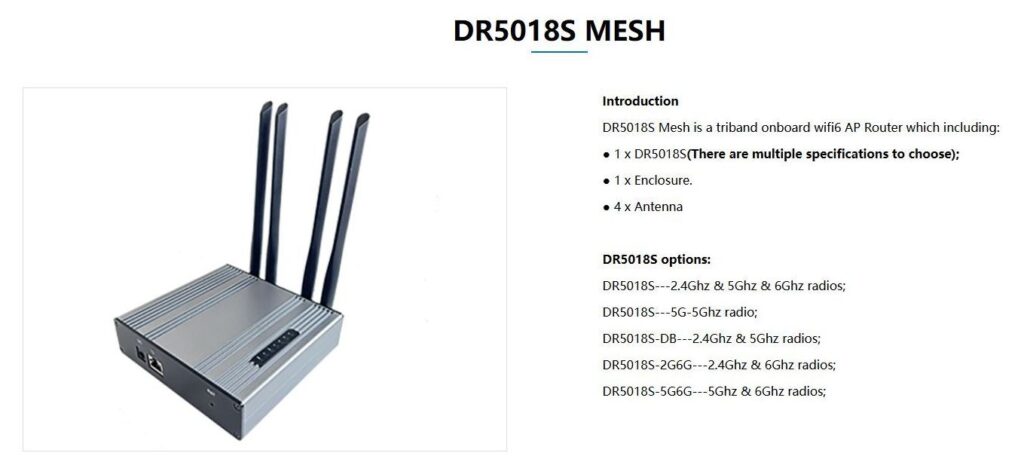
xperience next-level WiFi 6 tri-band performance with the DR5018S Mesh – designed for industrial, enterprise, and large-scale applications. Seamless connectivity, EasyMesh support, and robust hardware all in one compact solution. 💡 Learn more and explore full specifications on our website:
: Introducing the DR5018S – Built for Industrial Grade Wireless – Qualcomm IPQ5018
🚀 When 5G NR Meets Mesh: Filling the Coverage Gaps
5G NR provides standardized, high-performance connectivity — but there are still scenarios where base station deployment is difficult or impractical:
Drone swarms requiring real-time coordination in remote airspace Robots in underground mines where signals can’t penetrate Military field operations demanding resilient, ad-hoc communication In such environments, Mesh networks step in as a complementary layer, ensuring local connectivity even when 5G NR coverage is limited.
👉 Question for the community: Do you see Mesh as a temporary patch until 5G expands everywhere, or as a long-term complement to 3GPP 5G NR in mission-critical deployments?
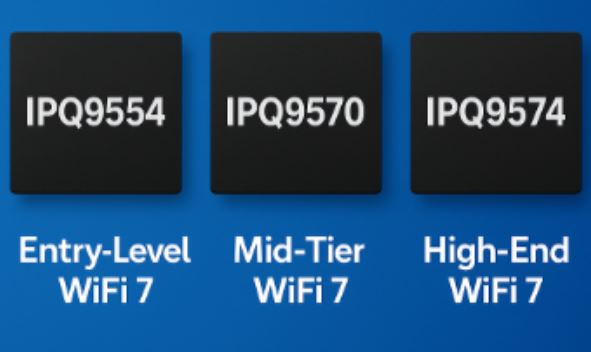
WiFi 7 (802.11be) is the latest generation of wireless technology, designed to deliver unprecedented throughput, ultra-low latency, and improved reliability for both consumer and industrial applications. Qualcomm, as a leader in wireless innovation, has introduced several system-on-chip (SoC) platforms to power WiFi 7 devices—among them the IPQ9554, IPQ9570, and IPQ9574.
Though they all share the same WiFi 7 foundation, these three platforms are designed for different performance tiers and deployment scenarios.
1. Qualcomm IPQ9554 – Entry-Level WiFi 7 Platform
The IPQ9554 is positioned as an entry WiFi 7 solution, balancing performance and efficiency. It is suitable for devices that require reliable WiFi 7 functionality without the complexity of high-end designs.
Key Technical Points:
Supports Multi-Link Operation (MLO) and 4K QAM
Optimized for cost-effective and thermally efficient designs
Good fit for mainstream routers, small enterprise APs, and IoT gateways
2. Qualcomm IPQ9570 – Mid-Tier WiFi 7 Platform
The IPQ9570 is a step up from IPQ9554, offering stronger processing capabilities and enhanced wireless capacity. It is intended for environments with heavier traffic and multiple concurrent connections.
Key Technical Points:
Higher throughput and concurrency handling compared to IPQ9554
Designed for mesh networks and enterprise-grade deployments
Supports advanced WiFi 7 features such as enhanced MU-MIMO
Balanced between performance and power efficiency
3. Qualcomm IPQ9574 – High-End WiFi 7 Flagship
The IPQ9574 represents Qualcomm’s flagship WiFi 7 solution, designed for maximum performance in carrier-grade, enterprise, and industrial networks.
Optimized thermal management for sustained heavy workloads
Supports scalability in large enterprise networks, ISPs, and industrial deployments
4. Technical Comparison
Feature IPQ9554 IPQ9570 IPQ9574 Performance Tier Entry-Level Mid-Tier High-End Flagship WiFi 7 Support MLO, 4K QAMMLO, enhanced MU-MIMO Full WiFi 7 suite (MLO, 320 MHz, advanced MU-MIMO) Throughput Good Strong Excellent, highest Use Case SMB routers, small APsMesh, enterprise, industrialCarrier, enterprise, high-density deployments
5. Conclusion
Qualcomm’s WiFi 7 platforms are designed to cover the entire spectrum of networking needs:
IPQ9554 → A balanced entry for cost-sensitive designs.
IPQ9570 → A mid-tier option for enterprise and automation.
IPQ9574 → A flagship platform for maximum throughput and scalability.
By offering these three tiers, Qualcomm ensures that WiFi 7 technology can be applied across consumer, enterprise, and industrial networks, depending on performance and cost requirements.
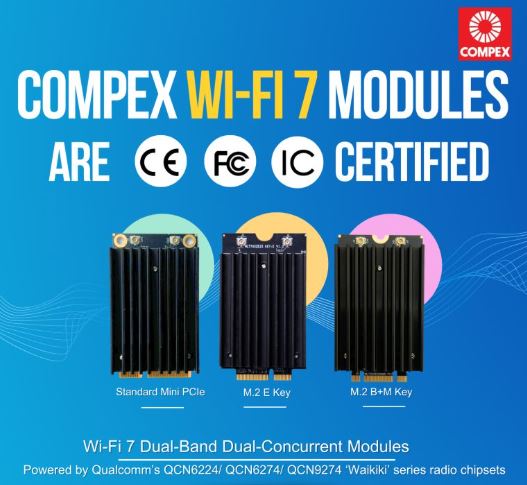
Compex Wi-Fi 7 Dual-Band Dual-Concurrent Modules are CE, FCC and IC certified, bringing together global compliance and industry-leading performance. Available in Standard MiniPCIe form factor and M.2 variants, our Qualcomm-powered modules deliver reliable and high-performance wireless connectivity for markets worldwide.
✅Powered by Qualcomm’s QCN6224 / QCN6274 / QCN9274 “Waikiki” series chipsets ✅Comes with band options: 2.4+5GHz, 2.4+6GHz, 5+5GHz and 5+6GHz ✅Multi-Link Operation (MLO) for higher throughput, lower latency and improved reliability ✅Diplexer Design to reduce the need for multiple Wi-Fi antennas for transmission ✅Open Source Ath12k Support
📩 Reach out to us at info@524wifi dot net or com to explore how we can power your next project.






 Exciting News from 524WiFi !